
clickup-cli
A CLI for the ClickUp API, optimized for AI agents and human users.
Covers all ~130 endpoints across 28 resource groups and 4 utility commands.





 Documentation
## Why?
ClickUp's API responses are massive. A single task list query returns deeply nested JSON — statuses, assignees, priorities, custom fields, checklists, dependencies — easily **12,000+ tokens** for just 5 tasks. For AI agents (Claude Code, Cursor, Copilot, etc.) operating within context windows, this is a serious problem: a few API calls can consume most of an agent's available context.
clickup-cli solves this with **token-efficient output by default**:
```
Full API JSON for 5 tasks: ~12,000 tokens (450 lines)
clickup-cli table output: ~150 tokens (7 lines)
Reduction: ~98%
```
The CLI flattens nested objects, selects only essential fields, and renders compact tables. Agents get the information they need without drowning in JSON. When you need the full response, `--output json` is always available.
Beyond token efficiency, the `clickup-cli` CLI (or `clkup` for short) gives AI agents a simple, predictable interface to ClickUp: `clickup-cli [ID] [flags]`. No SDK, no auth boilerplate, no JSON parsing — just shell commands with structured output.
## Install
### npm (any platform with Node.js)
```bash
npm install -g @nick.bester/clickup-cli
```
### Homebrew (macOS or Linux)
```bash
brew tap nicholasbester/clickup-cli
brew install clickup-cli
```
To upgrade to the latest version:
```bash
brew upgrade clickup-cli
```
Works on Linux too — the tap ships native x86_64 and arm64 Linux binaries.
### macOS / Linux (pre-built binary)
Download the latest release for your platform:
```bash
# macOS Apple Silicon (M1/M2/M3/M4)
curl -L https://github.com/nicholasbester/clickup-cli/releases/latest/download/clickup-macos-arm64.tar.gz | tar xz
sudo mv clickup-cli clkup /usr/local/bin/
# macOS Intel
curl -L https://github.com/nicholasbester/clickup-cli/releases/latest/download/clickup-macos-x86_64.tar.gz | tar xz
sudo mv clickup-cli clkup /usr/local/bin/
# Linux x86_64
curl -L https://github.com/nicholasbester/clickup-cli/releases/latest/download/clickup-linux-x86_64.tar.gz | tar xz
sudo mv clickup-cli clkup /usr/local/bin/
# Linux ARM64
curl -L https://github.com/nicholasbester/clickup-cli/releases/latest/download/clickup-linux-arm64.tar.gz | tar xz
sudo mv clickup-cli clkup /usr/local/bin/
```
**Alpine / musl Linux:**
```sh
curl -L https://github.com/nicholasbester/clickup-cli/releases/latest/download/clickup-linux-x86_64-musl.tar.gz | tar xz
mv clickup-cli clkup /usr/local/bin/
```
### Arch Linux (AUR)
```bash
yay -S clickup-cli-bin
# or
paru -S clickup-cli-bin
```
`clickup-cli-bin` wraps the prebuilt Linux binaries — no Rust toolchain required. Auto-updated on every release.
### Windows
Download `clickup-windows-x86_64.zip` from the [latest release](https://github.com/nicholasbester/clickup-cli/releases/latest), extract it, and add `clickup-cli.exe` (and optionally `clkup.exe`) to your PATH.
### From crates.io (any platform)
Requires [Rust](https://rustup.rs/) 1.70+:
```bash
cargo install clickup-cli
```
### Docker
```bash
docker build -t clickup-cli .
docker run -i --rm -e CLICKUP_TOKEN=pk_xxx -e CLICKUP_WORKSPACE=12345 clickup-cli mcp serve
```
### From source
```bash
git clone https://github.com/nicholasbester/clickup-cli.git
cd clickup-cli
cargo install --path .
```
### Two binaries
Every install method ships **two** binaries with identical behaviour:
- `clickup-cli` — canonical name (use this in scripts, CI, MCP configs)
- `clkup` — short alias, handy for daily interactive typing
Pick whichever you prefer; both accept the same flags and subcommands.
### Verify installation
```bash
clickup-cli --version
# or
clkup --version
```
## Quick Start
```bash
# Configure your API token
clickup-cli setup
# Or non-interactive
clickup-cli setup --token pk_your_token_here
# Verify
clickup-cli auth whoami
```
## Usage Examples
```bash
# Hierarchy navigation
clickup-cli workspace list
clickup-cli space list
clickup-cli folder list --space 12345
clickup-cli list list --folder 67890
# Task management
clickup-cli task list --list 12345
clickup-cli task create --list 12345 --name "My Task" --priority 3
clickup-cli task get abc123
clickup-cli task update abc123 --status "in progress"
clickup-cli task search --status "in progress" --assignee 44106202
# Comments and collaboration
clickup-cli comment list --task abc123
clickup-cli comment create --task abc123 --text "Looking good!"
clickup-cli comment reply COMMENT_ID --text "Thanks!"
# Time tracking
clickup-cli time start --task abc123 --description "Working on feature"
clickup-cli time stop
clickup-cli time list --start-date 2026-03-01 --end-date 2026-03-31
# Goals and views
clickup-cli goal list
clickup-cli view list --space 12345
clickup-cli view tasks VIEW_ID
# Tags and custom fields
clickup-cli tag list --space 12345
clickup-cli field list --list 12345
clickup-cli field set FIELD_ID --value "some value" TASK_ID
# Chat (v3)
clickup-cli chat channel-list
clickup-cli chat message-send --channel CHAN_ID --text "Hello team"
# Docs (v3)
clickup-cli doc list
clickup-cli doc get DOC_ID
# Output modes
clickup-cli task list --list 12345 --output json # Full JSON
clickup-cli task list --list 12345 --output json-compact # Default fields as JSON
clickup-cli task list --list 12345 --output csv # CSV
clickup-cli task list --list 12345 -q # IDs only
clickup-cli task list --list 12345 --fields id,name,status # Custom fields
# Auto-detect task ID from git branch (on a branch like feat/CU-abc123-foo)
clickup-cli task get # Resolves to abc123 from the branch
clickup-cli task update --status "in progress"
clickup-cli comment create --text "Looking good!"
clickup-cli field set FIELD_ID --value "some value"
```
### Auto-detect task ID from git branch
When a git-tracked branch follows a common naming convention, `clickup-cli` resolves the task ID automatically:
- ClickUp default IDs — `feat/CU-abc123-foo` → `abc123`
- Custom task IDs — `PROJ-42-add-login` → `PROJ-42` (auto-injects `custom_task_ids=true&team_id=`)
Prefixes stripped case-insensitively: `feature/`, `feat/`, `fix/`, `hotfix/`, `bugfix/`, `release/`, `chore/`, `docs/`, `refactor/`, `test/`, `ci/`, `perf/`, `build/`, `style/`. Custom-ID matches whose prefix is `FEATURE`, `FEAT`, `BUGFIX`, `BUG`, `FIX`, `HOTFIX`, `RELEASE`, `CHORE`, `DOCS`, `DOC`, `REFACTOR`, `TEST`, `CI`, `PERF`, `BUILD`, `STYLE`, `WIP`, or `TMP` are rejected.
Resolution order (highest priority first): explicit CLI arg → `CLICKUP_TASK_ID` env var → git branch. Explicit `CU-abc123` is transparently stripped to `abc123`. Destructive or ambiguous commands (`task delete`, `task link`, `task unlink`, `guest share-task`, `guest unshare-task`) never auto-detect — pass the ID explicitly.
Disable for one invocation with `CLICKUP_GIT_DETECT=0`, or permanently in config:
```toml
[git]
enabled = false # disable branch detection
verbose = false # suppress the "resolved task X from branch Y" breadcrumb
```
## Command Groups
| Group | Commands |
|-------|----------|
| `setup` | Configure token and workspace |
| `auth` | whoami, check, login, logout, status |
| `workspace` | list, seats, plan |
| `space` | list, get, create, update, delete |
| `folder` | list, get, create, update, delete |
| `list` | list, get, create, update, delete, add-task, remove-task |
| `task` | list, search, get, create, update, delete, time-in-status, add-tag, remove-tag, add-dep, remove-dep, link, unlink, move, set-estimate, replace-estimates |
| `checklist` | create, update, delete, add-item, update-item, delete-item |
| `comment` | list, create, update, delete, replies, reply |
| `tag` | list, create, update, delete |
| `field` | list, set, unset |
| `task-type` | list |
| `attachment` | list, upload |
| `time` | list, get, current, create, update, delete, start, stop, tags, add-tags, remove-tags, rename-tag, history |
| `goal` | list, get, create, update, delete, add-kr, update-kr, delete-kr |
| `view` | list, get, create, update, delete, tasks |
| `member` | list |
| `user` | invite, get, update, remove |
| `chat` | channel-list, channel-create, channel-get, channel-update, channel-delete, dm, message-list, message-send, message-update, message-delete, reaction-list, reaction-add, reaction-remove, reply-list, reply-send, and more |
| `doc` | list, create, get, pages, add-page, page, edit-page |
| `webhook` | list, create, update, delete |
| `template` | list, apply-task, apply-list, apply-folder |
| `guest` | invite, get, update, remove, share-task, unshare-task, share-list, unshare-list, share-folder, unshare-folder |
| `group` | list, create, update, delete |
| `role` | list |
| `shared` | list |
| `audit-log` | query |
| `acl` | update |
| **Utilities** | |
| `status` | Show current config, token (masked), workspace |
| `completions` | Generate shell completions (bash, zsh, fish, powershell) |
| `agent-config` | show, inject — CLI reference for AI agent configs |
| `mcp` | serve — MCP server for native LLM tool integration |
## AI Agent Integration
Two ways to connect AI agents to ClickUp:
### Recommended: CLI Mode (shell commands)
The CLI approach is **the most token-efficient way** to give an agent ClickUp access. Injecting the command reference costs ~1,000 tokens once, and every command returns compact table output (~150 tokens for 5 tasks). There are no tool schemas consuming context. Works with any LLM/agent framework.
```bash
clickup-cli agent-config inject # Auto-detects: CLAUDE.md, agent.md, .cursorrules, etc.
clickup-cli agent-config inject AGENT.md # Or specify any file explicitly
clickup-cli agent-config show # Preview the block
```
Auto-detection checks for existing files in order: `CLAUDE.md`, `agent.md`, `AGENT.md`, `.cursorrules`, `.github/copilot-instructions.md`. Falls back to creating `CLAUDE.md` if none exist.
The agent then runs CLI commands directly — the full ClickUp API in ~1,000 tokens of instructions.
### Alternative: MCP Server (native tool calls)
For Claude Desktop, Cursor, and other MCP-capable tools that prefer native tool integration. Note: MCP tool schemas consume more tokens in the agent's context than the CLI reference approach.
Generate the MCP config automatically:
```bash
clickup-cli agent-config init --mcp
```
Or add `.mcp.json` to your project root manually:
```json
{
"mcpServers": {
"clickup-cli": {
"command": "/opt/homebrew/bin/clickup-cli",
"args": ["mcp", "serve"]
}
}
}
```
This exposes 144 tools covering 100% of the ClickUp API as native tool calls with token-efficient compact responses. See the [MCP documentation](https://clickup-cli.com/mcp) for full setup.
### Limiting MCP tools
By default `clickup-cli mcp serve` exposes all 144 tools. You can restrict this at startup to shrink the LLM's context and enforce access control. Flags and matching env vars:
| Flag | Env var | Purpose |
| --- | --- | --- |
| `--profile ` | `CLICKUP_MCP_PROFILE` | Preset: `all` (default), `read`, `safe` |
| `--read-only` | `CLICKUP_MCP_READ_ONLY=1` | Alias for `--profile read` |
| `--groups a,b,c` | `CLICKUP_MCP_GROUPS` | Include only these resource groups |
| `--exclude-groups x,y` | `CLICKUP_MCP_EXCLUDE_GROUPS` | Drop these groups |
| `--tools t1,t2` | `CLICKUP_MCP_TOOLS` | Include only these tools by exact name |
| `--exclude-tools t1` | `CLICKUP_MCP_EXCLUDE_TOOLS` | Drop these tools |
`--read-only` agent:
```json
{
"mcpServers": {
"clickup": {
"command": "clickup-cli",
"args": ["mcp", "serve", "--read-only"]
}
}
}
```
Task-focused agent (task + comment + time groups only):
```json
{
"mcpServers": {
"clickup": {
"command": "clickup-cli",
"args": ["mcp", "serve", "--groups", "task,comment,time"]
}
}
}
```
Filtered tools are rejected at `tools/call` as well as hidden from `tools/list`, so a misbehaving agent can't smuggle a destructive call past the filter.
## Configuration
### Config Files
| Level | File | Use case |
|-------|------|----------|
| **Project** | `.clickup.toml` | Per-project token/workspace (team repos, CI) |
| **Global** | `~/.config/clickup-cli/config.toml` | Personal default |
Create a project-level config:
```bash
clickup-cli agent-config init --token pk_xxx --workspace 12345
```
This creates `.clickup.toml` in the current directory. Add it to `.gitignore` if it contains a token. Project config takes priority over global config.
### OAuth (bring your own app)
`clickup-cli auth login` supports a BYO ClickUp app using `CLICKUP_OAUTH_CLIENT_ID` and `CLICKUP_OAUTH_CLIENT_SECRET` (or `--client-id` / `--client-secret`). Register the exact redirect `http://127.0.0.1:53682/callback`; `--redirect-port` changes the port. Use `--no-browser` to print the URL, `--keyring` for opt-in OS storage, `auth status` for the effective identity/kind/source/workspace, and `auth logout` to remove stored credentials. No maintainer secret or proxy is shipped.
**Live loopback acceptance and token-response verification remain outstanding.** See [authentication and storage](docs/authentication.md) for registration, headless/SSH limitations, keyring build features, logout scope and owner acceptance requirements.
### Token Resolution (highest priority wins)
1. `--token` CLI flag (personal by default; `--token-kind oauth` selects OAuth)
2. `CLICKUP_TOKEN` environment variable (personal)
3. `CLICKUP_OAUTH_TOKEN` environment variable (OAuth)
4. Nearest ancestor `.clickup.toml` with credentials
5. OS global config (`~/.config/clickup-cli/config.toml` on Linux)
`[auth] kind = "oauth"` selects OAuth; omitted kind defaults to personal. File storage is default; `storage = "keychain"` explicitly selects the OS keychain and fails if unavailable. Personal tokens send `Authorization: `; OAuth tokens send `Authorization: Bearer `, including uploads and MCP. `CLICKUP_CONFIG` selects a single config path and disables discovery, useful for isolated environments.
### Workspace Resolution
1. `--workspace` CLI flag
2. `CLICKUP_WORKSPACE` environment variable
3. `.clickup.toml` (project-level)
4. `~/.config/clickup-cli/config.toml` (global)
### Check Current Config
```bash
clickup-cli status
```
```
clickup-cli vX.Y.Z
Config: ~/.config/clickup-cli/config.toml
Token: pk_abc...wxyz
Workspace: 1234567
```
## Shell Completions
```bash
# Bash
clickup-cli completions bash > ~/.bash_completion.d/clickup-cli
# Zsh
clickup-cli completions zsh > ~/.zfunc/_clickup-cli
# Fish
clickup-cli completions fish > ~/.config/fish/completions/clickup-cli.fish
# PowerShell
clickup-cli completions powershell > clickup-cli.ps1
```
## Output Modes
| Flag | Description |
|------|-------------|
| _(default)_ | Aligned table with essential fields |
| `--output json` | Full API response |
| `--output json-compact` | Default fields as JSON |
| `--output csv` | CSV format |
| `-q` / `--quiet` | IDs only, one per line |
## Exit Codes
| Code | Meaning |
|------|---------|
| 0 | Success |
| 1 | Client error (bad input) — includes CLI usage/parse errors |
| 2 | Auth/permission error (401, 403) |
| 3 | Not found (404) |
| 4 | Rate limited (429) |
| 5 | Server error (5xx) |
## Related projects
Other community tools in the ClickUp ecosystem — picking the right one depends on your use case:
**CLIs**
- [`triptechtravel/clickup-cli`](https://github.com/triptechtravel/clickup-cli) — Go CLI focused on developer workflows. Auto-detects task IDs from git branch names (`CU-abc123`), tight GitHub PR integration.
- [`dang3r/clickupy`](https://github.com/dang3r/clickupy) — Python CLI + library. Has a FUSE mount mode if you want to browse ClickUp like a filesystem.
- [`code-gorilla-au/clickup-cli`](https://pkg.go.dev/github.com/code-gorilla-au/clickup-cli) — another Go CLI.
- [`techlove/gitclick`](https://github.com/techlove/gitclick) — narrow-scope ClickUp ↔ GitHub PR sync.
**MCP servers**
- [ClickUp's official MCP](https://developer.clickup.com/docs/connect-an-ai-assistant-to-clickups-mcp-server) — hosted, OAuth, curated tool set.
- [`taazkareem/clickup-mcp-server`](https://github.com/taazkareem/clickup-mcp-server), [`hauptsacheNet/clickup-mcp`](https://github.com/hauptsacheNet/clickup-mcp), [`Nazruden/clickup-mcp-server`](https://github.com/Nazruden/clickup-mcp-server) — community-maintained Node/TypeScript MCP servers.
**Where this project fits**
Rust binary, zero runtime dependency, ~130 REST endpoints + 144 MCP tools (100% API coverage), statically linked musl build for Alpine / distroless containers, and token-efficient output tuned for LLM agents. Use this when you want one binary that covers both the CLI and MCP roles without a Node/Python toolchain.
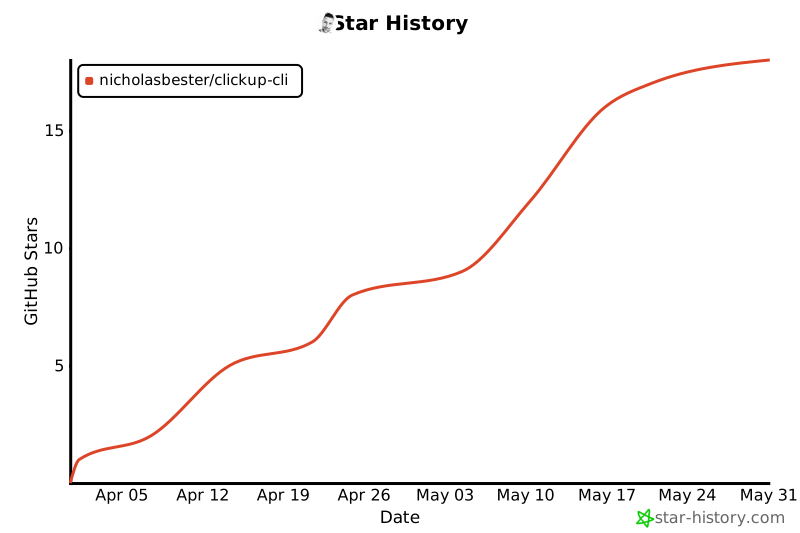
## Star History
 ## License
[Apache-2.0](LICENSE)