# ServerHub
[](LICENSE)
[](https://dotnet.microsoft.com/)
[]()
**An extensible server dashboard that doesn't just watch—it acts.**
### ⭐ If you find ServerHub useful, please consider giving it a star! ⭐
It helps others discover the project and motivates continued development.
[](https://github.com/nickprotop/ServerHub/stargazers)
ServerHub is a terminal control panel for servers and homelabs. Monitor your system, execute actions, and build custom monitoring for your specific setup—all without touching the codebase.
**Monitor. Act. Extend.**
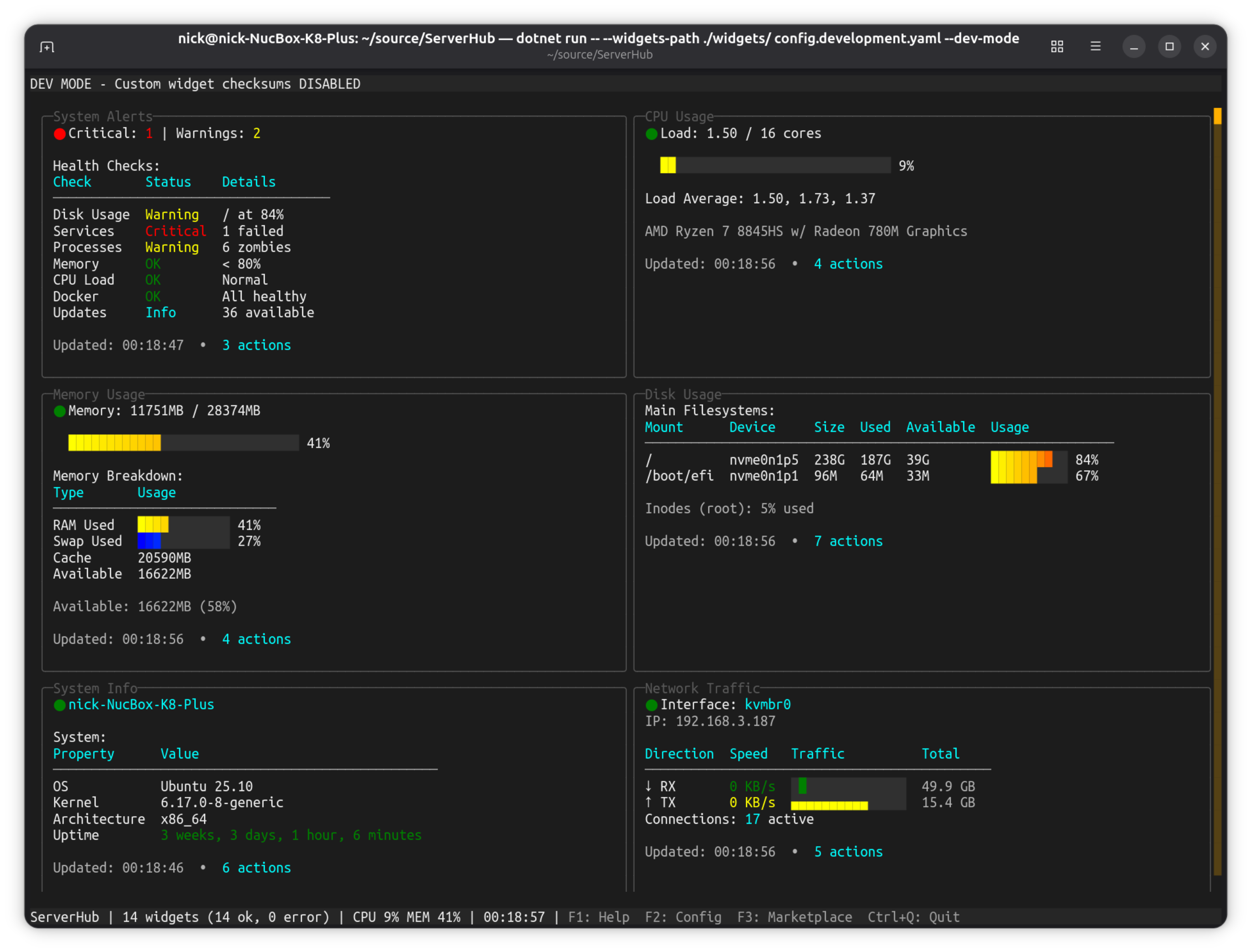
**[View more screenshots](docs/SCREENSHOTS.md)**
## Quick Start
Get ServerHub running in 3 steps:
```bash
# 1. Install ServerHub
curl -fsSL https://raw.githubusercontent.com/nickprotop/ServerHub/main/install.sh | bash
# 2. Run it (creates default config automatically)
serverhub
# 3. Press F3 to browse and install community widgets
```
That's it! You now have a working dashboard with 14 bundled widgets. Press `F3` to explore the marketplace, `F2` to configure widgets, or `?` for help.
## Table of Contents
- [What Makes ServerHub Different](#what-makes-serverhub-different)
- [Core Features](#core-features)
- [Marketplace](#marketplace) - Browse and install community widgets
- [Widget Development](docs/WIDGET_DEVELOPMENT.md) - Create and test widgets
- [Requirements](#requirements)
- [Installation](#installation)
- [Usage](#usage)
- [Configuration](#configuration)
- [Bundled Widgets](#bundled-widgets)
- [Custom Widgets](#custom-widgets)
- [Security](#security)
- [Screenshots](docs/SCREENSHOTS.md)
- [Examples](docs/EXAMPLES.md)
- [Widget Protocol](docs/WIDGET_PROTOCOL.md)
- [Widget Development](docs/WIDGET_DEVELOPMENT.md)
## What Makes ServerHub Different
**Extensible by design** - Write a script in any language (C#, Python, bash, Node.js, Go, Rust, or compiled binaries). If it outputs to stdout, it's a widget. Monitor anything: custom services, APIs, hardware you built yourself, scripts you already have. Widgets support expanded views - press Enter for full details beyond the dashboard summary.
**Context-aware actions** - Widgets don't just display data—they export actions based on what they're showing. A service widget shows different restart options depending on which services are running. An updates widget exports "Upgrade All" only when updates are available. Docker widget offers actions per container. Each widget adapts to the current state.
**Control, not just monitoring** - Upgrade packages, restart services, manage containers, trigger backups—execute actions with confirmation dialogs, progress tracking, and sudo support when needed. Your dashboard becomes a control panel.
**Security-first extensibility** - SHA256 validation for custom widgets with a documented threat model. Minimal environment variables. Path restrictions. Symlink blocking. Professional security without sacrificing flexibility.
## Core Features
- **14 bundled widgets** - CPU, memory, disk, network, Docker, systemd services, package updates, logs, SSL certificates, sensors, and more
- **Responsive layout** - 1-4 column layout adapts to terminal width
- **Custom widgets** - Write bash scripts to monitor anything specific to your setup
- **Action system** - Execute commands directly from widgets with progress tracking
- **SHA256 validation** - All custom widgets require checksum validation (development mode available)
- **YAML configuration** - Simple, version-controllable config files
- **Keyboard navigation** - Tab/Shift+Tab between widgets, arrow keys to scroll
- **Marketplace** - Browse and install community widgets with F3
## Marketplace
Discover and install community-contributed widgets from the ServerHub marketplace.
**[Full Marketplace Documentation](docs/MARKETPLACE.md)**
**[Browse the Marketplace](https://nickprotop.github.io/serverhub-registry/)**
### Interactive Browser (TUI)
Press `F3` in the dashboard to open the interactive marketplace browser:
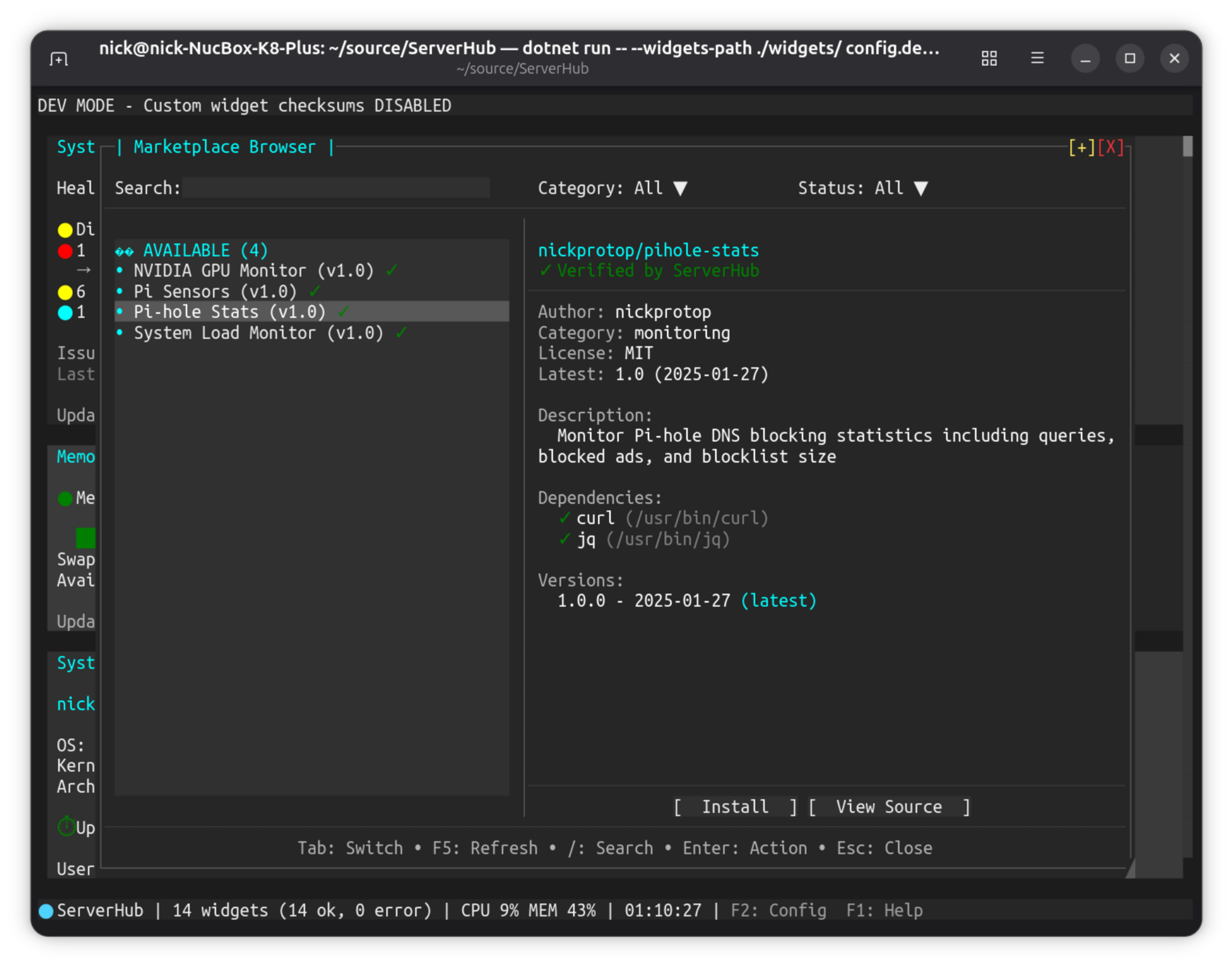
- Browse widgets with visual cards and detailed information
- Filter by category (monitoring, infrastructure, development, databases, etc.)
- Filter by verification status (Verified, Community, Unverified)
- View dependencies and system requirements
- One-click installation with automatic config integration
- One-click uninstall for installed widgets (removes file and config)
- Respects `--widgets-path` if you started ServerHub with a custom widgets directory
**Widget management:**
- **Install**: Click "Install" button on any available widget
- **Uninstall**: Click "Uninstall" button on installed widgets (confirmation required)
- **Update**: Click "Update to X.X.X" when newer versions are available
- Bundled widgets cannot be uninstalled (only custom/marketplace widgets)
**[View all screenshots](docs/SCREENSHOTS.md)**
### Command Line (CLI)
Search and install from the terminal:
```bash
# Search for widgets
serverhub marketplace search monitoring
# List all widgets
serverhub marketplace list
# List by category
serverhub marketplace list --category monitoring
# Get detailed information
serverhub marketplace info username/widget-name
```
### Install Widgets
```bash
# Install latest version
serverhub marketplace install username/widget-name
# Install specific version
serverhub marketplace install username/widget-name@1.0.0
# View installed marketplace widgets
serverhub marketplace list-installed
```
### Update Widgets
```bash
# Check for available updates
serverhub marketplace check-updates
# Update a specific widget
serverhub marketplace update username/widget-name
# Update to a specific version
serverhub marketplace update username/widget-name --version 2.0.0
# Update all widgets
serverhub marketplace update-all
# Auto-confirm updates (skip prompts)
serverhub marketplace update --yes username/widget-name
```
> **Note:** Uninstall marketplace widgets via the interactive browser (F3 in dashboard)
## Widget Testing
Validate widget scripts before deployment with the `test-widget` command:
```bash
serverhub test-widget mywidget.sh # Interactive test
serverhub test-widget mywidget.sh --yes # Skip confirmation (CI/CD)
serverhub test-widget mywidget.sh --extended # Test extended mode
```
The test command validates protocol compliance, checks action syntax, and provides warnings and suggestions. Returns exit code 0 on success, 1 on failure (CI/CD friendly).
**[Full Widget Testing Documentation](docs/WIDGET_TESTING.md)**
### Security & Verification
The marketplace uses a security-first approach:
- **SHA256 checksums** - All widgets have mandatory checksums verified during installation
- **Verification tiers** - Clear badges indicate review status:
- **Verified** (green) - Code reviewed by ServerHub maintainers
- **Community** (yellow) - Multiple installs, no reported issues
- **Unverified** (red) - New or untested, requires explicit confirmation
- **GitHub-only hosting** - Widgets must be hosted on GitHub releases
- **Dependency checking** - Required system commands verified before installation
- **Code transparency** - All widget code is publicly reviewable
**You are responsible for reviewing code before installing unverified widgets.**
**Want to contribute your own widget?** See [MARKETPLACE.md](docs/MARKETPLACE.md#contributing-widgets) for the submission process.
## Requirements
- Linux (x86_64 or ARM64)
- Bash (for widget scripts)
No .NET runtime required - ServerHub ships as a self-contained binary.
## Installation
### Quick Install (Recommended)
Download and install the latest release:
```bash
curl -fsSL https://raw.githubusercontent.com/nickprotop/ServerHub/main/install.sh | bash
```
This automatically:
- Downloads the binary for your architecture
- Installs bundled widgets
- Adds `~/.local/bin` to your PATH
- Creates default config on first run
### Build from Source
For development or if you want to build from source:
```bash
git clone https://github.com/nickprotop/ServerHub.git
cd ServerHub
./build-and-install.sh
```
Requires .NET 9.0 SDK for building.
## Uninstall
To remove ServerHub from your system:
```bash
curl -fsSL https://raw.githubusercontent.com/nickprotop/ServerHub/main/uninstall.sh | bash
```
This removes:
- The ServerHub binary from `~/.local/bin`
- Bundled widgets from `~/.local/share/serverhub`
- Optionally, your configuration from `~/.config/serverhub` (the script will ask)
## Usage
```bash
serverhub # Run with default config
serverhub myconfig.yaml # Use custom config file
serverhub --init-config config.yaml # Create config by discovering widgets
serverhub --discover # Find and add custom widgets
serverhub --verify-checksums # Verify all widget checksums
serverhub --dev-mode # Development mode (see Security section)
serverhub test-widget