# cxgpu
[](LICENSE)
[](https://dotnet.microsoft.com/)
[]()
[]()
**A multi-vendor GPU monitor for the terminal, built on [SharpConsoleUI](https://github.com/nickprotop/ConsoleEx).**
### ⭐ If you find cxgpu useful, please consider giving it a star! ⭐
It helps others discover the project and motivates continued development.
[](https://github.com/nickprotop/cxgpu/stargazers)
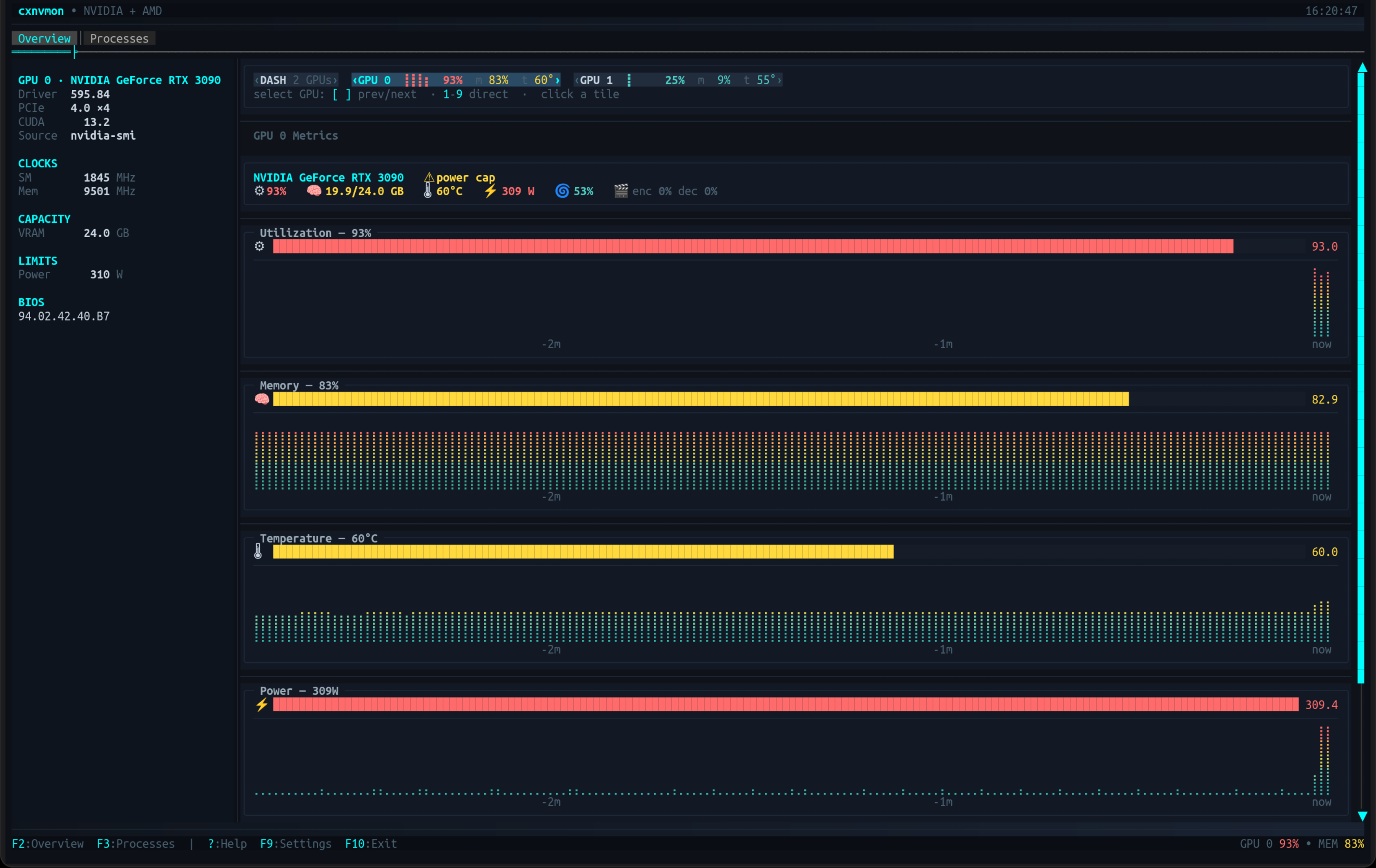
Live gauges and braille sparkline history for utilization, memory, temperature, power and fan;
per-process GPU usage with signal actions; a fleet dashboard for multi-GPU boxes; and full device
details — for **NVIDIA and AMD**, side by side in the same view.
**Monitor your GPUs. Right in the terminal.**
## Quick Start
**Option 1: One-line install** (Linux, no .NET required)
```bash
curl -fsSL https://raw.githubusercontent.com/nickprotop/cxgpu/main/install.sh | bash
cxgpu
```
**Windows** (PowerShell)
```powershell
irm https://raw.githubusercontent.com/nickprotop/cxgpu/main/install.ps1 | iex
```
**Option 2: Build from source** (requires .NET 10)
```bash
git clone https://github.com/nickprotop/cxgpu.git
cd cxgpu
./build-and-install.sh
cxgpu
```
No GPU to hand? `cxgpu --demo` runs against simulated GPUs — useful for trying the multi-GPU
views on a single-GPU machine, or with no GPU driver at all.
## Supported hardware
cxgpu probes for each vendor at startup and shows whichever it finds — including both at once on a
hybrid machine. A vendor that isn't present is simply absent; nothing errors.
| Vendor | Source | Platform |
|---|---|---|
| **NVIDIA** | `nvidia-smi` | Linux, Windows |
| **AMD** | `sysfs` + `hwmon` + `/proc/*/fdinfo` | Linux |
| **AMD** | `amd-smi` / `rocm-smi` | Windows, or Linux without sysfs |
The AMD backend needs **no extra tooling and no root** on Linux — it reads the kernel directly, which
is both faster than a CLI and the only source that can attribute memory to individual processes.
> **Metrics differ by vendor, and cxgpu says so rather than guessing.** Each backend declares what
> it can measure, and anything it can't is **omitted** — never shown as a zero. An APU with no fan
> sensor shows no fan gauge; a source that can't attribute per-process usage says
> "not available" instead of "no processes".
## Views
### Overview — one GPU in depth
Gauges plus braille sparkline history for utilization, memory, temperature, power and fan, a
one-line vitals summary, encode/decode readouts, and a spec-sheet of the device: driver, PCIe link,
CUDA version, clocks, VRAM, limits, VBIOS, and which data source is live.
A **throttle chip** appears only when the GPU is genuinely throttling (`⚠ thermal`, `⚠ power cap`,
`⚠ hw slowdown`) — the benign "idle" bits every card reports are filtered out, so the chip means
something when you see it.
### Dashboard — the whole fleet at once
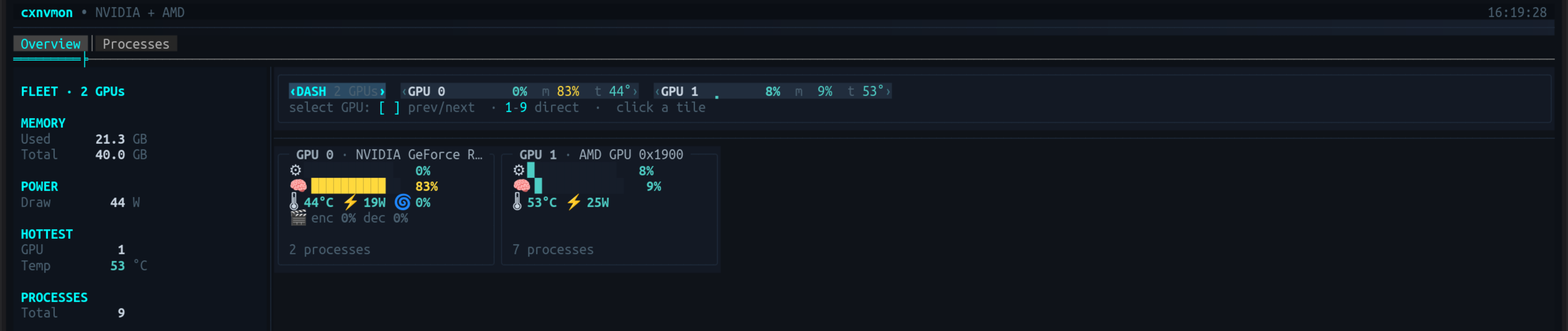
On a multi-GPU machine the summary strip gains a **`‹DASH›` chip**. Select it and the Overview
becomes a fleet view: aggregate totals on the left (combined VRAM, combined draw, hottest card,
total processes, anything throttling) and a hero panel per GPU on the right. Double-click a panel to
jump into that GPU's detail.
### Processes — who is using the GPU
An expandable tree of GPU processes with a toolbar to filter by GPU (or show **all GPUs** at once)
and sort by memory, SM%, PID or name. Expand a row for the full command path and live per-process
detail; from there you can send **SIGTERM** or **SIGKILL**, with a confirmation on the latter.
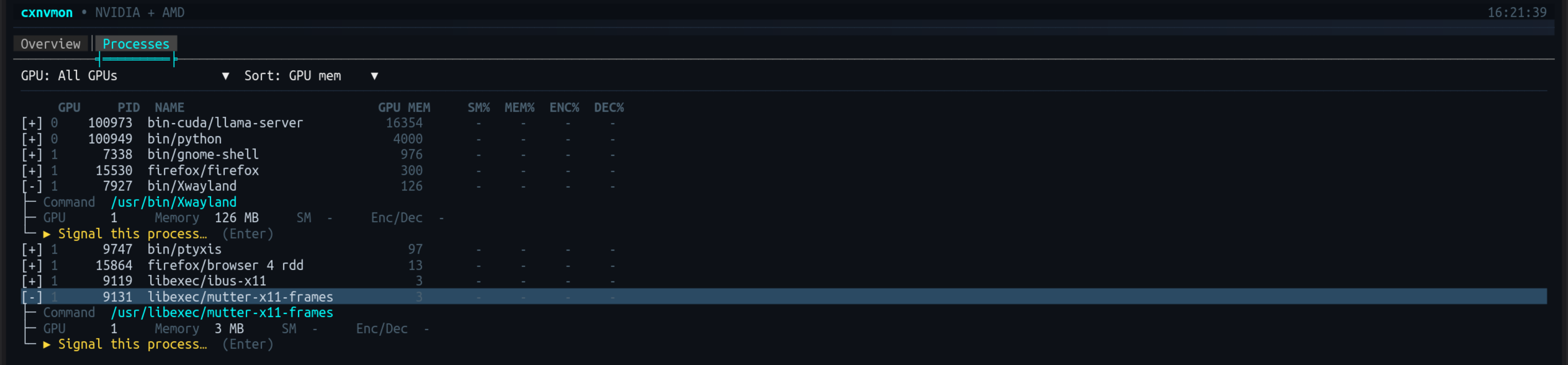
Outcomes are reported honestly: "permission denied — it belongs to another user" and "already
exited" are distinct messages, not a generic failure.
## Features
| | |
|---|---|
| 🖥️ **Multi-Vendor** | NVIDIA and AMD in one view, each through its own backend |
| 📊 **Overview** | Live gauges with braille sparkline history, vitals line, and a full device spec-sheet |
| 🧩 **Fleet Dashboard** | Per-GPU hero panels plus aggregate totals, on the `‹DASH›` chip |
| 📋 **Processes** | Expandable tree with GPU filter, sorting, per-process engine usage, and signal actions |
| ⚠️ **Throttle Detection** | Named throttle reasons surfaced only when a real throttle is active |
| 🔔 **Alerts** | Threshold and throttle events with toasts, a status-bar badge, and a history flyout |
| 📈 **Session Stats** | Peak temperature, peak power and throttle time per GPU, in-app and on exit |
| 📡 **Prometheus** | `--prometheus` serves `/metrics`; `--no-ui` runs it headless |
| 🎬 **Encode / Decode** | NVENC/NVDEC utilization where the hardware reports it |
| 🎯 **Capability-Aware** | Unsupported metrics are omitted, never faked as zero |
| 🎛️ **Settings** | A paged settings dialog (F9) — refresh, graphs, tabs, alerts, and per-backend options |
| ❓ **Help Overlay** | `?` or F1 lists every binding, marking those that don't apply on this machine |
| 📐 **Responsive** | Adapts to terminal width — side-by-side or stacked, wrapping panel grids |
| 🧪 **Demo Mode** | `--demo[=N]` simulates up to 9 GPUs for states real hardware won't produce on demand |
## Keyboard Shortcuts
| Key | Action |
|-----|--------|
| F2 / F3 | Overview / Processes tab |
| `[` `]` | Previous / next GPU tile (multi-GPU) |
| 1–9 | Select a GPU directly (multi-GPU) |
| → / Enter | Expand a process row (Processes) |
| ← | Collapse |
| `k` | Signal the selected process (Processes) |
| ? / F1 | Keyboard shortcuts |
| F9 | Settings |
| F10 / Esc | Exit |
Status-bar hints and GPU tiles are clickable; double-clicking a dashboard panel opens that GPU. The
alert badge at the right of the status bar opens the event history.
## Command Line
```
cxgpu [options]
--demo[=N] Run against N simulated GPUs (default 4, max 9) instead of
real hardware. Also settable via CXGPU_FAKE_GPUS=N.
--prometheus Serve Prometheus metrics at /metrics.
--port PORT Port for the exporter (default 9835).
--bind ADDRESS Interface to bind (default localhost). Use 0.0.0.0 for all.
--no-ui Run the exporter without the TUI. Requires --prometheus.
-h, --help Show help and exit.
-v, --version Show the version and exit.
```
## Alerts
cxgpu raises an event when a GPU crosses a threshold, and when the driver itself reports a throttle.
Both land in one list, so the chips on screen and the alert history can never disagree.
- **Warnings** raise a toast that dismisses itself; **criticals** raise one that stays until you
dismiss it. At most one toast per GPU per metric, so a card oscillating around a threshold cannot
bury the screen.
- A **badge** appears at the right of the status bar once anything has fired. Click it for the
history — active events in colour, resolved ones dimmed with how long they lasted. That is the
point of keeping them: the throttle chips vanish when a condition clears, so "did it throttle while
I was at lunch?" is otherwise unanswerable.
- Events are **edge-triggered with hysteresis**: one entry per episode, not one per refresh, and a
value resting on the threshold does not flap.
Thresholds are per vendor and editable under **F9 → Alerts**. The defaults differ by part because the
hardware does — a GeForce warns at 83 °C where a Radeon warns at 90 °C, and temperature colouring
everywhere in the UI follows the same numbers, so what you see and what fires always agree.
Throttle events come from the driver's own reason flags, never inferred. A backend that cannot read
them contributes nothing rather than reporting "not throttling".
## Prometheus
```bash
cxgpu --prometheus --no-ui & # headless exporter
cxgpu --prometheus # alongside the UI
cxgpu --prometheus --port 9100 --bind 0.0.0.0 # on every interface
```
Metrics are served at `/metrics` and read through the same provider the UI uses, so a scrape and the
screen cannot drift. Series carry a stable `card` label (the PCI address) as well as `gpu`, `name`
and `backend` — an index-labelled series silently re-points at different hardware when a backend
fails to probe, which is invisible in the UI but permanent in a time-series database.
```
cxgpu_temperature_celsius{gpu="0",name="NVIDIA GeForce RTX 3090",backend="NVIDIA",card="0000:01:00.0"} 44
cxgpu_throttled{gpu="0",...,reason="thermal"} 0
```
**Unsupported metrics are absent, not zero.** On a mixed box the NVIDIA card exports fan, power and
throttle series while the AMD card does not, because that backend genuinely cannot read them — a
fabricated zero would be averaged into a dashboard forever with nobody noticing.
The exporter binds **localhost** unless `--bind` says otherwise, warns on startup when it is
listening publicly, and fails rather than quietly choosing another port if the one you asked for is
taken.
## Configuration
Settings live as JSON at the platform config location:
- **Linux:** `~/.config/cxgpu/config.json` (honours `XDG_CONFIG_HOME`)
- **Windows:** `%APPDATA%\cxgpu\config.json`
Edit them in-app with **F9**. The dialog is paged: refresh interval, graph options, tab visibility,
and a page per GPU backend where you can enable or disable that vendor and change its options — for
example which mechanism the AMD backend reads through. A disabled backend is never probed at all.
A missing or invalid file falls back to defaults, so the app always starts. Unrecognised keys are
preserved on save, so a config written by a newer build survives a downgrade.
## Architecture
GPU access sits behind one seam. Each vendor is a **backend** that declares its own capabilities and
settings, so adding a vendor doesn't touch the UI.
```
cxgpu/
├── Program.cs # Entry point, CLI parsing
├── Configuration/ # CxgpuConfig (JSON load/save)
├── Gpu/
│ ├── Abstractions/ # Models, IGpuBackend, capabilities, identity, fleet summary
│ ├── Alerts/ # Threshold engine, events, session stats
│ ├── GpuBackendRegistry.cs # Probes backends, aggregates, assigns global GPU indices
│ ├── GpuBackendPlugin.cs # Backends as SharpConsoleUI plugin services
│ ├── GpuStatsFactory.cs # Backend selection and configuration
│ ├── ProcessSignals.cs # SIGTERM/SIGKILL delivery
│ └── Backends/
│ ├── Nvidia/ # nvidia-smi
│ ├── Amd/ # sysfs + hwmon + fdinfo, or amd-smi/rocm-smi
│ └── Demo/ # Synthetic GPUs for --demo
├── Export/ # Prometheus formatter, HTTP exporter, CLI options
├── Dashboard/ # Main window, settings, help, busy indicator
├── Helpers/ # UI constants, shared metric formatting, history
├── Widgets/ # Reusable controls (hero panel, strip, alert portal)
└── Tabs/ # Overview (+ fleet dashboard), Processes
```
Adding a vendor means writing one backend — the UI, alerts and exporter all adapt to what it declares
it can read. See **[Writing a GPU backend](docs/WRITING-A-BACKEND.md)**.
Backends implement SharpConsoleUI's `IPluginService`, so they are already valid plugins — the day the
framework gains runtime assembly loading, they become drop-in without a refactor.
## Building from Source
cxgpu uses a conditional project reference for [SharpConsoleUI](https://github.com/nickprotop/ConsoleEx):
- **Local development:** if ConsoleEx is cloned as a sibling directory (`../ConsoleEx`), the project
reference is used automatically
- **CI/Release builds:** falls back to the SharpConsoleUI NuGet package
```bash
# Clone both repos as siblings
git clone https://github.com/nickprotop/ConsoleEx.git
git clone https://github.com/nickprotop/cxgpu.git
cd cxgpu
dotnet build cxgpu.csproj
```
**Key Technologies:** .NET 10, [SharpConsoleUI](https://github.com/nickprotop/ConsoleEx), `nvidia-smi`,
Linux `sysfs`/`hwmon`, `amd-smi`/`rocm-smi`
## Uninstall
**Linux:**
```bash
cxgpu-uninstall.sh
```
**Windows (PowerShell):**
```powershell
& "$env:LOCALAPPDATA\cxgpu\cxgpu-uninstall.ps1"
```
## Contributing
Bug reports, hardware reports and pull requests are welcome — see
[CONTRIBUTING.md](CONTRIBUTING.md). Adding a vendor is one self-contained backend:
[Writing a GPU backend](docs/WRITING-A-BACKEND.md).
## License
MIT License. See [LICENSE](LICENSE) for details.