# CXPost
[](LICENSE)
[](https://dotnet.microsoft.com/)
[]()
**A cross-platform terminal email client built on [SharpConsoleUI](https://github.com/nickprotop/ConsoleEx).**
### ⭐ If you find CXPost useful, please consider giving it a star! ⭐
It helps others discover the project and motivates continued development.
[](https://github.com/nickprotop/cxpost/stargazers)
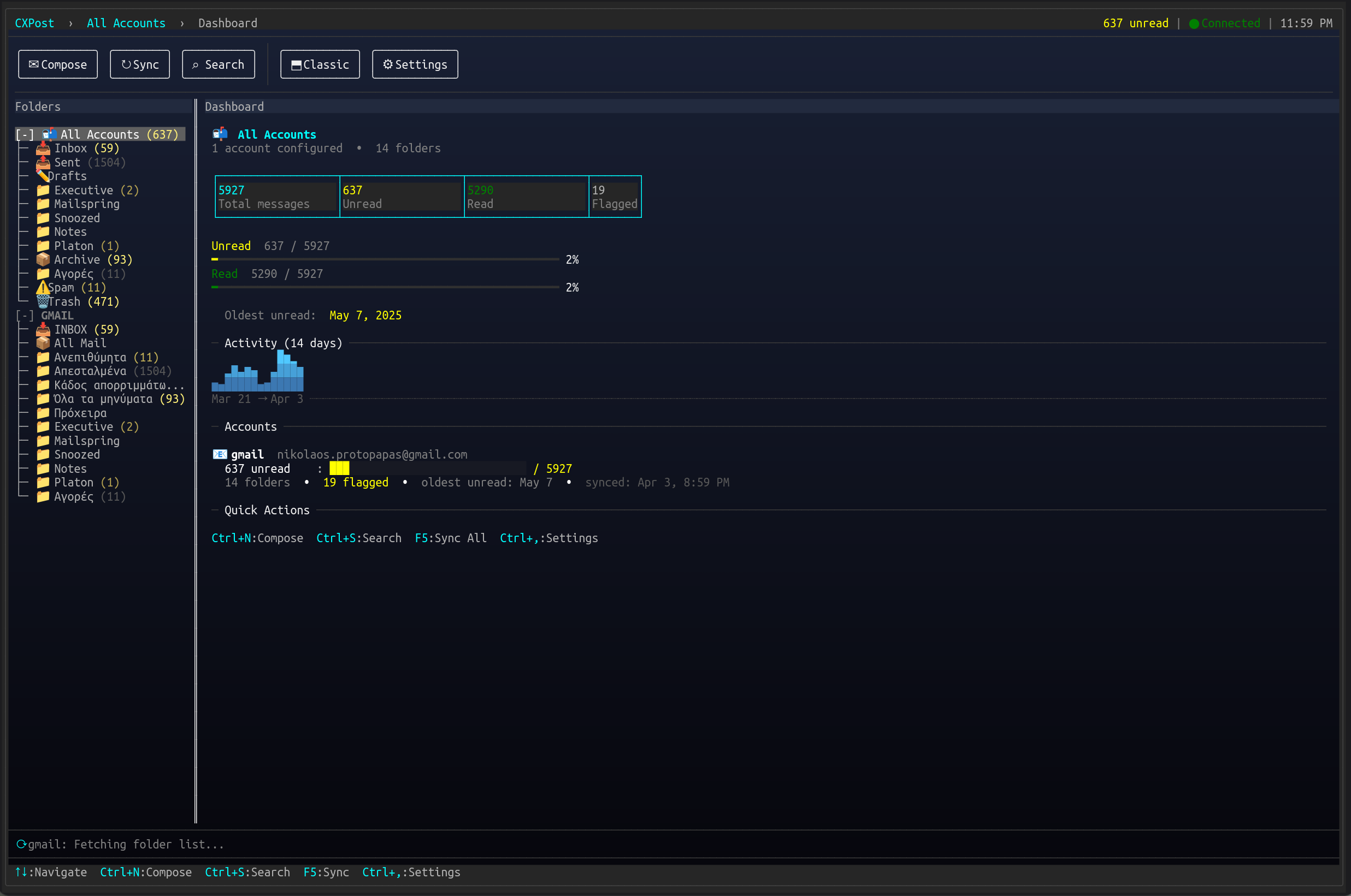
CXPost brings a polished terminal UI to email. Multi-account IMAP with push notifications, offline SQLite caching, conversation threading, rich HTML rendering, attachment support, and a three-pane layout — all without leaving the terminal.
**Read. Compose. Manage.**
## Quick Start
**Option 1: One-line install** (Linux/macOS, no .NET required)
```bash
curl -fsSL https://raw.githubusercontent.com/nickprotop/cxpost/master/install.sh | bash
cxpost
```
**Windows** (PowerShell)
```powershell
irm https://raw.githubusercontent.com/nickprotop/cxpost/master/install.ps1 | iex
```
**Option 2: Build from source** (requires .NET 10)
```bash
git clone https://github.com/nickprotop/cxpost.git
cd cxpost
./build-and-install.sh
cxpost
```
On first run, CXPost will prompt you to configure your email account (IMAP/SMTP).
## Features
| | |
|---|---|
| 📬 **Multi-Account** | Unified inbox across multiple email accounts with per-account folder trees |
| 📎 **Attachments** | View attachment metadata, save to disk (quick save or folder picker), send with attachments |
| 🔍 **Search** | Instant local search + server-side IMAP SEARCH with recent query suggestions |
| 💬 **Threading** | JWZ conversation threading via Message-ID/References/In-Reply-To headers |
| 📊 **Dashboard** | Interactive account dashboard with stats, sparklines, clickable folders and actions |
| 🖥️ **Layouts** | Classic, Wide, and Read mode with composable view toggles (F2/F3/F4/F8) |
| ✉️ **Compose** | Reply, reply-all, forward with configurable prefixes. Signature with position control |
| 🗑️ **Safe Delete** | Move to Trash with 5-second undo. Confirmation dialog for permanent deletes |
| 🔐 **Credentials** | OS-native keyring (secret-tool/Keychain) with encrypted file fallback |
| 🌐 **HTML Email** | AngleSharp-based rendering to rich terminal markup with link preservation |
| ⚡ **IMAP IDLE** | Push notifications with debounced sync for real-time new mail |
| 📁 **Folder Detection** | IMAP special-use attributes (RFC 6154) + name heuristics, manual override in settings |
| 🔄 **Offline Cache** | SQLite-backed message/contact storage with lazy body fetching |
| 🎨 **Polished UI** | Depth-based focus dimming, animated transitions, gradient sync progress, row micro-animations |
| ⚙️ **Per-Account Settings** | Signature, reply-to, auto-bcc, default-cc, sync interval, mark-as-read, folder paths |
| 🖱️ **Mouse Support** | Click to navigate, click buttons, click attachment save, click breadcrumb |
## Keyboard Shortcuts
| Key | Action |
|-----|--------|
| `↑` `↓` | Navigate messages / folders |
| `Enter` | Select / activate |
| `Ctrl+N` | Compose new message |
| `Ctrl+R` | Reply (Ctrl+Shift+R for reply all) |
| `Ctrl+F` | Forward |
| `Ctrl+S` | Search messages |
| `Ctrl+U` | Toggle read/unread |
| `Ctrl+D` | Toggle flag |
| `Ctrl+M` | Move to folder |
| `Del` | Delete (move to Trash / confirm permanent) |
| `F2` | Toggle folder tree |
| `F3` | Toggle preview panel |
| `F4` | Toggle read mode (full-width reader with message strip) |
| `Ctrl+B` | Toggle message strip in read mode |
| `F5` | Sync all accounts |
| `F8` | Toggle layout (Classic ↔ Wide) |
| `Ctrl+,` | Settings |
| `Esc` | Exit read mode / clear search / close dialog |
| `1-9` | Save attachment #N |
| `Ctrl+1-9` | Save As attachment #N |
| `A` | Save all attachments |
## Configuration
CXPost stores configuration and data in standard OS locations:
| | Linux | macOS / Windows |
|---|---|---|
| **Config** | `~/.config/cxpost/config.yaml` | `%APPDATA%/CXPost/config.yaml` |
| **Data** | `~/.local/share/cxpost/` | `%LOCALAPPDATA%/CXPost/` |
| **Credentials** | OS keyring or encrypted file | OS keyring |
### Per-Account Settings
Each account can be configured independently via Settings → Edit Account:
- **General**: Display name, email, username, reply-to, password
- **Server**: IMAP/SMTP host, port, security (SSL/TLS/None)
- **Compose**: Signature (with position), auto-bcc, default-cc, reply/forward prefixes
- **Sync**: Interval, max messages per folder, mark-as-read on view, notifications, folder path overrides
### Global Settings
- **Appearance**: Layout (Classic / Wide / Last Used)
- **Behavior**: Sync interval, notifications, startup view, confirm before quit
## Building from Source
**Prerequisites**: [.NET 10 SDK](https://dotnet.microsoft.com/download), optionally [ConsoleEx](https://github.com/nickprotop/ConsoleEx) checked out alongside
```bash
git clone https://github.com/nickprotop/cxpost.git
cd cxpost
# If ConsoleEx is at ../ConsoleEx, it uses the project reference automatically
# Otherwise it pulls SharpConsoleUI from NuGet
dotnet build
dotnet run --project CXPost
```
### Install locally
```bash
./build-and-install.sh # Builds and installs to ~/.local/bin/cxpost
```
### Release
```bash
./publish.sh patch # Bumps version, pushes tag, triggers GitHub Actions
```
## Architecture
```
CXPost/
├── Models/ # Account, MailMessage, MailFolder, AttachmentInfo
├── Services/ # IMAP, SMTP, Cache, Config, Credentials, FolderResolver
├── Coordinators/ # MailSync, MessageList, Compose, Search, Notification
├── Data/ # SQLite repositories, migrations
└── UI/
├── CXPostApp.cs # Main window, layout, event handling
├── Components/ # Dashboard, StatusBar, MessageBar, HtmlConverter
└── Dialogs/ # Compose, Search, Settings, AccountSettings, Confirm
```
**Key technologies**: [SharpConsoleUI](https://github.com/nickprotop/ConsoleEx) (TUI framework), [MailKit](https://github.com/jstedfast/MailKit) (IMAP/SMTP), [AngleSharp](https://anglesharp.github.io/) (HTML parsing), SQLite (offline cache), YamlDotNet (config)
## Uninstall
```bash
cxpost-uninstall.sh
# Or manually:
rm ~/.local/bin/cxpost
rm -rf ~/.config/cxpost ~/.local/share/cxpost # optional: remove data
```
## License
[MIT](LICENSE)