# Itsypad
[](https://github.com/nickustinov/itsypad-macos/actions/workflows/tests.yml)
[](https://github.com/nickustinov/itsypad-macos/releases/latest)
[](https://github.com/nickustinov/itsypad-macos/releases)
[](LICENSE)
[](https://swift.org)
[](https://www.apple.com/macos/sonoma/)
[](https://formulae.brew.sh/cask/itsypad)
A tiny, fast scratchpad and clipboard manager for Mac. [itsypad.app](https://itsypad.app)
[](https://apps.apple.com/app/itsypad/id6758999332)
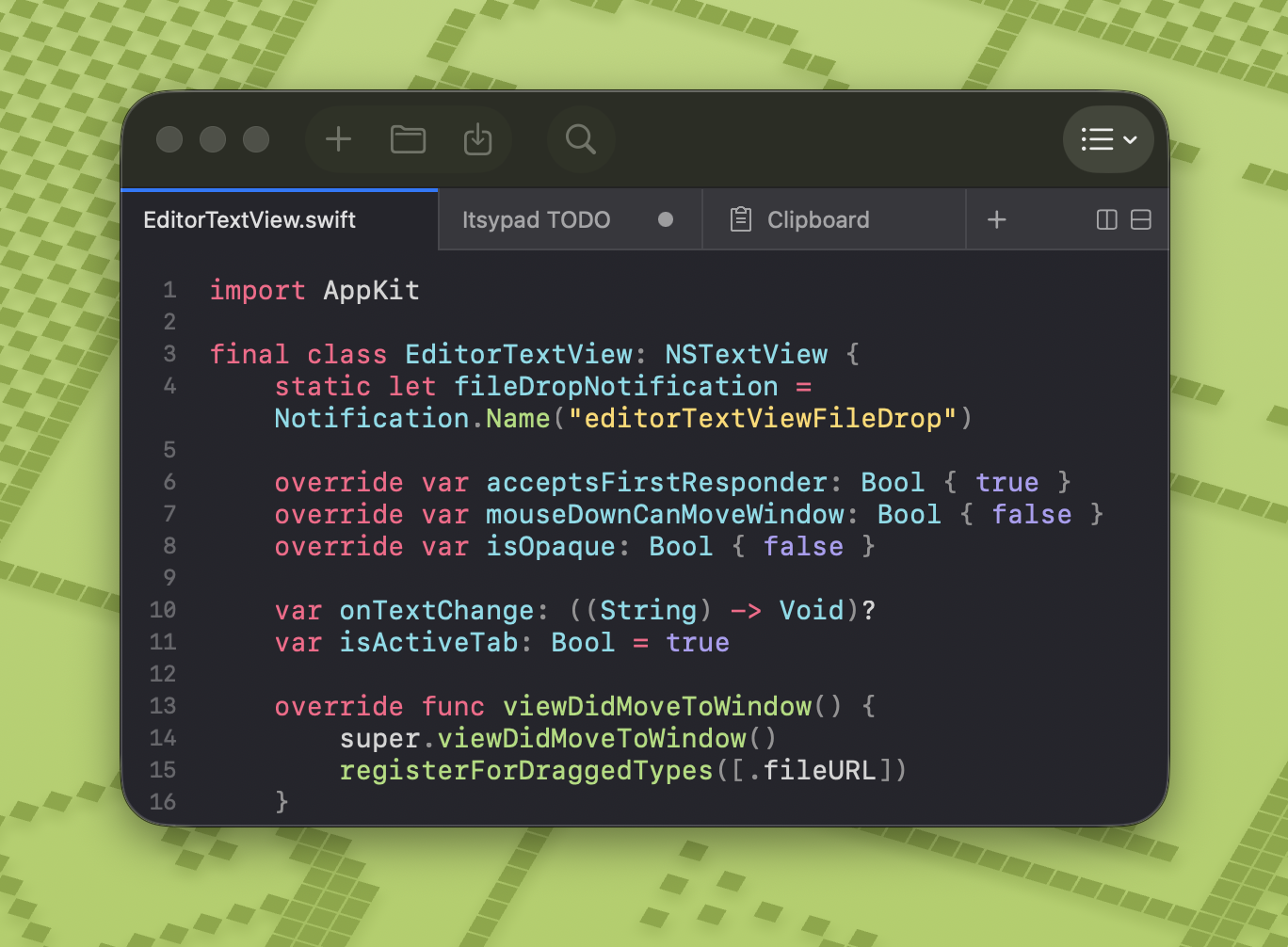
❤️ If you enjoy Itsypad, grab the [App Store version](https://apps.apple.com/app/itsypad/id6758999332) to support development and get automatic updates. You can also download the DMG from [GitHub releases](https://github.com/nickustinov/itsypad-macos/releases) or install via Homebrew.
## Features
- **Text editor** — syntax highlighting, multi-tab, split view, find and replace, clickable links, lists and checklists
- **Clipboard manager** — 1,000-item history, searchable, keyboard navigable, grid or panels layout, iCloud sync (text entries)
- **Global hotkeys** — tap left ⌥ three times to show/hide, or define your own hotkey
- **Lightweight** — nearly zero CPU and memory usage
- **No AI, no telemetry** — your data stays on your machine
- **Menu bar icon** — show or hide in menu bar
- **Dock icon** — show or hide in Dock, as you prefer
- **Open at login** — optional auto-start
- **iCloud sync** — sync scratch tabs and clipboard history (text only) across Macs via iCloud
- **12 languages** — English, Spanish, French, German, Russian, Japanese, Simplified Chinese, Traditional Chinese, Korean, Portuguese (Brazil), Italian, Polish
## Editor
- **Multi-tab and split view** — work on multiple files/notes at once, drag to reorder, pin tabs to keep them visible (tab bar by [Bonsplit](https://github.com/almonk/bonsplit))
- **Syntax highlighting** — 185+ languages via [highlight.js](https://highlightjs.org), with automatic language detection
- **Find and replace** — built-in find bar with next/previous match and use selection for find
- **Session persistence** — all tabs, content, and cursor positions are preserved across restarts
- **Auto-save** — content is continuously saved to session, never lose your work
- **Markdown preview** — side-by-side rendered preview for `.md` tabs (⇧⌘P), live-updates as you type, themed code blocks, local images
- **Clickable links** — URLs in plain text and markdown tabs are highlighted and underlined; click to open in browser
- **Always on top** — pin the window above all other apps (⇧⌘T)
- **Syntax themes** — 9 curated themes (Atom One, Catppuccin, GitHub, Gruvbox, IntelliJ / Darcula, Itsypad, Stack Overflow, Tokyo Night, Visual Studio) with dark and light variants
## Lists and checklists
Itsypad supports markdown-compatible lists and checklists directly in the editor. All state lives in the text itself — no hidden metadata, fully portable.
### Syntax
```
- bullet item
* also a bullet
1. numbered item
- [ ] unchecked task
- [x] completed task
```
### How it works
Type a list prefix and start writing. Press **Enter** to auto-continue with the next item. Press **Enter** on an empty item to exit list mode. Use **Tab** / **Shift+Tab** to indent and outdent list items.
For checklists, press **⇧⌘L** to convert any line(s) to a checklist, or type `- [ ] ` manually. Toggle checkboxes with **⌘Return** or by clicking directly on the `[ ]` / `[x]` brackets. Checked items appear with ~~strikethrough~~ and dimmed text.
Move lines up or down with **⌥⌘↑** / **⌥⌘↓**. Wrapped list lines align to the content start, not the bullet.
### Visual styling
| Element | Appearance |
|---|---|
| Bullet dashes `-`, `*` | 🔴 Magenta/red (`bulletDashColor`) |
| Ordered numbers `1.` | 🔴 Magenta/red (`bulletDashColor`) |
| Checkbox brackets `[ ]`, `[x]` | 🟣 Purple |
| Checked item content | ~~Strikethrough~~ + dimmed |
| URLs `https://...` | 🔵 Blue underlined (`linkColor`) |
## Clipboard manager
- **Text and images** — stores up to 1,000 clipboard entries
- **Searchable** — filter history with highlighted search matches
- **Click to copy** — click any entry to copy it back to clipboard (or paste directly — configurable in settings)
- **Quick-access shortcuts** — ⌘1–9 to copy the Nth item, ⌥1–9 to paste it into the previously active app
- **Zoom preview** — hover a tile and click the magnifying glass to view full content in a near-fullscreen overlay
- **Keyboard navigation** — arrow keys to browse items, Enter to copy, Space to preview/unpreview, Escape to deselect
- **Grid or panels** — switch between a multi-column grid and full-width panel rows
- **Configurable cards** — adjust preview line count and font size in settings
- **Delete entries** — remove individual items on hover
- **Separate hotkey** — assign a dedicated global hotkey to show/hide
- **iCloud sync** — text entries sync across devices alongside scratch tabs (up to 200 most recent)
## Also on iPhone & iPad
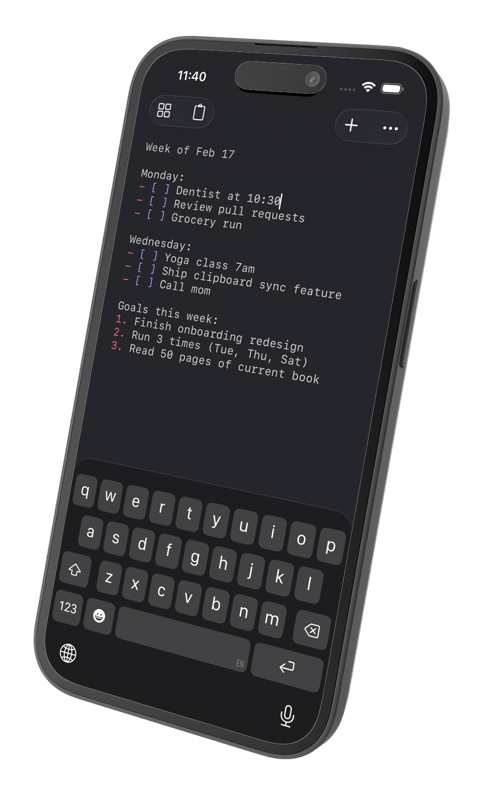 Itsypad is also on [iPhone and iPad](https://apps.apple.com/app/itsypad/id6758999332). Scratch tabs and clipboard history (text) sync across all your devices over iCloud.
**Licensing in short:** the Mac app is free and open source (MIT) via Homebrew or GitHub. The App Store version is a single one-time purchase that runs on iPhone, iPad **and** Mac, and supports development – no subscription.
[](https://apps.apple.com/app/itsypad/id6758999332)
Itsypad is also on [iPhone and iPad](https://apps.apple.com/app/itsypad/id6758999332). Scratch tabs and clipboard history (text) sync across all your devices over iCloud.
**Licensing in short:** the Mac app is free and open source (MIT) via Homebrew or GitHub. The App Store version is a single one-time purchase that runs on iPhone, iPad **and** Mac, and supports development – no subscription.
[](https://apps.apple.com/app/itsypad/id6758999332)
## Install
```bash
brew install --cask itsypad
```
Or download the latest DMG from [GitHub releases](https://github.com/nickustinov/itsypad-macos/releases).
## Keyboard shortcuts
| Shortcut | Action |
|----------|--------|
| ⌘T / ⌘N | New tab |
| ⌘W | Close tab |
| ⌘O | Open file |
| ⌘S | Save |
| ⇧⌘S | Save as |
| ⌃Tab | Next tab |
| ⇧⌃Tab | Previous tab |
| ⌘F | Find |
| ⌥⌘F | Find and replace |
| ⌘G | Find next |
| ⇧⌘G | Find previous |
| ⌘E | Use selection for find |
| ⌘D | Duplicate line |
| ⌘Return | Toggle checkbox |
| ⇧⌘L | Toggle checklist |
| ⌥⌘↑ | Move line up |
| ⌥⌘↓ | Move line down |
| ⌘1–9 | Switch to tab by position |
| ⇧⌘T | Always on top |
| ⇧⌘D | Split right |
| ⇧⌃⌘D | Split down |
| ⌘+ | Increase font size |
| ⌘- | Decrease font size |
| ⌘0 | Reset font size |
| Tab | Indent line/selection |
| ⇧Tab | Unindent line/selection |
| Fn↓ / Fn↑ | Page down / up (moves cursor) |
### Clipboard
| Shortcut | Action |
|----------|--------|
| ↓ | Move focus from search to first item |
| ↑↓←→ | Navigate between items |
| Return | Copy selected item (or paste — see settings) |
| Space | Toggle preview overlay |
| Escape | Deselect item / close preview |
| ⌘1–9 | Copy Nth visible item to clipboard |
| ⌥1–9 | Copy Nth item and paste into active app |
## Also by me
If you like Itsypad, check out my other macOS apps - same philosophy of native, lightweight, no-bloat design.
**[Itsyhome](https://itsyhome.app)** – control your entire smart home from the macOS menu bar. Cameras, lights, thermostats, locks, scenes, and 18+ HomeKit device types. Global keyboard shortcuts, Stream Deck support, deeplinks, and webhooks for power users. [Open source](https://github.com/nickustinov/itsyhome-macos).
**[Itsytv](https://itsytv.app)** – the missing Apple TV remote for macOS. Full D-pad and playback controls, now-playing widget, app launcher, text input, and multi-device support. [Open source](https://github.com/nickustinov/itsytv-macos).
## Distribution
Itsypad ships in two variants from the same codebase: a **direct/DMG** version (downloaded from GitHub/Homebrew) and an **App Store** version. The differences are minimal but important to understand.
### Schemes and configs
| Scheme | Configs | Entitlements | Use |
|---|---|---|---|
| `itsypad` | `Debug` / `Release` | `itsypad-direct.entitlements` | Direct/DMG distribution |
| `itsypad-appstore` | `Debug-AppStore` / `Release-AppStore` | `itsypad.entitlements` | App Store distribution |
App Store configs set the `APPSTORE` Swift compilation condition, used to hide features that aren't allowed in the App Store (e.g. the update checker).
### Entitlements
Both entitlements files are sandboxed and share the same capabilities:
| Entitlement | Direct | App Store |
|---|---|---|
| `app-sandbox` | yes | yes |
| `files.user-selected.read-write` | yes | yes |
| `files.bookmarks.app-scope` | yes | yes |
| `cs.allow-unsigned-executable-memory` | yes (highlight.js JSContext) | yes |
| `network.client` | yes (update checker) | no |
| `ubiquity-kvstore-identifier` | yes (legacy, unused) | yes (legacy, unused) |
| `icloud-container-identifiers` | `iCloud.com.nickustinov.itsypad` | same |
| `icloud-container-environment` | `Production` | same |
| `icloud-services` | `CloudKit` | same |
The only real difference is `network.client` – the direct version needs it for checking GitHub releases. The App Store version doesn't need it because App Store handles updates.
Both versions use the same CloudKit container (`iCloud.com.nickustinov.itsypad`) and sync with each other.
### Signing
- **Direct/DMG:** Signed with "Developer ID Application" certificate and a Developer ID provisioning profile. The build script (`scripts/build-release.sh`) archives unsigned, embeds the profile, then manually signs with resolved entitlements (Xcode variables like `$(TeamIdentifierPrefix)` are expanded to literal values).
- **App Store:** Signed automatically by Xcode with the App Store provisioning profile. Uploaded via Xcode Organizer or `xcodebuild -exportArchive`.
### iCloud sync
Both versions use CloudKit via `CKSyncEngine` for syncing scratch tabs and clipboard history. The `CloudSyncEngine` singleton manages the sync lifecycle. See the record schema and sync flow in the [iOS migration docs](../itsypad-ios/docs/cloudkit-sync.md).
## Architecture
```
Sources/
├── App/
│ ├── AppDelegate.swift # Menu bar, toolbar, window, and panel setup
│ ├── BonsplitRootView.swift # SwiftUI root view rendering editor and clipboard tabs
│ ├── CloudSyncEngine.swift # CloudKit sync via CKSyncEngine for tabs and clipboard
│ ├── G2SyncEngine.swift # Even Realities G2 glasses sync (Labs)
│ ├── KVSMigration.swift # Legacy iCloud KVS data migration
│ ├── Launch.swift # App entry point
│ ├── MenuBuilder.swift # Main menu bar construction
│ ├── Models.swift # ShortcutKeys and shared data types
│ ├── TabStore.swift # Tab data model with persistence
│ └── UpdateChecker.swift # GitHub release check for new versions
├── Editor/
│ ├── EditorContentView.swift # NSViewRepresentable wrapping text view, scroll view, and gutter
│ ├── EditorCoordinator.swift # Tab/pane orchestrator bridging TabStore and Bonsplit
│ ├── EditorStateFactory.swift # Editor state creation and theme application
│ ├── EditorTextView.swift # NSTextView subclass with editing helpers and file drops
│ ├── EditorTheme.swift # Dark/light color palettes with CSS-derived theme cache
│ ├── FileWatcher.swift # DispatchSource-based file change monitoring
│ ├── HighlightJS.swift # JSContext wrapper for highlight.js with CSS/HTML parsing
│ ├── LanguageDetector.swift # File extension → language mapping for highlight.js
│ ├── LayoutSerializer.swift # Split layout capture and restore for session persistence
│ ├── LineNumberGutterView.swift # Line number gutter drawn alongside the text view
│ ├── ListHelper.swift # List/checklist parsing, continuation, and toggling
│ ├── MarkdownPreviewManager.swift # Markdown preview lifecycle and toolbar integration
│ ├── MarkdownPreviewView.swift # WKWebView wrapper for rendered markdown preview
│ ├── MarkdownRenderer.swift # Markdown-to-HTML via marked.js + highlight.js in JSContext
│ ├── SessionRestorer.swift # Session restore logic for tabs and editor state
│ ├── SyntaxHighlightCoordinator.swift # Syntax highlighting coordinator using HighlightJS
│ └── SyntaxThemeRegistry.swift # Curated syntax theme definitions with dark/light CSS mapping
├── Clipboard/
│ ├── ClipboardStore.swift # Clipboard monitoring, history persistence, and CloudKit sync
│ ├── ClipboardContentView.swift # NSCollectionView grid with search, keyboard nav, and layout
│ ├── ClipboardCollectionView.swift # NSCollectionView subclass with key event delegation
│ ├── ClipboardCardItem.swift # NSCollectionViewItem wrapper for card views
│ ├── ClipboardCardView.swift # Individual clipboard card with preview, delete, and zoom
│ ├── ClipboardPreviewOverlay.swift # Near-fullscreen zoom preview overlay
│ ├── ClipboardTabView.swift # NSViewRepresentable wrapper for ClipboardContentView
│ ├── CardTextField.swift # Non-interactive text field (suppresses I-beam cursor)
│ └── AccessibilityHelper.swift # Accessibility check and CGEvent paste simulation
├── Settings/
│ ├── SettingsStore.swift # UserDefaults-backed settings with change notifications
│ ├── SettingsView.swift # SwiftUI settings window (general, editor, appearance, clipboard)
│ └── ShortcutRecorder.swift # SwiftUI hotkey recorder control
├── Hotkey/
│ ├── HotkeyManager.swift # Global hotkeys and triple-tap modifier detection
│ └── ModifierKeyDetection.swift # Left/right modifier key identification from key codes
├── Resources/
│ ├── Assets.xcassets # App icon and custom images
│ └── Localizable.xcstrings # String catalog for 12 languages
├── Info.plist # Bundle metadata and document types
├── itsypad.entitlements # App Store entitlements (sandbox, CloudKit, iCloud)
└── itsypad-direct.entitlements # Direct/DMG entitlements (adds network.client for update checker)
Executable/
└── main.swift # Executable target entry point
Packages/
└── Bonsplit/ # Local package: split pane and tab bar framework
Tests/
├── AutoDetectTests.swift
├── ClipboardShortcutTests.swift
├── ClipboardStoreTests.swift
├── CloudSyncEngineTests.swift
├── EditorThemeTests.swift
├── FileWatcherTests.swift
├── HighlightJSTests.swift
├── KVSMigrationTests.swift
├── LanguageDetectorTests.swift
├── LineNumberGutterViewTests.swift
├── ListHelperTests.swift
├── MarkdownPreviewManagerTests.swift
├── MarkdownRendererTests.swift
├── ModifierKeyDetectionTests.swift
├── SettingsStoreTests.swift
├── ShortcutKeysTests.swift
├── SyntaxThemeRegistryTests.swift
└── TabStoreTests.swift
scripts/
├── build-release.sh # Build, sign, and package DMG for direct distribution
├── pull-translations.sh # Pull translations from Lokalise into xcstrings
└── push-translations.sh # Push English source strings to Lokalise
```
## Requirements
- macOS 14 (Sonoma) or later
- Xcode 16.0 or later
- [XcodeGen](https://github.com/yonaskolb/XcodeGen) for Xcode project generation
## Building
```bash
xcodegen generate
open itsypad.xcodeproj
```
Then build and run with ⌘R in Xcode. Tests run with ⌘U.
## Releasing
### Both versions
1. Bump `MARKETING_VERSION` and `CURRENT_PROJECT_VERSION` in `project.yml`
2. Run `xcodegen generate`
### Direct/DMG release
3. Build, sign, and package:
```bash
bash scripts/build-release.sh
```
This archives with the `itsypad` scheme (`Release` config), embeds the Developer ID provisioning profile, signs with `itsypad-direct.entitlements`, and creates a DMG.
4. Notarize and staple:
```bash
xcrun notarytool submit dist/itsypad-.dmg \
--apple-id --team-id \
--password --wait
xcrun stapler staple dist/itsypad-.dmg
```
5. Create the GitHub release:
```bash
gh release create v dist/itsypad-.dmg \
--title "v" --notes "Release notes here"
git fetch --tags
```
The [Homebrew cask](https://formulae.brew.sh/cask/itsypad) is updated automatically – BrewTestBot picks up the new GitHub release and opens a bump PR, usually within a day. To push the update out immediately instead: `brew bump-cask-pr itsypad --version `.
### App Store release
3. Archive with the `itsypad-appstore` scheme (`Release-AppStore` config) in Xcode
4. Upload to App Store Connect via Xcode Organizer
5. Submit for review in App Store Connect
## Localization
Itsypad uses a Swift String Catalog (`Sources/Resources/Localizable.xcstrings`) for localization. Translations are managed via [Lokalise](https://lokalise.com).
Languages: English (base), Spanish, French, German, Russian, Japanese, Simplified Chinese, Traditional Chinese, Korean, Portuguese (Brazil), Italian, Polish.
### Setup
```bash
brew tap lokalise/cli-2
brew install lokalise2
cp lokalise.yml.example lokalise.yml
# Edit lokalise.yml and add your API token
```
### Push source strings to Lokalise
Extracts English keys and values from the xcstrings file and uploads to Lokalise:
```bash
scripts/push-translations.sh
```
### Pull translations from Lokalise
Downloads all translations from Lokalise and merges them into the xcstrings file:
```bash
scripts/pull-translations.sh
```
### Adding new strings
All user-facing strings use `String(localized:defaultValue:)` with a structured key:
```swift
// SwiftUI
Toggle(String(localized: "settings.general.show_in_menu_bar", defaultValue: "Show in menu bar"), isOn: $store.showInMenuBar)
Section(String(localized: "settings.editor.spacing", defaultValue: "Spacing")) { ... }
// AppKit
NSMenuItem(title: String(localized: "menu.file.new_tab", defaultValue: "New tab"), ...)
alert.messageText = String(localized: "alert.save_changes.title", defaultValue: "Do you want to save changes to \"\(name)\"?")
```
### Key naming convention
Keys use dot-separated structured names: `{area}.{context}.{name}`
| Area | Example keys |
|---|---|
| `menu.*` | `menu.file.new_tab`, `menu.edit.copy`, `menu.view.always_on_top` |
| `alert.*` | `alert.save_changes.title`, `alert.file_changed.reload` |
| `settings.*` | `settings.general.title`, `settings.editor.font_size` |
| `toolbar.*` | `toolbar.settings.label`, `toolbar.clipboard.tooltip` |
| `clipboard.*` | `clipboard.empty_state`, `clipboard.search_placeholder` |
| `tab.*` | `tab.context.copy_path`, `tab.context.pin` |
| `time.*` | `time.just_now`, `time.minutes_ago` |
| `accessibility.*` | `accessibility.alert.title` |
| `update.*` | `update.available.message` |
### Workflow after adding new strings
1. Build the project – Xcode auto-populates new keys in `Localizable.xcstrings`
2. Push source strings to Lokalise: `scripts/push-translations.sh`
3. Translate in [Lokalise](https://app.lokalise.com) (or let translators handle it)
4. Pull translations back: `scripts/pull-translations.sh`
5. Build and verify
### How it works
- All strings (SwiftUI and AppKit) use `String(localized:defaultValue:)` with structured keys
- Xcode populates the `.xcstrings` file with discovered keys on each build
- Push extracts English as `.strings` and uploads to Lokalise
- Pull downloads `.strings` per language and merges back into the xcstrings file
## License
MIT — see [LICENSE](LICENSE).