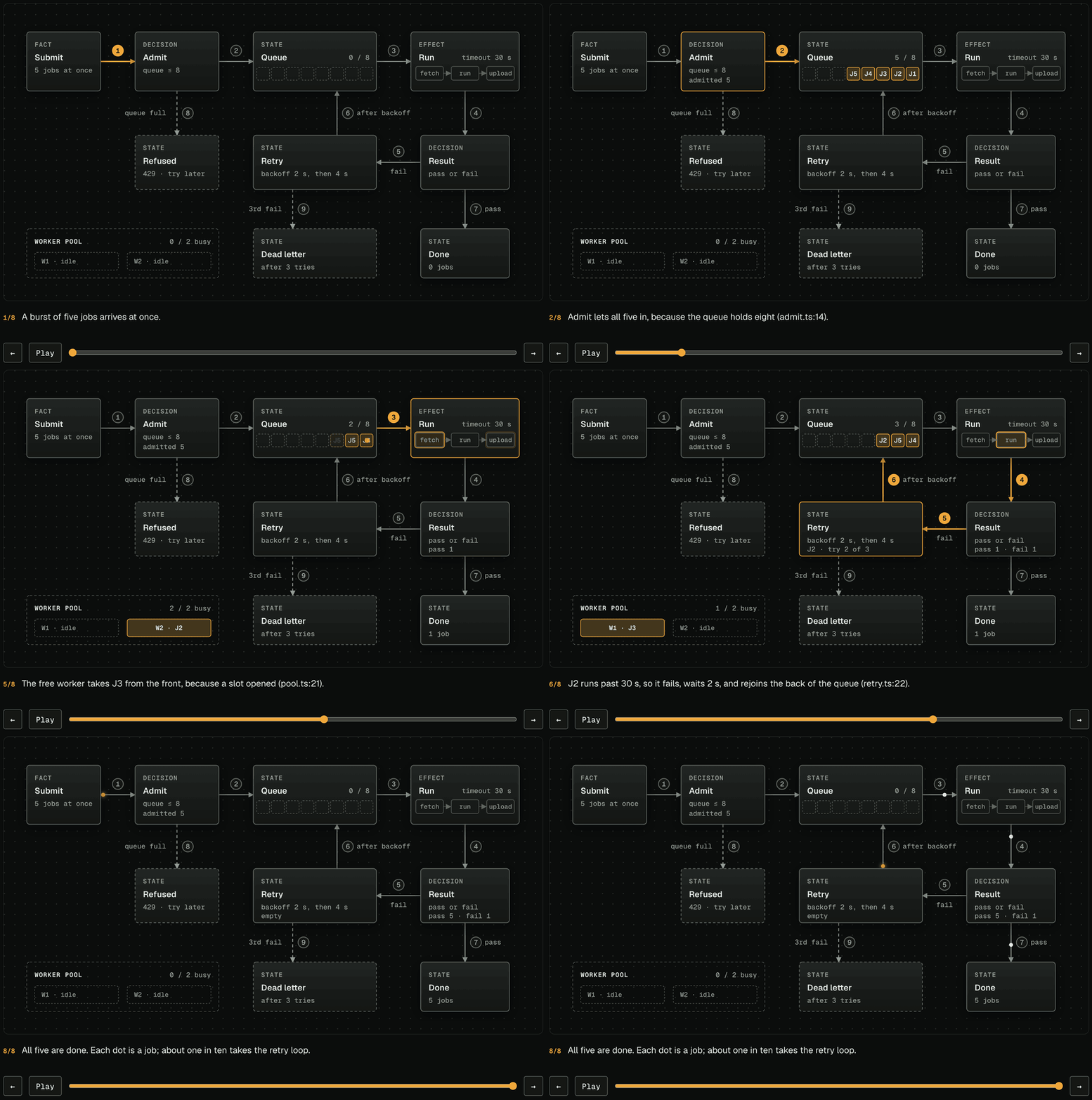
 Step through a state machine one event at a time: the route each event took lights up, jobs pile into queues and drain, and each step says why it happened ([example](examples/replay-job-queue.html)).
## Install
| Harness | Support | Install path / behavior |
|---|---|---|
| Claude Code | Marketplace plugin | Preserved marketplace shape with source at `plugins/visual-explainer/` |
| Pi | Package metadata plus installer | `package.json` advertises the skill, prompts, and native `visual_explainer` tool with `prepare` and `render` actions; `install-pi.sh` installs copied skill/prompt resources for legacy manual installs |
| MCP hosts | Local stdio MCP server | `visual-explainer-mcp` exposes prepare and render tools, prompt templates, and read-only skill resources without starting an HTTP server |
| PPTX export | Best-effort static utility | `visual-explainer-pptx` converts simple HTML slide decks to `.pptx`; HTML remains the source of truth |
| Video export | Local renderer (needs ffmpeg, Chrome, and `playwright-core`, installed separately) | `/generate-video` writes a video deck and `visual-explainer-video` records it to a 1080p MP4, frame by frame, narrated when a speech API key is set and captioned otherwise |
| Antigravity CLI | Native Agent Skills path | Copy `plugins/visual-explainer/` to `~/.gemini/antigravity-cli/skills/visual-explainer` for global use or `.agents/skills/visual-explainer` for one workspace |
| Codex CLI | Native skill path plus optional prompts | Copy to `~/.codex/skills/visual-explainer`; optional prompts go in `~/.codex/prompts/` if your Codex build supports them |
| OpenCode/opencode | Observed skill/command paths | Copy to `~/.config/opencode/skill/visual-explainer`; optional commands go in `~/.config/opencode/command/` |
| Cursor | Native Agent Skills path | Copy `plugins/visual-explainer/` to `~/.cursor/skills/visual-explainer` globally or `.cursor/skills/visual-explainer` per workspace; optional legacy rule in `configs/cursor/` |
| Agent Plugins clients | [Agent Plugins](https://agent-plugins.org/) 1.0.0 plugin | The repository root is the plugin: `plugin.json` plus `skills/visual-explainer`, a link to `plugins/visual-explainer/`. On Windows, clone with `git -c core.symlinks=true` so the link resolves |
| OpenClaw | Lightweight AGENTS/rules guidance | Use the supplied AGENTS guidance with the canonical skill directory |
| VS Code Copilot / Copilot CLI | Custom instructions or rules guidance | Add the supplied AGENTS guidance to your supported workspace instruction or rules setup |
**Claude Code (marketplace):**
```shell
/plugin marketplace add nicobailon/visual-explainer
/plugin install visual-explainer@visual-explainer-marketplace
```
Note: Claude Code plugins namespace commands as `/visual-explainer:command-name`.
**Pi:**
```bash
pi install git:github.com/nicobailon/visual-explainer
```
Or from a local checkout:
```bash
git clone --depth 1 https://github.com/nicobailon/visual-explainer.git
pi install ./visual-explainer
```
The package manifest advertises the canonical skill, command templates, and Pi tool:
```json
"pi": {
"extensions": ["./plugins/visual-explainer/extension.ts"],
"skills": ["./plugins/visual-explainer"],
"prompts": ["./plugins/visual-explainer/commands"],
"image": "./banner.png"
}
```
The Pi extension registers one native `visual_explainer` tool. Use `action: "prepare"` to plan a visual explanation after generating or reviewing a substantial plan, architecture, diff, or implementation, and `action: "render"` to render a page source (`path`) or complete HTML to `~/.agent/diagrams/`, or to `VISUAL_EXPLAINER_OUTPUT_DIR` when set, with the same output jail as the MCP server. Render can open with `viewer: "browser"` by default, `viewer: "glimpse"` when `glimpseui` is installed, or `viewer: "auto"` to try Glimpse and fall back to the browser. `/generate-web-diagram` remains the bundled prompt template command.
If you previously used the old curl/manual installer, remove those copied files before using `pi install`; otherwise Pi will report skill and prompt conflicts because the user-level copies shadow the package resources:
```bash
rm -rf ~/.pi/agent/skills/visual-explainer
rm -f ~/.pi/agent/prompts/{compare,diff-review,fact-check,generate-slides,generate-video,generate-visual-plan,generate-web-diagram,plan-review,project-recap}.md
rm -f ~/.pi/agent/prompts/s[h]are*.md
```
The legacy installer still works if you prefer copied skill and prompt files over package management, but it does not install the native Pi tool:
```bash
curl -fsSL https://raw.githubusercontent.com/nicobailon/visual-explainer/main/install-pi.sh | bash
```
**MCP:**
Use `visual-explainer-mcp` from a package install, or run `npm install --no-package-lock` before pointing your host at `plugins/visual-explainer/mcp/server.mjs` from a checkout. Some hosts need an absolute path to the binary. The MCP server is local stdio only. It does not call an LLM, start an HTTP listener, handle credentials, or write outside its configured output directory (default `~/.agent/diagrams/`). Set `VISUAL_EXPLAINER_OUTPUT_DIR` to move that jail to another directory on the same machine; unset keeps the default path byte-identical. A configured jail must resolve to itself, so symlinked jail paths, including macOS `/tmp`, are rejected before anything is created. The default directory follows a symlinked `~/.agent`. Render targets reject existing symlinks and are written through a temporary file rename. Point the jail at a directory only your user can write; avoid world-writable or group-writable shared folders so another local user cannot replace render targets between validation and write.
Example package configuration:
```json
{
"mcpServers": {
"visual-explainer": {
"command": "visual-explainer-mcp"
}
}
}
```
Example checkout configuration:
```json
{
"mcpServers": {
"visual-explainer": {
"command": "node",
"args": ["/absolute/path/to/visual-explainer/plugins/visual-explainer/mcp/server.mjs"]
}
}
}
```
The server exposes two tools: `visual_explainer_prepare` and `visual_explainer_render_html`. Render defaults to `open: false`; set `open: true` only when you want the server to request a browser or Glimpse window. It also exposes the bundled command templates as MCP prompts and the canonical `SKILL.md`, its `references/*.md`, the kit stylesheet, and command markdown as read-only resources.
**Antigravity CLI:**
Antigravity CLI is the supported Google successor path for consumer Gemini CLI workflows. It loads Agent Skills from `.agents/skills/` at the workspace level or `~/.gemini/antigravity-cli/skills/` globally.
Global install:
```bash
git clone --depth 1 https://github.com/nicobailon/visual-explainer.git /tmp/visual-explainer
mkdir -p ~/.gemini/antigravity-cli/skills
cp -R /tmp/visual-explainer/plugins/visual-explainer ~/.gemini/antigravity-cli/skills/visual-explainer
rm -rf /tmp/visual-explainer
```
PowerShell (global):
```powershell
$ErrorActionPreference = 'Stop'
$tmp = Join-Path $env:TEMP ("visual-explainer-" + [guid]::NewGuid().ToString())
$dest = Join-Path $env:USERPROFILE ".gemini\antigravity-cli\skills\visual-explainer"
$parent = Split-Path -Parent $dest
$run = $null
$staging = $null
$backup = $null
$moved = $false
$attempted = $false
$installed = $false
New-Item -ItemType Directory -Force -Path $tmp | Out-Null
try {
$repo = Join-Path $tmp 'repo'
git clone --depth 1 https://github.com/nicobailon/visual-explainer.git $repo
if ($LASTEXITCODE -ne 0) { throw "git clone failed with exit code $LASTEXITCODE" }
New-Item -ItemType Directory -Force -Path $parent | Out-Null
$run = Join-Path $parent (".visual-explainer-install-" + [guid]::NewGuid().ToString())
$staging = Join-Path $run 'staging'
$backup = Join-Path $run 'backup'
New-Item -ItemType Directory -Force -Path $run | Out-Null
Copy-Item -LiteralPath (Join-Path $repo 'plugins\visual-explainer') -Destination $staging -Recurse -Force
if (-not (Test-Path -LiteralPath (Join-Path $staging 'SKILL.md') -PathType Leaf)) { throw 'staged skill is incomplete' }
if (Test-Path -LiteralPath $dest) { Move-Item -LiteralPath $dest -Destination $backup; $moved = $true }
$attempted = $true
Move-Item -LiteralPath $staging -Destination $dest
$installed = $true
} finally {
if (-not $installed -and $attempted) {
if (Test-Path -LiteralPath $dest) { Move-Item -LiteralPath $dest -Destination (Join-Path $run 'failed') -ErrorAction SilentlyContinue }
if ($moved -and (Test-Path -LiteralPath $backup) -and -not (Test-Path -LiteralPath $dest)) { Move-Item -LiteralPath $backup -Destination $dest -ErrorAction SilentlyContinue }
}
if ($run -and ((-not (Test-Path -LiteralPath $backup)) -or $installed)) { Remove-Item -LiteralPath $run -Recurse -Force -ErrorAction SilentlyContinue }
Remove-Item -LiteralPath $tmp -Recurse -Force -ErrorAction SilentlyContinue
}
```
Workspace install:
```bash
git clone --depth 1 https://github.com/nicobailon/visual-explainer.git /tmp/visual-explainer
mkdir -p .agents/skills
cp -R /tmp/visual-explainer/plugins/visual-explainer .agents/skills/visual-explainer
rm -rf /tmp/visual-explainer
```
PowerShell (workspace):
```powershell
$ErrorActionPreference = 'Stop'
$tmp = Join-Path $env:TEMP ("visual-explainer-" + [guid]::NewGuid().ToString())
$dest = ".agents\skills\visual-explainer"
$parent = Split-Path -Parent $dest
$run = $null
$staging = $null
$backup = $null
$moved = $false
$attempted = $false
$installed = $false
New-Item -ItemType Directory -Force -Path $tmp | Out-Null
try {
$repo = Join-Path $tmp 'repo'
git clone --depth 1 https://github.com/nicobailon/visual-explainer.git $repo
if ($LASTEXITCODE -ne 0) { throw "git clone failed with exit code $LASTEXITCODE" }
New-Item -ItemType Directory -Force -Path $parent | Out-Null
$run = Join-Path $parent (".visual-explainer-install-" + [guid]::NewGuid().ToString())
$staging = Join-Path $run 'staging'
$backup = Join-Path $run 'backup'
New-Item -ItemType Directory -Force -Path $run | Out-Null
Copy-Item -LiteralPath (Join-Path $repo 'plugins\visual-explainer') -Destination $staging -Recurse -Force
if (-not (Test-Path -LiteralPath (Join-Path $staging 'SKILL.md') -PathType Leaf)) { throw 'staged skill is incomplete' }
if (Test-Path -LiteralPath $dest) { Move-Item -LiteralPath $dest -Destination $backup; $moved = $true }
$attempted = $true
Move-Item -LiteralPath $staging -Destination $dest
$installed = $true
} finally {
if (-not $installed -and $attempted) {
if (Test-Path -LiteralPath $dest) { Move-Item -LiteralPath $dest -Destination (Join-Path $run 'failed') -ErrorAction SilentlyContinue }
if ($moved -and (Test-Path -LiteralPath $backup) -and -not (Test-Path -LiteralPath $dest)) { Move-Item -LiteralPath $backup -Destination $dest -ErrorAction SilentlyContinue }
}
if ($run -and ((-not (Test-Path -LiteralPath $backup)) -or $installed)) { Remove-Item -LiteralPath $run -Recurse -Force -ErrorAction SilentlyContinue }
Remove-Item -LiteralPath $tmp -Recurse -Force -ErrorAction SilentlyContinue
}
```
Launch `agy` in the project and use `/skills` to confirm `visual-explainer` is discovered. Ask Antigravity to use the `visual-explainer` skill for diagrams, visual reviews, slide decks, and complex tables. Antigravity SDK projects can reuse the same `SKILL.md` content as an Agent Skill resource, but this repo does not ship a separate SDK wrapper. The bundled prompt templates remain reference markdown under `plugins/visual-explainer/commands/`; no separate Antigravity plugin adapter is included.
**Codex CLI:**
```bash
git clone --depth 1 https://github.com/nicobailon/visual-explainer.git /tmp/visual-explainer
mkdir -p ~/.codex/skills ~/.codex/prompts
cp -R /tmp/visual-explainer/plugins/visual-explainer ~/.codex/skills/visual-explainer
# Optional, only if your Codex build supports prompt templates:
cp /tmp/visual-explainer/plugins/visual-explainer/commands/*.md ~/.codex/prompts/
rm -rf /tmp/visual-explainer
```
PowerShell:
```powershell
$ErrorActionPreference = 'Stop'
$tmp = Join-Path $env:TEMP ("visual-explainer-" + [guid]::NewGuid().ToString())
$dest = Join-Path $env:USERPROFILE ".codex\skills\visual-explainer"
$parent = Split-Path -Parent $dest
$promptDir = Join-Path $env:USERPROFILE ".codex\prompts"
$run = $null
$staging = $null
$backup = $null
$moved = $false
$attempted = $false
$installed = $false
New-Item -ItemType Directory -Force -Path $tmp | Out-Null
try {
$repo = Join-Path $tmp 'repo'
git clone --depth 1 https://github.com/nicobailon/visual-explainer.git $repo
if ($LASTEXITCODE -ne 0) { throw "git clone failed with exit code $LASTEXITCODE" }
New-Item -ItemType Directory -Force -Path $parent, $promptDir | Out-Null
$run = Join-Path $parent (".visual-explainer-install-" + [guid]::NewGuid().ToString())
$staging = Join-Path $run 'staging'
$backup = Join-Path $run 'backup'
New-Item -ItemType Directory -Force -Path $run | Out-Null
Copy-Item -LiteralPath (Join-Path $repo 'plugins\visual-explainer') -Destination $staging -Recurse -Force
if (-not (Test-Path -LiteralPath (Join-Path $staging 'SKILL.md') -PathType Leaf)) { throw 'staged skill is incomplete' }
# Optional, only if your Codex build supports prompt templates:
Copy-Item -Path (Join-Path $staging 'commands\*.md') -Destination $promptDir -Force
if (Test-Path -LiteralPath $dest) { Move-Item -LiteralPath $dest -Destination $backup; $moved = $true }
$attempted = $true
Move-Item -LiteralPath $staging -Destination $dest
$installed = $true
} finally {
if (-not $installed -and $attempted) {
if (Test-Path -LiteralPath $dest) { Move-Item -LiteralPath $dest -Destination (Join-Path $run 'failed') -ErrorAction SilentlyContinue }
if ($moved -and (Test-Path -LiteralPath $backup) -and -not (Test-Path -LiteralPath $dest)) { Move-Item -LiteralPath $backup -Destination $dest -ErrorAction SilentlyContinue }
}
if ($run -and ((-not (Test-Path -LiteralPath $backup)) -or $installed)) { Remove-Item -LiteralPath $run -Recurse -Force -ErrorAction SilentlyContinue }
Remove-Item -LiteralPath $tmp -Recurse -Force -ErrorAction SilentlyContinue
}
```
Invoke with `$visual-explainer` or ask Codex to use the `visual-explainer` skill. If prompts are installed and supported, use `/prompts:diff-review`, `/prompts:plan-review`, etc.
**OpenCode/opencode:**
```bash
git clone --depth 1 https://github.com/nicobailon/visual-explainer.git /tmp/visual-explainer
mkdir -p ~/.config/opencode/skill ~/.config/opencode/command
cp -R /tmp/visual-explainer/plugins/visual-explainer ~/.config/opencode/skill/visual-explainer
# Optional command templates:
cp /tmp/visual-explainer/plugins/visual-explainer/commands/*.md ~/.config/opencode/command/
rm -rf /tmp/visual-explainer
```
PowerShell:
```powershell
$ErrorActionPreference = 'Stop'
$tmp = Join-Path $env:TEMP ("visual-explainer-" + [guid]::NewGuid().ToString())
$dest = Join-Path $env:USERPROFILE ".config\opencode\skill\visual-explainer"
$parent = Split-Path -Parent $dest
$promptDir = Join-Path $env:USERPROFILE ".config\opencode\command"
$run = $null
$staging = $null
$backup = $null
$moved = $false
$attempted = $false
$installed = $false
New-Item -ItemType Directory -Force -Path $tmp | Out-Null
try {
$repo = Join-Path $tmp 'repo'
git clone --depth 1 https://github.com/nicobailon/visual-explainer.git $repo
if ($LASTEXITCODE -ne 0) { throw "git clone failed with exit code $LASTEXITCODE" }
New-Item -ItemType Directory -Force -Path $parent, $promptDir | Out-Null
$run = Join-Path $parent (".visual-explainer-install-" + [guid]::NewGuid().ToString())
$staging = Join-Path $run 'staging'
$backup = Join-Path $run 'backup'
New-Item -ItemType Directory -Force -Path $run | Out-Null
Copy-Item -LiteralPath (Join-Path $repo 'plugins\visual-explainer') -Destination $staging -Recurse -Force
if (-not (Test-Path -LiteralPath (Join-Path $staging 'SKILL.md') -PathType Leaf)) { throw 'staged skill is incomplete' }
# Optional command templates:
Copy-Item -Path (Join-Path $staging 'commands\*.md') -Destination $promptDir -Force
if (Test-Path -LiteralPath $dest) { Move-Item -LiteralPath $dest -Destination $backup; $moved = $true }
$attempted = $true
Move-Item -LiteralPath $staging -Destination $dest
$installed = $true
} finally {
if (-not $installed -and $attempted) {
if (Test-Path -LiteralPath $dest) { Move-Item -LiteralPath $dest -Destination (Join-Path $run 'failed') -ErrorAction SilentlyContinue }
if ($moved -and (Test-Path -LiteralPath $backup) -and -not (Test-Path -LiteralPath $dest)) { Move-Item -LiteralPath $backup -Destination $dest -ErrorAction SilentlyContinue }
}
if ($run -and ((-not (Test-Path -LiteralPath $backup)) -or $installed)) { Remove-Item -LiteralPath $run -Recurse -Force -ErrorAction SilentlyContinue }
Remove-Item -LiteralPath $tmp -Recurse -Force -ErrorAction SilentlyContinue
}
```
Activate it by asking OpenCode to use the `visual-explainer` skill. Command-template behavior depends on the installed OpenCode/opencode build.
**Cursor:**
Cursor loads Agent Skills from `~/.cursor/skills/` globally and `.cursor/skills/` at the workspace level. Copy the canonical skill directory there and Cursor discovers it from the `name:` field in `SKILL.md`.
Global install:
```bash
set -euo pipefail
tmp="$(mktemp -d "${TMPDIR:-/tmp}/visual-explainer.XXXXXX")"
dest="$HOME/.cursor/skills/visual-explainer"
parent="$(dirname "$dest")"
run=''
stage=''
backup=''
moved=0
installed=0
cleanup() {
status=$?
if [ "$status" -ne 0 ] && [ "$moved" -eq 1 ] && [ "$installed" -eq 0 ]; then
if [ -e "$dest" ]; then mv -- "$dest" "$run/failed" || true; fi
if [ -e "$backup" ]; then mv -- "$backup" "$dest" || true; fi
fi
if [ -n "$run" ] && { [ "$installed" -eq 1 ] || [ ! -e "$backup" ]; }; then
rm -rf -- "$run" || true
fi
rm -rf -- "$tmp" || true
}
trap cleanup EXIT
if git clone --depth 1 https://github.com/nicobailon/visual-explainer.git "$tmp/repo"; then :; else
status=$?
echo "git clone failed with exit code $status" >&2
exit "$status"
fi
mkdir -p "$parent"
run="$(mktemp -d "$parent/.visual-explainer-install.XXXXXX")"
stage="$run/staging"
backup="$run/backup"
cp -R "$tmp/repo/plugins/visual-explainer" "$stage"
test -f "$stage/SKILL.md"
if [ -e "$dest" ]; then mv -- "$dest" "$backup"; moved=1; fi
mv -- "$stage" "$dest"
installed=1
```
Workspace install:
```bash
set -euo pipefail
tmp="$(mktemp -d "${TMPDIR:-/tmp}/visual-explainer.XXXXXX")"
dest=".cursor/skills/visual-explainer"
parent="$(dirname "$dest")"
run=''
stage=''
backup=''
moved=0
installed=0
cleanup() {
status=$?
if [ "$status" -ne 0 ] && [ "$moved" -eq 1 ] && [ "$installed" -eq 0 ]; then
if [ -e "$dest" ]; then mv -- "$dest" "$run/failed" || true; fi
if [ -e "$backup" ]; then mv -- "$backup" "$dest" || true; fi
fi
if [ -n "$run" ] && { [ "$installed" -eq 1 ] || [ ! -e "$backup" ]; }; then
rm -rf -- "$run" || true
fi
rm -rf -- "$tmp" || true
}
trap cleanup EXIT
if git clone --depth 1 https://github.com/nicobailon/visual-explainer.git "$tmp/repo"; then :; else
status=$?
echo "git clone failed with exit code $status" >&2
exit "$status"
fi
mkdir -p "$parent"
run="$(mktemp -d "$parent/.visual-explainer-install.XXXXXX")"
stage="$run/staging"
backup="$run/backup"
cp -R "$tmp/repo/plugins/visual-explainer" "$stage"
test -f "$stage/SKILL.md"
if [ -e "$dest" ]; then mv -- "$dest" "$backup"; moved=1; fi
mv -- "$stage" "$dest"
installed=1
```
Ask Cursor to use the `visual-explainer` skill for diagrams, visual reviews, slide decks, and complex tables.
Optional legacy rule: add `configs/cursor/visual-explainer.mdc` to your Cursor rules if you prefer rules-based guidance over relying on skill discovery alone.
**OpenClaw:**
Use `configs/openclaw/AGENTS.md` as lightweight project guidance and copy or reference `plugins/visual-explainer/` as the canonical skill source. No native OpenClaw plugin adapter is included.
**VS Code Copilot / Copilot CLI:**
Use `configs/copilot/AGENTS.md` as custom instructions or rules guidance. For VS Code, copy it into a supported workspace custom-instructions file, such as `.github/copilot-instructions.md`. For Copilot CLI, add it through the workspace instruction or rules setup supported by your installed version. Both read the canonical skill from `plugins/visual-explainer/`; this repository does not provide native Agent Skills support, a Copilot package, or a tested Copilot plugin adapter.
## Commands
| Command | What it does |
|---------|-------------|
| `/generate-web-diagram` | Generate a figure-first page for any topic: diagrams, data, or a concept explained |
| `/generate-visual-plan` | An implementation plan you answer in the page: the change drawn, a short tree of claims, decisions with suggested defaults, then one response to paste back. After the build, the same page shows what was built |
| `/generate-slides` | Generate a magazine-quality slide deck |
| `/generate-video` | Generate a narrated MP4 explainer, or record a walkthrough of a live web app |
| `/diff-review` | Visual diff review with architecture comparison and code review |
| `/plan-review` | Check a plan against the codebase: each finding shows its evidence and a fix you accept or reject in the page |
| `/project-recap` | Mental model snapshot for context-switching back to a project |
| `/compare` | Draw two or more options side by side, recommend one, and let you pick in the page; the pick comes back to the agent |
| `/fact-check` | Verify accuracy of a document against actual code |
The agent also kicks in automatically when it's about to dump a complex table in the terminal (4+ rows or 3+ columns) — it renders HTML instead.
## Slide Deck Mode
Any command that produces a scrollable page supports `--slides` to generate a slide deck instead:
```
/diff-review --slides
/project-recap --slides 2w
```
For a portable presentation file, add `--pptx` to `/generate-slides` or run the exporter after generating an HTML deck:
```bash
visual-explainer-pptx ~/.agent/diagrams/my-deck.html ~/.agent/diagrams/my-deck.pptx
```
PPTX export is best-effort and static. It extracts titles, text, bullets, simple tables, code blocks, and Mermaid source placeholders from `
Step through a state machine one event at a time: the route each event took lights up, jobs pile into queues and drain, and each step says why it happened ([example](examples/replay-job-queue.html)).
## Install
| Harness | Support | Install path / behavior |
|---|---|---|
| Claude Code | Marketplace plugin | Preserved marketplace shape with source at `plugins/visual-explainer/` |
| Pi | Package metadata plus installer | `package.json` advertises the skill, prompts, and native `visual_explainer` tool with `prepare` and `render` actions; `install-pi.sh` installs copied skill/prompt resources for legacy manual installs |
| MCP hosts | Local stdio MCP server | `visual-explainer-mcp` exposes prepare and render tools, prompt templates, and read-only skill resources without starting an HTTP server |
| PPTX export | Best-effort static utility | `visual-explainer-pptx` converts simple HTML slide decks to `.pptx`; HTML remains the source of truth |
| Video export | Local renderer (needs ffmpeg, Chrome, and `playwright-core`, installed separately) | `/generate-video` writes a video deck and `visual-explainer-video` records it to a 1080p MP4, frame by frame, narrated when a speech API key is set and captioned otherwise |
| Antigravity CLI | Native Agent Skills path | Copy `plugins/visual-explainer/` to `~/.gemini/antigravity-cli/skills/visual-explainer` for global use or `.agents/skills/visual-explainer` for one workspace |
| Codex CLI | Native skill path plus optional prompts | Copy to `~/.codex/skills/visual-explainer`; optional prompts go in `~/.codex/prompts/` if your Codex build supports them |
| OpenCode/opencode | Observed skill/command paths | Copy to `~/.config/opencode/skill/visual-explainer`; optional commands go in `~/.config/opencode/command/` |
| Cursor | Native Agent Skills path | Copy `plugins/visual-explainer/` to `~/.cursor/skills/visual-explainer` globally or `.cursor/skills/visual-explainer` per workspace; optional legacy rule in `configs/cursor/` |
| Agent Plugins clients | [Agent Plugins](https://agent-plugins.org/) 1.0.0 plugin | The repository root is the plugin: `plugin.json` plus `skills/visual-explainer`, a link to `plugins/visual-explainer/`. On Windows, clone with `git -c core.symlinks=true` so the link resolves |
| OpenClaw | Lightweight AGENTS/rules guidance | Use the supplied AGENTS guidance with the canonical skill directory |
| VS Code Copilot / Copilot CLI | Custom instructions or rules guidance | Add the supplied AGENTS guidance to your supported workspace instruction or rules setup |
**Claude Code (marketplace):**
```shell
/plugin marketplace add nicobailon/visual-explainer
/plugin install visual-explainer@visual-explainer-marketplace
```
Note: Claude Code plugins namespace commands as `/visual-explainer:command-name`.
**Pi:**
```bash
pi install git:github.com/nicobailon/visual-explainer
```
Or from a local checkout:
```bash
git clone --depth 1 https://github.com/nicobailon/visual-explainer.git
pi install ./visual-explainer
```
The package manifest advertises the canonical skill, command templates, and Pi tool:
```json
"pi": {
"extensions": ["./plugins/visual-explainer/extension.ts"],
"skills": ["./plugins/visual-explainer"],
"prompts": ["./plugins/visual-explainer/commands"],
"image": "./banner.png"
}
```
The Pi extension registers one native `visual_explainer` tool. Use `action: "prepare"` to plan a visual explanation after generating or reviewing a substantial plan, architecture, diff, or implementation, and `action: "render"` to render a page source (`path`) or complete HTML to `~/.agent/diagrams/`, or to `VISUAL_EXPLAINER_OUTPUT_DIR` when set, with the same output jail as the MCP server. Render can open with `viewer: "browser"` by default, `viewer: "glimpse"` when `glimpseui` is installed, or `viewer: "auto"` to try Glimpse and fall back to the browser. `/generate-web-diagram` remains the bundled prompt template command.
If you previously used the old curl/manual installer, remove those copied files before using `pi install`; otherwise Pi will report skill and prompt conflicts because the user-level copies shadow the package resources:
```bash
rm -rf ~/.pi/agent/skills/visual-explainer
rm -f ~/.pi/agent/prompts/{compare,diff-review,fact-check,generate-slides,generate-video,generate-visual-plan,generate-web-diagram,plan-review,project-recap}.md
rm -f ~/.pi/agent/prompts/s[h]are*.md
```
The legacy installer still works if you prefer copied skill and prompt files over package management, but it does not install the native Pi tool:
```bash
curl -fsSL https://raw.githubusercontent.com/nicobailon/visual-explainer/main/install-pi.sh | bash
```
**MCP:**
Use `visual-explainer-mcp` from a package install, or run `npm install --no-package-lock` before pointing your host at `plugins/visual-explainer/mcp/server.mjs` from a checkout. Some hosts need an absolute path to the binary. The MCP server is local stdio only. It does not call an LLM, start an HTTP listener, handle credentials, or write outside its configured output directory (default `~/.agent/diagrams/`). Set `VISUAL_EXPLAINER_OUTPUT_DIR` to move that jail to another directory on the same machine; unset keeps the default path byte-identical. A configured jail must resolve to itself, so symlinked jail paths, including macOS `/tmp`, are rejected before anything is created. The default directory follows a symlinked `~/.agent`. Render targets reject existing symlinks and are written through a temporary file rename. Point the jail at a directory only your user can write; avoid world-writable or group-writable shared folders so another local user cannot replace render targets between validation and write.
Example package configuration:
```json
{
"mcpServers": {
"visual-explainer": {
"command": "visual-explainer-mcp"
}
}
}
```
Example checkout configuration:
```json
{
"mcpServers": {
"visual-explainer": {
"command": "node",
"args": ["/absolute/path/to/visual-explainer/plugins/visual-explainer/mcp/server.mjs"]
}
}
}
```
The server exposes two tools: `visual_explainer_prepare` and `visual_explainer_render_html`. Render defaults to `open: false`; set `open: true` only when you want the server to request a browser or Glimpse window. It also exposes the bundled command templates as MCP prompts and the canonical `SKILL.md`, its `references/*.md`, the kit stylesheet, and command markdown as read-only resources.
**Antigravity CLI:**
Antigravity CLI is the supported Google successor path for consumer Gemini CLI workflows. It loads Agent Skills from `.agents/skills/` at the workspace level or `~/.gemini/antigravity-cli/skills/` globally.
Global install:
```bash
git clone --depth 1 https://github.com/nicobailon/visual-explainer.git /tmp/visual-explainer
mkdir -p ~/.gemini/antigravity-cli/skills
cp -R /tmp/visual-explainer/plugins/visual-explainer ~/.gemini/antigravity-cli/skills/visual-explainer
rm -rf /tmp/visual-explainer
```
PowerShell (global):
```powershell
$ErrorActionPreference = 'Stop'
$tmp = Join-Path $env:TEMP ("visual-explainer-" + [guid]::NewGuid().ToString())
$dest = Join-Path $env:USERPROFILE ".gemini\antigravity-cli\skills\visual-explainer"
$parent = Split-Path -Parent $dest
$run = $null
$staging = $null
$backup = $null
$moved = $false
$attempted = $false
$installed = $false
New-Item -ItemType Directory -Force -Path $tmp | Out-Null
try {
$repo = Join-Path $tmp 'repo'
git clone --depth 1 https://github.com/nicobailon/visual-explainer.git $repo
if ($LASTEXITCODE -ne 0) { throw "git clone failed with exit code $LASTEXITCODE" }
New-Item -ItemType Directory -Force -Path $parent | Out-Null
$run = Join-Path $parent (".visual-explainer-install-" + [guid]::NewGuid().ToString())
$staging = Join-Path $run 'staging'
$backup = Join-Path $run 'backup'
New-Item -ItemType Directory -Force -Path $run | Out-Null
Copy-Item -LiteralPath (Join-Path $repo 'plugins\visual-explainer') -Destination $staging -Recurse -Force
if (-not (Test-Path -LiteralPath (Join-Path $staging 'SKILL.md') -PathType Leaf)) { throw 'staged skill is incomplete' }
if (Test-Path -LiteralPath $dest) { Move-Item -LiteralPath $dest -Destination $backup; $moved = $true }
$attempted = $true
Move-Item -LiteralPath $staging -Destination $dest
$installed = $true
} finally {
if (-not $installed -and $attempted) {
if (Test-Path -LiteralPath $dest) { Move-Item -LiteralPath $dest -Destination (Join-Path $run 'failed') -ErrorAction SilentlyContinue }
if ($moved -and (Test-Path -LiteralPath $backup) -and -not (Test-Path -LiteralPath $dest)) { Move-Item -LiteralPath $backup -Destination $dest -ErrorAction SilentlyContinue }
}
if ($run -and ((-not (Test-Path -LiteralPath $backup)) -or $installed)) { Remove-Item -LiteralPath $run -Recurse -Force -ErrorAction SilentlyContinue }
Remove-Item -LiteralPath $tmp -Recurse -Force -ErrorAction SilentlyContinue
}
```
Workspace install:
```bash
git clone --depth 1 https://github.com/nicobailon/visual-explainer.git /tmp/visual-explainer
mkdir -p .agents/skills
cp -R /tmp/visual-explainer/plugins/visual-explainer .agents/skills/visual-explainer
rm -rf /tmp/visual-explainer
```
PowerShell (workspace):
```powershell
$ErrorActionPreference = 'Stop'
$tmp = Join-Path $env:TEMP ("visual-explainer-" + [guid]::NewGuid().ToString())
$dest = ".agents\skills\visual-explainer"
$parent = Split-Path -Parent $dest
$run = $null
$staging = $null
$backup = $null
$moved = $false
$attempted = $false
$installed = $false
New-Item -ItemType Directory -Force -Path $tmp | Out-Null
try {
$repo = Join-Path $tmp 'repo'
git clone --depth 1 https://github.com/nicobailon/visual-explainer.git $repo
if ($LASTEXITCODE -ne 0) { throw "git clone failed with exit code $LASTEXITCODE" }
New-Item -ItemType Directory -Force -Path $parent | Out-Null
$run = Join-Path $parent (".visual-explainer-install-" + [guid]::NewGuid().ToString())
$staging = Join-Path $run 'staging'
$backup = Join-Path $run 'backup'
New-Item -ItemType Directory -Force -Path $run | Out-Null
Copy-Item -LiteralPath (Join-Path $repo 'plugins\visual-explainer') -Destination $staging -Recurse -Force
if (-not (Test-Path -LiteralPath (Join-Path $staging 'SKILL.md') -PathType Leaf)) { throw 'staged skill is incomplete' }
if (Test-Path -LiteralPath $dest) { Move-Item -LiteralPath $dest -Destination $backup; $moved = $true }
$attempted = $true
Move-Item -LiteralPath $staging -Destination $dest
$installed = $true
} finally {
if (-not $installed -and $attempted) {
if (Test-Path -LiteralPath $dest) { Move-Item -LiteralPath $dest -Destination (Join-Path $run 'failed') -ErrorAction SilentlyContinue }
if ($moved -and (Test-Path -LiteralPath $backup) -and -not (Test-Path -LiteralPath $dest)) { Move-Item -LiteralPath $backup -Destination $dest -ErrorAction SilentlyContinue }
}
if ($run -and ((-not (Test-Path -LiteralPath $backup)) -or $installed)) { Remove-Item -LiteralPath $run -Recurse -Force -ErrorAction SilentlyContinue }
Remove-Item -LiteralPath $tmp -Recurse -Force -ErrorAction SilentlyContinue
}
```
Launch `agy` in the project and use `/skills` to confirm `visual-explainer` is discovered. Ask Antigravity to use the `visual-explainer` skill for diagrams, visual reviews, slide decks, and complex tables. Antigravity SDK projects can reuse the same `SKILL.md` content as an Agent Skill resource, but this repo does not ship a separate SDK wrapper. The bundled prompt templates remain reference markdown under `plugins/visual-explainer/commands/`; no separate Antigravity plugin adapter is included.
**Codex CLI:**
```bash
git clone --depth 1 https://github.com/nicobailon/visual-explainer.git /tmp/visual-explainer
mkdir -p ~/.codex/skills ~/.codex/prompts
cp -R /tmp/visual-explainer/plugins/visual-explainer ~/.codex/skills/visual-explainer
# Optional, only if your Codex build supports prompt templates:
cp /tmp/visual-explainer/plugins/visual-explainer/commands/*.md ~/.codex/prompts/
rm -rf /tmp/visual-explainer
```
PowerShell:
```powershell
$ErrorActionPreference = 'Stop'
$tmp = Join-Path $env:TEMP ("visual-explainer-" + [guid]::NewGuid().ToString())
$dest = Join-Path $env:USERPROFILE ".codex\skills\visual-explainer"
$parent = Split-Path -Parent $dest
$promptDir = Join-Path $env:USERPROFILE ".codex\prompts"
$run = $null
$staging = $null
$backup = $null
$moved = $false
$attempted = $false
$installed = $false
New-Item -ItemType Directory -Force -Path $tmp | Out-Null
try {
$repo = Join-Path $tmp 'repo'
git clone --depth 1 https://github.com/nicobailon/visual-explainer.git $repo
if ($LASTEXITCODE -ne 0) { throw "git clone failed with exit code $LASTEXITCODE" }
New-Item -ItemType Directory -Force -Path $parent, $promptDir | Out-Null
$run = Join-Path $parent (".visual-explainer-install-" + [guid]::NewGuid().ToString())
$staging = Join-Path $run 'staging'
$backup = Join-Path $run 'backup'
New-Item -ItemType Directory -Force -Path $run | Out-Null
Copy-Item -LiteralPath (Join-Path $repo 'plugins\visual-explainer') -Destination $staging -Recurse -Force
if (-not (Test-Path -LiteralPath (Join-Path $staging 'SKILL.md') -PathType Leaf)) { throw 'staged skill is incomplete' }
# Optional, only if your Codex build supports prompt templates:
Copy-Item -Path (Join-Path $staging 'commands\*.md') -Destination $promptDir -Force
if (Test-Path -LiteralPath $dest) { Move-Item -LiteralPath $dest -Destination $backup; $moved = $true }
$attempted = $true
Move-Item -LiteralPath $staging -Destination $dest
$installed = $true
} finally {
if (-not $installed -and $attempted) {
if (Test-Path -LiteralPath $dest) { Move-Item -LiteralPath $dest -Destination (Join-Path $run 'failed') -ErrorAction SilentlyContinue }
if ($moved -and (Test-Path -LiteralPath $backup) -and -not (Test-Path -LiteralPath $dest)) { Move-Item -LiteralPath $backup -Destination $dest -ErrorAction SilentlyContinue }
}
if ($run -and ((-not (Test-Path -LiteralPath $backup)) -or $installed)) { Remove-Item -LiteralPath $run -Recurse -Force -ErrorAction SilentlyContinue }
Remove-Item -LiteralPath $tmp -Recurse -Force -ErrorAction SilentlyContinue
}
```
Invoke with `$visual-explainer` or ask Codex to use the `visual-explainer` skill. If prompts are installed and supported, use `/prompts:diff-review`, `/prompts:plan-review`, etc.
**OpenCode/opencode:**
```bash
git clone --depth 1 https://github.com/nicobailon/visual-explainer.git /tmp/visual-explainer
mkdir -p ~/.config/opencode/skill ~/.config/opencode/command
cp -R /tmp/visual-explainer/plugins/visual-explainer ~/.config/opencode/skill/visual-explainer
# Optional command templates:
cp /tmp/visual-explainer/plugins/visual-explainer/commands/*.md ~/.config/opencode/command/
rm -rf /tmp/visual-explainer
```
PowerShell:
```powershell
$ErrorActionPreference = 'Stop'
$tmp = Join-Path $env:TEMP ("visual-explainer-" + [guid]::NewGuid().ToString())
$dest = Join-Path $env:USERPROFILE ".config\opencode\skill\visual-explainer"
$parent = Split-Path -Parent $dest
$promptDir = Join-Path $env:USERPROFILE ".config\opencode\command"
$run = $null
$staging = $null
$backup = $null
$moved = $false
$attempted = $false
$installed = $false
New-Item -ItemType Directory -Force -Path $tmp | Out-Null
try {
$repo = Join-Path $tmp 'repo'
git clone --depth 1 https://github.com/nicobailon/visual-explainer.git $repo
if ($LASTEXITCODE -ne 0) { throw "git clone failed with exit code $LASTEXITCODE" }
New-Item -ItemType Directory -Force -Path $parent, $promptDir | Out-Null
$run = Join-Path $parent (".visual-explainer-install-" + [guid]::NewGuid().ToString())
$staging = Join-Path $run 'staging'
$backup = Join-Path $run 'backup'
New-Item -ItemType Directory -Force -Path $run | Out-Null
Copy-Item -LiteralPath (Join-Path $repo 'plugins\visual-explainer') -Destination $staging -Recurse -Force
if (-not (Test-Path -LiteralPath (Join-Path $staging 'SKILL.md') -PathType Leaf)) { throw 'staged skill is incomplete' }
# Optional command templates:
Copy-Item -Path (Join-Path $staging 'commands\*.md') -Destination $promptDir -Force
if (Test-Path -LiteralPath $dest) { Move-Item -LiteralPath $dest -Destination $backup; $moved = $true }
$attempted = $true
Move-Item -LiteralPath $staging -Destination $dest
$installed = $true
} finally {
if (-not $installed -and $attempted) {
if (Test-Path -LiteralPath $dest) { Move-Item -LiteralPath $dest -Destination (Join-Path $run 'failed') -ErrorAction SilentlyContinue }
if ($moved -and (Test-Path -LiteralPath $backup) -and -not (Test-Path -LiteralPath $dest)) { Move-Item -LiteralPath $backup -Destination $dest -ErrorAction SilentlyContinue }
}
if ($run -and ((-not (Test-Path -LiteralPath $backup)) -or $installed)) { Remove-Item -LiteralPath $run -Recurse -Force -ErrorAction SilentlyContinue }
Remove-Item -LiteralPath $tmp -Recurse -Force -ErrorAction SilentlyContinue
}
```
Activate it by asking OpenCode to use the `visual-explainer` skill. Command-template behavior depends on the installed OpenCode/opencode build.
**Cursor:**
Cursor loads Agent Skills from `~/.cursor/skills/` globally and `.cursor/skills/` at the workspace level. Copy the canonical skill directory there and Cursor discovers it from the `name:` field in `SKILL.md`.
Global install:
```bash
set -euo pipefail
tmp="$(mktemp -d "${TMPDIR:-/tmp}/visual-explainer.XXXXXX")"
dest="$HOME/.cursor/skills/visual-explainer"
parent="$(dirname "$dest")"
run=''
stage=''
backup=''
moved=0
installed=0
cleanup() {
status=$?
if [ "$status" -ne 0 ] && [ "$moved" -eq 1 ] && [ "$installed" -eq 0 ]; then
if [ -e "$dest" ]; then mv -- "$dest" "$run/failed" || true; fi
if [ -e "$backup" ]; then mv -- "$backup" "$dest" || true; fi
fi
if [ -n "$run" ] && { [ "$installed" -eq 1 ] || [ ! -e "$backup" ]; }; then
rm -rf -- "$run" || true
fi
rm -rf -- "$tmp" || true
}
trap cleanup EXIT
if git clone --depth 1 https://github.com/nicobailon/visual-explainer.git "$tmp/repo"; then :; else
status=$?
echo "git clone failed with exit code $status" >&2
exit "$status"
fi
mkdir -p "$parent"
run="$(mktemp -d "$parent/.visual-explainer-install.XXXXXX")"
stage="$run/staging"
backup="$run/backup"
cp -R "$tmp/repo/plugins/visual-explainer" "$stage"
test -f "$stage/SKILL.md"
if [ -e "$dest" ]; then mv -- "$dest" "$backup"; moved=1; fi
mv -- "$stage" "$dest"
installed=1
```
Workspace install:
```bash
set -euo pipefail
tmp="$(mktemp -d "${TMPDIR:-/tmp}/visual-explainer.XXXXXX")"
dest=".cursor/skills/visual-explainer"
parent="$(dirname "$dest")"
run=''
stage=''
backup=''
moved=0
installed=0
cleanup() {
status=$?
if [ "$status" -ne 0 ] && [ "$moved" -eq 1 ] && [ "$installed" -eq 0 ]; then
if [ -e "$dest" ]; then mv -- "$dest" "$run/failed" || true; fi
if [ -e "$backup" ]; then mv -- "$backup" "$dest" || true; fi
fi
if [ -n "$run" ] && { [ "$installed" -eq 1 ] || [ ! -e "$backup" ]; }; then
rm -rf -- "$run" || true
fi
rm -rf -- "$tmp" || true
}
trap cleanup EXIT
if git clone --depth 1 https://github.com/nicobailon/visual-explainer.git "$tmp/repo"; then :; else
status=$?
echo "git clone failed with exit code $status" >&2
exit "$status"
fi
mkdir -p "$parent"
run="$(mktemp -d "$parent/.visual-explainer-install.XXXXXX")"
stage="$run/staging"
backup="$run/backup"
cp -R "$tmp/repo/plugins/visual-explainer" "$stage"
test -f "$stage/SKILL.md"
if [ -e "$dest" ]; then mv -- "$dest" "$backup"; moved=1; fi
mv -- "$stage" "$dest"
installed=1
```
Ask Cursor to use the `visual-explainer` skill for diagrams, visual reviews, slide decks, and complex tables.
Optional legacy rule: add `configs/cursor/visual-explainer.mdc` to your Cursor rules if you prefer rules-based guidance over relying on skill discovery alone.
**OpenClaw:**
Use `configs/openclaw/AGENTS.md` as lightweight project guidance and copy or reference `plugins/visual-explainer/` as the canonical skill source. No native OpenClaw plugin adapter is included.
**VS Code Copilot / Copilot CLI:**
Use `configs/copilot/AGENTS.md` as custom instructions or rules guidance. For VS Code, copy it into a supported workspace custom-instructions file, such as `.github/copilot-instructions.md`. For Copilot CLI, add it through the workspace instruction or rules setup supported by your installed version. Both read the canonical skill from `plugins/visual-explainer/`; this repository does not provide native Agent Skills support, a Copilot package, or a tested Copilot plugin adapter.
## Commands
| Command | What it does |
|---------|-------------|
| `/generate-web-diagram` | Generate a figure-first page for any topic: diagrams, data, or a concept explained |
| `/generate-visual-plan` | An implementation plan you answer in the page: the change drawn, a short tree of claims, decisions with suggested defaults, then one response to paste back. After the build, the same page shows what was built |
| `/generate-slides` | Generate a magazine-quality slide deck |
| `/generate-video` | Generate a narrated MP4 explainer, or record a walkthrough of a live web app |
| `/diff-review` | Visual diff review with architecture comparison and code review |
| `/plan-review` | Check a plan against the codebase: each finding shows its evidence and a fix you accept or reject in the page |
| `/project-recap` | Mental model snapshot for context-switching back to a project |
| `/compare` | Draw two or more options side by side, recommend one, and let you pick in the page; the pick comes back to the agent |
| `/fact-check` | Verify accuracy of a document against actual code |
The agent also kicks in automatically when it's about to dump a complex table in the terminal (4+ rows or 3+ columns) — it renders HTML instead.
## Slide Deck Mode
Any command that produces a scrollable page supports `--slides` to generate a slide deck instead:
```
/diff-review --slides
/project-recap --slides 2w
```
For a portable presentation file, add `--pptx` to `/generate-slides` or run the exporter after generating an HTML deck:
```bash
visual-explainer-pptx ~/.agent/diagrams/my-deck.html ~/.agent/diagrams/my-deck.pptx
```
PPTX export is best-effort and static. It extracts titles, text, bullets, simple tables, code blocks, and Mermaid source placeholders from `