# Mimick - Immich Desktop Client for Linux


[](https://github.com/nicx17/mimick/releases/latest)
[](https://github.com/rust-lang/rust)
[](https://github.com/torvalds/linux)
[](https://gitlab.gnome.org/GNOME/gtk)
[](LICENSE)
[](https://flathub.org/en/apps/dev.nicx.mimick)
[](https://flathub.org/en/apps/dev.nicx.mimick)

[](https://sonarcloud.io/summary/new_code?id=nicx17_mimick)
[](https://sonarcloud.io/summary/new_code?id=nicx17_mimick)
[](https://sonarcloud.io/summary/new_code?id=nicx17_mimick)
[](https://sonarcloud.io/summary/new_code?id=nicx17_mimick)

Mimick is an unofficial Immich desktop client for Linux. It provides a GTK4/libadwaita interface for automatic background sync of local photo and video folders to a self-hosted Immich server, and an optional library browser for viewing, searching, and managing assets directly from the desktop.
> This is a community-developed project and is not affiliated with or endorsed by the Immich project.
## Table of Contents
- [](#screenshots)
- [](#core-architecture--features)
- [](#installation-recommended)
- [](#usage--configuration)
- [](#building-from-source-for-developers)
- [](#documentation)
- [](#trust-and-verification)
- [](#license)
[](https://github.com/nicx17/mimick/wiki/Installation)
[](https://github.com/nicx17/mimick/wiki/Configuration-and-First-Run)
[](https://github.com/nicx17/mimick/wiki/Home)
[](https://github.com/nicx17/mimick/wiki/Troubleshooting)
[](https://github.com/nicx17/mimick/wiki)
**Status:** Supports Immich v3.0.0+.
## Screenshots
| Library View (Light) | Explore View |
| :----------------------------------------------------------------------------------------: | :--------------------------------------------------------------------------------------------------------: |
| 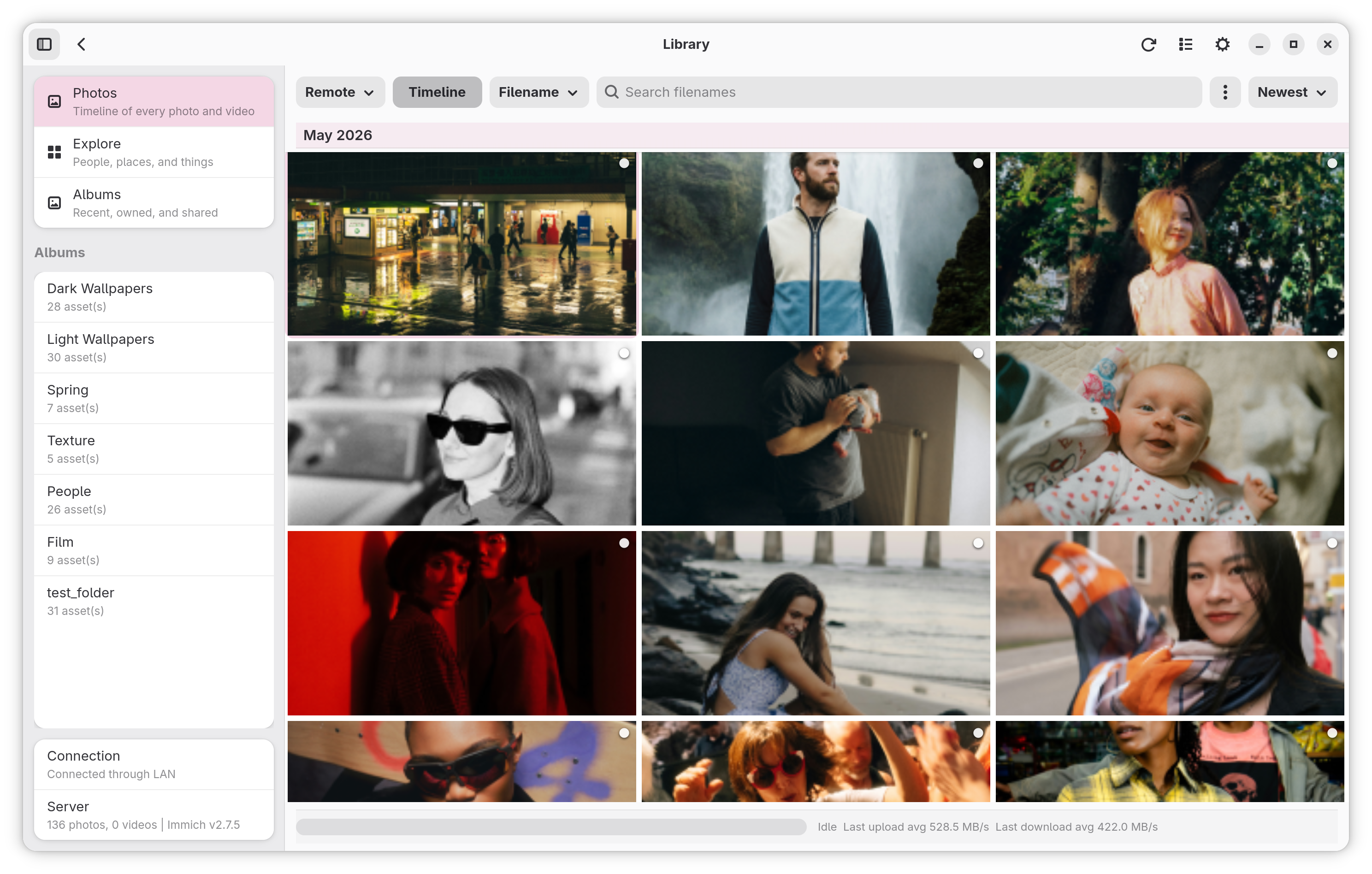 | 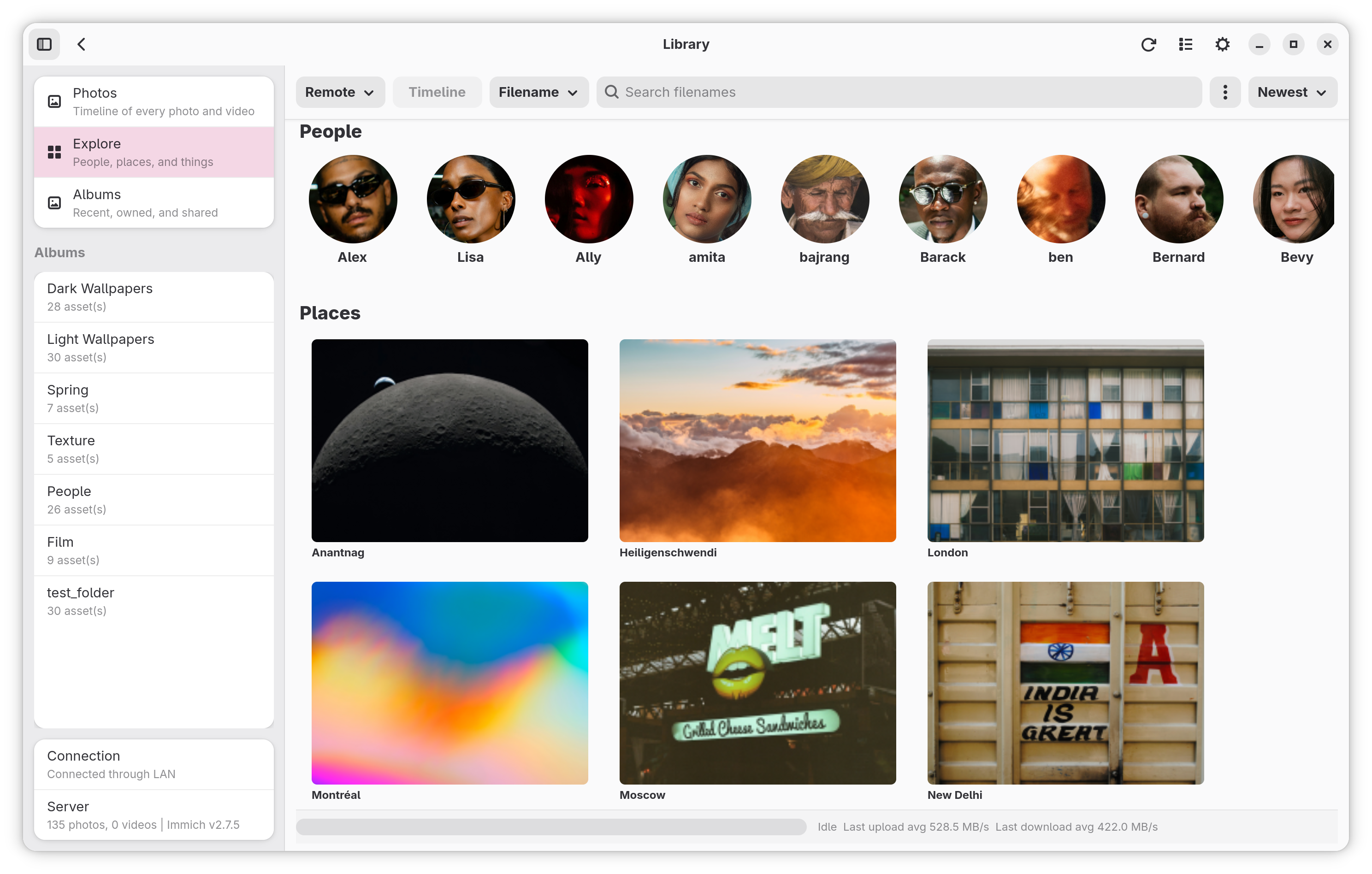 |
| **Sync Status Dashboard** | **Settings & Watch Folders** |
|  |  |
[](https://github.com/nicx17/mimick/wiki/Screenshots)
## Core Architecture & Features
### Sync Engine
- **Asynchronous Concurrent Uploads**: Configurable parallel worker tasks (1–10 streams) stream files from disk, maintaining flat memory usage footprints.
- **SHA-1 Deduplication**: Verifies files locally via checksum prior to upload, utilizing payload logic identical to official Immich mobile apps.
- **Atomic File Monitoring**: Delays queuing until file sizes stabilize and physical write locks are released, preventing partial data uploads.
- **Per-Folder Sync Methods**: Upload Only by default, which never changes local files, or Download Only and Full sync with a linked album, with optional deletion mirroring in either direction.
### Reliability & State Management
- **Persistent Offline Storage**: Upload network failures are safely serialized to disk (`~/.cache/mimick/retries.json`) and gracefully replayed during subsequent daemon lifecycles.
- **Local State Indexing**: Unmodified, previously uploaded media is aggressively skipped during startup catch-up scans using local indexes to minimize disk I/O overhead.
- **Queue Inspector**: Interactive UI module to interpret active error payloads, selectively retry specific dropped files, or flush the active failure queue.
- **Dynamic Endpoint Resolution**: Automatically negotiates requests between configured Internal (LAN) and External (WAN) URI addresses based on immediate network topologies and heartbeat reachability.
### Environment & Desktop Integration
- **Native Implementation**: Developed purely in Rust, utilizing GTK4 and Libadwaita bindings alongside an AppIndicator system tray for headless daemon control.
- **Hardware Awareness**: Follows the system's metered-network state (through the network portal in the Flatpak) and `/sys/class/power_supply` to identify running states and optionally defer daemon I/O operations strictly during explicitly metered networks or active battery deployments.
- **Sandbox Security**: Employs Flatpak desktop portal file-choosers to grant the application isolated, per-directory access without requesting system-wide filesystem permissons.
- **Encrypted Keystore**: API keys are stored securely via the [oo7](https://github.com/linux-credentials/oo7) keyring library. Inside Flatpak, credentials are kept in a portal-encrypted file within the sandbox. On native installs, the desktop's Secret Service (GNOME Keyring, KWallet) is used.
- **Quiet Hours**: Configurable chronological barriers to globally suspend daemon uploads.
- **Open With Mimick**: Right-click supported media files in your file manager and choose Mimick to open a staging window where you can preview, select, and upload files to your library or a specific album.
- **Drag-and-Drop Import/Export**: Drag files directly from your file manager into the library or onto specific albums to instantly upload them, or drag assets out to your desktop to auto-download and export them.
### Directory Scoping & Filtering
Each watched directory operates with isolated logical constraints:
- **Upload Targets:** Send files directly to the Immich library, a selected album, or dynamically generated folder-name albums.
- **Hidden File Omission:** Pre-flight omission of hidden paths (dotfiles).
- **Extension Allowances:** Predetermined allowance lists strictly for explicit file extensions (e.g. `.avif`, `.mp4`).
- **File Size Ceilings:** Upper-bound maximum file size ceilings.
### Library View (Optional)
An optional desktop library interface for browsing and managing your Immich photos directly on Linux (turn on **Settings → App → Library View**):
- **Browsing & Lightbox:** Timeline and album grid, full-resolution previews that show edits made in Immich, fullscreen viewing, selectable and copyable recognized text (OCR), media metadata viewer, asset download, an Explore landing page (people, places, things), and a map of your photos with location editing for one or many photos.
- **Video Playback:** In-app playback that streams from Immich with hardware (VA-API) decoding, seeking, speed control, loop, audio/subtitle tracks, and **Open with…** for an external player.
- **Search & Discovery:** Metadata search, smart CLIP semantic search, OCR text lookup, and server-folder browsing.
- **Asset Management:** Edit dates and descriptions, toggle favorites, archive assets to hide them from the main timeline, or manage the Immich trash.
- **People & Tags:** Face recognition browser with favorite people, birthdays, and person merging; hierarchical tag tree with color tagging and creation.
- **Sharing & Collaboration:** Partner library sharing (browse a partner's photos, or show them in your own timeline), shared albums with role management (Viewer/Editor), and password-protected public shared links.
- **Adaptive Layout:** Responsive design with a mobile bottom navigation bar on narrow screens (< 600 px), view headers with navigation history (Back/Forward, touch swipe), and automatic hiding of features disabled on the server.
> See the [Library View User Guide](https://github.com/nicx17/mimick/wiki/Library-View-User-Guide) for complete documentation and keyboard shortcuts, or press **Ctrl+?** in the app.
---
## Installation (Recommended)
The easiest and official way to install Mimick on any Linux distribution is via Flathub. This ensures you receive automatic updates whenever a new version is released.
**Prerequisites**: Flatpak must be installed on your system.

### Install from Flathub
You can install Mimick directly from Flathub:
```bash
flatpak install flathub dev.nicx.mimick
```
> **Note:** If you haven't set up Flathub yet, follow the setup guide for your distribution at [flathub.org/setup](https://flathub.org/setup).
## Usage & Configuration
### First Launch
Launch Mimick from your Application Launcher. The settings window opens automatically on first launch.
The window is split into two pages:
- **Settings** for server details, behavior switches, watch folders, and folder rules
- **Status** for sync health, queue actions, manual sync, pause/resume, and diagnostics export
The UI is fully responsive and automatically adapts its layout for narrow widths (sub-360px), making it compatible with mobile Linux devices.
1. **Internal URL** — LAN address (e.g., `http://192.168.1.50:2283`).
2. **External URL** — WAN/Public address (e.g., `https://photos.example.com`). _At least one must be enabled._
3. **API Key** — Generate in Immich Web UI under Account Settings > API Keys. See [Required API Key permissions](#required-api-key-permissions) below for the minimum scopes and which features unlock with each.
4. **Watch Paths** — Add folders to monitor with the built-in folder picker. Each folder can upload directly to your library, use a selected album, or use a folder-name album.
5. **Run on Startup** — Enable this in the **App** section to start Mimick automatically when you log in.
6. **Folder Rules** — Each watched folder can open a rules dialog to ignore hidden paths, set a max size in MB, or restrict uploads to specific extensions.
7. **Sync Controls** — Use **Pause**, **Resume**, or **Sync Now** from the settings window or tray menu when you want manual control.
8. **Queue Inspector** — Review recent queue events, inspect failed uploads, retry individual files, retry all failures, or clear the failed queue.
9. **Export Diagnostics** — Create a support bundle from **Settings → Troubleshooting** when troubleshooting sync issues.
10. **Saving** — Settings save and apply as soon as you change them, without relaunching Mimick; server details wait for **Save and Connect**.
11. **Close / Quit** — Closing the window leaves Mimick running when **Background Sync** is on; **Quit Mimick** in the main menu fully exits the app.
### Required API Key permissions
When generating the API key in Immich (**Account Settings → API Keys**), grant only what you need:
**Base — required for core sync to work:**
| Permission | Why |
| ---------------- | ------------------------------------------------ |
| `user.read` | Establish current user session and identity |
| `asset.upload` | Send media to the server |
| `asset.update` | Apply correct timezone metadata after upload |
Granting `all` enables every feature automatically. For least-privilege configurations, optional features (albums, library browsing, trash, tags, people, folders, map, sharing) require specific scopes.
> See the full [API Key Security & Required Permissions Guide](https://github.com/nicx17/mimick/wiki/Configuration-and-First-Run#api-key-security--required-permissions) in the wiki for the complete per-feature permissions mapping.
### Autostart
Use the built-in **Run on Startup** switch in the settings window.
- Flatpak builds request background/autostart permission through the desktop portal.
- Native builds write an autostart desktop entry to `~/.config/autostart/dev.nicx.mimick.desktop`.
### Folder Access
Mimick now uses selected-folder access instead of full home-directory access in Flatpak.
- Add watch folders from the settings window so the file chooser portal can grant access.
- If you are upgrading from an older build that had full home access, re-add your existing watch folders once so the new permission model can take effect.
- Portal-backed folders may appear by name in the UI and logs instead of showing the raw `/run/user/.../doc/...` sandbox path.
### Existing Files and Album Changes
Mimick can process existing files and adapt to configuration changes automatically.
- On startup (or when clicking **Sync Now**), Mimick rescans watched folders to queue missing media. You can constrain this with **When Mimick Starts, Check** (**Changed in the Last 7 Days** or **New Files Only**) to save disk I/O.
- A local sync index (stored safely in the persistent data directory) ensures unchanged files that are already synced are skipped efficiently. Clearing the application cache will not wipe your sync state.
- If you change a watch folder's target album, unchanged files are automatically reassociated to the new album on the next scan without requiring a full reupload.
- If a previously targeted album is deleted, Mimick refreshes album resolution and recreates or rebinds the target album as needed.
- For deeper manual synchronization, the **Library View** provides on-demand, bidirectional album syncing to download or upload differences between linked folders and remote albums.
### Quitting vs Closing
Mimick is a background app, so closing the settings window does not quit it.
- Use **Close** in the settings window or the window close button to hide the window and keep Mimick running in the tray.
- Use **Quit** from the tray menu, the settings window, or the launcher action to stop the app completely.
### Queue and Diagnostics Tools
Mimick now includes a small control center for active troubleshooting and recovery.
On the **Status** page:
- **Sync Now** reruns the watched-folder scan immediately.
- **Pause** toggles upload activity without quitting Mimick.
- **Queue Inspector** shows failed items and recent queue activity from the current session.
- **Retry All Failed** requeues everything currently stored in the failed list.
- **Retry** on a single failed row requeues only that item.
- **Clear Failed Queue** removes persisted failed items you no longer want Mimick to retry.
- **Export Diagnostics** writes a bundle with `summary.txt`, `config.redacted.json`, `status.redacted.json`, `retries.redacted.json`, `synced_index.redacted.json`, and `privacy-note.txt`.
### Network and Power-Aware Behavior
If enabled in the **Uploads** section, Mimick can pause uploads automatically:
- on metered connections, as reported by the system (through the network portal in the Flatpak)
- while running on battery power, detected best-effort from `/sys/class/power_supply`
These options defer uploads rather than changing your watch configuration, so syncing resumes when conditions improve or when you manually resume.
---
## Building from Source (For Developers)
If you prefer to compile Mimick yourself, you can build it natively with Cargo or package it as a local Flatpak.
### Prerequisites
- Rust toolchain (`cargo`):
- GTK4 (>= 4.24), Libadwaita (>= 1.10), libheif (>= 1.21), and libshumate (>= 1.7) development libraries
- GStreamer development libraries and the GTK 4 video sink plugin (for video playback)
- libclang (for generating the bundled LibRaw bindings)
Detailed package installation commands for Ubuntu/Debian, Fedora, Arch Linux, and local Flatpak SDK dependencies are documented in the [Development Wiki Guide](https://github.com/nicx17/mimick/wiki/Development).
### Native Build
```bash
git clone https://github.com/nicx17/mimick.git
cd mimick
cargo build --release
# Run Directly
cargo run # start in background mode
cargo run -- --settings # open the settings window immediately
```
### Local Flatpak Build
```bash
flatpak-builder --user --install --force-clean build-dir dev.nicx.mimick.local.yml
flatpak run dev.nicx.mimick
```
For runtime profile switching (`MIMICK_PROFILE`), logger verbosity flags (`RUST_LOG`), and test workflows, see the [Development Guide](https://github.com/nicx17/mimick/wiki/Development) and [Testing Guide](https://github.com/nicx17/mimick/wiki/Testing).
---
## Documentation
[](https://github.com/nicx17/mimick/wiki)
[](https://github.com/nicx17/mimick/wiki/Installation)
[](https://github.com/nicx17/mimick/wiki/Configuration-and-First-Run)
[](https://github.com/nicx17/mimick/wiki/Home)
[](https://github.com/nicx17/mimick/wiki/Development)
[](https://github.com/nicx17/mimick/wiki/Testing)
[](https://github.com/nicx17/mimick/wiki/Troubleshooting)
[](https://mimick.nicx.dev/docs/)
[](SECURITY.md)
## Trust and Verification
Mimick currently publishes a few concrete trust signals:
- GitHub release assets with checksums
- CodeQL analysis in GitHub Actions
- CI checks for formatting, linting, tests, and dependency audits
## Contributing
Pull requests are welcome. See `CONTRIBUTING.md` for commit and style guidelines.
## Acknowledgments
- Application icon illustration by Round Icons on Unsplash.
## License
GNU General Public License v3.0 — see [LICENSE](LICENSE).