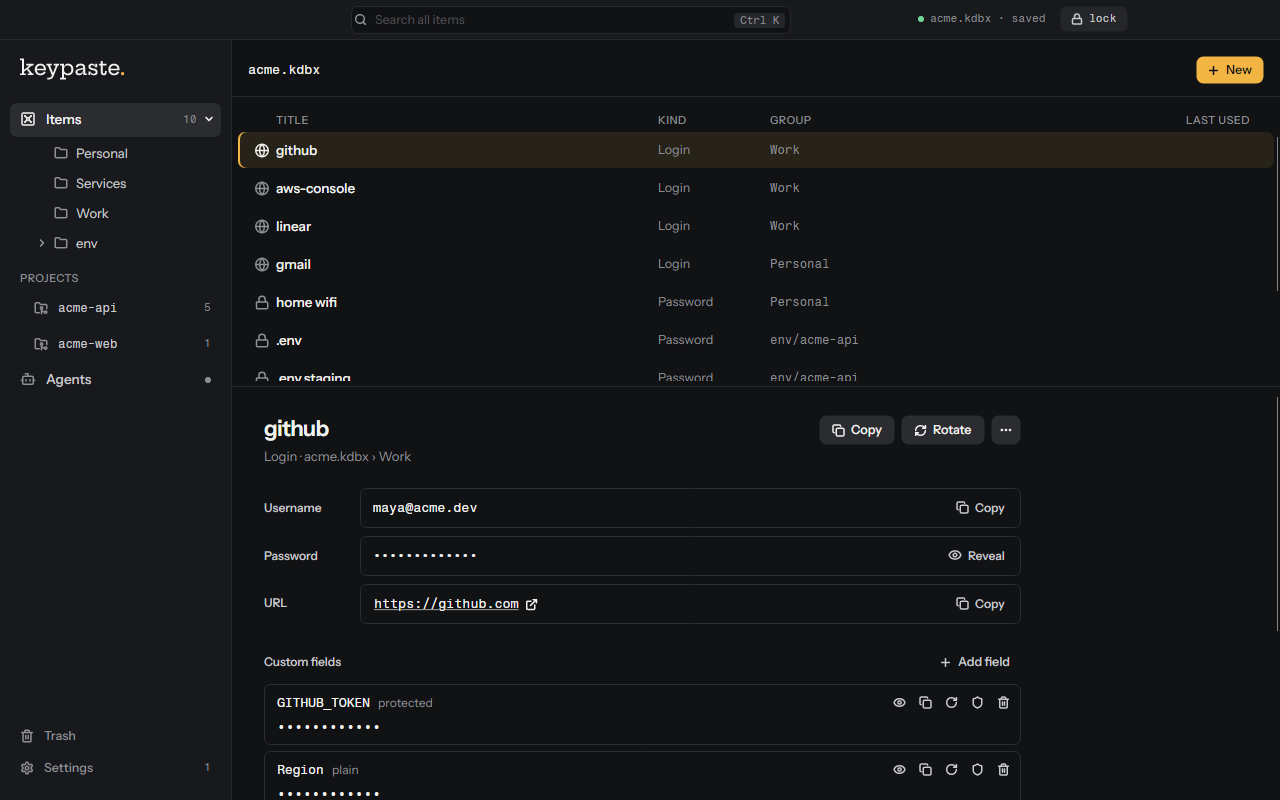
keypaste keeps your logins and your projects' secrets in one KeePass-compatible vault, and gives an AI agent a secret only when you allow it.
The desktop app, built from source. It has no public release yet.
## What it does
The published `v0.3.0` CLI stores logins and environment variables in a local KDBX vault, runs commands with them, and asks you before an agent receives one. Everything else below is in source until the next release, and the desktop app has no public release; [FEATURES](docs/FEATURES.md) records what exists where.
**As a password manager**
- One KDBX 4 file on your disk, with no account and no network. KeePassXC opens and edits the same file, and CI checks both directions against `keepassxc-cli` on Linux, macOS and Windows.
- Logins with a title, username, password, URL and notes, in groups. Search covers titles, usernames and URLs and never reads a password.
- A generator for 8 to 256 characters from a shell-safe alphabet, or passphrases of 6 to 32 words from the EFF list. `keypaste rotate` replaces a password with a generated one and never prints it.
- History for every change, restored in one step, and rolling encrypted backups beside the vault.
- `keypaste import` copies another KDBX file in, or keeps editing it in place.
**For developers and their agents**
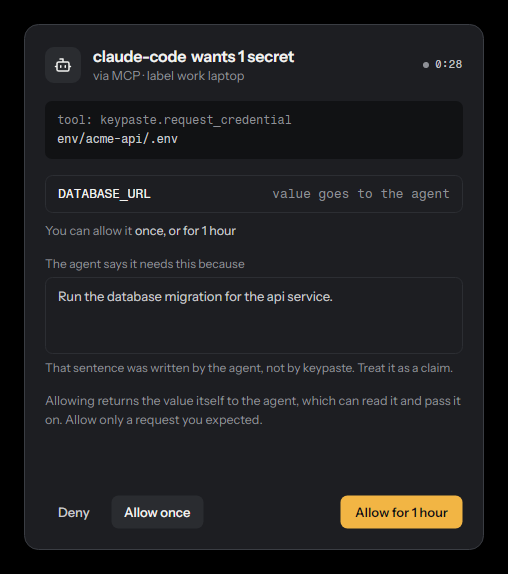
- MCP approval: an agent asks for one field of one entry and gives its reason. You answer Deny, Allow once or Allow for 1 hour, and every request lands in a hash-chained audit log.
- Inject-only runs: `keypaste run` puts values in a command's environment and nothing on disk. With `--allow-run`, an agent can run a command you approve and gets back its output with each value replaced, though a command it can edit can still reveal a value ([T-35](THREATS.md#t-35--a-run-keeps-values-out-of-the-result-not-out-of-the-agents-reach)). [PRODUCT §2](docs/PRODUCT.md) bounds it: no shell, and you approve the exact command.
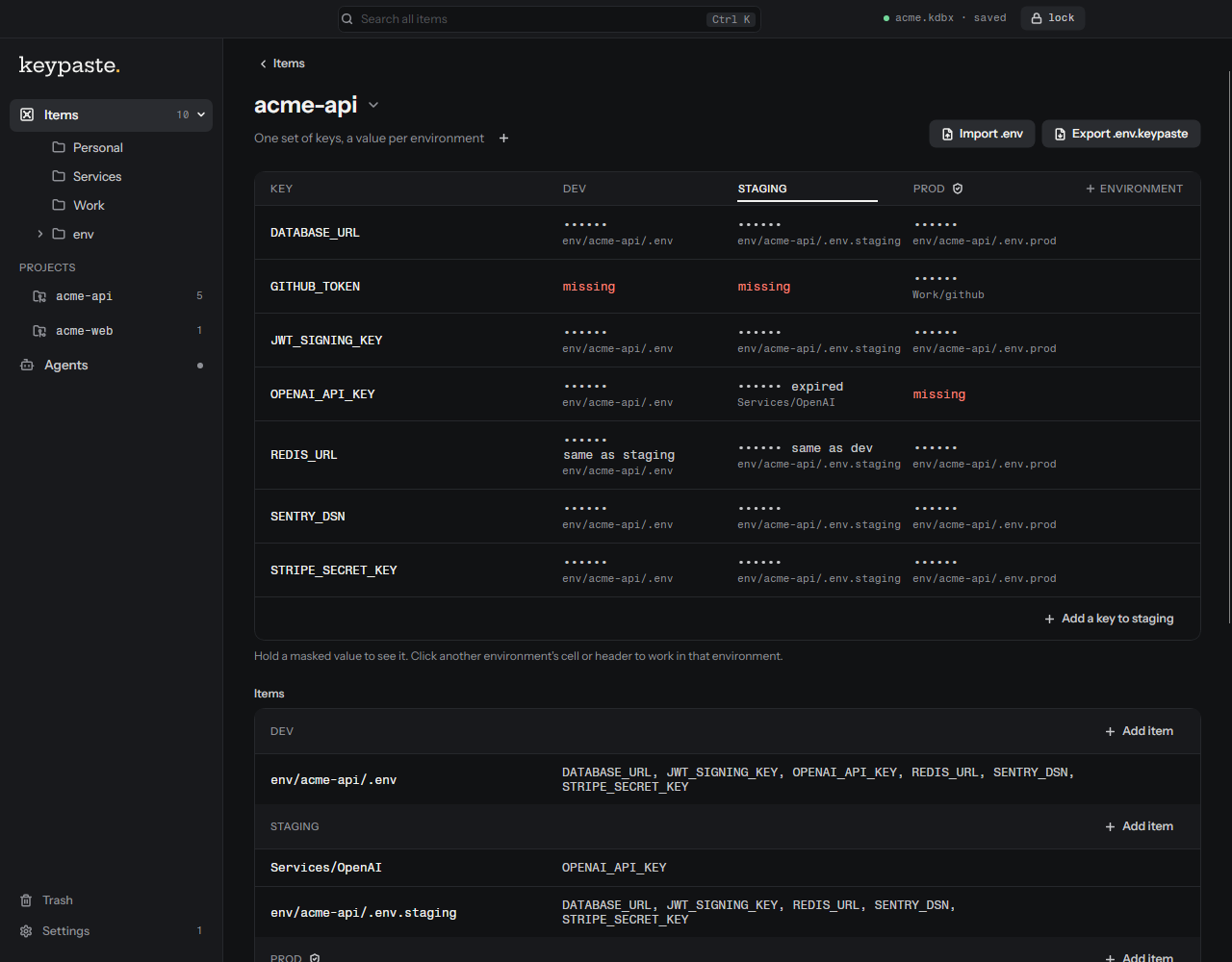
- Projects: one set of keys per project, with a value for dev, staging and prod. Prod always needs a live answer.
- `.env.keypaste`: `KEY=kp://project/profile/KEY` references and no values, safe to commit.
- Scoped tokens for CI, such as `read:acme-api/staging/*`: inject-only, and expiring after 30 days by default.
- Share links: one field, or an entry's login (username, password and URL), encrypted on your machine, opened 1 to 10 times (once by default) before it expires. keypaste.com serves the links; the command is in source until the next release.
An agent's request, in the app
A project and its .env.keypaste
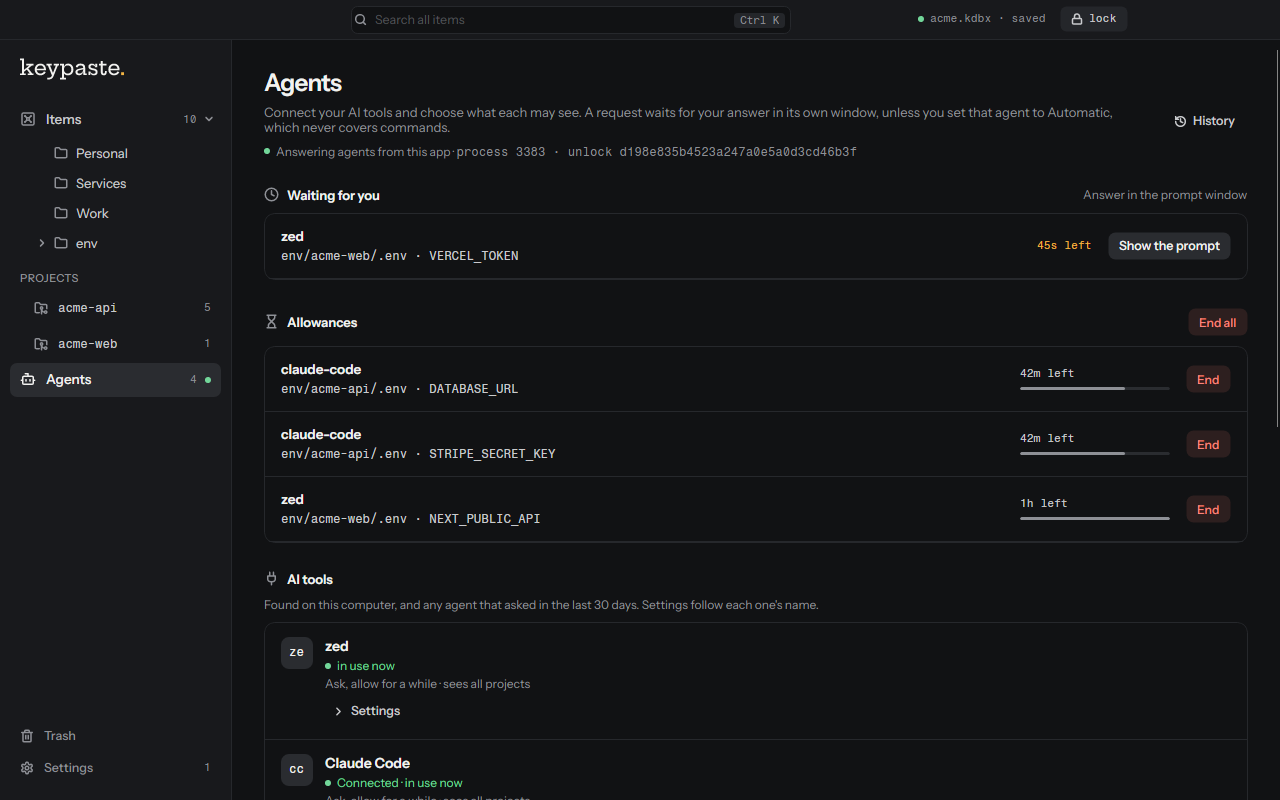
Requests, allowances and AI tools
## The approval, in the terminal
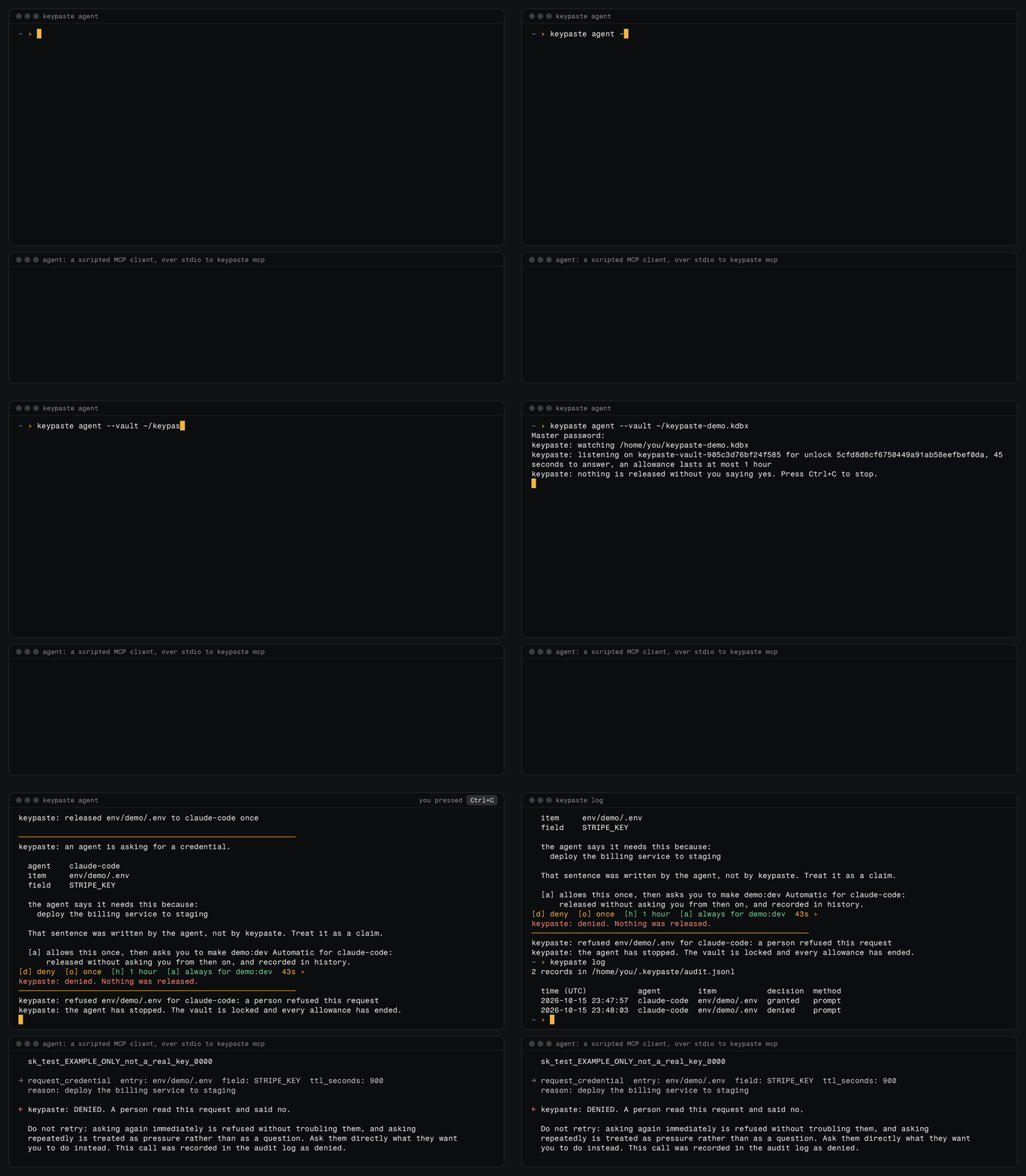
Rendered from the source's output for the next release before its prompt offered Always for, with a scripted MCP client in place of the agent; the published v0.3.0 asks Approve? [y/N] and allows up to 300 seconds. The prompt as text:
```
────────────────────────────────────────────────────────────
keypaste: an agent is asking for a credential.
agent claude-code (claude-code)
item env/demo/.env
field STRIPE_KEY
the agent says it needs this because:
deploy the billing service to staging
That sentence was written by the agent, not by keypaste. Treat it as a claim.
[a] allows this once, then asks you to make demo:dev Automatic for claude-code:
released without asking you from then on, and recorded in history.
[d] deny [o] once [h] 1 hour [a] always for demo:dev 45s ›
```
[The demo](docs/demo.md) shows a credential request, approval and deploy in about sixty seconds.
You can transport the encrypted file with your existing file-sync service; keypaste has no merge or managed-sync workflow. KDBX compatibility does not mean complete KeePassXC feature coverage. The code is open source under AGPL-3.0.
The published download is pre-1.0 CLI/MCP `v0.3.0`. Replace `v0.2.0`: a save racing another program's save could undo it without keeping the lost change in history. Replace `v0.1.0`: it could also delete a vault through `env export`, modify the wrong entry through `env rm`, and return the wrong password through `get`. [CHANGELOG](CHANGELOG.md#030) lists what `v0.3.0` repairs. Published versions are immutable, so both remain available with those defects.
The [desktop app](docs/desktop.md) holds the vault unlocked for one session: it answers agents in its own prompt window, launches projects with their variables and locks everything at once. [RELEASE](docs/RELEASE.md) defines distribution status, [ROADMAP](ROADMAP.md) what comes next, and [PRODUCT](docs/PRODUCT.md) product commitments. Broader ideas are in [BACKLOG](docs/BACKLOG.md).
## Install
Download the archive and its checksum, verify the hash, then extract it. Each binary is a native executable with no .NET runtime dependency. The Unix instructions move both binaries into `~/.local/bin`.
### macOS: Apple Silicon
```sh
curl -fLO https://dl.keypaste.com/v0.3.0/keypaste-0.3.0-osx-arm64.tar.gz
curl -fLO https://dl.keypaste.com/v0.3.0/keypaste-0.3.0-osx-arm64.tar.gz.sha256
shasum -a 256 -c keypaste-0.3.0-osx-arm64.tar.gz.sha256
tar -xzf keypaste-0.3.0-osx-arm64.tar.gz
mkdir -p ~/.local/bin && mv keypaste keypaste-mcp ~/.local/bin/
```
**macOS 14 or later.** This floor follows [.NET 10 support](https://github.com/dotnet/core/blob/main/release-notes/10.0/supported-os.md); no run backs this floor. Intel Macs have no published binary and require a source build. [GitHub offers native Intel runners](https://docs.github.com/en/actions/reference/runners/github-hosted-runners), but this release matrix does not yet build or test that target.
### Linux: x64 and arm64
```sh
curl -fLO https://dl.keypaste.com/v0.3.0/keypaste-0.3.0-linux-x64.tar.gz
curl -fLO https://dl.keypaste.com/v0.3.0/keypaste-0.3.0-linux-x64.tar.gz.sha256
sha256sum -c keypaste-0.3.0-linux-x64.tar.gz.sha256
tar -xzf keypaste-0.3.0-linux-x64.tar.gz
mkdir -p ~/.local/bin && mv keypaste keypaste-mcp ~/.local/bin/
```
For arm64, substitute `linux-arm64` in all three filenames. Both are built against glibc 2.35. The release workflow checks the x64 binary on a clean Debian 12 container and checks that it fails on Alpine; the equivalent container check is not implemented for arm64. Alpine and other musl distributions have no published binary; build from source there.
### Windows: x64
```powershell
$a = "keypaste-0.3.0-win-x64.zip"
Invoke-WebRequest -OutFile $a "https://dl.keypaste.com/v0.3.0/$a"
Invoke-WebRequest -OutFile "$a.sha256" "https://dl.keypaste.com/v0.3.0/$a.sha256"
$want = (Get-Content "$a.sha256" -Raw).Split()[0]
if ((Get-FileHash $a -Algorithm SHA256).Hash -ne $want) { throw "checksum mismatch" }
Expand-Archive $a -DestinationPath .
```
Windows 10 1809 or later. This floor follows [.NET 10 support](https://github.com/dotnet/core/blob/main/release-notes/10.0/supported-os.md); no run backs this floor.
On Windows, put the extracted binaries in a directory you add to `PATH`. On macOS and Linux, check that `~/.local/bin` is on `PATH` with `command -v keypaste`.
Keep the absolute path of `keypaste-mcp` for your MCP client configuration.
### Download verification
The checksum detects a corrupted or incomplete download. It does not authenticate the publisher. The checksum is served from the same origin as the archive, so anyone able to replace one can replace both. The published binaries are unsigned and un-notarized. `v0.3.0` also publishes a build attestation that GitHub CLI can check without an account, covering every asset and the release manifest; `v0.2.0` and earlier have none. [`THREATS.md`](THREATS.md) T-21 describes the download trust boundary, and [`SECURITY.md`](SECURITY.md#verifying-a-release) has the verification steps in one place.
The installation instructions keep downloaded commands visible for review before execution.
Browser downloads set `com.apple.quarantine`; these command-line download and extraction steps should avoid it. The release runner executed the binary with quarantine deliberately set, but that observation does not establish behavior on every Mac. If macOS blocks the unsigned binary, `xattr -d com.apple.quarantine ~/.local/bin/keypaste` removes the attribute.
### Or build it from source
Building from source lets you inspect the code you compile without relying on a prebuilt binary matching it. Install the SDK pinned in [`global.json`](global.json):
```sh
git clone https://github.com/notinferred/keypaste
cd keypaste
dotnet build keypaste.slnx -c Release
```
`keypaste` lands at `artifacts/bin/Keypaste.Cli/release/` (`.exe` on Windows), and in source it is also the MCP bridge, run as `keypaste mcp`. This is also the only supported route on Intel Macs, on musl distributions such as Alpine, and on Windows on ARM.
## Sixty seconds to a project with no `.env` in it
```sh
keypaste init ~/vault.kdbx
export KEYPASTE_VAULT=~/vault.kdbx
keypaste env pull dev
keypaste run dev -- npm start
```
[Replace your `.env` in 5 minutes](docs/replace-dotenv.md) covers import, CI use, sync, export and lost master passwords.
## Connecting it to Claude
`keypaste-mcp` is started by your MCP client and forwards requests without holding a vault. You start `keypaste agent`, which 0.5.0 renames `keypaste approve`, in your terminal to unlock the vault and approve requests:
```sh
keypaste agent --vault ~/vault.kdbx
```
If you installed `v0.1.0` and have not replaced it yet, configure the client using the manual [Claude Code](docs/mcp-setup.md#claude-code) or [Claude Desktop](docs/mcp-setup.md#claude-desktop) instructions, with the absolute path of the downloaded `keypaste-mcp`.
With `v0.2.0` or later, configure clients with:
```sh
keypaste setup --vault ~/vault.kdbx
```
`setup` configures detected clients through their `mcp add` command, or prints a configuration block for clients without one. `--dry-run` prints commands without changing configuration; `--remove` removes keypaste. `v0.1.0` lacks `setup`; every later release includes it.
Client configuration contains no master password. [Connecting keypaste to Claude](docs/mcp-setup.md) explains setup, exposure and audit reading.
## Using it
```sh
keypaste init ~/vault.kdbx
export KEYPASTE_VAULT=~/vault.kdbx
keypaste add github --username me --url https://github.com
keypaste ls
keypaste get github
keypaste get github --show
keypaste rm github --yes
```
`ls` prints a names-only group tree. `get` copies the password to the clipboard and clears it after twenty seconds; `--show` writes it to stdout instead. Password prompts never echo input. Command data goes to stdout and diagnostics to stderr, so `keypaste get x --show` can be piped. Set `KEYPASTE_VAULT` or pass `--vault` to each command.
In `v0.3.0`, `rm` permanently deletes the entry and its history. In 0.5.0, which is not yet published, it moves the entry to the vault's recycle bin, where KeePassXC can see and restore it, unless the vault's recycle bin is switched off, and `get --reveal` replaces `get --show`, which is refused. Printing a value with `get` and explicit env export expose plaintext. The standalone passphrase generator described below is an Unreleased source feature.
### Generating one
`add` and `env set` generate the secret they store when you pass `--generate`, and print how much of it there was rather than what it was:
```sh
keypaste add github --generate
keypaste add github --generate --length 32 --no-symbols --no-lookalikes
keypaste env set billing STRIPE_KEY --generate
```
Characters come from an 85-character alphabet: letters, digits and `!#%()*+,-./:;=?@[]^_{}~`. The punctuation that breaks in a shell, in YAML or in a URL is left out on purpose. Twenty characters is the default, about 128 bits; `--length` takes 8 to 256. `--no-symbols` leaves letters and digits, `--no-lookalikes` drops `Il1O0`, and both cost entropy to solve a problem the Copy button and `keypaste run` are there to remove.
**New in 0.5.0, not yet published:** `--words N` generates a passphrase instead, drawn from the [EFF long word list](third_party/eff-large-wordlist/UPSTREAM.md) of 7,776 words vendored into keypaste and pinned by digest. These options and `keypaste generate` are absent from the published `v0.3.0` download. Each word is worth about 12.9 bits, so the six-word minimum is about 78 bits; `--words` takes 6 to 32, and `--separator` chooses what goes between them, a full stop by default. A hyphen is refused, because four of the list's words are spelled with one and a hyphen-joined passphrase cannot be split back into the words you counted.
```sh
keypaste add github --generate --words 6
keypaste env set billing STRIPE_KEY --generate --words 8 --separator _
```
`keypaste generate --words 6` prints a passphrase and stores nothing. Generation details go to stderr, so a redirect captures only the passphrase. It opens no vault and asks for nothing.
| exit code | meaning |
| --- | --- |
| 0 | success |
| 1 | usage error |
| 2 | internal or environment error (including no usable clipboard, and an entry name two entries answer to) |
| 3 | vault or entry not found |
| 4 | wrong master password |
| 5 | the audit log is not the file keypaste wrote |
When stdin is not a terminal each prompt consumes one line in order. `init` takes the new password twice; `add` and `env set` take the master password followed by a value unless generating one. While the desktop app or `keypaste approve` holds the vault they take the value alone, and the holder asks you to allow the change; a line more is refused. In 0.5.0, `access --password` takes the current master password and then the new one twice; `access` refuses with 1 before changing anything it would not change safely and with 4 for a wrong current password. Commands that do not open a vault, such as `log`, need no master password. Consult command help before scripting confirmation or export prompts.
## Environment variables
In `v0.3.0` each variable is an ordinary entry under `env/`, with its name as the title and value as the password; [D-0014](docs/decisions-archive.md) explains the convention. In 0.5.0, which is not yet published, a variable is a protected field of an entry tagged `env:`, and `env set` and `env pull` put a new one on the project's entry `env//.env`, so the value below is read with `keypaste get env/billing/.env --field DATABASE_URL --reveal`; an entry of the earlier layout stays an ordinary entry and is no longer a variable. KeePassXC can edit both directly. CI checks interoperability on all three operating systems.
```sh
keypaste env pull billing
keypaste env pull billing config/.env.prod --yes --delete-source
keypaste env set billing DATABASE_URL
keypaste env set billing STRIPE_KEY=sk_test_x
keypaste env ls
keypaste env ls billing
keypaste get env/billing/DATABASE_URL --show
keypaste env rm billing STRIPE_KEY --yes
keypaste env export billing --dotenv --stdout
```
`env ls` lists projects; adding a project name lists variable names without values. `env pull` validates the entire file before importing. Malformed input leaves the vault unchanged. Its plan lists new, updated and unchanged variables by name; unchanged values are not rewritten.
The parser accepts `export` prefixes, comments, three quoting styles and multiline values. A `#` starts a comment only after a space, so `PASSWORD=hunter2#42` retains its suffix. Duplicate keys are errors. `${VAR}` and `$VAR` remain literal to avoid binding the vault to one machine's environment. Double quotes expand `\n`, `\r`, `\t`, `\\` and `\"`; use single quotes for a literal Windows path such as `C:\temp`.
The `KEY=value` form exposes the value to shell history and process listings, so keypaste warns on use. Updates retain old values in KeePassXC entry history. Deleting a `.env` does not erase its storage or backups; see [`SECURITY.md`](SECURITY.md).
## Running things with those variables
```sh
keypaste run dev -- npm start
keypaste run prod -- ./deploy.sh
```
The `--` is required. Without it, `keypaste run dev npm start` cannot be told apart from a project called `npm`; everything after it belongs to the command, including flags keypaste also understands.
The child inherits your environment with project variables overlaid, and receives the terminal's stdin, stdout and stderr. `run` opens the vault itself, asking for its password, and closes it before starting the child. In source, `keypaste run --session` opens nothing and asks for no password: the desktop app or `keypaste approve` holding the vault unlocked shows the project, its variable names, the command and the directory, and the child starts only if you allow it there. A refusal, a lock, 45 seconds without an answer or nothing holding the vault each end the run with a reason and no child. The child receives a snapshot: later edits or locks do not update or erase its environment.
After startup, keypaste returns the child's exit code. Missing commands return 127 and non-executable commands return 126. keypaste's own failures print a line beginning `keypaste run:`. Ctrl+C, `docker stop` and `timeout` reach the child; keypaste waits for it to exit.
A set is injected whole or not at all. An expired entry, an untitled one, an invalid or repeated name, or names differing only in case prevent injection, and the error lists every offending key and why, never a value, so they can be corrected in KeePassXC. An entry in the recycle bin is not part of the set.
## Getting them back out
`env export` writes plaintext for tools that require a file or for moving credentials elsewhere.
```sh
keypaste env export billing .env --dotenv
keypaste env export billing --dotenv --stdout
```
In `v0.3.0`, export requires `--dotenv`. In 0.5.0, `keypaste env export billing -p staging > .env.keypaste` without it writes one `kp://` reference per variable and no value, which `keypaste run --env-file .env.keypaste -- ` resolves; [Replace your `.env`](docs/replace-dotenv.md#profiles-and-references) covers profiles and references. With `--dotenv`, file output warns with the destination path and asks for confirmation; overwriting also requires `--force`. keypaste reports a `.git` ancestor and creates owner-readable files on Linux and macOS. Windows has no equivalent permission control and reports that limit. Export refuses to overwrite its source vault or any other KeePass vault, even with `--force`; in `v0.1.0`, `--force` could destroy the vault. Prefer `keypaste run` when a file is unnecessary.
Export uses single quotes where possible for consistent reading by `motdotla/dotenv`, `python-dotenv`, `godotenv`, Docker Compose v2 and `sh`. Values containing apostrophes or carriage returns need escapes; keypaste names those keys on stderr because readers differ in escape handling.
## Agent access
In `v0.3.0` two tools appear in the client: `list_entry_names`, which returns group paths and entry names and never a value, and `request_credential`, which asks you to release one field of one entry. In 0.5.0, which is not yet published, a third, `request_access_change`, asks for a change to that agent's own settings and waits for you to confirm one that gives it more, and every bridge `keypaste setup` connects also offers `run`, which runs nothing until you turn it on for that agent.
A credential request requires your approval, a matching rule you wrote in `v0.3.0`, or in 0.5.0 a setting you confirmed that makes that agent Automatic for the entry. Enter your master password only in `keypaste agent`, `keypaste approve` in 0.5.0, which you start yourself. Agents cannot trigger a password prompt, avoiding prompts another local program could imitate.
An explicit refusal tells the agent not to retry. Silence for 45 seconds denies the request. Matching requests can reuse a live approval. Every call, including denied and malformed calls, is appended to `~/.keypaste/audit.jsonl` without the returned value.
The TTL expires keypaste's cached approval. It does not erase the client's copies or revoke the password at its issuer. The bridge does not add the released value to its audit record, but agent-written arguments can themselves contain sensitive text; treat the local log as sensitive data. [SECURITY.md](SECURITY.md) states these boundaries in full.
In `v0.3.0` exposure defaults to the `env/` subtree, and only explicit `--expose` globs in your client configuration widen it. In 0.5.0 an agent sees every project's variables, the custom fields named like environment variables on entries tagged into a project, until you change its settings, and an `--expose` in the client configuration can only narrow that.
### Saying yes in advance
In `v0.3.0`, a narrow rule in `~/.keypaste/policy.toml` releases matching requests without asking you; `keypaste policy ls` displays its parsed patterns, and [the `v0.3.0` policy guide](https://github.com/notinferred/keypaste/blob/v0.3.0/docs/policy.md) explains them.
In 0.5.0 `policy.toml` is no longer read. Each agent has settings kept in the vault, under the `--client-label` its bridge was given: what it can see, whether it is given values, whether it may run commands, and a mode for the agent and for each project or environment you add a row for. Ask every time offers Allow once only; Ask, allow for a while, the default, also offers an hour; Automatic releases what the agent can see without asking you and records each release, optionally at most so many an hour or until a date, after which it asks again. Commands and protected environments are always asked. A change that gives an agent more waits for your confirmation where the vault is unlocked, in the app or in `keypaste approve`'s terminal; one that gives it less applies at once:
```sh
keypaste clients
keypaste clients claude-code --project billing:dev --mode automatic --per-hour 20
```
The app's Agents screen sets the same things, and its prompt's Always for button makes an item's environment Automatic after the same confirmation. [Agent settings and modes](docs/policy.md) explains them. The settings are stored in the vault as [ACAF v1](https://keypaste.com/acaf/v1/), a published format other KeePass apps can read.
### Seeing what happened
Every call an agent makes is one line in `~/.keypaste/audit.jsonl`, allowed or refused. `keypaste log` reads it back:
```
3 records in /home/you/.keypaste/audit.jsonl
time (UTC) agent item decision method
2026-07-26 14:03:09 claude-code - granted exposure
2026-07-26 14:03:11 claude-code env/demo/.env granted prompt
2026-07-26 14:07:44 claude-code env/demo/.env denied prompt
```
`--denied`, `--client ` and `--since 2h` narrow it, and a narrowed view always says so.
Each audit record includes its predecessor's hash. `keypaste log verify` checks the chain and reports its limits on every pass: a complete recomputed chain and records removed from the end can escape detection.
[Approvals](docs/approvals.md) explains the prompt. [THREATS.md](THREATS.md) covers prompt injection, unauthenticated clients, approval fatigue, cached grants and audit tampering.
[KeePass and agents](docs/keepass-and-agents.md) explains the local approval design and its relation to browser integration.
## Packages
| Roadmap name | Project | Ships as |
| --- | --- | --- |
| `keypaste-core` | `src/Keypaste.Core` | shared vault library |
| `keypaste-cli` | `src/Keypaste.Cli` | `keypaste` |
| `keypaste-mcp` | `src/Keypaste.Mcp` | the stdio forwarding bridge, inside `keypaste` as `keypaste mcp`; `v0.3.0` ships it as `keypaste-mcp` |
| `keypaste-app` | `src/Keypaste.App` | desktop app; source builds and CI packages, no public release |
## Vault format
KDBX4 with Argon2d key derivation (2 iterations, 64 MiB, parallelism 2) and AES-256. keypaste never invents a format and writes no cryptography of its own (docs/PRODUCT.md §2, §3.6): the format layer is [KeePassLib](third_party/KeePassLib/UPSTREAM.md), vendored from KeePass 2.61 and reached through a single file, `src/Keypaste.Core/Internal/KeePassInterop.cs`.
`scripts/verify-keepassxc-compat.sh` and `scripts/verify-keepassxc-writeback.sh` check interoperability against a real `keepassxc-cli` on Linux, macOS and Windows on qualifying pushes to `main` and on each pull request that changes the code that writes vaults or the gate's own scripts. This is a permanent gate under docs/PRODUCT.md §4.6 and [D-0008 and D-0014](docs/decisions-archive.md).
Directories and namespaces use .NET's PascalCase convention; the kebab-case names above are the roadmap's and survive where they are user-visible, in the shipped binary names.
The CLI, MCP server and desktop app share vault and authorization logic in `Keypaste.Core` (docs/PRODUCT.md §4.3).
## Build and test
Local verification needs the .NET SDK pinned in [`global.json`](global.json), Git, jq and running Docker for workflow validation with the pinned actionlint image. Process checks use GNU timeout (included with Git Bash/Linux; `gtimeout` from coreutils on macOS) to bound a stuck child. From PowerShell, run:
```powershell
./scripts/verify.ps1
```
From Git Bash, macOS or Linux, run:
```sh
bash scripts/verify.sh
```
The command runs every check but the KeePassXC compatibility gate. A full run validates workflows, restores locked dependencies, checks formatting and builds both solutions plus the separate CLI/desktop consistency project, exercises offline script fixtures and real CLI/MCP process interactions, then runs their Release tests. The PowerShell wrapper selects Git Bash. `--list` prints the selection and commands without executing them, and `--from ` resumes after a failure. [CLAUDE.md](CLAUDE.md#local-verification-and-delivery) owns the final verification procedure. Other operating systems, NativeAOT and release installation retain their separate gates. To run the CLI after building, use `dotnet run --project src/Keypaste.Cli -c Release`.
Builds treat warnings as errors and enforce code style. Declare dependencies in `Directory.Packages.props` and the project, then regenerate the lock files with `bash scripts/dev.sh --relock`, which runs `dotnet restore --force-evaluate` on CI's SDK and writes the changed ones into your tree, and commit them. Changes to `RuntimeIdentifiers` also require regenerated locks; otherwise `--locked-mode` fails with NU1004.
Do not pass `-r` to restore. It narrows the runtime identifier set and conflicts with lock files recording all four targets. The projects already declare their RIDs and `PublishAot=true`; restore with `dotnet restore --locked-mode` and select a RID only when publishing.
### Building a native binary yourself
NativeAOT binaries must be built on their target operating system. Per O-0005, Linux needs `clang` and `zlib1g-dev`, macOS needs Xcode command line tools, and Windows needs MSVC C++ build tools with `vswhere.exe` discoverable. `keypaste` links libsodium, which `scripts/build-libsodium.sh` builds first from its signed release; it also needs curl, OpenSSL 3, and `make` outside Windows.
```sh
bash scripts/build-libsodium.sh
dotnet restore keypaste.slnx --locked-mode
dotnet publish src/Keypaste.Cli -c Release -r linux-x64 --no-restore -o out
dotnet publish src/Keypaste.Mcp -c Release -r linux-x64 --no-restore -o out
```
`dotnet publish` otherwise restores implicitly with its selected RID, rewriting the locks for one target and breaking the next locked restore. Use `--no-restore` after a full restore, as `release.yml` does.
Publishing produces one native file per project; `PublishAot=true` is already configured. Use `osx-arm64` or `win-x64` for those platforms. `scripts/verify-aot-trim.sh` compares publish diagnostics with the accepted vendored-code baseline and rejects new warnings or any warning from `src/`. Capture output after changes under `third_party/`:
```sh
dotnet publish src/Keypaste.Cli -c Release -r linux-x64 --no-restore -o out > cli.log 2>&1
scripts/verify-aot-trim.sh cli.log
```
Eleven vendored-code diagnostics are accepted in [D-0040](docs/decisions-archive.md). ILC analyzes only changed inputs; if a repeat publish emits none, the script reports that no new analysis occurred.
`third_party/Directory.Build.props` isolates vendored source from project style checks, and `dotnet format` excludes `third_party/` to preserve upstream mergeability.
To run the KeePassXC compatibility gate locally you need `keepassxc-cli` on `PATH` (or `KPXC_CLI` pointing at it):
```sh
bash scripts/verify.sh compat
```
In PowerShell, use `./scripts/verify.ps1 compat`.
The fixture is built by the shipped `keypaste` binary, so the gate covers the CLI as well as the vault writer. The write-back script builds its own vault and drives both tools in turn: keypaste modifies an entry, then KeePassXC edits and adds env variables that keypaste has to read back.
## Found something wrong?
Bugs, missing features and "this made no sense to me" go to the [issue tracker](https://github.com/notinferred/keypaste/issues). They are read by the person who wrote the thing. A report that says what you ran, what you expected and what happened is worth more than a polished one.
Anything that looks like a security problem goes to instead of the tracker. [`SECURITY.md`](SECURITY.md) owns what is in scope, what happens next and how fast.
## Security
Report vulnerabilities privately using [`SECURITY.md`](SECURITY.md).
## License
[AGPL-3.0](LICENSE). Auditable code is the trust strategy (docs/PRODUCT.md §3.8).