# MCP Manager
[](https://pypi.org/project/mcp-manager/)
[](https://www.python.org/downloads/)
[](https://www.gnu.org/licenses/gpl-3.0)
[](https://github.com/nstebbins/mcp-manager/actions/workflows/test.yml)
A CLI tool that makes MCP server management across Claude Desktop, Cursor, and more dead simple.
[Installation](#-installation) • [Quick Start](#-quick-start) • [Available Servers](#-available-servers) • [Supported MCP Clients](#-supported-mcp-clients)
## 🚀 Quick Start
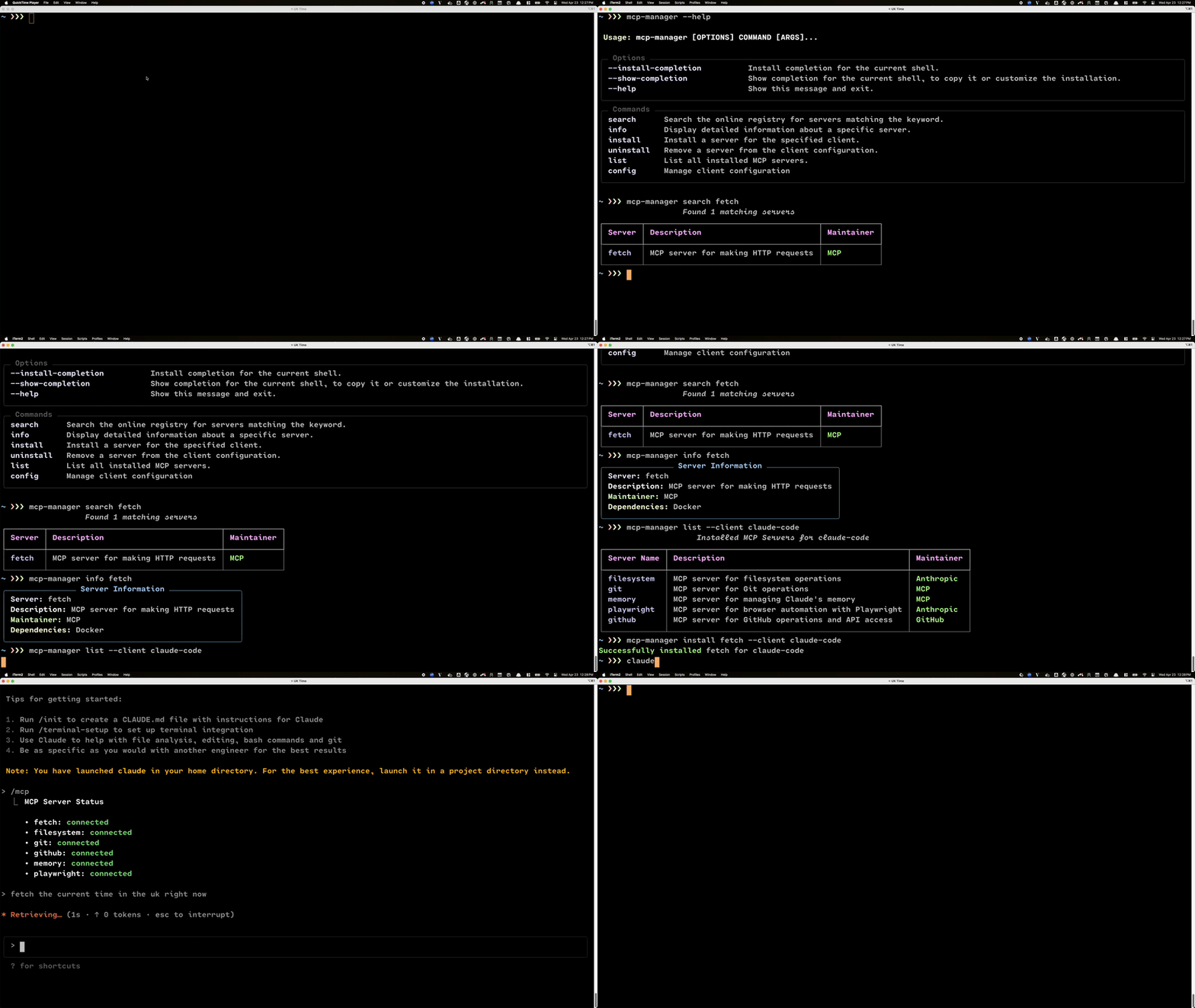
## 🛠️ Available Commands
| Command | Description |
|---------|-------------|
| `search ` | Search for available MCP servers matching the keyword |
| `info ` | Display detailed information about a specific server |
| `install [--client=claude-desktop\|cursor\|claude-code]` | Install an MCP server for a specific client |
| `uninstall [--client=claude-desktop\|cursor\|claude-code]` | Remove an installed server |
| `list` | List all installed MCP servers |
| `config path [--client=claude-desktop\|cursor\|claude-code]` | Show current client config file path |
| `config set-path [--client=claude-desktop\|cursor\|claude-code]` | Set a new path for the client config file |
## 🔌 Available Servers
| Server | Description | Dependencies |
|--------|-------------|--------------|
| **Playwright** | Browser automation server for web interactions | Node.js, npm |
| **Filesystem** | File system operations server for local file access | Node.js, npm |
| **Fetch** | Server for making HTTP requests | Docker |
| **Git** | Server for Git operations | Docker |
| **GitHub** | Server for GitHub API operations | Docker |
| **Memory** | Server for managing Claude's memory | Docker |
## 👥 Supported MCP Clients
Currently supports:
- ✅ Claude Desktop (default client)
- ✅ Cursor
- ✅ Claude Code
## 🎯 Features
- 🔍 Smart server discovery and search
- 🔒 Secure configuration management
- 🔄 Automatic dependency checking
- 🛡️ Client-specific installation options
- 📝 Detailed server information and documentation
## 💻 Installation
For users:
```bash
pip install mcp-manager
```
For developers:
```bash
# Clone the repository
git clone https://github.com/nstebbins/mcp-manager.git
cd mcp-manager
# Install dependencies and development tools
poetry install
pre-commit install # Install git hooks
```
### Code Quality
We maintain high code quality standards through automated checks:
```bash
# Run all pre-commit hooks
pre-commit run --all-files
# Format code
poetry run ruff format .
# Run linter
poetry run ruff check .
# Run tests
poetry run pytest
```
### 🧪 Testing
The project uses pytest for testing. Run the test suite with:
```bash
poetry run pytest
```
## 🤝 Contributing
Contributions are welcome! Please feel free to submit a Pull Request.