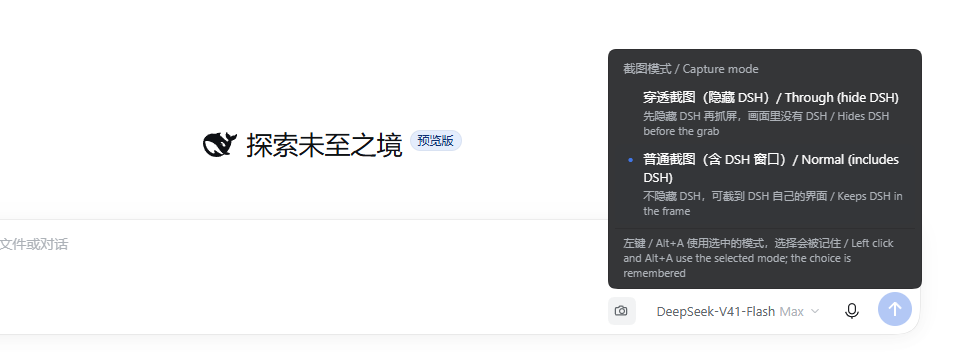
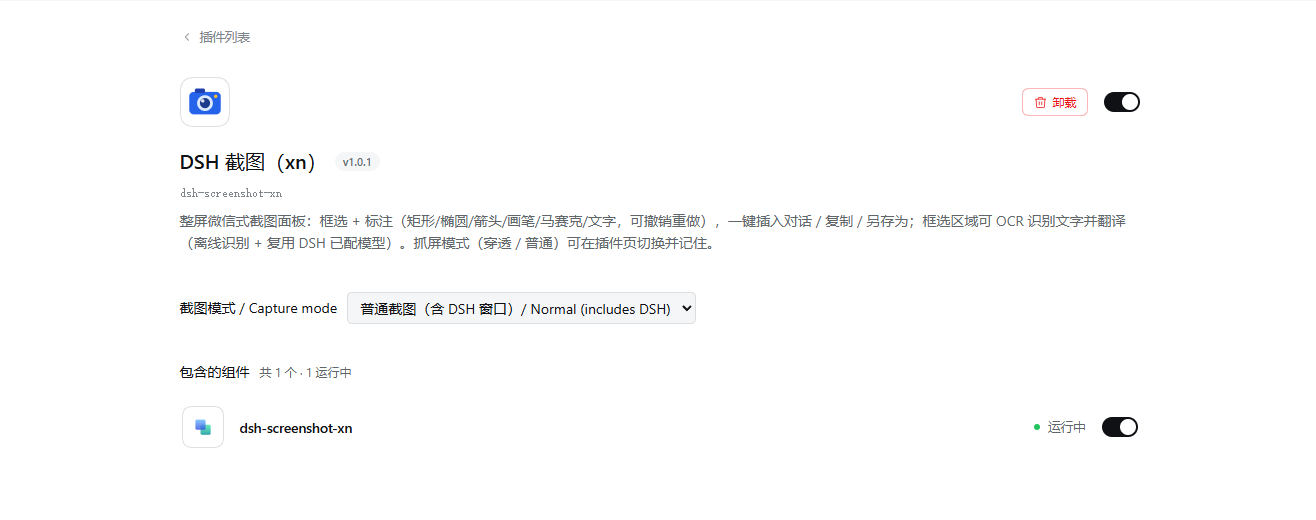
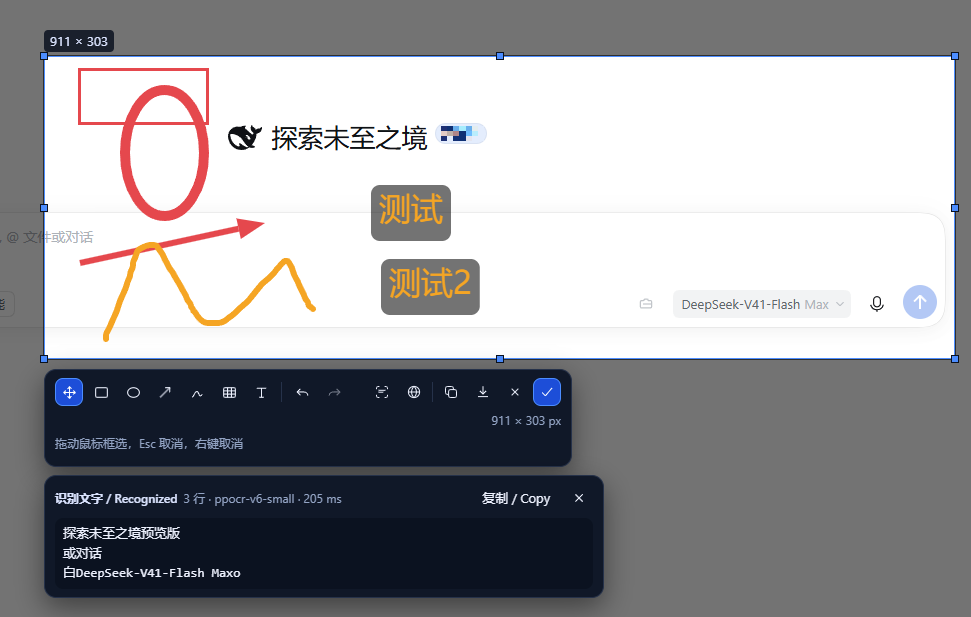
# dsh-screenshot-xn (DSH screenshot) [简体中文](README.md) | **English** Adds a screenshot plugin to DSH Desktop: click the button next to the input box (or press `Alt+A`) → the whole screen dims and an **independent full-screen screenshot panel** appears (WeChat-style: it covers the entire screen including the taskbar, and the DSH window is temporarily hidden first, so what you see is the real desktop) → marquee select and annotate (rectangle / ellipse / arrow / pen / mosaic / text, with undo and redo) → click "insert into conversation / copy / save as", the panel closes, and the result lands in DSH. The same selection can also **recognize text** and **translate** it: "recognize text" at the far left of the toolbar reads the selected region into copyable, editable text (default engine PP-OCRv6, running locally, **offline, no key**; falls back to the Windows built-in OCR when the model is not ready), and "translate" then turns it into any one of 9 languages (using **the model you already configured in DSH**, zero configuration by default); the source text and the translation both land on the same result card, each with its own "copy / Copy". ## Preview All three below are real-machine shots (this machine's 3440×1440 primary screen), not staged and not composited: **① Marquee select + annotate + region recognition (panel)** — the toolbar appears after you drag out a selection (the two buttons "recognize text" and "translate" are at the far left of the first row); rectangles/ellipses drawn in red, yellow arrows and a hand-drawn curve, and two text annotations are all drawn inside the selection; below is the result card of "recognize text" (engine `ppocr-v6-small`, elapsed time, line count, and "copy / Copy" at the end of the row). Recognition reads the **original image** on screen: a red frame drawn over text does not enter the recognition result. Full-screen screenshot panel: marquee selection 911×303 with a rectangle/ellipse/arrow/hand-drawn curve and two text annotations, and below it the recognize-text result card (ppocr-v6-small, 3 lines, 205 ms) **② Capture mode (right-click the screenshot button)** — "through capture (hide DSH)" and "normal capture (including the DSH window)", with a blue dot in front of the currently selected one; the choice is remembered, and both left click and `Alt+A` use it. **③ The same setting in the DSH plugin page** — `plugins → DSH screenshot (xn)`, whose dropdown shows the same `captureMode`; changes take effect immediately and survive a restart.
The capture mode menu popped up by right-clicking the screenshot button: through capture (hide DSH) / normal capture (including the DSH window), with a note at the bottom that the choice is remembered DSH plugin page: DSH screenshot (xn) v1.0.1, the "capture mode / Capture mode" dropdown row, component dsh-screenshot-xn running
② Switch modes from the right-click menu ③ Switch modes from the plugin page (the same setting)
> **Plugin name**: `dsh-screenshot-xn` (renamed from `dsh-screenshot` on 2026-09-30, to distinguish it from screenshot plugins with the same or a similar name on the market). > The directory (on the day of the rename) was still `E:\dshplugins\dsh-screenshot`; the only things changed were the **package name and the cordis row id/name** (which is what the plugin list and plugin page display). > **2026-10-11: the checkout moved to `E:\dsh-screenshot-xn\dsh-screenshot`** (to match the repository name; the old path `E:\dshplugins\dsh-screenshot` is retired). Moving it retargets nothing: the profile still holds a `link:` to a path that no longer exists, and on **DSH Desktop 2.0.17** that is a **startup-level** failure (the whole app refuses to start), not a plugin that merely does not work - see the first row of "Troubleshooting". > **Unchanged** (all frozen contracts, untouched by the rename): the route `/api/dsh-screenshot/*`, the metrics header `X-DSH-Screenshot`, > the slot entry ids `dsh-screenshot.button` / `dsh-screenshot.overlay`, and the DOM marker `data-dsh-screenshot-ui`. > The same-name migration has been done: registration in the active profile (dependency key / bundles / row id+name), the persisted `captureMode` override, and the node_modules links. - Code origin: `E:\dsh-screenshot-xn\dsh-screenshot` (since 2026-10-11; before that `E:\dshplugins\dsh-screenshot`) - Runtime: DSH Desktop (Windows). The host half depends on Windows PowerShell 5.1 + .NET `System.Drawing` (both built into the system, no third-party native dependencies); the independent panel is hosted by a kiosk window of the system browser (Edge / Chrome); the client half is pure browser code. - Verified versions: **DSH 0.1.7-rc.2**, active profile `comfyui`, node v24.14.1, Windows PowerShell 5.1.26100.9444 (R-06: after upgrading DSH, re-verify the slots and routes visually). > **You must restart DSH Desktop after changing code**: the host half (the routes in `index.js`, kiosk launching, exit cleanup) is only loaded when the DSH process starts. If the host is still an old version, clicking the screenshot button shows "independent screenshot panel unavailable… (overlay.start http 404)" and **automatically falls back** to the in-DSH overlay flow described under "Limitations" below — no functionality is missing, but that is not this version's main path. --- ## Installation Installation is handled by the official `plugin_manager` tool; **do not** hand-write the profile's `package.json` / `cordis.patch.yml`, and do not run pnpm in the profile directory. 1. Point `plugin_manager`'s `install_bundle` at this directory's absolute path: ``` plugin_manager action: install_bundle target: E:\dsh-screenshot-xn\dsh-screenshot ``` That action calls pnpm to install the local directory into the active profile, and applies `cordis.patch.yml` according to `package.json`'s `dsh.bundle.patch`. `target` is the absolute path where this checkout currently lives (the path above is this development machine; **on another machine or after a move, use your own**). The install leaves `"dsh-screenshot-xn": "link:"` in the profile `package.json`, and `/node_modules/dsh-screenshot-xn` points at the same directory. **If either of those two points at a path that does not exist, DSH Desktop 2.0.17 refuses to start** (symptom and fix: the first row of "Troubleshooting"). 2. **Approval is required**: the install action (and possibly build scripts) will ask the user for approval; the installation does not take effect without approval. If `pendingBuilds` shows up in the response body, this plugin needs no build scripts at all — do not authorize any for it. 3. Record the `application` field returned by `install_bundle` (DoD A-7): | `application` | Meaning and follow-up | | --- | --- | | `applied` | Effective immediately (the client half is hot-loaded); the host half's routes are still the ones loaded at process start, so restart DSH if you changed `index.js` | | `restart-required` | Restart DSH Desktop and verify again | | `overridden` | A higher-priority layer overrode this row; check the profile's patch layers | | `failed` | Look at the response body's `warnings`/error reason; the usual cause is that `target` is not this directory's absolute path | > **Prerequisite 1 (every new machine): the full-screen panel needs DSH Desktop to allow "ordinary browser access".** > The main path's "independent full-screen panel" is a system browser (an Edge/Chrome kiosk window) loading `http://127.0.0.1:/api/dsh-screenshot/overlay/page`; DSH Desktop's webServer **lets through only requests carrying the renderer token** — measured on DSH Desktop 2.0.15, `permits()` in `lib/webserver.js` re-reads `desktopBrowserAccess` on every request, and `decideDesktopBrowserAccess` in `lib/desktop-browser-access-*.js` returns `denied` for every non-Electron-renderer request while `ordinaryBrowserEnabled` is `false` (the default value of `openBrowser`), so the response is `403` with a 9-byte body: `forbidden`. > **Under the default settings that 403 is exactly what the kiosk window gets**: the plugin's pre-flight check catches it *before* capturing (`desktop-browser-access-denied`), shows a visible hint, and **falls back automatically** to the in-DSH overlay flow (a frozen frame appears inside the DSH window and you select on that image). This is not a failure and not a wrong version — nothing is missing, it is simply not the main path. > > How to turn it on (either one; **restart DSH Desktop** afterwards, since the host half is only loaded at process start): > - **UI**: DSH Desktop **Settings → "Browser & LAN" → tick "Allow opening this Profile in a browser"**. That switch is only usable while the window mode is "compatibility", otherwise it is greyed out with "browser access is only available in compatibility mode; choose compatibility mode first."; > - **Config**: add the following line to the current profile's `cordis.patch.yml` (this machine was verified with it; copy the `case` and the indentation exactly): > > ```yaml > - id: desktop-shell > name: dsh-plugin-desktop > config: > mode: compatibility > openBrowser: true > networkExposure: loopback > ``` > > It works without this too: the full-screen panel then takes the fallback path every time, and annotation, recognition, translation, insertion, copying and "save as" all behave identically. > **Prerequisite 2 (do not elevate): DSH Desktop must run with ordinary rights.** > When an elevated process starts Chromium (Edge/Chrome), the browser takes the **AutoDeElevate** path: it notices it was started by an elevated process, exits immediately, and lets the shell relaunch it unelevated; **with a long command line that relay drops the arguments**, so the kiosk never opens the panel URL. The symptom is a kiosk window that **flashes and disappears**, `panel files fetched: 0 (none)` in the DSH log, and a browser log (the plugin enables `--enable-logging`, so it lands in the throwaway profile's `chrome_debug.log`) holding a single line: `Edge is running elevated: 1`. Upstream: chromium issue 436869753. > Since t81 the plugin carries the upstream workaround flag `--do-not-de-elevate`, so an elevated DSH usually works too — at the cost of leaving the browser elevated as well, which is why **running DSH with ordinary rights remains the recommendation**. > In particular, if the DSH executable carries the compatibility layer `~ RUNASADMIN` (under `HKCU\Software\Microsoft\Windows NT\CurrentVersion\AppCompatFlags\Layers`), elevation is unavoidable: the startup log names it outright (`DSH is running with the RUNASADMIN compatibility layer (__COMPAT_LAYER=…)`). Remove that layer and restart DSH Desktop with ordinary rights. 4. Self-check list (can be done within 30 s after install + restart): - Open any ordinary conversation; the screenshot button appears in the input box's action area, and hovering shows 「截图 / Screenshot」; - Click the button: the DSH window flickers (temporarily hidden and then restored), and then **the whole screen** is covered by the screenshot panel (including the taskbar); - Marquee select a region → the toolbar appears → click 「复制」 → the panel closes, you are back in DSH, and a success toast appears; - Press Esc in the panel (or right-click, or make the selection too small) → the panel closes, and the draft text and attachments in DSH are exactly the same as before entering; - Temporarily rename both Edge and Chrome (simulating "no browser") → clicking the screenshot button shows 「未找到可用的浏览器…」 and **you can still capture** (falling back to the in-DSH overlay). - The kiosk window **flashes and nothing follows** after clicking the button (neither a full-screen panel nor a frozen frame) → see **Prerequisite 2** under "Installation": with DSH running elevated, Chromium's AutoDeElevate swallows this launch entirely, and the log shows `panel files fetched: 0 (none)` while the browser log holds only `Edge is running elevated: 1`. --- ## Configuration Configuration goes in the `config:` of that one `cordis.patch.yml` row (`config: {}` means everything uses defaults). All keys are optional, and unknown keys are ignored. Among them `captureMode` is special: it is declared by the `Config` schema as a **volatile** field, and is contributed to the DSH plugin page's `plugins.bundle.config` by the **client half** (`key` = the package name `dsh-screenshot`) — so it shows up as the "capture mode / Capture mode" dropdown on the `plugins → dsh-screenshot` page, through the same mechanism as the voice input plugin's "recognition service / recognition language". The value you change there (or in the right-click menu) is written by DSH into the **current profile**'s `cordis.patch.yml` (not this plugin's bundle patch), and takes effect immediately and survives a restart. Hand-writing `config: { captureMode: normal }` works just as well. > Note: the DSH plugin page only renders the config area when there **is a client contribution** (the `configured ? … : null` layer outside `renderSlot("plugins.bundle.config", …, { entryKey: pkg.name })`), so this item has to be contributed by this plugin's `client.js` — that was the last missing link, added in t74. > It looks like this (real-machine shot): see **③ Switch modes from the plugin page** under "Preview". ```yaml - insert: - id: dsh-screenshot-xn name: dsh-screenshot-xn config: timeoutMs: 20000 cacheTtlMs: 1500 keepTempFile: false ``` **Capture (host)** | Key | Default | Meaning | | --- | --- | --- | | `captureMode` | `through` | **The persistable capture mode** (`through` / `normal`), and the only item rendered in the settings page / plugin management: declared as a `volatile` field of `Config`, it takes effect immediately on change and is written into the current profile's patch, surviving a restart. The mode chosen in the right-click menu is what gets written here. | | `enabled` | `true` | When `false` the plugin registers no routes at all (equivalent to temporarily disabling it) | | `timeoutMs` | `20000` | Upper bound for a single capture; after the timeout the child process is terminated and `502 capture.failed` (`capture.timeout`) is returned | | `cacheTtlMs` | `1500` | Short TTL cache for capture results: concurrent fetches are merged into one capture by "single flight"; the cache reference is released after the TTL (D-9) | | `scriptPath` | `lib/capture.ps1` | Capture script path; a relative path is resolved against the package directory, and an absolute path also works (the fault-injection point of D-6) | | `outDir` | `%TEMP%\dsh-screenshot-xn` | Temporary directory for capture PNGs (deleted right after reading, see `keepTempFile`) | | `tag` | `dsh-screenshot-xn` | Filename prefix of the temporary PNGs | | `keepTempFile` | `false` | When `true` the temporary PNGs are kept, for troubleshooting (note that disk usage accumulates). Since t75 it is also the switch for the region PNG used by recognition and the text file used by the clipboard | | `powershellPath` | `%SystemRoot%\System32\WindowsPowerShell\v1.0\powershell.exe` | PowerShell engine path; when it does not exist it falls back to `powershell.exe` from `PATH` | | `hideWaitMs` | `250` | How long to wait after hiding the DSH window before capturing. The value is clamped to `150`–`400` ms | | `hideMethod` | `hide` | `hide` (`SW_HIDE`, the window disappears entirely) or `minimize` (`SW_MINIMIZE`, going through the minimize animation) | | `dshImage` | Derived from `process.execPath` (e.g. `DSH Desktop`) | The image name used to confirm "this is my own window". Hiding is only allowed when one of pid / image name / title matches | | `dshTitleHint` | `DSH` | Only windows whose title contains this fragment count as DSH's (the final fallback criterion) | | `dshPid` | The pid of the plugin host process's parent process | The preferred owning process of the window (the Electron main process). The script also cross-checks with the image name/title | **Independent screenshot panel (overlay, B1)** | Key | Default | Meaning | | --- | --- | --- | | `overlayBrowserPaths` | Edge ×2 → Chrome ×2 (`C:\Program Files…`) | Candidate browser executables, taking the first that exists in order; if you supply a custom list it will **no longer** look in `PATH` | | `overlayDir` | In-package `overlay/` | Panel page directory (`index.html` + `overlay.js` + `overlay.css`), served same-origin by the host | | `overlayHostScript` | `lib/overlay-host.ps1` | Helper script for browser lookup / kiosk liveness probing / closing and force-killing the window | | `overlayHeartbeatMs` | `5000` | Heartbeat silence limit: the panel page sends a heartbeat every 1 s, and if no message arrives within this window the session is judged `aborted` (clamped to 1000–5000) | | `overlayTimeoutMs` | `120000` | Upper bound for a single panel session; when reached it is judged `timeout` and the kiosk window is closed (clamped to 5 s–15 min) | | `overlayRetainMs` | `30000` | How long the frame/result is retained after a session ends (the client needs to fetch the result PNG after `ready`) | | `overlayBodyLimitBytes` | `33554432` | Upper bound for the result posted back by the panel (32 MB) | | `overlayLaunch` | None (use a real browser) | **For offline testing only**: replace the browser launch command with a custom argv stand-in, where `${url}` / `${token}` are substituted; the environment variable `DSH_SCREENSHOT_OVERLAY_LAUNCH` (JSON array or space-separated command) also works | **Region recognition and translation (t75)** | Key | Default | Meaning | | --- | --- | --- | | `ocrEnabled` | `true` | When `false` the recognition endpoint returns `503 ocr.disabled` (the button is still visible in the panel, and clicking it explains why) | | `ocrScriptPath` | `lib/ocr.ps1` | Recognition script path; a relative path is resolved against the package directory. It runs on **Windows PowerShell 5.1** (`powershellPath`, the same engine `capture.ps1` uses) — only 5.1 still projects the WinRT type `Windows.Media.Ocr` | | `ocrLanguage` | Empty (auto) | A BCP-47 tag such as `zh-Hans-CN` / `en-US`; **empty = use the language order configured for the Windows user**. Dirty values (containing quotes, semicolons, over-long variants) always fall back to "auto" and are never passed into script arguments | | `ocrTimeoutMs` | `20000` | Upper bound for a single recognition; on timeout it returns `504 ocr.timeout` | **Recognition engine (t77: switched to PP-OCRv6 by default, running locally)** The Windows built-in engine is very poor at **screenshots of small Chinese text** (for the same real-machine screenshot of 1978×1059, "截取屏幕、框选并标注,然后复制、另存为或插入当前对话。" was read as "截取驛幂梃选并标注 然 制 、 另 存 为 或 入 当 前 对 话"). So the default engine was switched to **PP-OCRv6 (detection + recognition) running on `onnxruntime-node`**: for that same image it reads `DSH 截图 v1.0.0` / `dsh-screenshot` / `截取屏幕、框选并标注,然后复制、另存为或插入当前对话。` / `穿透截图(隐藏 DSH) / Through (hide DSH)`, in about 1.6s (CPU, 960 long edge, 30 lines). | Key | Default | Meaning | | --- | --- | --- | | `ocrEngine` | `auto` | `auto` = use PP-OCR when the model is ready, otherwise fall back to the Windows engine; `onnx` = force PP-OCR (unavailable means `503 ocr.unavailable`, with no silent degrade); `windows` = use the built-in engine only | | `ocrModelTier` | `small` | `tiny` / `small` / `medium` (two models: detection + recognition). Sizes: tiny ≈ ?/ small ≈ 9.9MB + 21.2MB / medium larger, with quality increasing | | `ocrModelDir` | `~/.dsh/dsh-screenshot-ocr` | Model storage directory (the user data directory, not a temporary directory); delete it to go back to the Windows engine | | `ocrModelSource` | The official ModelScope direct link | Model download source prefix; change it when you need your own mirror/proxy (the default source is directly reachable in China) | | `ocrDownloadModels` | `true` | Download models on demand at the first recognition (SHA256 verified, written to `.part` and then atomically renamed). `false` = never go online, using only existing models or the Windows engine | | `ocrDetLimit` | `960` | Upper bound for the detection input's long edge (clamped to 320–4096); larger is more accurate and slower | **Dependencies and size**: the runtime is the npm package `onnxruntime-node` (prebuilt, no Python/GPU/administrator needed), declared as an **optional dependency**: when build scripts are not allowed / it cannot be installed / you are offline, **the plugin still installs and works**, and OCR automatically falls back to the Windows engine (the `auto` tier). Its postinstall downloads native libraries, so **allowing build scripts** at install time makes OCR stronger (the manager will ask). This package ships the binaries of every platform in its tarball (measured at 287MB), and this plugin includes a pruning helper that keeps only the current platform: ``` node lib/prune-onnx-runtime.mjs # first see how much can be saved (report only) node lib/prune-onnx-runtime.mjs --apply # actually delete: 288MB → 65MB (win-x64); reinstalling the dependency restores it ``` Neither the models nor the ONNX Runtime are **distributed with the package**, nor do they go into git. Licensing: the PP-OCR models and the RapidOCR manifest are Apache-2.0, and `onnxruntime-node` is MIT; this plugin only downloads the official direct links and verifies against the official SHA256 (see the manifest in `lib/ocr-models.mjs`). | `translateEnabled` | `true` | When `false` the translation endpoint returns `503 translate.disabled`. Translation **really calls your model** (spending tokens), so it has its own switch | | `translateProvider` / `translateModel` | Empty / empty | Which model route to use for translation; **leaving both empty = use DSH's current default model** (`agentDefaultModel.currentSelection()`), hence zero configuration by default | | `translateTarget` | `zh-Hans` | The default target language; the value is an id from the closed set in `lib/ocr.mjs` (`zh-Hans`/`zh-Hant`/`en`/`ja`/`ko`/`fr`/`de`/`es`/`ru`). It only decides the panel dropdown's **initial value**: what the user changes on the card affects only the current session | | `translateTimeoutMs` | `45000` | Upper bound for a single translation; when reached it aborts the request with `AbortController` and returns `504 translate.timeout` | | `translateMaxTokens` | `4000` | Upper bound for the translation output (a screenful of text needs no more) | | `translatePrompt` | Empty | Extra requirements appended after the system prompt (for example "keep terminology in English"), listed item by item alongside the built-in rules | **Host routes (the client half depends on them, and they can also be used for self-checks)** | Item | Value | | --- | --- | | Capture | `GET /api/dsh-screenshot/capture` (other methods `405 {"ok":false,"error":"method.not_allowed"}`) | | Capture success | `200`, body is a PNG, `Content-Type: image/png`, `Cache-Control: no-store, max-age=0` | | Capture metrics header | `X-DSH-Screenshot: `, shaped like `{"widthPx":3440,"heightPx":1440,"url":"/api/dsh-screenshot/capture","scale":1,"bounds":{"x":0,"y":0,"width":3440,"height":1440},"viewportCss":{...},"bytes":2202907,"elapsedMs":148,"mode":"through","hiddenMs":325,"restoreOk":true}` | | Capture failure | `502`, `{"ok":false,"error":"capture.failed","message":""}` | | Capture query parameters | `vw`/`vh` = the client's CSS viewport width/height at capture time; `fresh=1` skips the cache and captures again; `mode=through` enables through capture (absent/any other value = normal mode) | | Panel session | `POST /api/dsh-screenshot/overlay/start` → `{ok:true,token,startMs,mode,hiddenMs,frameBytes}`, or `{ok:false,reason:"no-browser"}` when no browser is available (**without hiding DSH and without capturing**) | | Panel page and static assets | `GET …/overlay/page?token=`, `…/overlay/asset/`, `…/overlay/lib/.mjs` (pure logic modules are handed straight to the page for import, not copied) | | Panel frame / result | `GET …/overlay/frame?token=` (the frozen frame in the session cache, so refreshing the page does not capture a second time), `GET …/overlay/result.png?token=` (only available after `ready`) | | Panel status / heartbeat / submit | `GET …/overlay/status?token=` → `{state:"running"|"ready"|"cancelled"|"aborted"|"timeout", action, hasResult}`; `GET …/overlay/ping?token=`; `POST …/overlay/result?token=` with body `{action:"insert"|"copy"|"save"|"cancel", png:"data:image/png;base64,…"}` (you can also POST the PNG bytes directly + `?action=`) | | Region recognition | `POST …/overlay/ocr?token=` with body `{png:"data:image/png;base64,…", language?:"zh-Hans-CN"}` → `200 {ok:true,text,lines:[{text,words:[{text,x,y,width,height}]}],language,engine,elapsedMs,empty}`; failures `400 ocr.bad-body` / `503 ocr.unavailable,ocr.disabled` / `502 ocr.failed` / `504 ocr.timeout` | | Translation | `POST …/overlay/translate?token=` with body `{text:"…", target?:"ja"}` → `200 {ok:true,text,source,target,provider,model,unchanged,truncated,elapsedMs}`; failures `400 translate.bad-body` / `503 translate.unavailable,translate.disabled` / `502 translate.failed` / `504 translate.timeout` | | Copy text | `POST …/overlay/clipboard?token=` with body `{text:"…"}` → `200 {ok:true,chars,elapsedMs}`. **The page itself never touches the clipboard**: it hands the text to the host, and the host writes the system clipboard with `lib/clipboard.ps1` (t57-4 in `tests/overlay-page.test.mjs` pins this down) | | Unknown token | `404 {"ok":false,"error":"overlay.unknown-token"}` (all data routes validate the token first, including the three above) | Note: the metrics header uses the **base64url** alphabet (`-`, `_`, with no `=` padding), so clients must restore standard base64 before decoding. Capture pipeline: `index.js` → `lib/capture.ps1` (DPI-aware, `SetProcessDpiAwarenessContext(PER_MONITOR_AWARE_V2)`) → outputs `---JSON-BEGIN--- {...} ---JSON-END---`; when the script fails it reports the error with a non-zero exit code + JSON containing `ok:false`. It prefers the `subprocess` process Service already provided by the host, falling back to `node:child_process` when unavailable; both paths are bounded by `timeoutMs`, hide the child process console window, and force-terminate on timeout (D-7: no leftover processes). **Hiding DSH during capture (across both paths)** - Semantics: before capturing, **DSH's own window** is temporarily hidden (`SW_HIDE`, or `hideMethod: minimize`), then it waits `hideWaitMs` for the desktop compositor to repaint, captures one frame, and **restores immediately** (`SW_RESTORE` + `SetForegroundWindow`). Desktop content occluded by DSH can therefore be captured, and the image seen in the panel **does not contain the DSH UI**. - Only its own window is touched: the script confirms "this is DSH's window" with three criteria — ① parent process pid ② image name ③ title fragment — and it must be a visible top-level window and not the script itself. **If any one of them does not match, nothing is hidden**, and it falls back to an ordinary capture (the response is still `200`, only `mode` goes back to `normal` and the image contains DSH) — better to capture DSH than to minimize the user's other windows. - Restoration does not rely on luck: hide + wait + capture + restore all run inside the script's `try/finally`; the restoration criterion is "the window is visible again and not minimized", and `SW_RESTORE` retries and degrades in turn to `SW_SHOW`/`SW_SHOWNORMAL`; if the script reports `restoreOk:false`, the host additionally runs the `-RestoreOnly` rescue entry point (idempotent, with a 5 s cap). When restoration is unconfirmed the whole request returns `502`, and an image that "may be stuck in the hidden state" is never handed to the client. - Timings (measured on this machine at 3440×1440, in-script timing taking the median of 3 runs): | Path | Total script time | Of which the hide segment `hiddenMs` | End to end (including process startup) | | --- | --- | --- | --- | | Normal (no hiding) | 89 ms | 0 | ≈ 490 ms | | Hide then capture (`hideWaitMs: 250`) | 539 ms | 325 ms | ≈ 980 ms | | Hide then capture (`hideWaitMs: 150`) | 442 ms | 230 ms | ≈ 890 ms | That is, hiding costs about 350–450 ms more than not hiding. To make the panel pop up faster, set `hideWaitMs` to `150` (less waiting may leave individual windows on a semi-transparent fade-out frame; weigh that yourself). --- ## Uninstall Two ways, either one: 1. **Complete removal**: `plugin_manager` → `action: remove_bundle`, `target: dsh-screenshot-xn`. That action removes the package and the bundle row from the active profile; after restarting as prompted the button disappears and DSH starts normally (F-4). The workspace source directory is unaffected. 2. **Temporary disabling**: `plugin_manager` → `action: set_bundle`, `target: dsh-screenshot-xn`, `enabled: false`. After a restart the plugin is not activated and the input box is unaffected (D-5); `enabled: true` restores it. Leftover check: after uninstalling, `%TEMP%\dsh-screenshot-xn` holds at most the temporary PNGs this plugin left behind (on the normal path they are deleted right after reading); `%TEMP%\dsh-screenshot-xn-overlay-` is the one-off profile of the panel browser and is deleted when the session ends (abnormal paths such as force-killing may leave an empty directory, which can simply be deleted). --- ## Troubleshooting | Symptom | Cause and handling | | --- | --- | | **The whole app refuses to start after DSH Desktop is upgraded to 2.0.17** (the window flashes and disappears, or nothing but a blank page appears), and the log says `dsh-plugin-desktop: cannot resolve package "dsh-screenshot-xn" from the Desktop installation or active Profile` (error name `PackageOverlayNotFoundError`) | **The `link:` entry for this plugin in the profile points at a path that no longer exists** (the classic case: the checkout directory was moved or renamed - see the "2026-10-11 directory move" note at the top). At startup 2.0.17 runs `resolveOverlayPackage` over **every bundle row** of the profile (`loadRecoveryFilteredProfile` in `lib/profile-*.js` -> `lib/package-overlay-*.js`) and **refuses to start** when one cannot be resolved; 2.0.15 and earlier merely treated such a row as missing, which is why this shows up only **after the upgrade to 2.0.17**. Handling (either one): ① the official route - `plugin_manager` -> `action: install_bundle`, `target: E:\dsh-screenshot-xn\dsh-screenshot`, which rewrites the link to the current path; ② by hand - edit the profile `package.json` so `"dsh-screenshot-xn": "link:"` names the real directory, and make `/node_modules/dsh-screenshot-xn` point at the same directory (a junction or a symlink, a **directory link** rather than a copy). Emergency channel while it will not start: drop `dsh-screenshot-xn` from the profile `dsh.profile.bundles` (= "disable" in the Desktop UI); DSH starts again, and you can repair the link and add it back. Self-check without restarting: `node -e "const{createRequire}=require('module');console.log(createRequire('/package.json').resolve('dsh-screenshot-xn/package.json'))"` printing a path means it is fixed; 2.0.17 accepts only a resolution that lands **inside `/node_modules`** (the offset check in `lib/package-overlay-*.js`), so do not point `link:` at an ancestor `node_modules` outside the profile and expect it to be the fallback | | No screenshot button next to the input box | ① The plugin is not activated: confirm that `install_bundle` returned `application: applied`, otherwise restart once; ② the client bundle is not loaded: open the developer tools and look for `bundle ... loaded without registering "dsh-screenshot"`; ③ the slot: this plugin currently registers only `conversation.input.right` (if that slot does not render under some composer variant, the fallback is to register `conversation.composer.dock` instead, which moves the button below the input card — see "Limitations") | | After clicking the screenshot button, **the whole screen is covered by a white/grey background, with only a line "drag the mouse to select" and one input box visible** | The panel page's **CSS/JS did not load** (an unstyled skeleton). Cause (fixed in t64): the host put token validation before the static asset branch, while the page's ``, `