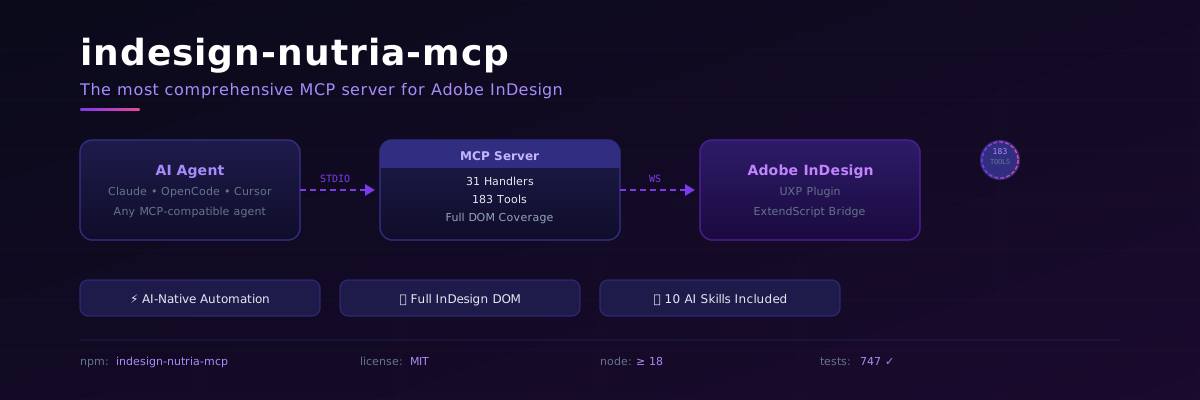
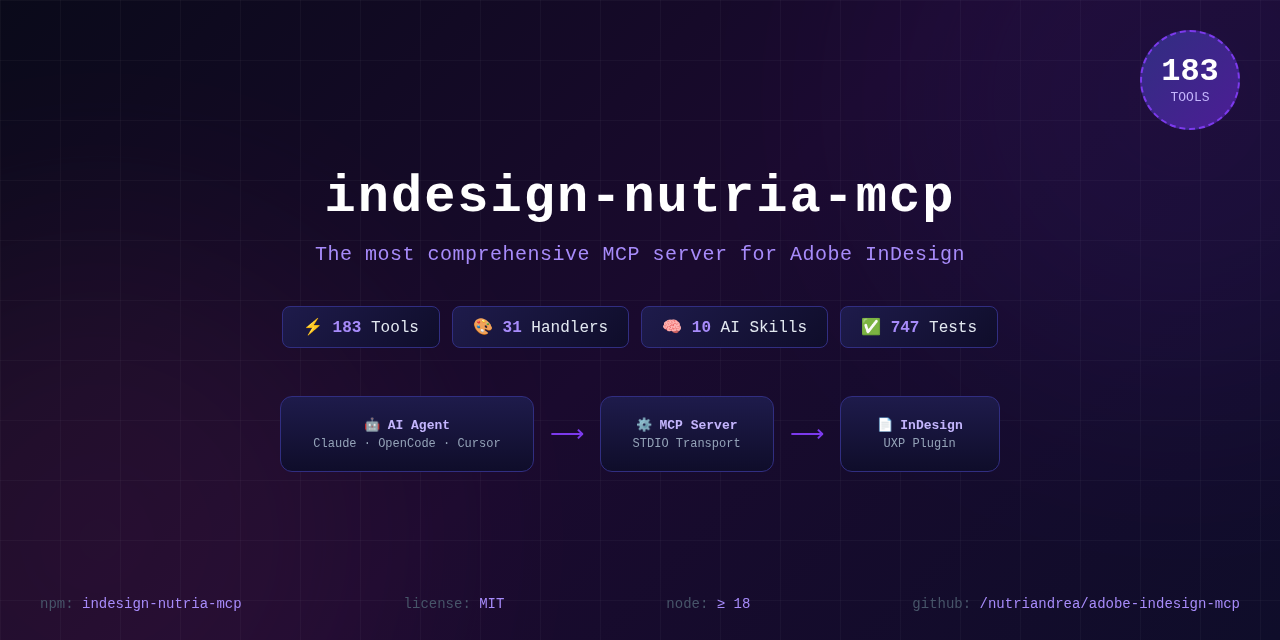
Say "Create an A4 document with 5 pages, add a red circle on page 3" — and it happens. The most comprehensive MCP server for Adobe InDesign. 198 tools. 34 handlers. Full DOM coverage.
⚡ Click for a quick demo · v1.1.0 release
> **Published to npm** as
> [`indesign-nutria-mcp`](https://www.npmjs.com/package/indesign-nutria-mcp).
> Your agent starts it with `npx -y indesign-nutria-mcp` — see
> [Quick Start](#-quick-start-30-seconds). InDesign still runs on your machine:
> the server reaches it over a local bridge, and nothing leaves the box.
---
## 🚀 Why This Exists
**InDesign automation has been broken for 20 years.** ExtendScript is ancient. CEP panels are over-engineered. UXP scripting requires a CS degree. You just want AI to do the layout.
This MCP server fixes that. Clone it, point your agent at it, and InDesign is
yours to drive like a puppeteer.
### 🆚 MCP vs The Old Ways
| | **MCP (this)** | **ExtendScript** | **CEP Panels** | **UXP Scripts** | **Manual** |
|---|---|---|---|---|---|
| **Learn in** | 30 seconds | 3 weeks | 2 months | 1 month | 0 (slow) |
| **AI-native** | ✅ Any MCP agent | ❌ | ❌ | ❌ | ❌ |
| **Tool count** | **198** | Unlimited (you write them) | 5-20 typical | 5-20 typical | ∞ (manual) |
| **Error messages** | Human-readable | Opaque crashes | Varies | Better | N/A |
| **Setup time** | 5 minutes | 10 minutes | 2 hours | 30 minutes | Instant |
| **Undo support** | ✅ Built-in | ❌ | Varies | ❌ | ✅ |
| **Search text** | `text_search("pattern")` | Write 50 lines | Maybe | Maybe | Ctrl+F |
| **Debug mode** | ✅ Stack traces | ❌ | Varies | Limited | N/A |
| **Remote control** | ✅ Anywhere STDIO works | ❌ InDesign-only | ❌ | ❌ | N/A |
| **Maintenance** | Zero (we handle 198 tools) | You write+test everything | Fragile | Fragile | N/A |
---
## ✨ What It Can Do
### 📝 Text & Typography (27 tools)
Create frames, set content, apply paragraph/character styles, control formatting, search with GREP, find/replace, apply fonts, set columns, insets, auto-size, vertical justification, drop caps, keep options, hyphenation, tabs, paragraph rules, text wrap, baseline, linking/unlinking.
### 🎨 Shapes & Objects (20 tools)
Rectangles, ellipses, polygons, lines, groups, anchored objects — create, modify, delete, list, arrange.
### 🖼️ Images (5 tools)
Place from disk, query metadata, fit/proportional, adjust brightness/contrast, relink.
### 🎭 Colors & Swatches (6 tools)
CMYK/RGB/LAB/spot swatches, ink list, gradients, apply to fill/stroke.
### 📄 Pages & Documents (15 tools)
Create, open, save, close, getInfo, listOpen — plus page add/delete/duplicate/move/getInfo/listAll/applyMaster, sections.
### 📊 Tables (20 tools)
Create, set cells, add/delete rows/columns, merge/split, alignment, fills, strokes, insets, header/footer, row/column sizing, table styles, cell styles.
### 🧬 Styles (10 tools)
Paragraph, character, object styles — create, list, duplicate, delete, apply.
### 🏗️ Masters & Books (10 tools)
Master spreads — create, duplicate, apply, delete, list, getPages. Books — list, open, getDocuments, synchronize.
### 📤 Export (9 tools)
PDF, EPUB, HTML, JPG, PNG, package — plus preflight, font/swatch/table lists, and `script_run()` for custom ExtendScript.
### 🔍 Find & Replace (5 tools)
GREP find/replace, format-aware find/replace.
### 🔄 Transform (5 tools)
Align, distribute, rotate, scale, flip.
### 🔗 Interactive (5 tools)
Hyperlinks, buttons, cross-reference anchors.
### 📚 References (10 tools)
Footnotes, endnotes, cross-references, index entries/topics/generation.
### 📋 Lists (6 tools)
Define, apply to paragraph/selection, remove, restart numbering.
### 🧩 XML & Data Merge (11 tools)
XML tags, import/export, data merge with CSV/TSV/XML sources.
### 🔧 Other
Layers, effects (drop shadow, feather, transparency), TOC, sections, undo/redo, undo groups.
---
## 🧠 Included AI Skills
Ten skills ship with the repo, auto-loaded by trigger keywords when you use any AI agent:
| # | Skill | What it does for you |
|---|---|---|
| 1 | **Aesthetic Preference** | Asks 8 questions before any creative work — font, palette, style, margins. Builds a persistent JSON profile. |
| 2 | **Layout Readability** | Validates overlays, contrast, orphans/widows, hierarchy, spacing, overflow before delivery. |
| 3 | **Export & Verify** | Mandatory modify → export JPG → analyze pixels → fix → repeat cycle. |
| 4 | **Import Word** | Imports `.docx`, maps Word styles to InDesign paragraph styles. |
| 5 | **Batch Operations** | Applies the same modification across N pages. |
| 6 | **Image Optimize** | Place, resize, DPI check, relink. Profiles for print (300dpi CMYK) vs web (72dpi RGB). |
| 7 | **Table Format** | Creates and styles tables — columns, rows, borders, fills, merge cells. |
| 8 | **Template Manager** | Save/load reusable page templates. |
| 9 | **Export Batch** | Export same document to multiple formats at once with different profiles. |
| 10 | **Style Extractor** | Scans `.indd` files, extracts full style profile (fonts, colors, styles, masters, margins) as JSON, replicates on new layout. |
---
## 🏗️ Architecture
```
┌─────────────────────┐ STDIO ┌──────────────────────┐ WebSocket ┌──────────────────┐
│ Any AI Agent │ ◄────────────────► │ indesign-nutria-mcp │ ◄───────────────► │ Adobe InDesign │
│ (Claude, OpenCode, │ │ (Node.js MCP Server) │ port 8120 │ + UXP Plugin │
│ Cursor, etc.) │ │ 34 handlers │ │ + ExtendScript │
└─────────────────────┘ │ 198 tools │ └──────────────────┘
│ 10 AI skills │
└──────────────────────┘
```
### Two ways to reach InDesign
The MCP protocol always speaks stdio. Only the last hop differs, and you pick
one per platform:
| | macOS | Windows |
|---|---|---|
| **With plugin** | UXP panel in `plugin/` | UXP panel in `plugin/` |
| **Without plugin** | `node bridge-proxy.mjs` (JXA/osascript) | `COM_BRIDGE_ENABLED=true` (in-process COM) |
Both are supported. The plugin is the richer path (it also emits change
events); the proxy exists for setups where you cannot or do not want to load a
UXP panel. See [WINDOWS.md](WINDOWS.md) for the Windows bridge and
`start-bridge.sh` for the macOS one.
> **Full breakdown:** the four macOS processes, the request lifecycle, the error
> contract and the trust boundaries are in
> [docs/architecture.md](docs/architecture.md).
### Full Handler Catalog
| Handler | Tools | Key Features |
|---------|-------|-------------|
| **AnchoredObject** | 5 | create, getSettings, release, setPosition, setProperties |
| **Book** | 4 | list, open, getDocuments, synchronize |
| **Changes** | 1 | getStatus — what changed since T?, without touching InDesign |
| **Color** | 6 | swatch CRUD, inks, gradients, apply |
| **DataMerge** | 5 | selectDataSource, listFields, mergeRecords, export, removeDataSource |
| **Document** | 9 | create/open/save/close, getInfo, listOpen, **getState**, **getPageStories, getStoryPages** |
| **Effect** | 4 | drop shadow, feather, transparency, gradient feather |
| **Export** | **11** | multi-format export, print packaging, batch folder, preflight, fonts/swatches/tables/masters/XML, **executeScript, script_run** |
| **Font** | 5 | list, find, change, missing check, glyph insert |
| **Grep** | 4 | find, replace, findFormat, replaceFormat |
| **Image** | 5 | place, info, adjust, fit, relink |
| **Index** | 4 | addEntry, createTopic, generate, listTopics |
| **Interactive** | 5 | hyperlinks, buttons, anchors |
| **Layer** | 5 | create, delete, list, reorder, setProperties |
| **List** | 6 | define, apply, remove, restart numbering |
| **Master** | 6 | create, duplicate, apply, delete, list, getPages |
| **Note** | 4 | footnotes, endnotes |
| **Object** | 6 | shapes, groups, image links |
| **Page** | 7 | add, delete, duplicate, move, getInfo, listAll, applyMaster |
| **Preview** | 1 | document — render a page as an image the agent can see |
| **Recipe** | 2 | flow a placed text story across pages, export with a named PDF preset — each in one undo group |
| **Resources** | 6 | list/update/embed/unembed links, getLinkInfo |
| **Section** | 4 | create, list, setNumbering, delete |
| **Shape** | 6 | rectangle/ellipse/line/polygon create, delete, modify |
| **Style** | 7 | paragraph/character/object styles CRUD |
| **Table** | 16 | create, cells, rows/columns, merge/split, alignment, fills, strokes, header/footer |
| **TableStyle** | 4 | tableStyle, cellStyle CRUD |
| **Text** | 7 | frames, content, stories, findReplace, **BOM filtering, timeout** |
| **TextAdvanced** | **20** | columns, wrap, links, drop caps, rules, tabs, **formatting read/write, search** |
| **Toc** | 4 | createStyle, generate, update, listStyles |
| **Transform** | 5 | align, distribute, rotate, scale, flip |
| **Undo** | **5** | undo, redo, history, **beginGroup, endGroup** |
| **Xml** | 6 | tags CRUD, tag/untag items, import/export |
| **Xref** | 3 | create, list, updateFormat |
| | **198** | 34 handlers, no duplicates |
`tests/contract/toolInventory.test.ts` pins this number, so the table cannot
drift from the code without failing CI.
Verified end-to-end against InDesign 2026 (21.3) on the plugin-free macOS path:
MCP stdio → WebSocket bridge → JXA proxy → InDesign, creating a document,
adding a text frame, reading it back, and closing.
> **Closing documents from an agent?** `document_close` defaults to
> `saveOptions: "no"` — the only value that cannot raise a modal dialog. `"ask"`
> opens a save prompt, and `"yes"` opens a **Save As** dialog for a document that
> was never saved; both block the script until the bridge times out. Save first
> with `document_save { filePath }`, then close.
### MCP Resources
| URI | What it gives you |
|---|---|
| `mcp://session/status` | Active document session state |
| `mcp://bridge/status` | WebSocket bridge health + queue depth |
| `mcp://tools/inventory` | Full 198-tool catalog for agent self-discovery |
| `mcp://document/active` | Currently active document info |
---
## 🎯 Use Cases
### 🏢 Agency Production
> "Create a 200-page catalog from this CSV. Product name in 14pt Arial Bold, price in 12pt Arial Regular, description in 10pt. Add a red 'SALE' badge on page 1, 50, 100, 150. Export as PDF."
### 📚 Book Publishing
> "Import this Word document. Map Heading 1 to 'Chapter Title' style, Normal to 'Body Text'. Add running headers with page numbers. Generate a TOC. Export to PDF with crop marks."
### 🎨 Creative Automation
> "Take this InDesign template and generate 50 variations with different colors and text from this spreadsheet. Export each as a separate PDF."
### 🏭 Print Production
> "Check all 200 files for missing fonts and broken links. Fix them. Export as PDF/X-1a."
### 🔄 Continuous Publishing
> "Every morning at 8am, update the daily newspaper template with fresh content from our CMS, preflight, and upload to the web server."
---
## ⚡ Quick Start (30 seconds)
Two halves: the **server** your agent runs — one line from npm, no clone and no
build — and the **bridge** that reaches InDesign on this machine.
### 1️⃣ Connect InDesign
The server listens on `127.0.0.1:8120`; something still has to drive InDesign.
Pick by platform:
**macOS — with the UXP panel** (also emits change events)
1. Open **UXP Developer Tool**
2. Load the `plugin/` directory — it ships in this repository, so clone it once:
`git clone https://github.com/nutriandrea/adobe-indesign-mcp` (no build step)
3. Open the **MCP Bridge** panel — it connects on its own
**macOS — without the panel**
```bash
git clone https://github.com/nutriandrea/adobe-indesign-mcp
cd adobe-indesign-mcp
npm install # gives the proxy its `ws` dependency; nothing to build
./start-bridge.sh # launches InDesign, then the JXA proxy
```
**Windows — no bridge process.** The COM bridge drives InDesign in-process, so
Windows needs neither the clone nor a second process; it is enabled by the env
var in the config you use in step 2 (see
[`examples/claude-desktop.windows.json`](examples/claude-desktop.windows.json)).
See [WINDOWS.md](WINDOWS.md) for the details and caveats.
### 2️⃣ Connect your AI agent
Both hosts start the same published package — nothing to clone, nothing to
build.
**Claude Desktop:**
```json
{
"mcpServers": {
"indesign": {
"command": "npx",
"args": ["-y", "indesign-nutria-mcp"]
}
}
}
```
**OpenCode** (project `opencode.json`, or the same block in
`~/.config/opencode/opencode.json`):
```json
{
"mcp": {
"servers": {
"indesign": {
"type": "local",
"command": ["npx", "-y", "indesign-nutria-mcp"]
}
}
}
}
```
On OpenCode the servers live under `mcp.servers`, not `mcpServers`, and the
command is an array — that is [the documented V2 shape](https://opencode.ai/v2/docs/mcp-servers).
Ready-made files for Claude Desktop, Cursor and Claude Code — including the
Windows COM variant — are in [`examples/`](examples/README.md). Each one is
copy-paste.
### 3️⃣ Start creating
```
🤖 "Create a landscape A3 document with 3 pages."
🤖 "Add a blue rectangle covering the top half of page 1."
🤖 "In the rectangle, add text 'Hello World' in white, Arial Bold 72pt."
🤖 "Export page 1 as JPG."
```
### 📝 Notes for MCP client developers
Building a custom client (script, harness, test runner) against this server? Two lessons from real-world integration:
| Pitfall | Fix |
|---------|-----|
| **Large responses arrive split across stdout chunks.** `preview_document` at 150ppi returns ~100+ KB of base64 — more than one pipe chunk. Parsing each `data` event with `JSON.parse(chunk)` silently drops the pieces and the call appears to hang forever. | Accumulate stdin into a buffer and only `JSON.parse` complete newline-delimited lines: `buf += chunk; while ((i = buf.indexOf('\n')) >= 0) { parse(buf.slice(0, i)); buf = buf.slice(i + 1); }` |
| **Image tools return `image` content, not `text`.** `preview_document` responds with `{ type: 'image', mimeType: 'image/png', data: '' }` — reading `.text` yields `undefined`. | Read the base64 payload from `content[0].data` (check `content[0].type`). |
Every message is a single-line JSON-RPC object terminated by `\n`; there is no framing beyond the newline.
---
## 🆕 What's New in v1.6.0
### Fixed
| ⚠️ | Read this before you script |
|---|---|
| **The layout skill named tools that do not exist** | `skills/indesign/indesign-mcp-layout/SKILL.md` advertised an `mcp_indesign_*` prefix the registry never used, and pointed connectivity checks at `health_check` and `list_ai_skills` — neither is registered by any handler. A skill is instruction, so naming a tool that does not resolve sends a model into a second failure on top of the one it was recovering from. |
| Change | What it means for you |
|--------|----------------------|
| **The skill names real tools now** | It points at the bare tool names the registry actually exposes, and documents the read-only resources (`mcp://bridge/status` and friends), which never touch InDesign and cost no round-trip. |
| **Skills are guarded like the instructions are** | `tests/unit/skillGuidance.test.ts` walks every `SKILL.md` under `skills/` and `marketplace/` and fails on a tool name the registry does not know — and on a skill whose frontmatter `name` disagrees with its folder. Regression-proven against the bug above. |
| **Marketplace counts are checked too** | `verify:tool-counts` now reads the markdown under `marketplace/`, so the number quoted to a buyer is checked alongside the README, `llms.txt` and the package description. |
### Added
| Change | What it means for you |
|--------|----------------------|
| **Client configs** | `examples/` holds copy-paste configs for Claude Desktop (macOS, and the Windows COM variant), Cursor and Claude Code, plus `examples/README.md`. |
| **Registry and bundle metadata** | `server.json` — generated from `package.json` and gated by `verify:server-json` — and `mcpb/manifest.json`, so the MCP Registry and an MCP Bundle can be published from the same release. |
| **Release automation** | `release.yml` takes a tag through `verify` and `verify:pack`, publishes to npm with provenance, builds the `.mcpb` and attaches it to the GitHub Release with the CHANGELOG notes. `publish-mcp-registry.yml` chains off the release, so the registry never advertises a version npm does not have. `validate-release-tag.sh` refuses a tag that disagrees with `package.json` or has no CHANGELOG section. |
| **A packaged companion skill** | `marketplace/agensi/` prepares the skill for a third-party marketplace, with `npm run build:agensi` asserting the archive shape the reviewer requires — one top-level folder, `SKILL.md` at its root, text files only. Like `mcpb/`, it does not ship to npm. |
v1.5.0
### For AI agents
| ⚠️ | Read this before you script |
|---|---|
| **Pass `document_id` — don't trust the front tab** | Every tool takes an optional `document_id`: a document name (as `document_listOpen` reports it) or a 0-based index. With more than one document open the front tab is **not** reliably the intended target, and a call that lands on the wrong document edits the wrong file. Call `document_getState`, then pass `document_id` on everything that follows. |
| Change | What it means for you |
|--------|----------------------|
| **`document_id` on every tool** | 198 tools, one extra optional parameter. Omit it and a tool acts on the front document — exactly the previous behaviour, so nothing you already send changes. |
| **A target that is not open fails loudly** | `document_id 'Gone.indd' is not open. Open documents: A.indd, B.indd`, classified `document_not_found` and suggesting `document_listOpen`. Previously the script silently edited whichever document happened to be frontmost. |
| **One shared resolver** | `app.activeDocument` was written inline in **197 places across 32 handlers**; `__resolveDocument()` is now injected with every script and every document-scoped handler resolves through it, so the target holds for the whole call — even if the front tab changes mid-script. |
| **Safe by construction** | `document_id` reaches InDesign as a JSON string literal and is matched by name, so it is never executable. It is bound per call in `AsyncLocalStorage`, so a call that awaits before dispatching cannot be hijacked by a concurrent one. |
### Changed
| Change | What it means for you |
|--------|----------------------|
| **The "pin the document" advice is now executable** | The connect-time contract used to tell the host to *ask which document was meant*. It now names `document_id` and how to pass it, and the shipped `indesign-mcp-layout` skill points at it too. |
v1.4.3
### For AI agents
| ⚠️ | Read this before you script |
|---|---|
| **Failures now tell you how to recover** | A failing call returns a JSON envelope `{ ok: false, code, message, suggested_next_tool?, suggested_args? }` instead of prose. Branch on `code`, and call `suggested_next_tool` when it is present rather than guessing. |
| **State before action** | `document_getState` returns the front document's geometry, its index, every open document, the active layer and the selection count in one round-trip. Call it before mutating instead of assembling that state from four separate calls. |
| **A recipe is one call, not a chain** | `recipe_flowTextStory` places a text file and flows it across pages; `recipe_exportPreset` applies a named PDF preset and exports. Measured live, the flow cost **1 call / 215 bytes** against **6 calls / 786 bytes** for the nearest atomic chain — which cannot place the text at all. |
| Change | What it means for you |
|--------|----------------------|
| **Structured error envelopes** | Sixteen failure classes, each with a `suggested_next_tool` checked against the live registry (a bad frame index suggests `document_getInfo`; a timeout suggests `document_listOpen`). ExtendScript errors carry `line`, `file` and `stack`. |
| **A workflow contract on connect** | The server advertises roughly 680 tokens of `instructions` — bridge bootstrap, state-before-action, the `document_close` save trap, the error-envelope shape and undo grouping. |
| **`document_getState`** | One round-trip replaces the `document_getInfo` + `document_listOpen` + layer + selection sequence. |
| **`preview_document` takes `documentIndex`** | Render any open document, not only the front one. Exports are capped at 4 MB and re-rendered once at a fitting resolution before failing with `output_too_large`. |
| **Two new recipes** | `recipe_flowTextStory` and `recipe_exportPreset`, bringing the catalog to 197. |
| **Opt-in success envelope** | `RESPONSE_ENVELOPE_SUCCESS` (or `responseEnvelope.success`) wraps successful results as `{ ok: true, ... }`, so a single key covers success and failure. **Off by default**, because it changes the response shape. |
| **A smaller, correct package** | A `files` allowlist replaces the `.npmignore` denylist: **1.6 MB unpacked**, down from 4.4 MB — and the `bridge-proxy.mjs` that the macOS launcher execs is now actually shipped. |
### Changed
| Change | What it means for you |
|--------|----------------------|
| **Error responses are JSON text** | The failure message is preserved verbatim inside the envelope; `isError: true` is unchanged. |
| **`document_close` defaults `saveOptions` to `"no"`** | `"ask"` raised a modal save dialog that blocked until the bridge timed out and could leave InDesign wedged; `"no"` cannot prompt. Call `document_save` first when you want the work kept. |
### Fixed
| Fix | What it means |
|-----|---------------|
| **Every call after `undo_beginGroup` failed** | `wrapExtendScript` set `app.scriptPreferences.undoMode`, a property InDesign does not have. Undo groups now run through `app.doScript(..., UndoModes.ENTIRE_SCRIPT)`. |
| **`undo`, `redo` and `undo_history` threw on every call** | They read `document.undoable` / `document.redoable`, which are not part of the DOM. |
| **The server reported itself as v1.0.0** | Four releases after v1.0.0 it advertised the old literal on `initialize`. `SERVER_VERSION` is now the single source of truth, and two gates keep it honest. |
v1.4.2
### For AI agents
| ⚠️ | Read this before you script |
|---|---|
| **Prefer the typed tools** | `export_executeScript` and `script_run` have **no cancellation**. A hung script leaves the bridge busy and every later call queues behind it until the host restarts. Loops, font enumeration and multi-mutation probes belong in the typed tools, which validate arguments and time out. See [skills/indesign/indesign-mcp-layout](skills/indesign/indesign-mcp-layout/SKILL.md). |
| Change | What it means for you |
|--------|----------------------|
| **The bridge protocol is now canonical** | Responses are `{ type: 'result', id, result }` or `{ type: 'error', id, error }`. Legacy `success`/`response` types are still accepted on input, but an unknown type with a valid `id` is now an explicit error instead of a silently resolved promise. |
| **Plugin-free macOS setup** | `start-bridge.sh` launches InDesign and the JXA proxy — no UXP panel to load. |
| **The JXA proxy no longer blocks or corrupts** | Scripts reach `osascript` through a temp file instead of shell-quoted `-e` strings, and execution is asynchronous with a FIFO queue. A script containing a quote, backslash or newline can no longer be mangled, and the MCP server keeps answering while InDesign works. |
| **Configurable InDesign version** | `INDESIGN_APP` replaces the hardcoded "Adobe InDesign 2024" process name. |
| **The panel connects itself** | The MCP Bridge panel connects on open, so there is no Connect click to miss. |
| **InDesign 2026 anchoring** | Creating an anchored object no longer depends on `move()`, which 2026 rejects for insertion-point targets. |
| **The shipped config starts everywhere** | It declared the wrong MCP transport and would have aborted startup on macOS and Linux had it enabled the Windows COM bridge. Both are now covered by a test. |
v1.4.0
| Change | What it means for you |
|--------|----------------------|
| **Agent vision: `preview_document`** | Render any page as an image the agent can actually see — layout mistakes get caught in the loop, not after export. |
| **Batch PDF: `export_batchFolder`** | Export every `.indd` in a folder to PDF in one call, with per-file results. |
| **Windows COM bridge** | Run with zero plugins via `COM_BRIDGE_ENABLED=true`. See [WINDOWS.md](WINDOWS.md). |
| **Hardened file paths** | Every file-touching tool validates paths up front — traversal attempts (`..`) and system directories are rejected before InDesign ever sees them (now 11 guarded call sites). |
v1.3.0
| Change | What it means for you |
|--------|----------------------|
| **InDesign 2026 ready** | Color and anchored-object tools work on 2026's renamed enums — no more silent failures after upgrading. |
| **Real env var config** | Every setting in `.env.example` is now honored: `BRIDGE_PORT`, `HTTP_BRIDGE_ENABLED`, `LOG_LEVEL`, … Invalid values never block startup. |
| **No more 30s hangs** | If the plugin isn't connected, tool calls fail instantly with "Bridge is not connected" instead of timing out. |
| **One escaping path** | All handlers share a single battle-tested ExtendScript string escaper. |
| **Hardened path validation** | File-path checks now use true containment (no prefix-collision escapes). |
| **Honest status** | `getStatus().connected` reflects actual plugin connectivity, and CI enforces coverage gates. |
What's New in v1.1.0
| Feature | Tools | What it solves |
|---------|-------|----------------|
| **Text formatting read** | `text_getFormatting` | Get font/size/style per text range. No more custom scripts. |
| **Character style apply** | `text_applyCharStyle` | Apply to a range in one call. |
| **Font apply** | `text_applyFont` | Apply font family/style/size to a range. |
| **Text search** | `text_search`, `text_searchFormatting` | GREP + format-aware search with paragraph-relative positions. |
| **Story→Page map** | `document_getPageStories`, `document_getStoryPages` | Which stories are on which pages. |
| **Undo groups** | `undo_beginGroup`, `undo_endGroup` | Group operations into one undo step. |
| **Debug mode** | `script_run(code, debug=true)` | Full ExtendScript stack traces. |
| **BOM filtering** | Text reads | `\ufeff` and `\u0004` filtered by default. |
| **Timeout/maxResults** | `text_getStories`, etc. | Custom limits for large documents. |
| **MCP resources** | `mcp://tools/inventory` | Agent auto-discovers all tools. |
---
## ⚙️ Configuration
All settings have defaults — zero config required. To customize, copy `.env.example` to `.env` or pass a JSON file; environment variables win over the file:
```bash
BRIDGE_PORT=8120 # WebSocket port the UXP plugin connects to
HTTP_BRIDGE_ENABLED=false # optional REST fallback bridge
HTTP_BRIDGE_PORT=3000
SERVER_TRANSPORT=stdio # stdio | websocket
LOG_LEVEL=info # debug | info | warn | error
COM_BRIDGE_ENABLED=false # Windows only: drive InDesign over COM, no plugin
RESPONSE_ENVELOPE_SUCCESS=false # wrap successful results as { ok: true, ... }
```
The plugin-free macOS proxy takes its own variables:
```bash
INDESIGN_APP="Adobe InDesign 2026" # matches your installed version
BRIDGE_WS_URL=ws://127.0.0.1:8120
BRIDGE_TIMEOUT_MS=120000 # a long export is not a hang
BRIDGE_RECONNECT_DELAY_MS=3000
```
Precedence: **environment variables > JSON config file > defaults**. Invalid values are ignored, never fatal.
---
## 🪟 Windows
Two ways to run on Windows: the standard UXP plugin flow (identical to macOS) or the new opt-in **COM bridge** that needs no plugin at all. See [WINDOWS.md](WINDOWS.md).
---
## 📦 Project Structure
```
├── src/
│ ├── server/ # MCP server (STDIO transport)
│ ├── bridge/ # WebSocket bridge, ScriptExecutor, protocol, COM executor
│ ├── handlers/ # 34 handler modules (198 tools)
│ ├── schemas/ # Zod parameter schemas
│ ├── core/ # Session tracking
│ ├── types/ # TypeScript definitions
│ └── utils/ # Config, logger, security, JSON polyfill
├── plugin/ # UXP panel (index.html, index.js, manifest.json)
├── examples/ # Copy-paste client configs (Claude Desktop, Cursor, Claude Code)
├── mcpb/ # MCP Bundle manifest (npm run build:mcpb packs the archive)
├── server.json # MCP Registry manifest (generated from package.json)
├── llms.txt # llms.txt index for agents and directories
├── bridge-proxy.mjs # Plugin-free macOS proxy (JXA/osascript)
├── jxa-driver.js # Runs one ExtendScript inside InDesign
├── start-bridge.sh # Launches InDesign + the proxy
├── skills/ # Agent-facing skills shipped with the server
├── marketplace/ # Store listings that package a skill for third-party channels
├── tests/ # 1131 tests (vitest)
├── .opencode/skills/ # 10 AI agent skills
├── docs/ # Documentation and fork audits
├── media/ # Social preview, hero images
├── dist/ # Compiled output
└── opencode.json # MCP configuration
```
---
## 📋 Requirements
| Requirement | Version |
|-------------|---------|
| **Adobe InDesign** | 2022+ (2024/2025/2026 recommended) |
| **Node.js** | 18+ |
| **OS** | macOS or Windows (Linux can run the MCP server, but no InDesign automation path exists there) |
---
## 🧪 Development
```bash
npm test # Run 1131 tests
npm run test:watch # Watch mode
npm run build # TypeScript compile
npm run lint # ESLint
```
### Live smoke test (macOS)
```bash
npm run smoke:macos
```
`npm test` covers the handlers, the protocol and the startup sequence, but it
cannot see the seams between the four separate processes on the plugin-free
macOS path. That gap is not hypothetical: 965 tests once passed against a build
whose bridge never listened on its port, so every tool call failed in the field
and nothing went red.
`smoke:macos` drives the real chain — MCP stdio → WebSocket bridge → JXA proxy →
InDesign — against a running InDesign, creating a document, writing to it,
reading it back, and closing it. It creates one unsaved document and cleans up
after itself. It needs a desktop app, so it is not part of `npm test` and does
not run on CI; it exits 0 with a SKIP notice if InDesign is not open.
Run it by hand before releasing a change to the bridge, the protocol, the proxy
or the driver.
```bash
npm run smoke:recipes # the live gate for the two recipes
```
`smoke:recipes` does what the unit tests cannot: it flows a long text file with
`recipe_flowTextStory`, checks the document grew by exactly what the tool
reported, calls `undo` **once** to confirm the whole flow is a single undo step,
then exercises both preset paths of `recipe_exportPreset`. Same rules as above —
needs a desktop app, exits 0 with a SKIP notice when InDesign is closed.
```bash
npm run smoke:target # the live gate for document_id
```
`smoke:target` opens **two** documents and proves the thing `document_id` is for:
a call that names the non-front document edits *that* document and leaves the
front one alone. It then checks index targeting, that omitting `document_id`
still acts on the front document (the additive guarantee), that an unopened
target arrives as a `document_not_found` envelope suggesting `document_listOpen`,
and that a hostile `document_id` is inert rather than executed. It closes only
the documents it created, never saves, and leaves every pre-existing document
untouched. Same rules as above — needs a desktop app, exits 0 with a SKIP notice
when InDesign is closed.
---
## 🗺️ Roadmap
- [ ] **InDesign Server** — headless server support for CI/CD pipelines
- [ ] **Live preview** — stream InDesign canvas to agent
- [ ] **Template marketplace** — share and discover InDesign templates
- [ ] **Natural language → layout** — describe a page, get a page
- [ ] **Batch PDF processing** — apply changes across hundreds of files
- [ ] **VSCode extension** — control InDesign from your editor
---
## 📚 Deep Dives
- [Architecture](docs/architecture.md) — the four-process macOS path, request lifecycle, error contract
- [Available tools](docs/available-tools.md) — every tool, generated from the registry
- [Troubleshooting](docs/troubleshooting.md) — modal hangs, port conflicts, missing fonts, blocked scripts
- [Development](docs/development.md) — build, test, and the live smoke test
- [Origin Story](docs/origin.md) — how this project came to life
- [Comparison docs](docs/comparison.md) — MCP vs CEP vs ExtendScript in depth
- [Launch thread](docs/launch-thread.md) — social launch content
---
## 🤝 Contributing
PRs welcome! The handler pattern is designed to be simple:
1. Create `src/handlers/YourHandler.ts`
2. Define tools with Zod schemas
3. Register in `IndesignMcpServer.ts`
4. Add tests
Check [CONTRIBUTING.md](CONTRIBUTING.md) for details.
---
## 🙏 Acknowledgements
This server is a merge of what four people found in the field. Each of these
contributions fixed something that was genuinely broken, not a cosmetic
preference.
- **[@graydini](https://github.com/graydini)** — built the Windows COM bridge
that this project runs on today: a persistent `cscript` process holding one
live COM connection, `NEVER_INTERACT` so export dialogs can never block, and
the path-containment hardening in `validateFilePath`.
See [PR #1](https://github.com/nutriandrea/adobe-indesign-mcp/pull/1) and the
[PR #21](https://github.com/nutriandrea/adobe-indesign-mcp/pull/21) merge.
Also reported the InDesign 2026 API incompatibilities that shaped official
Windows support: renamed and read-only `ColorModel` and `AnchorPoint` enums,
and `move()` no longer accepting `InsertionPoint` targets. Earlier fixes from
the same line of work landed on `main` as safe `basedOn`/`pointSize` reads in
style listing, rich style-creation parameters, `\n` → paragraph-break
normalization in text content, and an `eval`-free JSON polyfill that survives
the ExtendScript sanitizer.
Their branch also carried COM-specific operational knowledge — that a hung
script wedges the Windows bridge with no way out, that `fontFamily`,
`italic` and `weight` throw under COM, and that InDesign must be visibly
running — now documented in
[WINDOWS.md](WINDOWS.md) and the layout skill. A file-by-file audit of what
was still unmerged is in
[docs/forks/graydini-windows-com-bridge-audit.md](docs/forks/graydini-windows-com-bridge-audit.md).
- **[@advaitakelkar](https://github.com/advaitakelkar)** — diagnosed why the
macOS proxy returned junk, in
[PR #22](https://github.com/nutriandrea/adobe-indesign-mcp/pull/22). Three
real bugs in one report: `osascript` sends script *results* on **stderr**, so
every successful call was read as a failure; the script was passed through
shell `-e` quoting, which mangles any quote, backslash or newline; and the
app name was hardcoded to "Adobe InDesign 2024", so every other version
failed. The same work also moved the connection handshake out of
`app.doScript`, where it was being parsed as ExtendScript. Adopted and
extended — see [What's New in v1.4.2](CHANGELOG.md#142---2026-09-27).
- **[@ijeetu](https://github.com/ijeetu)** — two fixes, both easy to miss and
both real. The MCP Bridge panel now connects on open instead of waiting for
a Connect click, so the panel no longer looks dead when the server is
already running. Earlier, they traced a parse failure in the JSON polyfill to
`sanitizeCode()` rewriting `eval(` into a comment and orphaning the
parentheses — the shipped `wrapExtendScript` already reflects that fix.
---
## 📄 License
MIT © Andrea Cacioppo
---
Made with ❤️ for designers who code and AI agents who design. GitHub ·
Issues ·
Contributing