# Video2World Post-training for DreamGen Bench
This guide provides instructions on running post-training with Cosmos-Predict2 Video2World models.
## Table of Contents
- [Prerequisites](#prerequisites)
- [Preparing Data](#1-preparing-data)
- [Post-training](#2-post-training)
- [Inference with the Post-trained checkpoint](#3-inference-for-gr00t-dreams-checkpoints)
- [Inference for DreamGen Benchmark](#4-inference-for-dreamgen-benchmark)
## Prerequisites
Before running training:
1. **Environment setup**:
- Follow the [Setup guide](setup.md) for installation instructions.
- For user who want to run the command in https://github.com/nvidia/GR00T-dreams, after setup the environment, run the following command to install extra dependencies:
```bash
# If use Docker and see ERROR: Cannot install httpcore==1.0.7 because these package versions have conflicting dependencies
# The following command may help resolve the package version conflict:
# grep -v "^h11==" /etc/pip/constraint.txt > /etc/pip/constraint_new.txt && mv /etc/pip/constraint_new.txt /etc/pip/constraint.txt
# grep -v "^httpcore==" /etc/pip/constraint.txt > /etc/pip/constraint_new.txt && mv /etc/pip/constraint_new.txt /etc/pip/constraint.txt
pip install openai tyro numpydantic albumentations tianshou git+https://github.com/facebookresearch/pytorch3d.git
```
2. **Model checkpoints**: Download required model weights following the [Downloading Checkpoints](setup.md#downloading-checkpoints) section in the Setup guide.
3. **Hardware considerations**: Review the [Performance guide](performance.md) for GPU requirements and model selection recommendations.
Example of the training data for the GR1 and DROID models:
| Dataset | Model Weight | Text prompt | Training video |
|-------------|--------------|--------------|-------------|
| GR1 | [🤗 Huggingface](https://huggingface.co/nvidia/Cosmos-Predict2-14B-Sample-GR00T-Dreams-GR1) | Use the left hand to pick up red milk carton from teal bowl to pink plate. | |
| DROID | [🤗 Huggingface](https://huggingface.co/nvidia/Cosmos-Predict2-14B-Sample-GR00T-Dreams-DROID) | A multi-view video shows that a robot put the marker on the table The video is split into four views: The top-left view shows the robotic arm from the left side, the top-right view shows it from the right side, the bottom-left view shows a first-person perspective from the robot's end-effector (gripper), and the bottom-right view is a black screen (inactive view). The robot put the marker on the table | |
## 1. Preparing Data
### 1.1 Download DreamGen Bench Training Dataset
For training on the robotic training datasets from the DreamGen paper, please use the following command to download the GR1 training dataset from https://huggingface.co/datasets/nvidia/GR1-100
under `cosmos-predict2/` folder, run:
```
# This command will download the videos for physical AI
huggingface-cli download nvidia/GR1-100 --repo-type dataset --local-dir datasets/benchmark_train/hf_gr1/ && \
mkdir -p datasets/benchmark_train/gr1/videos && \
mv datasets/benchmark_train/hf_gr1/gr1/*mp4 datasets/benchmark_train/gr1/videos && \
mv datasets/benchmark_train/hf_gr1/metadata.csv datasets/benchmark_train/gr1/
```
### 1.2 Preprocessing the Data
Run the following command to pre-compute T5-XXL embeddings for the video captions used for post-training:
```bash
# The script will use the provided prompt, save the T5-XXL embeddings in pickle format.
python -m scripts.get_t5_embeddings_from_groot_dataset --dataset_path datasets/benchmark_train/gr1
```
Dataset folder format:
```
datasets/benchmark_train/gr1/
├── metas/
│ ├── *.txt
├── videos/
│ ├── *.mp4
├── t5_xxl/
│ ├── *.pickle
```
## 2. Post-training
#### Cosmos-Predict2-2B-Video2World
Run the following command to execute an example post-training job with `GR1` data.
```bash
EXP=predict2_video2world_training_2b_groot_gr1_480
torchrun --nproc_per_node=8 --master_port=12341 -m scripts.train --config=cosmos_predict2/configs/base/config.py -- experiment=${EXP}
```
The model will be post-trained using the `GR1` dataset.
See the config `predict2_video2world_training_2b_groot_gr1_480` defined in `cosmos_predict2/configs/base/experiment/groot.py` to understand how the dataloader is defined.
```python
# GROOT example
example_video_dataset_gr1 = L(Dataset)(
dataset_dir="datasets/benchmark_train/gr1",
num_frames=93,
video_size=(432, 768),
)
dataloader_train_gr1 = L(DataLoader)(
dataset=example_video_dataset_gr1,
sampler=L(get_sampler)(dataset=example_video_dataset_gr1),
batch_size=1,
drop_last=True,
num_workers=8,
pin_memory=True,
)
```
The checkpoints will be saved to `checkpoints/PROJECT/GROUP/NAME`.
In the above example, `PROJECT` is `posttraining`, `GROUP` is `video2world`, `NAME` is `2b_groot_gr1_480`.
See the job config to understand how they are determined.
```python
predict2_video2world_training_2b_groot_gr1_480 = dict(
dict(
...
job=dict(
project="posttraining",
group="video2world",
name="2b_groot_gr1_480",
),
...
)
)
```
The checkpoints will be saved in the below structure.
```
checkpoints/posttraining/video2world/2b_groot_gr1_480/checkpoints/
├── model/
│ ├── iter_{NUMBER}.pt
├── optim/
├── scheduler/
├── trainer/
├── latest_checkpoint.txt
```
#### Cosmos-Predict2-14B-Video2World
Run the following command to execute an example post-training job with `GR1` data with 4 nodes with 8 GPUs.
```bash
EXP=predict2_video2world_training_14b_groot_gr1_480
NVTE_FUSED_ATTN=0 torchrun --nproc_per_node=8 --nnodes=4 --rdzv_id 123 --rdzv_backend c10d --rdzv_endpoint $MASTER_ADDR:1234 \
-m scripts.train --config=cosmos_predict2/configs/base/config.py -- experiment=${EXP}
```
* Optionally, you could load the `Cosmos-Predict2-14B-Video2World-GR00T-Dreams-GR1` checkpoint for initialization, by appending `model.config.model_manager_config.dit_path=checkpoints/nvidia/Cosmos-Predict2-14B-Video2World-Sample-GR00T-Dreams-GR1/model-480p-16fps.pt` to the above command.
## 3. Inference for GR00T Dreams Checkpoints
checkout [inference_video2world.md](inference_video2world.md) for more examples of how to use the inference script.
* Inference with GR1 checkpoint
```bash
torchrun --nproc_per_node=8 --master_port=12341 \
-m examples.video2world_gr00t \
--model_size 14B \
--gr00t_variant gr1 \
--prompt "Use the right hand to pick up rubik\'s cube from from the bottom of the three-tiered wooden shelf to to the top of the three-tiered wooden shelf." \
--input_path assets/sample_gr00t_dreams_gr1/8_Use_the_right_hand_to_pick_up_rubik\'s_cube_from_from_the_bottom_of_the_three-tiered_wooden_shelf_to_to_the_top_of_the_three-tiered_wooden_shelf..png \
--num_gpus 8 \
--prompt_prefix "" \
--save_path output/generated_video_gr1.mp4 \
```
* Inference with DROID checkpoint
```bash
torchrun --nproc_per_node=8 --master_port=12341 \
-m examples.video2world_gr00t \
--model_size 14B \
--gr00t_variant droid \
--prompt "A multi-view video shows that a robot pick the lid and put it on the pot The video is split into four views: The top-left view shows the robotic arm from the left side, the top-right view shows it from the right side, the bottom-left view shows a first-person perspective from the robot's end-effector (gripper), and the bottom-right view is a black screen (inactive view). The robot pick the lid and put it on the pot" \
--input_path assets/sample_gr00t_dreams_droid/episode_000408.png \
--prompt_prefix "" \
--num_gpus 8 \
--save_path output/generated_video_droid.mp4
```
Example of the inference output:
| Checkpoint | Text prompt | Input Image | Training video |
|-------------|--------------|--------------|--------------|
| GR1 | Use the right hand to pick up rubik's cube from from the bottom of the three-tiered wooden shelf to to the top of the three-tiered wooden shelf. |  | |
| DROID | A multi-view video shows that a robot pick the lid and put it on the pot The video is split into four views: The top-left view shows the robotic arm from the left side, the top-right view shows it from the right side, the bottom-left view shows a first-person perspective from the robot's end-effector (gripper), and the bottom-right view is a black screen (inactive view). The robot pick the lid and put it on the pot | 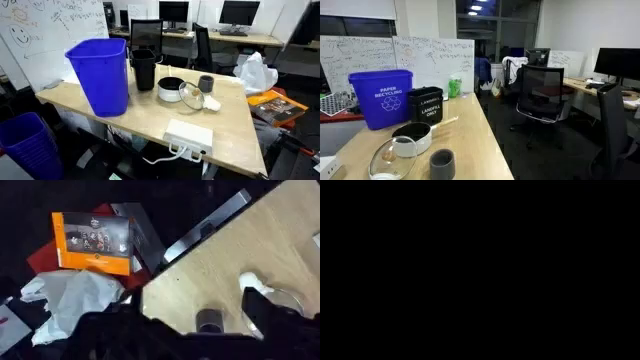 | |
## 4. Inference for DreamGen Benchmark
### 4.1 Download the DreamGen Benchmark dataset
* The following command will download the DreamGen Benchmark dataset from https://huggingface.co/datasets/nvidia/EVAL-175
```
huggingface-cli download nvidia/EVAL-175 --repo-type dataset --local-dir dream_gen_benchmark
```
### 4.2 Prepare batch input json
```bash
python -m scripts.prepare_batch_input_json \
--dataset_path dream_gen_benchmark/gr1_object/ \
--save_path output/dream_gen_benchmark/cosmos_predict2_14b_gr1_object/ \
--output_path dream_gen_benchmark/gr1_object/batch_input.json
```
### 4.3 Inference
```bash
python -m examples.video2world_gr00t \
--model_size 14B \
--gr00t_variant gr1 \
--batch_input_json dream_gen_benchmark/gr1_object/batch_input.json \
--disable_guardrail
```
* Note: For full evaluation without missing videos, it's better to turn off the guardrail checks (add `--disable_guardrail` to the command) to make sure all the videos are generated.
* See [documentations/inference_video2world.md](./inference_video2world.md) for inference run details.
## 5. Inference with Cosmos-Reason1 Rejection Sampling
checkout [inference_video2world.md](inference_video2world.md) and [Cosmos-Reason1 video critic instruction](https://github.com/nvidia-cosmos/cosmos-reason1/blob/main/examples/video_critic/README.md) for more examples on how to improve video quality using Cosmos-Reason1's video critic capability. Refer to [API Documentation](inference_video2world.md#rejection-sampling-video2world_bestofnpy) for detailed usage of `video2world_bestofn.py`.
* Inference with GR1 checkpoint and rejection sampling
```bash
torchrun --nproc_per_node=8 --master_port=12341 \
-m examples.video2world_bestofn \
--model_size 14B \
--gr00t_variant gr1 \
--prompt "Use the right hand to pick up rubik\'s cube from from the bottom of the three-tiered wooden shelf to to the top of the three-tiered wooden shelf." \
--input_path assets/sample_gr00t_dreams_gr1/8_Use_the_right_hand_to_pick_up_rubik\'s_cube_from_from_the_bottom_of_the_three-tiered_wooden_shelf_to_to_the_top_of_the_three-tiered_wooden_shelf..png \
--num_gpus 8 \
--num_generations 4 \
--prompt_prefix "" \
--disable_guardrail \
--save_path output/best-of-n-gr00t-gr1
```