
[](https://github.com/observIQ/stanza/actions)
[](https://github.com/observIQ/stanza/actions)
[](https://codecov.io/gh/observIQ/stanza)
[](https://goreportcard.com/report/github.com/observIQ/stanza)
[](https://github.com/observIQ/stanza/license)
[](https://github.com/observIQ/stanza/actions/workflows/gosec.yml)
# About Stanza
Stanza is a fast and lightweight log transport and processing agent. It's designed as a modern replacement for Fluentd, Fluent Bit, and Logstash and can run as a standalone agent on all major operating systems. Stanza is also highly integrated to perform seamlessly with the applications in Google Cloud Platform (GCP) based production environments.
## OpenTelemetry
Stanza has been contributed to the [OpenTelemetry](https://opentelemetry.io/) project and will be intergrated into the [OpenTelemetry collector](https://github.com/open-telemetry/opentelemetry-collector).
# Features
- Flexible
- Supports many different input types such as file, journald, windows events, tcp / udp, and external APIs (cloudwatch, azure log analytics) as well as parsing with json and regex.
- Easily extended by writing an "operator" or "plugin" which is just a unit of code that performs a task such as reading data from a source, parsing data, or shipping data.
- Pre-built Plugins
- Over 80 Plugins have been pre-built and are ready to be configured.
- Lightweight with low resource consumption
- Uses next to no resource while idling. It does not pollute the system with tons of clutter, it exists strictly in /opt/observiq/stanza with just a few files.
- Written in pure Go
- Everything is self contained into a single binary, there are no external dependencies.
- High Performance
- Stanza is lightweight, blazing-fast, and designed to scale.
## Supported [Plugins](https://github.com/observIQ/stanza-plugins)
Utilize Plugins to get up and running quickly. Here's a quick list of Stanza's most popular plugins:
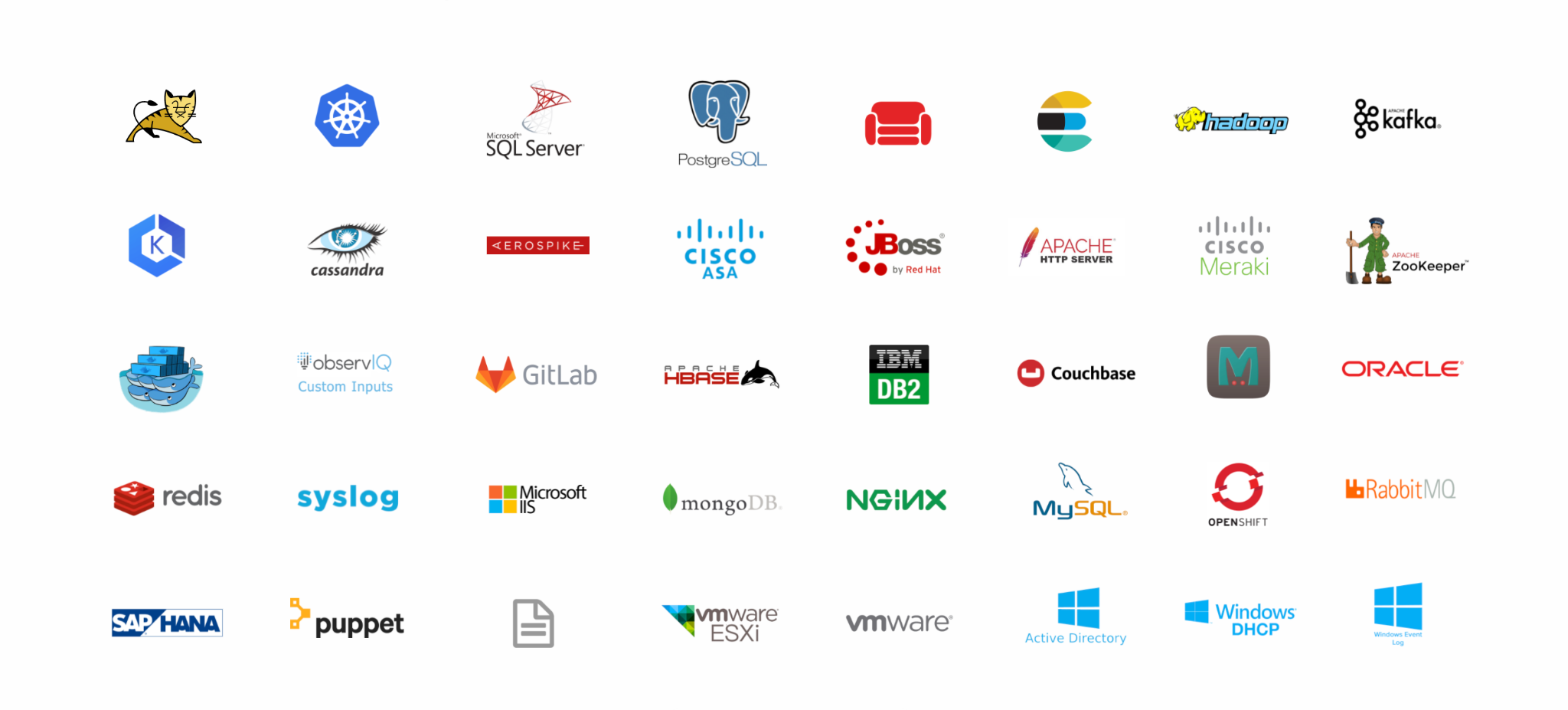
These are many of the Plugins supported by Stanza, with more being developed all the time. View a full list of Plugins [here](https://github.com/observIQ/stanza-plugins/tree/main/plugins).
## Supported Operating Systems
### Windows
- 2012
- 2012 r2
- 2016
- 2019
- 2022
### Linux
- Ubuntu 16.04, 18.04, 20.04
- Debian 9, 10, 11
- Alma, Rocky 8
- Red Hat 7, 8
- Suse 12, 15
- CentOS 7, 8 Stream
### MacOS
- 12 (Monterey)
- 11 (Big Sur)
- 10.15 (Catalina)
- 10.14 (Mojave)
# Quick Start
## Installation
### Linux Package Manager
Linux packages are available for the following Linux Distributions:
- RHEL / CentOS 7 and 8
- Oracle Linux 7 and 8
- Alma, Rocky Linux
- Fedora 30 and newer
- Debian 9 and newer
- Ubuntu LTS 16.04 and newer
Once installed, Stanza will be running under a systemd service named `stanza` as the user `stanza`.
#### RPM Install
On Red Hat based platforms, Stanza can be installed with:
```bash
sudo dnf install https://github.com/observIQ/stanza/releases/download/v1.6.1/stanza_1.6.1_linux_amd64.rpm
sudo systemctl enable --now stanza
```
On RHEL / Centos 7, use `yum` instead of `dns`.
On Suse based platforms, Stanza can be installed with:
```bash
sudo zypper install https://github.com/observIQ/stanza/releases/download/v1.6.1/stanza_1.6.1_linux_amd64.rpm
sudo systemctl enable --now stanza
```
Be sure to replace the URL with the version you require. You can find Stanza versions [here](https://github.com/observIQ/stanza/releases).
#### DEB Install
On Debian / Ubuntu based platforms, Stanza can be installed with:
```bash
curl -L -o stanza.deb https://github.com/observIQ/stanza/releases/download/v1.6.1/stanza_1.6.1_linux_amd64.deb
sudo apt-get install -f ./stanza.deb
sudo systemctl enable --now stanza
```
#### Changing the Runtime User
Sometimes it may be nessisary to have Stanza run as `root`. This can be
accomplished by creating a systemd override.
Run `sudo systemctl edit stanza` and paste:
```
[Service]
User=root
Group=root
```
Restart Stanza: `sudo systemctl restart stanza`.
### Linux / macOS Script
- Single command install, requires the `curl` command
- Stanza will automatically be running as a service
- On Linux, Stanza will be running as the `root` user. On Macos, Stanza will be running as your current user.
- `sudo` is always required for Linux installations while macOS requires it if the invoking user does not have write permissions to `/usr/local/bin`.
```shell
sh -c "$(curl -fsSlL https://github.com/observiq/stanza/releases/latest/download/unix-install.sh)" unix-install.sh
```
### Windows Script
```pwsh
[Net.ServicePointManager]::SecurityProtocol = [Net.SecurityProtocolType]::Tls12 ; Invoke-Expression ((New-Object net.webclient).DownloadString('https://github.com/observiq/stanza/releases/latest/download/windows-install.ps1')); Log-Agent-Install
```
### Kubernetes
To deploy Stanza to Kubernetes, AKS, EKS, GKE or Openshift check out the installation guides [here](/docs/examples/k8s).
## Configuration
To get started navigate to the `config.yaml` file in the Stanza install directory, located in the following locations by default:
- Linux: `/opt/observiq/stanza`
- MacOS: `/Users//observiq/stanza`
- Windows: `C:\observiq\stanza`
You can utilize [operators](/docs/operators/README.md) and [plugins](/docs/plugins.md) in a pipeline to easily configure Stanza to ship logs to your target destination.
Stanza also offers several outputs to be configured for sending data, including:
- [Stdout](/docs/operators/stdout.md)
- [File](/docs/operators/file_output.md)
- [Google Cloud Logging](/docs/operators/google_cloud_output.md)
In the below examples, Stanza is configured to ship logs to Google Cloud logging using the file_input operator, and the MySQL plugin. You will need to have a `credentials.json` for your GCP environment which can be generated by following Google's documentation [here](https://cloud.google.com/iam/docs/creating-managing-service-account-keys).
### Operators
This `config.yaml` collects logs from a file and sends them to Google Cloud. A full list of available operators can be found [here](/docs/operators/README.md).
```yaml
pipeline:
# An example input that monitors the contents of a file.
# For more info: https://github.com/observIQ/stanza/blob/master/docs/operators/file_input.md
- type: file_input
include:
- /sample/file/path.log
# An example output that sends captured logs to Google Cloud.
# For more info: https://github.com/observIQ/stanza/blob/master/docs/operators/google_cloud_output.md
- type: google_cloud_output
credentials_file: /tmp/credentials.json
```
### Plugins
This `config.yaml` collects logs from MySQL via a plugin and sends them to Google Cloud. By default, MySQL plugin collects general, slow query, and error logs. More details of the MySQL plugin can be viewed [here](https://github.com/observIQ/stanza-plugins/blob/main/plugins/mysql.yaml). A full list of available plugins can be found [here](https://github.com/observIQ/stanza-plugins/blob/main/plugins/).
```yaml
pipeline:
# An example input that configures a MySQL plugin.
# For more info: https://github.com/observIQ/stanza/blob/master/docs/plugins.md
- type: mysql
enable_general_log: true
general_log_path: "/var/log/mysql/general.log"
# An example output that sends captured logs to Google Cloud.
# For more info: https://github.com/observIQ/stanza/blob/master/docs/operators/google_cloud_output.md
- type: google_cloud_output
credentials_file: /tmp/credentials.json
```
That's it! Logs should be streaming to Google Cloud.
For more details on installation and configuration, check out our full [Install Guide](/docs/README.md)!
### Common Scenarios
To see specific examples of Stanza configuration, check out the [scenarios](/docs/examples/scenarios). Below are some of our more popular scenarios:
- [Syslog](/docs/examples/scenarios/syslog.md)
- [MySQL](/docs/examples/scenarios/mysql.md)
- [Windows Events](/docs/examples/scenarios/windows_events.md)
- [File](/docs/examples/scenarios/file.md)
- [Custom Parsing](/docs/examples/scenarios/custom_parsing.md)
# Community
Stanza is an open source project. If you'd like to contribute, take a look at our [contribution guidelines](/CONTRIBUTING.md) and [developer guide](/docs/development.md). We look forward to building with you.
## Code of Conduct
Stanza follows the [CNCF Code of Conduct](https://github.com/cncf/foundation/blob/master/code-of-conduct.md). Please report violations of the Code of Conduct to any or all [maintainers](MAINTAINERS.md).
# Other questions?
Check out our [FAQ](/docs/faq.md), send us an [email](mailto:support.stanza@observiq.com), or open an issue with your question. We'd love to hear from you!