# PowerContext
**Context that stays with the work — across sessions, agents, and people.**
[](https://pypi.org/project/powercontext/)
[](LICENSE)
[](https://discord.com/invite/74cF8vbNEs)
[](https://deepwiki.com/oceanbase/powercontext)
*[English](README.md) · [中文](README_CN.md) · [日本語](README_JP.md)*
[Website](https://powercontext.oceanbase.io/) · [Quickstart](https://powercontext.oceanbase.io/en/docs/get-started/quickstart/) · [Manual startup](docs/en/docs/get-started/manual-start.md) · [Integrations](https://powercontext.oceanbase.io/en/docs/integrations/) · [Benchmarks](https://powercontext.oceanbase.io/en/benchmarks/) · [Interfaces](https://powercontext.oceanbase.io/en/docs/develop/interfaces/)
## What is PowerContext?
**PowerContext is an open-source context service for AI agents.** It keeps the durable part of your work — decisions,
constraints, evidence, progress — outside any single conversation, so the next session, the next agent, or the next
person can pick up from the current state instead of rereading the transcript.
You can use it as a ready-to-run Server or embed the same contracts in another application:
| Layer | What it owns | Use it when |
| --- | --- | --- |
| Core protocol | `Source`, `Artifact`, and `Trigger` contracts | Embedding PowerContext or adding a component |
| Builtin runtime | Memory, Handoff, Experience, and Skill services, scheduling, inference, and supported storage backends | Running the standard local Server |
| Server and integrations | HTTP/MCP, Python Client, CLI, Dashboard, and Agent plugins | Connecting an Agent or application |
Work rarely ends with whoever starts it. You hand a task to an agent, the agent gets part of the way, and later you or
someone else takes over. The reasoning and current state often stay behind in that conversation. PowerContext moves them
out of the conversation and into revisioned artifacts you can inspect:
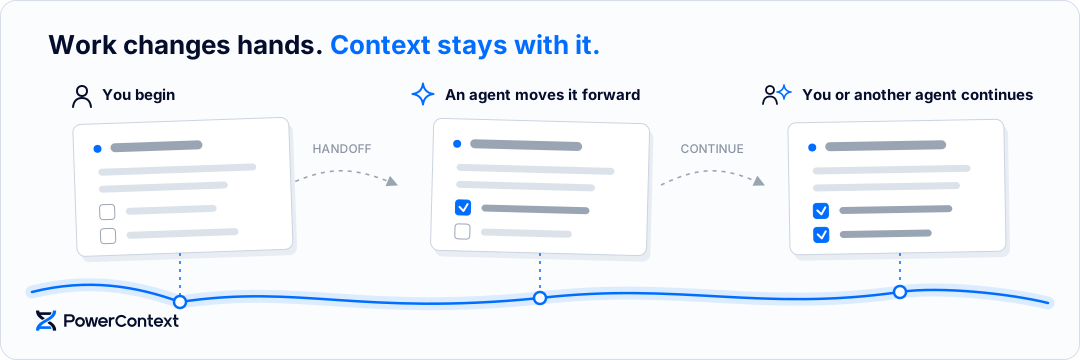
Everything belongs to a **Scope** — one isolated Source journal, Memory lifecycle, review inbox, and Handoff history.
A Scope ID selects data; it does not prove user identity, grant tool access, or authorize execution.
```text
Scope
├── Source journal # evidence: prompts, documents, work contracts, task outcomes
├── Memory # atomic-memory/ARTIFACT_ID@REVISION — decisions, constraints, next steps
├── Review Inbox # pending Experience and Skill candidates awaiting a decision
├── Handoff history # handoff/ARTIFACT_ID@REVISION — work continuity across sessions
└── Topic Memory # extracted in the background from eligible Sources
```
For Kubernetes deployments with external OceanBase, see the [Helm chart and deployment guide](deploy/helm/powercontext/README.md).
*The Dashboard screenshots below use synthetic demonstration records.*
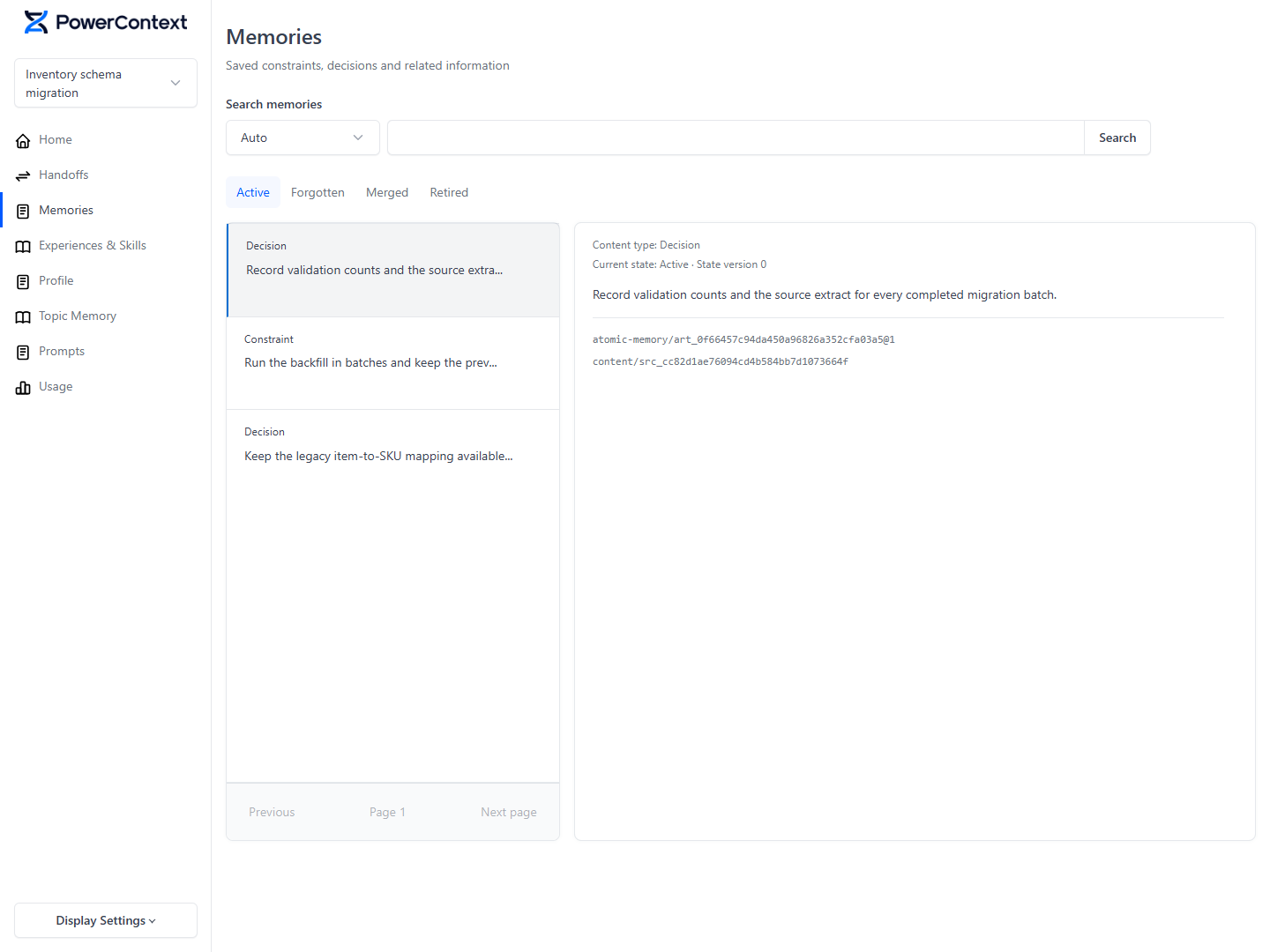
### Memory — decisions and constraints that outlive a session
Memory is a revisioned Artifact family for reusable decisions, constraints, facts, state, and next steps. An entry is
`active`, `forgotten`, `merged`, or `retired`. Forgetting one through `POST /v1/atomic-memory/lifecycle` takes it out of
active recall while its content and history stay available and restorable, without advancing the content revision.
Explicit Memory writes need no model at all; extraction from captured Sources needs a configured generation pipeline.
> "Don't refactor the old auth module — mobile is still using it."
> Context this expensive shouldn't depend on someone repeating it in every session.
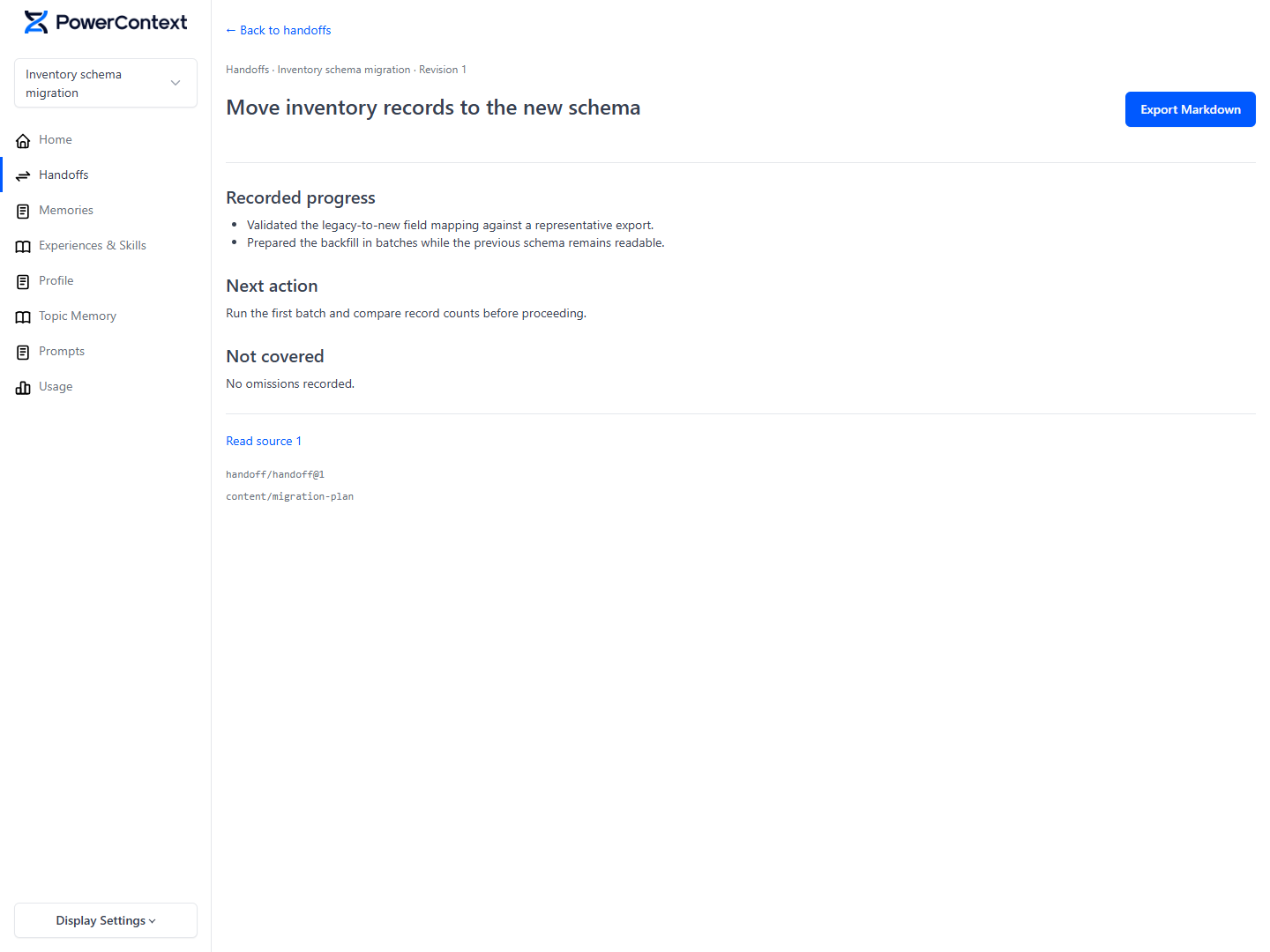
### Handoff — the current state, not the whole transcript
Handoff records work continuity as a four-step loop:
```text
Work Contract → Prepared Handoff → Acknowledgement → Task Outcome
```
`handoff_current_work` captures an inspected boundary and returns a temporary Prepared Handoff. Committing it creates a
durable Revision only when the user wants a milestone. The receiver resolves the Handoff and records an Acknowledgement;
a Task Outcome preserves the final status and checks as Source evidence. The
[Handoff Report](https://powercontext.oceanbase.io/en/docs/workflows/use-handoff-report/) projects the latest Revision in
each selected Scope — read-only, and it never rewrites Memory.
### Experience — what worked, reviewed before it is reused
An Experience records a situation, an action, an observed outcome, and a reusable lesson. It enters a scope-local Review
Inbox as a pending Candidate. Review writes use `expected_version`, so a decision cannot silently apply after another
writer changes the proposal. Approval writes an immutable Revision; rejection records a reason. Both are terminal, and
only the approved current head takes part in recall — pending, rejected, and historical Revisions are excluded.
### Skill — a reviewed procedure, exported on purpose
A managed Skill holds a name, a discovery description, instructions, validation checks, and lineage. Approval does not
install or execute it: an exact approved Revision must be exported explicitly before an Agent host can discover the
host-local projection.
[Operational metrics](docs/en/docs/operate/observability.md) expose dependency observations, processing freshness, and attempt latency, including a protected metrics-only endpoint for standalone background deployments.
## Why PowerContext?
- **Context lives outside the conversation.** Memory, Handoff, Experience, and Skill are server-side artifacts, not
files inside one agent's home directory. Switch from Codex to Claude Code — or hand the work to a teammate — and the
work travels with you.
- **Everything is revisioned and traceable.** Each Artifact is addressed as `FAMILY/ARTIFACT_ID@REVISION`. The Artifact
ID stays stable while approved replacements create later Revisions, and reading an exact reference returns that
historical snapshot even after the family head advances.
- **Generation, review, and execution are separate steps.** A model proposes content, review approves a Revision, and
export creates a host-local copy. None of those steps grants an Agent permission to execute instructions. See
[Interfaces](https://powercontext.oceanbase.io/en/docs/develop/interfaces/) for what each surface exposes today.
- **Recall is bounded, not dumped.** `PreparedContext` selects configured sections from active Memory and approved
Experience, with optional Profile snapshots and Topic Memory, then applies a shared byte budget and returns `ready`
content or `empty`. Recalled content is history, not an instruction authority: the receiving Agent still follows
current instructions and checks live workspace state.
- **Review before reuse.** Experience and Skill pass through a review decision that is terminal either way, and
approval writes an immutable Revision. With access control enforced, approval requires `scope.review`. An
authorized Agent can approve its own Candidate;
[separate submission and review](https://powercontext.oceanbase.io/en/docs/workflows/review-candidates/#separate-agent-submission-from-review)
with distinct identities and permissions when a person must decide.
- **One Server, several views of the same contract.** HTTP is the complete remote application contract. The Python Client
gives typed access, MCP is a curated Agent-facing projection, and Core protocols let an application assemble its own
Source, Artifact, and Trigger implementations.
### How it compares
The comparison assumes typical single-agent or host-local setups; exact behavior depends on how each system is deployed.
| | Re-reading chat history | RAG over transcripts | Host-local memory files | PowerContext |
|---|---|---|---|---|
| Survives a new session | manual | yes | yes | yes |
| Survives switching agents | no | no | no | yes |
| Handing work to a person | manual | manual | manual | Handoff, first-class |
| Reusable procedure | no | no | prose only | Experience / Skill |
| Earlier revisions kept | no | depends on the index | only via git | immutable Revisions |
| Review before reuse | n/a | no | no | Review Inbox |
| Bounded recall for one turn | no | partial | no | `PreparedContext` byte budget |
| Inspectable outside the Agent | no | no | yes | yes |
## Proof it works
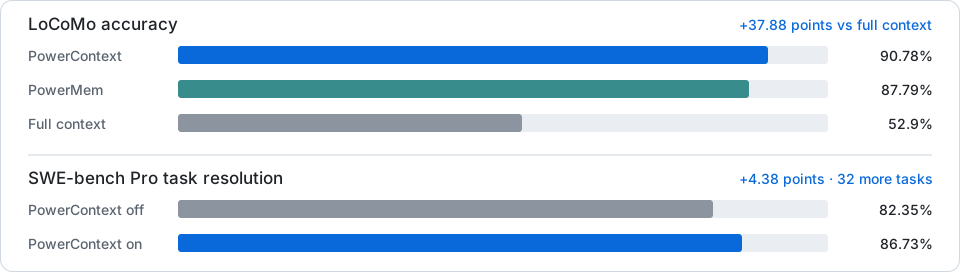
- **Long-conversation memory (LoCoMo; 1,540 scored questions across categories 1–4): 90.78% accuracy**, against 87.79%
for PowerMem and 52.9% for full-context replay — **+37.88 points** over full context.
- **Coding tasks (SWE-bench Pro; a paired project run on all 731 public v2 tasks, not an official submission): 86.73%
task resolution with PowerContext on, 82.35% with it off** — **+4.38 points** and 32 more tasks resolved.
- **Retrieval quality (LoCoMo Plus)**, native PowerContext against PowerContext with Jev candidate filtering after
retrieval. Each model is used for both Memory extraction and answering; embeddings use `qwen3.7-text-embedding`
(1024 dimensions):
| Model | PowerContext | PowerContext + Jev | Difference |
|---|---|---|---|
| GPT-4o-mini | 40.855% | 49.78% | +8.925 points |
| Qwen3.7-plus | 60.37% | 68.947% | +8.577 points |
| GPT-4o | 65.082% | 69.28% | +4.198 points |
Full methods, results, and limitations: [benchmarks](https://powercontext.oceanbase.io/en/benchmarks/). Two caveats we
would rather state than bury: the six LoCoMo Plus scores above were supplied by the project owner, and their run
artifacts are not publicly available for verification — the published instructions reproduce the harness, not those
scores. Windows support is `experimental`.
## Quick start
If you want to manually configure and start PowerContext, see the [manual startup guide](docs/en/docs/get-started/manual-start.md).
PowerContext keeps durable project context outside any single chat. A first run follows this path:
```text
Agent input → Source evidence → Memory / Topic Memory → PreparedContext → next session or Agent
```
PowerContext 1.4.1 includes an interactive setup wizard. You need Python 3.11+, Git, and
[uv](https://docs.astral.sh/uv/getting-started/installation/); uv can provision Python when needed. To connect an Agent,
also install its CLI. In the wizard, choose Basic memory for explicit saves and recall without model APIs; Full memory
requires separate Generation and Embedding API credentials. For a local Server without model APIs, see
[Install and run](docs/en/docs/get-started/install-and-run.md).
macOS and Linux are supported; Windows support is `experimental`.
Choose the path that matches your goal:
| Goal | Choose | What you need |
| --- | --- | --- |
| Try explicit saves and recall | **Basic memory** | CLI and Server; no model API |
| Process Sources automatically and use Topic Memory or semantic retrieval | **Full memory** | Separate Generation and Embedding API credentials; schedules and Scope policies still apply |
| Learn the core workflows in Python | The first seven Jupyter tutorials | A repository checkout and `uv`; no model or API key |
### 1. Install and run the wizard
```bash
uv tool install --force "powercontext[cli,server]==1.4.1"
mkdir -p powercontext-config && cd powercontext-config
powercontext config init --language en --output .env
powercontext config validate --env-file .env
powercontext server run --env-file .env # keep this terminal open
```
The wizard asks about storage, local or remote usage, memory capabilities, Dashboard/access, and Agent connections. SQLite is the simplest first storage choice; choose embedded seekdb only when you need it and can approve its dependency install.
The wizard writes one `.env` environment file and `.env.next-steps.md`. These files can contain credentials; do not
commit them. Keep Server running; in another terminal, return to `powercontext-config`, reload the generated environment
file, and check the connection:
```bash
set -a
. ./.env
set +a
powercontext ready
powercontext capabilities
```
Continue with `.env.next-steps.md` to create and bind the selected Scopes. Use the real `scope_id` returned by the
creation request; a planned `codex-...` title is not an ID. Changing directories does not create isolation; use the
same Server and Scope in the Dashboard and Agent. Then install the matching plugins and launch a new Agent session.
The [complete walkthrough](https://powercontext.oceanbase.io/en/docs/get-started/quickstart/) covers Codex and Claude
Code, Dashboard login, SSH forwarding, HTTPS prerequisites, and observable acceptance checks. For example, the matching
Codex installation is:
```bash
powercontext setup codex --ref powercontext-v1.4.1
powercontext doctor codex
```
Before sending the first message in a new Codex session, open `/hooks` and, when prompted, trust the PowerContext
hooks. Without an enabled `UserPromptSubmit` hook, automatic prompt capture and recall do not run, even if MCP connects.
See [first-session checks and recovery](docs/en/docs/integrations/codex.md#first-session-hook-trust).
After the first check below, use the [capability and trigger guide](docs/en/docs/get-started/quickstart.md#5-choose-your-next-workflow)
to try all seven Artifact families, Source, and Tag. Basic memory needs no separate Server model API; the Agent still uses its own model.
### 2. Verify the first end-to-end result
This checks the path that makes PowerContext useful: Source capture → background processing → cross-session recall. In
the new Agent session bound to the same Scope, send a concrete decision such as:
```text
We are designing the Aurora acceptance project. Use uv for Python dependencies and .env for configuration.
The first deployment runs on one Linux server, with a Mac connecting through an SSH tunnel.
Restate these constraints without changing any code.
```
If you enabled Dashboard, open the URL printed by the wizard; an empty Dashboard before capture is expected. Then:
1. Confirm that the prompt appears as a Source.
2. After the configured inspection interval and model processing, confirm that a related Topic Memory appears.
3. Send a related update and confirm that the new Source arrives and the topic content or revision history reflects it.
4. Start a new Agent session with the same Scope and ask for the Aurora decisions with citations.
`doctor codex` checks installation and connectivity only. Source capture does not by itself create Memory or Topic
Memory, and processing can wait for configured schedules and model work. In Basic memory mode, explicitly ask the Agent
to save a decision, then search for it in a new session; that does not test automatic extraction.
### 3. Explore Python first — no API key
The tutorials run from a repository checkout and take their dependencies from a `uv` dependency group, so they are not
part of the `powercontext` package. From the repository root:
```bash
uv sync --locked --group notebooks
uv run --locked --group notebooks jupyter lab --notebook-dir=examples/jupyter
```
Start with [01 · Memory across sessions](examples/jupyter/01_memory_across_sessions.ipynb), then work through the
[22 Chinese Jupyter tutorials and a complete team workflow](examples/jupyter/README.md) to run Memory, context
preparation, Handoff, Experience, Skill, and a real Agent step by step. The first seven tutorials need no model or API
key.
### Common issues
- `doctor codex` verifies Codex installation and connectivity. To verify automatic memory, check that a real prompt
becomes a Source, produces a Topic, evolves after a related prompt, and can be recalled in a new session using the
same Scope.
- If Python dependency downloads are slow or fail, configure a package index for
[uv](https://docs.astral.sh/uv/configuration/indexes/) and retry.
- Choose **Full memory capabilities** to test automatic Memory and Topic Memory; this requires separate Generation and
Embedding API credentials. An Agent subscription does not provide those Server credentials. Choose **Basic memory** to
save and retrieve memories explicitly without additional model APIs.
- If seekdb needs installing, the wizard asks once and installs the dependency in the background.
- The optional recall-sufficiency gate records scope-local daily search effort and budget omissions for later policy
evaluation. See the [configuration reference](docs/en/docs/operate/configuration.md) for its recording and failure
behavior.
- For a Server on another machine, use HTTPS or follow the
[remote connection guide](docs/en/docs/operate/connect-remote-server.md). Setup recognizes remote HTTP URLs from flags
or environment variables and asks for explicit consent; automated setup uses `--allow-insecure-http`.
## Connect your Agent
Codex is `official`; other maintained hosts and Python Agent frameworks are `community`; Bub is `evaluation` only.
These tags describe PowerContext integration maintenance and use. The
[capability matrix](https://powercontext.oceanbase.io/en/docs/integrations/capabilities/) records which hosts are
qualified, along with their supported features and availability.
Applications can use PowerContext through the async Python client, HTTP API, MCP, or the in-process Core SDK. See the
[interface reference](https://powercontext.oceanbase.io/en/docs/develop/interfaces/) to choose an entry point.
## Build PowerContext
```bash
make install
make check
make test
```
See [CONTRIBUTING.md](CONTRIBUTING.md) for the complete development workflow.
Coding and memory evaluations, performance benchmarks, and Skill regressions live under
[`evaluation/`](evaluation/README.md).
## Learn more
- [Get started](https://powercontext.oceanbase.io/en/docs/get-started/quickstart/)
- [Connect Agents](https://powercontext.oceanbase.io/en/docs/integrations/)
- [Manage context](https://powercontext.oceanbase.io/en/docs/workflows/)
- [Deploy and operate](https://powercontext.oceanbase.io/en/docs/operate/)
- [Develop with APIs](https://powercontext.oceanbase.io/en/docs/develop/)
PowerContext is the successor to [PowerMem](https://www.powermem.ai/).
## Contributors
Thank you to everyone who contributes to PowerContext. ❤️
 [See all contributors](https://github.com/oceanbase/powercontext/graphs/contributors) ·
[Start contributing](CONTRIBUTING.md)
## License
PowerContext is licensed under the [Apache License 2.0](LICENSE).
[See all contributors](https://github.com/oceanbase/powercontext/graphs/contributors) ·
[Start contributing](CONTRIBUTING.md)
## License
PowerContext is licensed under the [Apache License 2.0](LICENSE).