Immaculaterr
===
[](https://github.com/ohmzi/Immaculaterr/actions/workflows/publish-containers.yml)
[](https://github.com/ohmzi/Immaculaterr/releases)
[](../LICENSE)
[](https://github.com/ohmzi/Immaculaterr/pkgs/container/immaculaterr)
[](https://hub.docker.com/r/ohmzii/immaculaterr)
Immaculaterr is a **Plex “autopilot”** that watches what you’re watching, generates recommendations, and keeps your library tidy.
It builds curated Plex collections (with proper artwork), can optionally send missing titles to Radarr/Sonarr or Seerr, and gives you detailed run reports so you always know what happened.
Official Docker images and release artifacts are the supported public distribution channel. The public source repository remains visible for transparency and reference, but the source code is not licensed for general reuse.
Major Features Include
---
- **Seerr integration (optional centralized request flow)**:
- Route missing movie/TV requests to Seerr instead of direct ARR sends.
- Works per task card, so you can choose where missing titles go.
- Includes Command Center reset control to clear all Seerr requests when needed.
- **Plex-triggered automation**:
- Finish a movie or episode, and Immaculaterr can turn that watch into fresh collections and great new recommendations right away.
- **Scheduler automation**:
- Off-peak schedules keep those rows fresh with background refresh, discovery, cleanup, and maintenance.
- **Shared persisted job queue**:
- Manual runs, schedules, Plex webhooks, and Plex polling all go through one persisted FIFO queue.
- Rewind shows queued work, live progress, reports, logs, and run history.
- **Managed Plex collections**:
- `Based on your recently watched Movie` and `Based on your recently watched Show`
- `Change of Movie Taste` and `Change of Show Taste`
- `Inspired by your Immaculate Taste in Movies` and `Inspired by your Immaculate Taste in Shows`
- `Fresh Out Of The Oven` and `Fresh Out Of The Oven Show`
- `Netflix Import Picks` and `Netflix Import: Change of Taste`
- `Plex History Picks` and `Plex History: Change of Taste`
- Immaculate Taste profiles can also create extra custom-named collections.
- **Immaculate Taste profiles**:
- Give each profile its own users, media type, filters, collection names, and download route.
- Use genre and audio-language filters to build focused lanes like animation, family, or specific-language picks.
- **Recommendation engine**:
- TMDB is the main source.
- Google and OpenAI are optional helpers for widening or refining results.
- You can tune the mix between titles available now and future releases.
- **Download routing**:
- Send missing titles directly to Radarr and Sonarr, or route them through Seerr on a per-task basis.
- Observatory can hold items for swipe approval before they are sent.
- **Discovery and maintenance jobs**:
- `Fresh Out Of The Oven` builds recent-release movie and TV rows for titles a user has not watched yet.
- `TMDB Upcoming Movies` finds upcoming movies with filter sets and routes matches to Radarr or Seerr.
- `Rotten Tomatoes Upcoming Movies + TV Shows` scrapes fixed Rotten Tomatoes movie and TV pages, uses saved Movies and TV toggles with separate Movie Top 20 and TV Top 10 counts, and lets Run Now use those saved settings directly.
- Cleanup and ARR sync jobs help keep Plex, Radarr, and Sonarr tidy after imports and downloads, including season-aware Sonarr monitoring cleanup.
- **History imports**:
- Netflix CSV import creates dedicated Netflix import collections and feeds the main recommendation system.
- Plex watch-history import does the same without needing a CSV.
- **Custom posters for managed collections**:
- Upload and manage poster overrides in Command Center.
- Posters are stored so they survive restarts and updates.
- **Built-in admin sign-in and recovery**:
- Create the admin login during setup.
- Password recovery uses security questions.
- **Management pages**:
- Use Vault for integrations, Task Manager for jobs, Rewind for reports, and Command Center for resets, posters, user monitoring, and request cleanup.
- **More features on the way:**
- Email reports on media server health
- Windows and macOS support
How Recommendations Are Built
---
1. A watch event, manual run, or history import supplies a seed title, and the app builds a richer seed profile from it.
2. TMDB pulls fuller metadata and candidate pools, including standard picks plus wildcard lanes for global-language films and hidden gems.
3. A multi-factor ranking engine scores candidates using similarity, quality, novelty, and indie/popularity signals.
4. Ranking weights change by intent, so latest-watched and change-of-taste runs do not rank titles the same way, and released vs. upcoming mixes can be tuned separately.
5. Final picks are interleaved so core recommendations stay strong while wildcard discoveries add variety.
Screenshots
---
**Desktop UI**

**Plex UI examples**


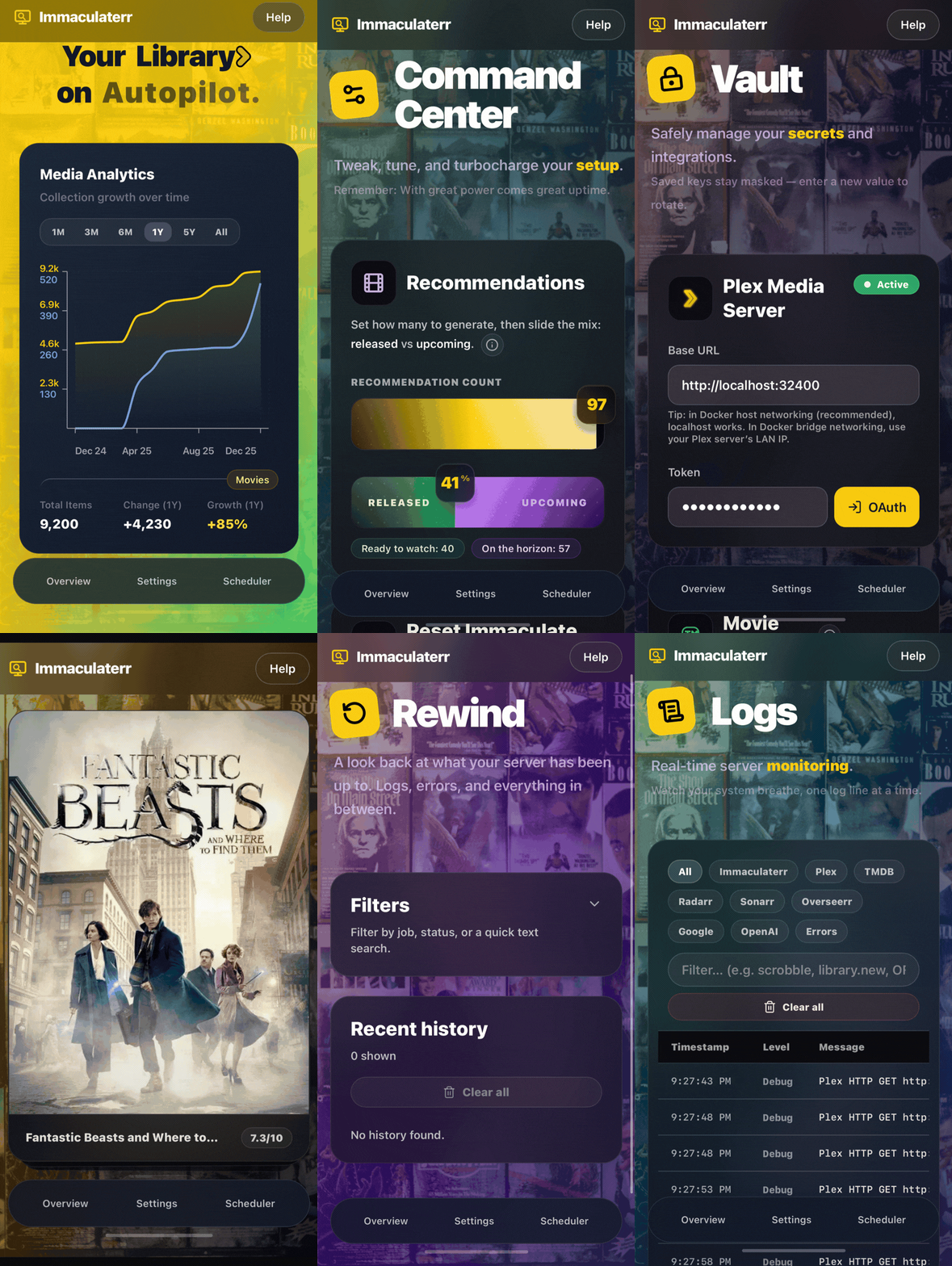
**Mobile UI (full mobile support)**
Getting Started (Docker)
---
Use the production Docker stack (app + Caddy) so both HTTP and HTTPS are available:
```bash
mkdir -p /opt/immaculaterr
cd /opt/immaculaterr
curl -fsSL -o docker-compose.dockerhub.yml https://raw.githubusercontent.com/ohmzi/Immaculaterr/master/docker/immaculaterr/docker-compose.dockerhub.yml
curl -fsSL -o caddy-entrypoint.sh https://raw.githubusercontent.com/ohmzi/Immaculaterr/master/docker/immaculaterr/caddy-entrypoint.sh
curl -fsSL -o install-local-ca.sh https://raw.githubusercontent.com/ohmzi/Immaculaterr/master/docker/immaculaterr/install-local-ca.sh
chmod +x caddy-entrypoint.sh install-local-ca.sh
cat > .env <<'EOF'
TZ=America/New_York
EOF
docker rm -f Immaculaterr ImmaculaterrHttps 2>/dev/null || true
IMM_IMAGE=ohmzii/immaculaterr IMM_TAG=latest docker compose -f docker-compose.dockerhub.yml up -d --force-recreate
```
Then open either:
- `http://:5454/`
- `https://:5464/`
The `.env` file above sets the app container timezone to `America/New_York`. Change it if you prefer a different IANA timezone.
Optional: host under an app base path
---
`APP_BASE_PATH` is only the public path prefix for Immaculaterr. Do not put a full URL, domain, protocol, or port in this value.
Leave `APP_BASE_PATH` unset if the app is served at the site root. Set it and keep `TRUST_PROXY=1` only when a reverse proxy or tunnel serves Immaculaterr from a subpath.
Replace `/immaculaterr` below with any subpath you want, such as `/recommendations` or `/media-helper`.
Example `.env` or compose overrides:
```env
APP_BASE_PATH=/immaculaterr
TRUST_PROXY=1
```
After that, browse to:
- `http://:5454/immaculaterr/`
- `https://:5464/immaculaterr/`
Make sure your proxy preserves and forwards that same prefix to Immaculaterr. This works with nginx, Caddy, Traefik, Cloudflare Tunnel, Tailscale Funnel, and similar setups.
In the app, use `Setup` for the hosting walkthrough, then open `Profile` to confirm the active `App base path` value. Root deployments should show `/`. Subpath deployments should show the exact configured prefix.
Example nginx reverse proxy:
```nginx
location = /immaculaterr {
return 301 /immaculaterr/;
}
location /immaculaterr/ {
proxy_pass http://127.0.0.1:5454;
proxy_http_version 1.1;
proxy_set_header Host $host;
proxy_set_header X-Forwarded-Host $host;
proxy_set_header X-Forwarded-Proto $scheme;
proxy_set_header X-Forwarded-For $proxy_add_x_forwarded_for;
proxy_set_header X-Forwarded-Port $server_port;
}
```
Optional (recommended for HTTPS without browser warnings):
```bash
cd /opt/immaculaterr
./install-local-ca.sh
```
If users browse from other devices, import `/tmp/immaculaterr-local-ca.crt` from the Docker host into those devices.
For full setup and update options (including certificate trust), use [`doc/setupguide.md`](setupguide.md).
Platform-specific guides are also available:
- [TrueNAS SCALE](setup-truenas.md) — GUI-only Custom Apps with HTTPS and HTTP-only options.
- [Unraid](setup-unraid.md) — Docker template and compose setup with HTTPS and HTTP-only options.
Contributing
---
Thanks for wanting to help improve Immaculaterr.
The public repository is available so people can inspect and validate the source code. Immaculaterr is not open source, so code contributions, pull requests, and external patches are not accepted or encouraged.
If you want to help:
- Report bugs: [GitHub Issues](https://github.com/ohmzi/Immaculaterr/issues)
- Suggest features or improvements: [GitHub Issues](https://github.com/ohmzi/Immaculaterr/issues)
- Report security issues: see [`doc/security.md`](security.md), or use GitHub Issues if needed
Support
---
- **Report Bug**: [GitHub Issues](https://github.com/ohmzi/Immaculaterr/issues)
- **Send Suggestion**: [Immaculaterr Feedback Form](https://forms.gle/wMpsDu9jPEY14dua6)
License
---
Immaculaterr is distributed under custom terms — see [LICENSE](../LICENSE).
Source code: the public repository does not grant permission to use, copy, modify, redistribute, sublicense, or sell the source code without separate written permission from the copyright holder.
Official Docker images and release artifacts: you may download and run the unmodified official artifacts published by the project owner for personal, noncommercial self-hosting only. Redistribution, resale, derivative images, repackaging, and commercial use are not allowed without separate written permission.
This project uses publicly available APIs and integrates with third‑party services (Plex, Radarr, Sonarr, TMDB, OpenAI, Google).
You are responsible for complying with their respective terms of service. Immaculaterr is not affiliated with or endorsed by those services.