[](https://stand-with-ukraine.pp.ua)
# pspg - Postgres Pager
Everybody who uses `psql` also uses the `less` pager. Which, while it works well, has no special
support for tabular data. I found a few projects, but none was good enough for this purpose.
Thus I decided to write a small specialized pager to use as a `psql` pager.
This pager can be used from the following command line clients, too:
- `mysql`
- `sqlite`
- [`pgcli`](https://github.com/dbcli/pgcli/)
- `monetdb`
- [`Trino (formerly Presto SQL)`](https://trino.io/)
- [`usql`](https://github.com/xo/usql/)
- [`sqlcl`](https://github.com/okbob/pspg/#sqlcl) (for oracle)
- [`nushell`](https://www.nushell.sh/)
## Main target
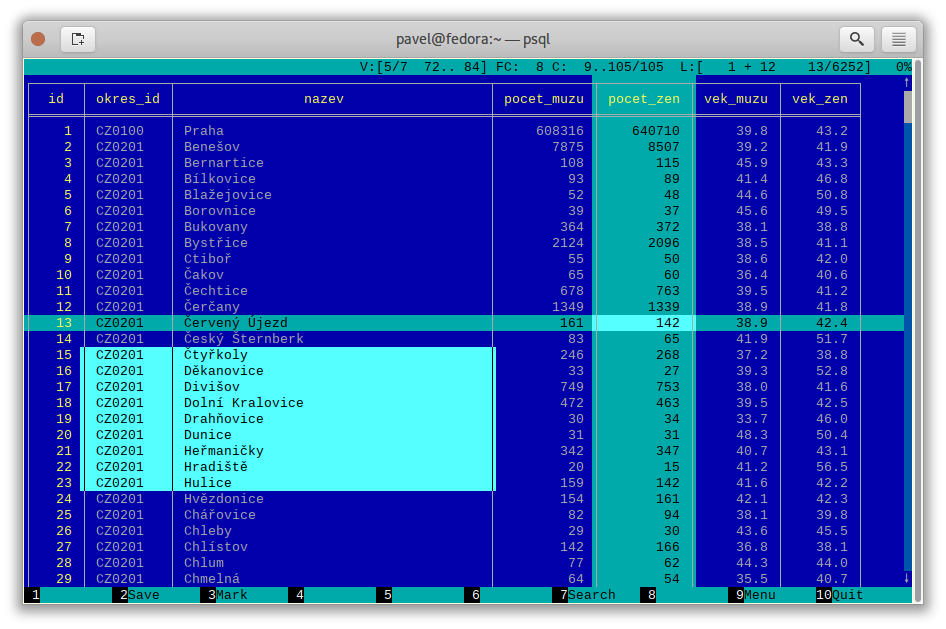
* ability to freeze the first few rows, or first few columns
* ability to sort data by the specified numeric column
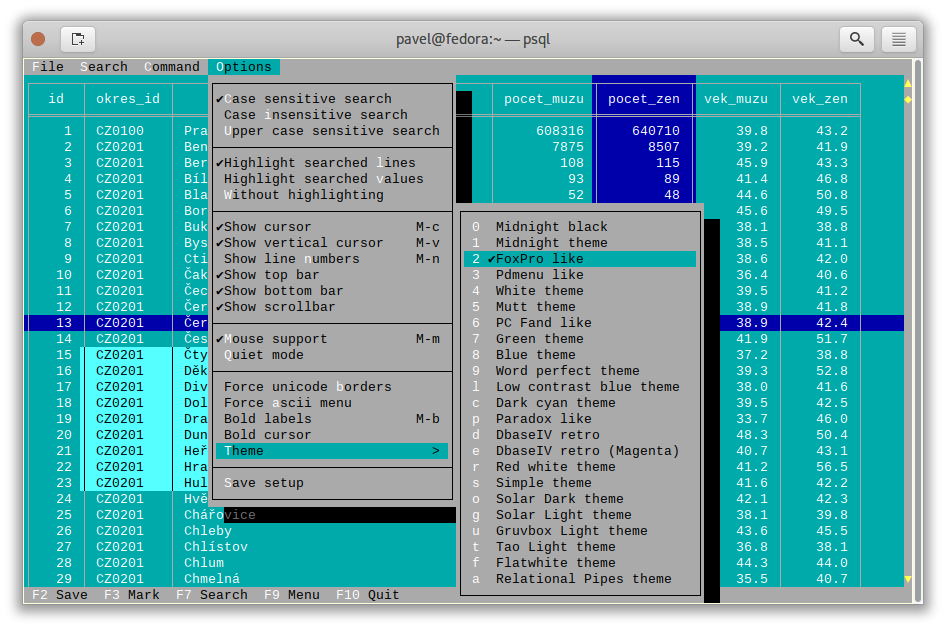
* ability to use fancy themes - like `mcview` or `FoxPro` - http://okbob.blogspot.com/2019/12/pspg-themes-what-you-use-it.html
* mouse is supported and used
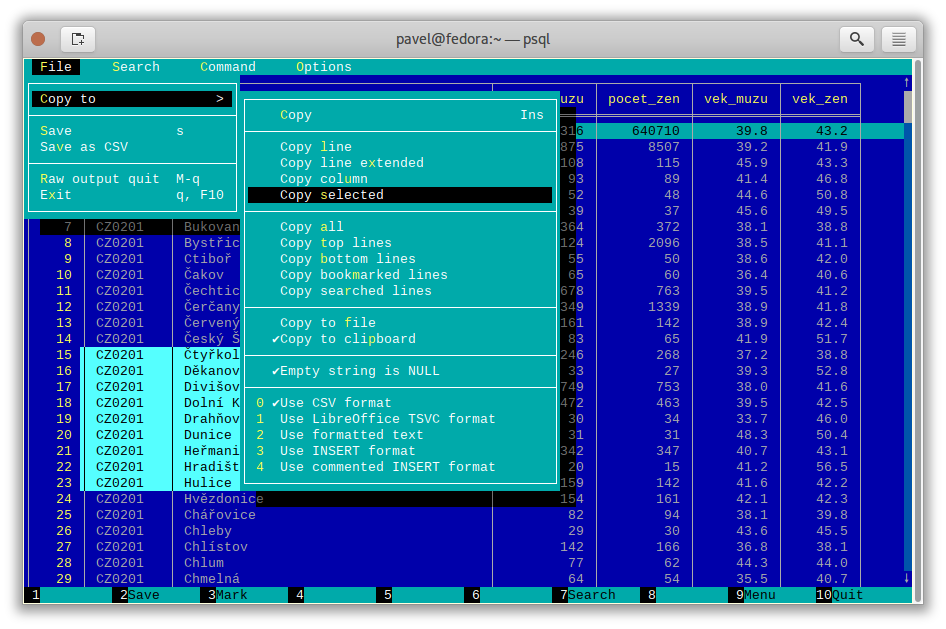
* ability to copy a selected range to the clipboard
## Installation and basic configuration
The `pspg` can be simply installed from Debian (Ubuntu) repositories. RedHat (Fedora) repositories
contains `pspg` too:
# Debian (Ubuntu)
sudo apt-get install pspg
# RedHat (Fedora)
sudo dnf install pspg
Basic configuration is very simple - just set system environment variable `PSQL_PAGER`:
export PSQL_PAGER='pspg'
or with some common options (`-b` means blackwhite theme, `-X` preserve content after exit):
export PSQL_PAGER='pspg -X -b'
Attention: options used in command line has higher priority than options specified in configuration file (`~/.pspgconf`).
Native installation on MS Windows is not supported, but `pspg` works well inside `wsl2`.
Inside wsl2 environment, the installation is same like on used Linux system.
Installation on macOS/homebrew is simple by `brew install pspg`.
## Video presentation
[](https://www.youtube.com/watch?v=JyxuEkoYDQk)
## Screenshots
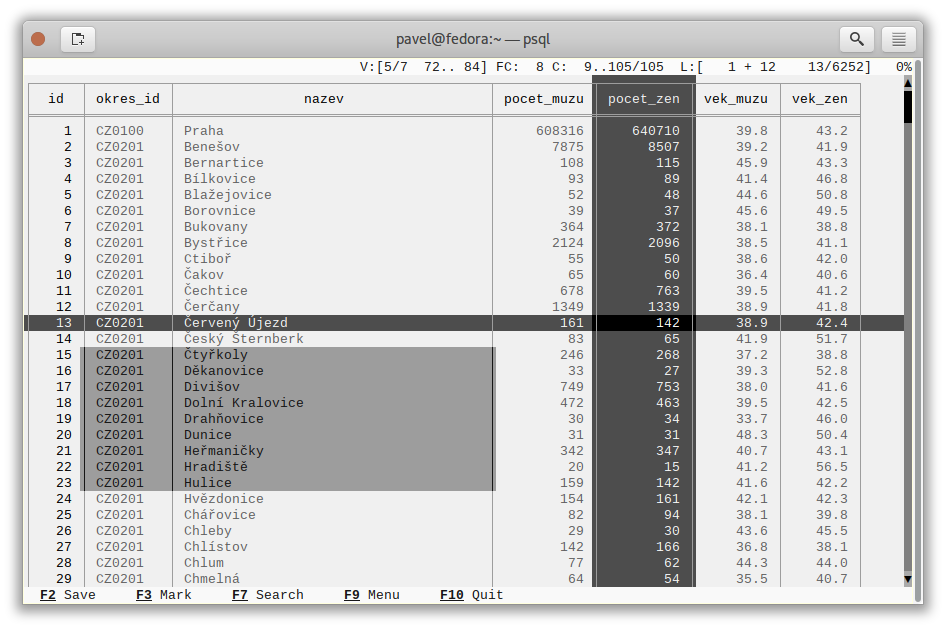
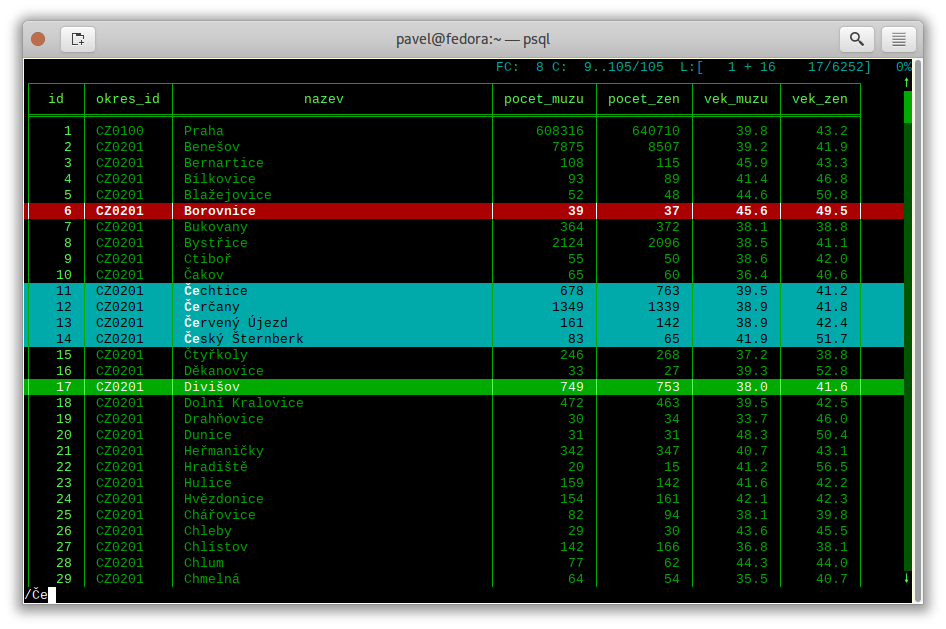
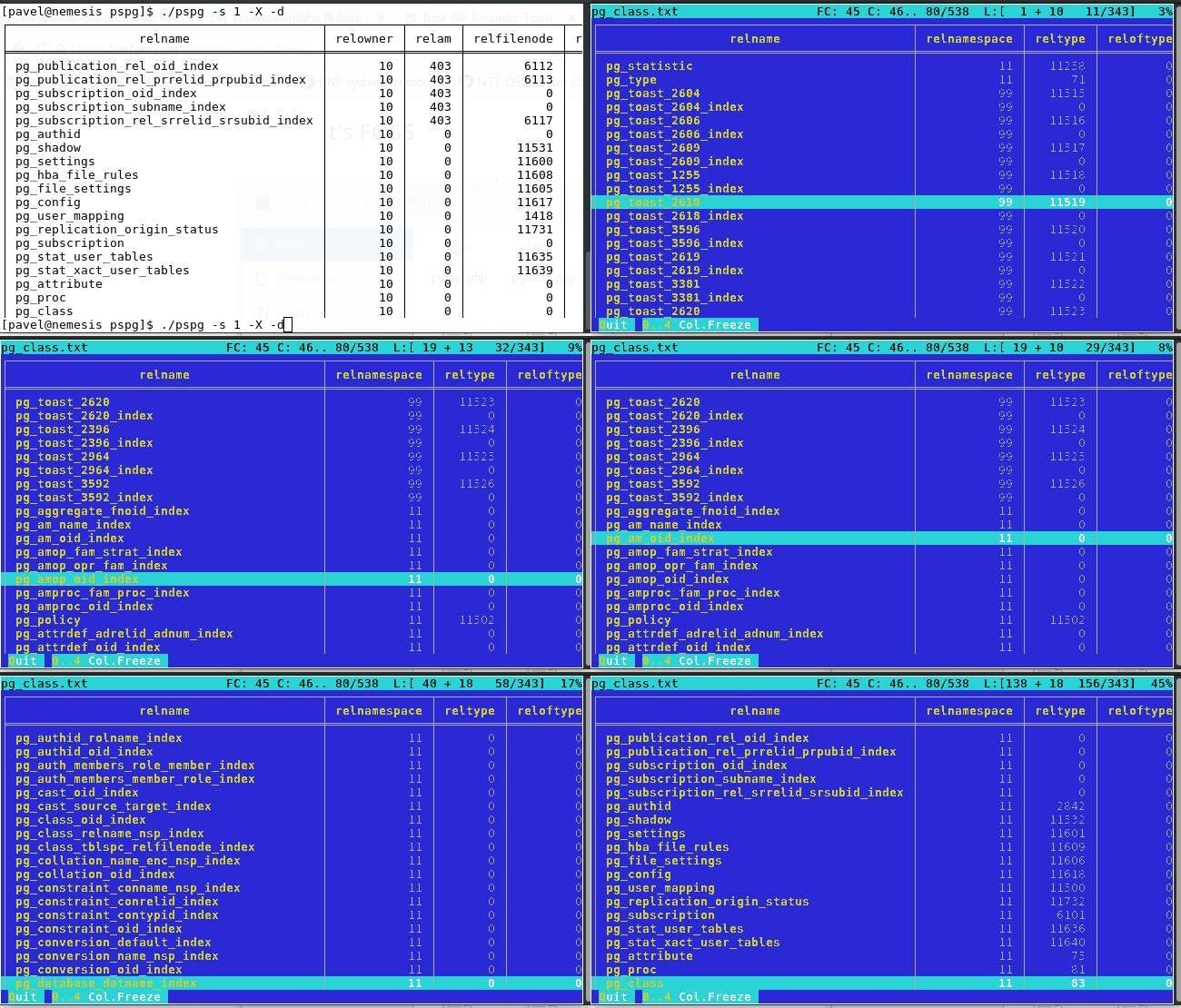
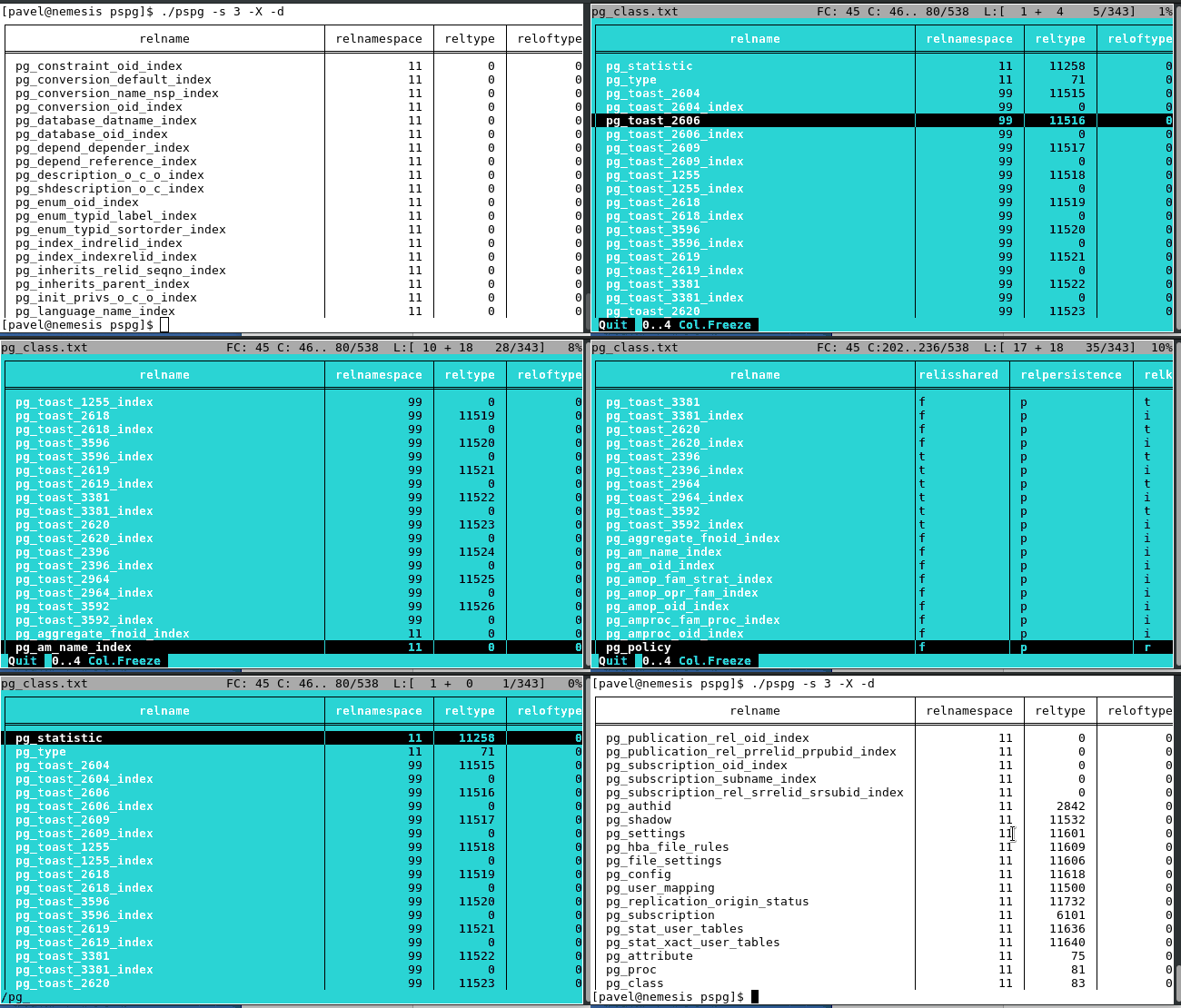
## Options
[pavel@localhost ~]$ pspg --help
pspg is a Unix pager designed for table browsing.
Usage:
pspg [OPTION] [file]
General options:
--about about authors
--help show this help
-V, --version show version
--info show info about libraries and system
--direct-color force direct-color terminal mode
-f, --file=FILE open file
-F, --quit-if-one-screen
quit if content is one screen
--clipboard-app=NUM specify app used by copy to clipboard (1, 2, 3, 4)
--esc-delay=NUM specify escape delay in ms (-1 inf, 0 not used, )
--interactive force interactive mode
--ignore_file_suffix don't try to deduce format from file suffix
--ni not interactive mode (only for csv and query)
--no-watch-file don't watch inotify event of file
--no-mouse don't use own mouse handling
--no-progressive-load don't use progressive data load
--no-sigint-search-reset
without reset searching on sigint (CTRL C)
--no-sleep without waits against flickering
--no_xterm_mouse_mode don't use optional xterm mouse mode
--only-for-tables use std pager when content is not table
--on-sigint-exit exit on sigint(CTRL C or Escape)
--pgcli-fix try to fix some pgcli related issues
--querystream read queries from stream forever
--quit-on-f3 exit on F3 like mc viewers
--rr=ROWNUM rows reserved for specific purposes
--stream read input forever
-X, --reprint-on-exit preserve content after exit
Output format options:
-a, --ascii force ascii
-b, --blackwhite black-white style
-s, --style=N set color style number (0..22)
--bold-labels row, column labels use bold font
--bold-cursor cursor use bold font
--border type of borders (0..2)
--double-header header separator uses double lines
--force-uniborder replace ascii borders by unicode borders
--highlight-odd-rec highlights odd records (when it is supported by style)
--hide-header-line hides header line (between column names and data)
--ignore-short-rows rows with wrong column numbers are ignored
--null=STRING STRING used instead NULL
Searching options
-g --hlite-search, -G --HILITE-SEARCH
don't highlight lines for searches
-i --ignore-case ignore case in searches that do not contain uppercase
-I --IGNORE-CASE ignore case in all searches
Interface options:
-c, --freezecols=N freeze N columns (0..9)
--less-status-bar status bar like less pager
--line-numbers show line number column
--menu-always show top bar menu every time
--no-bars, --no-commandbar, --no-topbar
don't show bottom, top bar or both
--no-cursor row cursor will be hidden
--no-last-row-search don't use the last pattern when starting a new search
--no-scrollbar don't show scrollbar
--no-sound don't use beep when scroll is not possible
--tabular-cursor cursor is visible only when data has table format
--vertical-cursor show vertical column cursor
Input format options:
--csv input stream has csv format
--csv-separator char used as field separator
--csv-header [on/off] specify header line usage
--skip-columns-like="SPACE SEPARATED STRING LIST"
columns with substr in name are ignored
--csv-trim-width=NUM trim value after NUM chars
--csv-trim-rows=NUM trim value after NUM rows
--tsv input stream has tsv format
On exit options:
--on-exit-reset sends reset terminal sequence "\33c"
--on-exit-clean sends clean terminal sequence "\033[2J"
--on-exit-erase-line sends erase line terminal sequence "\33[2K\r"
--on-exit-sgr0 sends sgr0 terminal sequence "\033[0;10m"
Watch mode options:
-q, --query=QUERY execute query
-w, --watch time the query (or read file) is repeated every time (sec)
Connection options:
-d, --dbname=DBNAME database name
-h, --host=HOSTNAME database server host (default: "local socket")
-p, --port=PORT database server port (default: "5432")
-U, --username=USERNAME database user name
-W, --password force password prompt
Debug options:
--log=FILE log debug info to file
--wait=NUM wait NUM seconds to allow attach from a debugger
pspg shares a lot of key commands with the less pager or the vi editor.
Options can also be passed within the `PSPG` environment variable. Configuration
file is processed first. Options from the `PSPG` variable are processed afterwards
step and command line options are processed at the end. One option can
be processed multiple times, the last value wins.
## Environment variables
| Name | Usage |
|---------------|-------------------------------------------|
|`PSPG` | can hold same options like command line |
|`PSPG_CONF` | path to configuration file |
|`PSPG_HISTORY` | path to file pspg's readline history file |
## Example of config file
The default path of config file is `~/.pspgconf`.
The fields names can be different than from related command line options:
ascii_menu = false
bold_labels = false
bold_cursor = false
ignore_case = false
ignore_lower_case = false
no_cursor = false
no_sound = false
no_mouse = false
less_status_bar = false
no_highlight_search = false
no_highlight_lines = false
force_uniborder = false
show_rownum = false
without_commandbar = false
without_topbar = false
vertical_cursor = false
on_sigint_exit = false
no_sigint_search_reset = false
double_header = false
quit_on_f3 = false
pgcli_fix = false
xterm_mouse_mode = true
show_scrollbar = true
menu_always = false
empty_string_is_null = true
last_row_search = true
progressive_load_mode = true
highlight_odd_rec = false
hide_header_line = false
on_exit_reset = false
on_exit_clean = false
on_exit_erase_line = false
on_exit_sgr0 = false
direct_color = false
theme = 16
border_type = 2
default_clipboard_format = 0
clipboard_app = 0
hist_size = 500
esc_delay = -1
## Themes
|Code| Name |
|---:|---------------------------------------|
| 0 | black & white |
| 1 | Midnight Commander like |
| 2 | FoxPro like |
| 3 | Pdmenu like |
| 4 | White theme |
| 5 | Mutt like |
| 6 | PCFand like |
| 7 | Green theme |
| 8 | Blue theme |
| 9 | Word Perfect like |
| 10 | Low contrast blue theme |
| 11 | Dark cyan/black mode |
| 12 | Paradox like |
| 13 | dBase IV retro style |
| 14 | dBase IV retro style (Magenta labels) |
| 15 | Red white theme |
| 16 | Simple theme |
| 17 | Solarized dark theme |
| 18 | Solarized light theme |
| 19 | Gruvbox light theme |
| 20 | Tao Light theme |
| 21 | FlatWhite theme |
| 22 | Relational pipes theme |
| 23 | Paper Color theme |
| 24 | Dracula theme |
see http://okbob.blogspot.cz/2017/07/i-hope-so-every-who-uses-psql-uses-less.html
### Custom themes
The theme can be customized over base and menu templates referencing the
built-in themes. The custom theme file should be saved in directory with `pspg`
configuration. The name of this file should be .pspg_theme_xxx. The custom
theme can be selected by command line option `--custom-style=name` or by
command `\ctheme name`.
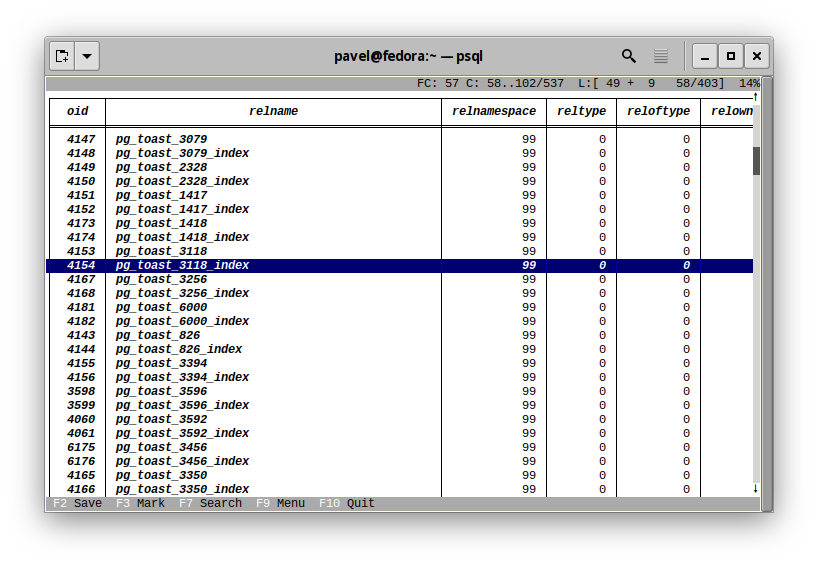
Example of a custom theme file (named `.pspg_theme_mc2` (it can be activated by
command `\ctheme mc2`)):
template = 1
template_menu = 3
background = black, white
data = black, white
label = black, white, italic, bold
border = #000000, white
footer = lightgray, white
cursor_data = blue, white, italic, bold, dim, reverse
cursor_border = blue, blue , italic, bold, dim, reverse
cursor_label = blue, white, italic, bold, dim, reverse
cursor_footer = blue, white, italic, bold, dim, reverse
cursor_bookmark = red, white, italic, bold, dim, reverse
cross_cursor = white, blue, italic, bold
cross_cursor_border = brightblue, blue
status_bar = black, lightgray
title = black, lightgray
scrollbar_arrows = black, white
scrollbar_background = lightgray, white
scrollbar_slider = white, gray
Some keys can be marked by symbol `*`. Marked keys are used for odd records.
data* = black, lightgray
label* = black, lightgray, italic, bold
border* = #000000, lightgray
`template` and `template_menu` set fallback values for any keys not specified
in the custom theme. `template_menu` in particular is currently the only way to
customize the F9 menu appearance.
| key | customizes |
|---------------------------------------|---------------------------------------------------------------------|
| `background` | Background color |
| `data` | Data (non-header or frozen column) text |
| `border` | Border color |
| `label` | Label (header or frozen column) text |
| `row_number` | Line numbers |
| `record_number` | |
| `selected_area` | |
| `footer` | Results footer (non-tabular e.g. rowcount) |
| `cursor_data` | Highlighted data (non-header or frozen column) text |
| `cursor_border` | Highlighted border color |
| `cursor_label` | Highlighted label (header or frozen column) text |
| `cursor_row_number` | Highlighted line numbers |
| `cursor_record_number` | |
| `cursor_selected_area` | |
| `cursor_footer` | Highlighted results footer (non-tabular e.g. rowcount) |
| `scrollbar_arrows` | Scrollbar up and down arrows |
| `scrollbar_background` | Scrollbar "empty" background |
| `scrollbar_slider` | Scrollbar slider over the background |
| `scrollbar_active_slider` | Scrollbar slider grabbed by mouse |
| `title` | Results headline (in psql describe commands) |
| `status_bar` | Top query and cursor location information |
| `prompt_bar` | |
| `info_bar` | Info text (e.g. "Not found" when searching) |
| `input_bar` | Input prompt and text (e.g. search) |
| `error_bar` | |
| `bookmark` | |
| `bookmark_border` | |
| `cursor_bookmark` | |
| `cross_cursor` | Highlighted cell at intersection of horizontal and vertical cursors |
| `cross_cursor_border` | Borders at intersection of horizontal and vertical cursors |
| `matched_pattern` | Search result match text |
| `matched_pattern_nohl` | |
| `matched_line` | Line containing search result |
| `matched_line_border` | Borders in search result line |
| `matched_pattern_cursor` | Highlighted search result match text |
| `matched_line_vertical_cursor` | Vertically highlighted search result match text |
| `matched_line_vertical_cursor_border` | Borders of vertically highlighted cell with search result match |
| `error` | |
ANSI colors `Black`, `Red`, `Green`, `Brown`, `Blue`, `Magenta`, `Cyan`,
`LightGray`, `Gray`, `BrightRed`, `BrightGreen`, `Yellow`, `BrightBlue`,
`BrightMagenta`, `BrightCyan`, `White`, and `Default` will display as your
terminal emulator configures them. Alternatively, you can specify hex RGB
values `#FF00FF`.
Styles are any combination of: `bold`, `italic`, `underline`, `reverse`,
`standout`, `dim`.
If the format of some key is not correct, then this row is ignored. For debugging of
custom theme is good to start `pspg` with option `--log`. An information about broken
definitions are stored in log file.
## Keyboard commands
| Key(s) | Command |
|--------------------------------------------------------------------------|---------------------------------------------------------------------|
| 0, 1, 2, 3, .., 9 | freeze first N columns |
| KEY_UP, k | navigate backward by one line |
| KEY_DOWN, j | navigate forward by one line |
| KEY_LEFT, h | scroll to left |
| KEY_RIGHT, l | scroll to right |
| Ctrl+KEY_LEFT | scroll one char left |
| Ctrl+KEY_RIGHT | scroll one char right |
| Shift+KEY_LEFT | scroll one column left |
| Shift+KEY_RIGHT | scroll one column right |
| Ctrl+Home, g | go to the start of file |
| Ctrl+End, G | go to the end of file |
| Alt+l | go to line number |
| H | go to first line of current window |
| M | go to half of current window |
| L | go to end of current window |
| PPAGE, Ctrl+b | backward one window |
| NPAGE, Ctrl+f, space | forward one window |
| HOME, ^ | go to begin of line, first column |
| END, $ | go to end of line, last column |
| Ctrl+e | scroll a window down |
| Ctrl+y | scroll a window up |
| Ctrl+d | forward a half window |
| Ctrl+u | backward a half window |
| s | save content to file |
| / | search for a pattern which will take you to the next occurrence |
| ? | search for a pattern which will take you to the previous occurrence |
| n | for next match |
| N | for next match in reverse direction |
| c | column search |
| Alt+/ | search for a pattern inside selected area |
| Alt+? | backward search for a pattern inside selected area |
| Alt+c | switch (on, off) drawing line cursor |
| Alt+m | switch (on, off) own mouse handler |
| Alt+n | switch (on, off) drawing line numbers |
| Alt+v, double click on column header | switch (on, off) drawing column cursor |
| Mouse button wheel | scroll vertical |
| Alt+Mouse button wheel | scroll horizontal |
| F9 | show menu |
| q, F10, Esc 0 | quit |
| Alt+q | quit and print raw (unformatted) content |
| Alt+k, Alt+double click | switch bookmark |
| Alt+j | go to next bookmark |
| Alt+i | go to previous bookmark |
| Alt+o | flush bookmarks |
| a | sort ascendent |
| d | sort descendent |
| u | unsorted (sorted in origin order) |
| Space | stop/continue in watch mode |
| R | Repaint screen and refresh input file |
| Ins | export row, column or cell to default target |
| shift+cursor up, down | define row range |
| Ctrl+Shift+cursor left, right | define column range |
| F3 | start/finish of selection rows |
| Shift+F3 | start/finish of selection block |
| Ctrl+drag mouse | defines rows selection, on column header defines column selection |
| Ctrl+o | show primary screen, press any key to return to pager again |
| %, Ctrl+a | select all |
## Backslash commands
| Command | Description |
|--------------------------------------------------------------|----------------------------|
| `\N` | go to line number |
| `\+N` | go to N lines forward |
| `\-N` | go to N lines backward |
| `\N+` | go to line number |
| `\N-` | go to line number from end |
| `\theme N` | set theme number |
| `\copy [all\|selected] [nullstr "str"] [csv\|tsv\|insert\|text\|pipesep\|sqlvalues]` | copy data to clipboard |
| `\save [all\|selected] [nullstr "str"] [csv\|tsv\|insert\|text\|pipesep\|sqlvalues]` | copy data to clipboard |
| `\order [N\|column name]` | sort by column |
| `\orderd [N\|column name]` | desc sort by column |
| `\sort [N\|column name]` | sort by column |
| `\sortd [N\|column name]` | desc sort by column |
| `\dsort [N\|column name]` | desc sort by column (alias)|
| `\rsort [N\|column name]` | desc sort by column (alias)|
| `\asc [N\|column name]` | sort by column (alias) |
| `\desc [N\|column name]` | desc sort by column (alias)|
| `\search [back] [selected] [column name] [string\|"string"]` | search string in data |
The output can be redirected to any command when the name starts with pipe symbol:
\copy csv | less
## Ending
The pager can be ended by pressing keys q or F10 or Esc 0.
With option `--on-sigint-exit` then the pager is closed by pressing keys Ctrl+c
or Esc Esc.
## Use Escape, key instead Alt + key
pspg supports a possibility to use a sequence of keys Esc, key instead an
combination of Alt+key. The interval between pressing Esc and
key is limited by interval specified by option `esc-delay` or by configuration's
option `esc_delay`. This is max delay time in ms. After this interval, the single pressing Esc
is interpreted as `Escape`. -1 meas unlimited, 0 disables this feature.
## Column search
Column search is case insensitive every time. Searched column is marked by vertical cursor.
Last non empty string searching pattern is used when current searching pattern is empty string.
Searching is starting after visible vertical column or on first visible not freezed columns (after
some horizontal scrolling) or on first column. After last column searching starts from first again.
## Export & Clipboard
For clipboard support the clipboard application should be installed: 1. wl-clipboard (Wayland),
2. xclip (xwindows), 3. pbcopy (MacOS) or 4. clip.exe (WSL2).
`pspg` try to translate unicode symbol '∅' to NULL every time. If you don't use special setting
by `\pset null ...`, then `psql` displays empty string instead NULL. `pspg` hasn't any special
detection (in export routines) for this case. You should to check and enable or disable menu
item `Empty string is NULL`.
`pspg` has automatic detection of clipboard application. Unfortunately, this detection should
not to work for same cases. You can specify the application by specify number (1,2,3,4) to
`--clipboard-app` option.
Formats make a difference! pspg copies records in CSV format by default, which uses comma
separators and **trims initial and trailing whitespace**. Use "formatted text" to copy query output
exactly, or choose one of the other available options.
## Status line description
* `V: [d/d d..d]` - vertical cursor: (column number)/(columns) (char positions from) .. (char positions to)
* `FC: d` - freezed columns length in chars
* `C: d..d/d` - unfreezed visible data in chars (from .. to)/(total)
* `L:[d + d d/d]` - lines (number of first visible line) + (number of line of display), (current line)/(lines)
* `d%` - percent of already displayed data
## Usage as csv viewer
It works well with miller http://johnkerl.org/miller/doc/index.html
mlr --icsv --opprint --barred put '' obce.csv | pspg --force-uniborder
New version has integrated csv support - just use `--csv` option.
It can be integrated into mc
* copy file from `/etc/mc/mc.ext` to your `~/.config/mc directory`
* insert there
##csv

regex/\.csv
    View=pspg -f %f --csv
* restart mc
## Known issues
* When you use `pspg` on Cygwin, then some temporary freezing of scrolling was reported
In this case, please, use an option `--no-sleep`. I see slow scrolling (via scrollbar)
inside konsole (KDE terminal). The option `--no-sleep` helps too.
## Usage in watch mode
The result of query can be refreshed every n seconds. `pspg` remembers cursor row,
possible vertical cursor, possible ordering. The refreshing should be paused by pressing
space key. Repeated pressing of this key enables refreshing again.
`pspg` uses inotify API when it is available, and when input file is changed, then
`pspg` reread file immediately. This behave can be disabled by option `--no-watch-file`
or by specification watch time by option `--watch`.
## Streaming modes
`pspg` can read a continuous stream of tabular data from pipe, named pipe or from file
(with an option `--stream` or it can read a stream of queries from pipe or from file
(with an option `--querystream`). In stream mode, only data in table format can be
processed, because `pspg` uses empty line as separator between tables.
The query stream mode is an sequence of SQL statements separated by char GS (Group
separator - 0x1D on separated line.
pavel@localhost ~]$ cat < /dev/pts/3 > ~/pipe
select 10
^]
select 20
^]
select *
from
pg_class
^]
## Recommended psql configuration
you should to add to your profile:
#for Postgres 10 and older
export PAGER="pspg"

#for postgres 11 and newer
export PSQL_PAGER="pspg"

#or "\setenv PAGER pspg" to .psqlrc
and .psqlrc
\set QUIET 1
\pset linestyle unicode
\pset border 2
\pset null ∅
\unset QUIET
some possible configuration:
-- Switch pagers with :x and :xx commands
\set x '\\setenv PAGER less'
\set xx '\\setenv PAGER \'pspg -bX --no-mouse\''
:xx
`LC_CTYPE` should be correct. Mainly when you use unicode borders.
ncurses doesn't display unicode borders (produced by `psql`) without
correct setting of this variable. Is possible to check a value 'C.UTF8'.
## Attention
When you use a option `--only-for-tables`, then
* set `PAGER` to `pspg` and `PSQL_PAGER` to `less` or
* set `PAGER` to `less` and `PSQL_PAGER` to `pspg`
## MySQL usage
MariaDB [sakila]> pager pspg -s 14 -X --force-uniborder --quit-if-one-screen
PAGER set to 'pspg -s 14 -X --force-uniborder --quit-if-one-screen'
MariaDB [sakila]> select now();
MariaDB [sakila]> select * from nicer_but_slower_film_list limit 100;
## SQLite
SQLite native client doesn't produce well formatted output, but can be forced
to generate CSV format - and this format is well readable for `pspg`
sqlite3 -csv -header testdb.db 'select * from foo2' | pspg --csv --csv-header=on --double-header
## pgcli
[pgcli](https://github.com/dbcli/pgcli/) needs the following configuration options (`~/.config/pgcli/config`):
pager = /usr/bin/pspg --csv --rr=2 --quit-if-one-screen --ignore-case --csv-header on --pgcli-fix
table_format = csv
Older version of pgcli had very slow output in tabular format. An workaround was using csv format. This should not be necessary on current versions when the performance issue was fixed.
An option `--pgcli-fix` fixed import of partially broken csv format generated by `pgcli`. Modern version of `pgcli` doesn't need csv format,
and doesn't need `--pgcli-fix` option.
pager = /usr/bin/pspg --rr=2 --quit-if-one-screen --ignore-case
## sqlcl
As `sqlcl` doesn't currently support a pager option directly, you can either use a tool like [qsh](https://github.com/muhmud/qsh) to work around this issue, or use the [pspg.sql](https://github.com/okbob/pspg/blob/master/scripts/sqlcl/pspg.sql) script from this repo.
To use the script, start `sqlcl` as shown below (it's important to pass in the details of your current tty):
$ TTY=$(tty) sqlcl system/system @/path/to/pspg.sql
You can now have the results of a query sent to `pspg` like this:
SQL> pspg select * from user_tables;
## nushell
The `pspg` supports default `table_mode`: `rounded` and `table_mode`: `heavy`.
The conversion to csv can be used too.
sys | get cpu | to csv | pspg --csv
Note: `footer_mode` should be disabled
nushell configuration:
$env.config.footer_mode = never
$env.config.table.header_on_separator = false
$env.config.ls.clickable_links = false
$env.config.table.mode = rounded
## Note - mouse
pspg try to use xterm mouse mode 1002, when terminal and ncurses are not too antique. If there
are problems with usage - unwanted visual artefacts when you move with mouse when some mouse
button is pressed, then 1. please, report issue (please, attach log file), 2. use an option
`--no-xterm-mouse-mode` and `pspg` will not try to activate this mode.
## Note - true color themes on KDE konsole terminal
On my Fedora this terminal doesn't correctly display true color themes. The basic problem
is in default `TERM` setting, that is `xterm-256color`. Unfortunately, the `konsole` terminal
is not fully compatible with `xterm`, and doesn't allow color changing. You can force direct
colors by using the option `--direct-color` or by setting `TERM=xterm-direct`. Second option
is more correct setting of `TERM` variable to `konsole-256color`. In this case the `pspg` will
map the true rgb colors to supported 256 colors.
## Note - compilation issue
Some linker issues can be fixed by:
I changed
gcc -lncursesw pager.c -o pspg -ggdb
to
gcc pager.c -o pspg -ggdb -lncursesw
If you want to use `pspg` as Postgres client, then you need run
`configure --with-postgresql=yes`. On Fedora with own Postgres build
I had to install `openssl-devel` package and I had to set
`export PKG_CONFIG_PATH="/usr/local/pgsql/master/lib/pkgconfig/"`.
On FreeBsd you should to use `gmake` instead `make`.
## Note - Installation details
When you compile code from source, run ./configure first. Sometimes ./autogen.sh first
If you would to display UTF-8 characters, then `pspg` should be linked with `ncursesw`
library. UTF-8 characters are displayed badly when library `ncursesw` is used. You can
see broken characters with incorrect locale setting too.
You can check wide chars support by `pspg --version`. Row `ncurses with wide char support`
is expected. Re-run `configure` with `--with-ncursesw` option. When this command fails check
if development package for ncursesw library is installed.
### Homebrew (for Linux & MacOS)
# brew install pspg
You can compile easily `pspg` without `brew`, but you need `gnu readline` library. MacOS uses
by default readline emulated over libedit, but `pspg` requires full gnu readline library.
LDFLAGS="-L/usr/local/opt/readline/lib" CPPFLAGS="-I/usr/local/opt/readline/include" ./configure
LDFLAGS="-L/usr/local/opt/readline/lib" CPPFLAGS="-I/usr/local/opt/readline/include" make
### Debian
# apt-cache search pspg
# apt-get install pspg
### Fedora (28 and later)
# dnf install pspg
### RPM (CentOS/openSUSE/…)
The pspg is available from community repository https://yum.postgresql.org/packages.php
### Alpine Linux
# apk add pspg
### Gentoo
# emerge -av dev-db/pspg
### Arch Linux
The Arch User Repository contains two versions:
* [pspg](https://aur.archlinux.org/packages/pspg/) is a fixed release.
* [pspg-git](https://aur.archlinux.org/packages/pspg-git/) tracks the `master` branch.
Use the AUR helper of your choice or git and `makepkg` to install pspg.
### FreeBSD
# pkg install pspg
### OpenBSD
# pkg_add pspg
[More about it](https://fluca1978.github.io/2021/10/28/pspgOpenBSD.html)
### Using MacPorts (MacOS only)
# port install pspg
### MS Windows
`pspg` can be simply used on MS Windows by using wsl2. I tested it, and it is working without problems.
* In terminal execute `wsl --install -d Ubuntu-22.04`
* In terminal open Ubuntu session
```
sudo apt-get update
sudo apt-get install pspg
sudo apt-get install postgresql postgresql-contrib
# set password for user postgres
sudo passwd postgres
su - postgres
psql postgres
>> create role pavel login;
\q
exit
touch ~/.psqlrc
mcedit .psqlrc
\pset linestyle unicode
\pset border 2
\setenv PSQL_PAGER 'pspg -b -X'
# press F2 and F10
psql postgres
```
there is not any difference from installation and work on Ubuntu (Debian)
`pspg` is not ported to MS Windows yet. There is the dependency on ncurses and correctly (fully)
implemented function `newterm` (`pdcurses` does this only on Unix platforms). It can work
with WSL2 maybe (I didn't test it). An alternative can be using `less` pager, that is ported
to some MS Win enviroments. `less` depends on `termcap`, and it is little bit more portable
than `pspg` (`termcal` is low layer of ncurses). `less` supports fixed rows and with `--chop-long-lines`
option or just `-S` can be used as pager for `pspg`.
export PSQL_PAGER="less --chop-long-lines --header 1"
### Solaris
There are few issues requires manual code changes for successful compilation - we successfully
tested `pspg`, but although `pspg` was linked with ncursesw libraries, the utf8 encoding support
didn't work fully correctly - probably due some issues in `libc` library. There are problems with
chars encoded to 3bytes - unicode borders, .. Two bytes unicode chars should be displayed well.
You can use `pspg` with usual accented chars, but unicode borders should not be used. Replacement
ascii borders by special borders chars (by ncurses technology) works well - looks on `Options|Force unicode borders`
option.
* Solaris `make` doesn't support conditional statements - should be removed So, remove unsupported
functionality from `Makefile` (`ifdef`,`endif`), replace `-include` by `include` first.
* After running `configure` remove link on `termcap` library from `config.make`. It is garbage
produced by `readline` automake script. Combination with `ncurses` libraries makes some
linking issues.
#### builtin libraries
export CURSES_CFLAGS="-I/usr/include/ncurses/"
export PANEL_LIBS="-lpanelw"
./configure
#### OpenCSW development
export CFLAGS="-m64 -I/opt/csw/include"
export LDFLAGS="-L/opt/csw/lib/64 -R/opt/csw/lib/64"
export PKG_CONFIG_PATH="/opt/csw/lib/64/pkgconfig"
./configure
## Possible ToDo
* Store data in some column format (now data are stored like array of rows). With this change can
be possible to operate over columns - hide columns, change width, cyclic iteration over columns,
change order of columns, mark columns and export only selected columns (selected rows).
* Replace printing document directly to ncurses window by some smarter structure. Internally
there are lot of checks and fixes to support complex dynamic layout. The possibly views should
to remember first row, last row, current row. Now, these data are in global variables or in
DataDesc and ScrDesc structures.
## st_menu
This project uses st_menu library - implementation of CUA menubar and pulldown menu for ncurses
https://github.com/okbob/ncurses-st-menu
## Note
If you like it, send a postcard from your home country to my address, please:
Pavel Stehule
Skalice 12
256 01 Benesov u Prahy
Czech Republic
I invite any questions, comments, bug reports, patches on mail address pavel.stehule@gmail.com