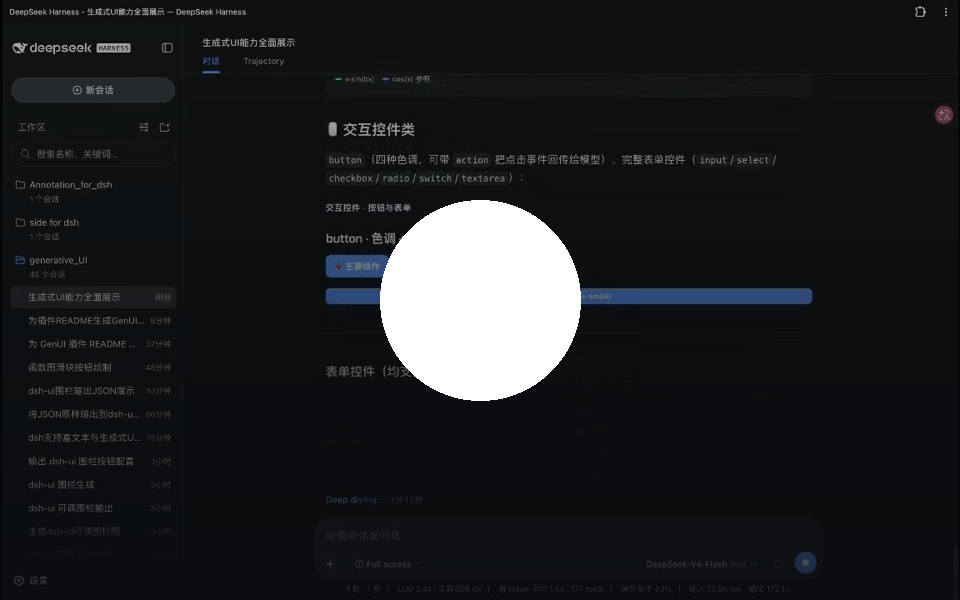
Click the preview to download the original MP4 if the GitHub player is unavailable.
Click the preview to download the original MP4 if the GitHub player is unavailable.
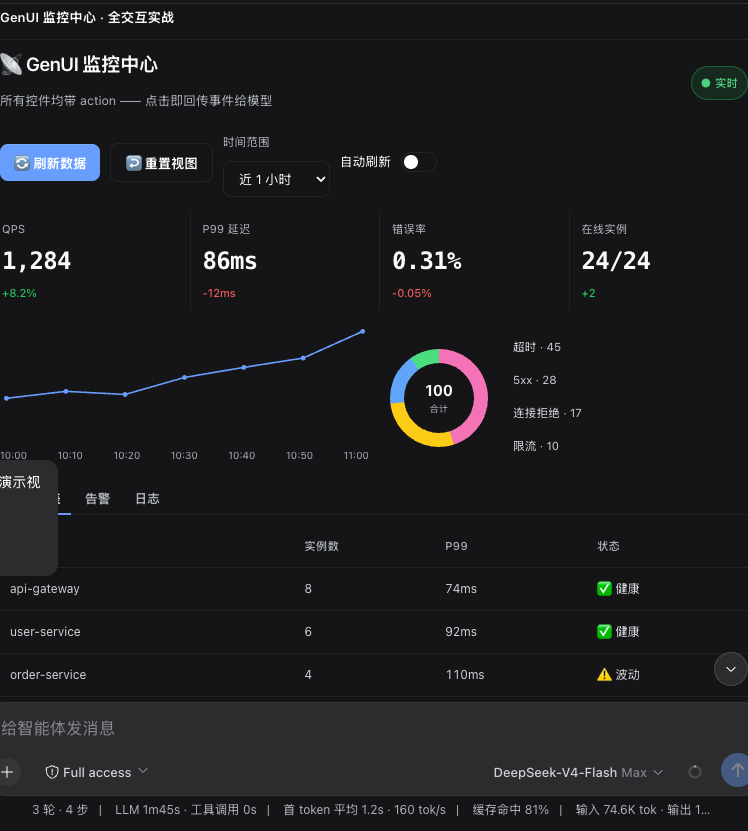
Real output: refresh/reset controls, time-range selection, statistics, charts, and a service table live inside the assistant reply.
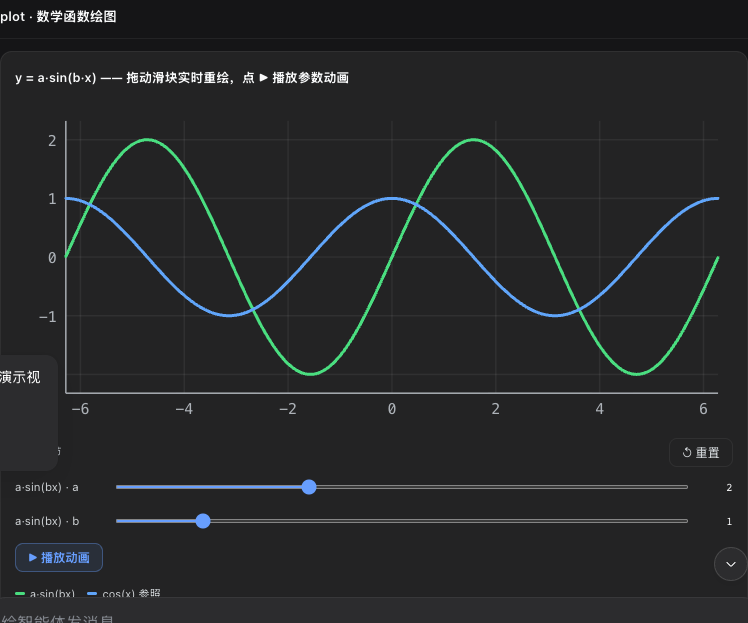
Real output: `plot` renders curves while sliders, reset, and animation controls update the graph locally.
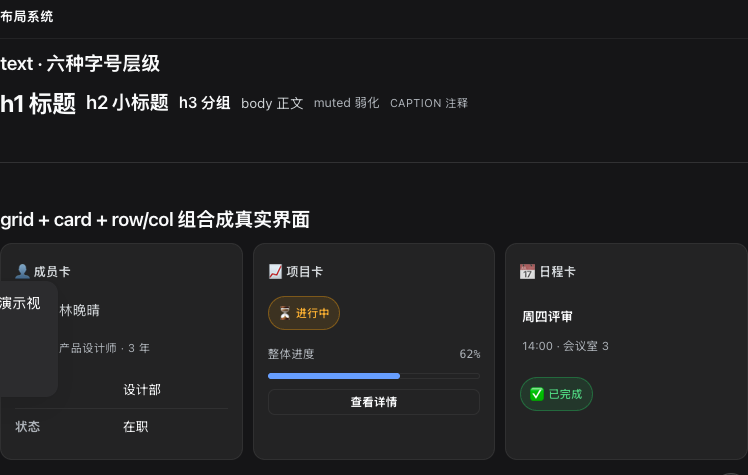
Real output: typography, grid, card, and row/column primitives combine into a hierarchy the model can describe declaratively.
` body. If your dsh build renders fences with a different class name, they still render (and a one-time console warning tells you the host DOM drifted). Whichever channel is active, components, interactions, panels, and persistence behave identically. The repository ships both renderer channels, the host plugin, and the built browser bundle. The host still owns **client activation** and must provide the `slots` and `sessions` services. A downloaded `client.js` or a ModuleLoader cache entry proves only that bytes arrived — successful activation always prints `[genui] client active; fence-channel=registry|dom`. If that line is absent, fix package/profile identity or host activation first; DOM attributes such as `data-streaming` and `data-chat-anchor-key` are optional fallbacks, not installation prerequisites. --- ## ✨ Before vs. after | Plain answer | With dsh-genui | |---|---| | "Revenue this month: ¥128,430, +12.4% MoM — watch the conversion rate." | One line of analysis + three stat cards (revenue / orders / conversion), a trend chart, and a progress bar rendered right beside it | | Want to see more? Type another question. | The panel already has "Refresh" / "Switch view" buttons — click, and the model updates the data | ## 🚀 Quick start Prerequisites — all required: 1. **dsh installed** (any open-source build works — the plugin picks its rendering channel at startup, see "dual-channel rendering" above) 2. **`pnpm` on your PATH**: the `dsh plugin` command depends on it. If missing: `corepack enable` (or `npm i -g pnpm`), then **open a new terminal** and confirm `pnpm -v` prints a version Install and activate in DSH (one command, all dependencies included): ```sh # Public npm package (works without an npm account) dsh plugin --profile web add @changfenhuang/dsh-genui # Or install directly from the public GitHub source dsh plugin --profile web add git+https://github.com/omdsh-dev/dsh-genui.git ``` To add it only as a Node dependency in an existing project: ```sh npm install @changfenhuang/dsh-genui ``` > `npm install` only adds the dependency; it does not register the plugin with DSH. Use `dsh plugin add` above when installing it into DSH. > ⚠️ **Don't use `link:` on a freshly cloned directory** — `link:` does not install the plugin's dependencies (mermaid / three / react), so the renderer will break. Use the git URL form above; reserve `link:` for local development iteration (see below). ### Migrating from the old `@omdsh-dev` package name If you installed from `github:omdsh-dev/dsh-genui` before v0.9.2, pnpm may keep the dependency under the old `@omdsh-dev/dsh-genui` key even though the repository now declares `@changfenhuang/dsh-genui`. The loader resolves plugins from the profile's dependency keys, so a later reinstall can then fail with `Cannot find package '@changfenhuang/dsh-genui'`. Re-add the plugin under its current package name: ```sh dsh plugin --profile web remove @omdsh-dev/dsh-genui dsh plugin --profile web add @changfenhuang/dsh-genui ``` This migration is required once for old GitHub-spec installs. New npm and GitHub installs created with the commands above use the current dependency key. ### Verify the install in 60 seconds After the command completes, restart dsh web and hard-refresh the browser. In a **new** session, say: ```text Use dsh-ui to draw a stats dashboard with a sortable service table. ``` You should see the reply turn into an in-place dashboard rather than a code block. For an unambiguous technical check, open the browser console: successful activation prints `[genui] client active; fence-channel=registry|dom`. ### One-click script (recommended) After cloning, just run it — the script checks the prerequisites above, performs the install, and prompts you to restart: ```sh git clone https://github.com/omdsh-dev/dsh-genui.git cd dsh-genui ./scripts/install.sh ``` ### Developer iteration (link mode) ```sh cd dsh-genui pnpm install dsh plugin --profile web add link:$PWD ``` ## 🧩 Capability map | Surface | First thing to try | Observable behavior | |---|---|---| | Data | Ask for an order or service dashboard | `stat`, `table`, `chart`, and `progress` appear inside the reply; supported numeric table values sort numerically. | | Media | Ask for an audio or video reference | Browser-reachable media plays inline, with poster/aspect-ratio and failure states. | | Exploration | Ask for `plot` with a parameter | Dragging sliders redraws the curve locally and immediately. | | Feedback | Ask for a short quiz | The UI grades and explains locally; only the next model step needs an `action`. | | Workspace | Ask for `/panel` or `panel: true` | A persistent, resizable session dock is updated in place. | The following is the detailed capability reference. Every behavior is constrained by the whitelisted `dsh-ui` specification; see [SKILL.md](./SKILL.md) for the JSON syntax. - **Answer-as-UI**: components are embedded in the reply and appear as they stream — no waiting for the whole message - **30+ components**: cards, tables, charts, forms, tabs, accordions, file trees, timelines, diffs… - **Native media**: audio and video play inline from browser-reachable http(s) or same-origin relative URLs, with user-controlled playback, video posters/aspect ratios, and visible failure states - **ECharts integration**: the `echart` node renders full ECharts charts with theme-aware colors, tooltips, and legends. Two modes: **preset shorthand** (`preset: 'bar' | 'line' | 'area' | 'pie' | 'scatter'` + `data`/`series`) for quick upgrade from the `chart` node, or **full option** (`option` field) for custom chart types, dataZoom, visualMap, and other advanced ECharts features. The echarts engine (~1 MB) is lazy-loaded on demand — the main bundle never carries it, and conversations without `echart` nodes never download it- **Function plots**: `plot` draws curves; parameter sliders redraw in real time, with optional auto-animation - **Quiz**: `quiz` grades on click with explanation and retry; with `action`, the answer is also sent back to the model (grading stays local and instant) - **Local grading (submit)**: a multiple-choice set = one `radio` per question with `group` + `answer` (correct answer) + `explanation`, plus one `submit` button — after the user answers everything and clicks once, **the score, per-question right/wrong, and explanations appear right in the UI with zero model round-trips**; the quiz then locks, and "retake" resets locally (optional `resetAction` notifies the model). Questions without an answer fall back to an aggregated action (`fields` collects every input with an `id`) - **State persistence**: answers, submission locks, and input values are saved per "session + content fingerprint" — refresh or reopen restores everything; re-rendering identical content keeps user state; new content starts fresh; LRU cap of 200 blocks - **Form semantics**: `input` Enter / `textarea` Ctrl+Enter submits immediately (`submit:true`), no blur needed; fields with an `id` are collected into the submit's `fields` - **Secrets ban**: GenUI must never ask for passwords, API keys, access tokens, recovery codes, or other secrets; even if a password input appears, it stays masked, is never persisted, and never enters form collection - **Local-first principle**: state changes the UI can do itself (grading, quiz checking, resets, expand/collapse, selection) always happen locally and instantly; actions are reserved for things that genuinely need the model (generating new content, running tools, next-step suggestions) - **Honest interactions**: interactive components must carry `action`; buttons without one render disabled (kills the "looks clickable, does nothing" fake button); buttons with `action` show instant "triggered" local feedback (proof the local event fired, not that the model received it) - **Event loop**: buttons/switches/inputs/dropdowns/checkboxes/radios/textareas/quizzes carry `action`; click or blur sends back to the model, which updates the UI; same-name actions are debounced with a 300 ms trailing edge — rapid clicks merge into one (last value wins) - **Tool channel**: the `render_ui` tool renders the same spec as a card in the tool row (deliverable-style UI goes through the tool, answer-style UI through the fence) - **Session panel**: a persistent dock above the composer; `render_ui` / `panel: true` fences update the same surface in place; `/panel` opens it from the client (`/panel` customizes via the model, `/panel clear` clears); the top border is draggable to resize; `append: true` merges incrementally — same-named tabs append content, new tabs get added; the whole panel caps at 200 nodes / 200 appends, after which the model should send `replace` to rebuild - **Self-healing & limits**: every fence passes a spec guard — bad nodes are silently dropped, numbers clamped, strings truncated; the whole tree is capped at 200 nodes / 8 nesting levels; pathological specs never crash the UI - **Chart error self-healing**: mermaid failures auto-retry with repairs (strip backticks, quote Chinese/space labels, remove `
`) before degrading to source; a broken chart never hits the screen - **Accessibility**: tabs/accordions/switches/progress bars carry full ARIA and keyboard navigation (arrow keys switch tabs, Home/End jump) - **Zero intrusion**: without the plugin, fences are just code blocks — no errors, no session pollution Component JSON syntax: [SKILL.md](./SKILL.md) (also copyable to `~/.dsh/skills/genui/` to boost the model). ## 📄 Example The model outputs this fence (written for the browser — you don't need to read it): ```dsh-ui {"title":"Order overview","items":[ {"type":"stat","label":"Total revenue","value":"¥128,430","delta":"+12.4%"}, {"type":"stat","label":"Orders","value":"1,024","delta":"-3.1%"} ]} ``` What you see: two stat cards. ### ECharts example ```dsh-ui {"title":"Q1 Revenue","items":[ {"type":"echart","title":"Monthly Revenue","preset":"bar","data":[ {"label":"Jan","value":98}, {"label":"Feb","value":112}, {"label":"Mar","value":128} ]} ]} ``` What you see: a themed bar chart with tooltips and axis labels — rendered by ECharts, lazy-loaded on demand. ## 🔧 How it works The model writes the interface description as JSON inside a `dsh-ui` fence; the browser-side renderer (`src/client`) claims this language through the main repo's `fence-registry` interface and renders it. Components are whitelisted — the model can't smuggle in HTML/scripts; function expressions go through a standalone parser, never `eval`. The core render package stays light (≈110 KB min / 28 KB gzip); the mermaid, three.js, and echarts engines are bundled separately as on-demand assets (loaded through the plugin's self-registered HTTP routes the first time they're used), so startup only downloads the rendering core. ## ❓ FAQ - **Rendering as a code block?** First check the browser console for `[genui] client active; fence-channel=registry|dom`. If absent, the client bundle was not activated even if its URL returns 200 — align the profile dependency, `package.json.name`, `cordis.patch.yml`, ModuleLoader id, and configured bundle name. If present, inspect the fence label/body; registry-less hosts automatically use the DOM channel. - **Chat UI goes blank when rendering a dsh-ui fence?** Your dsh is too old — update dsh first, then reinstall the plugin. - **`dsh: pnpm not found on PATH`?** Install pnpm, then **open a new terminal** and retry (`corepack enable` or `npm i -g pnpm`). - **Stuck on git credentials / 404 during install?** The repository and npm package are public and require no login. Run `npm view @changfenhuang/dsh-genui version` to verify the package name and public registry; if a newly published version still returns 404, retry shortly or use the GitHub install command above in the meantime. - **Installed but scene3d/mermaid/echarts don't render?** The engines (mermaid / three / echarts) are no longer inlined in client.js — they load on demand the first time they're used (`/plugins/@changfenhuang/dsh-genui/assets/*.js`, hosted by the plugin's own HTTP routes). First restart dsh web + hard refresh (Cmd+Shift+R); still broken, remove and reinstall (`dsh plugin --profile web remove @changfenhuang/dsh-genui`, then add again). Hosts without the asset routes degrade to source/load-error hints — update dsh. - **Model not outputting fences?** New sessions pick it up after a restart; or just say "output it with dsh-ui". - **No lib/ after cloning?** Build it yourself: `pnpm install && pnpm run check`. ## 🧑💻 Development ```sh pnpm install pnpm run check # type check + full tests + build ``` ### Real-device e2e The real chain end to end: start a temporary dsh web → install the plugin → send a message in a browser so the model outputs a `dsh-ui` fence → assert the rendering → click an action button → assert the model responds (event-loop closure): ```sh DEEPSEEK_API_KEY=sk-... node scripts/e2e.mjs # link-installs the current workspace DEEPSEEK_API_KEY=sk-... node scripts/e2e.mjs --install git # friend path (git URL) ``` Prereqs: `dsh`/`pnpm` on PATH, `DEEPSEEK_API_KEY`, and the main repo's web build output (playwright resolves it from the main repo). On PASS it saves an `e2e-final.png` screenshot. ### Visual e2e (no model key) For style/component iterations, a visual smoke that needs no API key: boots a real dsh web with the plugin link-installed, injects the component gallery fence through the DOM channel, renders it in headless Chrome, screenshots the full page, and exercises local interactions (table sort, quiz judging, tree collapse, numeric alignment) with hard assertions: ```sh npx tsx scripts/e2e-visual.mts # → .e2e-artifacts/gallery.png + interactions.png npx tsx scripts/e2e-visual.mts --keep # keep the scratch DSH_HOME for debugging ``` Overridable: `--port 3098`, `--out`, `DSH_BIN` (defaults to the npm-mode `~/node_modules/.bin/dsh`), `PLAYWRIGHT_PATH` (defaults to the global playwright-core). ## 🗺️ Roadmap (evaluated) | Direction | Verdict | Rationale | |---|---|---| | Incremental patching (model sends diffs, not full specs) | Not doing | A fence costs 200–800 tokens; resending is nearly free; a patch protocol's teaching cost and error rate aren't worth it. Revisit if sub-second auto-refreshing panels ever appear | | Action debounce/dedup | ✅ Done (300 ms trailing edge, per action name) | Rapid-click spam is real friction; one choke point | | Cross-session state persistence (replay restores tabs/switches) | Not doing | Replay-reset is the more correct default (the model has already updated the UI with a new fence); state survives naturally during streaming | | MCP adapter / standalone gallery page / i18n | Not doing | No cross-tool demand signal; gallery material is covered by `gallery.ts` + demo-prompts + README screenshots; only 6 built-in strings | Unit tests and builds use the locked published dsh rc.8 packages. `DSH_ROOT` is only needed by source-level or end-to-end checks. ## 🔗 Friendly links - [Linux.do](https://linux.do) --- 📄 License: MIT