# Omnivore
[](https://github.com/omnivore-app/omnivore/actions/workflows/build-self-host-docker-images.yml)
[](https://discord.gg/h2z5rppzz9)
[](https://pkm.social/@omnivore)
[](https://twitter.com/OmnivoreApp)

 Omnivore is a complete, open source read-it-later solution for people who like text.
> [!IMPORTANT]
> Omnivore is now a completely Self-Hosted application. The Cloud application was deprecated in November of 2024. The community still exists on Discord, and we endeavour to keep things updated and bug-fixes ongoing.
>
> A guide for running a self hosted server can be found [here](./self-hosting/GUIDE.md)
We built Omnivore because we love reading and we want it to be more social. Join us!
- Highlighting, notes, search, and sharing
- Full keyboard navigation
- Automatically saves your place in long articles
- Add newsletter articles via email (with substack support!)
- PDF support
- Web app written in Node.js and TypeScript
- Native iOS app ([source](https://github.com/omnivore-app/omnivore/tree/main/apple))
- Android app ([source](https://github.com/omnivore-app/omnivore/tree/main/android/Omnivore))
- Progressive web app for Android users
- Browser extensions for Chrome, Safari, Firefox, and Edge
- Labels (aka tagging)
- Offline support
- Text to speech (iOS only)
- [Logseq](https://logseq.com/) support via our [Logseq Plugin](https://github.com/omnivore-app/logseq-omnivore)
- [Obsidian](https://obsidian.md/) support via our [Obsidian Plugin](https://github.com/omnivore-app/obsidian-omnivore)
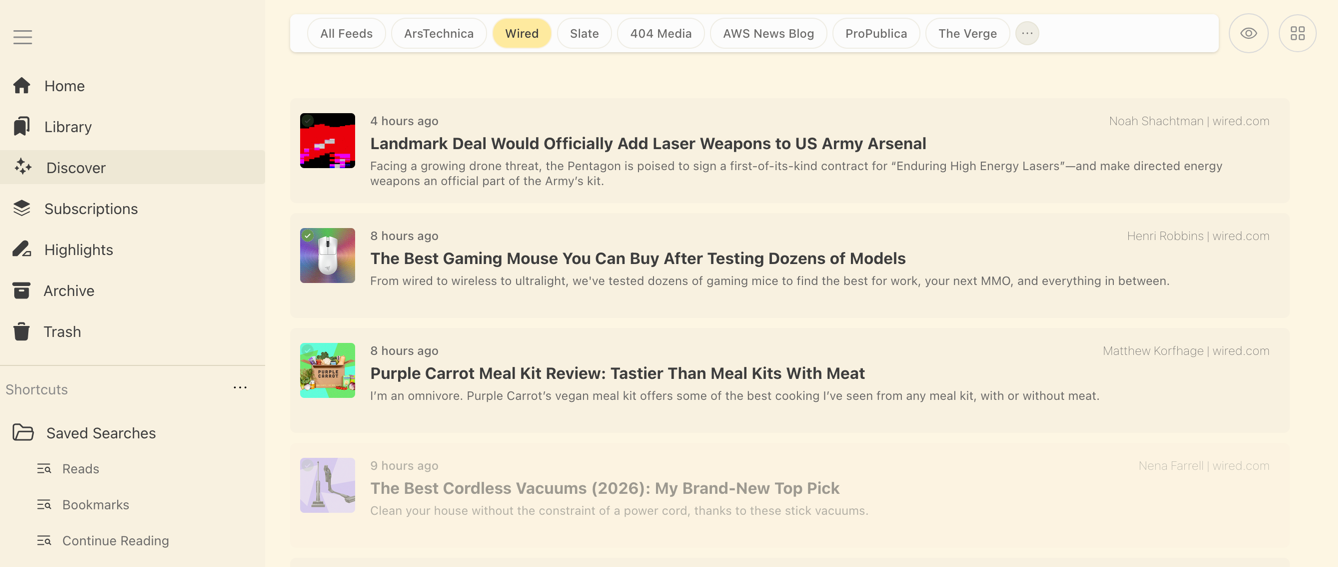
- RSS Client with ability to hide/categorise your RSS Feeds
Every single part is fully open source! Fork it, extend it, or deploy it to your own server.
A guide for running a self hosted server can be found [here](./self-hosting/GUIDE.md)
Omnivore is a complete, open source read-it-later solution for people who like text.
> [!IMPORTANT]
> Omnivore is now a completely Self-Hosted application. The Cloud application was deprecated in November of 2024. The community still exists on Discord, and we endeavour to keep things updated and bug-fixes ongoing.
>
> A guide for running a self hosted server can be found [here](./self-hosting/GUIDE.md)
We built Omnivore because we love reading and we want it to be more social. Join us!
- Highlighting, notes, search, and sharing
- Full keyboard navigation
- Automatically saves your place in long articles
- Add newsletter articles via email (with substack support!)
- PDF support
- Web app written in Node.js and TypeScript
- Native iOS app ([source](https://github.com/omnivore-app/omnivore/tree/main/apple))
- Android app ([source](https://github.com/omnivore-app/omnivore/tree/main/android/Omnivore))
- Progressive web app for Android users
- Browser extensions for Chrome, Safari, Firefox, and Edge
- Labels (aka tagging)
- Offline support
- Text to speech (iOS only)
- [Logseq](https://logseq.com/) support via our [Logseq Plugin](https://github.com/omnivore-app/logseq-omnivore)
- [Obsidian](https://obsidian.md/) support via our [Obsidian Plugin](https://github.com/omnivore-app/obsidian-omnivore)
- RSS Client with ability to hide/categorise your RSS Feeds
Every single part is fully open source! Fork it, extend it, or deploy it to your own server.
A guide for running a self hosted server can be found [here](./self-hosting/GUIDE.md)
## Join us on Discord! :speech_balloon:
We're building our community on Discord. [Join us!](https://discord.gg/h2z5rppzz9)
## Shoutouts :tada:
Omnivore takes advantage of some great open source software:
- [TypeScript](https://www.typescriptlang.org/) - Most of our backend and frontend are written in TypeScript.
- [Next.js](https://nextjs.org/) - Our frontend is a Next.JS app and is hosted on [Vercel](https://vercel.com/).
- [SWR](https://swr.vercel.app/) - We do all our data fetching on the web using SWR.
- [Stitches](https://stitches.dev/) - We use Stitches on the frontend to style our components.
- [Mozilla Readability](https://github.com/mozilla/readability) - We use Mozilla's Readability library to make pages easier to read.
- [Swift GraphQL](https://www.swift-graphql.com/) - We generate our GraphQL queries on iOS using Swift GraphQL.
- [Apollo GraphQL](https://www.apollographql.com/) - We generate our GraphQL queries on Android using Apollo GraphQL.
- [Radix](https://www.radix-ui.com/) - We use Radix UI's components on our frontend.
- [PDF.js](https://github.com/mozilla/pdf.js) - PDF.js is used to have open source pdf functionality.
- And many more awesome libraries, just checkout our package files to see what we are using.
## Shoutouts: Community 🧑🤝🧑
- [Poudlardo](https://github.com/Poudlardo) - Providing a Podman-compose file for self-hosting.
- [leopku](https://github.com/leopku) - Fixing build issues with v3 manifest
- [travisemslander-fn](https://github.com/travisemslander-fn) - Providing fixes for SNS Emails.
- [andrew-craig](https://github.com/andrew-craig) & [lukebtaylor](https://github.com/lukebtaylor) - Providing fixes for emails.
- [Benature](https://github.com/Benature) - Providing fixes for Minio
- [rbarbazz](https://github.com/rbarbazz) - Providing a HTML toggle for notes.
- [pgrosslicht](https://github.com/pgrosslicht) - various fixes to iOs Applications
- [Adil, m1xxos, Mike Baker, David Adams, Russ Taylor, William Theaker, keumky2](https://github.com/omnivore-app/omnivore/commit/4e582fb55db5537a462061c9eb0805b482cc9a00) - Who contributed to the initial commit for self-hosting, which was squashed - unfortunately losing the history in the process.
- mollydot on Discord - For continuing to moderate, and be an active part of our community!
And of course...
- [jacksonh](https://github.com/jacksonh), [sywhb](https://github.com/sywhb) and [satindar](https://github.com/satindar) - who provided the initial repo, and core functionality.
and many more who contributed in the past. If you feel like your name is missing from this list, please contact me [(Podginator)](https://github.com/podginator) via our Discord.
## How to deploy to your own server
A guide for running a self hosted server can be found [here](./self-hosting/GUIDE.md)
## How to setup local development :computer:
The easiest way to get started with local development is to use `docker compose up`. This will start a postgres container, our web frontend, an API server, and our content fetching microservice.
### Requirements for development
Omnivore is written in TypeScript and JavaScript.
- [Node.js](https://nodejs.org/) (v24.19) and [Yarn](https://classic.yarnpkg.com/lang/en/) -- Versions are managed by [Volta](https://docs.volta.sh/guide/getting-started).
- [Chromium](https://www.chromium.org/chromium-projects/) -- See below for installation info.
### Running the web and API services
#### 1. Start docker compose
```bash
git clone https://github.com/omnivore-app/omnivore
cd omnivore/self-hosting/docker-compose/self-build
docker compose up
```
This will start postgres, initialize the database, and start the web and api services.
#### 2. Open the browser
Open and confirm Omnivore is running
#### 3. Login with the test account
During database setup docker compose creates an account `demo@omnivore.work`, password: `demo_password`.
Go to in your browser and choose `Continue with Email` to login.
### Frontend Development
If you want to work on just the frontend of Omnivore you can run the backend services
with docker compose and the frontend locally:
```bash
docker compose up api content-fetch
cd packages/web
cp .env.template .env.local
yarn dev
```
You will need to configure some values in the new `.env.local` file. These are
the values for running the `web` service directly on your host machine and
running `api` and `content-fetch` within docker:
```sh
NEXT_PUBLIC_BASE_URL=http://localhost:3000
NEXT_PUBLIC_HIGHLIGHTS_BASE_URL=http://localhost:3000
NEXT_PUBLIC_LOCAL_BASE_URL=http://localhost:3000
NEXT_PUBLIC_SERVER_BASE_URL=http://localhost:4000
NEXT_PUBLIC_LOCAL_SERVER_BASE_URL=http://localhost:4000
```
### Running the puppeteer-parse service outside of Docker
To save pages you need to run the `puppeteer-parse` service.
#### 1. Install and configure Chromium
```bash
brew install chromium --no-quarantine
export PUPPETEER_SKIP_CHROMIUM_DOWNLOAD=true
export CHROMIUM_PATH=`which chromium`
```
#### 2. Navigate to the service directory, setup your env file, and install dependencies
```bash
cd packages/puppeteer-parse
cp .env.example .env
yarn
```
#### 3. Start the service
```bash
yarn start
```
This will start the puppeteer-parse service on port 9090.
In your browser go to , click the `Add Link` button,
and enter a URL such as `https://blog.omnivore.work/p/getting-started-with-omnivore`.
You should see a Chromium window open and navigate to your link. When the service
is done fetching your content you will see it in your library.
## License
Omnivore and our extensions to Readability.js are under the AGPL-3.0 license.

## Join us on Discord! :speech_balloon:
We're building our community on Discord. [Join us!](https://discord.gg/h2z5rppzz9)
## Shoutouts :tada:
Omnivore takes advantage of some great open source software:
- [TypeScript](https://www.typescriptlang.org/) - Most of our backend and frontend are written in TypeScript.
- [Next.js](https://nextjs.org/) - Our frontend is a Next.JS app and is hosted on [Vercel](https://vercel.com/).
- [SWR](https://swr.vercel.app/) - We do all our data fetching on the web using SWR.
- [Stitches](https://stitches.dev/) - We use Stitches on the frontend to style our components.
- [Mozilla Readability](https://github.com/mozilla/readability) - We use Mozilla's Readability library to make pages easier to read.
- [Swift GraphQL](https://www.swift-graphql.com/) - We generate our GraphQL queries on iOS using Swift GraphQL.
- [Apollo GraphQL](https://www.apollographql.com/) - We generate our GraphQL queries on Android using Apollo GraphQL.
- [Radix](https://www.radix-ui.com/) - We use Radix UI's components on our frontend.
- [PDF.js](https://github.com/mozilla/pdf.js) - PDF.js is used to have open source pdf functionality.
- And many more awesome libraries, just checkout our package files to see what we are using.
## Shoutouts: Community 🧑🤝🧑
- [Poudlardo](https://github.com/Poudlardo) - Providing a Podman-compose file for self-hosting.
- [leopku](https://github.com/leopku) - Fixing build issues with v3 manifest
- [travisemslander-fn](https://github.com/travisemslander-fn) - Providing fixes for SNS Emails.
- [andrew-craig](https://github.com/andrew-craig) & [lukebtaylor](https://github.com/lukebtaylor) - Providing fixes for emails.
- [Benature](https://github.com/Benature) - Providing fixes for Minio
- [rbarbazz](https://github.com/rbarbazz) - Providing a HTML toggle for notes.
- [pgrosslicht](https://github.com/pgrosslicht) - various fixes to iOs Applications
- [Adil, m1xxos, Mike Baker, David Adams, Russ Taylor, William Theaker, keumky2](https://github.com/omnivore-app/omnivore/commit/4e582fb55db5537a462061c9eb0805b482cc9a00) - Who contributed to the initial commit for self-hosting, which was squashed - unfortunately losing the history in the process.
- mollydot on Discord - For continuing to moderate, and be an active part of our community!
And of course...
- [jacksonh](https://github.com/jacksonh), [sywhb](https://github.com/sywhb) and [satindar](https://github.com/satindar) - who provided the initial repo, and core functionality.
and many more who contributed in the past. If you feel like your name is missing from this list, please contact me [(Podginator)](https://github.com/podginator) via our Discord.
## How to deploy to your own server
A guide for running a self hosted server can be found [here](./self-hosting/GUIDE.md)
## How to setup local development :computer:
The easiest way to get started with local development is to use `docker compose up`. This will start a postgres container, our web frontend, an API server, and our content fetching microservice.
### Requirements for development
Omnivore is written in TypeScript and JavaScript.
- [Node.js](https://nodejs.org/) (v24.19) and [Yarn](https://classic.yarnpkg.com/lang/en/) -- Versions are managed by [Volta](https://docs.volta.sh/guide/getting-started).
- [Chromium](https://www.chromium.org/chromium-projects/) -- See below for installation info.
### Running the web and API services
#### 1. Start docker compose
```bash
git clone https://github.com/omnivore-app/omnivore
cd omnivore/self-hosting/docker-compose/self-build
docker compose up
```
This will start postgres, initialize the database, and start the web and api services.
#### 2. Open the browser
Open and confirm Omnivore is running
#### 3. Login with the test account
During database setup docker compose creates an account `demo@omnivore.work`, password: `demo_password`.
Go to in your browser and choose `Continue with Email` to login.
### Frontend Development
If you want to work on just the frontend of Omnivore you can run the backend services
with docker compose and the frontend locally:
```bash
docker compose up api content-fetch
cd packages/web
cp .env.template .env.local
yarn dev
```
You will need to configure some values in the new `.env.local` file. These are
the values for running the `web` service directly on your host machine and
running `api` and `content-fetch` within docker:
```sh
NEXT_PUBLIC_BASE_URL=http://localhost:3000
NEXT_PUBLIC_HIGHLIGHTS_BASE_URL=http://localhost:3000
NEXT_PUBLIC_LOCAL_BASE_URL=http://localhost:3000
NEXT_PUBLIC_SERVER_BASE_URL=http://localhost:4000
NEXT_PUBLIC_LOCAL_SERVER_BASE_URL=http://localhost:4000
```
### Running the puppeteer-parse service outside of Docker
To save pages you need to run the `puppeteer-parse` service.
#### 1. Install and configure Chromium
```bash
brew install chromium --no-quarantine
export PUPPETEER_SKIP_CHROMIUM_DOWNLOAD=true
export CHROMIUM_PATH=`which chromium`
```
#### 2. Navigate to the service directory, setup your env file, and install dependencies
```bash
cd packages/puppeteer-parse
cp .env.example .env
yarn
```
#### 3. Start the service
```bash
yarn start
```
This will start the puppeteer-parse service on port 9090.
In your browser go to , click the `Add Link` button,
and enter a URL such as `https://blog.omnivore.work/p/getting-started-with-omnivore`.
You should see a Chromium window open and navigate to your link. When the service
is done fetching your content you will see it in your library.
## License
Omnivore and our extensions to Readability.js are under the AGPL-3.0 license.