



`Rainbow` adds text color, background color and style for console and command
line output in Swift. It is born for cross-platform software logging
in terminals, working in both Apple's platforms and Linux.
## Basic Usage
Nifty way, using the `String` extension, and print the colorized string.
### Named Color & Style
```swift
import Rainbow
print("Red text".red)
print("Blue background".onBlue)
print("Light green text on white background".lightGreen.onWhite)
print("Underline".underline)
print("Cyan with bold and blinking".cyan.bold.blink)
print("Plain text".red.onYellow.bold.clearColor.clearBackgroundColor.clearStyles)
```
It gives you something like this:

## Installation
### Swift Package Manager
If you are developing a cross platform software in Swift,
[Swift Package Manager](https://github.com/apple/swift-package-manager) might
be your choice for package management. Just add the url of this repo to your
`Package.swift` file as a dependency:
```swift
import PackageDescription
let package = Package(
name: "YourAwesomeSoftware",
dependencies: [
.package(url: "https://github.com/onevcat/Rainbow", .upToNextMajor(from: "4.0.0"))
],
targets: [
.target(
name: "MyApp",
dependencies: ["Rainbow"]
)
]
)
```
Then run `swift build` whenever you get prepared.
You could know more information on how to use Swift Package Manager in Apple's [official page](https://swift.org/package-manager/).
### Running the Demo
Rainbow includes a comprehensive demo that showcases all features. To see it in action:
```bash
# Clone the repository
git clone https://github.com/onevcat/Rainbow.git
cd Rainbow
# Run the demo
swift run RainbowPlayground
```
The demo covers basic colors, background colors, text styles, 8-bit/24-bit colors, hex colors, HSL colors, builder pattern, and practical examples.
 ## Performance Optimization
Rainbow v4.2.0+ includes performance optimizations for high-frequency styling operations.
### Builder Pattern
For complex styling with multiple chained calls, use the builder pattern:
```swift
// Traditional chaining - creates multiple intermediate strings
let traditional = "Hello".red.bold.underline.onBlue
// Optimized builder pattern - lazy evaluation, single string generation
let optimized = "Hello".styled.red.bold.underline.onBlue.build()
```
### Batch Operations
Apply multiple styles in a single operation:
```swift
// Traditional - multiple parsing cycles
let traditional = "Warning".red.bold.underline.italic
// Optimized - single parsing cycle
let optimized = "Warning".applyingAll(
color: .named(.red),
styles: [.bold, .underline, .italic]
)
```
### Performance Guidelines
- Use **builder pattern** (`.styled...build()`) for complex styling
- Use **batch operations** (`.applyingAll()`) for multiple styles
- Avoid repeated styling of the same strings in loops
- See [PERFORMANCE_GUIDE.md](PERFORMANCE_GUIDE.md) for detailed optimization strategies
## Other Usage
### String Interpolation & Nested
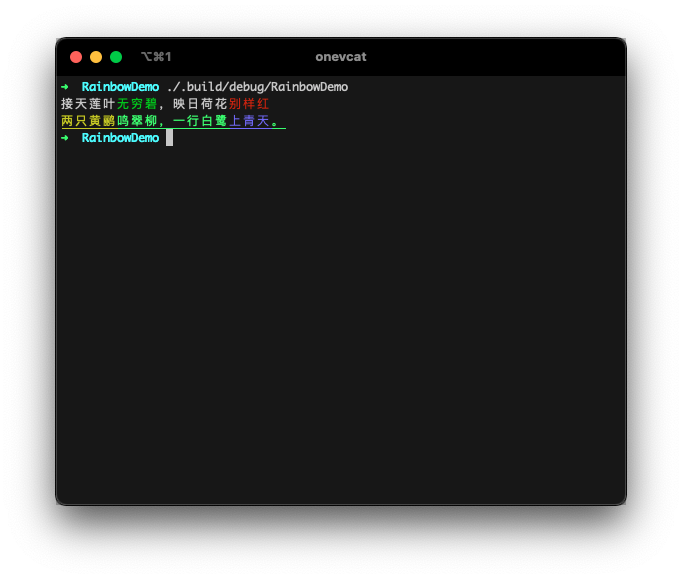
Swift string interpolation is supported. Define the color for part of the string. Or even create nested colorful strings. The inner color style will be kept:
```swift
print("接天莲叶\("无穷碧".green),映日荷花\("别样红".red)")
print("\("两只黄鹂".yellow)鸣翠柳,一行白鹭\("上青天".lightBlue)。".lightGreen.underline)
```
### ANSI 256-Color Mode
[8-bit color](https://en.wikipedia.org/wiki/ANSI_escape_code#8-bit) is fully supported, for both text color and background color:
```swift
print("停车坐爱\("枫林晚".bit8(31)),\("霜叶".bit8(160))红于\("二月花".bit8(198))。")
print("\("一道残阳".bit8(202))铺水中,\("半江瑟瑟".bit8(30).onBit8(226))半江红。")
```

### Hex Colors (approximated)
It also accepts a Hex color. Rainbow tries to convert it to a most approximate `.bit8` color:
```swift
print("黑云压城\("城欲摧".hex("#666")),甲光向日\("金鳞开".hex("000000").onHex("#E6B422"))。")
print("日出江花\("红胜火".hex(0xd11a2d)),春来江水\("绿如蓝".hex(0x10aec2))")
```

> Valid format: `"FFF"`, `"#FFF"`, `"FFFFFF"`, `"#FFFFFF"`, `0xFFFFFF`
### True color
A few terminal emulators supports 24-bit true color. If you are sure the 24-bit colors can be displayed in your user's
terminal, Rainbow has no reason to refuse them!
```swift
print("疏影横斜\("水清浅".bit24(36,116,181)),暗香浮动\("月黄昏".bit24(254,215,26))")
print("\("春色满园".hex("#ea517f", to: .bit24))关不住,\("一枝红杏".hex("#f43e06", to: .bit24))出墙来。")
```

### HSL Colors
HSL (Hue, Saturation, Lightness) colors are also supported:
```swift
print("天街小雨润如酥,草色遥看近却无".hsl(120, 20, 80))
print("最是一年春好处,绝胜烟柳满皇都".hsl(90, 60, 70))
```
> Format: `hue` (0-360°), `saturation` (0-100%), `lightness` (0-100%)
### Conditional Styling
Rainbow supports conditional styling that allows you to apply colors and styles based on runtime conditions, making your code more readable and reducing the need for ternary operators:
```swift
// Basic conditional styling
let isError = true
let isWarning = false
print("Error occurred".colorIf(isError, .red).styleIf(isError, .bold))
print("Warning message".colorIf(isWarning, .yellow))
// Log level styling
enum LogLevel { case error, warning, info }
let level = LogLevel.error
let message = "Something happened"
print(message
.colorIf(level == .error, .red)
.colorIf(level == .warning, .yellow)
.colorIf(level == .info, .cyan)
.styleIf(level == .error, .bold))
```
#### Advanced Conditional Builder
For more complex conditional styling scenarios, use the fluent builder interface:
```swift
let isActive = true
let isWarning = false
let isError = false
let styledText = "Server Status: Running"
.conditionalStyled
.when(isActive).green.bold
.when(isWarning).yellow
.when(isError).red.underline
.build()
print(styledText)
// With closure-based conditions
let progress = 75
let statusMessage = "Processing..."
.conditionalStyled
.when { progress < 33 }.red.italic
.when { progress >= 33 && progress < 67 }.yellow
.when { progress >= 67 }.green.bold
.build()
print(statusMessage)
```
### Output Target
By default, Rainbow should be smart enough to detect the output target, to determine if it is a tty. For example, it
automatically output plain text if written to a file:
```sh
// main.swift
print("Hello Rainbow".red)
$ .build/debug/RainbowDemo > output.txt
// output.txt
Hello Rainbow
```
This is useful for sharing the same code for logging to console and to a log file.
You can manually change this behavior. Rainbow follows these rules in priority:
- Set the `Rainbow.enabled` in your code explicitly.
- Pass `FORCE_COLOR=1` to enable color even if the output is not a tty. ([`FORCE_COLOR`](https://force-color.org/) has a higher priority than `NO_COLOR`)
- Pass `NO_COLOR=1` as environment value when executing your app to disable color.
- Set the `Rainbow.outputTarget` yourself.
### Verbose Way
You can also use the more verbose way if you want:
```swift
import Rainbow
let output = "The quick brown fox jumps over the lazy dog"
.applyingCodes(Color.red, BackgroundColor.yellow, Style.bold)
print(output) // Red text on yellow, bold of course :)
```
Or even construct everything from scratch:
```swift
let entry = Rainbow.Entry(
segments: [
.init(text: "Hello ", color: .named(.magenta)),
.init(text: "Rainbow", color: .bit8(214), backgroundColor: .named(.lightBlue), styles: [.underline]),
]
)
print(Rainbow.generateString(for: entry))
```
Please remember, the string extensions (such as `"Hello".red`) is `O(n)`. So if you are handling a huge string or very
complex nesting, there might be a performance issue or hard to make things in stream. The manual way is a rescue for these
cases.
## Motivation and Compatibility
Thanks to the open source of Swift, developers now could write cross platform
programs with the same language. And I believe the command line software would be
the next great platform for Swift. Colorful and well-organized output always
helps us to understand what happens. It is really a necessary utility to create
wonderful software.
`Rainbow` should work well in both OS X and Linux terminals. It is smart enough
to check whether the output is connected to a valid text terminal or not, to
decide the log should be modified or not. This could be useful when you want to
send your log to a file instead to console.
## Contact
Follow and contact me on [Twitter](http://twitter.com/onevcat) or
[Sina Weibo](http://weibo.com/onevcat). If you find an issue,
just [open a ticket](https://github.com/onevcat/Rainbow/issues/new) on it. Pull
requests are warmly welcome as well.
## Backers & Sponsors
Open-source projects cannot live long without your help. If you find Kingfisher is useful, please consider supporting this
project by becoming a sponsor. Your user icon or company logo shows up [on my blog](https://onevcat.com/tabs/about/) with a link to your home page.
Become a sponsor through [GitHub Sponsors](https://github.com/sponsors/onevcat). :heart:
## License
Rainbow is released under the MIT license. See LICENSE for details.
## Performance Optimization
Rainbow v4.2.0+ includes performance optimizations for high-frequency styling operations.
### Builder Pattern
For complex styling with multiple chained calls, use the builder pattern:
```swift
// Traditional chaining - creates multiple intermediate strings
let traditional = "Hello".red.bold.underline.onBlue
// Optimized builder pattern - lazy evaluation, single string generation
let optimized = "Hello".styled.red.bold.underline.onBlue.build()
```
### Batch Operations
Apply multiple styles in a single operation:
```swift
// Traditional - multiple parsing cycles
let traditional = "Warning".red.bold.underline.italic
// Optimized - single parsing cycle
let optimized = "Warning".applyingAll(
color: .named(.red),
styles: [.bold, .underline, .italic]
)
```
### Performance Guidelines
- Use **builder pattern** (`.styled...build()`) for complex styling
- Use **batch operations** (`.applyingAll()`) for multiple styles
- Avoid repeated styling of the same strings in loops
- See [PERFORMANCE_GUIDE.md](PERFORMANCE_GUIDE.md) for detailed optimization strategies
## Other Usage
### String Interpolation & Nested
Swift string interpolation is supported. Define the color for part of the string. Or even create nested colorful strings. The inner color style will be kept:
```swift
print("接天莲叶\("无穷碧".green),映日荷花\("别样红".red)")
print("\("两只黄鹂".yellow)鸣翠柳,一行白鹭\("上青天".lightBlue)。".lightGreen.underline)
```

### ANSI 256-Color Mode
[8-bit color](https://en.wikipedia.org/wiki/ANSI_escape_code#8-bit) is fully supported, for both text color and background color:
```swift
print("停车坐爱\("枫林晚".bit8(31)),\("霜叶".bit8(160))红于\("二月花".bit8(198))。")
print("\("一道残阳".bit8(202))铺水中,\("半江瑟瑟".bit8(30).onBit8(226))半江红。")
```

### Hex Colors (approximated)
It also accepts a Hex color. Rainbow tries to convert it to a most approximate `.bit8` color:
```swift
print("黑云压城\("城欲摧".hex("#666")),甲光向日\("金鳞开".hex("000000").onHex("#E6B422"))。")
print("日出江花\("红胜火".hex(0xd11a2d)),春来江水\("绿如蓝".hex(0x10aec2))")
```

> Valid format: `"FFF"`, `"#FFF"`, `"FFFFFF"`, `"#FFFFFF"`, `0xFFFFFF`
### True color
A few terminal emulators supports 24-bit true color. If you are sure the 24-bit colors can be displayed in your user's
terminal, Rainbow has no reason to refuse them!
```swift
print("疏影横斜\("水清浅".bit24(36,116,181)),暗香浮动\("月黄昏".bit24(254,215,26))")
print("\("春色满园".hex("#ea517f", to: .bit24))关不住,\("一枝红杏".hex("#f43e06", to: .bit24))出墙来。")
```

### HSL Colors
HSL (Hue, Saturation, Lightness) colors are also supported:
```swift
print("天街小雨润如酥,草色遥看近却无".hsl(120, 20, 80))
print("最是一年春好处,绝胜烟柳满皇都".hsl(90, 60, 70))
```
> Format: `hue` (0-360°), `saturation` (0-100%), `lightness` (0-100%)
### Conditional Styling
Rainbow supports conditional styling that allows you to apply colors and styles based on runtime conditions, making your code more readable and reducing the need for ternary operators:
```swift
// Basic conditional styling
let isError = true
let isWarning = false
print("Error occurred".colorIf(isError, .red).styleIf(isError, .bold))
print("Warning message".colorIf(isWarning, .yellow))
// Log level styling
enum LogLevel { case error, warning, info }
let level = LogLevel.error
let message = "Something happened"
print(message
.colorIf(level == .error, .red)
.colorIf(level == .warning, .yellow)
.colorIf(level == .info, .cyan)
.styleIf(level == .error, .bold))
```
#### Advanced Conditional Builder
For more complex conditional styling scenarios, use the fluent builder interface:
```swift
let isActive = true
let isWarning = false
let isError = false
let styledText = "Server Status: Running"
.conditionalStyled
.when(isActive).green.bold
.when(isWarning).yellow
.when(isError).red.underline
.build()
print(styledText)
// With closure-based conditions
let progress = 75
let statusMessage = "Processing..."
.conditionalStyled
.when { progress < 33 }.red.italic
.when { progress >= 33 && progress < 67 }.yellow
.when { progress >= 67 }.green.bold
.build()
print(statusMessage)
```
### Output Target
By default, Rainbow should be smart enough to detect the output target, to determine if it is a tty. For example, it
automatically output plain text if written to a file:
```sh
// main.swift
print("Hello Rainbow".red)
$ .build/debug/RainbowDemo > output.txt
// output.txt
Hello Rainbow
```
This is useful for sharing the same code for logging to console and to a log file.
You can manually change this behavior. Rainbow follows these rules in priority:
- Set the `Rainbow.enabled` in your code explicitly.
- Pass `FORCE_COLOR=1` to enable color even if the output is not a tty. ([`FORCE_COLOR`](https://force-color.org/) has a higher priority than `NO_COLOR`)
- Pass `NO_COLOR=1` as environment value when executing your app to disable color.
- Set the `Rainbow.outputTarget` yourself.
### Verbose Way
You can also use the more verbose way if you want:
```swift
import Rainbow
let output = "The quick brown fox jumps over the lazy dog"
.applyingCodes(Color.red, BackgroundColor.yellow, Style.bold)
print(output) // Red text on yellow, bold of course :)
```
Or even construct everything from scratch:
```swift
let entry = Rainbow.Entry(
segments: [
.init(text: "Hello ", color: .named(.magenta)),
.init(text: "Rainbow", color: .bit8(214), backgroundColor: .named(.lightBlue), styles: [.underline]),
]
)
print(Rainbow.generateString(for: entry))
```
Please remember, the string extensions (such as `"Hello".red`) is `O(n)`. So if you are handling a huge string or very
complex nesting, there might be a performance issue or hard to make things in stream. The manual way is a rescue for these
cases.
## Motivation and Compatibility
Thanks to the open source of Swift, developers now could write cross platform
programs with the same language. And I believe the command line software would be
the next great platform for Swift. Colorful and well-organized output always
helps us to understand what happens. It is really a necessary utility to create
wonderful software.
`Rainbow` should work well in both OS X and Linux terminals. It is smart enough
to check whether the output is connected to a valid text terminal or not, to
decide the log should be modified or not. This could be useful when you want to
send your log to a file instead to console.
## Contact
Follow and contact me on [Twitter](http://twitter.com/onevcat) or
[Sina Weibo](http://weibo.com/onevcat). If you find an issue,
just [open a ticket](https://github.com/onevcat/Rainbow/issues/new) on it. Pull
requests are warmly welcome as well.
## Backers & Sponsors
Open-source projects cannot live long without your help. If you find Kingfisher is useful, please consider supporting this
project by becoming a sponsor. Your user icon or company logo shows up [on my blog](https://onevcat.com/tabs/about/) with a link to your home page.
Become a sponsor through [GitHub Sponsors](https://github.com/sponsors/onevcat). :heart:
## License
Rainbow is released under the MIT license. See LICENSE for details.