# onWatch
**Free, open-source AI API quota monitoring for developers.**
Track usage across [Synthetic](https://synthetic.new), [Z.ai](https://z.ai), [Anthropic](https://anthropic.com), [Codex](https://openai.com/codex), [GitHub Copilot](https://github.com/features/copilot), [MiniMax](https://platform.minimax.io), [Gemini CLI](docs/GEMINI_SETUP.md) (legacy), [Cursor](docs/CURSOR_SETUP.md), [Grok](docs/GROK_SETUP.md), [Kimi Code](docs/KIMI_SETUP.md), and Antigravity in one place.
See history, get alerts, and open a local web dashboard before you hit throttling or run over budget. Additionally, you can ingest local telemetry from your own API-driven workflows with API Integrations, keeping track of token use and spending across multiple providers.
**Links:** [Website](https://onwatch.onllm.dev) | [Buy Me a Coffee](https://buymeacoffee.com/prakersh)
**Trust & Quality**
[](https://github.com/onllm-dev/onwatch/stargazers)
[](https://github.com/avelino/awesome-go)
[](https://github.com/onllm-dev/onwatch/releases)
[](https://codecov.io/gh/onllm-dev/onwatch)
[](LICENSE)
 **Compatibility & Docs**
[](https://github.com/onllm-dev/onwatch/releases/tag/v2.14.11)
[](https://marketplace.visualstudio.com/items?itemName=onllm-dev.onwatch)
[](https://go.dev)
[](#quick-start)
[](https://pkg.go.dev/github.com/onllm-dev/onwatch/v2)
onWatch fills the gap between "current usage snapshot" and the historical, per-cycle, cross-session view that developers actually need. It runs as a lightweight background agent (<50 MB RAM with all providers polling in parallel), stores historical data in SQLite, and serves a Material Design 3 web dashboard with dark/light mode.
It works with any tool that uses Synthetic, Z.ai, Anthropic, Codex, GitHub Copilot, MiniMax, Gemini CLI, Cursor, Grok, or Antigravity API keys, including **Cline**, **Roo Code**, **Kilo Code**, **Claude Code**, **Codex CLI**, **Cursor**, **GitHub Copilot**, **MiniMax Coding Plan**, **Grok CLI**, **Antigravity**, and others.
**Zero telemetry. Single binary. All data stays on your machine.**
**Beta:** onWatch is currently in active development. Features and APIs may change as we refine the product.
[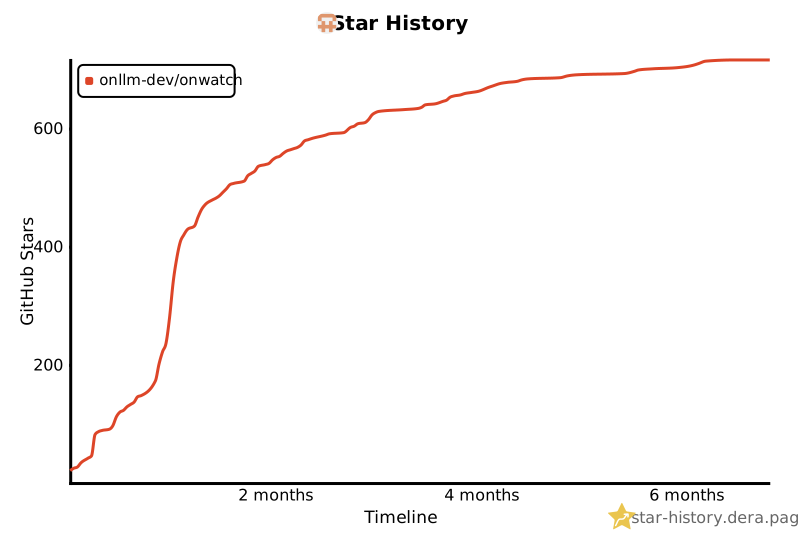](https://star-history.dera.page/#onllm-dev/onwatch&Timeline)
If onWatch helps you track your AI spending, consider giving it a star. It helps others discover the project.
> Powered by [onllm.dev](https://onllm.dev) | [Landing Page](https://onwatch.onllm.dev)
---
## Quick Start
### macOS & Linux
**One-line install:**
```bash
curl -fsSL https://raw.githubusercontent.com/onllm-dev/onwatch/main/install.sh | bash
```
This downloads the binary to `~/.onwatch/`, creates a `.env` config, sets up a systemd service (Linux) or a launchd agent (macOS, offered during install), and adds `onwatch` to your PATH.
The installer downloads the standard binary, which includes the menubar companion on macOS and the system tray on Linux desktops.
### Homebrew (macOS & Linux)
```bash
brew install onllm-dev/tap/onwatch
onwatch setup # Interactive setup wizard for API keys and config
```
### Windows
**One-line install** (PowerShell):
```powershell
irm https://raw.githubusercontent.com/onllm-dev/onwatch/main/install.ps1 | iex
```
Or download `install.bat` from the [Releases](https://github.com/onllm-dev/onwatch/releases) page and double-click it.
This downloads the binary to `%USERPROFILE%\.onwatch\`, runs interactive setup for API keys, creates a `.env` config, and adds `onwatch` to your PATH.
For manual setup or troubleshooting, see the [Windows Setup Guide](docs/WINDOWS_SETUP.md).
### Manual Installation
**Download binaries** from the [Releases](https://github.com/onllm-dev/onwatch/releases) page. Binaries are available for macOS (ARM64, AMD64), Linux (AMD64, ARM64), and Windows (AMD64, ARM64).
**Or build from source** (requires Go 1.25+):
```bash
git clone https://github.com/onllm-dev/onwatch.git && cd onwatch
cp .env.example .env # then add your API keys
./app.sh --build && ./onwatch --debug # or: make build && ./onwatch --debug
```
**Or use Docker** (requires Docker or Docker Compose):
```bash
cp .env.docker.example .env # add your API keys
docker-compose up -d
```
Or via `app.sh`:
```bash
./app.sh --docker --run
```
The Docker image uses a distroless base (~10-12 MB) and runs as non-root. An Alpine variant with shell access is also available (`ghcr.io/onllm-dev/onwatch:alpine`). Data persists via volume mount at `/data`. Logs go to stdout (`docker logs -f onwatch`). See [Docker Deployment](#docker-deployment) for details.
### Configure
Edit `~/.onwatch/.env` (or `.env` in the project directory if built from source):
```bash
SYNTHETIC_API_KEY=syn_your_key_here # https://synthetic.new/settings/api
ZAI_API_KEY=your_zai_key_here # https://www.z.ai/api-keys
ANTHROPIC_TOKEN=your_token_here # Auto-detected from Claude Code credentials
CODEX_TOKEN=your_token_here # Recommended for Codex-only setups
COPILOT_TOKEN=ghp_your_token_here # GitHub PAT with copilot scope (Beta)
ONWATCH_ADMIN_USER=admin
ONWATCH_ADMIN_PASS=changeme
```
At least one provider key is required. Configure any combination to track them in parallel. Anthropic tokens are auto-detected from Claude Code credentials (macOS Keychain, Linux keyring, or `~/.claude/.credentials.json`). For Codex-only setups, set `CODEX_TOKEN` in `.env`; during runtime onWatch re-reads Codex auth state from `~/.codex/auth.json` (or `CODEX_HOME/auth.json`) and picks up token changes. Copilot tokens require a GitHub Personal Access Token (classic) with the `copilot` scope.
Provider setup guides:
- [Windows Setup Guide](docs/WINDOWS_SETUP.md) - Detailed Windows installation & manual configuration
- [Codex Setup Guide](docs/CODEX_SETUP.md)
- [Copilot Setup Guide](docs/COPILOT_SETUP.md)
- [MiniMax Setup Guide](docs/MINIMAX_SETUP.md)
- [Antigravity Setup Guide](docs/ANTIGRAVITY_SETUP.md)
- [Cursor Setup Guide](docs/CURSOR_SETUP.md)
- [API Integration Setup Guide](docs/API_INTEGRATIONS_SETUP.md)
### Run
```bash
onwatch # start in background (daemonizes, logs to ~/.onwatch/data/.onwatch.log)
onwatch --debug # foreground mode, logs to stdout
onwatch stop # stop the running instance
onwatch status # check if running
```
Open **http://localhost:9211** and log in with your `.env` credentials.
---
### VS Code Extension
Put the same quotas in your editor. The extension is published on the VS Code Marketplace:
**https://marketplace.visualstudio.com/items?itemName=onllm-dev.onwatch**
```bash
code --install-extension onllm-dev.onwatch
```
It is a thin client: it needs the onWatch daemon running (steps above) and finds it automatically. Status bar item, hover tables and an onWatch sidebar with the quick view. Every GitHub release also ships the extension as `onwatch-vscode-.vsix` for editors without Marketplace access. See [docs/VSCODE_EXTENSION.md](docs/VSCODE_EXTENSION.md).
## What onWatch Tracks (That Your Provider Doesn't)
```
┌──────────────────────────────────────────────────────────────────┐
│ What your provider shows │ What onWatch adds │
├───────────────────────────────────┼──────────────────────────────┤
│ Current quota usage │ Historical usage trends │
│ │ Reset cycle detection │
│ │ Per-cycle consumption stats │
│ │ Usage rate & projections │
│ │ Per-session tracking │
│ │ Multi-provider unified view │
│ │ Live countdown timers │
└───────────────────────────────────┴──────────────────────────────┘
```
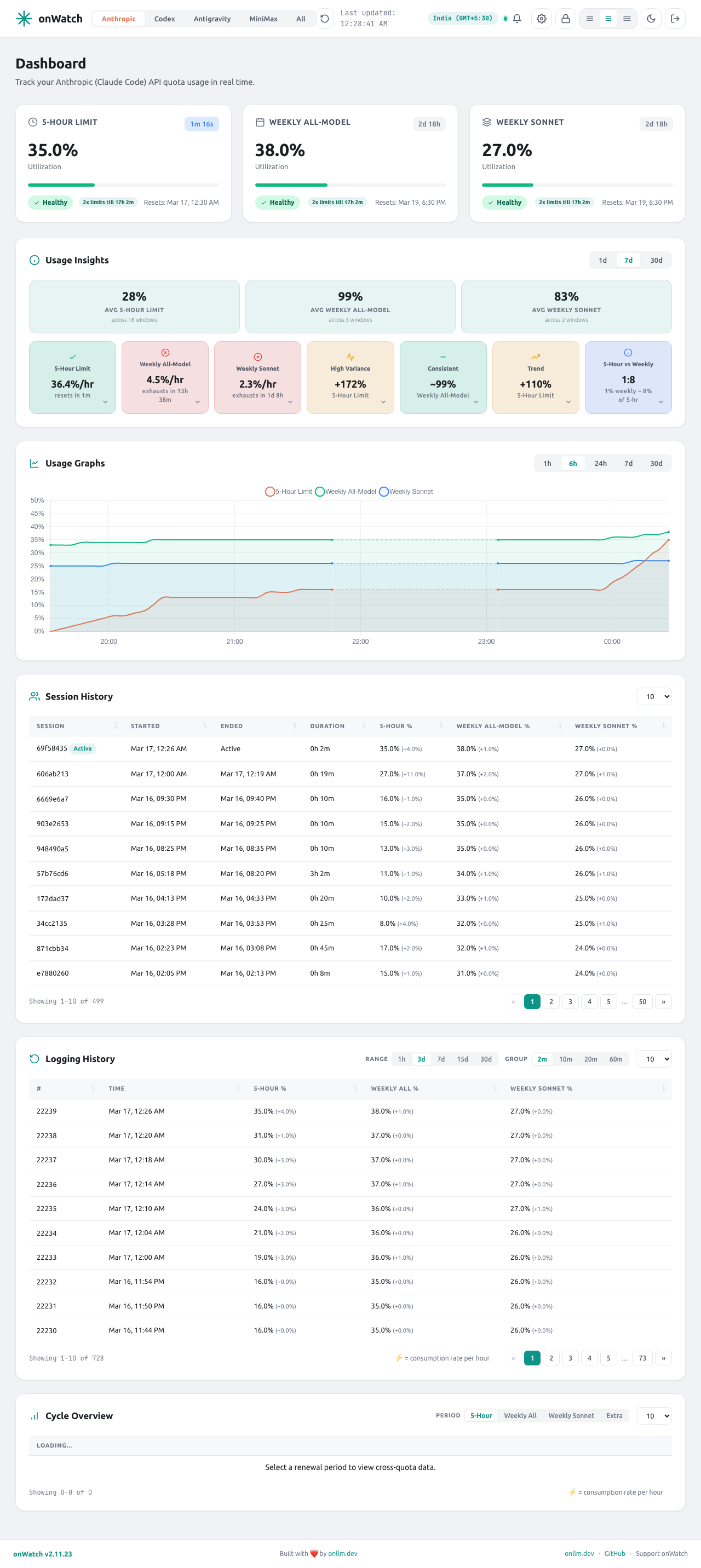
**Dashboard** -- Material Design 3 with dark/light mode (auto-detects system preference). Provider tabs appear for each configured provider:
- **Synthetic** -- Subscription, Search, and Tool Call quota cards
- **Z.ai** -- Tokens, Time, and Tool Call quota cards
- **Anthropic** -- Dynamic quota cards (5-Hour, 7-Day, 7-Day Sonnet, Monthly, etc.) with utilization percentages, OAuth token auto-refresh, and automatic rate limit bypass via token rotation
- **Codex** -- Dynamic quota cards (LLMs, Review Requests) with OAuth auth-state refresh, historical cycle analytics, **multi-account support (Beta)** for tracking multiple ChatGPT accounts, and an **auto quota-starter (Beta, off by default)** that can start an unstarted 5h/weekly window for you (see FAQ)
- **GitHub Copilot (Beta)** -- Premium Interactions, Chat, and Completions quota cards with monthly reset tracking
- **MiniMax Coding Plan** -- Shared quota pool tracking for M2, M2.1, and M2.5 models with 5-hour rolling window reset cycles and **multi-account support** for tracking multiple MiniMax subscriptions via the dashboard UI
- **Gemini CLI (Legacy)** -- Per-model quota tracking for Gemini 2.5/3.x Pro, Flash, and Flash Lite models with 24-hour reset cycles. Kept working for existing setups, but no longer the recommended path: Google's Gemini CLI has been superseded by Antigravity. New installs should use the `agy` source on the **Antigravity** provider instead
- **Antigravity** -- Multi-model quota cards (Claude, Gemini, GPT) with grouped quota pools, logging history, and cycle overview. Selectable data **source** -- the desktop **IDE** probe or the **`agy` CLI** (richer weekly + 5-hour buckets), or **both** (default) -- switchable in the dashboard settings; all variants share one Google-account quota
- **Cursor** -- Individual, Team, and Enterprise account tracking with auto-detected credentials from Cursor Desktop SQLite or macOS Keychain/Linux keyring, OAuth token auto-refresh, burn rate forecasts, and on-demand spend tracking
- **Kimi Code** -- Moonshot Kimi Code CLI OAuth quotas via `GET /coding/v1/usages` (auto-detect `~/.kimi-code/credentials`). Weekly + window limits with reset countdown. See [Kimi Setup](docs/KIMI_SETUP.md).
- **Grok** -- xAI Grok Build / SuperGrok credits tracking via local `~/.grok/auth.json` (or `$GROK_HOME`), optional `grok agent stdio` RPC, and grok.com gRPC-web bearer probe (no browser cookie import). Primary "Credits" utilization against plan limit with reset countdown. Informational local session token stats also captured.
- **Moonshot** -- Balance-based tracking for the Moonshot (Kimi) open-platform API. Available, Voucher, and Cash balance cards with drop-rate trends. Set `MOONSHOT_API_KEY`. See [Moonshot Setup](docs/MOONSHOT_SETUP.md).
- **DeepSeek** -- Balance-based tracking for the DeepSeek platform API. Total, Granted, and Topped-Up balance cards with drop-rate trends. Set `DEEPSEEK_API_KEY`. See [DeepSeek Setup](docs/DEEPSEEK_SETUP.md).
- **OpenCode Go** -- Subscription quota cards (5-Hour, Weekly, and Monthly when present) read from the plan's own meters (used and limit in USD) via the OpenCode console API, using a service-account key (`OPENCODE_GO_API_KEY`) or your browser session (`OPENCODE_GO_WORKSPACE_ID` + `OPENCODE_GO_AUTH_COOKIE`), with cycle history and deep insights. Separate from `OPENCODE_ENABLED`, which only feeds ChatGPT credentials into the Codex provider. See [OpenCode Setup](docs/OPENCODE_SETUP.md).
- **Mistral** (beta) - Separate included API and Vibe Code allowances plus pay-as-you-go charges, with browser-cookie import or manual authentication. See [Mistral Setup](docs/MISTRAL_SETUP.md).
- **Ollama Cloud** (beta) -- Included monthly usage in USD from the ollama.com API with plan-derived caps, per-model request counts, extra-usage spend, cycle history and insights. Set `OLLAMA_API_KEY`. See [Ollama Setup](docs/OLLAMA_SETUP.md).
- **Muse** -- Meta Muse coding-plan quota tracking (5-hour prompts + weekly usage) from the same subscription snapshot `muse /usage` shows, via one minimal probe per poll. Opt-in: set `MUSE_ENABLED=true` and onWatch uses the key `muse login` stored (macOS Keychain / login file), or set `META_API_KEY` directly. Tracking stays off until you opt in, because each poll spends a prompt from your own 5h window. See [Muse Setup](docs/MUSE_SETUP.md).
- **Command Code** -- Credit balance plus the 5-hour and weekly rate-limit windows from the Command Code API, with billing-period cost, request and token totals. Auto-detected from the `cmd` CLI login (or the pi / OMP auth store); set `COMMAND_CODE_API_KEY` for Docker and headless hosts. Polling reads billing endpoints only, so it spends no credits. See [Command Code Setup](docs/COMMANDCODE_SETUP.md).
- **API Integrations** -- Local JSONL ingestion for custom API-driven workflows and automations. Track per-integration token volume, request counts, recent activity, costs, trends, and accumulated usage across separate API keys and providers.
- **All** -- Side-by-side view of all configured providers
- **Prometheus metrics endpoint (Beta)** -- Exposes `/metrics` for Prometheus/Grafana/Alertmanager integrations, with optional bearer token protection via `ONWATCH_METRICS_TOKEN`
- **PWA installable** -- Install onWatch from your browser for a native app experience (Beta)
Each quota card shows: usage vs. limit with progress bar, live countdown to reset, status badge (healthy/warning/danger/critical), and consumption rate with projected usage.
**Time-series chart** -- Chart.js area chart showing all quotas as % of limit. Time ranges: 1h, 6h, 24h, 7d, 30d.
**API Integrations chart** -- Dedicated telemetry view for custom API-driven scripts. Switch between tokens per request, request counts, accumulated token use, and cost where available.
**Insights** -- Burn rate forecasting, billing-period averages, usage variance, trend detection, and cross-quota ratio analysis (e.g., "1% weekly ~ 24% of 5-hr sprint"). Provider-specific: tokens-per-call efficiency and per-tool breakdowns for Z.ai.
**Cycle Overview** -- Cross-quota correlation table showing all quota values at peak usage points within each billing period. Helps identify which quotas spike together.
**Sessions** -- Every agent run creates a session that tracks peak consumption, letting you compare usage across work periods.
**Settings** -- Dedicated settings page (`/settings`) with tabs for general preferences, provider controls, notification thresholds, webhook delivery, and SMTP email configuration.
**Custom API Integrations setup** -- Use a small wrapper around your own API calls to append normalised JSONL events into `~/.onwatch/api-integrations/`, then open the API Integrations tab to monitor cumulative and recent usage. Full setup instructions live in [docs/API_INTEGRATIONS_SETUP.md](docs/API_INTEGRATIONS_SETUP.md).
**Menubar / system tray (macOS, Linux, Windows - Beta)** -- Every desktop build includes a tray companion. macOS shows the selected quota percentages next to a template icon and opens a native popover. Linux and Windows bake the percentage into a status-colored tray icon and open the same quick view in a frameless window. Two preset views:
- **Standard** -- Provider cards with circular quota meters and reset metadata
- **Detailed** -- Expanded provider cards with sparkline trends and full quota breakdowns
Configure it in **Settings > Menubar**. You can enable or disable the companion, pick the default view, change refresh and threshold settings, choose which quotas the icon shows, and drag providers into the order you want. Platform notes for Linux and Windows live in [docs/TRAY_LINUX_WINDOWS.md](docs/TRAY_LINUX_WINDOWS.md); GNOME users can also use the [GNOME Shell extension](docs/GNOME_MENUBAR_EXTENSION.md).
The tray is currently in beta. Feedback is highly appreciated at [github.com/onllm-dev/onwatch/issues](https://github.com/onllm-dev/onwatch/issues).
**VS Code extension** -- Shows your tightest quota in the VS Code status bar (`82%`, with time to reset at critical), colored by your theme at warning and critical. Hover for a per-provider breakdown; click to open the quick view or the full dashboard inside VS Code. The extension is a thin client for the daemon and follows the same menubar preferences (provider order, visibility, thresholds), so it stays in sync with the dashboard. Zero telemetry. Install it from the [VS Code Marketplace](https://marketplace.visualstudio.com/items?itemName=onllm-dev.onwatch) (`code --install-extension onllm-dev.onwatch`), grab the `.vsix` from any release, or build it from [extensions/vscode](extensions/vscode). Full setup, settings and troubleshooting live in [docs/VSCODE_EXTENSION.md](docs/VSCODE_EXTENSION.md).
**Email notifications (Beta)** -- Configure SMTP to receive alerts when quotas cross warning or critical thresholds, or when quotas reset. Per-quota threshold overrides for fine-grained control. Alerts fire once per quota cycle by default, or repeat on a configurable cooldown while a quota stays over threshold. SMTP passwords are encrypted at rest with AES-GCM.
**Push notifications (Beta)** -- Receive browser push notifications when quotas cross thresholds. onWatch is a PWA (Progressive Web App) - install it from your browser for a native app experience. Uses Web Push protocol (VAPID) with zero external dependencies. Configure delivery channels (email, push, webhook, or any combination) per your preference.
**Webhook notifications (Beta)** -- POST a JSON payload to any HTTP endpoint on warning, critical, reset, auth error, and Codex quota-starter events. Works with ntfy, Gotify, and custom services, with optional bearer-token auth and custom headers. Payloads never contain credentials. See [docs/WEBHOOK_SETUP.md](docs/WEBHOOK_SETUP.md).
**Dark/Light mode** -- Toggle via sun/moon icon in the header. Auto-detects system preference on first visit and persists your choice across sessions.
**Password management** -- Change your password from the dashboard. The hash is stored in SQLite and persists across restarts (takes precedence over `.env`). To force-reset, delete the row from the `users` table.
**Single binary** -- No runtime dependencies. All templates and static assets embedded via `embed.FS`. SQLite via pure Go driver (no CGO).
---
## Who Is onWatch For?
| Audience | Pain Point | How onWatch Helps |
| ------------------------------------------------------------------------------------------------------------------------ | ----------------------------------------------------------------------------------- | ------------------------------------------------------------------------------------------------------- |
| **Solo developers & freelancers** using Claude Code, Cline, Roo Code, or Kilo Code with Anthropic/Synthetic/Z.ai/Codex/Copilot/MiniMax/Gemini CLI/Antigravity | Budget anxiety -- no visibility into quota burn rate, surprise throttling mid-task | Real-time rate projections, historical trends, live countdowns so you never get throttled unexpectedly |
| **Small dev teams (3-20 people)** sharing API keys | No shared visibility into who's consuming what, impossible to budget next month | Shared dashboard with session tracking, cycle history for budget planning |
| **DevOps & platform engineers** | Shadow AI usage with no FinOps for coding API subscriptions | Lightweight sidecar (<50 MB), SQLite data source for Grafana, REST API for monitoring stack integration |
| **Privacy-conscious developers** in regulated industries | Can't use SaaS analytics that phone home; need local, auditable monitoring | Single binary, local SQLite, zero telemetry, GPL-3.0 source code, works air-gapped |
| **Researchers & educators** on grants | Need per-session API cost attribution for grant reports and paper methodology | Per-session usage tracking, historical export via SQLite |
| **Budget-conscious API users** paying $3-$60/month | Every request matters; no way to know if plan is underutilized or budget is at risk | Usage insights, plan capacity analysis, upgrade/downgrade recommendations via data |
---
## FAQ
### How do I track my Synthetic API usage?
Install onWatch, set `SYNTHETIC_API_KEY` in your `.env`, and run `./onwatch`. It polls the Synthetic `/v2/quotas` endpoint every 60 seconds, stores historical data in SQLite, and serves a dashboard at `localhost:9211` showing subscription, search, and tool call quotas with live countdowns, rate projections, and reset cycle history.
### How do I monitor Z.ai (GLM Coding Plan) API quota?
Set `ZAI_API_KEY` in your `.env`. onWatch polls the Z.ai `/monitor/usage/quota/limit` endpoint and tracks token limits, time limits, and tool call quotas. All providers can run simultaneously.
### How do I track my Anthropic (Claude Code) usage?
onWatch auto-detects your Claude Code credentials from the system keychain (macOS) or keyring/file (Linux). Just install and run -- if Claude Code is installed, Anthropic tracking is offered automatically. You can also set `ANTHROPIC_TOKEN` manually in your `.env`. Anthropic quotas are dynamic (5-Hour, 7-Day, Monthly, etc.) and displayed as utilization percentages. OAuth tokens are automatically refreshed before expiry, and onWatch gracefully handles auth failures with automatic retry when new credentials are detected.
### How do I track my Codex usage?
Set `CODEX_TOKEN` in your `.env` (recommended for Codex-only installs). You can retrieve it from `~/.codex/auth.json` (`tokens.access_token`) or from `$CODEX_HOME/auth.json` if you use a custom Codex home. onWatch re-reads Codex credentials while running, so token rotation is picked up automatically. Full walkthrough: [Codex Setup Guide](docs/CODEX_SETUP.md).
### What is the Codex auto quota-starter (Beta)?
Codex 5h and weekly windows only begin counting once you send your first message after a reset -- so if you do not use Codex right away, the fresh window (and its reserve) sits unstarted. The auto quota-starter detects an unstarted window (its reset countdown stays pinned at the full length instead of ticking down) and sends one tiny request that asks the model to reply `Quota Resumed`, which starts the window for you.
It is **Beta and disabled by default.** Enable it per window in **Settings -> Providers -> Codex** (`Auto-start 5h window` / `Auto-start weekly window`); changes apply without a daemon restart. Each ping costs roughly **62 tokens** (~44 in, ~18 out) and is hard-capped to **5 pings per rolling 4 hours per account**, so the token/quota cost is negligible. Full details: [Codex Setup Guide](docs/CODEX_SETUP.md#auto-quota-starter-beta).
### How do I track my GitHub Copilot usage?
Set `COPILOT_TOKEN` in your `.env` with a GitHub Personal Access Token (classic) that has the `copilot` scope. Generate one at [github.com/settings/tokens](https://github.com/settings/tokens). onWatch polls the GitHub Copilot internal API to track Interactions, Chat, and Completions quotas with monthly reset cycle detection. Works with both free and paid plans. This feature is in beta and uses an undocumented API.
### How do I track my MiniMax Coding Plan usage?
Set `MINIMAX_API_KEY` in your `.env` with your MiniMax Coding Plan API key. Get your key from the [MiniMax Console](https://platform.minimax.io). onWatch tracks the shared quota pool across all MiniMax models (M2, M2.1, M2.5) with 5-hour rolling window reset cycles. To track multiple MiniMax subscriptions, add additional accounts via the dashboard Settings > MiniMax > Add Account. Each account polls independently with its own API key and region. Full walkthrough: [MiniMax Setup Guide](docs/MINIMAX_SETUP.md).
### How do I track my OpenRouter usage?
Set `OPENROUTER_API_KEY` in your `.env` with your OpenRouter API key. Get one from [openrouter.ai/keys](https://openrouter.ai/keys). onWatch polls the OpenRouter auth key endpoint to track total credits usage, daily/weekly/monthly spending, credit limits, and remaining balance. Works with both free and paid accounts.
### Does onWatch work with Cline, Roo Code, Kilo Code, or Claude Code?
Yes. onWatch monitors the API provider (Synthetic, Z.ai, Anthropic, Codex, GitHub Copilot, MiniMax, OpenRouter, Gemini CLI, Cursor, Grok, or Antigravity), not the coding tool. Any tool that uses a Synthetic, Z.ai, Anthropic, Codex, Copilot, MiniMax, OpenRouter, Gemini CLI, Cursor, Grok, or Antigravity API key -- including Cline, Roo Code, Kilo Code, Claude Code, Codex CLI, Cursor, GitHub Copilot, MiniMax Coding Plan, OpenRouter, Gemini CLI, Grok CLI, Antigravity, and others -- will have its usage tracked automatically.
### Does onWatch send any data to external servers?
No. Zero telemetry. All data stays in a local SQLite file. The only outbound calls are to the Synthetic, Z.ai, Anthropic, Codex, GitHub Copilot, MiniMax, Gemini CLI, Cursor, Grok, and Antigravity quota APIs you configure (Antigravity connects to localhost only). Fully auditable on [GitHub](https://github.com/onllm-dev/onwatch) (GPL-3.0).
### How much memory does onWatch use?
<50 MB under all conditions (typically ~34 MB idle, ~43 MB under heavy load). Measured with providers (Synthetic, Z.ai, Anthropic, Codex, GitHub Copilot, MiniMax, Gemini CLI, Cursor, Grok, Antigravity) polling in parallel. Lighter than a single browser tab. See [DEVELOPMENT.md](docs/DEVELOPMENT.md) for detailed benchmarks.
---
## Architecture
```text
┌──────────────┐
│ Dashboard │
│ :9211 │
└──────┬───────┘
┌──────┴───────┐
│ SQLite │
│ (WAL) │
└──┬──┬──┬──┬──┬──┬──┬──┬─┘
┌───────────────────────┘ │ │ │ │ │ │ └───────────────────────┐
┌────┴─────┐ ┌────┴────┐ ┌────┴────┐ ┌────┴────┐ ┌────┴────┐ ┌────┴────┐ ┌────┴────┐ ┌────┴─────┐
│ Synthetic│ │ Z.ai │ │Anthropic│ │ Codex │ │ Copilot │ │ MiniMax │ │ Gemini │ │ Grok │ │Antigrav. │
│ Agent │ │ Agent │ │ Agent │ │ Agent │ │ Agent │ │ Agent │ │ Agent │ │ Agent │ │ Agent │
└────┬─────┘ └────┬────┘ └────┬────┘ └────┬────┘ └────┬────┘ └────┬────┘ └────┬────┘ └────┬─┘ └────┬─────┘
┌────┴─────┐ ┌────┴────┐ ┌────┴────┐ ┌────┴────┐ ┌────┴────┐ ┌────┴────┐ ┌────┴────┐ ┌────┴─┐ ┌────┴─────┐
│ Synthetic│ │ Z.ai │ │Anthropic│ │chatgpt │ │ GitHub │ │ MiniMax │ │ Gemini │ │Grok │ │ Local │
│ API │ │ API │ │OAuth API│ │OAuth API│ │Copilot │ │ API │ │CLI API │ │auth+ │ │ RPC │
└──────────┘ └─────────┘ └─────────┘ └─────────┘ └─────────┘ └─────────┘ └─────────┘ │probe │ └──────────┘
└──────┘
```
All agents run as parallel goroutines. Each polls its API at the configured interval and writes snapshots. The dashboard reads from the shared store.
**Measured RAM (all eight agents running in parallel):** ~34 MB idle, ~43 MB under heavy load. Single binary, all assets embedded via `embed.FS`.
---
## CLI Reference
| Flag | Env Var | Default | Description |
| ------------ | ----------------------- | ---------------------------- | ----------------------------------- |
| `--interval` | `ONWATCH_POLL_INTERVAL` | `120` | Poll interval in seconds (10--3600) |
| `--port` | `ONWATCH_PORT` | `9211` | Dashboard HTTP port |
| `--db` | `ONWATCH_DB_PATH` | `~/.onwatch/data/onwatch.db` | SQLite database path |
| `--debug` | -- | `false` | Foreground mode, log to stdout |
| `--test` | -- | `false` | Isolated PID/log files for testing |
| `--version` | -- | -- | Print version and exit |
Additional environment variables:
| Variable | Description |
| ------------------------ | ------------------------------------------------------ |
| `ANTHROPIC_TOKEN` | Anthropic OAuth token (auto-detected from Claude Code) |
| `CODEX_TOKEN` | Codex OAuth access token (recommended for Codex-only) |
| `COPILOT_TOKEN` | GitHub Copilot PAT with `copilot` scope (Beta) |
| `MINIMAX_API_KEY` | MiniMax Coding Plan API key |
| `MINIMAX_REGION` | MiniMax region: `global` (default) or `cn` |
| `GEMINI_ENABLED` | Enable Gemini CLI quota tracking (Legacy, auto-detected) |
| `GEMINI_REFRESH_TOKEN` | Gemini OAuth refresh token (for Docker/headless) |
| `GEMINI_ACCESS_TOKEN` | Gemini OAuth access token (for Docker/headless) |
| `GEMINI_CLIENT_ID` | Custom OAuth client ID (optional, has defaults) |
| `GEMINI_CLIENT_SECRET` | Custom OAuth client secret (optional, has defaults) |
| `CURSOR_TOKEN` | Cursor access token (auto-detected from Cursor Desktop)|
| `GROK_TOKEN` | Grok bearer from `grok login` (or auto-detected from ~/.grok/auth.json)|
| `GROK_ENABLED` | Enable Grok provider (default: auto when auth present; set false to disable)|
| `GROK_HOME` | Custom Grok home dir (default ~/.grok; auth.json and sessions live here)|
| `KIMI_TOKEN` / `KIMI_CODE_TOKEN` | Optional static Kimi Code access token (prefer local OAuth credentials)|
| `KIMI_CODE_ENABLED` | Enable Kimi Code provider (default: auto when credentials present)|
| `KIMI_CODE_CREDENTIALS` | Path to kimi-code.json (default ~/.kimi-code/credentials/kimi-code.json)|
| `MOONSHOT_API_KEY` | Moonshot (Kimi) open-platform API key (enables balance tracking)|
| `MOONSHOT_BASE_URL` | Override the Moonshot API base URL (default `https://api.moonshot.ai`)|
| `DEEPSEEK_API_KEY` | DeepSeek platform API key (enables balance tracking) |
| `DEEPSEEK_BASE_URL` | Override the DeepSeek API base URL (default `https://api.deepseek.com`)|
| `OPENCODE_GO_API_KEY` | OpenCode console service-account key with usage read access (enables quota tracking; preferred)|
| `OPENCODE_GO_WORKSPACE_ID` | Session mode: OpenCode Go workspace ID (`wrk_...`)|
| `OPENCODE_GO_AUTH_COOKIE` | Session mode: `__Host-console_session` cookie value from opencode.ai|
| `OPENCODE_GO_BASE_URL` | Override the OpenCode console base URL (default `https://opencode.ai`)|
| `MISTRAL_ENABLED` | Enable Mistral subscription and pay-as-you-go tracking (default: false) |
| `MISTRAL_AUTH_COOKIE` | Manual Mistral Cookie header; keep private |
| `MISTRAL_BROWSER` | auto, chrome, firefox, safari (macOS), or edge |
| `MISTRAL_BROWSER_PROFILE` | Browser profile path/name; Firefox supports `::container=ID` |
| `MISTRAL_RETENTION` | How long Mistral rows are kept in SQLite (default: `2160h` = 90 days, `0` disables pruning) |
| `OLLAMA_API_KEY` | Ollama Cloud API key from ollama.com/settings/keys (enables usage tracking)|
| `OLLAMA_MONTHLY_LIMIT` | Ollama included usage cap in USD (0 = derive from plan)|
| `OLLAMA_RESET_DAY` | Ollama reset day of month, 1-31 (0 = learn from the first observed reset, starting from the account anniversary)|
| `META_API_KEY` | Meta Muse API key. Setting it opts in to Muse tracking (otherwise the key from `muse login` is used once `MUSE_ENABLED=true`)|
| `META_MUSE_MODEL` | Muse usage-probe model (default: Muse settings model, else `muse-spark-1.3`)|
| `MUSE_ENABLED` | Opt in to Muse tracking (`true`), or disable it even with credentials present (`false`). Off by default: each poll spends a prompt from your 5h window|
| `COMMAND_CODE_API_KEY` | Command Code API key (`user_...`). Either this or a local `cmd login` credential is required to track the provider|
| `COMMANDCODE_ENABLED` | Disable Command Code tracking even with credentials present (`false`). Auto-detected by default from `~/.commandcode/auth.json` or the pi / OMP auth store|
| `COMMANDCODE_BASE_URL` | Override the Command Code API base URL (default `https://api.commandcode.ai`)|
| `COMMANDCODE_AUTH_PATH` | Override the Command Code auth-file path|
| `ANTIGRAVITY_ENABLED` | Enable Antigravity provider (auto-detects local server)|
| `ANTIGRAVITY_SOURCE` | Data source: `both` (default), `cli` (agy), or `ide` |
| `ANTIGRAVITY_CLI_PATH` | Override path to the `agy` binary (else PATH/well-known)|
| `ANTIGRAVITY_BASE_URL` | Antigravity base URL (for Docker/manual config) |
| `ANTIGRAVITY_CSRF_TOKEN` | Antigravity CSRF token (for Docker/manual config) |
| `SYNTHETIC_API_KEY` | Synthetic API key |
| `ZAI_API_KEY` | Z.ai API key |
| `ZAI_BASE_URL` | Z.ai base URL (default: `https://api.z.ai/api`) |
| `ZAI_REGION` | Z.ai region: `global` (default) or `cn` |
| `ONWATCH_ADMIN_USER` | Dashboard username (default: `admin`) |
| `ONWATCH_ADMIN_PASS` | Dashboard password (default: `changeme`). Applied on first start and whenever the stored password is still the default; a password changed in Settings wins after that |
| `ONWATCH_LOG_LEVEL` | Log level: debug, info, warn, error |
| `ONWATCH_HOST` | Bind address (default: `0.0.0.0`, reachable from your network). Set `127.0.0.1` to keep the dashboard local |
| `ONWATCH_AUTH_MODE` | `local` (default) or `trusted_proxy` (SSO via reverse proxy, see [docs/TRUSTED_PROXY_AUTH.md](docs/TRUSTED_PROXY_AUTH.md)) |
| `ONWATCH_TRUSTED_PROXY_CIDRS` | Comma-separated CIDRs/IPs allowed to assert identity headers (required for `trusted_proxy`) |
| `ONWATCH_TRUSTED_USER_HEADER` | Identity header set by the proxy (default: `X-Forwarded-User`) |
| `ONWATCH_API_INTEGRATIONS_ENABLED` | Enable or disable API Integrations ingestion (default: `true`) |
| `ONWATCH_API_INTEGRATIONS_DIR` | Directory onWatch tails for API Integrations JSONL events |
| `ONWATCH_API_INTEGRATIONS_RETENTION` | How long API Integrations rows are kept in SQLite (default: `1440h` = 60 days, `0` disables pruning) |
CLI flags override environment variables.
---
## API Endpoints
All endpoints require authentication (session cookie or Basic Auth). Append `?provider=synthetic|zai|anthropic|codex|copilot|minimax|gemini|cursor|antigravity|both` to select the provider.
| Endpoint | Method | Description |
| ------------------------------- | ----------- | ---------------------------------------------- |
| `/` | GET | Dashboard |
| `/settings` | GET | Settings page |
| `/login` | GET/POST | Login page |
| `/logout` | GET | Clear session |
| `/api/current` | GET | Latest snapshot with summaries |
| `/api/history?range=6h` | GET | Historical data for charts |
| `/api/cycles?type=subscription` | GET | Reset cycle history |
| `/api/cycle-overview` | GET | Cross-quota correlation at peak usage |
| `/api/summary` | GET | Usage summaries |
| `/api/capabilities` | GET | Build/runtime capabilities (platform, menubar) |
| `/api/menubar/summary` | GET | Normalized menubar snapshot payload (public on loopback, dashboard auth elsewhere) |
| `/api/menubar/tray-title` | GET | Compact tray title and per-provider segments |
| `/api/menubar/preferences` | GET/PUT | Menubar settings (providers, order, thresholds, tray display) |
| `/api/menubar/test` | GET | Browser-testable menubar page in test mode |
| `/api/sessions` | GET | Session history |
| `/api/insights` | GET | Usage insights |
| `/api/providers` | GET | Available providers |
| `/api/settings` | GET/PUT | User settings (notifications, SMTP, providers, menubar) |
| `/api/api-integrations/current` | GET | Current aggregated usage by API integration |
| `/api/api-integrations/history` | GET | Chart-ready API integration history, `?range=` |
| `/api/api-integrations/health` | GET | API integration ingest health and file state |
| `/api/settings/smtp/test` | POST | Send test email via configured SMTP |
| `/api/settings/webhook/test` | POST | Send test payload to configured webhook |
| `/api/password` | PUT | Change password |
| `/api/push/vapid` | GET | Get VAPID public key for push subscription |
| `/api/push/subscribe` | POST/DELETE | Subscribe/unsubscribe push endpoint |
| `/api/push/test` | POST | Send test push notification |
| `/api/update/check` | GET | Check for new version |
| `/api/update/apply` | POST | Download and apply update |
---
## Self-Update
onWatch can update itself from the dashboard or CLI:
```bash
onwatch update # Check for updates and self-update from CLI
```
Or click the update badge in the dashboard footer when a new version is available.
**Under systemd**, the update is fully automatic - no manual restart needed. onWatch detects its systemd service via `/proc/self/cgroup`, fixes the unit file if needed (`Restart=always`), runs `systemctl daemon-reload`, and triggers `systemctl restart` for a clean lifecycle-managed restart.
**Under launchd** (macOS with auto-start enabled), the update restarts the agent with `launchctl kickstart -k`, so launchd keeps owning the process.
**Standalone mode** (macOS without auto-start, or Linux without systemd) spawns the new binary, which takes over via PID file. If the spawn fails, onWatch automatically falls back to `systemctl restart` as a safety net.
`onwatch update` always leaves onWatch running: if the daemon was stopped (after a reboot, say), the update starts it rather than exiting silently.
The binary validates downloaded updates by checking executable magic bytes (ELF, Mach-O, PE) before replacing itself.
**If a self-update fails to restart**, the new binary is already on disk - just restart the service manually:
```bash
# systemd (Linux)
sudo systemctl restart onwatch
# launchd (macOS with auto-start enabled)
launchctl kickstart -k gui/$UID/dev.onllm.onwatch
# Standalone (macOS / Linux without systemd)
onwatch stop && onwatch
```
---
## Auto-Start at Login (macOS)
Without a launchd agent nothing restarts onWatch after a reboot or logout. The
installer offers to set this up, and `onwatch setup` / `onwatch update` offer it
once if it is missing. You can also manage it directly:
```bash
onwatch service install # Start automatically at login
onwatch service status # Show whether the agent is installed and loaded
onwatch service uninstall # Remove the agent
```
The agent is a per-user LaunchAgent at
`~/Library/LaunchAgents/dev.onllm.onwatch.plist` with `RunAtLoad` and
`KeepAlive: {SuccessfulExit: false}` - it restarts onWatch after a crash, but a
deliberate `onwatch stop` stays stopped until the next login. Declining the
prompt is remembered in `~/.onwatch/.autostart-declined`, so it is only asked
once.
For unattended installs, set `ONWATCH_AUTOSTART=yes` (or `no`) before running
`install.sh`.
If the GitHub CLI is installed and logged in, the installer and `onwatch setup`
ask once whether to star the repository. Yes is the default, and unattended
installs with no terminal star as well. Set `ONWATCH_STAR=no` to opt out.
On Linux, this role is played by the systemd unit that `install.sh` creates.
---
## Data Storage
```shell
~/.onwatch/
├── onwatch.pid # PID file
└── data/
├── onwatch.db # SQLite database (WAL mode)
├── .onwatch.log # Main daemon log file (background mode)
└── menubar.log # Menubar / tray companion log file (desktop builds)
```
Log files are stored next to the database (default `~/.onwatch/data/`).
Each log rotates at 50 MB with 3 backups (`.1`, `.2`, `.3`) for both main and menubar logs.
On first run, if a database exists at `./onwatch.db`, onWatch auto-migrates it to `~/.onwatch/data/`.
---
## Docker Deployment
The container auto-detects the Docker environment and runs in foreground mode with stdout logging.
> [!NOTE]
> onWatch provides Docker support with a distroless runtime image (~10-12 MB) and an Alpine variant (~15 MB) with shell access.
> You will almost certainly need to account for file permissions when using bind mounts for the SQLite database, as the container runs as non-root (UID 65532).
> See [Storage](#storage) below for details.
### Quick Start
**Using pre-built images from GitHub Container Registry:**
Multi-arch images (linux/amd64, linux/arm64) are automatically built and published on each release:
```bash
# Pull and run the latest release (distroless - default)
docker run -d --name onwatch -p 9211:9211 \
-v onwatch-data:/data \
-e SYNTHETIC_API_KEY=your_key_here \
ghcr.io/onllm-dev/onwatch:latest
```
An Alpine variant with shell access is also available for users who need `docker exec` (e.g. Codex multi-account setup):
```bash
# Alpine variant (includes /bin/sh)
docker run -d --name onwatch -p 9211:9211 \
-v onwatch-data:/data \
-e SYNTHETIC_API_KEY=your_key_here \
ghcr.io/onllm-dev/onwatch:alpine
```
| Tag | Base | Shell | Size |
|-----|------|-------|------|
| `latest`, `2.x.y` | Distroless | No | ~10-12 MB |
| `alpine`, `2.x.y-alpine` | Alpine 3.21 | Yes | ~15 MB |
**Docker Compose (recommended):**
```bash
git clone https://github.com/onllm-dev/onwatch.git && cd onwatch
cp .env.docker.example .env
nano .env # Add your API keys
docker-compose up -d
docker-compose logs -f
```
**Using app.sh:**
```bash
./app.sh --docker --build # Build Docker image
./app.sh --docker --run # Build + start container
./app.sh --docker --stop # Stop container
./app.sh --docker --clean # Remove container and image
```
**Manual Docker run:**
```bash
docker build -t onwatch:latest .
docker run -d --name onwatch -p 9211:9211 \
-v ./onwatch-data:/data \
--env-file .env \
onwatch:latest
```
### Configuration
Copy `.env.docker.example` to `.env` and set provider keys as needed. onWatch can start with no providers and you can enable them later from Settings. Key variables:
| Variable | Description | Default |
| ----------------------- | ------------------------------------------ | ---------- |
| `SYNTHETIC_API_KEY` | Synthetic API key | -- |
| `ZAI_API_KEY` | Z.ai API key | -- |
| `ZAI_REGION` | Z.ai region: `global` (default) or `cn` | `global` |
| `ANTHROPIC_TOKEN` | Anthropic token (auto-detected if not set) | -- |
| `CODEX_TOKEN` | Codex OAuth access token (recommended; required for Codex-only) | -- |
| `MINIMAX_API_KEY` | MiniMax Coding Plan API key | -- |
| `MINIMAX_REGION` | MiniMax region: `global` (default) or `cn` | `global` |
| `GEMINI_REFRESH_TOKEN` | Gemini OAuth refresh token (Beta) | -- |
| `ONWATCH_ADMIN_USER` | Dashboard username | `admin` |
| `ONWATCH_ADMIN_PASS` | Dashboard password | `changeme` |
| `ONWATCH_POLL_INTERVAL` | Polling interval (seconds) | `120` |
| `ONWATCH_LOG_LEVEL` | Log level | `info` |
### Storage
The container runs as non-root (UID 65532). The SQLite database is stored at `/data/onwatch.db` and must be persisted via a volume mount.
The `docker-compose.yml` uses a bind mount at `./onwatch-data/`:
```bash
# Pre-create with correct ownership
mkdir -p ./onwatch-data && sudo chown -R 65532:65532 ./onwatch-data
```
Alternatively, use a named volume for simpler permissions handling:
```bash
docker run -d --name onwatch -p 9211:9211 \
-v onwatch-data:/data \
--env-file .env \
onwatch:latest
```
### Resource Limits
The `docker-compose.yml` includes memory limits (64M limit, 32M reservation), log rotation (10 MB, 3 files), and `unless-stopped` restart policy.
### Troubleshooting
**Database path is not writable:** If startup shows `database path is not writable`, fix bind mount ownership recursively with `sudo chown -R 65532:65532 ./onwatch-data` or use named volumes.
**Container won't start:** Check `docker-compose logs -f`; verify API keys in `.env` and port 9211 availability.
**Debugging:** The default distroless image has no shell. Use the Alpine variant (`ghcr.io/onllm-dev/onwatch:alpine`) if you need `docker exec` access, or use a sidecar: `docker run -it --rm --pid=container:onwatch --net=container:onwatch nicolaka/netshoot bash`
**Anthropic 429 rate limit errors:** Anthropic's `/api/oauth/usage` endpoint has aggressive rate limits (~5 requests per token). onWatch automatically handles this by refreshing the OAuth token when rate limited, which provides a fresh rate limit window. This is transparent to users - onWatch logs "Rate limit bypassed successfully" when this occurs. The workaround requires OAuth credentials (auto-detected from Claude Code); API key authentication does not support token refresh. See [issue #16](https://github.com/onllm-dev/onWatch/issues/16) and [anthropics/claude-code#31021](https://github.com/anthropics/claude-code/issues/31021) for details.
---
## Security
- API keys loaded from `.env`, never committed, redacted in all log output
- Session-based auth with cookie + Basic Auth fallback
- Passwords stored as SHA-256 hashes with constant-time comparison
- SMTP passwords and webhook bearer tokens encrypted at rest with AES-256-GCM (key derived from admin password)
- VAPID keys auto-generated (ECDSA P-256) and stored in database
- Web Push payloads encrypted per RFC 8291 (ECDH + HKDF + AES-128-GCM)
- Parameterized SQL queries throughout
---
## Development
See [DEVELOPMENT.md](docs/DEVELOPMENT.md) for build instructions, cross-compilation, and testing.
```bash
./app.sh --build # Production binary with menubar/tray companion (or: make build)
./app.sh --test # Tests with race detection (or: make test)
./app.sh --build --run # Build + run debug mode (or: make run)
./app.sh --release # Cross-compile all platforms (or: make release-local)
```
### Nix
If you have Nix (flakes enabled), you can build, run, and develop without touching `app.sh`:
```bash
nix build .#onwatch # Build -> ./result/bin/onwatch (pure-Go, static)
nix run .#onwatch -- --debug # Build + run
nix develop # Enter a shell with go, gopls, gotools, gofumpt
```
With [direnv](https://direnv.net/) installed, run `direnv allow` once and the devShell loads automatically on `cd`.
The flake tracks `nixos-unstable` (pinned via `flake.lock`) because `go.mod` requires Go >= 1.25.7 and the `nixos-25.05` branch only ships Go 1.24. When you change `go.sum`, update the `vendorHash` in `flake.nix` by running `nix build .#onwatch` and pasting the `got: sha256-...` value from the mismatch error.
---
## Contributing
1. Fork the repository
2. Create a feature branch: `git checkout -b feat/my-feature`
3. Write tests first, then implement
4. Run `./app.sh --test` and commit with conventional format
5. Open a Pull Request
---
## License
GNU General Public License v3.0. See [LICENSE](LICENSE).
---
## Support
If onWatch saves you time, consider buying me a coffee:
[](https://buymeacoffee.com/prakersh)
---
## Acknowledgments
- Powered by [onllm.dev](https://onllm.dev)
- [Anthropic](https://anthropic.com) for the Claude Code API
- [Synthetic](https://synthetic.new) for the API
- [Z.ai](https://z.ai) for the API
- [Chart.js](https://www.chartjs.org/) for charts
- [modernc.org/sqlite](https://pkg.go.dev/modernc.org/sqlite) for pure Go SQLite
---
## Uninstall
**Homebrew (macOS & Linux):**
```bash
onwatch stop
brew uninstall onwatch
rm -rf ~/.onwatch
```
**Manual install (macOS):**
```bash
onwatch service uninstall # Remove the launchd auto-start agent, if enabled
onwatch stop
rm -rf ~/.onwatch
sed -i '' '/# onWatch/d; /\.onwatch/d' ~/.zshrc ~/.bash_profile 2>/dev/null
```
**Manual install (Linux):**
```bash
onwatch stop
rm -rf ~/.onwatch
sed -i '/# onWatch/d; /\.onwatch/d' ~/.zshrc ~/.bashrc ~/.bash_profile 2>/dev/null
# If using systemd user service:
systemctl --user stop onwatch && systemctl --user disable onwatch && rm -f ~/.config/systemd/user/onwatch.service && systemctl --user daemon-reload
# If using systemd system service:
sudo systemctl stop onwatch && sudo systemctl disable onwatch && sudo rm -f /etc/systemd/system/onwatch.service && sudo systemctl daemon-reload
```
**Windows (PowerShell):**
```powershell
.\onwatch.exe stop
$p = [Environment]::GetEnvironmentVariable("Path","User"); [Environment]::SetEnvironmentVariable("Path",($p -split ";" | Where-Object {$_ -notlike "*\.onwatch*"}) -join ";","User")
Remove-Item -Recurse -Force $env:USERPROFILE\.onwatch
```
**Compatibility & Docs**
[](https://github.com/onllm-dev/onwatch/releases/tag/v2.14.11)
[](https://marketplace.visualstudio.com/items?itemName=onllm-dev.onwatch)
[](https://go.dev)
[](#quick-start)
[](https://pkg.go.dev/github.com/onllm-dev/onwatch/v2)
onWatch fills the gap between "current usage snapshot" and the historical, per-cycle, cross-session view that developers actually need. It runs as a lightweight background agent (<50 MB RAM with all providers polling in parallel), stores historical data in SQLite, and serves a Material Design 3 web dashboard with dark/light mode.
It works with any tool that uses Synthetic, Z.ai, Anthropic, Codex, GitHub Copilot, MiniMax, Gemini CLI, Cursor, Grok, or Antigravity API keys, including **Cline**, **Roo Code**, **Kilo Code**, **Claude Code**, **Codex CLI**, **Cursor**, **GitHub Copilot**, **MiniMax Coding Plan**, **Grok CLI**, **Antigravity**, and others.
**Zero telemetry. Single binary. All data stays on your machine.**
**Beta:** onWatch is currently in active development. Features and APIs may change as we refine the product.
[](https://star-history.dera.page/#onllm-dev/onwatch&Timeline)

If onWatch helps you track your AI spending, consider giving it a star. It helps others discover the project.
> Powered by [onllm.dev](https://onllm.dev) | [Landing Page](https://onwatch.onllm.dev)
---
## Quick Start
### macOS & Linux
**One-line install:**
```bash
curl -fsSL https://raw.githubusercontent.com/onllm-dev/onwatch/main/install.sh | bash
```
This downloads the binary to `~/.onwatch/`, creates a `.env` config, sets up a systemd service (Linux) or a launchd agent (macOS, offered during install), and adds `onwatch` to your PATH.
The installer downloads the standard binary, which includes the menubar companion on macOS and the system tray on Linux desktops.
### Homebrew (macOS & Linux)
```bash
brew install onllm-dev/tap/onwatch
onwatch setup # Interactive setup wizard for API keys and config
```
### Windows
**One-line install** (PowerShell):
```powershell
irm https://raw.githubusercontent.com/onllm-dev/onwatch/main/install.ps1 | iex
```
Or download `install.bat` from the [Releases](https://github.com/onllm-dev/onwatch/releases) page and double-click it.
This downloads the binary to `%USERPROFILE%\.onwatch\`, runs interactive setup for API keys, creates a `.env` config, and adds `onwatch` to your PATH.
For manual setup or troubleshooting, see the [Windows Setup Guide](docs/WINDOWS_SETUP.md).
### Manual Installation
**Download binaries** from the [Releases](https://github.com/onllm-dev/onwatch/releases) page. Binaries are available for macOS (ARM64, AMD64), Linux (AMD64, ARM64), and Windows (AMD64, ARM64).
**Or build from source** (requires Go 1.25+):
```bash
git clone https://github.com/onllm-dev/onwatch.git && cd onwatch
cp .env.example .env # then add your API keys
./app.sh --build && ./onwatch --debug # or: make build && ./onwatch --debug
```
**Or use Docker** (requires Docker or Docker Compose):
```bash
cp .env.docker.example .env # add your API keys
docker-compose up -d
```
Or via `app.sh`:
```bash
./app.sh --docker --run
```
The Docker image uses a distroless base (~10-12 MB) and runs as non-root. An Alpine variant with shell access is also available (`ghcr.io/onllm-dev/onwatch:alpine`). Data persists via volume mount at `/data`. Logs go to stdout (`docker logs -f onwatch`). See [Docker Deployment](#docker-deployment) for details.
### Configure
Edit `~/.onwatch/.env` (or `.env` in the project directory if built from source):
```bash
SYNTHETIC_API_KEY=syn_your_key_here # https://synthetic.new/settings/api
ZAI_API_KEY=your_zai_key_here # https://www.z.ai/api-keys
ANTHROPIC_TOKEN=your_token_here # Auto-detected from Claude Code credentials
CODEX_TOKEN=your_token_here # Recommended for Codex-only setups
COPILOT_TOKEN=ghp_your_token_here # GitHub PAT with copilot scope (Beta)
ONWATCH_ADMIN_USER=admin
ONWATCH_ADMIN_PASS=changeme
```
At least one provider key is required. Configure any combination to track them in parallel. Anthropic tokens are auto-detected from Claude Code credentials (macOS Keychain, Linux keyring, or `~/.claude/.credentials.json`). For Codex-only setups, set `CODEX_TOKEN` in `.env`; during runtime onWatch re-reads Codex auth state from `~/.codex/auth.json` (or `CODEX_HOME/auth.json`) and picks up token changes. Copilot tokens require a GitHub Personal Access Token (classic) with the `copilot` scope.
Provider setup guides:
- [Windows Setup Guide](docs/WINDOWS_SETUP.md) - Detailed Windows installation & manual configuration
- [Codex Setup Guide](docs/CODEX_SETUP.md)
- [Copilot Setup Guide](docs/COPILOT_SETUP.md)
- [MiniMax Setup Guide](docs/MINIMAX_SETUP.md)
- [Antigravity Setup Guide](docs/ANTIGRAVITY_SETUP.md)
- [Cursor Setup Guide](docs/CURSOR_SETUP.md)
- [API Integration Setup Guide](docs/API_INTEGRATIONS_SETUP.md)
### Run
```bash
onwatch # start in background (daemonizes, logs to ~/.onwatch/data/.onwatch.log)
onwatch --debug # foreground mode, logs to stdout
onwatch stop # stop the running instance
onwatch status # check if running
```
Open **http://localhost:9211** and log in with your `.env` credentials.
---
### VS Code Extension
Put the same quotas in your editor. The extension is published on the VS Code Marketplace:
**https://marketplace.visualstudio.com/items?itemName=onllm-dev.onwatch**
```bash
code --install-extension onllm-dev.onwatch
```
It is a thin client: it needs the onWatch daemon running (steps above) and finds it automatically. Status bar item, hover tables and an onWatch sidebar with the quick view. Every GitHub release also ships the extension as `onwatch-vscode-.vsix` for editors without Marketplace access. See [docs/VSCODE_EXTENSION.md](docs/VSCODE_EXTENSION.md).
## What onWatch Tracks (That Your Provider Doesn't)
```
┌──────────────────────────────────────────────────────────────────┐
│ What your provider shows │ What onWatch adds │
├───────────────────────────────────┼──────────────────────────────┤
│ Current quota usage │ Historical usage trends │
│ │ Reset cycle detection │
│ │ Per-cycle consumption stats │
│ │ Usage rate & projections │
│ │ Per-session tracking │
│ │ Multi-provider unified view │
│ │ Live countdown timers │
└───────────────────────────────────┴──────────────────────────────┘
```
**Dashboard** -- Material Design 3 with dark/light mode (auto-detects system preference). Provider tabs appear for each configured provider:
- **Synthetic** -- Subscription, Search, and Tool Call quota cards
- **Z.ai** -- Tokens, Time, and Tool Call quota cards
- **Anthropic** -- Dynamic quota cards (5-Hour, 7-Day, 7-Day Sonnet, Monthly, etc.) with utilization percentages, OAuth token auto-refresh, and automatic rate limit bypass via token rotation
- **Codex** -- Dynamic quota cards (LLMs, Review Requests) with OAuth auth-state refresh, historical cycle analytics, **multi-account support (Beta)** for tracking multiple ChatGPT accounts, and an **auto quota-starter (Beta, off by default)** that can start an unstarted 5h/weekly window for you (see FAQ)
- **GitHub Copilot (Beta)** -- Premium Interactions, Chat, and Completions quota cards with monthly reset tracking
- **MiniMax Coding Plan** -- Shared quota pool tracking for M2, M2.1, and M2.5 models with 5-hour rolling window reset cycles and **multi-account support** for tracking multiple MiniMax subscriptions via the dashboard UI
- **Gemini CLI (Legacy)** -- Per-model quota tracking for Gemini 2.5/3.x Pro, Flash, and Flash Lite models with 24-hour reset cycles. Kept working for existing setups, but no longer the recommended path: Google's Gemini CLI has been superseded by Antigravity. New installs should use the `agy` source on the **Antigravity** provider instead
- **Antigravity** -- Multi-model quota cards (Claude, Gemini, GPT) with grouped quota pools, logging history, and cycle overview. Selectable data **source** -- the desktop **IDE** probe or the **`agy` CLI** (richer weekly + 5-hour buckets), or **both** (default) -- switchable in the dashboard settings; all variants share one Google-account quota
- **Cursor** -- Individual, Team, and Enterprise account tracking with auto-detected credentials from Cursor Desktop SQLite or macOS Keychain/Linux keyring, OAuth token auto-refresh, burn rate forecasts, and on-demand spend tracking
- **Kimi Code** -- Moonshot Kimi Code CLI OAuth quotas via `GET /coding/v1/usages` (auto-detect `~/.kimi-code/credentials`). Weekly + window limits with reset countdown. See [Kimi Setup](docs/KIMI_SETUP.md).
- **Grok** -- xAI Grok Build / SuperGrok credits tracking via local `~/.grok/auth.json` (or `$GROK_HOME`), optional `grok agent stdio` RPC, and grok.com gRPC-web bearer probe (no browser cookie import). Primary "Credits" utilization against plan limit with reset countdown. Informational local session token stats also captured.
- **Moonshot** -- Balance-based tracking for the Moonshot (Kimi) open-platform API. Available, Voucher, and Cash balance cards with drop-rate trends. Set `MOONSHOT_API_KEY`. See [Moonshot Setup](docs/MOONSHOT_SETUP.md).
- **DeepSeek** -- Balance-based tracking for the DeepSeek platform API. Total, Granted, and Topped-Up balance cards with drop-rate trends. Set `DEEPSEEK_API_KEY`. See [DeepSeek Setup](docs/DEEPSEEK_SETUP.md).
- **OpenCode Go** -- Subscription quota cards (5-Hour, Weekly, and Monthly when present) read from the plan's own meters (used and limit in USD) via the OpenCode console API, using a service-account key (`OPENCODE_GO_API_KEY`) or your browser session (`OPENCODE_GO_WORKSPACE_ID` + `OPENCODE_GO_AUTH_COOKIE`), with cycle history and deep insights. Separate from `OPENCODE_ENABLED`, which only feeds ChatGPT credentials into the Codex provider. See [OpenCode Setup](docs/OPENCODE_SETUP.md).
- **Mistral** (beta) - Separate included API and Vibe Code allowances plus pay-as-you-go charges, with browser-cookie import or manual authentication. See [Mistral Setup](docs/MISTRAL_SETUP.md).
- **Ollama Cloud** (beta) -- Included monthly usage in USD from the ollama.com API with plan-derived caps, per-model request counts, extra-usage spend, cycle history and insights. Set `OLLAMA_API_KEY`. See [Ollama Setup](docs/OLLAMA_SETUP.md).
- **Muse** -- Meta Muse coding-plan quota tracking (5-hour prompts + weekly usage) from the same subscription snapshot `muse /usage` shows, via one minimal probe per poll. Opt-in: set `MUSE_ENABLED=true` and onWatch uses the key `muse login` stored (macOS Keychain / login file), or set `META_API_KEY` directly. Tracking stays off until you opt in, because each poll spends a prompt from your own 5h window. See [Muse Setup](docs/MUSE_SETUP.md).
- **Command Code** -- Credit balance plus the 5-hour and weekly rate-limit windows from the Command Code API, with billing-period cost, request and token totals. Auto-detected from the `cmd` CLI login (or the pi / OMP auth store); set `COMMAND_CODE_API_KEY` for Docker and headless hosts. Polling reads billing endpoints only, so it spends no credits. See [Command Code Setup](docs/COMMANDCODE_SETUP.md).
- **API Integrations** -- Local JSONL ingestion for custom API-driven workflows and automations. Track per-integration token volume, request counts, recent activity, costs, trends, and accumulated usage across separate API keys and providers.
- **All** -- Side-by-side view of all configured providers
- **Prometheus metrics endpoint (Beta)** -- Exposes `/metrics` for Prometheus/Grafana/Alertmanager integrations, with optional bearer token protection via `ONWATCH_METRICS_TOKEN`
- **PWA installable** -- Install onWatch from your browser for a native app experience (Beta)
Each quota card shows: usage vs. limit with progress bar, live countdown to reset, status badge (healthy/warning/danger/critical), and consumption rate with projected usage.
**Time-series chart** -- Chart.js area chart showing all quotas as % of limit. Time ranges: 1h, 6h, 24h, 7d, 30d.
**API Integrations chart** -- Dedicated telemetry view for custom API-driven scripts. Switch between tokens per request, request counts, accumulated token use, and cost where available.
**Insights** -- Burn rate forecasting, billing-period averages, usage variance, trend detection, and cross-quota ratio analysis (e.g., "1% weekly ~ 24% of 5-hr sprint"). Provider-specific: tokens-per-call efficiency and per-tool breakdowns for Z.ai.
**Cycle Overview** -- Cross-quota correlation table showing all quota values at peak usage points within each billing period. Helps identify which quotas spike together.
**Sessions** -- Every agent run creates a session that tracks peak consumption, letting you compare usage across work periods.
**Settings** -- Dedicated settings page (`/settings`) with tabs for general preferences, provider controls, notification thresholds, webhook delivery, and SMTP email configuration.
**Custom API Integrations setup** -- Use a small wrapper around your own API calls to append normalised JSONL events into `~/.onwatch/api-integrations/`, then open the API Integrations tab to monitor cumulative and recent usage. Full setup instructions live in [docs/API_INTEGRATIONS_SETUP.md](docs/API_INTEGRATIONS_SETUP.md).
**Menubar / system tray (macOS, Linux, Windows - Beta)** -- Every desktop build includes a tray companion. macOS shows the selected quota percentages next to a template icon and opens a native popover. Linux and Windows bake the percentage into a status-colored tray icon and open the same quick view in a frameless window. Two preset views:
- **Standard** -- Provider cards with circular quota meters and reset metadata
- **Detailed** -- Expanded provider cards with sparkline trends and full quota breakdowns
Configure it in **Settings > Menubar**. You can enable or disable the companion, pick the default view, change refresh and threshold settings, choose which quotas the icon shows, and drag providers into the order you want. Platform notes for Linux and Windows live in [docs/TRAY_LINUX_WINDOWS.md](docs/TRAY_LINUX_WINDOWS.md); GNOME users can also use the [GNOME Shell extension](docs/GNOME_MENUBAR_EXTENSION.md).
The tray is currently in beta. Feedback is highly appreciated at [github.com/onllm-dev/onwatch/issues](https://github.com/onllm-dev/onwatch/issues).
**VS Code extension** -- Shows your tightest quota in the VS Code status bar (`82%`, with time to reset at critical), colored by your theme at warning and critical. Hover for a per-provider breakdown; click to open the quick view or the full dashboard inside VS Code. The extension is a thin client for the daemon and follows the same menubar preferences (provider order, visibility, thresholds), so it stays in sync with the dashboard. Zero telemetry. Install it from the [VS Code Marketplace](https://marketplace.visualstudio.com/items?itemName=onllm-dev.onwatch) (`code --install-extension onllm-dev.onwatch`), grab the `.vsix` from any release, or build it from [extensions/vscode](extensions/vscode). Full setup, settings and troubleshooting live in [docs/VSCODE_EXTENSION.md](docs/VSCODE_EXTENSION.md).
**Email notifications (Beta)** -- Configure SMTP to receive alerts when quotas cross warning or critical thresholds, or when quotas reset. Per-quota threshold overrides for fine-grained control. Alerts fire once per quota cycle by default, or repeat on a configurable cooldown while a quota stays over threshold. SMTP passwords are encrypted at rest with AES-GCM.
**Push notifications (Beta)** -- Receive browser push notifications when quotas cross thresholds. onWatch is a PWA (Progressive Web App) - install it from your browser for a native app experience. Uses Web Push protocol (VAPID) with zero external dependencies. Configure delivery channels (email, push, webhook, or any combination) per your preference.
**Webhook notifications (Beta)** -- POST a JSON payload to any HTTP endpoint on warning, critical, reset, auth error, and Codex quota-starter events. Works with ntfy, Gotify, and custom services, with optional bearer-token auth and custom headers. Payloads never contain credentials. See [docs/WEBHOOK_SETUP.md](docs/WEBHOOK_SETUP.md).
**Dark/Light mode** -- Toggle via sun/moon icon in the header. Auto-detects system preference on first visit and persists your choice across sessions.
**Password management** -- Change your password from the dashboard. The hash is stored in SQLite and persists across restarts (takes precedence over `.env`). To force-reset, delete the row from the `users` table.
**Single binary** -- No runtime dependencies. All templates and static assets embedded via `embed.FS`. SQLite via pure Go driver (no CGO).
---
## Who Is onWatch For?
| Audience | Pain Point | How onWatch Helps |
| ------------------------------------------------------------------------------------------------------------------------ | ----------------------------------------------------------------------------------- | ------------------------------------------------------------------------------------------------------- |
| **Solo developers & freelancers** using Claude Code, Cline, Roo Code, or Kilo Code with Anthropic/Synthetic/Z.ai/Codex/Copilot/MiniMax/Gemini CLI/Antigravity | Budget anxiety -- no visibility into quota burn rate, surprise throttling mid-task | Real-time rate projections, historical trends, live countdowns so you never get throttled unexpectedly |
| **Small dev teams (3-20 people)** sharing API keys | No shared visibility into who's consuming what, impossible to budget next month | Shared dashboard with session tracking, cycle history for budget planning |
| **DevOps & platform engineers** | Shadow AI usage with no FinOps for coding API subscriptions | Lightweight sidecar (<50 MB), SQLite data source for Grafana, REST API for monitoring stack integration |
| **Privacy-conscious developers** in regulated industries | Can't use SaaS analytics that phone home; need local, auditable monitoring | Single binary, local SQLite, zero telemetry, GPL-3.0 source code, works air-gapped |
| **Researchers & educators** on grants | Need per-session API cost attribution for grant reports and paper methodology | Per-session usage tracking, historical export via SQLite |
| **Budget-conscious API users** paying $3-$60/month | Every request matters; no way to know if plan is underutilized or budget is at risk | Usage insights, plan capacity analysis, upgrade/downgrade recommendations via data |
---
## FAQ
### How do I track my Synthetic API usage?
Install onWatch, set `SYNTHETIC_API_KEY` in your `.env`, and run `./onwatch`. It polls the Synthetic `/v2/quotas` endpoint every 60 seconds, stores historical data in SQLite, and serves a dashboard at `localhost:9211` showing subscription, search, and tool call quotas with live countdowns, rate projections, and reset cycle history.
### How do I monitor Z.ai (GLM Coding Plan) API quota?
Set `ZAI_API_KEY` in your `.env`. onWatch polls the Z.ai `/monitor/usage/quota/limit` endpoint and tracks token limits, time limits, and tool call quotas. All providers can run simultaneously.
### How do I track my Anthropic (Claude Code) usage?
onWatch auto-detects your Claude Code credentials from the system keychain (macOS) or keyring/file (Linux). Just install and run -- if Claude Code is installed, Anthropic tracking is offered automatically. You can also set `ANTHROPIC_TOKEN` manually in your `.env`. Anthropic quotas are dynamic (5-Hour, 7-Day, Monthly, etc.) and displayed as utilization percentages. OAuth tokens are automatically refreshed before expiry, and onWatch gracefully handles auth failures with automatic retry when new credentials are detected.
### How do I track my Codex usage?
Set `CODEX_TOKEN` in your `.env` (recommended for Codex-only installs). You can retrieve it from `~/.codex/auth.json` (`tokens.access_token`) or from `$CODEX_HOME/auth.json` if you use a custom Codex home. onWatch re-reads Codex credentials while running, so token rotation is picked up automatically. Full walkthrough: [Codex Setup Guide](docs/CODEX_SETUP.md).
### What is the Codex auto quota-starter (Beta)?
Codex 5h and weekly windows only begin counting once you send your first message after a reset -- so if you do not use Codex right away, the fresh window (and its reserve) sits unstarted. The auto quota-starter detects an unstarted window (its reset countdown stays pinned at the full length instead of ticking down) and sends one tiny request that asks the model to reply `Quota Resumed`, which starts the window for you.
It is **Beta and disabled by default.** Enable it per window in **Settings -> Providers -> Codex** (`Auto-start 5h window` / `Auto-start weekly window`); changes apply without a daemon restart. Each ping costs roughly **62 tokens** (~44 in, ~18 out) and is hard-capped to **5 pings per rolling 4 hours per account**, so the token/quota cost is negligible. Full details: [Codex Setup Guide](docs/CODEX_SETUP.md#auto-quota-starter-beta).
### How do I track my GitHub Copilot usage?
Set `COPILOT_TOKEN` in your `.env` with a GitHub Personal Access Token (classic) that has the `copilot` scope. Generate one at [github.com/settings/tokens](https://github.com/settings/tokens). onWatch polls the GitHub Copilot internal API to track Interactions, Chat, and Completions quotas with monthly reset cycle detection. Works with both free and paid plans. This feature is in beta and uses an undocumented API.
### How do I track my MiniMax Coding Plan usage?
Set `MINIMAX_API_KEY` in your `.env` with your MiniMax Coding Plan API key. Get your key from the [MiniMax Console](https://platform.minimax.io). onWatch tracks the shared quota pool across all MiniMax models (M2, M2.1, M2.5) with 5-hour rolling window reset cycles. To track multiple MiniMax subscriptions, add additional accounts via the dashboard Settings > MiniMax > Add Account. Each account polls independently with its own API key and region. Full walkthrough: [MiniMax Setup Guide](docs/MINIMAX_SETUP.md).
### How do I track my OpenRouter usage?
Set `OPENROUTER_API_KEY` in your `.env` with your OpenRouter API key. Get one from [openrouter.ai/keys](https://openrouter.ai/keys). onWatch polls the OpenRouter auth key endpoint to track total credits usage, daily/weekly/monthly spending, credit limits, and remaining balance. Works with both free and paid accounts.
### Does onWatch work with Cline, Roo Code, Kilo Code, or Claude Code?
Yes. onWatch monitors the API provider (Synthetic, Z.ai, Anthropic, Codex, GitHub Copilot, MiniMax, OpenRouter, Gemini CLI, Cursor, Grok, or Antigravity), not the coding tool. Any tool that uses a Synthetic, Z.ai, Anthropic, Codex, Copilot, MiniMax, OpenRouter, Gemini CLI, Cursor, Grok, or Antigravity API key -- including Cline, Roo Code, Kilo Code, Claude Code, Codex CLI, Cursor, GitHub Copilot, MiniMax Coding Plan, OpenRouter, Gemini CLI, Grok CLI, Antigravity, and others -- will have its usage tracked automatically.
### Does onWatch send any data to external servers?
No. Zero telemetry. All data stays in a local SQLite file. The only outbound calls are to the Synthetic, Z.ai, Anthropic, Codex, GitHub Copilot, MiniMax, Gemini CLI, Cursor, Grok, and Antigravity quota APIs you configure (Antigravity connects to localhost only). Fully auditable on [GitHub](https://github.com/onllm-dev/onwatch) (GPL-3.0).
### How much memory does onWatch use?
<50 MB under all conditions (typically ~34 MB idle, ~43 MB under heavy load). Measured with providers (Synthetic, Z.ai, Anthropic, Codex, GitHub Copilot, MiniMax, Gemini CLI, Cursor, Grok, Antigravity) polling in parallel. Lighter than a single browser tab. See [DEVELOPMENT.md](docs/DEVELOPMENT.md) for detailed benchmarks.
---
## Architecture
```text
┌──────────────┐
│ Dashboard │
│ :9211 │
└──────┬───────┘
┌──────┴───────┐
│ SQLite │
│ (WAL) │
└──┬──┬──┬──┬──┬──┬──┬──┬─┘
┌───────────────────────┘ │ │ │ │ │ │ └───────────────────────┐
┌────┴─────┐ ┌────┴────┐ ┌────┴────┐ ┌────┴────┐ ┌────┴────┐ ┌────┴────┐ ┌────┴────┐ ┌────┴─────┐
│ Synthetic│ │ Z.ai │ │Anthropic│ │ Codex │ │ Copilot │ │ MiniMax │ │ Gemini │ │ Grok │ │Antigrav. │
│ Agent │ │ Agent │ │ Agent │ │ Agent │ │ Agent │ │ Agent │ │ Agent │ │ Agent │ │ Agent │
└────┬─────┘ └────┬────┘ └────┬────┘ └────┬────┘ └────┬────┘ └────┬────┘ └────┬────┘ └────┬─┘ └────┬─────┘
┌────┴─────┐ ┌────┴────┐ ┌────┴────┐ ┌────┴────┐ ┌────┴────┐ ┌────┴────┐ ┌────┴────┐ ┌────┴─┐ ┌────┴─────┐
│ Synthetic│ │ Z.ai │ │Anthropic│ │chatgpt │ │ GitHub │ │ MiniMax │ │ Gemini │ │Grok │ │ Local │
│ API │ │ API │ │OAuth API│ │OAuth API│ │Copilot │ │ API │ │CLI API │ │auth+ │ │ RPC │
└──────────┘ └─────────┘ └─────────┘ └─────────┘ └─────────┘ └─────────┘ └─────────┘ │probe │ └──────────┘
└──────┘
```
All agents run as parallel goroutines. Each polls its API at the configured interval and writes snapshots. The dashboard reads from the shared store.
**Measured RAM (all eight agents running in parallel):** ~34 MB idle, ~43 MB under heavy load. Single binary, all assets embedded via `embed.FS`.
---
## CLI Reference
| Flag | Env Var | Default | Description |
| ------------ | ----------------------- | ---------------------------- | ----------------------------------- |
| `--interval` | `ONWATCH_POLL_INTERVAL` | `120` | Poll interval in seconds (10--3600) |
| `--port` | `ONWATCH_PORT` | `9211` | Dashboard HTTP port |
| `--db` | `ONWATCH_DB_PATH` | `~/.onwatch/data/onwatch.db` | SQLite database path |
| `--debug` | -- | `false` | Foreground mode, log to stdout |
| `--test` | -- | `false` | Isolated PID/log files for testing |
| `--version` | -- | -- | Print version and exit |
Additional environment variables:
| Variable | Description |
| ------------------------ | ------------------------------------------------------ |
| `ANTHROPIC_TOKEN` | Anthropic OAuth token (auto-detected from Claude Code) |
| `CODEX_TOKEN` | Codex OAuth access token (recommended for Codex-only) |
| `COPILOT_TOKEN` | GitHub Copilot PAT with `copilot` scope (Beta) |
| `MINIMAX_API_KEY` | MiniMax Coding Plan API key |
| `MINIMAX_REGION` | MiniMax region: `global` (default) or `cn` |
| `GEMINI_ENABLED` | Enable Gemini CLI quota tracking (Legacy, auto-detected) |
| `GEMINI_REFRESH_TOKEN` | Gemini OAuth refresh token (for Docker/headless) |
| `GEMINI_ACCESS_TOKEN` | Gemini OAuth access token (for Docker/headless) |
| `GEMINI_CLIENT_ID` | Custom OAuth client ID (optional, has defaults) |
| `GEMINI_CLIENT_SECRET` | Custom OAuth client secret (optional, has defaults) |
| `CURSOR_TOKEN` | Cursor access token (auto-detected from Cursor Desktop)|
| `GROK_TOKEN` | Grok bearer from `grok login` (or auto-detected from ~/.grok/auth.json)|
| `GROK_ENABLED` | Enable Grok provider (default: auto when auth present; set false to disable)|
| `GROK_HOME` | Custom Grok home dir (default ~/.grok; auth.json and sessions live here)|
| `KIMI_TOKEN` / `KIMI_CODE_TOKEN` | Optional static Kimi Code access token (prefer local OAuth credentials)|
| `KIMI_CODE_ENABLED` | Enable Kimi Code provider (default: auto when credentials present)|
| `KIMI_CODE_CREDENTIALS` | Path to kimi-code.json (default ~/.kimi-code/credentials/kimi-code.json)|
| `MOONSHOT_API_KEY` | Moonshot (Kimi) open-platform API key (enables balance tracking)|
| `MOONSHOT_BASE_URL` | Override the Moonshot API base URL (default `https://api.moonshot.ai`)|
| `DEEPSEEK_API_KEY` | DeepSeek platform API key (enables balance tracking) |
| `DEEPSEEK_BASE_URL` | Override the DeepSeek API base URL (default `https://api.deepseek.com`)|
| `OPENCODE_GO_API_KEY` | OpenCode console service-account key with usage read access (enables quota tracking; preferred)|
| `OPENCODE_GO_WORKSPACE_ID` | Session mode: OpenCode Go workspace ID (`wrk_...`)|
| `OPENCODE_GO_AUTH_COOKIE` | Session mode: `__Host-console_session` cookie value from opencode.ai|
| `OPENCODE_GO_BASE_URL` | Override the OpenCode console base URL (default `https://opencode.ai`)|
| `MISTRAL_ENABLED` | Enable Mistral subscription and pay-as-you-go tracking (default: false) |
| `MISTRAL_AUTH_COOKIE` | Manual Mistral Cookie header; keep private |
| `MISTRAL_BROWSER` | auto, chrome, firefox, safari (macOS), or edge |
| `MISTRAL_BROWSER_PROFILE` | Browser profile path/name; Firefox supports `::container=ID` |
| `MISTRAL_RETENTION` | How long Mistral rows are kept in SQLite (default: `2160h` = 90 days, `0` disables pruning) |
| `OLLAMA_API_KEY` | Ollama Cloud API key from ollama.com/settings/keys (enables usage tracking)|
| `OLLAMA_MONTHLY_LIMIT` | Ollama included usage cap in USD (0 = derive from plan)|
| `OLLAMA_RESET_DAY` | Ollama reset day of month, 1-31 (0 = learn from the first observed reset, starting from the account anniversary)|
| `META_API_KEY` | Meta Muse API key. Setting it opts in to Muse tracking (otherwise the key from `muse login` is used once `MUSE_ENABLED=true`)|
| `META_MUSE_MODEL` | Muse usage-probe model (default: Muse settings model, else `muse-spark-1.3`)|
| `MUSE_ENABLED` | Opt in to Muse tracking (`true`), or disable it even with credentials present (`false`). Off by default: each poll spends a prompt from your 5h window|
| `COMMAND_CODE_API_KEY` | Command Code API key (`user_...`). Either this or a local `cmd login` credential is required to track the provider|
| `COMMANDCODE_ENABLED` | Disable Command Code tracking even with credentials present (`false`). Auto-detected by default from `~/.commandcode/auth.json` or the pi / OMP auth store|
| `COMMANDCODE_BASE_URL` | Override the Command Code API base URL (default `https://api.commandcode.ai`)|
| `COMMANDCODE_AUTH_PATH` | Override the Command Code auth-file path|
| `ANTIGRAVITY_ENABLED` | Enable Antigravity provider (auto-detects local server)|
| `ANTIGRAVITY_SOURCE` | Data source: `both` (default), `cli` (agy), or `ide` |
| `ANTIGRAVITY_CLI_PATH` | Override path to the `agy` binary (else PATH/well-known)|
| `ANTIGRAVITY_BASE_URL` | Antigravity base URL (for Docker/manual config) |
| `ANTIGRAVITY_CSRF_TOKEN` | Antigravity CSRF token (for Docker/manual config) |
| `SYNTHETIC_API_KEY` | Synthetic API key |
| `ZAI_API_KEY` | Z.ai API key |
| `ZAI_BASE_URL` | Z.ai base URL (default: `https://api.z.ai/api`) |
| `ZAI_REGION` | Z.ai region: `global` (default) or `cn` |
| `ONWATCH_ADMIN_USER` | Dashboard username (default: `admin`) |
| `ONWATCH_ADMIN_PASS` | Dashboard password (default: `changeme`). Applied on first start and whenever the stored password is still the default; a password changed in Settings wins after that |
| `ONWATCH_LOG_LEVEL` | Log level: debug, info, warn, error |
| `ONWATCH_HOST` | Bind address (default: `0.0.0.0`, reachable from your network). Set `127.0.0.1` to keep the dashboard local |
| `ONWATCH_AUTH_MODE` | `local` (default) or `trusted_proxy` (SSO via reverse proxy, see [docs/TRUSTED_PROXY_AUTH.md](docs/TRUSTED_PROXY_AUTH.md)) |
| `ONWATCH_TRUSTED_PROXY_CIDRS` | Comma-separated CIDRs/IPs allowed to assert identity headers (required for `trusted_proxy`) |
| `ONWATCH_TRUSTED_USER_HEADER` | Identity header set by the proxy (default: `X-Forwarded-User`) |
| `ONWATCH_API_INTEGRATIONS_ENABLED` | Enable or disable API Integrations ingestion (default: `true`) |
| `ONWATCH_API_INTEGRATIONS_DIR` | Directory onWatch tails for API Integrations JSONL events |
| `ONWATCH_API_INTEGRATIONS_RETENTION` | How long API Integrations rows are kept in SQLite (default: `1440h` = 60 days, `0` disables pruning) |
CLI flags override environment variables.
---
## API Endpoints
All endpoints require authentication (session cookie or Basic Auth). Append `?provider=synthetic|zai|anthropic|codex|copilot|minimax|gemini|cursor|antigravity|both` to select the provider.
| Endpoint | Method | Description |
| ------------------------------- | ----------- | ---------------------------------------------- |
| `/` | GET | Dashboard |
| `/settings` | GET | Settings page |
| `/login` | GET/POST | Login page |
| `/logout` | GET | Clear session |
| `/api/current` | GET | Latest snapshot with summaries |
| `/api/history?range=6h` | GET | Historical data for charts |
| `/api/cycles?type=subscription` | GET | Reset cycle history |
| `/api/cycle-overview` | GET | Cross-quota correlation at peak usage |
| `/api/summary` | GET | Usage summaries |
| `/api/capabilities` | GET | Build/runtime capabilities (platform, menubar) |
| `/api/menubar/summary` | GET | Normalized menubar snapshot payload (public on loopback, dashboard auth elsewhere) |
| `/api/menubar/tray-title` | GET | Compact tray title and per-provider segments |
| `/api/menubar/preferences` | GET/PUT | Menubar settings (providers, order, thresholds, tray display) |
| `/api/menubar/test` | GET | Browser-testable menubar page in test mode |
| `/api/sessions` | GET | Session history |
| `/api/insights` | GET | Usage insights |
| `/api/providers` | GET | Available providers |
| `/api/settings` | GET/PUT | User settings (notifications, SMTP, providers, menubar) |
| `/api/api-integrations/current` | GET | Current aggregated usage by API integration |
| `/api/api-integrations/history` | GET | Chart-ready API integration history, `?range=` |
| `/api/api-integrations/health` | GET | API integration ingest health and file state |
| `/api/settings/smtp/test` | POST | Send test email via configured SMTP |
| `/api/settings/webhook/test` | POST | Send test payload to configured webhook |
| `/api/password` | PUT | Change password |
| `/api/push/vapid` | GET | Get VAPID public key for push subscription |
| `/api/push/subscribe` | POST/DELETE | Subscribe/unsubscribe push endpoint |
| `/api/push/test` | POST | Send test push notification |
| `/api/update/check` | GET | Check for new version |
| `/api/update/apply` | POST | Download and apply update |
---
## Self-Update
onWatch can update itself from the dashboard or CLI:
```bash
onwatch update # Check for updates and self-update from CLI
```
Or click the update badge in the dashboard footer when a new version is available.
**Under systemd**, the update is fully automatic - no manual restart needed. onWatch detects its systemd service via `/proc/self/cgroup`, fixes the unit file if needed (`Restart=always`), runs `systemctl daemon-reload`, and triggers `systemctl restart` for a clean lifecycle-managed restart.
**Under launchd** (macOS with auto-start enabled), the update restarts the agent with `launchctl kickstart -k`, so launchd keeps owning the process.
**Standalone mode** (macOS without auto-start, or Linux without systemd) spawns the new binary, which takes over via PID file. If the spawn fails, onWatch automatically falls back to `systemctl restart` as a safety net.
`onwatch update` always leaves onWatch running: if the daemon was stopped (after a reboot, say), the update starts it rather than exiting silently.
The binary validates downloaded updates by checking executable magic bytes (ELF, Mach-O, PE) before replacing itself.
**If a self-update fails to restart**, the new binary is already on disk - just restart the service manually:
```bash
# systemd (Linux)
sudo systemctl restart onwatch
# launchd (macOS with auto-start enabled)
launchctl kickstart -k gui/$UID/dev.onllm.onwatch
# Standalone (macOS / Linux without systemd)
onwatch stop && onwatch
```
---
## Auto-Start at Login (macOS)
Without a launchd agent nothing restarts onWatch after a reboot or logout. The
installer offers to set this up, and `onwatch setup` / `onwatch update` offer it
once if it is missing. You can also manage it directly:
```bash
onwatch service install # Start automatically at login
onwatch service status # Show whether the agent is installed and loaded
onwatch service uninstall # Remove the agent
```
The agent is a per-user LaunchAgent at
`~/Library/LaunchAgents/dev.onllm.onwatch.plist` with `RunAtLoad` and
`KeepAlive: {SuccessfulExit: false}` - it restarts onWatch after a crash, but a
deliberate `onwatch stop` stays stopped until the next login. Declining the
prompt is remembered in `~/.onwatch/.autostart-declined`, so it is only asked
once.
For unattended installs, set `ONWATCH_AUTOSTART=yes` (or `no`) before running
`install.sh`.
If the GitHub CLI is installed and logged in, the installer and `onwatch setup`
ask once whether to star the repository. Yes is the default, and unattended
installs with no terminal star as well. Set `ONWATCH_STAR=no` to opt out.
On Linux, this role is played by the systemd unit that `install.sh` creates.
---
## Data Storage
```shell
~/.onwatch/
├── onwatch.pid # PID file
└── data/
├── onwatch.db # SQLite database (WAL mode)
├── .onwatch.log # Main daemon log file (background mode)
└── menubar.log # Menubar / tray companion log file (desktop builds)
```
Log files are stored next to the database (default `~/.onwatch/data/`).
Each log rotates at 50 MB with 3 backups (`.1`, `.2`, `.3`) for both main and menubar logs.
On first run, if a database exists at `./onwatch.db`, onWatch auto-migrates it to `~/.onwatch/data/`.
---
## Docker Deployment
The container auto-detects the Docker environment and runs in foreground mode with stdout logging.
> [!NOTE]
> onWatch provides Docker support with a distroless runtime image (~10-12 MB) and an Alpine variant (~15 MB) with shell access.
> You will almost certainly need to account for file permissions when using bind mounts for the SQLite database, as the container runs as non-root (UID 65532).
> See [Storage](#storage) below for details.
### Quick Start
**Using pre-built images from GitHub Container Registry:**
Multi-arch images (linux/amd64, linux/arm64) are automatically built and published on each release:
```bash
# Pull and run the latest release (distroless - default)
docker run -d --name onwatch -p 9211:9211 \
-v onwatch-data:/data \
-e SYNTHETIC_API_KEY=your_key_here \
ghcr.io/onllm-dev/onwatch:latest
```
An Alpine variant with shell access is also available for users who need `docker exec` (e.g. Codex multi-account setup):
```bash
# Alpine variant (includes /bin/sh)
docker run -d --name onwatch -p 9211:9211 \
-v onwatch-data:/data \
-e SYNTHETIC_API_KEY=your_key_here \
ghcr.io/onllm-dev/onwatch:alpine
```
| Tag | Base | Shell | Size |
|-----|------|-------|------|
| `latest`, `2.x.y` | Distroless | No | ~10-12 MB |
| `alpine`, `2.x.y-alpine` | Alpine 3.21 | Yes | ~15 MB |
**Docker Compose (recommended):**
```bash
git clone https://github.com/onllm-dev/onwatch.git && cd onwatch
cp .env.docker.example .env
nano .env # Add your API keys
docker-compose up -d
docker-compose logs -f
```
**Using app.sh:**
```bash
./app.sh --docker --build # Build Docker image
./app.sh --docker --run # Build + start container
./app.sh --docker --stop # Stop container
./app.sh --docker --clean # Remove container and image
```
**Manual Docker run:**
```bash
docker build -t onwatch:latest .
docker run -d --name onwatch -p 9211:9211 \
-v ./onwatch-data:/data \
--env-file .env \
onwatch:latest
```
### Configuration
Copy `.env.docker.example` to `.env` and set provider keys as needed. onWatch can start with no providers and you can enable them later from Settings. Key variables:
| Variable | Description | Default |
| ----------------------- | ------------------------------------------ | ---------- |
| `SYNTHETIC_API_KEY` | Synthetic API key | -- |
| `ZAI_API_KEY` | Z.ai API key | -- |
| `ZAI_REGION` | Z.ai region: `global` (default) or `cn` | `global` |
| `ANTHROPIC_TOKEN` | Anthropic token (auto-detected if not set) | -- |
| `CODEX_TOKEN` | Codex OAuth access token (recommended; required for Codex-only) | -- |
| `MINIMAX_API_KEY` | MiniMax Coding Plan API key | -- |
| `MINIMAX_REGION` | MiniMax region: `global` (default) or `cn` | `global` |
| `GEMINI_REFRESH_TOKEN` | Gemini OAuth refresh token (Beta) | -- |
| `ONWATCH_ADMIN_USER` | Dashboard username | `admin` |
| `ONWATCH_ADMIN_PASS` | Dashboard password | `changeme` |
| `ONWATCH_POLL_INTERVAL` | Polling interval (seconds) | `120` |
| `ONWATCH_LOG_LEVEL` | Log level | `info` |
### Storage
The container runs as non-root (UID 65532). The SQLite database is stored at `/data/onwatch.db` and must be persisted via a volume mount.
The `docker-compose.yml` uses a bind mount at `./onwatch-data/`:
```bash
# Pre-create with correct ownership
mkdir -p ./onwatch-data && sudo chown -R 65532:65532 ./onwatch-data
```
Alternatively, use a named volume for simpler permissions handling:
```bash
docker run -d --name onwatch -p 9211:9211 \
-v onwatch-data:/data \
--env-file .env \
onwatch:latest
```
### Resource Limits
The `docker-compose.yml` includes memory limits (64M limit, 32M reservation), log rotation (10 MB, 3 files), and `unless-stopped` restart policy.
### Troubleshooting
**Database path is not writable:** If startup shows `database path is not writable`, fix bind mount ownership recursively with `sudo chown -R 65532:65532 ./onwatch-data` or use named volumes.
**Container won't start:** Check `docker-compose logs -f`; verify API keys in `.env` and port 9211 availability.
**Debugging:** The default distroless image has no shell. Use the Alpine variant (`ghcr.io/onllm-dev/onwatch:alpine`) if you need `docker exec` access, or use a sidecar: `docker run -it --rm --pid=container:onwatch --net=container:onwatch nicolaka/netshoot bash`
**Anthropic 429 rate limit errors:** Anthropic's `/api/oauth/usage` endpoint has aggressive rate limits (~5 requests per token). onWatch automatically handles this by refreshing the OAuth token when rate limited, which provides a fresh rate limit window. This is transparent to users - onWatch logs "Rate limit bypassed successfully" when this occurs. The workaround requires OAuth credentials (auto-detected from Claude Code); API key authentication does not support token refresh. See [issue #16](https://github.com/onllm-dev/onWatch/issues/16) and [anthropics/claude-code#31021](https://github.com/anthropics/claude-code/issues/31021) for details.
---
## Security
- API keys loaded from `.env`, never committed, redacted in all log output
- Session-based auth with cookie + Basic Auth fallback
- Passwords stored as SHA-256 hashes with constant-time comparison
- SMTP passwords and webhook bearer tokens encrypted at rest with AES-256-GCM (key derived from admin password)
- VAPID keys auto-generated (ECDSA P-256) and stored in database
- Web Push payloads encrypted per RFC 8291 (ECDH + HKDF + AES-128-GCM)
- Parameterized SQL queries throughout
---
## Development
See [DEVELOPMENT.md](docs/DEVELOPMENT.md) for build instructions, cross-compilation, and testing.
```bash
./app.sh --build # Production binary with menubar/tray companion (or: make build)
./app.sh --test # Tests with race detection (or: make test)
./app.sh --build --run # Build + run debug mode (or: make run)
./app.sh --release # Cross-compile all platforms (or: make release-local)
```
### Nix
If you have Nix (flakes enabled), you can build, run, and develop without touching `app.sh`:
```bash
nix build .#onwatch # Build -> ./result/bin/onwatch (pure-Go, static)
nix run .#onwatch -- --debug # Build + run
nix develop # Enter a shell with go, gopls, gotools, gofumpt
```
With [direnv](https://direnv.net/) installed, run `direnv allow` once and the devShell loads automatically on `cd`.
The flake tracks `nixos-unstable` (pinned via `flake.lock`) because `go.mod` requires Go >= 1.25.7 and the `nixos-25.05` branch only ships Go 1.24. When you change `go.sum`, update the `vendorHash` in `flake.nix` by running `nix build .#onwatch` and pasting the `got: sha256-...` value from the mismatch error.
---
## Contributing
1. Fork the repository
2. Create a feature branch: `git checkout -b feat/my-feature`
3. Write tests first, then implement
4. Run `./app.sh --test` and commit with conventional format
5. Open a Pull Request
---
## License
GNU General Public License v3.0. See [LICENSE](LICENSE).
---
## Support
If onWatch saves you time, consider buying me a coffee:
[](https://buymeacoffee.com/prakersh)
---
## Acknowledgments
- Powered by [onllm.dev](https://onllm.dev)
- [Anthropic](https://anthropic.com) for the Claude Code API
- [Synthetic](https://synthetic.new) for the API
- [Z.ai](https://z.ai) for the API
- [Chart.js](https://www.chartjs.org/) for charts
- [modernc.org/sqlite](https://pkg.go.dev/modernc.org/sqlite) for pure Go SQLite
---
## Uninstall
**Homebrew (macOS & Linux):**
```bash
onwatch stop
brew uninstall onwatch
rm -rf ~/.onwatch
```
**Manual install (macOS):**
```bash
onwatch service uninstall # Remove the launchd auto-start agent, if enabled
onwatch stop
rm -rf ~/.onwatch
sed -i '' '/# onWatch/d; /\.onwatch/d' ~/.zshrc ~/.bash_profile 2>/dev/null
```
**Manual install (Linux):**
```bash
onwatch stop
rm -rf ~/.onwatch
sed -i '/# onWatch/d; /\.onwatch/d' ~/.zshrc ~/.bashrc ~/.bash_profile 2>/dev/null
# If using systemd user service:
systemctl --user stop onwatch && systemctl --user disable onwatch && rm -f ~/.config/systemd/user/onwatch.service && systemctl --user daemon-reload
# If using systemd system service:
sudo systemctl stop onwatch && sudo systemctl disable onwatch && sudo rm -f /etc/systemd/system/onwatch.service && sudo systemctl daemon-reload
```
**Windows (PowerShell):**
```powershell
.\onwatch.exe stop
$p = [Environment]::GetEnvironmentVariable("Path","User"); [Environment]::SetEnvironmentVariable("Path",($p -split ";" | Where-Object {$_ -notlike "*\.onwatch*"}) -join ";","User")
Remove-Item -Recurse -Force $env:USERPROFILE\.onwatch
```