[](https://mcptoplist.com/server/io.github.ooples%2Ftoken-optimizer-mcp)

Token Optimizer MCP
Compression that optimises your bill, not your byte count —
and ships the benchmark so you can check it.







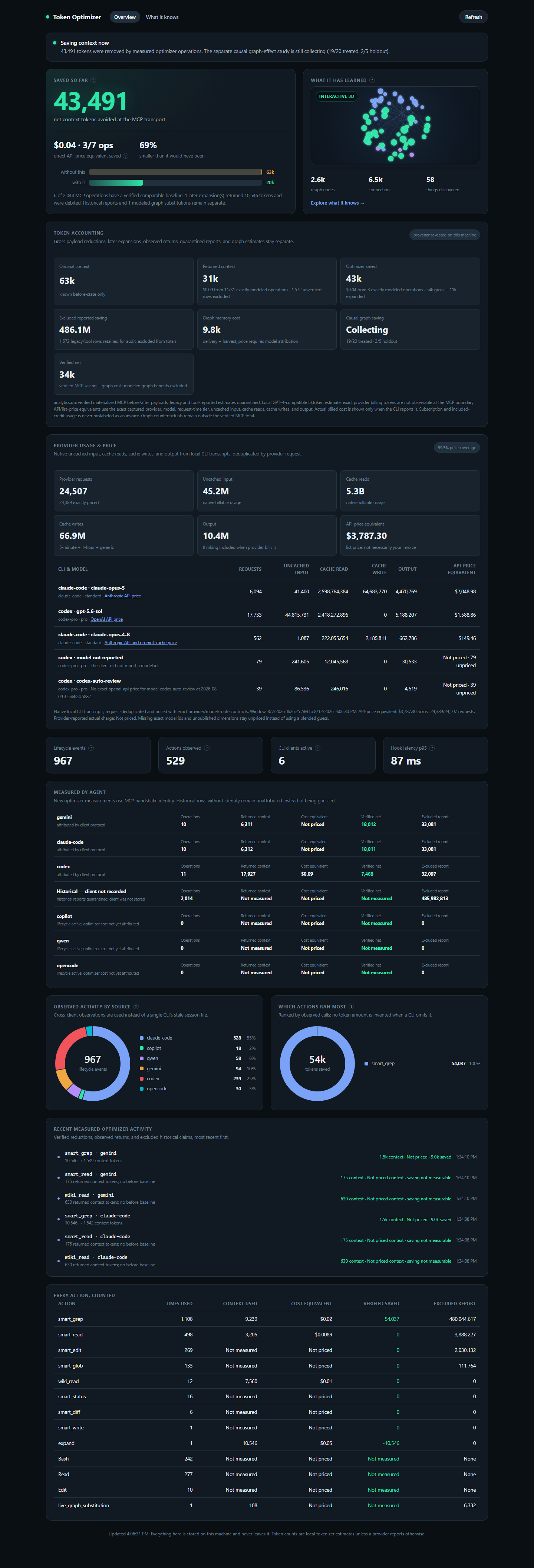
One local ledger for optimizer tools, live-graph substitutions, every agent, and the graph's own cost.
---
## How it compares to HeadRoom
Providers cache the prompt prefix: cached tokens re-read at **0.1x**, rewritten
ones bill at **1.25x**. Most compressors optimise bytes removed and ignore that
multiplier. This one optimises the bill.
**Measured against their real implementation, on their own fixtures.** Not a
reimplementation and not our fixtures: their harness compresses the payload,
dumps it, their resolver redeems their own markers, and ours is handed the
identical bytes. Their column is the best of the nine configurations that
capture holds, row by row.
Two of our arms are in the table, and they answer different questions. **`ours`**
is the block engine with nowhere to move a block, which is how the MCP tools and
the hooks run: everything it removes, it removes by compressing, and nothing
leaves the request. **`ours, proxy`** is the proxy a Claude Code session runs
through, which also moves a block it could not compress out to a file and
leaves a marker naming the path -- the same kind of trade their content-cache
reference makes. `ours, preset` is the block engine with that move switched on
at `spillWholeBlockBelow: 0.9`.
| workload | payload | theirs | ours | ours, proxy | ours, preset | zero-turn ids |
| -------------------- | ------: | ------------: | ------------: | ------------: | --------------: | ---------------: |
| agentic-conversation | 244,908 | 37.3% / 33.4% | 42.9% / 30.8% | 52.4% / 49.0% | 100.0% / 100.0% | 2099 / 2099 / 0 |
| agent-loop | 170,938 | 42.2% / 54.3% | 69.3% / 59.1% | 92.0% / 94.1% | 93.6% / 94.3% | 185 / 185 / 52 |
| agent-loop-logs | 327,500 | 51.5% / 53.0% | 61.9% / 58.1% | 88.7% / 91.5% | 96.2% / 97.0% | 2034 / 2034 / 81 |
| api-responses | 49,127 | 88.2% / 89.3% | 66.6% / 59.1% | 96.4% / 96.8% | 96.6% / 96.8% | 699 / 98 / 23 |
| browser-session | 781,774 | 21.7% / 13.1% | 93.7% / 26.5% | 55.5% / 90.2% | 100.0% / 99.9% | 334 / 334 / 0 |
| code-search | 131,264 | 47.4% / 59.7% | 81.8% / 70.8% | 97.7% / 97.9% | 95.7% / 96.1% | 201 / 201 / 43 |
| database-rows | 45,929 | 88.6% / 89.2% | 65.6% / 56.5% | 92.4% / 93.1% | 92.6% / 93.4% | 590 / 78 / 49 |
| codebase-exploration | 137,961 | 99.7% / 99.7% | 16.0% / 12.7% | 99.6% / 99.6% | 100.0% / 99.9% | 540 / 3 / 0 |
| grep-output | 75,219 | 99.6% / 99.6% | 56.1% / 51.9% | 99.5% / 99.6% | 99.9% / 99.9% | 1005 / 3 / 0 |
| log-entries | 91,385 | 80.8% / 83.2% | 63.5% / 52.0% | 95.4% / 95.7% | 95.5% / 96.0% | 1180 / 237 / 46 |
| human-authored-json | 37,425 | 30.6% / 30.0% | 66.6% / 66.0% | 81.6% / 83.7% | 96.7% / 96.9% | 154 / 154 / 11 |
| issue-triage | 109,354 | 53.1% / 55.2% | 88.1% / 85.7% | 97.2% / 97.6% | 95.1% / 95.7% | 59 / 59 / 21 |
| rag-conversation | 171,913 | 0.0% / 0.1% | 84.6% / 83.2% | 99.1% / 99.4% | 100.0% / 100.0% | 42 / 42 / 0 |
| raw-build-log | 158,057 | 99.8% / 99.8% | 70.6% / 48.2% | 99.7% / 99.8% | 100.0% / 100.0% | 430 / 3 / 0 |
| relevance-probe | 49,157 | 64.1% / 71.0% | 82.4% / 77.2% | 97.1% / 97.8% | 95.8% / 96.6% | 225 / 225 / 13 |
| search-results | 96,647 | 95.0% / 95.4% | 74.3% / 59.4% | 96.5% / 96.5% | 96.6% / 96.6% | 505 / 62 / 34 |
| repeated-reads | 158,285 | 37.4% / 30.4% | 71.7% / 68.5% | 99.5% / 99.6% | 100.0% / 100.0% | 394 / 388 / 0 |
| sre-debugging | 312,276 | 88.4% / 89.9% | 67.4% / 62.4% | 98.5% / 98.7% | 97.1% / 97.5% | 3116 / 506 / 82 |
Recorded 2026-10-17 at `b1231a8c`, by the command in the
record's `regenerate` field, over HeadRoom 0.37.0's own fixtures and harness. That arm runs
HeadRoom itself, so CI does not re-derive it -- it checks these figures and
this provenance against the record instead.
Over the corpus the proxy removes **82.5%** of the characters and **91.5%** of
the tokens; their best configuration removes 51.5% and 61.4%. It is cheaper than
their best arm on **18 of 18** rows when nothing is ever fetched back, which is
the end of the range their markers are built for, and on 17 of 18 when every
moved block is fetched back. The block engine alone removes
72.0% and 55.9%: more of the characters than theirs, fewer of the tokens.
**Where they still win, and why.** On `codebase-exploration`, `grep-output`,
`raw-build-log`, `sre-debugging` and the four raw-data rows their best arm takes
83.2-99.8% off the tokens and the block engine 12.7-62.4%. Their number there is
a **content-cache reference**: the block is not made smaller, it is taken out of
the request, put in a store, and replaced by a `<>` marker.
An engine with nowhere to put a block cannot match that, so on those rows the
`ours` column loses on reduction, and on cost when nothing is fetched back. The
proxy makes the same move: it is ahead of them on five of those eight rows, level
on `grep-output` and `raw-build-log`, and a tenth of a point behind on
`codebase-exploration`. The one row where the proxy costs more than they do is
`agentic-conversation`, and only when every block it moved is fetched back:
they move none of that conversation out, so they cost the same at either end,
while the proxy moves part of it and pays a retrieval for each part it wants
back.
**The other column is a turn.** A marker is not the content: to read what it
stands for, the agent spends a request. Of the 13,792 retention units planted in
the corpus, the block engine keeps 5,223 in the text and 8,569 more rebuildable
from the text alone, so every one of them is there with no extra turn; theirs
keeps 6,711 in the text and 7,075 behind its store, one retrieval call away.
**0 are unrecoverable on our side and 6 on theirs.** Their best arms force 17
round trips across the corpus to get their content back; the block engine
forces 0. The proxy, like theirs, trades a turn for every block it moves, and
that turn is what the fetch-rate end of the cost model prices.
**What their marker costs is priced, not just its size.** Their marker is only
redeemable because their proxy also sends a `headroom_retrieve` tool with the
request -- on by default (`ccr_inject_tool`), and on every later request once a
session has used it -- so every row where their best arm leaves a marker is
charged for that tool's definition as well, recorded from their own package by
`bench/compression/headroom/ccr-tool.py`. The turn that first adds the tool also
rewrites the whole cached prefix behind it; that is not charged, which errs in
their favour. Ours needs no tool: our marker names a path the agent opens with
the `Read` it already has, and the path is priced at the length the proxy really
writes (`/.tok//<15 digits>`, src/compress/spill-path.ts) rather than
a shorter invented one.
**`browser-session` is mostly the fixture.** This payload holds four images, two
of them distinct, and the base64 in them is generated rather than photographic:
one distinct image alone folds from 160,032 characters to 5,572, which no real
PNG would do. What carries over to a real session is the duplication -- half the
image bytes are a second copy of an image already in the request, which is
44.3% of the whole payload. The run the marker names is still in the output
above it, so the reader rebuilds it without asking for anything, which is why
the characters fall much further than the tokens: the image tokens are counted
from pixels on both arms either way.
Reproduce the whole table:
```bash
python bench/compression/headroom/run-theirs.py
python bench/compression/headroom/resolve-theirs.py
node bench/compression/head-to-head.mjs
```
### Against their published design
A second arm reimplements their published design from their own benchmark
generator's definitions — opaque hash markers, history compressed, a retrieval
tool and system message injected — so the four workloads with a published
comparator can be checked without their clone. `node bench/compression/proof.mjs`:
| workload | payload | theirs | ours | verdict |
| -------------------- | ------: | -----: | ----: | ------- |
| code-search | 17765 | 92.1% | 97.8% | ours |
| sre-debugging | 65694 | 92.2% | 98.6% | ours |
| issue-triage | 54174 | 72.8% | 97.5% | ours |
| codebase-exploration | 78502 | 47.4% | 54.7% | ours |
Four workloads, because those are the four this arm has a published comparator
for. The head-to-head harness scores eighteen; the other fourteen are not in
this arm, and are scored against their real implementation in the table above.
**`codebase-exploration` was theirs and is now ours, by 7.3 points.** An earlier
version of this table claimed 61.3% for us on that row, then parity, then a
published loss at 46.0% against their 47.4%. The first two were figures from a
branch rather than from here; the third was true on this tree when it was
written; four `log` engine commits then moved it to 54.2%, masking an interior
hashbang so a concatenated block still parses moved it to 64.9%, and
authenticating every marker with a six-character stamp took 0.2 of a point
back, and naming a spilled file by a digest of its contents, the way the proxy
sink really names it, instead of by its position in a counter, took another
half point, to reach 64.2%. Then the currency stopped being an estimate: every
figure in the table above is now the count Anthropic's own tokenizer returns
for the text, recorded into a committed fixture so this stays offline, and
under it the row reads **53.7%**, and pricing the path the proxy's sink really
writes -- content-addressed and decimal, where this arm had invented a 32-digit
hex name -- moved it to **54.7%**. That is the largest move in this history and
the only one that is not about the engine at all. Dividing characters by four
had been charging the control's hex markers too much and our own stamp far too
little -- the stamp was six characters of a vowelless base-31 alphabet then,
and a random string over a large alphabet is close to the worst case a BPE
tokenizer has, so it cost a measured 5.52 tokens where chars/4 billed 2. Those
three are the only figures here that moved the wrong way, and none of them is a
regression: each is the harness charging us for something it had been leaving
out. Being able to see that cost is what paid for the next move: the stamp is
now nine decimal digits, which carry slightly more entropy than those six
characters did and cost 4 tokens on every draw rather than a mean of 5.52 that
ranged from four to seven. Measured against the old stamp on this row -- the
same tree, the same fixture, only the stamp pinned back to its base-31 form --
that bought **a tenth of a point**, and a tenth is the honest size of it: a
marker got better than a quarter cheaper, but markers are a small part of what
the engine emits, so the headline moves far less than the per-marker saving
suggests. A
number in prose is a fact about the tree it was measured on, which is why
`bench/compression/readme-table.check.mjs` re-derives every figure in the block
above from the harness rather than trusting it.
Against the four comparators in this reimplemented arm: **ours on all four.**
Against their real implementation the answer is the table at the top of this
section, and it is a split rather than a sweep: the proxy is cheaper than their
best arm on every row when nothing is fetched back and takes more of the tokens
overall, while the block engine alone keeps every identifier without a turn and
loses on reduction wherever their best arm moves a block out of the request.
The two columns come from different arms of the same engine, and that is the
point. `v3-history` compresses history too and matches them byte for byte;
`v1-frontier` leaves the cached prefix alone and wins the invoice by 11–42%.
Maximising bytes removed is available and is not the default, because on a
cached prefix it costs money.
The competitor arm is this repository's reimplementation of their published
design — opaque hash markers, history compressed, a retrieval tool and system
message injected — not their binary, and it is held to the same signed-content
guard we hold ourselves to.
### On whole sessions
`node bench/compression/session-replay.mjs` replays real recorded conversations
turn by turn and prices each the way a provider does. Four independent sessions,
whole request including system prompt and tool schema, against no proxy:
| conversation length | **ours** | cheaper on |
| ------------------- | ---------- | ---------- |
| 10 turns | **0.953x** | **4 of 4** |
| 20 turns | **0.915x** | **4 of 4** |
This is the region nothing else touches: conversation history is ~65% of a live
request and the only part that grows every turn. The saving grows with session
length, because model reasoning accumulates.
### On end-to-end agent tasks
THOL, 16 real tasks against a no-proxy control:
- **cheaper on 11 of 16 tasks**
- **median cost 0.926x**, **median turns 0.671x**
- **zero quality cost**: mean score **0.994** against control's **0.994**,
lower on **0 of 16 tasks**
One run per task, so the aggregate interval still spans 1.0; the per-task tally
and the score parity are the solid parts. Every figure here is regenerated from
the committed benchmarks, which ship in this repository.
## The 30-second version
Your agent burns most of its context on work it already did: re-reading files
that have not changed, dumping a whole file to see three lines, running
unbounded searches, and re-deriving conclusions it reached last session and then
forgot.
Token Optimizer attacks that on four fronts.
**1. It makes the expensive call impossible.** Install the plugin and a built-in
`Read` of a 200 KB file is **denied**, with the refusal naming the cached,
diffed replacement. Same for `Grep`, `Glob`, `Edit`, `Write`, and `cat` /
`head` / `grep -r` through the shell. **Re-reading a file you already read this
session returns only a diff** — usually the single biggest win, and one that
size-based rules structurally cannot catch. There is no setting to turn on.
**2. It remembers what your agent worked out.** A per-project knowledge graph
accumulates findings, decisions and dead ends as a side effect of working, then
feeds them back the moment the agent touches the relevant file. A finding costs
~150 tokens to carry. Re-deriving it costs 5k–50k.
**3. It measures itself, in public, and tells you when it is losing.** A
materialized before/actual-return measurement for MCP progressive disclosure,
with later expansions debited from the same net. Modeled graph substitutions
and the randomized control arm for downstream graph effects remain separate.
Every number is measured, visibly collecting, excluded, or absent.
**4. It attributes the traffic.** Returned context, optional cost equivalents,
and net transport avoided are grouped by operation and MCP handshake identity. Codex, Claude Code,
Gemini, and any other connected client get separate rows. Old records without
identity remain explicitly unattributed instead of being assigned to whichever
agent happens to be open now.
No account and no hosted service. MIT, so it is usable at work.
Nothing is measured about you unless you ask for it. Anonymous usage data is
off by default and takes two separate opt-ins: `TOKEN_OPTIMIZER_TELEMETRY=1`
aggregates counts into a file on your own disk, and `TOKEN_OPTIMIZER_BEACON=1`
is what uploads any of it. Setting the first opens no socket. With both set,
the events already on disk are sent once per session at start-up -- in a batch,
never on the hot path -- and the file is cleared only after the receiver has
accepted them. `install_doctor` prints which of the two is on, how many events
are waiting and where they would go; it reports without sending. A package
built without the upload key cannot transmit at all, and the doctor says so
rather than letting an opt-in look like it is working.
`DO_NOT_TRACK=1` overrides both, whatever else is set. The version check
`npm run doctor` and `install_doctor` make is a plain GET to the registry npm
installs from, carries nothing about you, and runs only when you ask for a
diagnosis -- never during a session. `DO_NOT_TRACK=1` or
`TOKEN_OPTIMIZER_UPDATE_CHECK=0` suppresses it before a socket is opened. An event may only
contain numbers and flags -- a string is dropped before it is written, so a
path, a prompt or an error message cannot travel even by mistake -- and the
machine identifier is a salted hash, never your hostname. What the counts are
about is the hook ledger your own project already keeps: how often the graph
answered instead of a tool, what each arm of the holdout was delivered and
withheld, and whether the saving exceeded the cost -- reduced to integers once
every six hours, never the ledger itself, which names your files. Usage is
counted as a rollup rather than a row per request: one event per 200 requests,
holding the request count, bytes in and out, how often compression paid, how
often knowledge was injected, and how many blocks were elided, plus one final
event when the proxy stops. That keeps the totals exact -- a row per request
would overflow the batch on a busy session and leave you reporting its first
five hundred -- at the cost of the per-request distribution, which is not
something anyone downstream needs. `npm run doctor`
prints exactly which of these is on and what has been recorded.
### What the dashboard proves on a real machine
The screenshots in this README come from the shipped server reading persisted
local data, not a design mockup. In the capture above it reports:
- **43,491 net verified MCP transport tokens avoided** in the current live
proof: 54,037 gross reduction minus a deliberate 10,546-token expansion;
- **486,074,740 historical/tool-reported tokens quarantined**, dominated by
repository scan volume that never entered model context;
- a live Codex / Claude Code / Gemini stdio smoke against AiDotNet, with each
client attributed independently;
- **2,648 graph nodes, 6,527 edges, and 58 findings** across 11 local projects;
- **more than 1,000 hook runs with zero failures and zero timeouts** across six
active CLI clients in the selected rolling 24-hour window;
- **6,332 tokens of modeled graph-substitution potential**, excluded from the
verified headline while the causal graph-reuse study remains `Collecting`.
The dashboard now reads native CLI usage receipts and prices uncached input,
cache reads, cache writes, and output with the exact captured provider, model,
route, request-time tier, and versioned official source. Ambiguous model ids stay
**Not priced** instead of receiving a blended guess. API/list-price equivalents
are kept separate from provider-reported charges and are never labeled as a
subscription invoice. See the [token accounting contract](./docs/TOKEN_ACCOUNTING.md).
## Quick start
**Claude Code** — install the plugin, not the bare MCP server. The plugin is
what enforces; adding the server alone just gives the model tools it can ignore.
```text
/plugin marketplace add ooples/token-optimizer-mcp
/plugin install token-optimizer@token-optimizer
/reload-plugins
```
That is the entire installation. [All sixteen clients →](#installation)
Then, whenever you want to know what to do next:
```text
token_audit
```
One ranked queue: what is costing the most per session, with an optional monthly
cost equivalent only after you configure your own effective rate. Each line
names how to fix it. Not a dashboard, not six reports — a queue.
---
## Subagents and workflows
Agents are where token spend concentrates. A long-running subagent re-sends its
whole context on every turn, so every byte a tool adds is paid for again on each
later turn. In one measured session, 42 workflow subagents made 4,483 model
calls. The six longest made 218–348 calls each and peaked at 336K–609K tokens of
context. Together they spent 4.0M output tokens and 1.0B cache-read tokens. The bill is the re-reading, not the writing.
### What works with no setup
The plugin's hooks run for subagents exactly as they do for the main session.
Nothing needs to be configured per agent.
- **Whole-file reads are outlined, through `Read` and through the shell.**
Agents mostly read files with `cat`, `type` or `Get-Content`, rarely with
`Read`. In the measured session that was 2,071 shell reads against 9 `Read`
calls. On the first whole read of a large source file, either kind returns a
line-numbered outline of its symbols instead of the file. A second whole read
of the same file returns the file itself. A line range is never outlined:
`sed -n 'A,Bp'`, `head`, `Get-Content -TotalCount` and a paged `Read` all pass
through untouched.
- **Each subagent is briefed once.** A subagent never sees the SessionStart
guidance, so its first tool call carries a four-line briefing instead: load
the optimizer tools if they are listed, read ranges rather than whole files,
and keep the final report short. The tools are named only conditionally, so a
hooks-only install is never told to call something it does not have.
- **Advisories are said once.** A routing hint such as "use smart_grep" appears
at most once per agent for each kind of call, not on every matching command.
- **Past findings arrive only when they name what you are running.** A finding
with no explicit trigger is delivered with a command only when its claim names
that command's program and subcommand, such as `npx jest` or `dotnet build`,
not when the two merely share a word.
- **Repeated build and test output is bounded**, as it is in the main session.
- **Through the proxy, a range you asked for comes back whole.** A paged `Read`
or a shell slice is never folded, and a fold inside a whole-file read points at
the file's own line numbers.
### What to add when you brief an agent
Claude Code gives subagents MCP tools as *deferred* tools: the schemas are not
loaded until the agent asks for them. An agent that never loads them falls back
to shell commands. Put this in the agent's prompt:
```text
Before your first file read or search, load the token-optimizer tools:
ToolSearch("smart_read smart_grep smart_glob").
Use smart_read for files (it returns a diff on re-reads), smart_grep for
searching, and smart_glob for finding files. Do not print whole files or search
the tree through the shell. When you need part of a file, read a line range.
```
The server's own instructions now say the same thing to every client, deferred
or not.
### Keep agents short
The plugin can only shrink what enters an agent's context. The number of turns
and the size of the context it carries are set by how the work is split up:
- **One bounded task per agent.** Several short agents cost less than one agent
that runs for hundreds of turns, because each starts from a small context.
- **Give the agent the facts it needs** (paths, line numbers, the exact
question) instead of asking it to rediscover them.
- **Ask for a structured result** so the agent stops when it has the answer.
### Measuring an agent
Each subagent writes its own transcript next to the session's, under
`~/.claude/projects///subagents/`. The `usage` block on every
assistant row records `input_tokens`, `output_tokens`,
`cache_read_input_tokens` and `cache_creation_input_tokens`.
**Count each response once.** One model response is written as several
assistant rows that share a `message.id`, and each row repeats the usage
recorded so far. Keep the LAST row per `message.id`, which holds the final
usage, and sum those. Summing every row overstates the cost: on the session
above it reported 1.8B cache-read tokens instead of 1.0B. Keeping the first row
instead understates output, at 0.5M instead of 4.0M.
The number of distinct `message.id`s is the number of model calls the agent
made. Read against its peak context, it shows whether the agent should have
been split.
---
## The knowledge graph — the part nothing else has
Every agent session ends the same way: the reasoning evaporates. The next
session re-derives it, at full price, forever.
This builds a **living per-project graph** — nodes for files, symbols, tasks and
findings; edges for `derived_from`, `contains`, `supersedes`, `contradicts`,
`related` — and it fills itself in from real work. No ingestion job, no
embedding model, no rebuild step, no query to formulate.
```
you touch src/auth.ts
│
├─ verify() compares exp against the LOCAL clock (finding, 0.9)
├─ per-host retry budgets; global was rejected — deadlock (decision)
├─ ! the skew fix was reverted once already (dead end)
└─ [git] 47 changes in 90d, last three: "fix token expiry",
"revert skew fix", "fix token expiry again"
```
None of that is in your repository. It exists only because an agent once burned
tokens finding it out — and every other tool throws it away at the end of the
session.
**What a default install actually produces.** The structural graph — files,
symbols, tasks, and the edges between them — is captured from ordinary tool
traffic with no configuration at all. Findings are produced two ways. At session
end, `derive` reads evidence already on disk (command outcomes and exit codes,
red-to-green transitions, corrections, re-read churn) and writes findings from
it: no model call, no credential, nothing sent anywhere. And the active model
records durable conclusions itself through `wiki_write`.
The **model-based semantic harvest** is the third path, and the only one that
needs something you do not already have. It is **not opt-in** —
`TOKEN_OPTIMIZER_HARVEST=0` turns it _off_ — but its real gate is a credential:
with none it reports `off:no-key`, which is the state on CI, corporate machines,
and subscription-only logins. Point `TOKEN_OPTIMIZER_HARVEST_ENDPOINT` at a
local model and it runs **free and private, with nothing leaving the machine**.
`npx token-optimizer-doctor` states which of these is live.
### Why this is not RAG
| Classic RAG | This |
| -------------------------------------------------------------- | ----------------------------------------------------------------------------- |
| Retrieves **evidence**; the model re-derives meaning each time | Retrieves **verdicts** — the reasoning already happened |
| Index built by a **batch ingestion job** | Accretes from **real agent traffic** — coverage follows attention |
| **Similarity** search | **Traversal** — this symbol _and its callers_ |
| Model must **formulate a query** | Fires when the model **reaches for a file** |
| Staleness **invisible**; serves rotted chunks confidently | Staleness **computed** from content hashes, served with the invalidating diff |
| Returns only what is **in the documents** | Returns **dead ends**, which exist nowhere in your source tree |
Traversal plus lexical search: deterministic, instant, explainable, and it works
offline.
### The zero-turn refusal
A plain deny costs a full turn: the model calls `Read`, is refused, re-plans,
calls `smart_read`. But at refusal time we already hold the file _and_ the
snapshot the graph stored — so the refusal **carries the answer inside it**.
Nothing to re-plan, no second call. Turn cost drops from one to zero.
And when the graph already holds the verdict a tool output would support, the
output never enters context at all. Not compressed. Absent.
---
## The dashboard
```bash
npm install
npm run build
npm run dashboard # http://localhost:3100
```
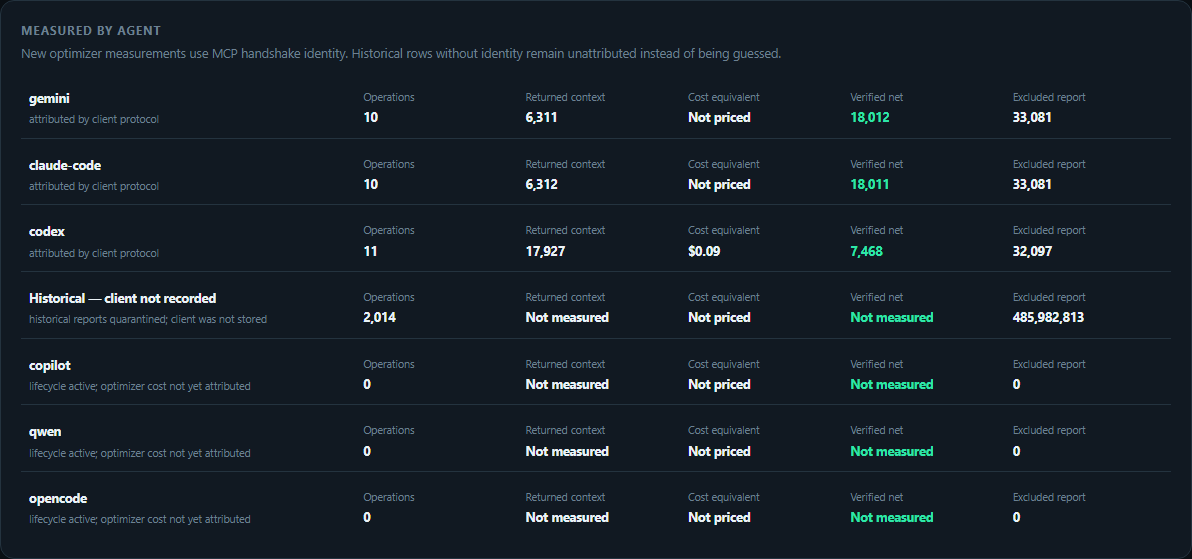
The overview answers the questions a token optimizer should answer first:
1. **How much MCP context did it avoid?** The headline is gross materialized
payload reduction minus every later linked expansion. Graph estimates are
intentionally separate.
2. **How much context still reached the agents?** Every successful current MCP
result records its actual returned text, even when no valid before-state
exists. That row is context-accounted but savings-unmeasured.
3. **Which agent and action spent it?** The client ledger and action table show
operations, returned context, optional cost equivalent, and net tokens
avoided. Lifecycle-only clients say `Not measured`; no zero is invented.
4. **Did remembering cost more than it saved?** Delivery and semantic-harvest
tokens are charged to the graph. A causal benefit is added only after the
treated/holdout evidence gate passes.
### Walkthrough: get useful data, not an empty dashboard
1. Install the MCP server and the native adapter for your CLI. The MCP handshake
provides per-client accounting; native lifecycle hooks provide automatic
routing, capture, health, and delivery where the client protocol permits it.
2. Use `smart_read`, `smart_grep`, `smart_glob`, `smart_edit`, or any other MCP
operation normally. Every successful result records returned context; tools
with a comparable materialized before-state also record a gross reduction;
later `expand` calls debit that reduction.
3. Let the active model record durable conclusions with `wiki_write`. Before a
new agent re-derives work, call `wiki_read` for the project or the files it is
about to touch. Native clients can also deliver matching knowledge
automatically.
Use `wiki_query` to read the graph directly — one finding by key, a ranked
BM25 search over claims, a node with its neighbours, or the graph's own audit
— which is how a subagent that never sees the SessionStart briefing reaches
what previous sessions established.
4. Open `http://localhost:3100`. Use **Overview** for combined accounting and
**What it knows** for capture health, graph exploration, audits, and causal
evidence.
5. To register existing local repositories without reading their source, run
`npm run projects:discover -- /absolute/path/to/repos`. This makes coverage
gaps explicit; it does not fabricate findings.
For maintainers, this live smoke exercises the shipped stdio transport and
creates separately attributed rows without seeding the analytics database:
```bash
npm run dashboard:attribution-smoke -- /absolute/path/to/project /absolute/path/to/large-file
npm run dashboard:verify-live -- http://localhost:3100
```
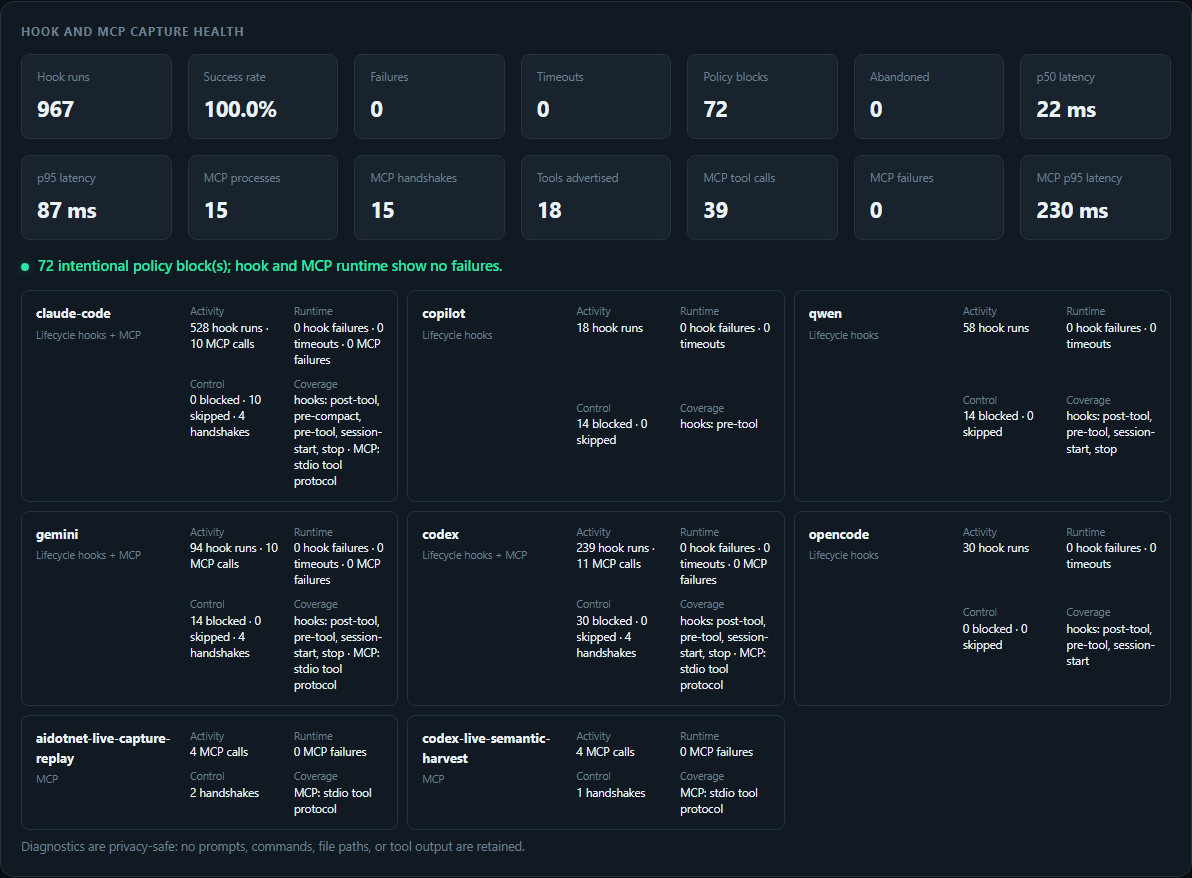
The health panel is deliberately operational rather than a raw text dump. Each
client has activity, runtime failures/timeouts, policy outcomes, and observed
surface coverage. Diagnostics keep no prompts, commands, paths, or tool output.
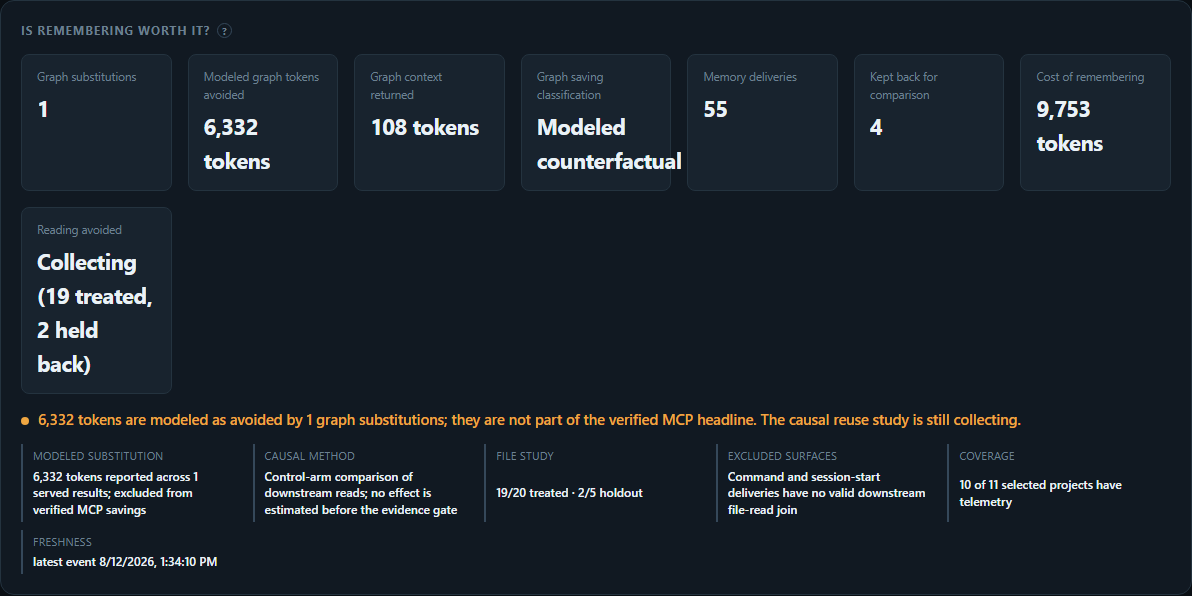
Modeled substitution potential and causal graph effects are different claims.
The first is a full-file counterfactual and is never promoted to the verified
MCP headline. The second asks whether delivered knowledge prevented later reads;
it uses a control arm and remains `Collecting` until there are at least 20
treated file touches and 5 holdouts with valid downstream joins.
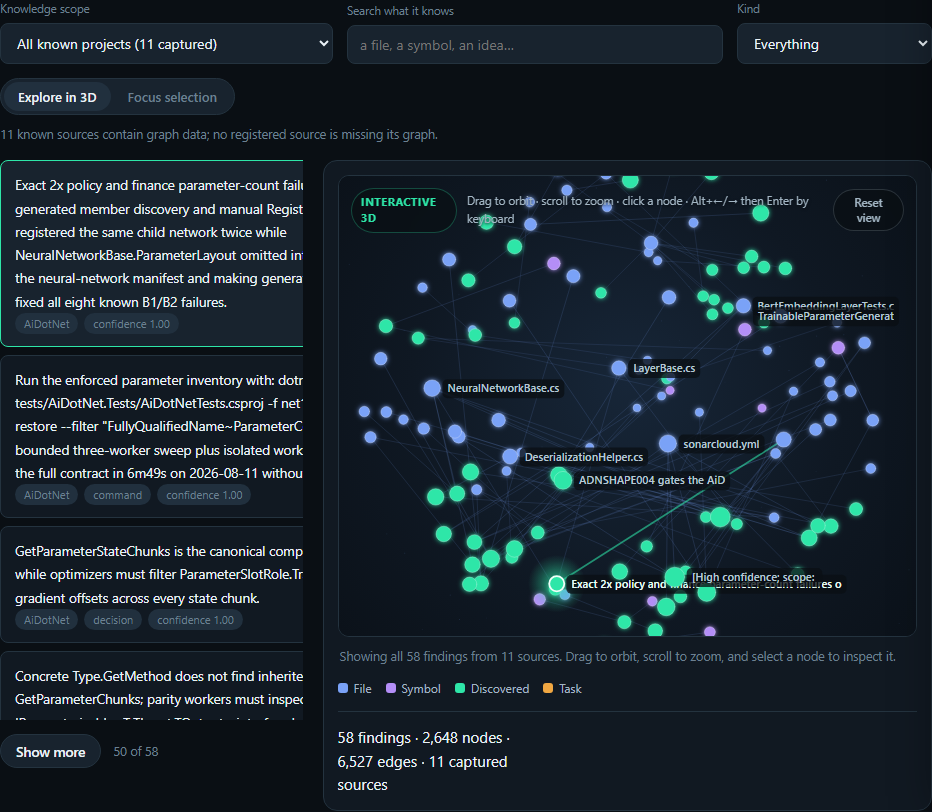
Drag to orbit, scroll to zoom, click a node for provenance, or switch to the
bounded one-hop focus view. The default **All known projects** scope pools local
graphs through opaque project IDs; filesystem paths never reach the browser.
**Audit tab.** Contradictions, stale findings, and low-confidence claims remain
reviewable instead of silently becoming model truth.
**Evidence console.** Client/model/task cohorts, matched effects with 95%
intervals, live outcome joins, harm feedback, and capability tiers for all 16
clients. Release and superiority claims fail closed while evidence is missing.
**One-click Markdown export.** The accumulated graph becomes documentation you
can inspect, edit, and commit.
Server-side by design: the browser asks for a neighbourhood, a search result or
a page. A mature graph holds thousands of nodes, and shipping it wholesale would
make every page load a multi-megabyte download for a view that shows twenty
things.
The default **All known projects** scope combines captured graphs through an
opaque machine-local project registry; filesystem paths never reach the
browser. Lifecycle hooks register repositories as they are used. To backfill
existing local checkouts without reading their source files, run the bounded
discovery command against one or more explicit roots:
```bash
npm run projects:discover -- /absolute/path/to/repos /absolute/path/to/worktrees
```
Coverage distinguishes repositories with graph data from known repositories
whose capture has not started. The balance cards are backed by persisted events:
**Memory deliveries** counts graph context actually supplied to an agent,
**Kept back for comparison** counts randomized control touches, and **Cost of
remembering** combines delivered-context tokens with measured semantic-write
payload cost. **Reading avoided** stays `Collecting` or `Not measured` until at
least 20 treated file touches and 5 holdouts exist with a downstream join; the
dashboard does not manufacture a savings estimate from missing data.
See the [cross-client capability contract](docs/CLIENT_SUPPORT.md) and the
[live evaluation suite](evals/README.md).
### Cross-client lifecycle diagnostics
Every native hook writes the same bounded JSONL lifecycle record, including
Claude Code's custom router and compaction paths. Records carry the client and
plugin versions, event, hashed session/turn correlation, latency, outcome,
input/output byte counts, and response key shape. They deliberately retain no
prompt, command, tool output, file content, or raw working-directory path. The
fields include OpenTelemetry log severity and resource semantics so the local
files can be collected without inventing a second schema.
```bash
npm run diagnostics # last 24 hours, summary-first JSON
npm run diagnostics -- --hours 72 --output hook-summary.json
npm run diagnostics -- --include-events --limit 100 --output hook-report.json
```
Raw event rows are opt-in and capped at 1,000. The default report contains aggregate health and
at most twenty recent failures/timeouts, keeping routine troubleshooting output small enough for
CLI and model context windows.
The dashboard's **Capture health** panel shows runs, failures, timeouts and
p50/p95 latency by client. Logs rotate at 5 MiB, retain at most 40 files for 14
days, and live under `.token-optimizer/logs` when a state directory is set (or
`~/.token-optimizer/logs` otherwise). `TOKEN_OPTIMIZER_LOG_DIR`,
`TOKEN_OPTIMIZER_LOG_MAX_BYTES`, `TOKEN_OPTIMIZER_LOG_MAX_FILES`, and
`TOKEN_OPTIMIZER_LOG_RETENTION_DAYS` override those operational defaults.
---
## What it does that other optimizers do not
### Compression that does not break the cache, or lose the needle
An optional local proxy compresses tool results, search output, logs and
conversation history on the way to the model. A hook cannot do this: the
`PostToolUse` output schema is `{hookEventName, additionalContext?,
classifierContext?}` and `updatedOutput` occurs nowhere in the client, so a hook
can add context but never replace a result. The proxy never tries to -- it
rewrites the outbound request, where those results already sit as history.
Two things make it different from simply compressing harder.
**It never rewrites cached content.** A cached prefix bills at 0.1x and a cache
write at 1.25x, so compressing history can cut tokens while multiplying the
bill. Measured on our own benchmark: compressing behind the cache breakpoint
removes more raw tokens on every workload and costs more money on every
workload. Compression stops at the frontier, and cache-weighted tokens are
reported beside raw ones so the trap is visible rather than inferred.
**It keeps the rows that matter.** Eliding a long array after the first few rows
scored 95.7% on a search payload here and destroyed both the UUID record and the
error record planted in it -- the only two rows anyone would have searched for.
The engine now keeps every row that departs from the shape, wherever it sits:
92.4% with the needles intact. A gate in the benchmark fails the build if a
planted needle disappears, because a size metric alone cannot tell compression
from truncation.
Reduction over the content each strategy is permitted to rewrite, on fixtures
matching the four workloads HeadRoom publishes, is the guarded table earlier in
this section -- 97.5%, 97.8%, 98.6% and 54.7% against their 72.8%, 92.1%, 92.2%
and 47.4%. It is stated once and checked there rather than restated here, which
is how this copy came to claim 98.9%, 98.2%, 92.8% and 61.3% long after the
tree had moved.
These are not their corpora, which are unpublished; the code workloads read real
files out of this repository and the rest are generated to the shape and scale
of their published ones, from their own benchmark generator's definition.
**Reduction is not the bill, and the two disagree.** Cache changes the
arithmetic: a cached prefix is re-read at 0.1x and a rewritten one is charged at
1.25x, so an arm can remove more bytes and still cost more. Run
`node bench/compression/proof.mjs` and that is exactly what happens -- the
HeadRoom-style arm removes a larger share of every workload and loses on
cache-weighted effective tokens on all of them:
| workload | raw reduction, ours / theirs | effective tokens, ours / theirs |
| --------------- | ---------------------------- | ------------------------------- |
| code search | 84.6% / **95.8%** | **999** / 1,383 |
| SRE debugging | 86.2% / **97.1%** | **1,833** / 2,261 |
| issue triage | 89.2% / **95.3%** | **812** / 1,277 |
| grep output | 45.9% / **51.9%** | **7,146** / 9,514 |
| raw build log | 54.7% / **59.4%** | **14,448** / 16,769 |
| browser session | 45.7% / **49.4%** | **11,398** / 14,685 |
The competitor arm is this repository's own reimplementation of their published
design -- opaque hash markers, history compressed, a retrieval tool and system
message injected -- not their binary. It is implemented to win where it can: the
raw column is theirs on six of six.
**On whole sessions.** `node bench/compression/session-replay.mjs` replays real
recorded conversations turn by turn and prices each one the way a provider does,
charging the longest byte-identical leading run at 0.1x and everything after at
1.25x. Four independent sessions, whole request including system prompt and tool
schema, against no proxy at all:
| turns | HeadRoom's design | ours (v4-substitute) | cheaper on |
| ----- | ----------------- | -------------------- | ---------- |
| 10 | 1.000x | **0.953x** | 4 of 4 |
| 20 | 0.999x | **0.915x** | 4 of 4 |
The replay uses stored transcripts, which discard reasoning text while retaining
signatures. Its savings therefore do not establish that useful reasoning survives
compression. It also uses our reimplementation of the competitor's design;
these are offline estimates, not results from their shipped proxy.
**Live comparison against HeadRoom's shipped proxy.** The balanced four-arm run
recorded in commit `f712b4ec` used `bench/live/ab.sh`, rotated each arm through
every position, and re-ran pytest independently after each task:
| arm | mean weighted input tokens | tests passed |
| -------------------------------------------------------- | -------------------------: | -----------: |
| uncompressed control | 134,706 | 4/4 |
| Token Optimizer, previous 1,500-character deferral floor | 100,818 | 4/4 |
| Token Optimizer, zero floor (now the default) | 49,053 | 4/4 |
| HeadRoom shipped proxy | 48,626 | 4/4 |
Weighted input is `input + 1.25 * cache_creation + 0.1 * cache_read`; it excludes
output cost. Both zero-floor Token Optimizer and HeadRoom reduced that measure
by about 64% versus control. Token Optimizer used about 0.9% more than HeadRoom.
This small arithmetic repair task does not establish superiority across tasks,
compression quality, or total cost. Rotation balances run position, but does
not guarantee that shared provider-cache effects disappear.
**Codex three-task comparison against HeadRoom 0.37.0 (2026-09-18).** Three
synthetic controlled-read tasks, three repetitions, three arms, every arm in
every position. All 27 runs returned the correct answer, so this compares cost
at equal correctness rather than accuracy. HeadRoom ran in `--mode token`, its
compression-first setting, not the `cache` default that exists to freeze the
cache hit rate.
| arm | mean input tokens | of which cached | output | requests | agent seconds |
| ------------------------------- | ----------------: | --------------: | -----: | -------: | ------------: |
| uncompressed control | 55,632 | 43,079 | 200 | 3.0 | 19.1 |
| Token Optimizer | 42,468 | 33,052 | 189 | 3.0 | 17.3 |
| HeadRoom 0.37.0, `--mode token` | 71,626 | 51,897 | 285 | 4.3 | 27.3 |
Input reduction against the control was 22.7% on the log task, 34.3% on the JSON
task and 11.5% on the code search; against HeadRoom, 54.9%, 10.0% and 42.2%.
Every task favoured this proxy on both comparisons, and the JSON column is where
HeadRoom is strongest and the margin thinnest.
The mechanism is visible in two numbers that move independently. Mean input per
REQUEST was 14,156 here against HeadRoom's 16,529 and the control's 18,544 --
both proxies compress, and this one compresses harder. Mean requests per RUN was
3.0, the same as the control, against HeadRoom's 4.3. A compressor that elides
content the agent then has to read back spends a turn recovering it, and on
these workloads a turn costs more than the elision saved; that is the failure
this project's own deferral floor exists to avoid, and it is what the extra
1.3 requests are.
WHAT THIS DOES NOT SHOW. These are token counts, not dollar costs, and
`bench/live/report-codex.mjs` deliberately declines to price them. Three short
synthetic workloads do not establish a universal win. Each task ran in a fresh
temporary workspace with no knowledge graph, so graph injection contributed
nothing and this measures compression alone. Cached tokens are a subset of the
input column, not an additional charge. HeadRoom's compression is scored from
provider usage rather than byte counts recorded at our own listener.
Reproduce with `HEADROOM_MODE=token node bench/live/codex.mjs`, then
`node bench/live/report-codex.mjs `; the figures above were read
only after that reporter returned `valid: true` with `balanced: true` and no
failures. Four earlier campaigns were discarded rather than published: one ran
without HeadRoom's `[proxy]` extra so every HeadRoom run errored before
readiness, one ran HeadRoom in its `cache` default, one was voided by the
reporter for an incomplete request capture, and one died on `ENOSPC` with the
host disk full.
The subsequent Claude Code default-versus-aggressive confirmation hit Claude's
weekly usage limit and is incomplete. Its missing usage cannot count as a win.
Codex validation runs independently through the Responses API.
**Latest Codex joint confirmation (2026-09-16).** The frozen twelve-family study
completed 120 pairs against installed HeadRoom 0.37.0. Our proxy passed 119/120
attempts; HeadRoom passed 120/120. One local allocation crash left unknown usage.
There were **77 strict joint wins** (passing, cheaper, and faster), 20 cost-only
losses, 12 speed-only losses, nine losses on both measures, one equal-time pair
that cost more, and the failed attempt. Across the **119 fully measured pairs
only**, estimated token cost was 26.9% lower and agent time 30.1% lower. JSON
agent time was 5.6% higher. Only logs and refactoring met the simultaneous
per-family criteria; the complete-study superiority gate failed. These results
do not establish that every task is cheaper or faster. The measured build
preserves explicit nulls, retains complete numeric tables, and avoids copying
unchanged payloads. See the [full results, every loss, and retained crash](bench/live/evidence/joint-confirmation-2026-09-16/README.md).
**Earlier expanded local Codex confirmation.** A preregistered seven-family study ran
70 pairs / 140 attempts against installed HeadRoom 0.37.0. Our frozen proxy
passed 70/70; HeadRoom passed 69/70 with one upstream HTTP 503 and missing usage.
The complete-ledger gate therefore failed: **superiority was not established**.
Across the 69 fully measured pairs only, descriptive totals were 25.7% lower
estimated cost, 38.9% lower input, and 30.0% lower agent time for our proxy.
JSON remained a loss (35.1% higher estimated cost). See the
[protocol, all attempts, and limitations](bench/live/evidence/confirmation-2026-09-15-v2/README.md).
A subsequent rare-string-group fix targets that JSON loss. In three fully measured
fresh pairs, input fell 17.7%, estimated cost 13.4%, and agent time 13.6% versus
HeadRoom, with three requests each. A fourth pair had a retained upstream 503 on
our arm; one measured pair still cost more. These are development results, not
confirmation of the new build or an all-workload win. See the
[complete screen and exclusions](bench/live/evidence/json-categories-2026-09-16/README.md).
**Current amended Codex study.** The next fixed 70-pair schedule completed:
our proxy passed 69/70 and HeadRoom 70/70. Our remaining attempt hit an upstream
503 with unknown usage, so strict superiority was not established. Across the
69 fully measured pairs only, estimated cost was 27.9% lower, input 44.2% lower,
and agent time 31.7% lower. Every family's mean cost favored our proxy, including
JSON at 27.5% lower, but 13 individual pairs still cost more. The run includes a
disclosed repair to a between-case file-hashing failure; the original product and
schedule stayed fixed. See the [full results, amendment, and retained failure](bench/live/evidence/confirmation-2026-09-16-v3-continuation/README.md).
**Exact search rows, subsequent development.** Factoring shared declaration syntax
while preserving every identifier and value closed the code-size gap: 37.5% fewer
bytes than archived HeadRoom on the original 40 losing inputs. Eight fresh local
cases also sent fewer bytes. Four balanced live pairs all passed their audits;
our estimated token cost was 50.1% lower, input 44.8% lower, and agent time 51.1%
lower. This is a small development follow-up, separate from the broader study.
See the [captured bodies, reconstruction checks, and live evidence](bench/live/evidence/search-columns-2026-09-16/README.md).
**Cost-loss follow-up (2026-09-16).** We investigated all 13 losing pairs and
implemented exact ID-prefix factoring plus support for records inside truncated
shell envelopes. A fixed follow-up of those 13 cases passed all 26 attempts;
12 pairs favored our proxy, with 33.4% lower total estimated cost. The remaining
loss exposed the outer-envelope bug. After fixing it, two balanced controlled
pairs both favored our proxy: all four attempts passed, estimated cost was 34.3%
lower, and input was 15.9% lower. These development runs retain every original
loss; cache and model variation also affect results. See the [case-by-case audit,
fixes, exact replay, and live evidence](bench/live/evidence/cost-losses-2026-09-16/README.md).
**Local proxy performance (2026-09-16).** Against installed HeadRoom 0.37.0,
2,160 completed local-upstream requests covered repeated and unique logs, JSON,
and code-search output in three rotated arm orders. Our mean latency and process
CPU were lower in all six groups. Sampled peak process-tree private memory was
80.0 MiB versus 1,909.9 MiB; this is footprint, not allocation volume. Unique
code still forwarded 5.7% more bytes. HeadRoom's rate limit was disabled for this
throughput measurement; compression settings stayed default. These measurements
do not measure model quality or billed cost. See the
[raw samples, reproduction commands, and limitations](bench/live/evidence/local-proxy-performance-2026-09-16/README.md).
**Live Codex comparison (2026-09-15).** Local Codex CLI 0.154.0, `gpt-6-astra`,
and installed HeadRoom 0.37.0 completed a balanced 27-run campaign. All three
arms passed all nine tasks; every initial read was complete, and all provider
ledger totals matched Codex's reported usage.
| workload | mean input, ours | mean input, HeadRoom | reduction vs HeadRoom |
| ------------------- | ---------------: | -------------------: | --------------------: |
| JSON outlier lookup | 39,318 | 44,043 | 10.7% |
| code search | 44,427 | 82,697 | 46.3% |
| log diagnosis | 39,203 | 84,308 | 53.5% |
These counts include cached input and extra retrieval turns; they are not raw
compression percentages or dollar costs. Output tokens did not improve on every
workload. See the [Codex evidence and limitations](bench/live/evidence/codex-2026-09-15/README.md)
and [reproduction instructions](bench/live/README.md). These three synthetic tasks
do not establish superiority across all workloads.
A separate **27-run natural-workflow development screen** passed all runs and
measured 35.5%, 43.5%, and 16.6% less total input than installed HeadRoom for retry
bug fixes, multi-file refactors, and configuration refreshes. These are small
synthetic repositories with natural tool selection. Uncached input and latency
have separate results; see the [workflow evidence and limitations](bench/live/evidence/codex-workflows-2026-09-15/README.md).
The proxy is enabled by default and binds loopback only.
**It is now on without launching anything through us.** Until 7.1.0 the only way
to be routed was to start the client through our wrapper, so anyone who installed
with `/plugin` and then opened Claude Code from a shortcut, an IDE or the desktop
app saved nothing -- and the doctor reported that as a broken installation rather
than as a feature that never applied. Installation now writes the endpoint into
Claude Code's own `settings.json`, which is the one thing a session we did not
start will read, and a small background proxy serves it. Four rules make that
safe to switch on:
- **Recorded.** Every value written is stored with whatever was there before.
`token-optimizer-uninstall --apply` restores it exactly, and refuses when the
value is no longer the one we wrote -- if you change it, it is yours again.
- **Never written on hope.** The entry appears only after the proxy has actually
served the route. A settings file naming a dead port does not degrade politely:
the client cannot reach its provider at all.
- **Self-healing.** The check runs again at every session start, before the first
model request, and removes the entry the moment the route cannot be served.
- **Hands off what is not ours.** A client already pointed at another local proxy
is left alone, and a settings file we cannot parse is never rewritten.
Set `TOKEN_OPTIMIZER_DEFAULT_ROUTING=0` to keep the wrapper-only behaviour, or
`TOKEN_OPTIMIZER_PROXY_AUTOSTART=0` if you do not want a local background service
at all. Either one also undoes an entry already written.
**Managed commands.** Global npm installs activate Claude hooks and wrap the
client commands you actually have -- `claude`, `codex`, `gemini`, `opencode`,
`qwen`, `crush`, `droid`, `cn` (Continue), `copilot` and `amp` -- in Command
Prompt, PowerShell, Bash, and Zsh when lifecycle scripts are enabled. Only
commands already on your PATH are wrapped, so installing this does not claim a
name for a client you have not installed; `TOKEN_OPTIMIZER_MANAGED_CLIENTS` takes
a comma-separated list (or `all`) when a client lives somewhere PATH cannot see,
and `0` skips shell activation entirely. Windows installs add owned `.cmd`
launchers to the User PATH, so profiles and PowerShell execution-policy changes
are not required. For local installs or disabled lifecycle scripts, run
`token-optimizer-install`. Reopen the terminal to load the updated PATH and shell
activation. Each managed session starts its own proxy, registers the packaged
core MCP tools (including wiki), and shuts the proxy down on exit.
`token-optimizer-run ...` works without shell activation.
**Which clients can be routed, and which cannot.** Ten have a supported way to
redirect model traffic and are listed above. Claude Code and Gemini have exactly
one provider each, so they are routed on installation. The rest choose a provider
in their own configuration, and are routed once that configuration names an
endpoint -- because forwarding on a guess would deliver one provider's
credentials to another company. Six clients cannot be routed at all: Cursor,
Cline, Windsurf, Kilo, Roo and Zed run the assistant inside the editor process
and expose no documented redirect. Everything else -- the optimizer tools, the
graph, the hooks -- still applies to them, and the doctor states the limitation
instead of counting it as a failure.
`token-optimizer-route` shows what is running and what configuration has been
written on your behalf. Zed is the one client that can be routed and cannot be
routed for you -- its provider is a named entry you pick inside the editor, and
only you know which endpoint and model it should use:
```bash
token-optimizer-route # what is routed right now
token-optimizer-route zed --upstream https://api.openai.com/v1 --model gpt-4o
token-optimizer-route zed --remove
```
Zed's provider schema here comes from its published settings documentation and
has not been exercised against an installed Zed in this repository. It is
written into a file the command can take back out, and nothing is written unless
the route is already being served.
Existing custom provider authentication stays in the client, and your own
endpoint stays yours: the proxy is inserted in front of whatever you configured,
never in place of it. `TOKEN_OPTIMIZER_PROXY=0` disables routing and
`TOKEN_OPTIMIZER_MODE=off` disables optimization. npm lifecycle scripts may be
blocked, so package installation alone is not proof that activation ran.
OpenCode's session plugin uses its resolved configuration and project directory;
account credentials and provider files stay in place. Unsupported endpoints and
provider modes retain native routing. Claude routing controlled by local
managed-policy files or Windows registry policy also stays native. Remote/MDM
policy can arrive after launch; the launcher reports observed model traffic, not
just listener startup.
`doctor` checks routing configuration.
Request-body capture is opt-in via `TOKEN_OPTIMIZER_PROXY_CAPTURE`; when enabled,
it writes plaintext request content to the named directory.
Capture queues are bounded to 128 requests and 16 MiB of queued snapshots and
metadata. Excess captures are rejected with a warning while requests continue;
live audits reject incomplete capture evidence. See the
[allocation hardening and follow-up results](bench/live/evidence/allocation-hardening-2026-09-16/README.md)
for the reproduced OOM fix, constrained-memory replay, and remaining cost losses.
Your provider key is forwarded in the request headers and is never read, stored
or written by the proxy. That is a narrower claim than "nothing sensitive is
written", and the difference matters: the proxy does write _message content_ to
disk, described next, and it does not inspect that content for secrets. If a
secret is in your conversation, it can reach a spill file the same way any other
text does.
It will not reach an unencrypted network, though: an upstream that is neither
`https` nor loopback is refused rather than forwarded to, and with no upstream
configured the proxy serves only Anthropic's own routes -- so a client for a
different provider is told to name its provider rather than having its key sent
to the wrong company.
**It does write some payload to disk, and you should know exactly when.** An
elision has to name a way back to what it removed, and content that arrived in a
tool result has no file of its own -- so that content is written to a _spill
file_ and the marker names its path. This happens only when an engine actually
elides something recoverable-by-path: a JSON array tail, a set of function
bodies, a passage of prose. Requests below the size floor, requests nothing
claims, and every elision that is lossless are all written nowhere.
Spills go under your OS temp directory in `token-optimizer-spill/`, one file per
distinct content, created `0600` (owner read/write only) and named by an HMAC of
the content under a salt generated fresh in each proxy process -- so the name
discloses nothing and two runs do not collide. They are never read back by us;
the agent reads them with the `Read` tool it already has, which is the whole
point of a path instead of a hash.
They are **not** deleted while the proxy is running, and that is deliberate: a
marker whose spill has been swept is exactly the dangling reference this design
exists to avoid, and the agent may follow a path many turns after it was
written. So retention within one run is bounded only by the distinct content you
elide -- there is no quota, and a very long session that elides constantly can
accumulate.
When the proxy stops, its spill directory is removed. Each proxy process gets
its own directory under `token-optimizer-spill/`, so stopping one never sweeps
another's live paths, and the moment it stops is also the moment no agent can
still be following one of them. If a run ends without that cleanup -- a kill
signal, a power cut -- the directory is left behind in your OS temp directory
and is safe to delete by hand. Running with the proxy off writes no spills at
all.
### Four switches, and what each one trades
| variable | default | what it does |
| ---------------------------------- | ---------- | ---------------------------------------------------------- |
| `TOKEN_OPTIMIZER_PROXY` | on | the compression proxy itself; set `0` to opt out |
| `TOKEN_OPTIMIZER_COMPRESSION` | `balanced` | `balanced`, `aggressive`, `conservative`, `lossless` |
| `TOKEN_OPTIMIZER_PROXY_KNOWLEDGE` | on | put what this project already learned in the cached prefix |
| `TOKEN_OPTIMIZER_PROXY_NET_SAVING` | off | never send upstream more bytes than the client gave |
Both of the `on` rows said `off` here until 7.1.0, which was wrong about the
shipped code rather than a change of default: an unset value has always meant
enabled, and `0`, `false`, `no` and `off` are what turn either one off.
`TOKEN_OPTIMIZER_PROXY_NET_SAVING` is off because the knowledge block is supposed
to grow the request: it is charged once as a cache write and then read at 0.1x for
the rest of the session, which pays on a long conversation and does not on a short
one. Turn it on and the block is dropped on any turn where sending it would hand
upstream more bytes than the client handed us -- the wire never inflates, and the
prefix knowledge is what you give up for that.
### Rollout channels
Each switch above is its own decision, which is fine until there are ten of them.
A channel is one decision instead: `stable` is what is on by default today, and
each wider channel carries everything the narrower ones do plus the features still
being measured.
| variable | default | what it does |
| ---------------------------------- | -------- | ----------------------------------------------------------- |
| `TOKEN_OPTIMIZER_ROLLOUT_CHANNEL` | `stable` | `stable`, `beta`, `canary`, `dev` |
| `TOKEN_OPTIMIZER_FEATURES` | unset | a comma list of feature names to turn on within the channel |
| `TOKEN_OPTIMIZER_DISABLE_FEATURES` | unset | a comma list to turn off, whatever else is set |
`beta` turns on install self-repair; `canary` adds compact tool definitions. Those
two are staged: the channel is what enables them.
Everything else a wider channel reaches is request-only, and a channel never turns
one on for you -- it only lets you ask. `beta` makes the output shaper and the
shared knowledge graph askable, `canary` adds identifier substitution and
thinking-block dropping, and `dev` holds nothing back. Each of those either changes
what the model writes or forces an answer the code otherwise works out from the
directory it is running in, which is a decision worth naming rather than inheriting:
```
TOKEN_OPTIMIZER_ROLLOUT_CHANNEL=canary TOKEN_OPTIMIZER_FEATURES=substitution
```
A variable you already set still wins over the channel. If
`TOKEN_OPTIMIZER_PROXY_SUBSTITUTE=1` is in your settings, substitution is on even
on `stable`, because that switch shipped before channels existed and moving you to
a channel is not supposed to quietly turn your own configuration off.
`TOKEN_OPTIMIZER_DISABLE_FEATURES` is the one thing nothing overrides.
A name this does not recognise turns nothing on, and a value it cannot read is not
treated as yes. Both are reported rather than guessed at:
```
npm run doctor # the channel and what it turned on
npm run doctor -- --features # every feature and the reason for each
```
### The telemetry switches
| variable | default | what it does |
| ------------------------------ | ------------------ | ------------------------------------------------------ |
| `TOKEN_OPTIMIZER_TELEMETRY` | off | aggregate counts into a file in your home directory |
| `TOKEN_OPTIMIZER_BEACON` | off | upload that file; requires the one above as well |
| `DO_NOT_TRACK` | unset | overrides both, whatever else is set |
| `TOKEN_OPTIMIZER_BEACON_URL` | project | send somewhere else, for a fork or a self-hosted table |
| `TOKEN_OPTIMIZER_BEACON_KEY` | packed | the key to send with; empty in a build without one |
| `TOKEN_OPTIMIZER_BEACON_TABLE` | `telemetry_events` | the table to insert into |
| `TOKEN_OPTIMIZER_UPDATE_CHECK` | on | ask npm for the latest version, in `doctor` only |
The key is not in this repository. It is public and the package is published, so
a committed key would be handed to everyone who runs `npm view` and could not be
rotated out of the copies already installed; the release workflow stamps it into
the tarball instead. A build without it still works and still aggregates locally
-- it just cannot upload, and `install_doctor` prints `packed without a key`
rather than letting an opt-in look like it is working.
`lossless` is worth knowing about: it forbids every transform that removes
something the output cannot reconstruct -- function bodies, array tails,
lower-signal prose -- and keeps the ones that can, which is whitespace, null
keys, folded duplicate lines with their timestamps listed, repeated path
prefixes, and back-references to content still in the request. Measured on the
codebase-exploration workload it still removes 12.2%, with **zero** lossy
elisions. For review or audit work where "the model can read the path" is not
an acceptable answer, that is the setting.
Presets are a starting point, not a ceiling: the library takes a
`CompressionOptions` object layered over the preset, so "aggressive, but keep
six head rows" is expressible.
### The graph, in the cached prefix
**The expensive failure here is turns, not tokens.** This project measured a
posture that cut nothing and cost 1.471x through extra turns alone. So a
finding that prevents one wasted turn pays for a great deal of context.
The knowledge graph knows things that would prevent them, but until now it
reached the model two ways and both arrive too late or too dear: a SessionStart
index chosen once from the opening task text, and a `PreToolUse` advisory that
fires _after_ the model already decided to make the call it is advising about --
so acting on it costs the very turn it was meant to save.
Verified project findings enter the **cached prefix** by default, with a
2,000-character budget. The proxy freezes the selected block for a conversation
to preserve the cache; new sessions can select newly recorded findings. This
includes the Codex Responses API path. Shared graphs exclude project-specific
claims. Set `TOKEN_OPTIMIZER_PROXY_KNOWLEDGE=0` to disable injection.
Added knowledge is reported separately as `injectedChars`. It adds input tokens;
net cost improvement requires measuring whether it prevents enough work.
Earlier head-to-head results do not establish that the newly enabled combination
wins every workload.
### Images
An image block was invisible to all of this until recently -- every walker keyed
on `block.text`. That matters because an image costs about `width * height /
750` tokens, so one 1456x816 screenshot is roughly 1,585, re-sent as history on
every later turn. A browser-driving agent sends the same frame repeatedly, and
those repeats now collapse to a reference to the copy already in the request.
Dimensions come from the file header, so there is no codec dependency; resizing
is deliberately not done for the same reason.
### Relevance: BM25 by default, a model if you want one
Retention is ranked by BM25, which is why this needs no Python, no model
weights and no RAM floor, and why it is deterministic enough to keep a cached
prefix byte-stable. Lexical has a ceiling, though: "the database ran out of
handles" shares no token with "connection pool exhausted", and worse, BM25
does not go quiet on that question -- it confidently picks the wrong line.
So there are two ways to do better. `registerRanker` installs any synchronous
ranker. Or supply a `SemanticEncoder` and let the proxy warm an embedding
cache: a request-level async pre-pass embeds the candidate units in one batch,
and the engines then read vectors synchronously, exactly as before. An
`onnxruntime-node` adapter is included, loaded dynamically so the runtime is
never a dependency of this package.
Anything the pre-pass did not see falls back to BM25 rather than scoring zero
-- a missing vector is our omission, not evidence about the line.
The adapter is verified against **real inference**, not mocked:
`npm run verify:onnx` runs nine checks against a 2.3 KB ONNX graph with real
weights, committed alongside the generator that builds it. It is a script
rather than a jest test because onnxruntime checks `instanceof Float32Array`
in native code and jest's per-suite VM realm has its own typed arrays; CI
installs the optional runtime and runs it.
**Not claimed:** that an embedding model actually beats BM25 on these
workloads. The mechanism is proved and the measurement is not done.
### Compaction is consolidation, not loss
Everyone else checkpoints and restores what you _had_ — which spends the
scarcest budget in the session replaying context you already paid for.
Selection here is **derived**, not a category list: `cost-to-rederive ×
irrecoverability × reuse-probability`, with dead ends and decisions on a floor,
because cheap-to-find is not the same as cheap-to-find-_again_. Restoration then
adapts to the situation — mid-problem, cold resume, or in-flow — within a
measured budget:
> **Where you were:** does clock skew explain the 401s?
> ruled out: token signing, clock drift on the client
> untested: NTP skew on the server
That is resuming a thought. A summary describes one.
### Progressive disclosure that knows what you asked
A large tool result becomes a preview chosen by the **session's actual
question**, after parsing the output's shape (test report, diff, stack trace,
log, JSON) — not the first 40 lines because they are first.
```
[selected against: "which shard fails?"]
--- failures ---
FAILED DBNetTests.BceOnRelu -- expected 0.0 got NaN
FAILED TftGradientFlow -- gradient did not reach the encoder
---- omitted: 1,760 lines of passing tests (expand 8bb6bd66) ----
```
Every cut is **named**, because a model reasoning over a silent truncation
cannot know it is missing anything. `expand` serves from a content-addressed
store — it never re-runs your test suite — and expanding both teaches the next
preview and promotes what you needed into the graph, so the second expansion
never happens.
### Prompt-cache economics, measured from your own transcript
Provider caches are billable and provider-specific; a cache hit is not a free
input token. For example, Anthropic publishes separate cache-read and
cache-write multipliers, while OpenAI and Gemini expose their own cached-input
usage and pricing rules. Token Optimizer reads native cache fields when the
client supplies them and keeps reads, writes, uncached input, and output
separate. It never applies one provider's cache multiplier to another client.
The attribution view then does the part a hit rate cannot:
```
! CLAUDE.md:2 has an embedded timestamp, invalidating everything after it
about 329,421 tokens re-written per session
```
Attributed to a line, priced by what sits _behind_ it. Keep-warm is decided by
expected value from your observed gaps, per TTL tier — and when neither tier
pays, it says so.
### Model routing decided by outcomes, not by task size
Everyone guesses from task shape and never checks. This reads which model ran
each episode and what happened — retries, errors, turns — and prices **both**
mistakes: what an overpowered model wastes, and what an underpowered one costs
in retries. A tier that needs a retry in more than half its episodes is excluded
at any price, because four cheap turns that fail are not cheap.
### Waste detection that becomes a ratchet
A report is read once and forgotten. Here a detection produces a **durable,
measured, reversible fix** — a skip rule, a composite touch — plus a ~50-token
session-start briefing so the waste never starts. Detectors are a shipped floor
_plus_ patterns derived from your project's own history, each carrying what it
has actually saved:
```
generated/schema.d.ts: read in 9/9 sessions, never the source of a finding
3,400 tokens/session; cost equivalent not priced; apply: waste_audit action="apply"
```
Anything that touches **your** files is proposed as a diff and never applied.
### One audit across every project
`fleet_audit` ranks your whole machine by measured cost, and does something a
per-project scanner cannot: a fix proven in one project is offered to the others
containing the **same file contents**, carrying the evidence from where it was
measured. Matching is by content hash, never by filename.
It also runs the natural experiment nobody else can — enforcing clients versus
directive ones — and reports it whichever way it falls, with the confound
stated.
### It learns from what already went wrong, offline
Every failed tool call you have already paid for is sitting in your agent's own
transcripts. `npx token-optimizer-learn` reads them locally, groups the failures
that keep repeating, and writes the ones worth remembering into the instructions
file that agent already reads -- `CLAUDE.md` for Claude Code, `AGENTS.md` for
Codex.
```bash
npx token-optimizer-learn # what it found, printed, nothing written
npx token-optimizer-learn --projects # which projects have transcripts
npx token-optimizer-learn --since 14 --write
```
`--agent `, `--project `, `--since `,
`--max-sessions `, `--json`. **Nothing is written without `--write`**, and a
block it writes is delimited, so running it again replaces its own advice instead
of appending another copy -- nothing outside those markers is ever touched.
Three things it refuses to do, because each one produced a confidently wrong rule
on a real corpus:
- **It does not blame a chained command line.** A transcript records the line and
the exit code, not which of `cd X && git grep a && ls b` failed, so those are
counted as unattributable and reported as a number rather than pinned on the
first command.
- **It does not turn your failing build into advice.** A failing test or compile
is the work going wrong, not a habit to avoid.
- **It says what it could not read.** Transcripts it could not parse and failures
it could not categorise are printed as counts, because they bound how much of
the result to believe.
It reads local files only -- no network, no upload -- and reduces your home
directory to `~` before any recommendation text is written. `TOKEN_OPTIMIZER_LEARN_PLUGINS`
takes a comma-separated list of module specifiers to add another agent's format;
nothing is discovered or imported unless you name it.
---
## Trust: we ship hooks that refuse your tool calls
That is a bigger ask than a normal dependency makes, so:
**Verify the release.** Published from CI with npm provenance — `npm audit
signatures` ties the artifact to the workflow run and the commit, without
trusting us. `CHECKSUMS.sha256` ships alongside for offline checking.
**If nothing seems to be happening, the lifecycle bundle is probably not
installed.** An MCP server process cannot modify the host that launched it, and
npm 11 gates lifecycle scripts behind `allow-scripts`. Install the native
plugin/hook bundle listed for your client below; adding only the MCP server gives
the model tools but no pre-execution veto. For a legacy global Claude Code
installation, recovery is one line:
```bash
npx token-optimizer-install # wire Claude Code hooks
npx token-optimizer-doctor # prove the Claude hooks work
```
**Check that it works — not that files exist.**
```bash
npx token-optimizer-doctor # or npm run doctor, from a clone
```
It feeds a synthetic payload to the _real_ hook binary and asserts a large read
is refused and a small one is not. A checklist would have passed on the exact
bug this project once shipped, where the plugin was connected, visible in
`/mcp`, and saving nothing. Every failure names its own fix.
**Every refusal carries its own off switch.** Enforcement that hides its disable
is coercive, and the person who needs it is mid-refusal, not reading a README:
```
auth.ts is 91 KB. Call smart_read instead.
(Not what you wanted? TOKEN_OPTIMIZER_MODE=off disables enforcement.)
```
**Removal is exact.** The installer records every file it wrote, with hashes.
Uninstall removes only what still matches; anything you edited since is left in
place and named. Your own hooks are never touched, and we never rewrite your
`settings.json` — we merge into it.
```bash
npm run uninstall-hooks # show the plan; changes nothing
npm run uninstall-hooks -- --apply # carry it out
```
---
## It separates direct savings from causal graph evidence
Every tool in this space reports "tokens saved" computed from its own
assumptions. That number cannot be wrong, because nothing checks it.
For optimizer results, this records the materialized before-state and the text
actually returned to the client, then subtracts any linked expansion responses.
Native graph-substitution counterfactuals stay labeled as modeled and outside
the main headline.
The graph's broader claim—whether delivered knowledge prevented later
re-reading—is causal, so it runs a **randomized holdout**. Delivery is silently
withheld on a slice of file touches, stratified by file, and the effect is the
difference in downstream reads between arms. That effect is not added to the
combined net until the experiment can support it, and the page will tell you
plainly:
> the graph is NOT yet paying for itself
A tool that can only ever report good news is not reporting. The same discipline
runs throughout: an unmeasurable saving renders as **unknown**, never as zero,
and never as `$0.00` — because "cannot tell yet" printed as "saved nothing" is a
silent false negative, and dollars get quoted to other people.
## It runs everywhere, and says which tier
The tier is a protocol guarantee, not a preference:
- **Lifecycle continuation:** Claude Code, Codex, GitHub Copilot CLI, Gemini CLI,
Qwen Code, and Cursor. Native routing/capture/delivery plus one active-model
completion reflection.
- **Native observation:** Cline, OpenCode, Kilo, and Windsurf. Native
routing/capture/delivery; the active model performs semantic writes.
- **MCP + rules:** Roo Code, Zed, Amp, Continue, Crush, and Droid. MCP-visible
activity and explicit graph tools, with no claim over hidden built-in calls.
The exact surfaces still differ. For example, a protocol that can replace a
large read before it reaches the model provides a stronger token guarantee than
one that can only observe it. The generated registry, adapters, dashboard, and
certification report all read the same capability source so those claims cannot
drift independently.
Every config shape is confirmed against that client's published documentation,
with the source URL recorded in its README.
## Everything here is verified, and you can run it
```bash
npm run verify:all
```
| Suite | Checks | What it proves |
| ---------------- | ------ | ----------------------------------------------------------------------------------------------------------------------- |
| `test` | 2,437 | Enforcement, staleness, injection, consolidation, disclosure, cache, routing, trust — driving the real hooks over stdin |
| `verify:clients` | 253 | Every client config, lifecycle manifest, and enforcement surface matches its documented schema |
| `verify:harvest` | 26 | Request shape, response parsing, and that **no secret from a tool result crosses the wire** |
| `verify:ui` | 22 | Real headless Chromium: layout, label collisions, legibility |
| `doctor` | 10 | The installed hooks actually refuse, and the server actually answers |
These are not decoration. They found six client configs that would have failed
**silently**, an installer that destroyed user hooks, a Windows path bug that
made enforcement blind to half its own refusals, and an uninstaller that printed
a plan and deleted nothing.
## OrcaRouter
[OrcaRouter](https://www.orcarouter.ai) is an OpenAI-compatible AI gateway that
routes many providers behind one endpoint. It is wired here as a first-class
provider for the optimizer's own model calls, with **two independent ways in**:
| Choice | Provider id | What it does |
| ------------------- | ------------------ | ------------------------------------------------------------------ |
| `OrcaRouter - API` | `orcarouter` | You paste an `sk-orca-…` key you already hold. Nothing opens. |
| `OrcaRouter - Auth` | `orcarouter-oauth` | OAuth 2.0 + PKCE: a browser asks for consent and issues you a key. |
Both produce the same ordinary OrcaRouter API key, and everything downstream —
the Bearer header, the endpoint, model discovery, `401` recovery — is identical
whichever one you used. The two are not interchangeable in the UI on purpose: a
single button that sometimes asks for a key and sometimes opens a browser makes
logout, reauthentication and support harder.
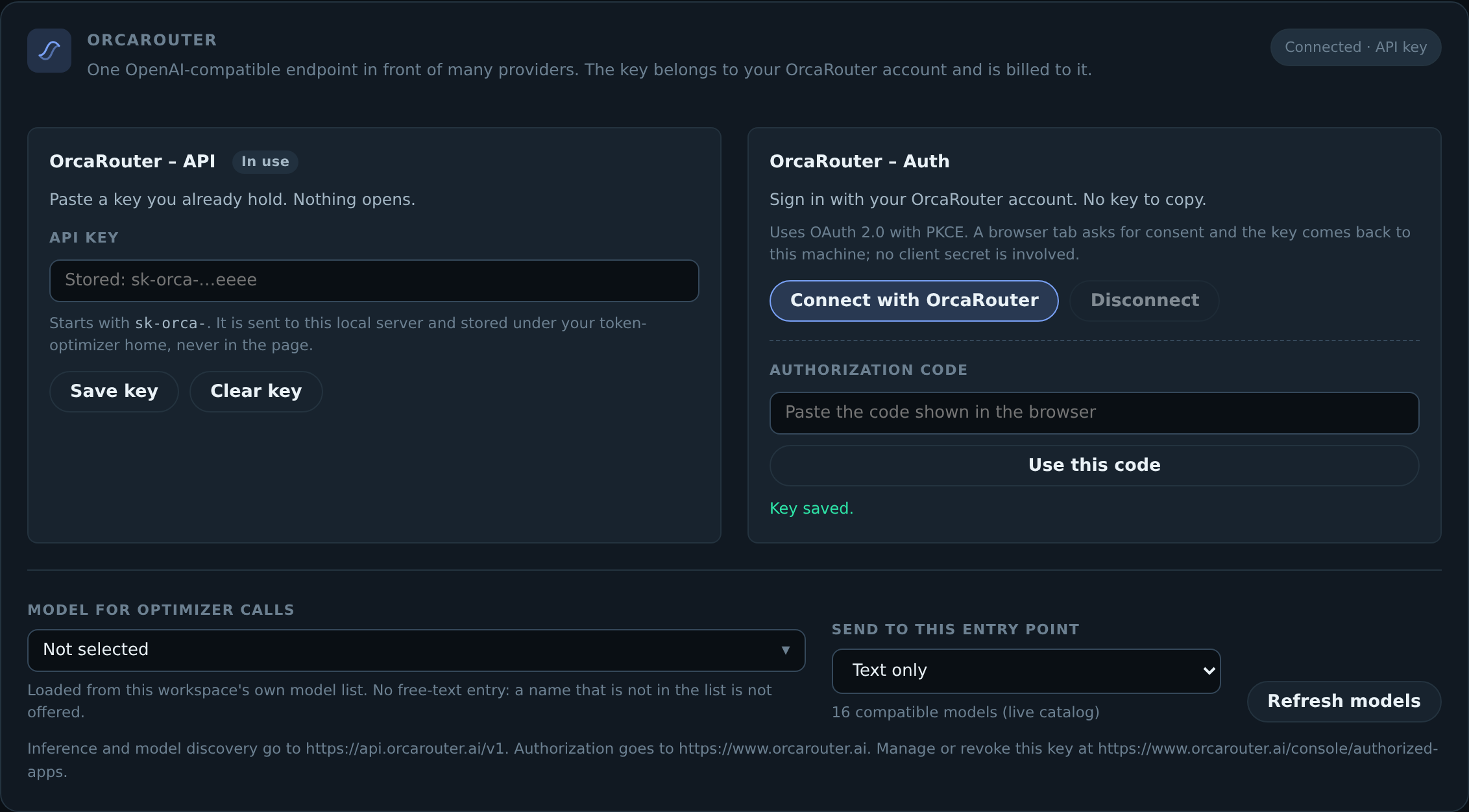
### Configure it
Open the dashboard (`npm run dashboard`) and use the **OrcaRouter** card, or set
it from the environment:
```bash
export ORCAROUTER_API_KEY=sk-orca-… # the API-key choice
export TOKEN_OPTIMIZER_ORCA_MODEL=orcarouter/auto # which model the optimizer calls
```
Or connect with an account instead, which writes the issued key under
`$TOKEN_OPTIMIZER_HOME` (default `~/.token-optimizer`) with owner-only
permissions:
```bash
token-optimizer-route orcarouter --connect # opens a browser, then stores the key
token-optimizer-route orcarouter --status # shows a redacted status and the origins in use
token-optimizer-route orcarouter --clear # removes the stored key
```
**A PKCE-issued key is durable, not a refresh token.** OrcaRouter returns a
long-lived key, not an access/refresh pair, so it is reused until you revoke it
at — there is no refresh to
schedule and re-authorizing on every launch would hit the account's limit of ten
keys per 24 hours. When the relay answers `401`, the exact account and credential
generation that made the rejected request is marked for reauthentication, and
nothing attempts a refresh. Refreshable OAuth tokens rotate automatically;
durable key grants such as OrcaRouter are reused until the provider revokes them.
### Origins
Authentication and inference are **different hosts**, and neither is derived from
the other:
| Purpose | Default |
| -------------------------------- | ------------------------------ |
| Consent screen and code exchange | `https://www.orcarouter.ai` |
| Inference and model discovery | `https://api.orcarouter.ai/v1` |
`https://api.orcarouter.ai/v1/auth/keys` is a 404 — the auth endpoints are not
under the relay. Self-hosted installs can set `ORCA_BASE_URL` for a single shared
origin, or `ORCA_AUTH_BASE_URL` / `ORCA_API_BASE_URL` separately; explicit values
win, and cleartext HTTP is permitted only for loopback.
### Models
The model control is a listbox built from `GET /v1/models` on the configured
origin, using your own key so the list is what your workspace can actually call.
Model ids keep their `vendor/model` namespace. Options are filtered per entry
point, and a model that does not declare a capability is **not offered** rather
than offered and then rejected:
- text chat — `?capability=chat`, and the model must declare an `openai`,
`anthropic`, `gemini` or `openai-response` endpoint type;
- multimodal — the same, plus an explicit `architecture.input_modalities` entry
for the modality being sent (an undeclared capability fails closed);
- embedding, image, video and rerank — matched strictly against the
`embeddings`, `image-generation`, `openai-video` and `jina-rerank` endpoint
types.
If discovery fails, a small **verified fallback** list is shown and labelled as
such (`openai/gpt-5.5`, `anthropic/claude-opus-4.8`, `google/gemini-3.5-flash`,
`deepseek/deepseek-v4-pro`, `orcarouter/auto`), with its context, modality and
reasoning-effort metadata intact. A successful live result is authoritative and
never has the fallback mixed into it.
| Text entry point | After switching to images |
| --------------------------------------------------------------------------------------------------- | --------------------------------------------------------------------------------------------------------------------------------------------------- |
| 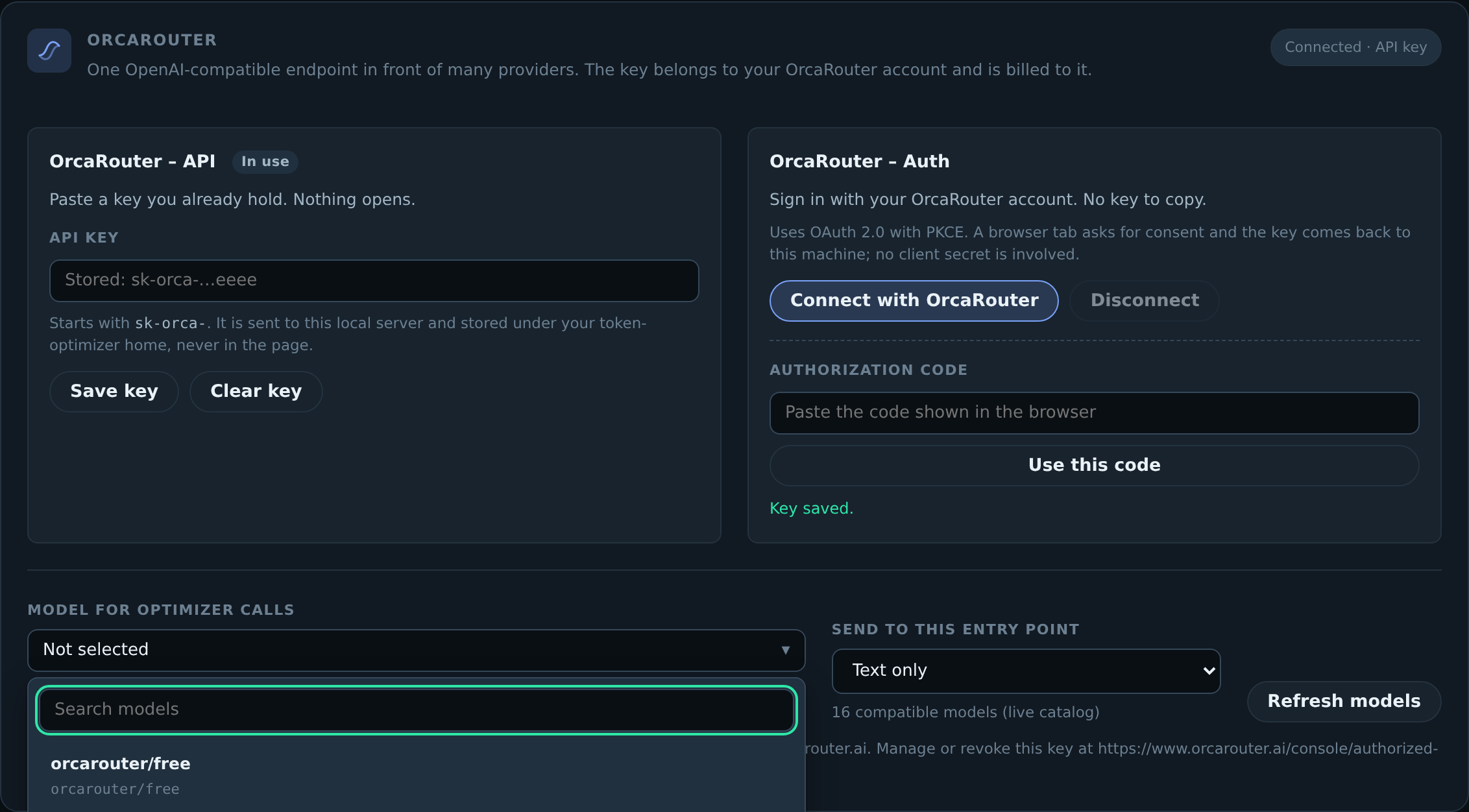 | 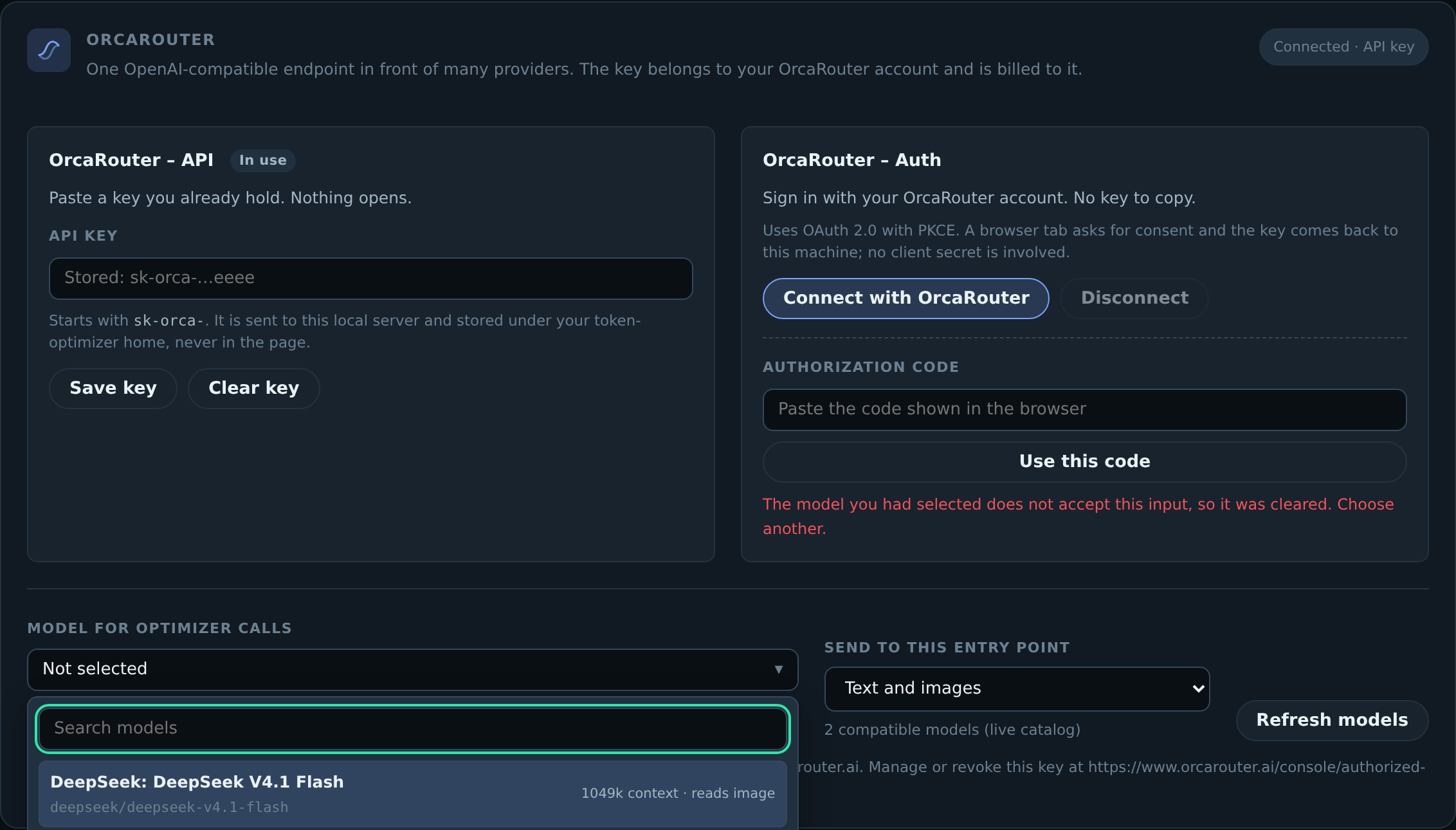 |
The second capture is after the entry point is switched to images: the text-only
selection is cleared, and only models whose catalog entry declares image
input remain.
`npm run evidence:orcarouter` regenerates the screenshots and assertions for the
card into `orca-evidence/` (untracked — it is a run artifact). The copies linked
from this README live in `docs/media/orcarouter/`, alongside the other dashboard
captures. A delivery check reads `orca-evidence/` and refuses a patch that ships
it, so the directory is ignored rather than committed.
---
## Honest comparison
| | Token Optimizer | Typical alternatives |
| ---------------------------- | -------------------------------------------------------------------- | ---------------------------------------------------- |
| **License** | MIT — commercial use fine | Often noncommercial-only; check before using at work |
| Default behaviour | Refuses the wasteful call | Suggests a better tool |
| Re-read of an unchanged file | Returns a diff | Returns the file again |
| Savings figure | Direct before/return ledger; causal graph effect separately held out | Computed from the tool's own assumptions |
| Cross-session memory | Findings, decisions, dead ends | Usually none |
| Compaction | Consolidation, ranked by cost-to-rederive | Checkpoint and replay |
| Cache economics | Measured from the transcript, attributed to a line | Rarely addressed |
| Model routing | Measured from episode outcomes | Guessed from task size |
| Cross-project | Fixes transfer by content hash | Per-project only |
| Clients | 16 | 3–6 typical |
| Telemetry | None | Varies |
---
## Installation
Every client launches the same stdio server — `npx -y @ooples/token-optimizer-mcp@latest` —
but they differ in what they let a hook _do_, and that difference is the whole
product. A client with a pre-execution veto can have the wasteful call refused;
one without can only be told. Both are listed honestly below.
Ready-made configuration for all sixteen lives in
[`integrations/`](./integrations), generated from one source and validated by
`npm run verify:clients`. Full matrix: [`docs/CLIENT_SUPPORT.md`](./docs/CLIENT_SUPPORT.md).
Every MCP connection also receives capability-aware mandatory routing
instructions in its `initialize` response. That gives all clients a universal
always-on policy, but only the ten clients with native pre-tool surfaces can
hard-veto a wasteful built-in call; install their lifecycle bundle for actual
enforcement.
### Enforcing tier — the wasteful call is refused
These ten clients expose a pre-execution hook. Their packaged lifecycle bundle
shares one capability-aware decision engine and defaults to `assist`: routing,
retrieval, capture and harvest all on, no refusals. Set
`TOKEN_OPTIMIZER_MODE=enforce` if you want expensive built-in calls vetoed, or
`off` to disable the hooks entirely.
| Client | Installable lifecycle surface |
| ---------------------- | ------------------------------------------------------------------------------------------------------------------------------------------------ |
| **Claude Code** | Native plugin: `/plugin marketplace add ooples/token-optimizer-mcp`, then `/plugin install token-optimizer@token-optimizer` |
| **Codex** | Native plugin in [`integrations/codex/plugin`](./integrations/codex/plugin), or standalone hooks in [`integrations/codex`](./integrations/codex) |
| **GitHub Copilot CLI** | Project hooks in [`integrations/copilot`](./integrations/copilot) |
| **Gemini CLI** | Gemini extension at the repository root, backed by [`integrations/gemini`](./integrations/gemini) |
| **Qwen Code** | Extension bundle in [`integrations/qwen`](./integrations/qwen) |
| **Cursor** | Project hooks and always-applied rule in [`integrations/cursor`](./integrations/cursor) |
| **Cline** | Project hooks and rule in [`integrations/cline`](./integrations/cline) |
| **OpenCode** | In-process plugin and hooks in [`integrations/opencode`](./integrations/opencode) |
| **Kilo** | In-process plugin and hooks in [`integrations/kilo`](./integrations/kilo) |
| **Windsurf** | Project hooks and rule in [`integrations/windsurf`](./integrations/windsurf) |
### Rules tier — mandatory routing where the host has no veto API
Roo Code, Zed, Amp, Continue, Crush, and Droid do not expose a packaged
pre-execution bridge that can safely veto built-in calls. Their generated,
always-on rules make optimized routing mandatory whenever the exact MCP schema
is visible, and fail open to a bounded native operation when it is not. The
integration directories contain both the MCP config and the rules file at the
paths documented by each host.
> **These paths are checked, not assumed.** Verifying them against each client's
> published docs found six configs that would have installed cleanly and never
> loaded — including Kilo, whose schema shares nothing with the `mcpServers`
> convention the other clients use. A convention is not a schema.
### Codex
#### 1. Add the MCP server or native plugin
For the best experience, install the Codex plugin. It bundles the MCP server, the token-optimization skill, session guidance, and a large-read hook:
```bash
codex plugin marketplace add ooples/token-optimizer-mcp
codex plugin add token-optimizer@token-optimizer
```
Review and trust the bundled hooks with `/hooks`, then start a new conversation. If you prefer an MCP-only installation, use:
```bash
codex mcp add token-optimizer -- npx -y @ooples/token-optimizer-mcp@latest
```
On Windows, if PowerShell blocks the `codex.ps1` shim, use the command launcher directly:
```powershell
codex.cmd mcp add token-optimizer -- npx -y @ooples/token-optimizer-mcp@latest
```
This writes the server to `~/.codex/config.toml`. Codex CLI, the Codex IDE extension, and the Codex app on the same host share that configuration.
#### 2. Verify the installation
```bash
codex mcp get token-optimizer
codex mcp list
```
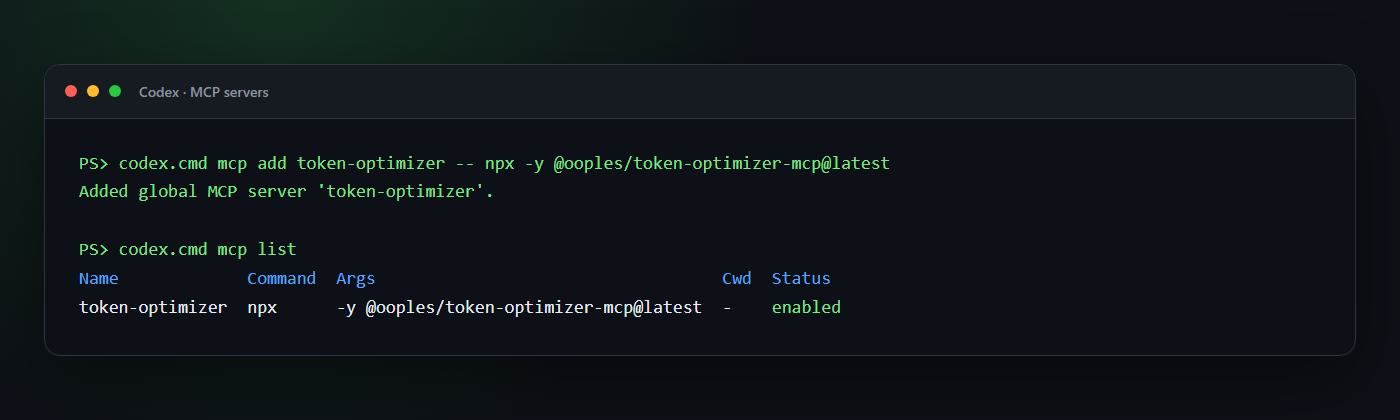
Start a new Codex conversation after installation so the new tools are discovered. In an interactive CLI session, `/mcp` shows the tools available to the conversation.
#### 3. Add optimization guidance and hooks
The plugin supplies both automatically. For an MCP-only installation, add the guidance from [`integrations/AGENTS.md`](./integrations/AGENTS.md) to a project or global `AGENTS.md`. A ready-made standalone hook is also available under [`integrations/codex/hooks`](./integrations/codex/hooks); merge its `hooks.json` into `~/.codex/hooks.json`, copy the script to `~/.codex/hooks/`, and review it once with `/hooks`.
The Codex hook injects guidance at `SessionStart`. Under `TOKEN_OPTIMIZER_MODE=enforce` it blocks expensive native operations when the bundled MCP has an exact replacement, including a single unambiguous code-mode shell call such as `cat` or `Get-Content`; multi-operation orchestration remains advisory so unrelated work is not discarded, and a second attempt at the same target passes through if the MCP is unavailable. The default is `assist`, which keeps retrieval and capture but never vetoes; `TOKEN_OPTIMIZER_MODE=advise` adds the routing advisory without vetoes, and `off` disables the hooks. The `AGENTS.md`/skill guidance remains important.
If you prefer a smaller instruction block:
```markdown
## Token optimization
Use the token-optimizer MCP for large or repeated reads:
- `smart_read` for files over roughly 400 lines and for files already read once.
- `smart_glob`/`smart_grep` for large search results.
- `optimize_text` to store bulky text outside the model context.
- `get_optimization_report` when the user asks for token or compression stats.
Use normal tools for small, one-off operations.
```
See the current [Codex hooks documentation](https://learn.chatgpt.com/docs/hooks.md) for hook trust, matching, and tool-coverage details.
#### Equivalent manual Codex configuration
If you prefer to edit `~/.codex/config.toml` yourself:
```toml
[mcp_servers.token-optimizer]
command = "npx"
args = ["-y", "@ooples/token-optimizer-mcp@latest"]
# Optional: keep the cache in a custom location.
# env = { TOKEN_OPTIMIZER_CACHE_DIR = "/absolute/path/to/cache" }
```
### Claude Code
**Install the plugin, not the bare MCP server.** The plugin is the only path that
optimizes by default; adding the MCP server alone gives the model a set of tools
it is free to never call.
```text
/plugin marketplace add ooples/token-optimizer-mcp
/plugin install token-optimizer@token-optimizer
/reload-plugins
```
That is the whole installation. There is nothing to configure and no flag to
turn on.
#### What you get immediately
From the first message of the next session, expensive built-in calls are
**refused and redirected** to the optimized equivalent:
| You (or the model) do this | What happens |
| ---------------------------------------------- | ---------------------------------------------------- |
| `Read` a file over ~25 KB | Denied → `smart_read` (cached) |
| `Read` **any** file already read this session | Denied → `smart_read` (returns only the diff) |
| `Grep` file contents / `Glob` for files | Denied → `smart_grep` / `smart_glob` |
| `Edit` a file over ~25 KB | Denied → `smart_edit` (returns a diff, not the file) |
| `cat`/`head`/`tail`/`Get-Content` a large file | Denied → `smart_read` |
| `grep -r` / `rg` across the tree | Denied → `smart_grep` |
| Context fills and compaction starts | `optimize_session` runs first |
The re-read case is usually the largest single win and the one most often
missed: a 5 KB config read fifteen times across a session costs far more than
one 200 KB file read once. Size-based rules never catch it.
#### It cannot get you stuck
Three properties, all tested:
- **Fail-open.** Any error in the optimizer — bad payload, unreadable file,
unexpected exception — allows the original call through, exactly as if the
plugin were not installed.
- **Loop-breaking.** A given target is refused **once**. Come back to it and it
is allowed. So if the MCP server is missing or misconfigured, the cost is one
wasted turn per file, self-healing, with no intervention.
- **Cheap calls are left alone.** Small files, paged reads, `git log | head`,
and binary paths are never touched.
#### Turning it down
One variable, no reinstall:
```bash
TOKEN_OPTIMIZER_MODE=advise # nudge instead of refuse (the pre-5.2 behaviour)
TOKEN_OPTIMIZER_MODE=off # disable the hooks entirely
TOKEN_OPTIMIZER_LARGE_READ_BYTES=51200 # raise the "large file" threshold
```
#### MCP server only (not recommended)
If you want the tools without the enforcement:
```bash
claude mcp add --transport stdio --scope user token-optimizer -- \
npx -y @ooples/token-optimizer-mcp@latest
```
Verify with `claude mcp get token-optimizer`, or `/mcp` inside Claude Code. Then
add the recommendations from [`integrations/AGENTS.md`](./integrations/AGENTS.md)
to your `CLAUDE.md` — but be aware that guidance in a context file is advisory,
and models routinely read past it.
Installing the package changes nothing on your machine. Hooks and managed Claude Code, Codex, and OpenCode commands are wired by one explicit command:
```bash
npm install -g @ooples/token-optimizer-mcp@latest
token-optimizer-install
```
`token-optimizer-install` is the only thing that edits `~/.claude/settings.json`; the install itself prints the path it would write and exits. The hooks it adds match nearly every tool call in every project on the machine, so that is not a side effect an `npm install` should have. Undo it with `token-optimizer-uninstall`, which is a dry run until you pass `--apply`. To activate as part of a container image or provisioning script, set `TOKEN_OPTIMIZER_AUTO_INSTALL=1` before installing. Open a new shell to activate managed CLI commands, or use `token-optimizer-run` directly. See the [hook installation guide](./docs/HOOKS-INSTALLATION.md).
### GitHub Copilot CLI
#### 1. Add the MCP server
On current Copilot CLI releases:
```bash
copilot mcp add token-optimizer -- npx -y @ooples/token-optimizer-mcp@latest
```
If your Copilot CLI does not expose `copilot mcp` yet, save this as `~/.copilot/mcp-config.json`:
```json
{
"mcpServers": {
"token-optimizer": {
"type": "local",
"command": "npx",
"args": ["-y", "@ooples/token-optimizer-mcp@latest"],
"tools": ["*"]
}
}
}
```
A ready-made copy is available at [`integrations/copilot/mcp-config.json`](./integrations/copilot/mcp-config.json).
#### 2. Verify the installation
```bash
copilot mcp get token-optimizer
copilot mcp list
```
Inside an interactive Copilot session, `/mcp show token-optimizer` displays the connection status and available tools.
#### 3. Add optimization guidance and hooks
Keep [`integrations/AGENTS.md`](./integrations/AGENTS.md) as the repository's `AGENTS.md`, or adapt the same guidance into `.github/copilot-instructions.md`.
For native lifecycle integration, install the hooks with the bundled command. It
copies the entry points AND composes the shared core beside them, which a plain
`cp -r` cannot do: the package ships the core once, not ten vendored copies.
```bash
npx -y @ooples/token-optimizer-mcp@latest token-optimizer-install-client --client copilot
```
It writes `.github/hooks/` by default, and `--check` reports what it would
write without writing it. `--dest ` writes to another directory but
changes no client configuration, so it has to be the directory the client's own
config already reads -- which is why the clients that resolve that directory at
runtime (Gemini, Qwen, the Codex plugin) require it.
The hooks inject optimization guidance at `sessionStart`. Under `TOKEN_OPTIMIZER_MODE=enforce` they deny a large built-in `view` so Copilot retries with `smart_read`; the default `assist` leaves the call alone. Partial reads and files below 25 KB always pass through unchanged, and `TOKEN_OPTIMIZER_MODE=advise` gives recommendations without vetoes. Repository hooks work without overwriting user-level files; global hooks can instead be placed in `~/.copilot/hooks/` with their script paths adjusted for that directory.
Restart Copilot CLI after changing hook files. See GitHub's official [MCP setup guide](https://docs.github.com/en/copilot/how-tos/copilot-cli/customize-copilot/add-mcp-servers) and [hooks reference](https://docs.github.com/en/copilot/reference/hooks-reference).
### Gemini CLI
#### 1. Add the MCP server
Add Token Optimizer directly at user scope:
```bash
gemini mcp add --scope user token-optimizer npx -y @ooples/token-optimizer-mcp@latest
```
Alternatively, install this repository as a Gemini extension so the MCP configuration and `GEMINI.md` guidance are packaged together:
```bash
gemini extensions install https://github.com/ooples/token-optimizer-mcp --auto-update
```
#### 2. Verify the installation
```bash
gemini mcp list
gemini extensions list
```
Run `/mcp` inside Gemini CLI to inspect the connection. Restart Gemini CLI after installing or updating the extension.
#### 3. Add optimization guidance and hooks
Direct MCP users should copy [`GEMINI.md`](./GEMINI.md) into the project or merge its rules into an existing `GEMINI.md`. Extension users receive that context file plus native hooks automatically.
The extension's `SessionStart` hook injects optimization guidance. Its `AfterTool` hook notices full-file `read_file` results over 25 KB and suggests `smart_read`. To make Gemini automatically replace those large results with a token-optimizer tail call, configure the extension setting **Automatic large-read routing** as `true`:
```bash
gemini extensions config token-optimizer
```
Automatic routing uses Gemini's native `tailToolCallRequest`: the `smart_read` result replaces the built-in read result before it reaches the model. Partial reads remain unchanged. Restart Gemini CLI after installing, updating, or reconfiguring the extension. See the official [Gemini MCP guide](https://geminicli.com/docs/tools/mcp-server/), [extension guide](https://geminicli.com/docs/extensions/reference/), and [hooks reference](https://geminicli.com/docs/hooks/reference/).
### OpenCode
#### 1. Add the MCP server
Create or update `opencode.json` in your project:
```json
{
"$schema": "https://opencode.ai/config.json",
"mcp": {
"token-optimizer": {
"type": "local",
"command": ["npx", "-y", "@ooples/token-optimizer-mcp@latest"],
"enabled": true
}
},
"instructions": ["./AGENTS.md"]
}
```
For a global installation, merge the same `mcp` entry into `~/.config/opencode/opencode.json`.
#### 2. Verify the installation
```bash
opencode mcp list
```
The output shows configured servers and their connection status.
#### 3. Add optimization guidance and the local plugin
Copy [`integrations/AGENTS.md`](./integrations/AGENTS.md) to the project as `AGENTS.md`; the `instructions` entry above loads it. Then copy the ready-made local plugin:
```bash
mkdir -p .opencode/plugins
cp integrations/opencode/.opencode/plugins/token-optimizer.js .opencode/plugins/
```
```powershell
New-Item -ItemType Directory -Force .opencode/plugins | Out-Null
Copy-Item integrations/opencode/.opencode/plugins/token-optimizer.js .opencode/plugins/
```
On OpenCode 1.3.3 or earlier (check `opencode --version`), copy `integrations/opencode/legacy/.opencode/plugins/token-optimizer.js` to the same place instead. Those releases call every export of a plugin file as a plugin function, so they cannot load the current file, whose default export is the object OpenCode 2.x requires. Both files have the same name, so copying one replaces the other.
The plugin preserves Token Optimizer usage state in OpenCode's compaction prompt. Under `TOKEN_OPTIMIZER_MODE=enforce` its `tool.execute.before` hook rejects full-file reads over 25 KB and steers the agent to `smart_read`; the default `assist` lets them through. Small and partial reads always pass normally, and `TOKEN_OPTIMIZER_MODE=advise` gives non-blocking guidance. Restart OpenCode after adding the plugin. See the official [OpenCode MCP guide](https://opencode.ai/docs/mcp-servers/) and [plugin hook guide](https://opencode.ai/docs/plugins/).
### Generic MCP configuration
Any stdio-capable MCP client can launch Token Optimizer with:
```json
{
"mcpServers": {
"token-optimizer": {
"command": "npx",
"args": ["-y", "@ooples/token-optimizer-mcp@latest"]
}
}
}
```
Additional ready-made integration files are available for [Claude Desktop](./examples/claude_desktop_config.json), [Codex](./integrations/codex/config.toml), [Gemini CLI](./integrations/gemini/), [OpenCode](./integrations/opencode/), and [GitHub Copilot](./integrations/copilot/mcp-config.json).
## Use it
You normally use Token Optimizer by asking your agent in plain language:
```text
Use token-optimizer smart_read for the large server file, then use it again
after the edit so only the diff comes back.
```
```text
Cache this API response with optimize_text under the key customer-schema,
then retrieve it only if we need the full payload again.
```
```text
Show my token savings with get_optimization_report.
```
For clients that expose direct MCP tool calls, the core inputs are small JSON objects:
```json
{
"tool": "smart_read",
"arguments": {
"path": "/absolute/path/to/large-file.ts"
}
}
```
```json
{
"tool": "optimize_text",
"arguments": {
"text": "A large response, log, document, or generated artifact...",
"key": "stable-reference-key",
"quality": 11
}
}
```
```json
{
"tool": "get_optimization_report",
"arguments": {
"topN": 10
}
}
```
## Understand the compression stats
`optimize_text` returns measurements with every call. This example uses a deliberately repetitive payload to make every field easy to see; it is not a benchmark:
```json
{
"success": true,
"key": "customer-schema",
"originalTokens": 4180,
"compressedTokens": 72,
"tokensSaved": 4108,
"percentSaved": 99.55,
"cached": true,
"compressionUsed": true
}
```
`get_optimization_report` applies the same versioned measurement contract as
the dashboard and aggregates qualifying operations into:
- gross preview reduction, linked expansion debits, and net transport avoided;
- observed returned context and the net reduction percentage;
- verified operations tracked, with legacy and tool-reported claims excluded;
- breakdowns by action/tool, hook phase, and MCP server;
- optional date-range and session filters.
Two tools sound similar but serve different purposes:
| Tool | Use it for | Context-window effect |
| --------------- | ----------------------------------------------------------- | --------------------------------------------------------- |
| `optimize_text` | Store bulky text under a key and return a compact reference | Reduces text kept in the active context |
| `compress_text` | Produce Brotli/base64 data for storage or transport | May use **more** model tokens if pasted back into context |
If your goal is a smaller prompt, prefer `optimize_text`. Use `compress_text` only when you specifically need byte compression.
## What is included
| Capability | Representative tools | What gets smaller or faster |
| ----------------------- | --------------------------------------------------------------------------------------------------- | ---------------------------------------- |
| Context and compression | `optimize_text`, `get_cached`, `count_tokens`, `analyze_optimization`, `context_delta` | Large payloads and repeated context |
| File and Git operations | `smart_read`, `smart_write`, `smart_edit`, `smart_grep`, `smart_glob`, `smart_diff`, `smart_status` | File contents, search results, and diffs |
| Caching | `smart_cache`, `cache_warmup`, `cache_invalidation`, `cache_compression`, `predictive_cache` | Repeated computation and retrieval |
| APIs and databases | `smart_api_fetch`, `smart_sql`, `smart_graphql`, `smart_rest`, `smart_schema` | Responses, schemas, and query analysis |
| Build and system tasks | `smart_build`, `smart_test`, `smart_lint`, `smart_logs`, `smart_processes` | Build logs and diagnostic output |
| Intelligence | `smart-summarization`, `pattern-recognition`, `natural-language-query`, `recommendation-engine` | Analysis and summaries |
| Analytics | `get_optimization_report`, `get_action_analytics`, `get_hook_analytics`, `export_analytics` | Token-savings visibility |
See [`docs/TOOLS.md`](./docs/TOOLS.md) for detailed tool inputs and examples.
## Requirements and data
- Node.js 22 or newer
- npm 9 or newer
- An MCP client with stdio transport support
Default local data locations include:
- cache: `~/.token-optimizer-cache/`
- analytics: `~/.token-optimizer-mcp/analytics.db`
- sessions and configuration: `~/.token-optimizer/`
Set `TOKEN_OPTIMIZER_CACHE_DIR` to override the cache location.
## Verify it, check it, remove it
This installs hooks that **refuse your tool calls**. That is a bigger ask than a
normal dependency makes, so here is everything needed to check it and undo it.
**Verify the release is genuine.** The package is published from CI with npm
provenance, which signs an attestation binding the artifact to the workflow run
and the commit that built it:
```bash
npm audit signatures
```
That verifies without trusting us. A `CHECKSUMS.sha256` is attached to each
GitHub release for offline checking (`sha256sum -c CHECKSUMS.sha256`) — useful
for mirrors, but weaker: it shares a trust root with the thing it hashes.
**Check it actually works.** Not that the files are in place — that it _works_:
```bash
npm run doctor
```
This feeds a synthetic payload to the real hook binary and asserts a large read
is refused and a small one is not, that session-start emits the policy, that the
graph directory is writable, and that the MCP server starts and lists its tools.
Every failure names its own fix. There is also an `install_doctor` MCP tool.
**Turn enforcement off, instantly.** Every refusal says this, so you never have
to come back here to find it:
```bash
TOKEN_OPTIMIZER_MODE=off # no enforcement, no hooks
TOKEN_OPTIMIZER_MODE=advise # suggestions only, nothing is ever denied
```
**Remove it.** The installer records every file it wrote, with hashes, so
removal is exact rather than best-effort:
```bash
npm run uninstall-hooks # show the plan; changes nothing
npm run uninstall-hooks -- --apply # carry it out
```
It removes only files that still match what we wrote. Anything you have edited
since is **left in place and named**, because removing it would destroy your
work and removing it silently would be worse. Hooks you added yourself are not
in the manifest and are never touched. Config entries we added are listed for
you to remove — we do not rewrite your `settings.json`.
## Technical reference
The detailed operational material below is intentionally retained for users who want to understand the complete tool surface, hooks pipeline, performance controls, analytics, and troubleshooting behavior.
### Complete Tool Reference (74 Total)
#### Core Caching & Optimization (8 tools)
Click to expand
- **optimize_text** - Compress and cache text (primary tool for token reduction)
- **get_cached** - Retrieve previously cached text
- **compress_text** - Compress text using Brotli
- **decompress_text** - Decompress Brotli-compressed text
- **count_tokens** - Count tokens using tiktoken (GPT-4 tokenizer)
- **analyze_optimization** - Analyze text and get optimization recommendations
- **get_cache_stats** - View cache hit rates and compression ratios
- **clear_cache** - Clear all cached data
**Usage Example**:
```typescript
// Cache large content to remove it from context window
optimize_text({
text: 'Large API response or file content...',
key: 'api-response-key',
quality: 11,
});
// Result: 60-90% token reduction
```
#### Smart File Operations (10 tools)
Click to expand
Optimized replacements for standard file tools with intelligent caching and diff-based updates:
- **smart_read** - Read files with 80% token reduction through caching and diffs
- **smart_write** - Write files with verification and change tracking
- **smart_edit** - Line-based file editing with diff-only output (90% reduction)
- **smart_grep** - Search file contents with match-only output (80% reduction)
- **smart_glob** - File pattern matching with path-only results (75% reduction)
- **smart_diff** - Git diffs with diff-only output (85% reduction)
- **smart_branch** - Git branch listing with structured JSON (60% reduction)
- **smart_log** - Git commit history with smart filtering (75% reduction)
- **smart_merge** - Git merge management with conflict analysis (80% reduction)
- **smart_status** - Git status with status-only output (70% reduction)
**Usage Example**:
```typescript
// Read a file with automatic caching
smart_read({ path: '/path/to/file.ts' });
// First read: full content
// Subsequent reads: only diff (80% reduction)
```
#### API & Database Operations (10 tools)
Click to expand
Intelligent caching and optimization for external data sources:
- **smart_api_fetch** - HTTP requests with caching and retry logic (83% reduction on cache hits)
- **smart-cache-api** - API response caching with TTL/ETag/event-based strategies
- **smart_database** - Database queries with connection pooling and caching (83% reduction)
- **smart_sql** - SQL query analysis with optimization suggestions (83% reduction)
- **smart_schema** - Database schema analysis with intelligent caching
- **smart_graphql** - GraphQL query optimization with complexity analysis (83% reduction)
- **smart_rest** - REST API analysis with endpoint discovery (83% reduction)
- **smart_orm** - ORM query optimization with N+1 detection (83% reduction)
- **smart_migration** - Database migration tracking (83% reduction)
- **smart_websocket** - WebSocket connection management with message tracking
**Usage Example**:
```typescript
// Fetch API with automatic caching
smart_api_fetch({
method: 'GET',
url: 'https://api.example.com/data',
ttl: 300,
});
// Cached responses: 95% token reduction
```
#### Build & Test Operations (10 tools)
Click to expand
Development workflow optimization with intelligent caching:
- **smart_build** - TypeScript builds with diff-based change detection
- **smart_test** - Test execution with incremental test selection
- **smart_lint** - ESLint with incremental analysis and auto-fix
- **smart_typecheck** - TypeScript type checking with caching
- **smart_install** - Package installation with dependency analysis
- **smart_docker** - Docker operations with layer analysis
- **smart_logs** - Log aggregation with pattern filtering
- **smart_network** - Network diagnostics with anomaly detection
- **smart_processes** - Process monitoring with resource tracking
- **smart_system_metrics** - System resource monitoring with performance recommendations
**Usage Example**:
```typescript
// Run tests with caching
smart_test({
onlyChanged: true, // Only test changed files
coverage: true,
});
```
#### Advanced Caching (10 tools)
Click to expand
Enterprise-grade caching strategies with 87-92% token reduction:
- **smart_cache** - Multi-tier cache (L1/L2/L3) with 6 eviction strategies (90% reduction)
- **cache_warmup** - Intelligent cache pre-warming with schedule support (87% reduction)
- **cache_analytics** - Real-time dashboards and trend analysis (88% reduction)
- **cache-benchmark** - Performance testing and strategy comparison (89% reduction)
- **cache_compression** - 6 compression algorithms with adaptive selection (89% reduction)
- **cache_invalidation** - Dependency tracking and pattern-based invalidation (88% reduction)
- **cache_optimizer** - ML-based recommendations and bottleneck detection (89% reduction)
- **cache_partition** - Sharding and consistent hashing (87% reduction)
- **cache_replication** - Distributed replication with conflict resolution (88% reduction)
- **predictive_cache** - ML-based predictive caching with ARIMA/LSTM (91% reduction)
**Usage Example**:
```typescript
// Configure multi-tier cache
smart_cache({
operation: 'configure',
evictionStrategy: 'LRU',
l1MaxSize: 1000,
l2MaxSize: 10000,
});
```
#### Monitoring & Dashboards (7 tools)
Click to expand
Comprehensive monitoring with 88-92% token reduction through intelligent caching:
- **alert_manager** - Multi-channel alerting (email, Slack, webhook) with routing (89% reduction)
- **metric_collector** - Time-series metrics with multi-source support (88% reduction)
- **monitoring_integration** - External platform integration (Prometheus, Grafana, Datadog) (87% reduction)
- **custom_widget** - Dashboard widgets with template caching (88% reduction)
- **data_visualizer** - Interactive visualizations with SVG optimization (92% reduction)
- **health_monitor** - System health checks with state compression (91% reduction)
- **log_dashboard** - Log analysis with pattern detection (90% reduction)
**Usage Example**:
```typescript
// Create an alert
alert_manager({
operation: 'create-alert',
alertName: 'high-cpu-usage',
channels: ['slack', 'email'],
threshold: { type: 'above', value: 80 },
});
```
#### System Operations (6 tools)
Click to expand
System-level operations with smart caching:
- **smart_cron** - Scheduled task management (cron/Windows Task Scheduler) (85% reduction)
- **smart_user** - User and permission management across platforms (86% reduction)
- **smart_ast_grep** - Structural code search with AST indexing (83% reduction)
- **get_session_stats** - Session-level token usage statistics
- **analyze_project_tokens** - Project-wide token analysis and cost estimation
- **optimize_session** - Compress large file operations from current session
**Usage Example**:
```typescript
// View session token usage
get_session_stats({});
// Result: Detailed breakdown of token usage by tool
```
#### Intelligence & Summarization (6 tools)
Click to expand
- **intelligent-assistant** - Context-aware assistance with compact recommendations
- **natural-language-query** - Natural-language querying over structured data
- **pattern-recognition** - Pattern discovery with summarized findings
- **predictive-analytics** - Predictive analysis with concise results
- **recommendation-engine** - Ranked, context-aware recommendations
- **smart-summarization** - Token-aware summarization for large content
#### Token Analytics (5 tools)
Click to expand
- **get_optimization_report** - Complete savings report with totals and breakdowns
- **get_action_analytics** - Savings aggregated by action or tool
- **get_hook_analytics** - Savings aggregated by hook phase
- **get_mcp_server_analytics** - Savings aggregated by MCP server
- **export_analytics** - Export recorded analytics for external analysis
#### Context State & Storage (2 tools)
Click to expand
- **optimization_storage** - Persist and retrieve optimized content
- **context_delta** - Track compact context changes between states
### Architecture and Global Hooks
#### Native client lifecycle coverage
The MCP server is identical in every client, but lifecycle APIs are not. The repository ships client-native adapters instead of copying Claude event names into tools that would silently ignore them.
| Client | Native integration events | Refusal under `MODE=enforce` | Advisory escape hatch |
| ------------------ | ------------------------------------------- | ------------------------------------------------------ | ----------------------------- |
| Codex | `SessionStart`, `PreToolUse` | Deny replaceable large reads and single shell dumps | `TOKEN_OPTIMIZER_MODE=advise` |
| Claude Code | `PreToolUse` plus optional global pipeline | Deny replaceable large reads and noisy searches | `TOKEN_OPTIMIZER_MODE=advise` |
| GitHub Copilot CLI | `sessionStart`, `preToolUse`, `postToolUse` | Deny large `view` calls and steer to `smart_read` | `TOKEN_OPTIMIZER_MODE=advise` |
| Gemini CLI | `SessionStart`, `BeforeTool`, `AfterTool` | Deny replaceable large reads before they enter context | `TOKEN_OPTIMIZER_MODE=advise` |
| OpenCode | `tool.execute.before`, compaction hook | Reject large full-file reads and steer to `smart_read` | `TOKEN_OPTIMIZER_MODE=advise` |
The default is `assist`: routing, retrieval, capture and harvest are on and nothing is ever refused. That is the posture two independent harnesses measured as our best -- on THOL, assist scored 0.971 in 14.4 turns against control's 0.969 in 16.2, while enforce scored 0.960 in 20.3 turns and cost 1.471x control per task (median across 17 tasks; cheaper on only 2 of them). Set `TOKEN_OPTIMIZER_MODE=enforce` for the refusals described above, which use a 25,600-byte threshold; override it with `TOKEN_OPTIMIZER_LARGE_READ_BYTES`, use `TOKEN_OPTIMIZER_MODE=advise` for the routing advisory without vetoes, or `TOKEN_OPTIMIZER_MODE=off` to disable the lifecycle integration. Partial reads always pass through because they may already be more efficient than a full cached read, and under `enforce` one repeated attempt is allowed so a failed MCP server cannot permanently block work.
#### Analytics workflow and storage
Click to expand
Granular token usage analytics for pinpointing optimization opportunities:
- **get_hook_analytics** - Token usage breakdown by hook phase (PreToolUse, PostToolUse, etc.)
- **get_action_analytics** - Token usage breakdown by tool/action (Read, Write, Grep, etc.)
- **get_mcp_server_analytics** - Token usage breakdown by MCP server (token-optimizer, filesystem, etc.)
- **export_analytics** - Export analytics data in JSON or CSV format with filtering
**Usage Example**:
```typescript
// Get per-hook analytics
get_hook_analytics({
startDate: '2025-01-01T00:00:00Z',
endDate: '2025-12-31T23:59:59Z',
});
// Result: Shows which hooks consume the most tokens
// Get per-action analytics
get_action_analytics({});
// Result: Shows which tools use the most tokens
// Export analytics as CSV
export_analytics({
format: 'csv',
hookPhase: 'PreToolUse',
});
// Result: CSV export filtered by PreToolUse hook
```
**Key Features**:
- Per-hook phase tracking (PreToolUse, PostToolUse, SessionStart, etc.)
- Per-action tracking (Read, Write, count_tokens, etc.)
- Per-MCP-server tracking (token-optimizer, filesystem, GitHub, etc.)
- Date range filtering
- JSON and CSV export
- Persistent storage with SQLite
- Zero performance impact (async batched writes)
#### Global Hooks System (7-Phase Optimization)
This complete seven-phase pipeline applies to the optional Claude Code global-hook installation. Codex, Copilot, Gemini, and OpenCode use the smaller native adapters above because their event names, payloads, and result-replacement capabilities differ.
When global hooks are installed, token-optimizer-mcp runs automatically on **every tool call**:
```
┌─────────────────────────────────────────────────────────────┐
│ Phase 1: PreToolUse - Tool Replacement │
│ ├─ Read → smart_read (80% token reduction) │
│ ├─ Grep → smart_grep (80% token reduction) │
│ └─ Glob → smart_glob (75% token reduction) │
└─────────────────────────────────────────────────────────────┘
↓
┌─────────────────────────────────────────────────────────────┐
│ Phase 2: Input Validation - Cache Lookups │
│ └─ get_cached checks if operation was already done │
└─────────────────────────────────────────────────────────────┘
↓
┌─────────────────────────────────────────────────────────────┐
│ Phase 3: PostToolUse - Output Optimization │
│ ├─ optimize_text for large outputs │
│ └─ compress_text for repeated content │
└─────────────────────────────────────────────────────────────┘
↓
┌─────────────────────────────────────────────────────────────┐
│ Phase 4: Session Tracking │
│ └─ Log all operations to operations-{sessionId}.csv │
└─────────────────────────────────────────────────────────────┘
↓
┌─────────────────────────────────────────────────────────────┐
│ Phase 5: UserPromptSubmit - Prompt Optimization │
│ └─ Optimize user prompts before sending to API │
└─────────────────────────────────────────────────────────────┘
↓
┌─────────────────────────────────────────────────────────────┐
│ Phase 6: PreCompact - Pre-Compaction Optimization │
│ └─ Optimize before Claude Code compacts the conversation │
└─────────────────────────────────────────────────────────────┘
↓
┌─────────────────────────────────────────────────────────────┐
│ Phase 7: Metrics & Reporting │
│ └─ Track token reduction metrics and generate reports │
└─────────────────────────────────────────────────────────────┘
```
### Performance evidence
Reduction targets in tool descriptions are design goals, not production
measurements. They never enter the verified ledger. Use the dashboard or
`get_optimization_report` for request-level measurements, and
`npm run dashboard:audit-savings` to inspect both qualifying and excluded rows.
No universal dollar value is claimed: configure an effective rate only when it
reflects your own provider, model, cache, route, plan, tier, and credits.
### Usage Examples
#### Basic Caching
```typescript
// Cache large content to remove from context window
const result = await optimize_text({
text: 'Large API response or file content...',
key: 'cache-key',
quality: 11,
});
// Result: Original tokens removed, only cache key remains (~50 tokens)
// Retrieve later
const cached = await get_cached({ key: 'cache-key' });
// Result: Full original content restored
```
#### Smart File Reading
```typescript
// First read: full content
await smart_read({ path: '/src/app.ts' });
// Subsequent reads: only changes (80% reduction)
await smart_read({ path: '/src/app.ts' });
```
#### API Caching
```typescript
// First request: fetch and cache
await smart_api_fetch({
method: 'GET',
url: 'https://api.example.com/data',
ttl: 300,
});
// Subsequent requests: cached (95% reduction)
await smart_api_fetch({
method: 'GET',
url: 'https://api.example.com/data',
});
```
#### Session Analysis
```typescript
// View token usage for current session
await get_session_stats({});
// Result: Breakdown by tool, operation, and savings
// Analyze entire project
await analyze_project_tokens({
projectPath: '/path/to/project',
});
// Result: Cost estimation and optimization opportunities
```
### Technology Stack
- **Runtime**: Node.js 22+
- **Language**: TypeScript
- **Database**: SQLite (better-sqlite3)
- **Token Counting**: tiktoken (GPT-4 tokenizer)
- **Compression**: Brotli (built-in Node.js)
- **Caching**: Multi-tier LRU/LFU/FIFO caching
- **Protocol**: MCP SDK (@modelcontextprotocol/sdk)
### Supported AI Tools
Token Optimizer works with stdio-capable MCP clients and includes first-party setup guidance for:
- **OpenAI Codex** - Direct MCP setup or the bundled plugin, skill, and hooks
- **Claude Code** - Direct MCP setup or the bundled plugin, skill, and hooks
- **GitHub Copilot CLI** - MCP configuration, AGENTS.md guidance, and repository hooks
- **Google Gemini CLI** - Direct MCP setup or the bundled context-and-hooks extension
- **OpenCode** - Local MCP configuration, AGENTS.md instructions, and compaction plugin
- **Claude Desktop**, **Cursor**, **Cline**, and **Windsurf** - Standard MCP JSON configuration
See [Installation](#installation) for the supported commands and configuration files.
### Performance Characteristics
- **Compression Ratio**: 2-4x typical (up to 82x for repetitive content)
- **Context Window Savings**: 60-90% average across all operations
- **Cache Hit Rate**: >80% in typical usage
- **Operation Overhead**: <10ms for cache operations (optimized from 50-70ms)
- **Compression Speed**: ~1ms per KB of text
- **Hook Overhead**: <10ms per operation (7x improvement from in-memory optimizations)
#### Performance Optimizations
The PowerShell hooks have been optimized to reduce overhead from 50-70ms to <10ms through:
- **In-Memory Session State**: Session data kept in memory instead of disk I/O on every operation
- **Batched Log Writes**: Operation logs buffered and flushed every 5 seconds or 100 operations
- **Lazy Persistence**: Disk writes only occur when necessary (session end, optimization, reports)
#### Environment Variables
Control hook behavior with these environment variables:
The MCP server exposes a 19-tool core catalog by default so tool schemas do not
consume a large share of the model context. Set
`TOKEN_OPTIMIZER_TOOL_PROFILE=full` before starting the server to expose all 104
specialized tools. `TOKEN_OPTIMIZER_TOOL_PROFILE=core` is the explicit form of
the default. Live graph capture uses
`TOKEN_OPTIMIZER_TOOL_PROFILE=continuity`, which exposes only capture and query.
The extended `cognitive` profile adds checkpoints, outcomes, and receipt
attestation. The native-token audit measures 480 startup tokens for continuity,
694 for extended cognitive, 4,815 for core, and 30,125 for full. Stateful
consumers normally receive zero MCP tools: host pre-action delivery adds only
the selected capsule through the client lifecycle channel. Other enabled MCP
servers add their own schemas independently.
For file-focused work, opt into `TOKEN_OPTIMIZER_TOOL_PROFILE=files` to advertise
seven tools: `smart_read`, `smart_write`, `smart_edit`, `smart_glob`, `smart_grep`,
`get_cached`, and `expand`. This profile retains file and cache retrieval while
omitting wiki, audit, and session tools. It works alongside the compression
proxy; see the [live comparison runner](bench/live/README.md) for the `full-files`
configuration and measured tradeoffs.
The current hardened cross-CLI smoke does not qualify. In the final
Codex-to-Claude adversarial pair, both successors were correct and the runtime
capsule was delivered with exact provider model attestations and zero consumer
MCP tools, but runtime used 5.383% more tokens and 41.758% more latency. The
reciprocal runtime arm was blocked by Claude provider quota, and Antigravity
1.1.11 required account authentication before a Gemini model could run. These
signed outcomes keep the release verdict `insufficient`; they are evidence of
working provenance and fail-closed behavior, not powered effectiveness or
universal superiority.
The replacement-grade protocol is intentionally larger than that smoke:
54,054 all-family/all-arm trial envelopes, 113,022 provider
calls, three independent model families, direction-level non-inferiority, and
1,056 hard-negative opportunities per direction and arm so the Bonferroni-adjusted
95% family-wise false-delivery upper bound—not only the point estimate—must
remain below 1%. Run
`npm run verify:ucr:study-design` to validate the frozen metric coverage. The
full protocol and CLI driver contract are in
[`evals/ucr/FULL_STUDY_CONTRACT.md`](evals/ucr/FULL_STUDY_CONTRACT.md).
#### Performance Controls
- **`TOKEN_OPTIMIZER_USE_FILE_SESSION`** (default: `false`)
- Set to `true` to revert to file-based session tracking (legacy mode)
- Use if you encounter issues with in-memory session state
- Example: `$env:TOKEN_OPTIMIZER_USE_FILE_SESSION = "true"`
- **`TOKEN_OPTIMIZER_SYNC_LOG_WRITES`** (default: `false`)
- Set to `true` to disable batched log writes
- Forces immediate writes to disk (slower but more resilient)
- Use for debugging or if logs are being lost
- Example: `$env:TOKEN_OPTIMIZER_SYNC_LOG_WRITES = "true"`
- **`TOKEN_OPTIMIZER_DEBUG_LOGGING`** (default: `true`)
- Set to `false` to disable DEBUG-level logging
- Reduces log file size and improves performance
- INFO/WARN/ERROR logs still written
- Example: `$env:TOKEN_OPTIMIZER_DEBUG_LOGGING = "false"`
#### Development Path
- **`TOKEN_OPTIMIZER_DEV_PATH`**
- Path to local development installation
- Automatically set to `~/source/repos/token-optimizer-mcp` if not specified
- Override for custom development paths
- Example: `$env:TOKEN_OPTIMIZER_DEV_PATH = "C:\dev\token-optimizer-mcp"`
**Performance Impact**: Using in-memory mode (default) provides a 7x improvement in hook overhead:
- Before: 50-70ms per hook operation
- After: <10ms per hook operation
- 85% reduction in hook latency
### Monitoring Token Savings
#### Real-Time Session Monitoring
**To view your actual token SAVINGS**, use the `get_session_stats` tool:
```typescript
// View current session statistics with token savings breakdown
await get_session_stats({});
```
**Output includes:**
- **Total tokens saved** (this is the actual savings amount!)
- **Token reduction percentage** (e.g., "60% reduction")
- **Cache hit rate** and **compression ratios**
- **Breakdown by tool** (Read, Grep, Glob, etc.)
- **Top 10 most optimized operations** with before/after comparison
**Example Output:**
```json
{
"sessionId": "abc-123",
"totalTokensSaved": 125430, // ← THIS is your savings!
"tokenReductionPercent": 68.2,
"originalTokens": 184000,
"optimizedTokens": 58570,
"cacheHitRate": 72.0,
"byTool": {
"smart_read": { "saved": 45000, "percent": 80 },
"smart_grep": { "saved": 32000, "percent": 75 }
}
}
```
#### Session Tracking Files
All operations are automatically tracked in session data files:
**Location**: `~/.claude-global/hooks/data/current-session.txt`
**Format**:
```json
{
"sessionId": "abc-123",
"sessionStart": "20251031-082211",
"totalOperations": 1250, // ← Number of operations
"totalTokens": 184000, // ← Cumulative token COUNT
"lastOptimized": 1698765432,
"savings": {
// ← Auto-updated every 10 operations (Issue #113)
"totalTokensSaved": 125430, // Tokens saved by compression
"tokenReductionPercent": 68.2, // Percentage of tokens saved
"originalTokens": 184000, // Original token count before optimization
"optimizedTokens": 58570, // Token count after optimization
"cacheHitRate": 42.5, // Cache hit rate percentage
"compressionRatio": 0.32, // Compression efficiency (lower is better)
"lastUpdated": "20251031-092500" // Last savings update timestamp
}
}
```
**New in v1.x**: The `savings` object is now automatically updated every 10 operations, eliminating the need to manually call `get_session_stats()` for real-time monitoring. This provides instant visibility into token optimization performance.
**How it works**:
- Every 10 operations, the PowerShell hooks automatically call `get_cache_stats()` MCP tool
- Savings metrics are calculated from cache performance data (compression ratio, original vs compressed sizes)
- The session file is atomically updated with the latest savings data
- If the MCP call fails, the update is skipped gracefully without blocking operations
**Note**: For detailed per-operation analysis, use `get_session_stats()`. The session file provides high-level aggregate metrics.
#### Project-Wide Analysis
Analyze token usage across your entire project:
```typescript
// Analyze project token costs
await analyze_project_tokens({
projectPath: '/path/to/project',
});
```
**Provides:**
- Total token cost estimation
- Largest files by token count
- Optimization opportunities
- Cost projections at current API rates
#### Cache Performance
Monitor cache hit rates and storage efficiency:
```typescript
// View cache statistics
await get_cache_stats({});
```
**Metrics:**
- Total entries
- Cache hit rate (%)
- Average compression ratio
- Total storage saved
- Most frequently accessed keys
### Troubleshooting
#### CLI connection and discovery
#### The tools do not appear in Codex
1. Run `codex mcp get token-optimizer`.
2. Confirm the entry is enabled with `codex mcp list`.
3. Start a new Codex conversation.
4. Run `/mcp` in the interactive CLI and inspect the server status.
#### `codex` is blocked on Windows
PowerShell may reject the `codex.ps1` shim under a restrictive execution policy. Use `codex.cmd` for the installation and verification commands, or review your user-scoped PowerShell execution policy.
#### Remove Token Optimizer from Codex
```bash
codex mcp remove token-optimizer
```
This removes the Codex registration; it does not delete your local cache or analytics database.
#### Common Issues and Solutions
#### Issue: "Invalid or malformed JSON" in Claude Code Settings
**Symptom**: Claude Code shows "Invalid Settings" error after running install-hooks
**Cause**: UTF-8 BOM (Byte Order Mark) was added to settings.json files
**Solution**: Upgrade to v3.0.2+ which fixes the BOM issue:
```bash
npm install -g @ooples/token-optimizer-mcp@latest
```
If you're already on v3.0.2+, manually remove the BOM:
```powershell
# Windows: Remove BOM from settings.json
$content = Get-Content "~/.claude/settings.json" -Raw
$content = $content -replace '^\xEF\xBB\xBF', ''
$content | Set-Content "~/.claude/settings.json" -Encoding utf8NoBOM
```
```bash
# Linux: Remove BOM from settings.json
sed -i '1s/^\xEF\xBB\xBF//' ~/.claude/settings.json
# macOS: Remove BOM from settings.json (BSD sed requires empty string after -i)
sed -i '' '1s/^\xef\xbb\xbf//' ~/.claude/settings.json
```
#### Issue: Hooks Not Working After Installation
**Symptom**: Token optimization not occurring automatically
**Diagnosis**:
1. Check if hooks are installed:
```powershell
# Windows
Get-Content ~/.claude/settings.json | ConvertFrom-Json | Select-Object -ExpandProperty hooks
```
```bash
# macOS/Linux
cat ~/.claude/settings.json | jq .hooks
```
2. Verify dispatcher.ps1 exists:
```powershell
# Windows
Test-Path ~/.claude-global/hooks/dispatcher.ps1
```
```bash
# macOS/Linux
[ -f ~/.claude-global/hooks/dispatcher.sh ] && echo "Exists" || echo "Missing"
```
**Solution**: Re-run the installer:
```powershell
# Windows
powershell -ExecutionPolicy Bypass -File install-hooks.ps1
```
```bash
# macOS/Linux
bash install-hooks.sh
```
#### Issue: Low Cache Hit Rate (<50%)
**Symptom**: Session stats show cache hit rate below 50%
**Causes**:
1. Working with many new files (expected)
2. Cache was recently cleared
3. TTL (time-to-live) is too short
**Solutions**:
1. **Warm up the cache** before starting work:
```typescript
await cache_warmup({
paths: ['/path/to/frequently/used/files'],
recursive: true,
});
```
2. **Increase TTL** for stable APIs:
```typescript
await smart_api_fetch({
url: 'https://api.example.com/data',
ttl: 3600, // 1 hour instead of default 5 minutes
});
```
3. **Check cache size limits**:
```typescript
await smart_cache({
operation: 'configure',
l1MaxSize: 2000, // Increase from default 1000
l2MaxSize: 20000, // Increase from default 10000
});
```
#### Issue: High Memory Usage
**Symptom**: Node.js process using excessive memory
**Cause**: Large cache in memory (L1/L2 tiers)
**Solution**: Configure cache limits:
```typescript
await smart_cache({
operation: 'configure',
evictionStrategy: 'LRU', // Least Recently Used
l1MaxSize: 500, // Reduce L1 cache
l2MaxSize: 5000, // Reduce L2 cache
});
```
Or clear the cache:
```typescript
await clear_cache({});
```
#### Issue: Slow First-Time Operations
**Symptom**: Initial Read/Grep/Glob operations are slow
**Cause**: Cache is empty, building indexes
**Solution**: This is expected behavior. Subsequent operations will be 80-90% faster.
To pre-warm the cache:
```typescript
await cache_warmup({
paths: ['/src', '/tests', '/docs'],
recursive: true,
schedule: 'startup', // Auto-warm on every session start
});
```
#### Issue: "Permission denied" Errors on Windows
**Symptom**: Cannot write to cache or log files
**Cause**: PowerShell execution policy or file permissions
**Solution**:
1. **Set execution policy**:
```powershell
Set-ExecutionPolicy -ExecutionPolicy RemoteSigned -Scope CurrentUser
```
2. **Check file permissions**:
```powershell
icacls "$env:USERPROFILE\.token-optimizer"
```
3. **Re-run installer as Administrator** if needed
#### Issue: Cache Files Growing Too Large
**Symptom**: `~/.token-optimizer/cache.db` is >1GB
**Cause**: Caching very large files or many API responses
**Solution**:
1. **Clear old entries**:
```typescript
await clear_cache({ olderThan: 7 }); // Clear entries older than 7 days
```
2. **Reduce cache retention**:
```typescript
await smart_cache({
operation: 'configure',
defaultTTL: 3600, // 1 hour instead of 7 days
});
```
3. **Manually delete cache** (nuclear option):
```bash
rm -rf ~/.token-optimizer/cache.db
```
#### Getting Help
If you encounter issues not covered here:
1. **Check the hook logs**: `~/.claude-global/hooks/logs/dispatcher.log`
2. **Check session data**: `~/.claude-global/hooks/data/current-session.txt`
3. **File an issue**: [GitHub Issues](https://github.com/ooples/token-optimizer-mcp/issues)
- Include debug logs
- Include your OS and Node.js version
- Include the output of `get_session_stats`
### Limitations
- **Small Text**: Best for content >500 characters (cache overhead on small snippets)
- **One-Time Content**: No benefit for content that won't be referenced again
- **Cache Storage**: Automatic cleanup after 7 days to prevent disk usage issues
- **Token Counting**: Uses GPT-4 tokenizer (approximation for Claude, but close enough)
## Development
```bash
git clone https://github.com/ooples/token-optimizer-mcp.git
cd token-optimizer-mcp
npm ci
npm run build
npm test
node scripts/mcp-smoke.mjs
```
To make Codex use your local build while developing:
```bash
codex mcp add token-optimizer-local -- node /absolute/path/to/token-optimizer-mcp/dist/server/index.js
```
## Documentation
- [Quick start](./docs/QUICK_START_GUIDE.md)
- [Tool reference](./docs/TOOLS.md)
- [Codex and agent guidance](./integrations/AGENTS.md)
- [Hook installation](./docs/HOOKS-INSTALLATION.md)
- [Testing](./docs/TESTING_INSTRUCTIONS.md)
- [Contributing](./docs/CONTRIBUTING.md)
- [Security policy](./SECURITY.md)
- [Changelog](./CHANGELOG.md)
## License
MIT License - see [LICENSE](./LICENSE) for details
## Author
Built for measurable token efficiency across supported coding agents by the ooples team.