

⚡ Termcp





English | 中文


## Let AI into your terminals
Lightweight AI-native secure terminal: visual multi-surface, MCP + SKILLS + API
- **Human and agent, equal** — both write to the same terminal, and you see every screenful as it happens; take over, switch, collaborate.
- **Fine-grained session control** — file management, port forwarding, multi-terminal multiplexing, terminal read/write access.
- **Dependency-free install** — a single ~10 MB file, multi-platform, with npx integration.
## Install
### 1 · One command per agent
| Agent | Command |
| --- | --- |
| **Claude Code** | `claude mcp add termcp -- npx -y @open-mcp-ai/termcp daemon stdio` |
| **Codex** | `codex mcp add termcp -- npx -y @open-mcp-ai/termcp daemon stdio` |
| **Gemini CLI** | `gemini mcp add termcp npx -- -y @open-mcp-ai/termcp daemon stdio` |
| **Crush** | add to `~/.config/crush/crushrc`: `mcp add termcp --command npx --args -y --args @open-mcp-ai/termcp --args daemon --args stdio` |
### 2 · Or this config file
```json
{
"mcpServers": {
"termcp": {
"command": "npx",
"args": ["-y", "@open-mcp-ai/termcp", "daemon", "stdio"]
}
}
}
```
That command is the whole server: it starts the background instance on first use, relays MCP over
stdin/stdout, and the instance exits on its own once idle. Ready to go as-is.
Other install methods — npm / Go / Docker / prebuilt binary
| | Command |
| --- | --- |
| **npm** | `npm i -g @open-mcp-ai/termcp` — installs a `termcp` command; with it, drop `npx -y @open-mcp-ai/termcp` from every snippet above and use `termcp`. Wrapper: [open-mcp-ai/Termcp-npm](https://github.com/open-mcp-ai/Termcp-npm). |
| **Go** | `go install github.com/open-mcp-ai/termcp@latest` — `GOPROXY=https://goproxy.cn,direct` in mainland China; also usable as a module (`go get github.com/open-mcp-ai/termcp`). |
| **Docker** | `docker run -d --name termcp -p 18765:18765 -v termcp-data:/home/termcp -e TERMCP_AUTH_TOKEN=change-me-to-a-long-random-secret ghcr.io/open-mcp-ai/termcp:latest termcp --no-internal --host 0.0.0.0 --port 18765` |
| **Binary** | [Prebuilt releases](https://github.com/open-mcp-ai/termcp/releases/latest) — `linux` / `darwin` / `windows` on `amd64` / `arm64`, one static file each. |
The npm wrapper downloads the matching prebuilt binary (override with `TERMCP_VERSION`, `TERMCP_MIRROR`,
`TERMCP_BIN`, `TERMCP_SKIP_DOWNLOAD`). Flags: [`docs/cli.md`](./docs/cli.md). Docker recipes, Compose and a
token-free loopback setup: [`docs/deploy.md`](./docs/deploy.md).
**HTTP transport**, when an instance is already answering somewhere (`npx -y @open-mcp-ai/termcp`):
```json
{
"mcpServers": {
"termcp": {
"type": "http",
"url": "http://localhost:18765/stream"
}
}
}
```
Reachable from a client in Docker as `http://host.docker.internal:18765/stream` (macOS/Windows) or the host's
LAN IP; from another container on the same network as `http://termcp:18765/stream`. Legacy SSE uses
`http://localhost:18765/sse` — only `/sse`, JSON-RPC goes to `/message` by itself. With
`--auth-token`, add a bearer header: `"headers": {"Authorization": "Bearer "}`.
## Preview
Open **** — every agent session appears here.

A shell's timeline marks each line by its source — green shell output, yellow your input, pink the agent's.
At `sudo`, a password, MFA or `[Y/n]`, the agent calls `notify_user` to hand the prompt back to you; you type
the secret in the browser, where it stays out of the model's context.
## Capabilities
| | |
| --- | --- |
| **Sessions** | Many long-lived SSH connections at once — to this host (`ssh_config="internal"`, zero config) or to any remote host; each session holds several shells, forwards and SFTP. |
| **Terminals** | Full `pty` (ConPTY on Windows) and line-oriented `pipe` channels on one connection; arbitrary rows/cols; input, named keys, resize. |
| **Output** | Byte-cursor reads (tail / offset / live reader), paged from disk and replayable after a restart; per-line timeline of who wrote what. |
| **Files** | SFTP browse, read, write, rename, delete, mkdir, permissions, links — plus HTTP URLs with Range resume. |
| **Forwarding** | `-L` local, `-R` remote, `-D` SOCKS5, over ProxyJump bastion chains. |
| **Notifications** | `shell_notify` wakes the agent on exit / silence / new output; `notify_user` toasts the human with the instance URL, plays a short tone and raises a desktop notification. |
| **SSH profiles** | A central TOML store with batch import/export, in-memory temporary hosts, connection testing, and edit/copy/rename. |
| **Review mode** | Per-session approval gate: every agent write waits for a human decision. |
| **Connected clients** | The header lists who is attached: MCP clients with the name they announced and their namespace, plus Web UI tabs with their address and what they are watching. |
| **Update notice** | The header tells you when a newer release exists — only for real `vX.Y.Z` builds, never for a local `dev-`. |
| **Discovery** | `shell_detect` finds the target's interactive shell instead of guessing from the local `PATH`. |
| **One REST entrance** | `POST /api/term` speaks the same command language as the MCP tool, so an agent drives everything with plain `curl`. |
## Security Model
- **Credentials stay server-side.** Passwords, private keys and passphrases written through `ssh_config` are stored on the host only and never read back; the MCP read interface returns profile names. Profile write tools stay off unless `--mcp-manage-ssh-configs` is set, and `--no-internal` narrows agents to remote hosts.
- **One token protects every surface.** `--auth-token`, or a salted `--auth-hash` so the server holds no plaintext — Web UI, REST, both MCP transports and the WebSocket. A non-loopback bind **requires** it.
- **Basic auth is Base64.** Terminate TLS in a reverse proxy when serving beyond your own machine; the token is never logged and never placed in a URL.
- **🚨 Do not put an agent on a production host unattended. If you must, turn review mode on.** Every write it makes over MCP then waits for a human decision. Review mode is a real gate, not a guarantee: a careless reviewer can still wave a destructive command through.
- **What needs a live connection.** On a closed (DEAD) session, file and forward tools return `session_not_running`; output reading keeps working, and the session's port forwards close with it.
## Docs
| | |
| --- | --- |
| [`docs/cli.md`](./docs/cli.md) | Every flag and subcommand, capability gates, authentication. |
| [`docs/clients.md`](./docs/clients.md) | All entrances end to end: MCP transports, the stdio bridge, Skill install, REST examples. |
| [`docs/deploy.md`](./docs/deploy.md) | Docker, multi-stage builds, Compose, pure-API build. |
| [`docs/api.md`](./docs/api.md) | REST endpoints, WebSocket frames, locator resolution. |
| [`docs/architecture.md`](./docs/architecture.md) | Session kernel, entrances, storage. |
| [`docs/design/`](./docs/design) | Design records: Web UI, resource model, session storage, font stack, mobile terminal. |
| [`CHANGELOG.md`](./CHANGELOG.md) | Release notes. |
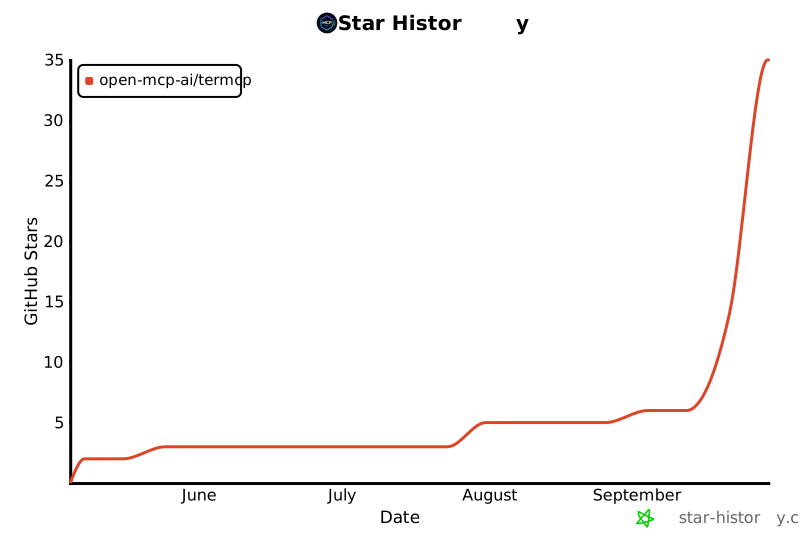
## Star History
## License
Released under the [MIT License](./LICENSE). You are free to use, modify, and distribute it, provided the copyright notice and permission notice are retained. Thanks to the [linux.do](https://linux.do/) community for the discussions and support.
---
