# Control Net (2023)
> [Adding Conditional Control to Text-to-Image Diffusion Models](https://arxiv.org/abs/2302.05543)
> **Task**: Text2Image
## Abstract
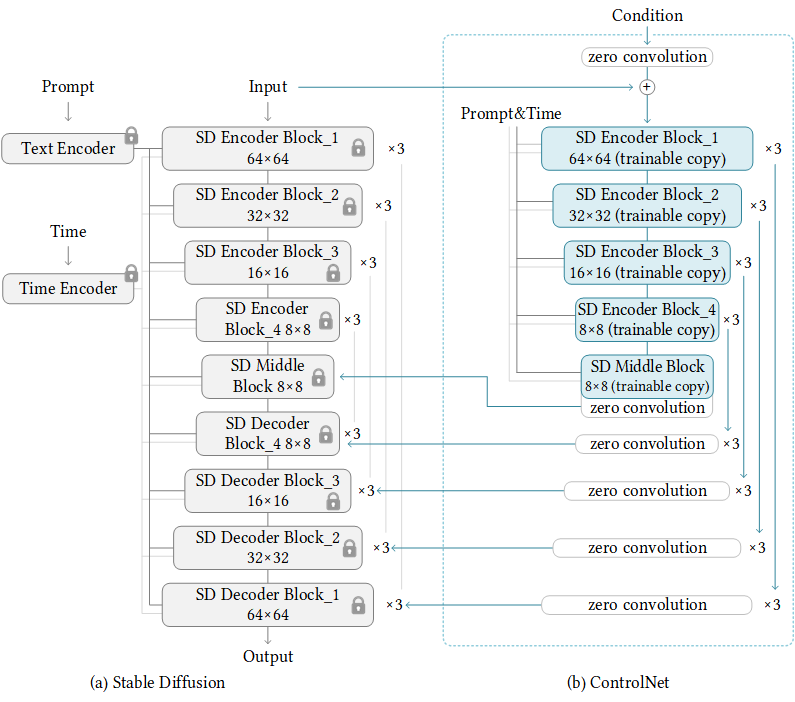
We present a neural network structure, ControlNet, to control pretrained large diffusion models to support additional input conditions. The ControlNet learns task-specific conditions in an end-to-end way, and the learning is robust even when the training dataset is small (\< 50k). Moreover, training a ControlNet is as fast as fine-tuning a diffusion model, and the model can be trained on a personal devices. Alternatively, if powerful computation clusters are available, the model can scale to large amounts (millions to billions) of data. We report that large diffusion models like Stable Diffusion can be augmented with ControlNets to enable conditional inputs like edge maps, segmentation maps, keypoints, etc. This may enrich the methods to control large diffusion models and further facilitate related applications.
## Pretrained models
We use ControlNet's weights provided by HuggingFace Diffusers. You do not have to download the weights manually. If you use Diffusers wrapper, the weights will be downloaded automatically.
This model has several weights including vae, unet and clip. You should download the weights from [stable-diffusion-1.5](https://huggingface.co/runwayml/stable-diffusion-v1-5) and change the 'pretrained_model_path' in config to the weights dir.
| Model | Dataset | Download |
| :---------------------------------------------: | :-----: | :----------------------------------------------------------------------------------------------: |
| [ControlNet-Demo](./controlnet-1xb1-fill50k.py) | - | - |
| [ControlNet-Canny](./controlnet-canny.py) | - | [model](https://huggingface.co/lllyasviel/ControlNet/blob/main/models/control_sd15_canny.pth) |
| [ControlNet-Pose](./controlnet-pose.py) | - | [model](https://huggingface.co/lllyasviel/ControlNet/blob/main/models/control_sd15_openpose.pth) |
| [ControlNet-Segmentation](./controlnet-seg.py) | - | [model](https://huggingface.co/lllyasviel/ControlNet/blob/main/models/control_sd15_seg.pth) |
Noted that, [ControlNet-Demo](./controlnet-1xb1-demo_dataset.py) is a demo config to train ControlNet with toy dataset named Fill50K.
Besides above configs, ControlNet have weight with other condition inputs, such as [depth](https://huggingface.co/lllyasviel/ControlNet/blob/main/models/control_sd15_depth.pth), [hed](https://huggingface.co/lllyasviel/ControlNet/blob/main/models/control_sd15_hed.pth), [mlsd](https://huggingface.co/lllyasviel/ControlNet/blob/main/models/control_sd15_mlsd.pth), [normal](https://huggingface.co/lllyasviel/ControlNet/blob/main/models/control_sd15_normal.pth), [scribble](https://huggingface.co/lllyasviel/ControlNet/blob/main/models/control_sd15_scribble.pth). You can simple change the `from_pretrained` field of ControlNet to use these weights. For example:
```python
# Switch from canny....
controlnet=dict(
type='ControlNetModel',
from_pretrained='lllyasviel/sd-controlnet-canny')
# To normal....
controlnet=dict(
type='ControlNetModel',
from_pretrained='lllyasviel/sd-controlnet-normal')
```
## Quick Start
Running the following codes, you can get a text-generated image.
```python
import cv2
import numpy as np
import mmcv
from mmengine import Config
from PIL import Image
from mmagic.registry import MODELS
from mmagic.utils import register_all_modules
register_all_modules()
cfg = Config.fromfile('configs/controlnet/controlnet-canny.py')
controlnet = MODELS.build(cfg.model).cuda()
prompt = 'Room with blue walls and a yellow ceiling.'
control_url = 'https://user-images.githubusercontent.com/28132635/230288866-99603172-04cb-47b3-8adb-d1aa532d1d2c.jpg'
control_img = mmcv.imread(control_url)
control = cv2.Canny(control_img, 100, 200)
control = control[:, :, None]
control = np.concatenate([control] * 3, axis=2)
control = Image.fromarray(control)
output_dict = controlnet.infer(prompt, control=control)
samples = output_dict['samples']
for idx, sample in enumerate(samples):
sample.save(f'sample_{idx}.png')
controls = output_dict['controls']
for idx, control in enumerate(controls):
control.save(f'control_{idx}.png')
```
 'control_0.png'
|
 'sample_0.png'
|
|
If you want to pretrained weights rather than original Stable-Diffusion v1.5, you can refers to the following codes.
```python
import mmcv
from mmengine import Config
from PIL import Image
from mmagic.registry import MODELS
from mmagic.utils import register_all_modules
register_all_modules()
cfg = Config.fromfile('configs/controlnet/controlnet-pose.py')
# convert ControlNet's weight from SD-v1.5 to Counterfeit-v2.5
cfg.model.unet.from_pretrained = 'gsdf/Counterfeit-V2.5'
cfg.model.vae.from_pretrained = 'gsdf/Counterfeit-V2.5'
cfg.model.init_cfg['type'] = 'convert_from_unet'
controlnet = MODELS.build(cfg.model).cuda()
# call init_weights manually to convert weight
controlnet.init_weights()
prompt = 'masterpiece, best quality, sky, black hair, skirt, sailor collar, looking at viewer, short hair, building, bangs, neckerchief, long sleeves, cloudy sky, power lines, shirt, cityscape, pleated skirt, scenery, blunt bangs, city, night, black sailor collar, closed mouth'
control_url = 'https://user-images.githubusercontent.com/28132635/230380893-2eae68af-d610-4f7f-aa68-c2f22c2abf7e.png'
control_img = mmcv.imread(control_url)
control = Image.fromarray(control_img)
control.save('control.png')
output_dict = controlnet.infer(prompt, control=control, width=512, height=512, guidance_scale=7.5)
samples = output_dict['samples']
for idx, sample in enumerate(samples):
sample.save(f'sample_{idx}.png')
controls = output_dict['controls']
for idx, control in enumerate(controls):
control.save(f'control_{idx}.png')
```
 'control_0.png'
|
 'sample_0.png'
|
|
### Using MMInferencer
You can only use several lines of codes to play controlnet by MMagic!
```python
from mmagic.apis import MMagicInferencer
# controlnet-canny
controlnet_canny_inferencer = MMagicInferencer(model_name='controlnet', model_setting=1)
text_prompts = 'Room with blue walls and a yellow ceiling.'
control = 'https://user-images.githubusercontent.com/28132635/230297033-4f5c32df-365c-4cf4-8e4f-1b76a4cbb0b7.png'
result_out_dir = 'controlnet_canny_res.png'
controlnet_canny_inferencer.infer(text=text_prompts, control=control, result_out_dir=result_out_dir)
# controlnet-pose
controlnet_pose_inferencer = MMagicInferencer(model_name='controlnet', model_setting=2)
text_prompts = 'masterpiece, best quality, sky, black hair, skirt, sailor collar, looking at viewer, short hair, building, bangs, neckerchief, long sleeves, cloudy sky, power lines, shirt, cityscape, pleated skirt, scenery, blunt bangs, city, night, black sailor collar, closed mouth'
control = 'https://user-images.githubusercontent.com/28132635/230380893-2eae68af-d610-4f7f-aa68-c2f22c2abf7e.png'
result_out_dir = 'controlnet_pose_res.png'
controlnet_pose_inferencer.infer(text=text_prompts, control=control, result_out_dir=result_out_dir)
# controlnet-seg
controlnet_seg_inferencer = MMagicInferencer(model_name='controlnet', model_setting=3)
text_prompts = 'black house, blue sky'
control = 'https://github-production-user-asset-6210df.s3.amazonaws.com/49083766/243599897-553a4c46-c61d-46df-b820-59a49aaf6678.png'
result_out_dir = 'controlnet_seg_res.png'
controlnet_seg_inferencer.infer(text=text_prompts, control=control, result_out_dir=result_out_dir)
```
## Train your own ControlNet!
You can start training your own ControlNet with the toy dataset [Fill50K](https://huggingface.co/lllyasviel/ControlNet/blob/main/training/fill50k.zip) with the following command:
```bash
bash tools/dist_train.sh configs/controlnet/controlnet-1xb1-demo_dataset 1
```
If you want use gradient accumulation, you can add `accumulative_counts` field to the optimizer's config as follow:
```python
# From...
optim_wrapper = dict(controlnet=dict(optimizer=dict(type='AdamW', lr=1e-5)))
# To...
optim_wrapper = dict(
controlnet=dict(accumulative_counts=4, optimizer=dict(type='AdamW', lr=1e-5)))
```
## Use ToMe to accelerate your training and inference
We support **[tomesd](https://github.com/dbolya/tomesd)** now! It is developed for stable-diffusion-based models referring to [ToMe](https://github.com/facebookresearch/ToMe), an efficient ViT speed-up tool based on token merging. To work on with **tomesd** in `mmagic`, you just need to add `tomesd_cfg` to `model` in [ControlNet-Canny](./controlnet-canny.py). The only requirement is `torch >= 1.12.1` in order to properly support `torch.Tensor.scatter_reduce()` functionality. Please do check it before running the demo.
```python
model = dict(
type='ControlStableDiffusion',
...
tomesd_cfg=dict(ratio=0.5),
...
init_cfg=dict(type='init_from_unet'))
```
For more details, you can refer to [Stable Diffusion Acceleration](../stable_diffusion/README.md#use-tome-to-accelerate-your-stable-diffusion-model).
## Comments
Our codebase for the stable diffusion models builds heavily on [diffusers codebase](https://github.com/huggingface/diffusers) and the model weights are from [stable-diffusion-1.5](https://github.com/huggingface/diffusers/blob/main/src/diffusers/pipelines/stable_diffusion/pipeline_stable_diffusion_controlnet.py) and [ControlNet](https://huggingface.co/lllyasviel/ControlNet/tree/main/models).
Thanks for the efforts of the community!
## Citation
```bibtex
@misc{zhang2023adding,
title={Adding Conditional Control to Text-to-Image Diffusion Models},
author={Lvmin Zhang and Maneesh Agrawala},
year={2023},
eprint={2302.05543},
archivePrefix={arXiv},
primaryClass={cs.CV}
}
```