Black & White
[![Build Status]][actions] [![Code Progress]][progress] [![Data Progress]][progress] [![Discord Badge]][discord]
=============
[Build Status]: https://github.com/openblack/bw1-decomp/actions/workflows/build.yml/badge.svg
[actions]: https://github.com/openblack/bw1-decomp/actions/workflows/build.yml
[Code Progress]: https://decomp.dev/openblack/bw1-decomp.svg?mode=shield&measure=code&label=Code
[Data Progress]: https://decomp.dev/openblack/bw1-decomp.svg?mode=shield&measure=data&label=Data
[progress]: https://decomp.dev/openblack/bw1-decomp
[Discord Badge]: https://img.shields.io/discord/608729286513262622?color=%237289DA&logo=discord&logoColor=%23FFFFFF
[discord]: https://discord.gg/5QTexBU
[ ][Progress]
A work-in-progress decompilation of Lionhead Studios' _Black & White_ (2001).
This repository does **not** contain any game assets or assembly. An existing copy of the game is required.
Scaffolded from [encounter/dtk-template](https://github.com/encounter/dtk-template) and adapted for PE/COFF (Windows) and PEF (Classic Mac OS) targets.
Supported versions:
- `BW1W100` — Windows v1.00 (PE/COFF, MSVC 6.0 SP4 with `/OPT:ICF`)
- `BW1W110` — Windows v1.10 (PE/COFF, MSVC 6.0 SP4)
- `BW1W120` — Windows v1.20 (PE/COFF, MSVC 6.0 SP5)
- `BW1W130` — Windows v1.30 (PE/COFF, MSVC 6.0 SP5)
- `BW1WCI` — Windows Creature Isle (PE/COFF, MSVC 6.0 SP5)
Work in progress:
- `BW1M110` — Classic Mac OS PowerPC v1.1.0 (PEF, CodeWarrior Mac)
- `BW1M115` — Classic Mac OS PowerPC v1.1.5 (PEF, CodeWarrior Mac)
- `BW1M119` — Classic Mac OS PowerPC v1.1.9 (PEF, CodeWarrior Mac)
- `BW1MCI119` — Classic Mac OS PowerPC Creature Isle v1.1.9 (PEF, CodeWarrior Mac)
Documentation
-------------
- [Dependencies](docs/dependencies.md)
- [Getting Started](docs/getting_started.md)
- [`symbols.txt`](docs/symbols.md)
- [`splits.txt`](docs/splits.md)
- [GitHub Actions](docs/github_actions.md)
- [Porting a version's config](docs/porting_versions.md)
References
----------
- [openblack](https://github.com/openblack/openblack) (Open-source engine reimplementation)
- [encounter/dtk-template](https://github.com/encounter/dtk-template) (Original GC/Wii project template this is based on)
- [decomp-toolkit](https://github.com/openblack/decomp-toolkit) (Tooling — openblack fork)
- [objdiff](https://github.com/encounter/objdiff) (Local diffing tool)
- [decomp.me](https://decomp.me) (Collaborate on matches)
- [decomp.dev](https://decomp.dev) (Decompilation progress hub and API)
Features
--------
- Few external dependencies: just `python` for the generator and `ninja` for the build system. See [Dependencies](docs/dependencies.md).
- Simple configuration: everything lives in `config.yml`, `symbols.txt`, and `splits.txt`.
- Multi-version support: separate configurations for each game version, and a `configure.py --version` flag to switch between them.
- Feature-rich analyzer: many time-consuming tasks are automated, allowing you to focus on the decompilation itself.
- No manual assembly: decomp-toolkit handles splitting the original binary into relocatable objects based on the configuration. No game assets are committed to the repository.
- Progress calculation and integration with [decomp.dev](https://decomp.dev).
- Integration with [objdiff](https://github.com/encounter/objdiff) for a diffing workflow.
- CI workflow for GitHub Actions.
Debug Symbols
=============
Black & White 1.1, 1.2 and 1.3 releases were built with debug symbols in a now-missing `.pdb` file that wasn't leaked.
The compilation with `.pdb` left traces in the released artifact and the default target here will produce a working executable with pdb as an intermediate step before changes are applied to make it byte-match:
* build/BW1W110/runblack-linked.exe
* build/BW1W110/runblack-linked.pdb
* build/BW1W120/runblack-linked.exe
* build/BW1W120/runblack-linked.pdb
* build/BW1W130/runblack-linked.exe
* build/BW1W130/runblack-linked.pdb
Use `runblack-linked.exe` and the pdb sitting next to it. Loading it into Ghidra or IDA gives function names across the whole image, plus the class layouts of every translation unit already matched and linked from source, so the types fill in as the decomp progresses. The exe is very close to the original: the differences are minor and do not have any offset differences.
They should be good enough to use as a reference.
Ghidra
---
In ghidra, pdb loading needs an experimental feature to be on. This option is only available in `Auto Analyze Options` under `PDB Universal` if you uncomment `VMARGS=-Dghidra.pdb.developerMode=true` in Ghidra's `launch.properties` file:
* Windows: `\support\launch.properties`
* Linux and macOS: `/support/launch.properties`

Diffing
=======
Once the initial build succeeds, an `objdiff.json` should exist in the project root.
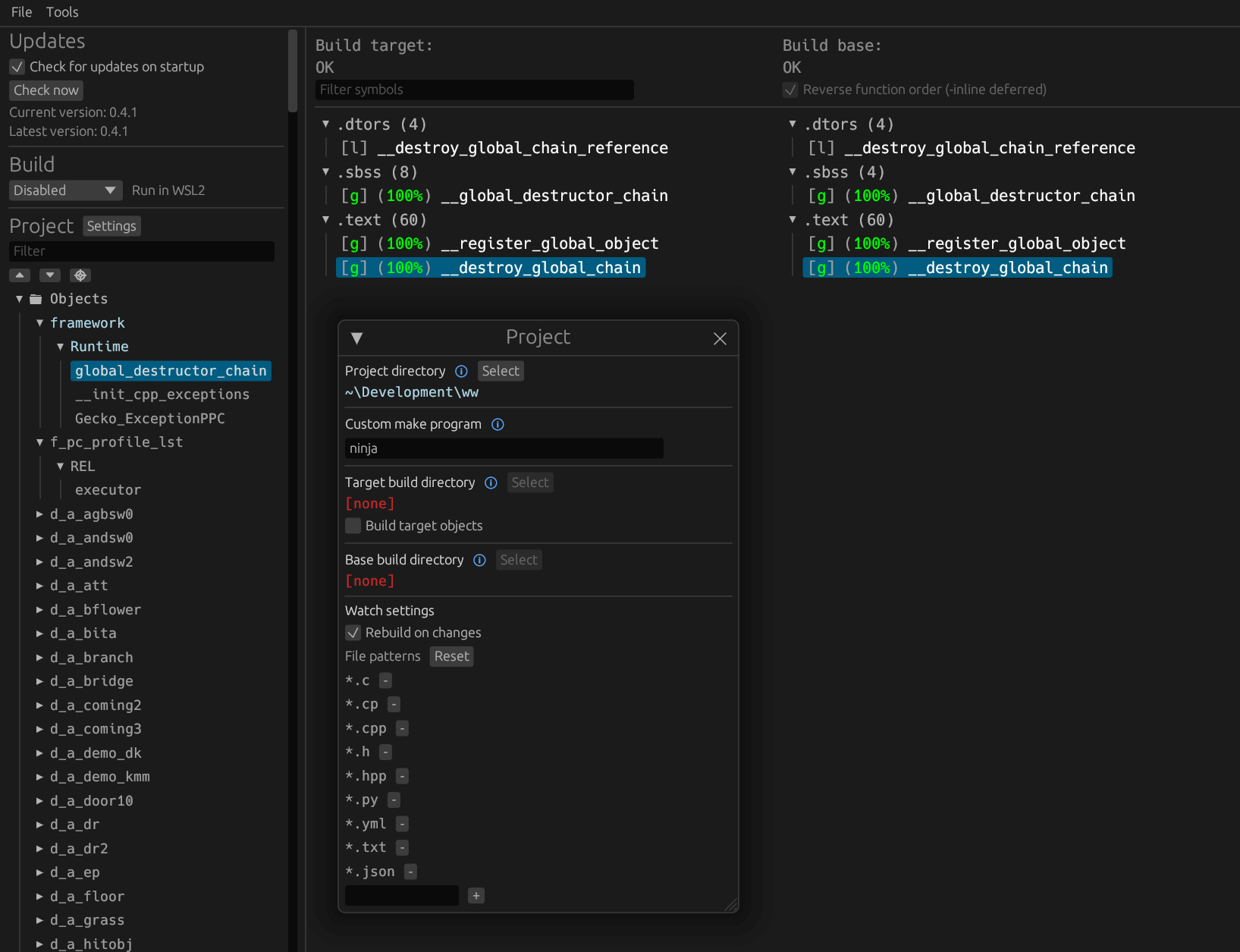
Download the latest release from [encounter/objdiff](https://github.com/encounter/objdiff). Under project settings, set `Project directory`. The configuration should be loaded automatically.
Select an object from the left sidebar to begin diffing. Changes to the project will rebuild automatically: changes to source files, headers, `configure.py`, `splits.txt` or `symbols.txt`.
Project structure
-----------------
- `configure.py` - Project configuration and generator script.
- `config/[VERSION]` - Configuration files for each game version (`BW1W100`, `BW1W110`, `BW1W120`, `BW1W130`, `BW1WCI`, `BW1M119`).
- `config/[VERSION]/build.sha1` - SHA-1 hashes for each built artifact, for final verification.
- `build/` - Build artifacts generated by the build process. Ignored by `.gitignore`.
- `orig/` - User-supplied original files, none committed (ignored by `.gitignore`). Holds each version's game binary in `orig/[VERSION]/`, the MSVC 6.0 static CRT libs in `orig/libs/msvc6./` (SP5, SP4 and RTM copies, depending on the version and the library), the Intel libraries in `orig/libs/amaths-2.0/` and `orig/libs/icc-5.0.115/`, and the DirectX 7.0 DDK in `orig/directx7.0/` (`include/` and `lib/`). See [Getting Started](docs/getting_started.md).
- `src/` - C/C++ source files.
- `include/` - C/C++ header files.
- `tools/` - Scripts shared between projects.
][Progress]
A work-in-progress decompilation of Lionhead Studios' _Black & White_ (2001).
This repository does **not** contain any game assets or assembly. An existing copy of the game is required.
Scaffolded from [encounter/dtk-template](https://github.com/encounter/dtk-template) and adapted for PE/COFF (Windows) and PEF (Classic Mac OS) targets.
Supported versions:
- `BW1W100` — Windows v1.00 (PE/COFF, MSVC 6.0 SP4 with `/OPT:ICF`)
- `BW1W110` — Windows v1.10 (PE/COFF, MSVC 6.0 SP4)
- `BW1W120` — Windows v1.20 (PE/COFF, MSVC 6.0 SP5)
- `BW1W130` — Windows v1.30 (PE/COFF, MSVC 6.0 SP5)
- `BW1WCI` — Windows Creature Isle (PE/COFF, MSVC 6.0 SP5)
Work in progress:
- `BW1M110` — Classic Mac OS PowerPC v1.1.0 (PEF, CodeWarrior Mac)
- `BW1M115` — Classic Mac OS PowerPC v1.1.5 (PEF, CodeWarrior Mac)
- `BW1M119` — Classic Mac OS PowerPC v1.1.9 (PEF, CodeWarrior Mac)
- `BW1MCI119` — Classic Mac OS PowerPC Creature Isle v1.1.9 (PEF, CodeWarrior Mac)
Documentation
-------------
- [Dependencies](docs/dependencies.md)
- [Getting Started](docs/getting_started.md)
- [`symbols.txt`](docs/symbols.md)
- [`splits.txt`](docs/splits.md)
- [GitHub Actions](docs/github_actions.md)
- [Porting a version's config](docs/porting_versions.md)
References
----------
- [openblack](https://github.com/openblack/openblack) (Open-source engine reimplementation)
- [encounter/dtk-template](https://github.com/encounter/dtk-template) (Original GC/Wii project template this is based on)
- [decomp-toolkit](https://github.com/openblack/decomp-toolkit) (Tooling — openblack fork)
- [objdiff](https://github.com/encounter/objdiff) (Local diffing tool)
- [decomp.me](https://decomp.me) (Collaborate on matches)
- [decomp.dev](https://decomp.dev) (Decompilation progress hub and API)
Features
--------
- Few external dependencies: just `python` for the generator and `ninja` for the build system. See [Dependencies](docs/dependencies.md).
- Simple configuration: everything lives in `config.yml`, `symbols.txt`, and `splits.txt`.
- Multi-version support: separate configurations for each game version, and a `configure.py --version` flag to switch between them.
- Feature-rich analyzer: many time-consuming tasks are automated, allowing you to focus on the decompilation itself.
- No manual assembly: decomp-toolkit handles splitting the original binary into relocatable objects based on the configuration. No game assets are committed to the repository.
- Progress calculation and integration with [decomp.dev](https://decomp.dev).
- Integration with [objdiff](https://github.com/encounter/objdiff) for a diffing workflow.
- CI workflow for GitHub Actions.
Debug Symbols
=============
Black & White 1.1, 1.2 and 1.3 releases were built with debug symbols in a now-missing `.pdb` file that wasn't leaked.
The compilation with `.pdb` left traces in the released artifact and the default target here will produce a working executable with pdb as an intermediate step before changes are applied to make it byte-match:
* build/BW1W110/runblack-linked.exe
* build/BW1W110/runblack-linked.pdb
* build/BW1W120/runblack-linked.exe
* build/BW1W120/runblack-linked.pdb
* build/BW1W130/runblack-linked.exe
* build/BW1W130/runblack-linked.pdb
Use `runblack-linked.exe` and the pdb sitting next to it. Loading it into Ghidra or IDA gives function names across the whole image, plus the class layouts of every translation unit already matched and linked from source, so the types fill in as the decomp progresses. The exe is very close to the original: the differences are minor and do not have any offset differences.
They should be good enough to use as a reference.
Ghidra
---
In ghidra, pdb loading needs an experimental feature to be on. This option is only available in `Auto Analyze Options` under `PDB Universal` if you uncomment `VMARGS=-Dghidra.pdb.developerMode=true` in Ghidra's `launch.properties` file:
* Windows: `\support\launch.properties`
* Linux and macOS: `/support/launch.properties`

Diffing
=======
Once the initial build succeeds, an `objdiff.json` should exist in the project root.
Download the latest release from [encounter/objdiff](https://github.com/encounter/objdiff). Under project settings, set `Project directory`. The configuration should be loaded automatically.
Select an object from the left sidebar to begin diffing. Changes to the project will rebuild automatically: changes to source files, headers, `configure.py`, `splits.txt` or `symbols.txt`.

Project structure
-----------------
- `configure.py` - Project configuration and generator script.
- `config/[VERSION]` - Configuration files for each game version (`BW1W100`, `BW1W110`, `BW1W120`, `BW1W130`, `BW1WCI`, `BW1M119`).
- `config/[VERSION]/build.sha1` - SHA-1 hashes for each built artifact, for final verification.
- `build/` - Build artifacts generated by the build process. Ignored by `.gitignore`.
- `orig/` - User-supplied original files, none committed (ignored by `.gitignore`). Holds each version's game binary in `orig/[VERSION]/`, the MSVC 6.0 static CRT libs in `orig/libs/msvc6./` (SP5, SP4 and RTM copies, depending on the version and the library), the Intel libraries in `orig/libs/amaths-2.0/` and `orig/libs/icc-5.0.115/`, and the DirectX 7.0 DDK in `orig/directx7.0/` (`include/` and `lib/`). See [Getting Started](docs/getting_started.md).
- `src/` - C/C++ source files.
- `include/` - C/C++ header files.
- `tools/` - Scripts shared between projects.