# esm-patient-tests-app
Functionality for viewing test results and ordering tests, whether lab tests, radiology, or otherwise.
## Test Results
It provides tabular and chart-based overviews of the test results available for a patient.
IMPORTANT NOTE: To have data show up in this view, your concepts just need to have "Type: Test" or "Type: LabSet".
If you are seeing strange things showing up, like Temperature, in the Test Results viewer, then you probably just need to change the Type for your Temperature concept to something other than "Test", such as "Finding."
## How to Configure the Lab Filter View
The Lab Filter feature enables you to set up custom filter views - eg based on standard medical hierarchies, or even based on your own custom concepts (e.g. "Our Favorite HIV-Related Tests"), like this:
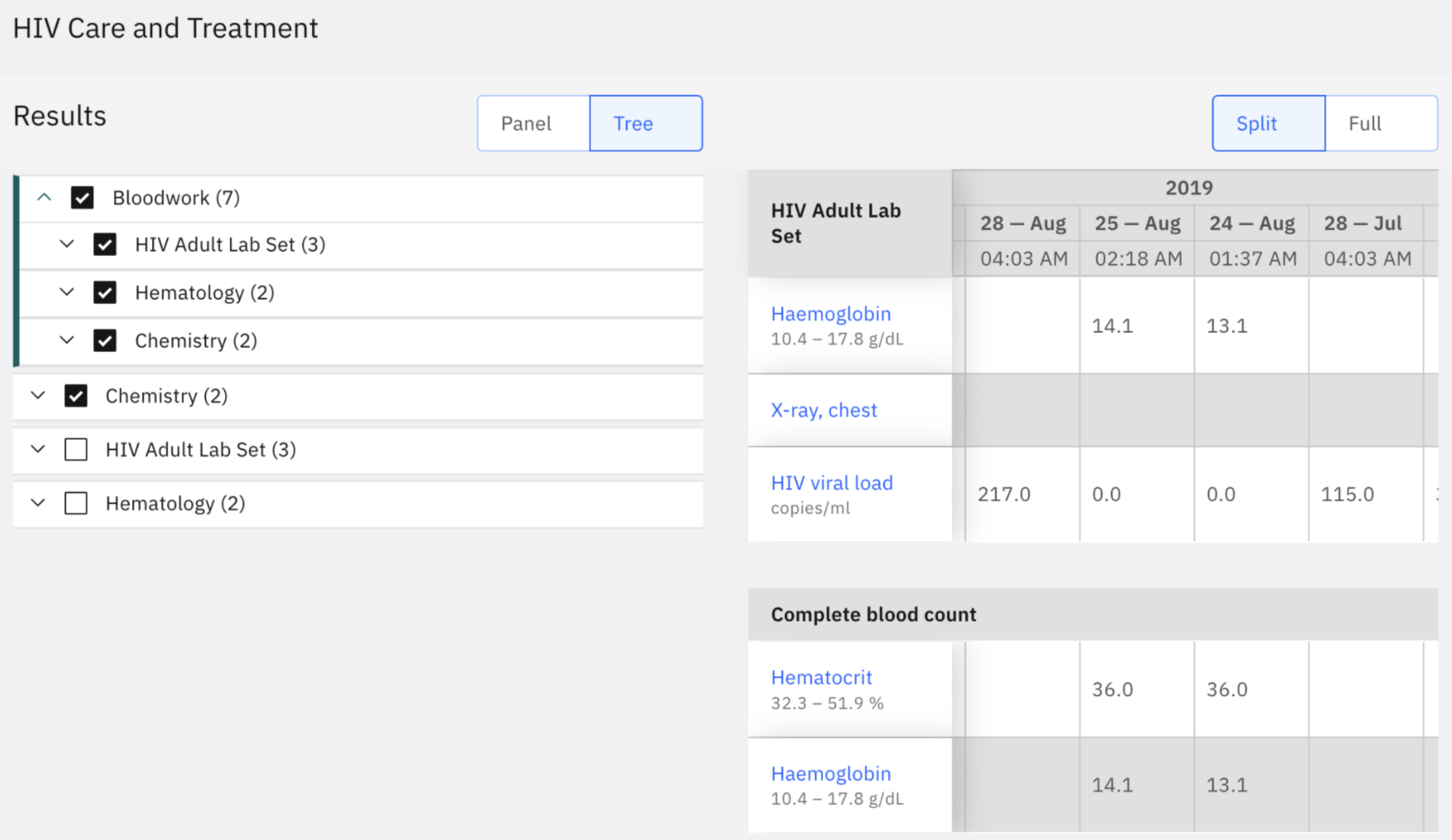 To configure your own Lab Filters, you need to use Labs, LabSets, and ConvSets (Convenience Sets) in your Concept Dictionary.
Below, we will walk through the steps taken to set up [**this OpenMRS Example Lab Filter**](https://app.openconceptlab.org/#/orgs/openmrs/collections/ExampleLabFilter/).
### 1. Decide what you want
In this example, we wanted a layout like:
* Bloodwork
* Hematology
* CBC
* Lymphocytes (%)
* Neutrophils (%)
* Hemoglobin
* Mean corpuscular volume (MCV)
* Hematocrit
* Red blood cells
* Platelets
* White blood cells
* Chemistry
* Serum Electrolytes
* Serum calcium
* Serum carbon dioxide
* Serum chloride
* Serum potassium
* Serum sodium
### 2. Create the "parents" as concepts with type = ConvSet
* Bloodwork --> Create as a custom concept, type = ConvSet
* Hematology --> Create as a custom concept, type = ConvSet
* Chemistry --> Create as a custom concept, type = ConvSet
### 3. Add the "children" Set Members to each parent
* Bloodwork
* Hematology --> Add concept as a Set Member to "Bloodwork"
* CBC --> Add concept as a Set Member to "Hematology"
* Chemistry --> Add concept as a Set Member to "Bloodwork"
* Serum Electrolytes --> Add concept as a Set Member to "Chemistry"
_Note1: As of March 2022, Set Members cannot be added to concepts through the Term Browser, but you can either use your EMR directly or the OpenMRS Dictionary Manager._
_Note2: if you don't already have all the "children" concepts, e.g. CBC, Serum Electrolytes, you may have to add these specifically into your dictionary first._
### 4. Check your work
Review your concepts to see that the hierarchy all looks right in the Dictionary/Collection. In the above example (which was created using the OpenMRS Dictionary Manager), you can see that _Bloodwork_ now correctly contains _Hematology_ and _Chemistry_.
To configure your own Lab Filters, you need to use Labs, LabSets, and ConvSets (Convenience Sets) in your Concept Dictionary.
Below, we will walk through the steps taken to set up [**this OpenMRS Example Lab Filter**](https://app.openconceptlab.org/#/orgs/openmrs/collections/ExampleLabFilter/).
### 1. Decide what you want
In this example, we wanted a layout like:
* Bloodwork
* Hematology
* CBC
* Lymphocytes (%)
* Neutrophils (%)
* Hemoglobin
* Mean corpuscular volume (MCV)
* Hematocrit
* Red blood cells
* Platelets
* White blood cells
* Chemistry
* Serum Electrolytes
* Serum calcium
* Serum carbon dioxide
* Serum chloride
* Serum potassium
* Serum sodium
### 2. Create the "parents" as concepts with type = ConvSet
* Bloodwork --> Create as a custom concept, type = ConvSet
* Hematology --> Create as a custom concept, type = ConvSet
* Chemistry --> Create as a custom concept, type = ConvSet
### 3. Add the "children" Set Members to each parent
* Bloodwork
* Hematology --> Add concept as a Set Member to "Bloodwork"
* CBC --> Add concept as a Set Member to "Hematology"
* Chemistry --> Add concept as a Set Member to "Bloodwork"
* Serum Electrolytes --> Add concept as a Set Member to "Chemistry"
_Note1: As of March 2022, Set Members cannot be added to concepts through the Term Browser, but you can either use your EMR directly or the OpenMRS Dictionary Manager._
_Note2: if you don't already have all the "children" concepts, e.g. CBC, Serum Electrolytes, you may have to add these specifically into your dictionary first._
### 4. Check your work
Review your concepts to see that the hierarchy all looks right in the Dictionary/Collection. In the above example (which was created using the OpenMRS Dictionary Manager), you can see that _Bloodwork_ now correctly contains _Hematology_ and _Chemistry_.
 ### 5. Update the config-schema file with your ConvSet codes
Go here to add the UUIDs for each of your ConvSet concepts which you want to show up in the Lab Results filters:
### 5. Update the config-schema file with your ConvSet codes
Go here to add the UUIDs for each of your ConvSet concepts which you want to show up in the Lab Results filters: