
An enterprise-class UI component library, support both Vue.js 2 and Vue.js 3, as well as PC and mobile.
[](https://deepwiki.com/opentiny/tiny-vue)
English | [简体中文](README.zh-CN.md)
🌈 Features:
- 📦 104 clean, easy-to-use and powerful components.
- 🖖 One code, Support both Vue.js 2 and Vue.js 3.
- 🖥️ One code, Support both PC and Mobile.
- 🌍 Support internationalization.
- 🎨 Support theme customization.
- 📊 Components support configuration development, can support low-code platform.
- 💡 Use a cross-end and cross-framework architecture, flexible and portable.
## Build with AI
`tiny-vue-skill` is a set of skill tools designed for AI coding assistants, enabling them to deeply understand the usage, APIs, and best practices of the TinyVue component library, thereby helping you develop applications with TinyVue more efficiently.
You can install `tiny-vue-skill` globally using the following command:
```bash
npx skills add opentiny/agent-skills -g --skill tiny-vue-skill --agent cursor
```
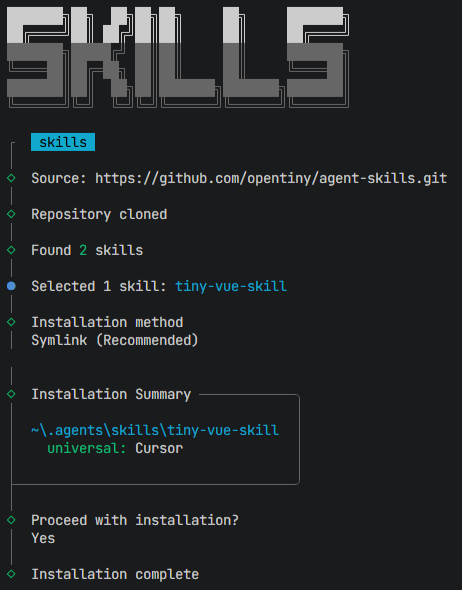
The `--agent` parameters corresponding to some other AI tools:
| Agent | `--agent` |
| -------------- | ---------------- |
| Amp | `amp` |
| Antigravity | `antigravity` |
| Claude Code | `claude-code` |
| Clawdbot | `clawdbot` |
| Codex | `codex` |
| Cursor | `cursor` |
| Droid | `droid` |
| Gemini CLI | `gemini-cli` |
| GitHub Copilot | `github-copilot` |
| Goose | `goose` |
| Kilo Code | `kilo` |
| Kiro CLI | `kiro-cli` |
| OpenCode | `opencode` |
| Roo Code | `roo` |
| Trae | `trae` |
| Windsurf | `windsurf` |
## 🛠️ Usage
### 1. Installation
Execute the following command to install the TinyVue component library for Vue.js 3.
```shell
npm i @opentiny/vue@3
```
Execute the following command to install the TinyVue component library for Vue.js 2.
```shell
npm i @opentiny/vue@2
```
### 2. Import component
Then you can use the TinyVue component(such as ``) in the `App.vue` file.
```html
Tiny Vue
```
## 🖥️ Development
```shell
git clone git@github.com:opentiny/tiny-vue.git
cd tiny-vue
pnpm i
# Vue.js 3
pnpm dev
# Vue.js 2
pnpm dev2
```
Open your browser and visit: [http://127.0.0.1:7130/](http://127.0.0.1:7130/)
## 🤝 Contributing
Welcome to join our OpenTiny community!🎉
If you don't know how to start, please read our [contributing guide](CONTRIBUTING.md).
- Add the official assistant WeChat `opentiny-official` and join the technical exchange group.
- Add to the mailing list `opentiny@googlegroups.com`
## ✨ Contributors
Contributors are community members who have 1 or more PR merged in OpenTiny.
Thanks goes to these wonderful people ([emoji key](https://allcontributors.org/docs/en/emoji-key)):
## ❤️ Credits
Thanks to:
- The [element](https://github.com/ElemeFE/element) project which is an old component library based on Vue.js. TinyVue draws on Element at the beginning of its design, and is compatible with Element's component API.
- The [floating-ui](https://github.com/floating-ui/floating-ui) project which is a small library that helps you create "floating" elements such as tooltips, popovers, dropdowns, and more. Many components of TinyVue are based on the capabilities provided by Floating UI.
- The [vxe-table](https://github.com/x-extends/vxe-table) project which is a Vue-based table component, supports rich features, TinyVue's Grid component is based on vxe-table.
- The [sortablejs](https://github.com/SortableJS/Sortable) project which is a powerful drag-and-drop library. The drag-and-drop sorting function of TinyVue's Grid / Transfer / Tabs and other components is based on Sortable.
- [@adamwathan](https://github.com/adamwathan)'s article [Renderless Components in Vue.js](https://adamwathan.me/renderless-components-in-vuejs/), which inspired TinyVue's renderless component design architecture and ultimately enabled cross-end and cross-framework capabilities in the TinyVue project.
## License
[MIT](LICENSE)


