
# wmux
### The ADE for AI agents.
**Automate everything else. Do your true work.**
Run fleets of AI agents — Claude Code, Codex, Gemini, or any CLI — side by side, native on **Windows and macOS**. Let them drive a real browser for the work beyond code, and answer them from your **iPhone**.
[](https://github.com/openwong2kim/wmux/releases/latest)
[](https://github.com/openwong2kim/wmux/releases/latest)
[](https://apps.apple.com/app/wmux-workspace-for-ai-agents/id6797904556)
[](https://github.com/openwong2kim/wmux/releases/latest)
[](https://github.com/openwong2kim/wmux/releases)
[](LICENSE)
[**Download**](https://github.com/openwong2kim/wmux/releases/latest) · [**Website**](https://www.wmux.app) · [**Docs**](docs/README.md) · [**iOS app**](https://apps.apple.com/app/wmux-workspace-for-ai-agents/id6797904556)
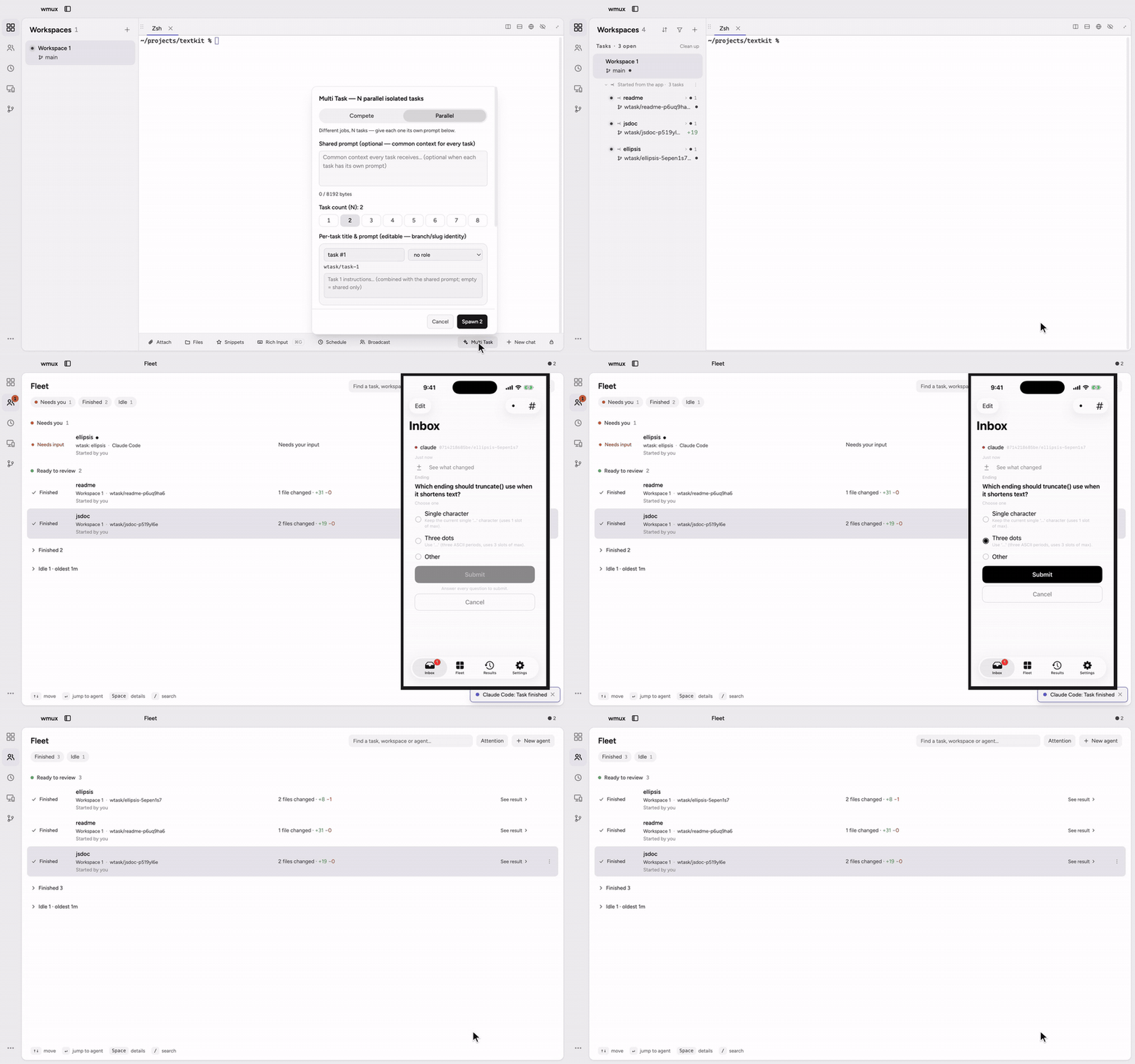 One prompt, three tasks in three git worktrees — the one question that came up answered from a phone, and all three ready to review.
wmux is a desktop app where your AI agents work side by side, each in its own pane, while a background daemon on your own machine keeps every session alive. What sets it apart:
- **Any CLI agent, natively on Windows and macOS.** Claude Code, Codex, Gemini, agy (Antigravity), and any other CLI agent run side by side in real PTYs — no WSL needed on Windows.
- **Sessions owned by your own daemon.** Closing the app, a crash, or a reboot does not end your agents' sessions.
- **Answer agents from your iPhone.** The iOS app pairs directly with the daemon on your machine: terminal output and your answers travel between the two without a cloud service in the middle.
- **One prompt, fanned out into git worktrees.** Each task gets its own worktree and agent, and you review the results hunk by hunk.
## Install
**Windows** — a package manager skips the SmartScreen prompt:
```powershell
winget install openwong2kim.wmux # or: choco install wmux
```
 ### One prompt, N worktrees
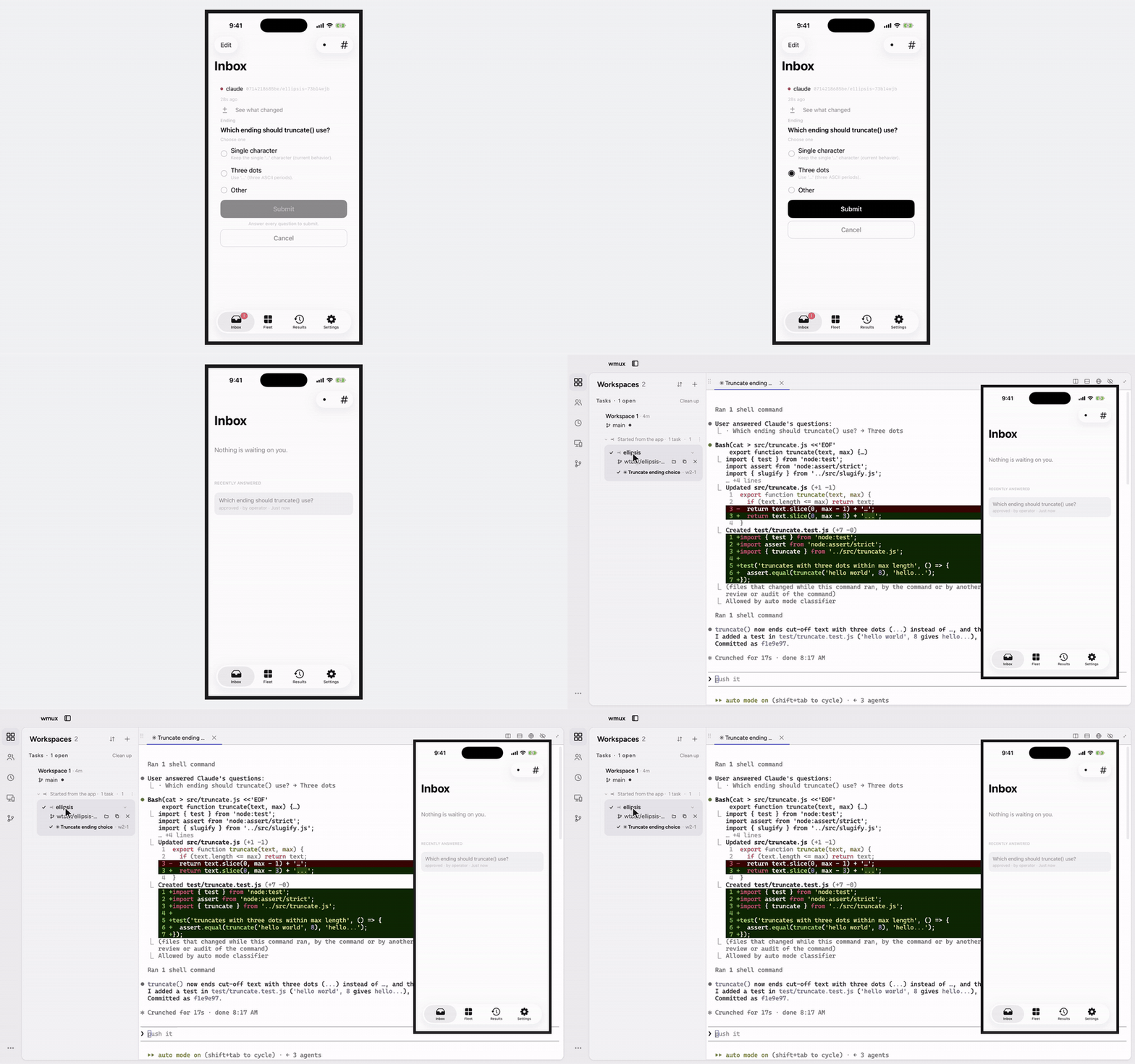
Fan one prompt out into up to 8 tasks, each in its own git worktree on a fresh `wtask/*` branch with its own agent pane. Review the diffs, tick the hunks you want across files, and adopt them as one all-or-nothing `git apply` — your tree takes the whole selection or stays untouched. Then close the task (the worktree is removed only after a clean check) or open a pull request. See [fan-out task environments](docs/how-to/fan-out-task-environment.md) for ports and prepared worktrees.
### One prompt, N worktrees
Fan one prompt out into up to 8 tasks, each in its own git worktree on a fresh `wtask/*` branch with its own agent pane. Review the diffs, tick the hunks you want across files, and adopt them as one all-or-nothing `git apply` — your tree takes the whole selection or stays untouched. Then close the task (the worktree is removed only after a clean check) or open a pull request. See [fan-out task environments](docs/how-to/fan-out-task-environment.md) for ports and prepared worktrees.
 ### Git page
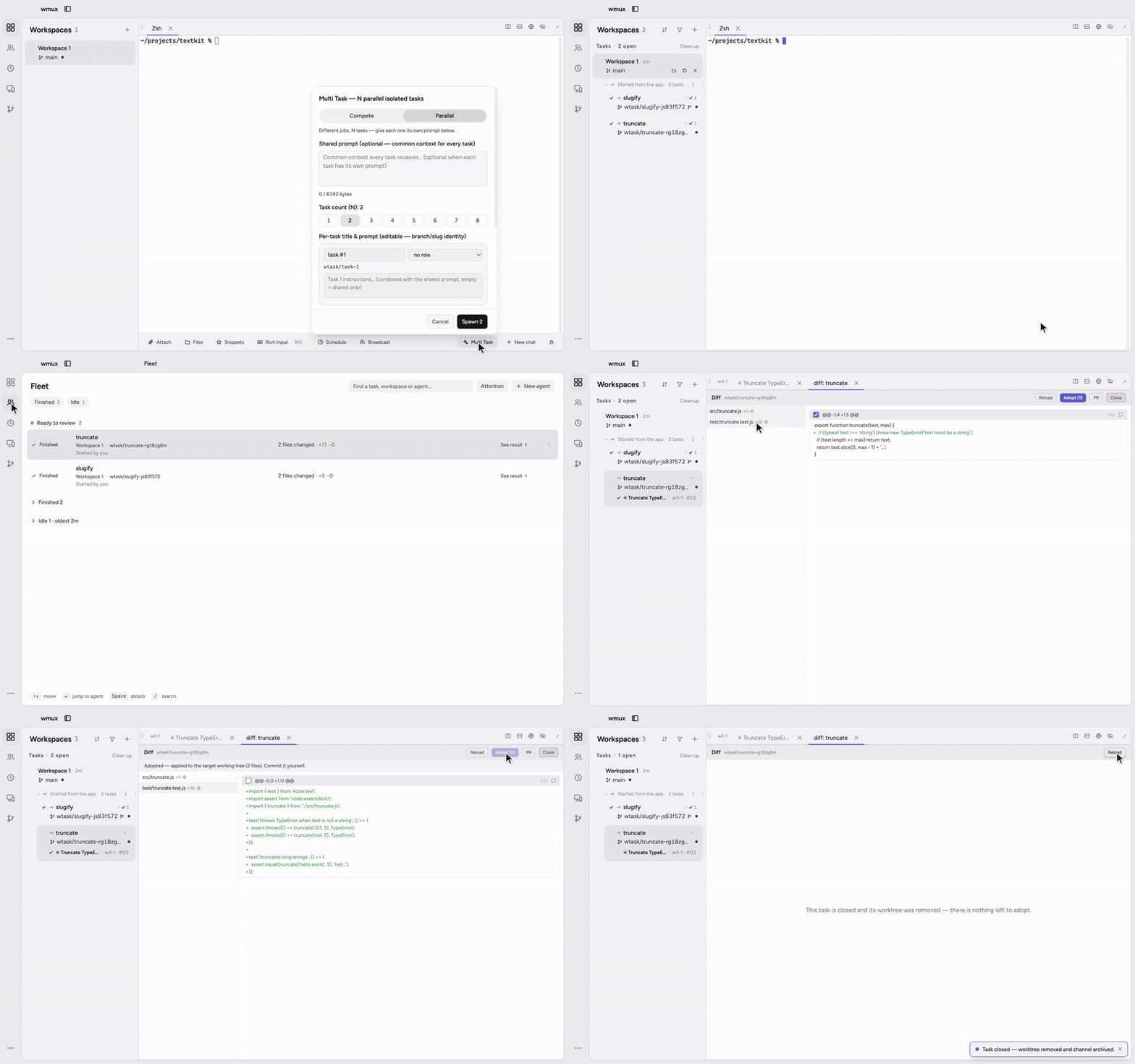
**Git** on the rail shows a repo's issues and pull requests. A pull request lists its checks, and a failed GitHub Actions run shows the end of its log right there, with **Rerun failed jobs**. Read the diff, comment on a line, approve or request changes, and squash and merge — every action is tied to the commit you were looking at. To hand an issue or PR to an agent, drag its row onto the agent's pane or a workspace in the sidebar; the agent gets a short reference with the link, never the item's text. Signed out? Connect GitHub from the page itself; `gh` keeps the credential.
### Git page
**Git** on the rail shows a repo's issues and pull requests. A pull request lists its checks, and a failed GitHub Actions run shows the end of its log right there, with **Rerun failed jobs**. Read the diff, comment on a line, approve or request changes, and squash and merge — every action is tied to the commit you were looking at. To hand an issue or PR to an agent, drag its row onto the agent's pane or a workspace in the sidebar; the agent gets a short reference with the link, never the item's text. Signed out? Connect GitHub from the page itself; `gh` keeps the credential.
 ### Fleet
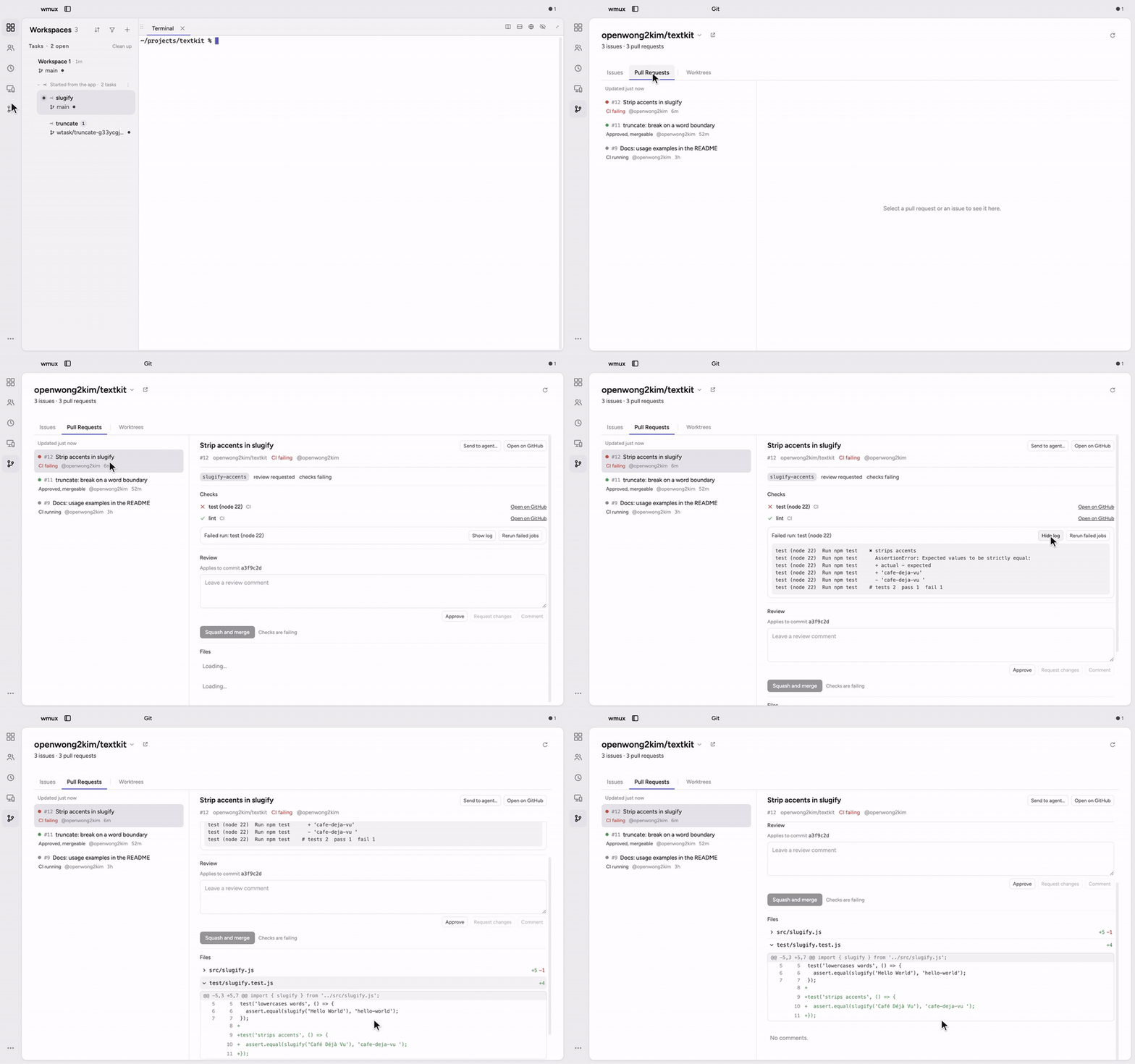
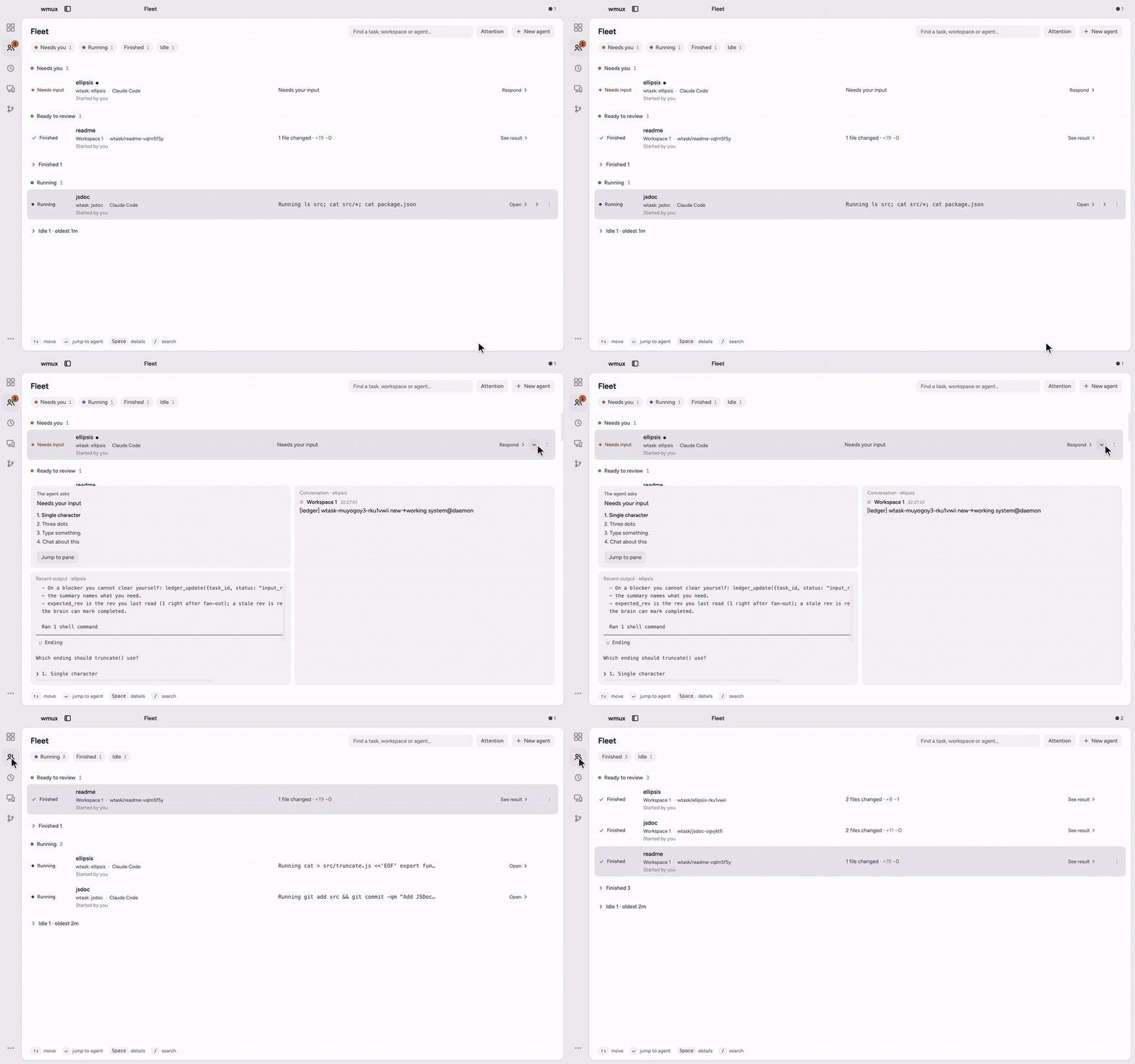
Fleet (`⌘⇧A` on macOS, `Ctrl+Shift+A` on Windows and Linux) lists every agent across every workspace as one attention list: **Needs you** on top, then Ready to review, Running, and a folded Idle row. A row that needs you shows the agent's question; open it to reply, open the approval, or jump to the pane. Running rows say what the agent is doing (`Running npm test`), and finished rows say what it did last.
### Fleet
Fleet (`⌘⇧A` on macOS, `Ctrl+Shift+A` on Windows and Linux) lists every agent across every workspace as one attention list: **Needs you** on top, then Ready to review, Running, and a folded Idle row. A row that needs you shows the agent's question; open it to reply, open the approval, or jump to the pane. Running rows say what the agent is doing (`Running npm test`), and finished rows say what it did last.
 ### Two ways to browse
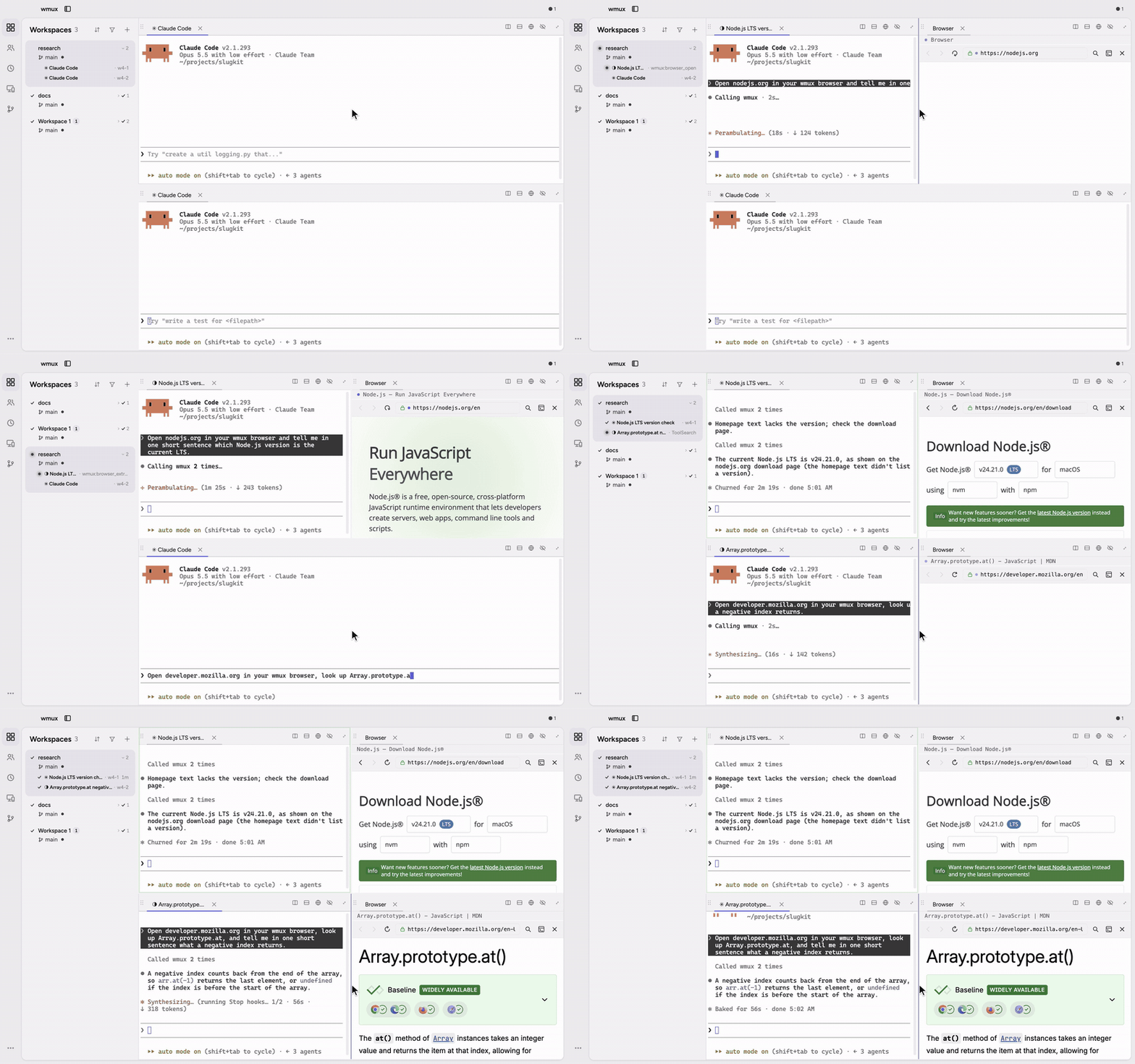
Your agents drive a browser through wmux's MCP tools — navigate, click, type, snapshot, screenshot, a stateful `browser_repl`, and `browser_replay` for recorded flows — and you watch every page they touch. Pick the backend in Settings → Browser.
**Built-in browser panes.** A browser pane opens as a split beside the agent, and each agent gets its own.
### Two ways to browse
Your agents drive a browser through wmux's MCP tools — navigate, click, type, snapshot, screenshot, a stateful `browser_repl`, and `browser_replay` for recorded flows — and you watch every page they touch. Pick the backend in Settings → Browser.
**Built-in browser panes.** A browser pane opens as a split beside the agent, and each agent gets its own.
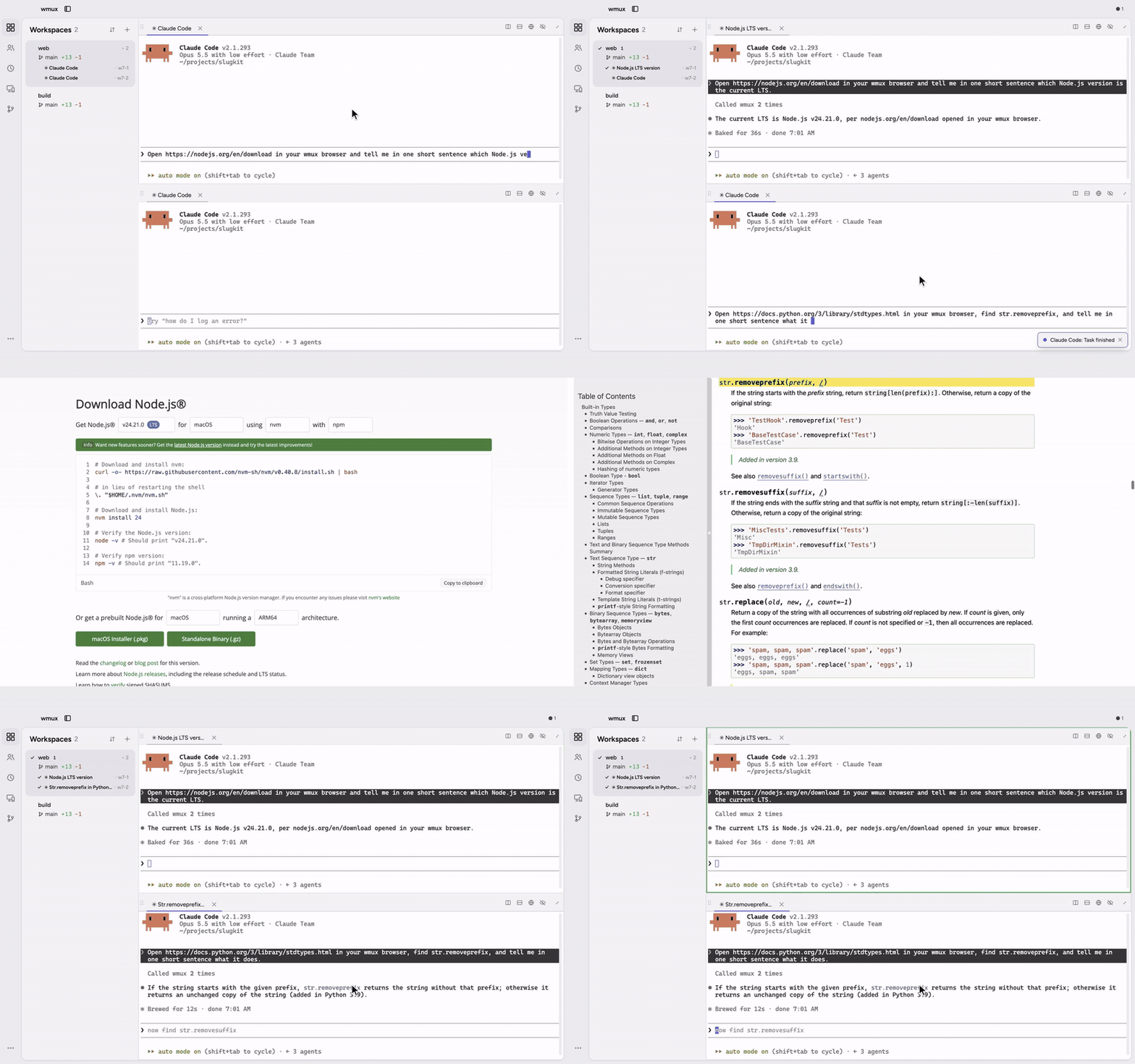
 **A dedicated Chrome over CDP.** Agents drive a real Chrome, each in its own tab, with a persistent profile separate from your daily browser — sign in once and the logins stick. See [browser backends](docs/browser-backends.md) for what CDP can and cannot do.
 ### Claude Code and Codex, talking
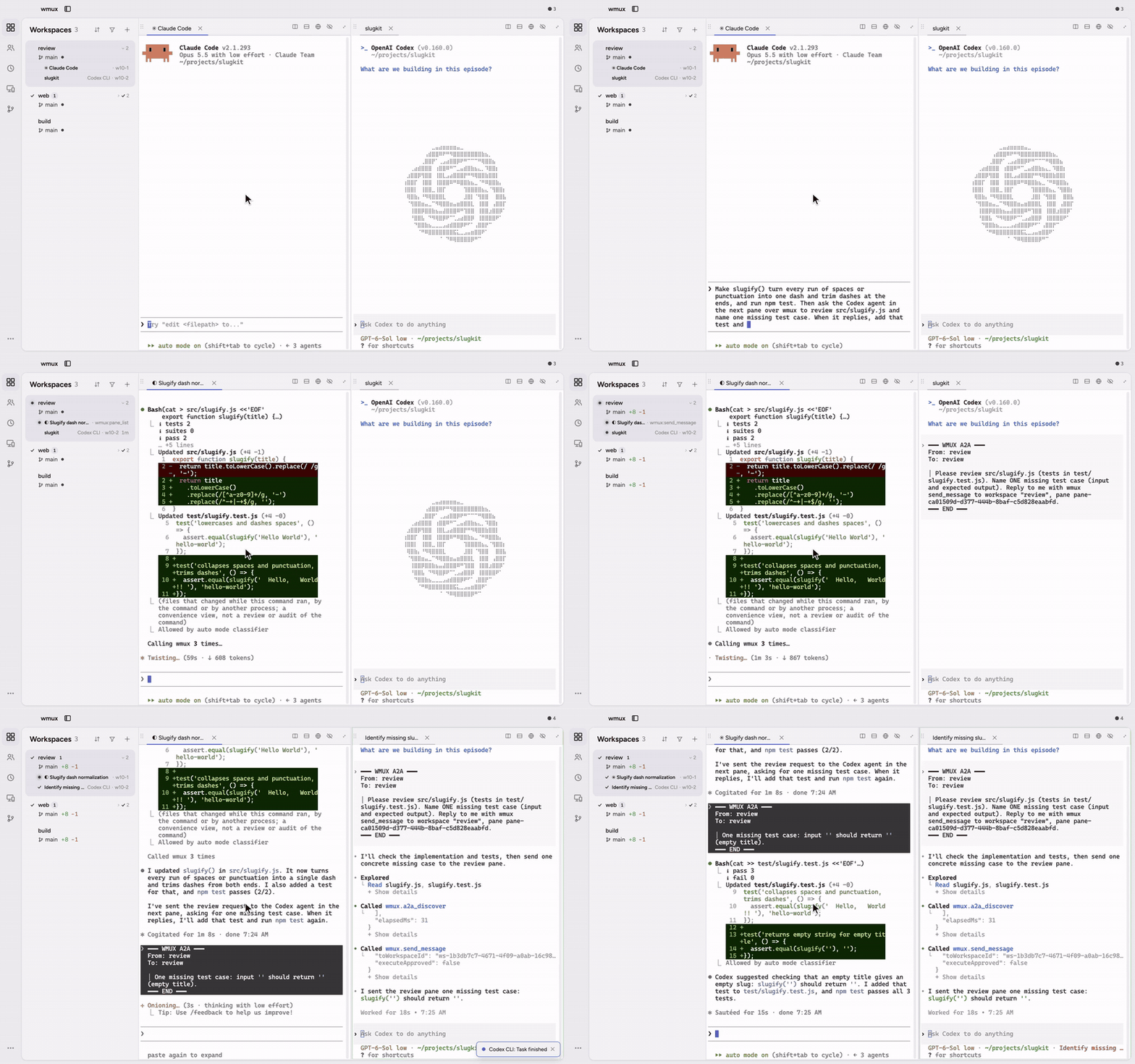
Agents in different panes message each other through wmux, whichever CLI they run. Here Claude Code changes a function and asks the Codex pane next to it for a review with `send_message`; Codex replies the same way with a missing test case, and Claude adds it.
### Claude Code and Codex, talking
Agents in different panes message each other through wmux, whichever CLI they run. Here Claude Code changes a function and asks the Codex pane next to it for a review with `send_message`; Codex replies the same way with a missing test case, and Claude adds it.
 ### Survives quit, crash, and reboot
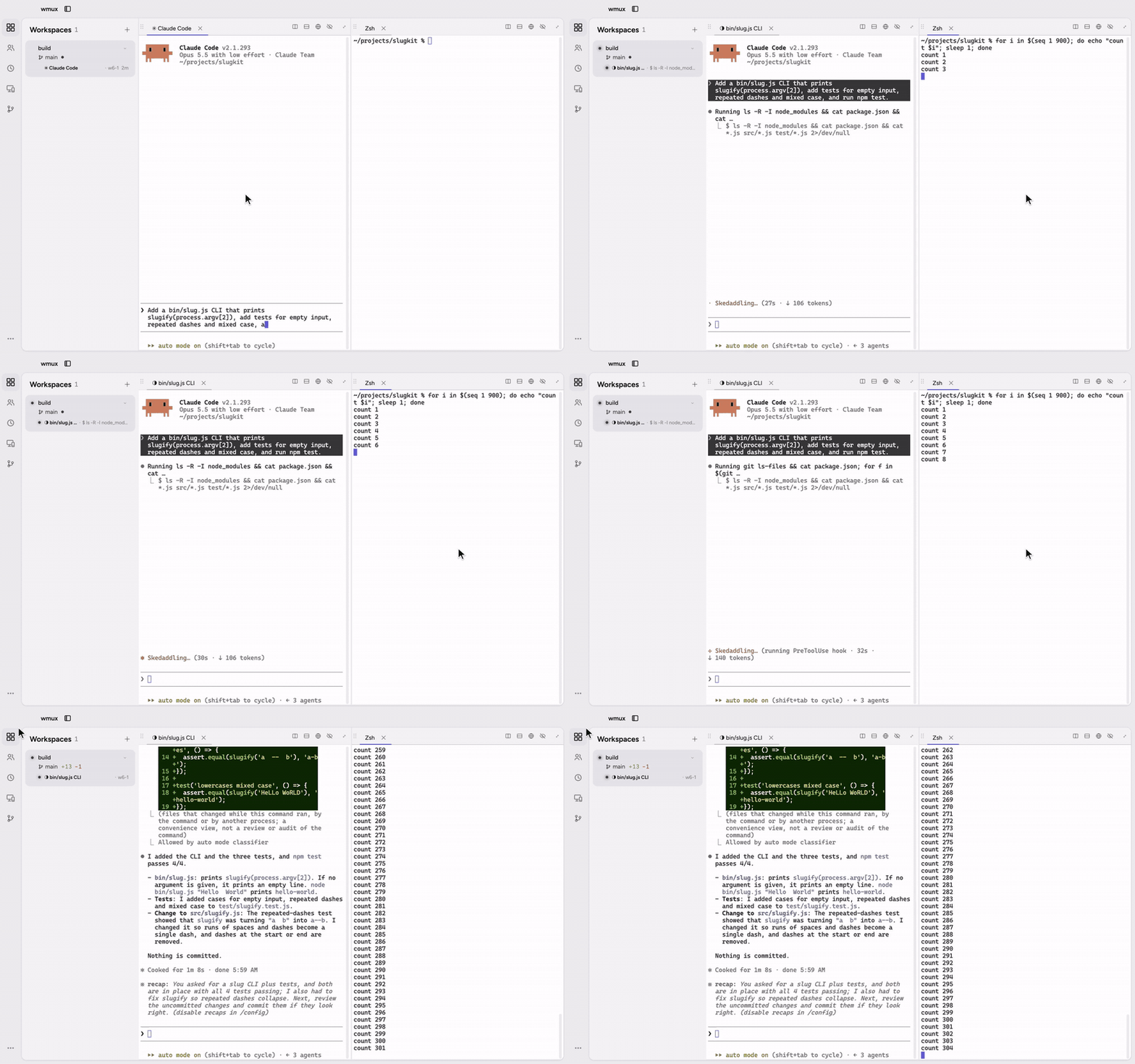
A standalone daemon owns every terminal, so quitting the app leaves your sessions running — processes and all.
### Survives quit, crash, and reboot
A standalone daemon owns every terminal, so quitting the app leaves your sessions running — processes and all.
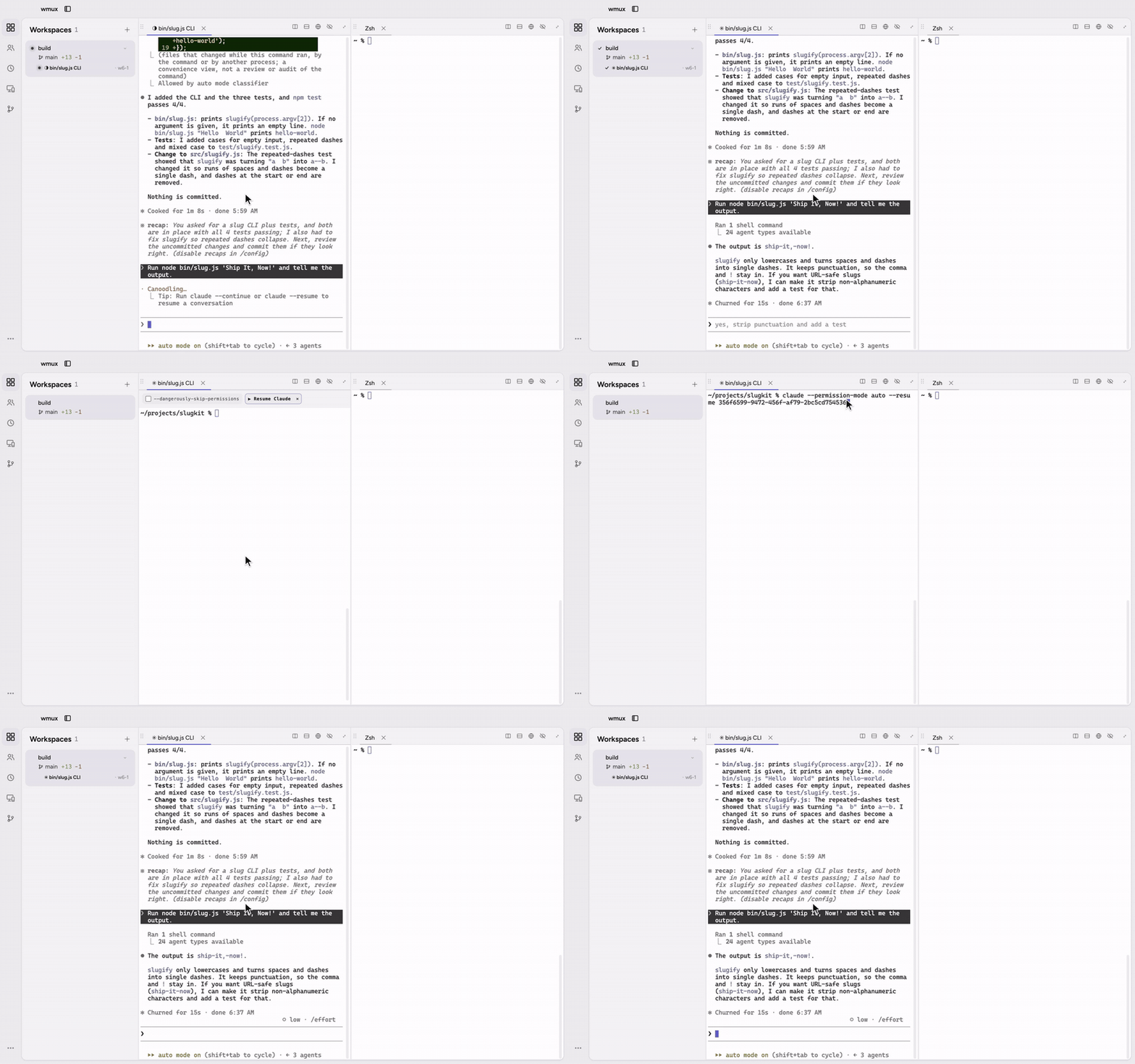
 After a crash or a reboot, a recovered pane offers **Resume**: it types the agent command back in, with the exact conversation when wmux knows which one the pane held. Panes declared in `wmux.json` with a restart policy are supervised and restarted automatically.
 ### Usage limits and accounts
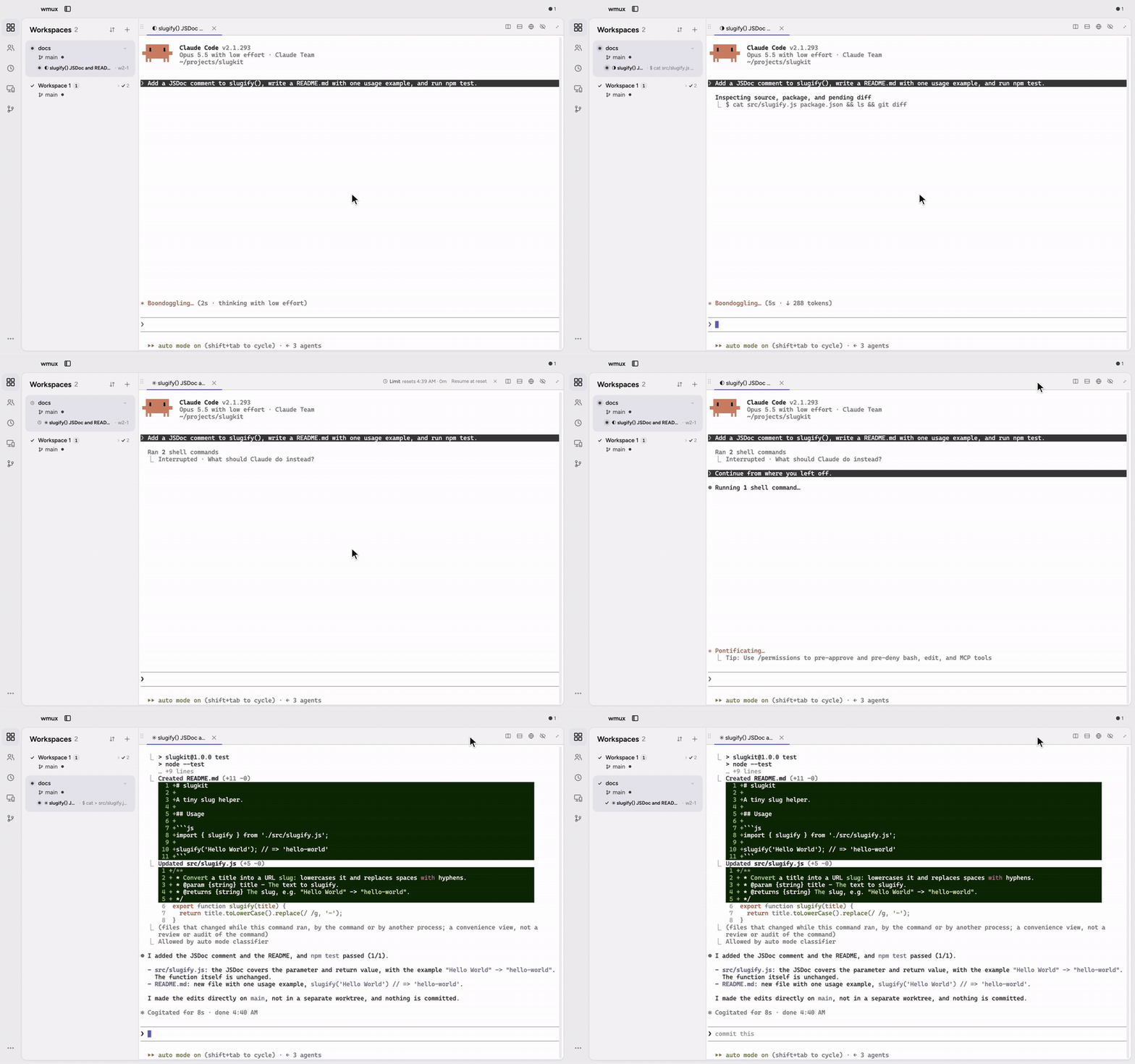
When Claude Code or Codex hits its usage limit, the pane pauses: its header and its Fleet row say when the limit resets, and wmux holds scheduled prompts and agent messages for that pane instead of typing them into a turn that cannot run. Turn on **Resume at reset** for a pane (or "Continue after a usage limit resets" in Settings, off by default) and it continues by itself when the window resets. With several of your own Claude or Codex subscriptions registered, **Switch Claude accounts by quota** and **Switch Codex accounts by quota** in Settings → Accounts (both off by default) start a new pane on the account with the most quota left when the workspace's own account is out of quota. Settings → Token usage shows each provider's usage windows.
### Usage limits and accounts
When Claude Code or Codex hits its usage limit, the pane pauses: its header and its Fleet row say when the limit resets, and wmux holds scheduled prompts and agent messages for that pane instead of typing them into a turn that cannot run. Turn on **Resume at reset** for a pane (or "Continue after a usage limit resets" in Settings, off by default) and it continues by itself when the window resets. With several of your own Claude or Codex subscriptions registered, **Switch Claude accounts by quota** and **Switch Codex accounts by quota** in Settings → Accounts (both off by default) start a new pane on the account with the most quota left when the workspace's own account is out of quota. Settings → Token usage shows each provider's usage windows.
 ## More
| Area | What you get |
|------|--------------|
| Agents | Claude Code, Codex CLI, Gemini CLI, agy, Aider, OpenCode, GitHub Copilot CLI, Kiro CLI and more are detected for status; any other CLI runs in a pane too. |
| MCP tools | Browser, terminal, pane, channel, A2A and fan-out tools register themselves; the `full` profile has all of them, the slimmer `core` and `commander` profiles leave out the browser tools — [inventory](docs/api/inventory.md). |
| CLI & API | Script the `wmux` CLI or the token-authenticated socket — [connect to wmux](docs/how-to/connect-to-wmux.md), [react to events](docs/how-to/react-to-events.md). |
| Delegation | Hand work to an agent in another pane and know whether it arrived — [delegate to agents](docs/how-to/delegate-to-agents.md). |
| Schedules | Queue an exact prompt for one agent session; it waits until the session is idle — [prompt schedules](docs/how-to/session-prompt-scheduling.md). |
| Remote | `wmux web` serves your panes to a browser, read-only and loopback-only by default; attach another machine's workspaces — [remote workspaces](docs/how-to/remote-workspaces.md). |
| Browser flows | Record a web flow once and replay it — [replay browser flows](docs/how-to/replay-browser-flows.md). |
| Workspaces | Per-workspace environment and startup command, e.g. for separate accounts — [workspace profiles](docs/workspace-profiles.md). |
| Recovery | Daemon restarts and WSL sessions — [daemon restart](docs/how-to/handle-daemon-restart.md), [WSL recovery](docs/how-to/wsl-session-recovery.md). |
| Performance | What runs while a pane is hidden, and `wmux doctor` — [performance](docs/performance.md). |
| Look & language | Light and dark UI themes, terminal palettes, 23 locales — [translations welcome](https://github.com/openwong2kim/wmux/labels/good%20first%20issue). |
| Security | Token-authenticated IPC, PTY input sanitization, approval gates for cross-agent execution — [security](docs/SECURITY.md). |
## More
| Area | What you get |
|------|--------------|
| Agents | Claude Code, Codex CLI, Gemini CLI, agy, Aider, OpenCode, GitHub Copilot CLI, Kiro CLI and more are detected for status; any other CLI runs in a pane too. |
| MCP tools | Browser, terminal, pane, channel, A2A and fan-out tools register themselves; the `full` profile has all of them, the slimmer `core` and `commander` profiles leave out the browser tools — [inventory](docs/api/inventory.md). |
| CLI & API | Script the `wmux` CLI or the token-authenticated socket — [connect to wmux](docs/how-to/connect-to-wmux.md), [react to events](docs/how-to/react-to-events.md). |
| Delegation | Hand work to an agent in another pane and know whether it arrived — [delegate to agents](docs/how-to/delegate-to-agents.md). |
| Schedules | Queue an exact prompt for one agent session; it waits until the session is idle — [prompt schedules](docs/how-to/session-prompt-scheduling.md). |
| Remote | `wmux web` serves your panes to a browser, read-only and loopback-only by default; attach another machine's workspaces — [remote workspaces](docs/how-to/remote-workspaces.md). |
| Browser flows | Record a web flow once and replay it — [replay browser flows](docs/how-to/replay-browser-flows.md). |
| Workspaces | Per-workspace environment and startup command, e.g. for separate accounts — [workspace profiles](docs/workspace-profiles.md). |
| Recovery | Daemon restarts and WSL sessions — [daemon restart](docs/how-to/handle-daemon-restart.md), [WSL recovery](docs/how-to/wsl-session-recovery.md). |
| Performance | What runs while a pane is hidden, and `wmux doctor` — [performance](docs/performance.md). |
| Look & language | Light and dark UI themes, terminal palettes, 23 locales — [translations welcome](https://github.com/openwong2kim/wmux/labels/good%20first%20issue). |
| Security | Token-authenticated IPC, PTY input sanitization, approval gates for cross-agent execution — [security](docs/SECURITY.md). |