

Serena is the IDE for your coding agent.
* Serena provides essential **semantic code retrieval, editing and refactoring tools** that are akin to an IDE's capabilities,
operating at the symbol level and exploiting relational structure.
* It integrates with any client/LLM via the model context protocol (**MCP**).
Serena's **agent-first tool design** involves robust high-level abstractions, distinguishing it from
approaches that rely on low-level concepts like line numbers or primitive search patterns.
Practically, this means that your agent operates **faster, more efficiently and more reliably**, especially in larger and
more complex codebases.
## How Serena Works
Serena provides the necessary [tools](https://oraios.github.io/serena/01-about/035_tools.html) for coding workflows,
but an LLM is required to do the actual work, orchestrating tool use.
Serena can extend the functionality of your existing AI client via the **model context protocol (MCP)**.
Most modern AI chat clients directly support MCP, including
* terminal-based clients like Claude Code, Codex, OpenCode, or Gemini-CLI,
* IDEs and IDE assistant plugins for VSCode, Cursor and JetBrains IDEs,
* desktop and web clients like Claude Desktop or OpenWebUI.
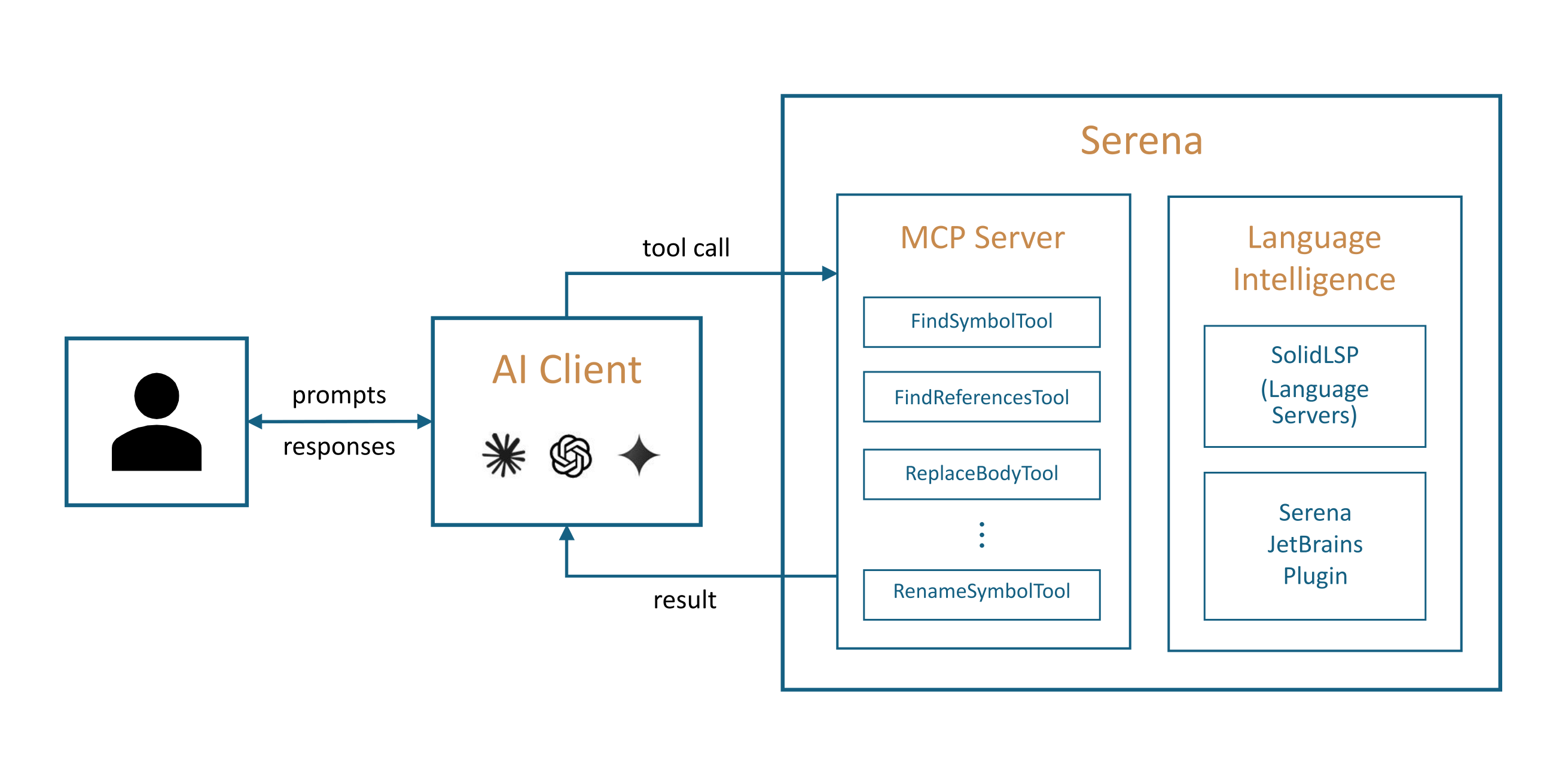 To connect the Serena MCP server to your client, you either
* provide the client with a launch command that allows it to start the MCP server, or
* start the Serena MCP server yourself in HTTP mode and provide the client with the URL.
See the [Quick Start](#quick-start) section below for information on how to get started.
## Programming Language Support & Semantic Analysis Capabilities
Serena provides a set of versatile code querying and editing functionalities
based on symbolic understanding of the code.
Equipped with these capabilities, your agent discovers and edits code just like a seasoned developer
making use of an IDE's capabilities would.
Serena can efficiently find the right context and do the right thing even in very large and
complex projects!
There are two alternative technologies powering these capabilities:
* **Language servers** implementing the language server Protocol (LSP) — the free/open-source alternative
which is used by default.
* The **Serena JetBrains Plugin**, which leverages the powerful code analysis and editing
capabilities of your JetBrains IDE (paid plugin; free trial available).
You can choose either of these backends depending on your preferences and requirements.
### Language Servers
Serena incorporates a powerful abstraction layer for the integration of language servers that implement the language server protocol (LSP).
The underlying language servers are typically open-source projects or at least freely available for use.
When using Serena's language server backend, we provide **support for over 40 programming languages**, including
AL, Ansible, Bash, C#, C/C++, Clojure, Crystal, Dart, Elixir, Elm, Erlang, Fortran, F#, GLSL, Go, Groovy, Haskell, HLSL, Java, JavaScript, Julia, Kotlin, Lean 4, Lua, Luau, Markdown, MATLAB, Nix, OCaml, Perl, PHP, PowerShell, Python, R, Ruby, Rust, Scala, Solidity, Swift, TOML, TypeScript, WGSL, YAML, and Zig.
### The Serena JetBrains Plugin
The paid Serena JetBrains Plugin (free trial available)
leverages the powerful code analysis capabilities of your JetBrains IDE.
The plugin naturally supports all programming languages and frameworks that are supported by JetBrains IDEs,
including IntelliJ IDEA, PyCharm, Android Studio, WebStorm, PhpStorm, RubyMine, GoLand, and potentially others (Rider and CLion are unsupported though).
To connect the Serena MCP server to your client, you either
* provide the client with a launch command that allows it to start the MCP server, or
* start the Serena MCP server yourself in HTTP mode and provide the client with the URL.
See the [Quick Start](#quick-start) section below for information on how to get started.
## Programming Language Support & Semantic Analysis Capabilities
Serena provides a set of versatile code querying and editing functionalities
based on symbolic understanding of the code.
Equipped with these capabilities, your agent discovers and edits code just like a seasoned developer
making use of an IDE's capabilities would.
Serena can efficiently find the right context and do the right thing even in very large and
complex projects!
There are two alternative technologies powering these capabilities:
* **Language servers** implementing the language server Protocol (LSP) — the free/open-source alternative
which is used by default.
* The **Serena JetBrains Plugin**, which leverages the powerful code analysis and editing
capabilities of your JetBrains IDE (paid plugin; free trial available).
You can choose either of these backends depending on your preferences and requirements.
### Language Servers
Serena incorporates a powerful abstraction layer for the integration of language servers that implement the language server protocol (LSP).
The underlying language servers are typically open-source projects or at least freely available for use.
When using Serena's language server backend, we provide **support for over 40 programming languages**, including
AL, Ansible, Bash, C#, C/C++, Clojure, Crystal, Dart, Elixir, Elm, Erlang, Fortran, F#, GLSL, Go, Groovy, Haskell, HLSL, Java, JavaScript, Julia, Kotlin, Lean 4, Lua, Luau, Markdown, MATLAB, Nix, OCaml, Perl, PHP, PowerShell, Python, R, Ruby, Rust, Scala, Solidity, Swift, TOML, TypeScript, WGSL, YAML, and Zig.
### The Serena JetBrains Plugin
The paid Serena JetBrains Plugin (free trial available)
leverages the powerful code analysis capabilities of your JetBrains IDE.
The plugin naturally supports all programming languages and frameworks that are supported by JetBrains IDEs,
including IntelliJ IDEA, PyCharm, Android Studio, WebStorm, PhpStorm, RubyMine, GoLand, and potentially others (Rider and CLion are unsupported though).
 See our [documentation page](https://oraios.github.io/serena/02-usage/025_jetbrains_plugin.html) for further details and instructions on how to apply the plugin.
## Features
Serena provides a wide range of tools for efficient code retrieval, editing and refactoring, as well as
a memory system for long-lived agent workflows.
Given its large scope, Serena adapts to your needs by offering a multi-layered configuration system.
See our [documentation page](https://oraios.github.io/serena/02-usage/025_jetbrains_plugin.html) for further details and instructions on how to apply the plugin.
## Features
Serena provides a wide range of tools for efficient code retrieval, editing and refactoring, as well as
a memory system for long-lived agent workflows.
Given its large scope, Serena adapts to your needs by offering a multi-layered configuration system.
Details
### Retrieval
Serena's retrieval tools allow agents to explore codebases at the symbol level, understanding structure and relationships
without reading entire files.
| Capability | Language Servers | JetBrains Plugin |
|----------------------------------|------------------|------------------|
| find symbol | yes | yes |
| symbol overview (file outline) | yes | yes |
| find referencing symbols | yes | yes |
| search in project dependencies | -- | yes |
| type hierarchy | -- | yes |
| find declaration | -- | yes |
| find implementations | -- | yes |
| query external projects | yes | yes |
### Refactoring
Without precise refactoring tools, agents are forced to resort to unreliable and expensive search and replace operations.
| Capability | Language Servers | JetBrains Plugin |
|-------------------------------------------|--------------------|-----------------------------------|
| rename | yes (only symbols) | yes (symbols, files, directories) |
| move (symbol, file, directory) | -- | yes |
| inline | -- | yes |
| propagate deletions (remove unused code) | -- | yes |
### Symbolic Editing
Serena's symbolic editing tools are less error-prone and much more token-efficient than typical alternatives.
| Capability | Language Servers | JetBrains Plugin |
|------------------------|-------------------|------------------|
| replace symbol body | yes | yes |
| insert after symbol | yes | yes |
| insert before symbol | yes | yes |
| safe delete | yes | yes |
### Basic Features
Beyond its semantic capabilities, Serena includes a set of basic utilities for completeness.
When Serena is used inside an agentic harness such as Claude Code or Codex, these tools are typically disabled by default,
since the surrounding harness already provides overlapping file, search, and shell capabilities.
- **`search_for_pattern`** – flexible regex search across the codebase
- **`replace_content`** – agent-optimised regex-based and literal text replacement
- **`list_dir` / `find_file`** – directory listing and file search
- **`read_file`** – read files or file chunks
- **`execute_shell_command`** – run shell commands (e.g. builds, tests, linters)
### Memory Management
A memory system is elemental to long-lived agent workflows, especially when knowledge is to be shared across
sessions, users and projects.
Despite its simplicity, we received positive feedback from many users who tend to combine Serena's memory management system with their
agent's internal system (e.g., `AGENTS.md` files).
It can easily be disabled if you prefer to use something else.
### Configurability
Active tools, tool descriptions, prompts, language backend details and many other aspects of Serena
can be flexibly configured on a per-case basis by simply adjusting a few lines of YAML.
To achieve this, Serena offers multiple levels of (composable) configuration:
* global configuration
* MCP launch command (CLI) configuration
* per-project configuration (with local overrides)
* execution context-specific configuration (e.g. for particular clients)
* dynamically composable configuration fragments (modes)
## Serena in Action
Demonstrations
#### Demonstration 1: Efficient Operation in Claude Code
A demonstration of Serena efficiently retrieving and editing code within Claude Code, thereby saving tokens and time. Efficient operations are not only useful for saving costs, but also for generally improving the generated code's quality. This effect may be less pronounced in very small projects, but often becomes of crucial importance in larger ones.
https://github.com/user-attachments/assets/ab78ebe0-f77d-43cc-879a-cc399efefd87
#### Demonstration 2: Serena in Claude Desktop
A demonstration of Serena implementing a small feature for itself (a better log GUI) with Claude Desktop.
Note how Serena's tools enable Claude to find and edit the right symbols.
https://github.com/user-attachments/assets/6eaa9aa1-610d-4723-a2d6-bf1e487ba753
## Quick Start
**Prerequisites**. Serena is managed by *uv*, and [installing uv](https://docs.astral.sh/uv/getting-started/installation/) is the only required prerequisite for running Serena.
> [!NOTE]
> When using the language server backend, some additional dependencies may need to be installed to support certain languages;
> see the [Language Support](https://oraios.github.io/serena/01-about/020_programming-languages.html) page for details.
**Initialise Serena**. To initialise Serena and verify that your setup works correctly, simply run:
```bash
uvx -p 3.13 --from git+https://github.com/oraios/serena serena init
```
By default, this will set up Serena to use the language server backend. To use the JetBrains backend instead, add the parameters `-b JetBrains`
(see the [JetBrains Plugin documentation page](https://oraios.github.io/serena/02-usage/025_jetbrains_plugin.html) for additional usage details).
Either way, you should receive a success message indicating that Serena has been initialised successfully.
**Configuring Your Client**. To connect Serena to your preferred MCP client, you typically need to [configure a launch command in your client](https://oraios.github.io/serena/02-usage/030_clients.html).
Follow the link for specific instructions on how to set up Serena for Claude Code, Codex, Claude Desktop, MCP-enabled IDEs and other clients (such as local and web-based GUIs).
> [!TIP]
> While getting started quickly is easy, Serena is a powerful toolkit with many configuration options.
> We highly recommend reading through the [user guide](https://oraios.github.io/serena/02-usage/000_intro.html) to get the most out of Serena.
>
> Specifically, we recommend to read about ...
> * [Serena's project-based workflow](https://oraios.github.io/serena/02-usage/040_workflow.html) and
> * [configuring Serena](https://oraios.github.io/serena/02-usage/050_configuration.html).
## User Guide
Please refer to the [user guide](https://oraios.github.io/serena/02-usage/000_intro.html) for detailed instructions on how to use Serena effectively.
## Acknowledgements
A significant part of Serena, especially support for various languages, was contributed by the open source community.
We are very grateful for the many contributors who made this possible and who played an important role in making Serena
what it is today.