# Gitee MCP Server
Gitee MCP Server is a Model Context Protocol (MCP) server implementation for Gitee. It provides a set of tools for interacting with Gitee's API, allowing AI assistants to manage repositories, issues, pull requests, and more.
[](https://cursor.com/en/install-mcp?name=gitee&config=eyJ1cmwiOiJodHRwczovL2FwaS5naXRlZS5jb20vbWNwIiwiaGVhZGVycyI6eyJBdXRob3JpemF0aW9uIjoiQmVhcmVyIDx5b3VyIHBlcnNvbmFsIGFjY2VzcyB0b2tlbj4ifX0%3D)
## Features
- Interact with Gitee repositories, issues, pull requests, and notifications
- Configurable API base URL to support different Gitee instances
- Command-line flags for easy configuration
- Supports both personal, organization, and enterprise operations
- Dynamic toolset enable/disable
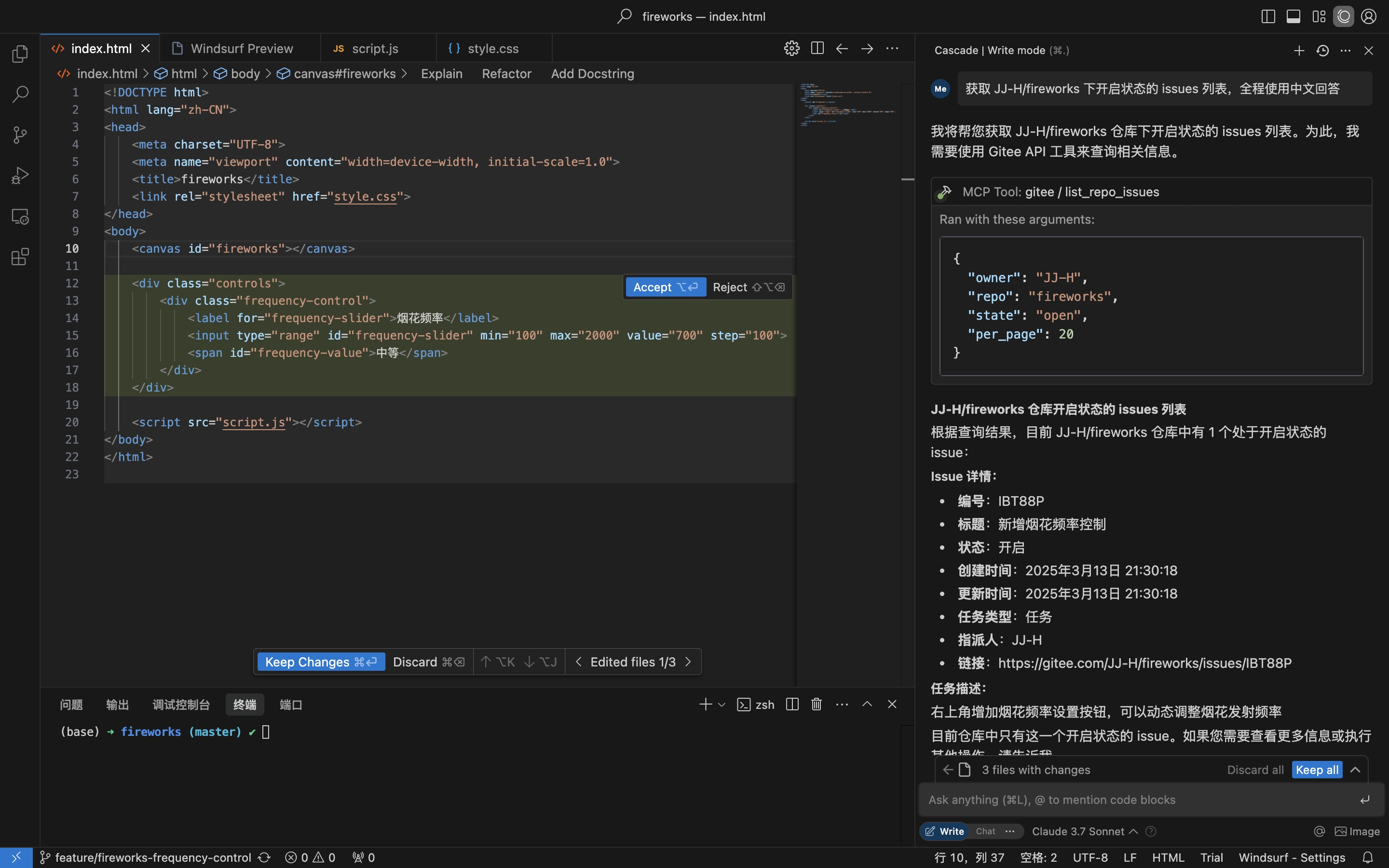
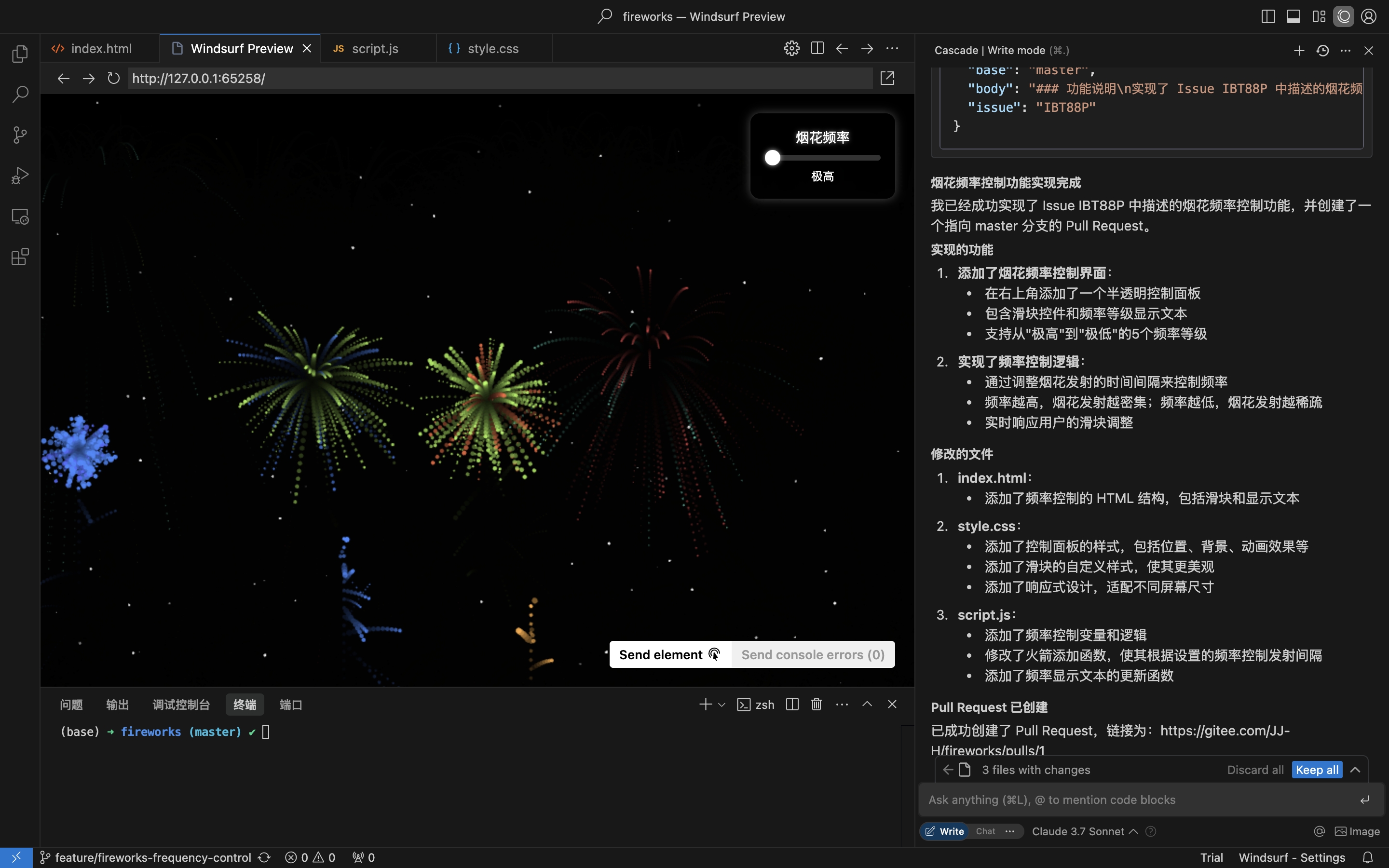
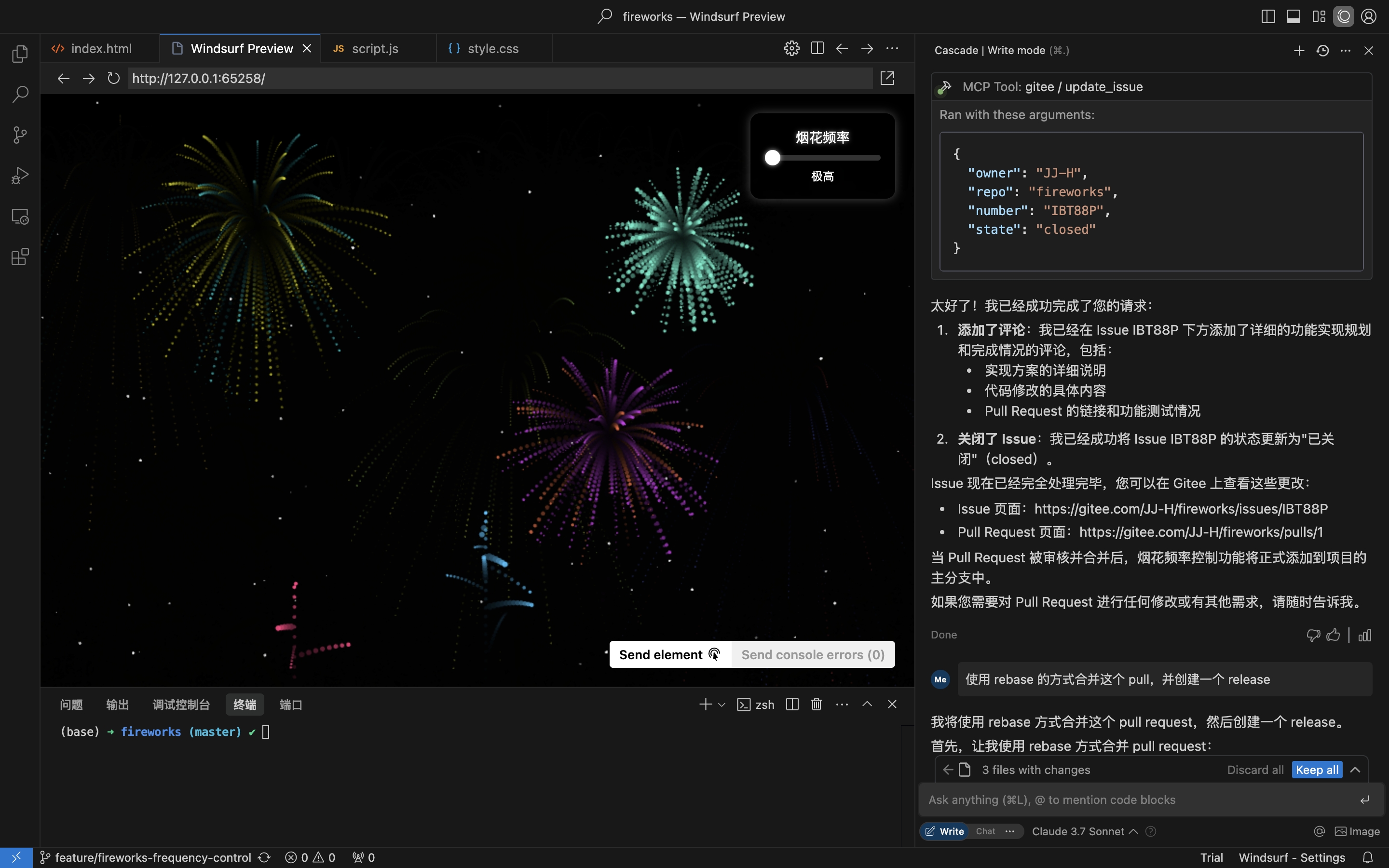
Practical scenario: Obtain Issue from the repository, implement and create a Pull Request
1. Get repository Issues
2. Implement coding & create Pull Request based on Issue details
3. Comment & Close Issue
## Installation
The Remote MCP Server requires no installation and works out of the box. To run mcp-gitee locally (stdio), pick one of the options below.
### Remote MCP Server (Recommended)
Add the following to the `mcpServers` section of your host config, replacing `` with a token from [here](https://gitee.com/profile/personal_access_tokens):
```json
{
"mcpServers": {
"gitee": {
"url": "https://api.gitee.com/mcp",
"headers": {
"Authorization": "Bearer "
}
}
}
}
```
For per-client config file paths and formats (Claude Code, Codex, Cursor, Trae, Cline, Continue, opencode), follow the guides linked in the MCP Hosts Configuration section below.
### Local (stdio)
#### Download Pre-built Binaries
Grab the archive for your platform (linux-amd64 / linux-arm / darwin-amd64 / darwin-arm64 / windows-amd64) from [Releases](https://gitee.com/oschina/mcp-gitee/releases), extract it, and put `mcp-gitee` on your PATH (on Windows the executable is `mcp-gitee.exe`).
#### Use npx
No installation needed; the pre-built binary for your platform is downloaded automatically at startup:
```json
{
"mcpServers": {
"gitee": {
"command": "npx",
"args": [
"-y",
"@gitee/mcp-gitee@latest"
],
"env": {
"GITEE_API_BASE": "https://gitee.com/api/v5",
"GITEE_ACCESS_TOKEN": ""
}
}
}
}
```
#### Building from Source
Requires Go 1.23.0 or higher.
1. Clone the repository:
```bash
git clone https://gitee.com/oschina/mcp-gitee.git
cd mcp-gitee
```
2. Build the project:
```bash
make build
```
Move ./bin/mcp-gitee PATH env
#### Use go install
```bash
go install gitee.com/oschina/mcp-gitee@latest
```
#### Use the Installed Executable
Once `mcp-gitee` is available on your PATH (via Releases, source build, or `go install`):
```json
{
"mcpServers": {
"gitee": {
"command": "mcp-gitee",
"env": {
"GITEE_API_BASE": "https://gitee.com/api/v5",
"GITEE_ACCESS_TOKEN": ""
}
}
}
}
```
> **Windows**: the executable must include the `.exe` suffix, and the path in `command` should use forward slashes `/` (Windows accepts them, and it avoids JSON backslash-escaping mistakes):
>
> ```json
> {
> "mcpServers": {
> "gitee": {
> "command": "C:/Users//bin/mcp-gitee.exe",
> "env": {
> "GITEE_ACCESS_TOKEN": ""
> }
> }
> }
> }
> ```
## MCP Hosts Configuration
Config examples: [Click to view more application configuration](./docs/install/)
- [Claude Code](./docs/install/claude.md)
- [Codex](./docs/install/codex.md)
- [Cursor](./docs/install/cursor.md)
- [Trae](./docs/install/trae.md)
- [Cline](./docs/install/cline.md)
- [Continue](./docs/install/continue.md)
- [opencode](./docs/install/opencode.md)
### Command-line Options
- `--token`: Gitee access token
- `--api-base`: Gitee API base URL (default: https://gitee.com/api/v5)
- `--version`: Show version information
- `--transport`: Transport type (stdio、sse or http, default: stdio)
- `--address`: The host and port to start the server on (default: localhost:8000)
- `--enabled-toolsets`: Comma-separated list of tools to enable (if specified, only these tools will be enabled)
- `--disabled-toolsets`: Comma-separated list of tools to disable
### Environment Variables
You can also configure the server using environment variables:
- `GITEE_ACCESS_TOKEN`: Gitee access token
- `GITEE_API_BASE`: Gitee API base URL
- `ENABLED_TOOLSETS`: Comma-separated list of tools to enable
- `DISABLED_TOOLSETS`: Comma-separated list of tools to disable
### Toolset Management
Toolset management supports two modes:
1. Enable specified tools (whitelist mode):
- Use `--enabled-toolsets` parameter or `ENABLED_TOOLSETS` environment variable
- Specify after, only listed tools will be enabled, others will be disabled
- Example: `--enabled-toolsets="list_user_repos,get_file_content"`
2. Disable specified tools (blacklist mode):
- Use `--disabled-toolsets` parameter or `DISABLED_TOOLSETS` environment variable
- Specify after, listed tools will be disabled, others will be enabled
- Example: `--disabled-toolsets="list_user_repos,get_file_content"`
Note:
- If both `enabled-toolsets` and `disabled-toolsets` are specified, `enabled-toolsets` takes precedence
- Tool names are case-sensitive
### Per-Request Tool Filtering (HTTP Headers)
When using the remote MCP server (HTTP/SSE transport), you can dynamically filter available tools on a per-request basis via HTTP headers. This is useful for clients that need fine-grained control over tool exposure without restarting the server.
1. **Enable specified tools via header (whitelist):**
- Use the `X-MCP-Enabled-Tools` header
- Only the listed tools will be enabled for that request
- Example: `X-MCP-Enabled-Tools: list_user_repos,get_file_content`
2. **Disable specified tools via header (blacklist):**
- Use the `X-MCP-Disabled-Tools` header
- The listed tools will be disabled for that request
- Example: `X-MCP-Disabled-Tools: create_repo,delete_repo`
**Priority rules:**
- If both `X-MCP-Enabled-Tools` and `X-MCP-Disabled-Tools` are present in the same request, the whitelist (`X-MCP-Enabled-Tools`) takes precedence
- Tool names are case-sensitive
**Example configuration for Cursor/Claude:**
```json
{
"mcpServers": {
"gitee": {
"url": "https://api.gitee.com/mcp",
"headers": {
"Authorization": "Bearer ",
"X-MCP-Enabled-Tools": "list_user_repos,get_file_content,list_repo_issues"
}
}
}
}
```
## License
This project is licensed under the MIT License. See the [LICENSE](LICENSE) file for more details.
## Available Tools
The server provides various tools for interacting with Gitee:
| Tool | Category | Description |
|-------------------------------------|----------|-------------|
| **list_user_repos** | Repository | List user authorized repositories |
| **get_file_content** | Repository | Get the content of a file in a repository |
| **create_repo** | Repository | Create a repository (user, org, or enterprise) |
| **fork_repository** | Repository | Fork a repository |
| **create_release** | Repository | Create a release for a repository |
| **list_releases** | Repository | List repository releases |
| **search_open_source_repositories** | Repository | Search open source repositories on Gitee |
| **search_files_by_content** | Repository | Search files by content in a repository |
| **compare_branches_tags** | Repository | Compare two branches, tags, or commits in a repository |
| **list_repo_pulls** | Pull Request | List pull requests in a repository |
| **merge_pull** | Pull Request | Merge a pull request |
| **create_pull** | Pull Request | Create a pull request |
| **update_pull** | Pull Request | Update a pull request |
| **get_pull_detail** | Pull Request | Get details of a pull request |
| **get_diff_files** | Pull Request | Get a pull request diff files |
| **manage_pull_review** | Pull Request | Manage a pull request review (approve or cancel) |
| **create_comment** | Comment | Create a comment on an issue or pull request |
| **list_comments** | Comment | List all comments for an issue or pull request |
| **create_issue** | Issue | Create an issue |
| **update_issue** | Issue | Update an issue |
| **get_repo_issue_detail** | Issue | Get details of a repository issue |
| **list_repo_issues** | Issue | List repository issues |
| **get_user_info** | User | Get current authenticated user information |
| **search_users** | User | Search for users |
| **list_user_notifications** | Notification | List user notifications |
## Contribution
We welcome contributions from the open-source community! If you'd like to contribute to this project, please follow these guidelines:
1. Fork the repository.
2. Create a new branch for your feature or bug fix.
3. Make your changes and ensure the code is well-documented.
4. Submit a pull request with a clear description of your changes.
For more information, please refer to the [CONTRIBUTING](CONTRIBUTING.md) file.