Open-source orchestration for zero-human companies, processes and departments. Run multiple AI agents on one project — without babysitting any of them. Coordinate Claude, Codex, Pi, Cursor and any CLI tool in parallel. One npm install. Zero infrastructure.
Set a goal at 10pm. Five agents decompose, implement, test, and review. You wake up to pull requests.
## You hired AI agents. Now you're managing them full-time.
You bought Claude, Codex, maybe Cursor. Each one is powerful alone. But your actual job isn't "use AI tools" — it's **ship a product at the speed of a full team, while being one person.**
Here's what that looks like today:
- You open 3 terminals. Copy-paste context between them. Forget which agent is doing what.
- One agent edits a file another is working on. Merge conflict. You fix it manually.
- An agent crashes at 2am. You don't notice until morning. Half a night wasted.
- You spend **40-60% of your time routing agents** instead of building your product.
**You're not the founder. You're the bottleneck.**
## What if your agents coordinated themselves?
```
$ orch org deploy startup-mvp --goal "Implement user auth with OAuth2"
✓ Deployed team "platform" — 5 agents
CTO (claude) → Decomposing goal into tasks...
Backend A (claude) → Waiting for tasks
Backend B (codex) → Waiting for tasks
QA (codex) → Waiting for tasks
Reviewer (claude) → Waiting for reviews
✓ CTO created 6 tasks from goal
$ orch run --all --watch
22:03 ▶ Backend A → "Implement OAuth2 flow" [feature/oauth]
22:03 ▶ Backend B → "JWT token service" [feature/jwt]
22:03 ▶ QA → waiting for implementations...
22:15 ✓ Backend B DONE (12m · 4,200 tokens)
22:15 ▶ QA → "Test JWT service" [test/jwt]
22:22 ✓ Backend A DONE (19m · 8,100 tokens)
22:24 ↻ QA RETRY attempt 2/3
22:28 ✓ QA DONE (6m · 2,800 tokens)
22:29 ▶ Reviewer → "Review OAuth2 implementation"
22:33 ✓ Reviewer DONE → all tasks in review
→ You went to sleep at 22:05.
→ You wake up to 6 tasks in review. Approve. Merge. Ship.
```
One goal. Five agents. Six PRs. Zero tab-switching. $4.20 in tokens.
## Start coordinating agents in 30 seconds
That's it. ORCH auto-initializes and opens the TUI dashboard. Add agents, set goals, and run — right from there.
### Claude Code integration
After install, the `/orch` skill is automatically available in **Claude Code**. Just type `/orch` and describe what you need in natural language:
```
/orch deploy a team to refactor the auth module and add tests
```
Claude will translate your intent into the right `orch` commands — create agents, tasks, goals, and run the orchestration. No need to memorize CLI flags.
Or deploy a pre-built team:
```bash
orch org deploy startup-mvp --goal "Build invoicing SaaS with Stripe"
orch run --all --watch
```
### System requirements
No database. No cloud. No Docker. No GPU — LLMs run via API, not locally.
### Your code is safe
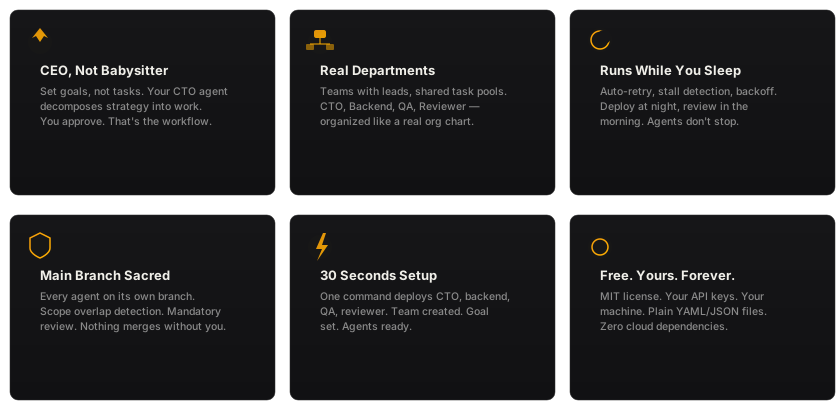
> **Every agent works in an isolated git worktree.** Your `main` branch is never touched until you explicitly approve and merge. Mandatory review step in the state machine — no code ships without your OK. Agents can't overwrite each other's work.
Why does each agent need ~300 MB?
ORCH itself is lightweight (~120 MB). The RAM goes to the **agent CLI processes** that ORCH spawns — each is a separate Node.js/Python runtime:
| Agent process | RAM per instance | Why |
|---------------|-----------------|-----|
| Claude Code CLI | 200-400 MB | Full Node.js runtime + context window |
| OpenCode | 200-400 MB | Node.js + provider SDK |
| Codex CLI | 150-300 MB | Python runtime + OpenAI SDK |
| Pi coding agent | 200-400 MB | Node.js runtime + Pi tools/extensions |
| Cursor CLI | 200-400 MB | Electron-based agent |
| Shell scripts | 10-50 MB | Depends on the tool |
**Formula:** `120 MB (ORCH) + N × ~300 MB` per concurrent agent.
2 agents ≈ 0.7 GB, 4 agents ≈ 1.3 GB, 6 agents ≈ 2 GB.
## How your AI team works
### CTO — strategic decomposition
Set a high-level goal. Your CTO agent decomposes it into concrete tasks, assigns priorities, and delegates to the right departments. You set strategy — AI executes.
### Engineering Department — parallel execution
Backend A, Backend B, Frontend — each agent gets its own git worktree (isolated branch). They work in parallel without file conflicts. Failed? Auto-retry with exponential backoff. Stalled? Zombie detection kills and re-queues.
### QA Department — automated verification
QA agents pick up completed work, run tests, validate contracts. Reject with feedback → task goes back to engineering with your notes. The loop closes automatically.
### Inter-department communication
Agents talk to each other — direct messages, team broadcasts, shared context store. Backend finishes auth module → sends message to QA → QA starts testing. No copy-paste. No manual routing.
### Code Review — mandatory quality gate
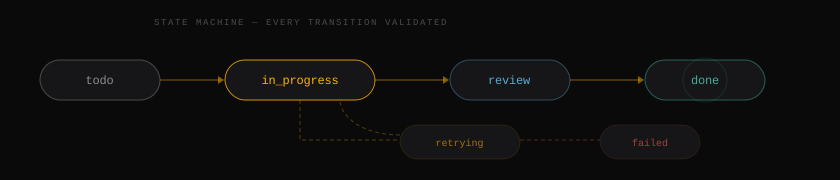
Nothing touches `main` until reviewed. Every task flows through the state machine:
Every transition validated. No task gets lost. No code merges without approval.
## Not just engineering
ORCH orchestrates **any process** — not just code. The shell adapter runs any CLI tool, which means any workflow becomes an automated pipeline:
| Department | Agents | What they do |
|-----------|--------|-------------|
| **Engineering** | Claude, Codex, Pi, Cursor | Write code, fix bugs, refactor |
| **Editorial** | Claude (writer), Claude (editor), Shell (grammarly) | Write articles, edit, check grammar, publish |
| **Sales Ops** | Shell (CRM scripts), Claude (copywriter), Shell (email sender) | Generate leads, write sequences, send outreach |
| **Analytics** | Shell (pandas, duckdb), Claude (analyst), Shell (matplotlib) | Clean data, compute KPIs, generate reports |
| **Content Factory** | Claude (strategist), Claude (writer x2), Claude (SEO) | Plan content calendar, write posts, optimize |
| **Security** | Shell (Semgrep, Trivy, Gitleaks), Claude (hunter) | Scan code, correlate findings, auto-fix |
| **DevOps** | Shell (terraform, kubectl), Claude (architect) | Plan infra changes, apply, verify |
Every department gets the same superpowers: state machine governance, retry, messaging, isolation, review gate.
## Why founders choose ORCH
### Works with every tool — AI or not
The `shell` adapter is the key: **if it runs in a terminal, it's an agent** — `npm test`, `python bot.py`, Semgrep, `curl`, CRM scripts, data pipelines. Any CLI tool gets state tracking, retry, and coordination for free.
## Pre-built teams — start with a proven setup
Deploy a full team with one command:
**Engineering**
| Template | Agents | What it does |
|----------|--------|-------------|
| `startup-mvp` | CTO, Backend x2, Frontend, QA, Reviewer | Ship an MVP in 48 hours |
| `pr-review-corp` | Security, Performance, Style, QA, CTO | Automated review for every PR |
| `migration-squad` | CTO, Migrator x3, QA, Reviewer | JS-to-TS migration over a weekend |
| `security-dept` | Lead Auditor, Scanner, Secrets Auditor, Hunter, Reviewer | Multi-layer security audit |
| `test-factory` | Coverage Lead, Backend x2, QA x2, Reviewer | Coverage from 40% to 80% overnight |
| `bugfix-dept` | Triager, Fixer x3, QA, Reviewer | 100 issues to 0 in a week |
**Non-Engineering**
| Template | Agents | What it does |
|----------|--------|-------------|
| `content-agency` | Strategist, Writer x2, Editor, SEO | Content factory: plan, write, edit, optimize |
| `data-lab` | Lead Analyst, Data Engineer | 3 CSVs → executive report by morning |
| `sales-machine` | Sales Director, SDR x2, Copywriter, Growth Analyst | Outbound pipeline: research, outreach, follow-up, close |
| `docs-team` | Docs Lead, Writer x2, Editor, Reviewer | Technical docs from codebase analysis |
```bash
orch org list # See all teams
orch org deploy startup-mvp # Deploy the default
orch org deploy startup-mvp --goal "Build X" # Deploy with a goal
orch org export my-team # Save your setup as template
```
## Headless daemon & CI/CD
Run ORCH on a server 24/7 — no terminal, no TUI. Structured JSON logs for Datadog, Grafana Loki, or `jq`.
```bash
# Daemon mode — runs forever, picks up new tasks automatically
orch serve
# CI/CD mode — process current tasks and exit
orch serve --once # exit 0 = all done, exit 1 = has failures
```
### Options
| Flag | Description | Default |
|------|-------------|---------|
| `--once` | Process all todo tasks and exit | watch mode |
| `--tick-interval ` | Override polling interval | 10000 |
| `--log-file ` | Tee logs to a file (append) | stdout only |
| `--log-format json\|text` | Output format | json |
| `--verbose` | Include `agent:output` events | off |
### Structured logs
Every event is a single JSON line — pipe to any log aggregator:
```json
{"ts":"2026-03-17T03:00:10.000Z","level":"info","event":"agent:started","agentId":"agt_abc","taskId":"tsk_123","runId":"run_xyz"}
{"ts":"2026-03-17T03:12:45.000Z","level":"info","event":"task:status_changed","taskId":"tsk_123","from":"in_progress","to":"review"}
{"ts":"2026-03-17T03:12:46.000Z","level":"info","event":"orchestrator:tick","running":0,"queued":2,"heap_mb":142}
```
### Deploy with pm2 or systemd
pm2
```bash
pm2 start "orch serve" --name orch-daemon --cwd ~/my-project
pm2 logs orch-daemon # structured JSON logs
pm2 stop orch-daemon # SIGINT → graceful shutdown
```
systemd
```ini
[Unit]
Description=ORCH AI Agent Daemon
After=network.target
[Service]
Type=simple
WorkingDirectory=/home/user/my-project
ExecStart=/usr/local/bin/orch serve
Restart=on-failure
RestartSec=10
[Install]
WantedBy=multi-user.target
```
### How it works
- **Watch mode** (default): tick loop runs indefinitely. Add tasks from another terminal (`orch task add`) — daemon picks them up on the next tick.
- **Once mode** (`--once`): processes all existing todo tasks, skips autonomous task seeding, exits when everything reaches a terminal status.
- **Lock protection**: only one orchestrator per project (reuses `.orchestry/orchestry.lock`). Second `orch serve` exits with a clear error.
- **Graceful shutdown**: SIGINT/SIGTERM → stops accepting new tasks → waits for running agents → saves state → releases lock.
- **Heap monitoring**: every tick logs `heap_mb` — catch memory leaks before OOM.
- **Idle throttling**: logs every 6th idle tick (~60s) to avoid flooding logs when nothing is happening.
## Full CLI reference
Setup & Diagnostics
```bash
orch init # Initialize project
orch doctor # System diagnostics
orch update # Check for updates
```
Departments & Agents
```bash
orch agent add --adapter claude --role "CTO — decomposes goals"
orch agent list # Status of all agents
orch agent disable/enable # Toggle availability
```
Organization Templates
```bash
orch org list # List available companies
orch org deploy # Deploy a full department
orch org deploy --goal "..." # Deploy with a goal
orch org export # Export current setup
```
Tasks
```bash
orch task add "Title" -p 1 # Create task (priority 1-4)
orch task list # List all tasks
orch task assign # Manual assignment
orch task cancel # Cancel running task
```
Teams (Departments)
```bash
orch team create --lead
orch team join
orch team add-task
orch team disband
```
Goals (Strategy)
```bash
orch goal add "Title" --description "..."
orch goal list
orch goal status achieved
```
Communication
```bash
orch msg send "message" # Direct message
orch msg broadcast "message" --team # Team broadcast
orch context set # Shared context
```
Execution & Monitoring
```bash
orch run --all --watch # Launch all agents
orch run # Run single task
orch serve # Headless daemon (JSON logs)
orch serve --once # CI/CD: process and exit
orch status # Quick overview
orch logs # View run logs
orch tui # Command center (TUI)
orch config edit # Open in $EDITOR
```
Aliases:orchestryorchao
## Architecture
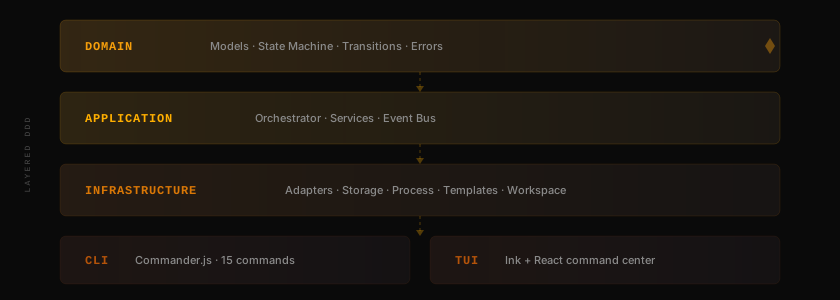
ORCH is an engine first, CLI second. The core has zero dependencies on CLI/TUI layers — you can import `@oxgeneral/orch` as a library and build your own interface.
Directory structure
```
src/
├── domain/ # Models, state machine, errors
├── application/ # Orchestrator engine, services, event bus
├── infrastructure/
│ ├── adapters/ # Claude, OpenCode, Codex, Pi, Cursor, Grok, Antigravity, Shell
│ ├── storage/ # File-based (YAML/JSON/JSONL)
│ ├── process/ # PID management, graceful kill
│ ├── template/ # LiquidJS prompt templates
│ └── workspace/ # Git worktree isolation
├── cli/ # Commander.js commands
└── tui/ # Ink + React command center
```
## Development
```bash
npm run dev # Run via tsx
npm run build # Build ESM + DTS
npm test # 1954 tests via Vitest
npm run typecheck # Strict TypeScript
```
## Community
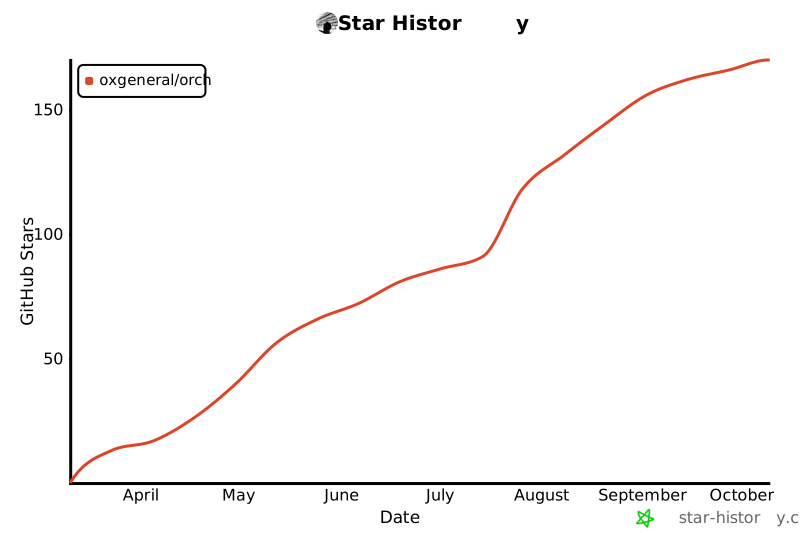
If ORCH saves you time — **[Star it on GitHub](https://github.com/oxgeneral/ORCH)** — it helps other founders find the project.
[](https://star-history.com/#oxgeneral/ORCH&Date)
- **Open an issue** if something breaks or could be better
- **Submit a PR** — see [CONTRIBUTING.md](CONTRIBUTING.md)
## Ship something with ORCH?
> Using ORCH on a real project? [Share your setup](https://github.com/oxgeneral/ORCH/issues/new?title=Using+ORCH&body=Tell+us+about+your+setup) — we'd love to hear how it went.
## FAQ
Do I need a team to use ORCH?
No. **Solo founders are the primary users.** You + 2 agents is already a zero-human company. ORCH gives you auto-retry, state machine, dashboard, and token tracking even with a single agent. Start with one, scale to departments.
Will agents mess up my codebase?
No. Every agent works in an isolated git worktree on its own branch. Nothing touches `main` until you explicitly approve. Mandatory review step in the state machine. Scope overlap detection prevents conflicts before they happen.
Is this only for engineering?
No. The shell adapter runs any CLI tool — which means ORCH orchestrates any process. Engineering, editorial, sales, analytics, security, DevOps. **If it runs in a terminal, it's an employee.** Deploy `content-agency`, `data-lab`, or `sales-machine` with one command.
How much does it cost?
ORCH is open-source (MIT license). You pay only for the AI APIs you already use — Claude, Codex, etc. The TUI shows token costs per agent per run in real-time. Example: 5 agents, 6 tasks — **$4.20 in tokens**. No surprise bills.
What AI tools does it support?
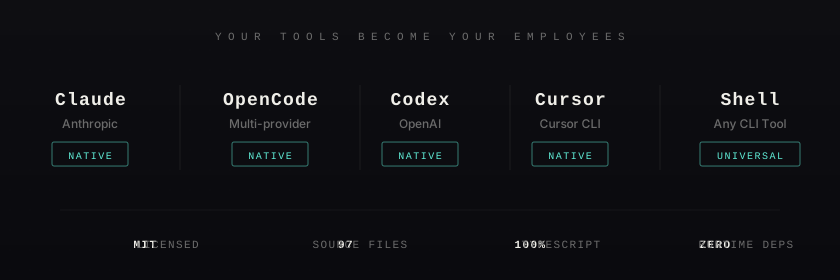
Eight adapters: **Claude Code**, **OpenCode** (Gemini, DeepSeek, any OpenRouter model), **Codex**, **Pi**, **Cursor**, **Grok**, **Antigravity**, and **Shell** (any CLI tool). Your API keys, your tools — ORCH coordinates them.
Can I run agents 24/7 on a server?
Yes. `orch serve` runs the orchestrator as a headless daemon — no TUI, structured JSON logs to stdout. Deploy with pm2, systemd, or any process manager. Add tasks from another terminal or machine — the daemon picks them up automatically. Graceful shutdown on SIGINT/SIGTERM.
Is there a cloud component?
None. Zero cloud. All state in `.orchestry/` — plain YAML, JSON, JSONL files. No signup, no account, no data leaves your machine.
How is this different from Paperclip?
Paperclip needs PostgreSQL, a web server, and cloud setup. ORCH needs `npm install`. Same vision — zero-human companies — but ORCH is the hacker's version: terminal-first, file-based, zero infrastructure, MIT licensed.
MIT — build whatever you want. This is how zero-human engineering teams start.