
oMockman








English | Русский
A browser DevTools extension that intercepts `fetch` and `XMLHttpRequest` in the
page and replaces responses — and request bodies on their way to the server —
with your own: no proxy, no changes to the application under test, no rebuild.
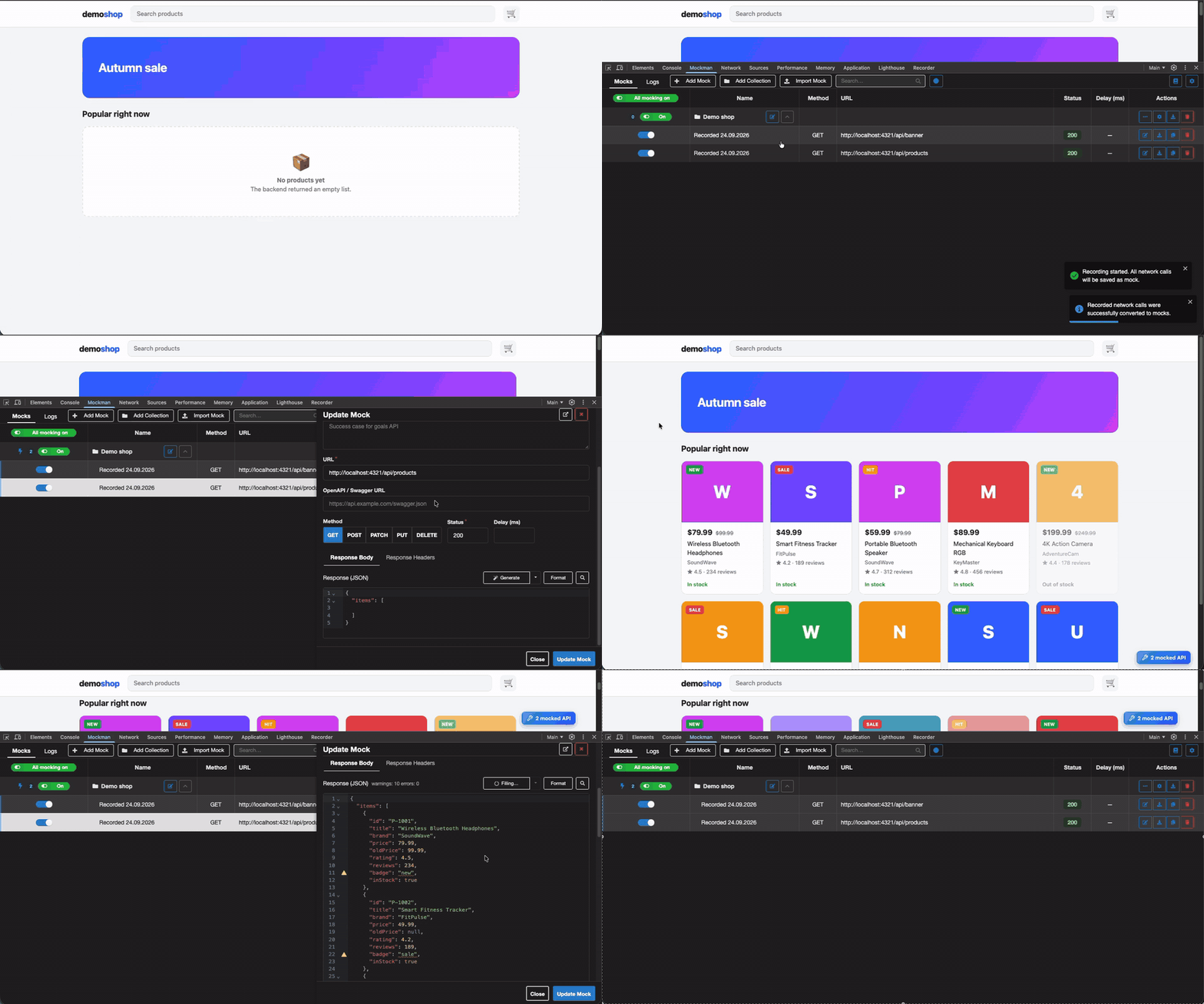
oMockman adds a **Mockman** tab to DevTools with two views: **Mocks** (rules that
replace responses) and **Logs** (every request the page makes, one click away
from becoming a mock).
- Chrome / Chromium (Manifest V3) and Firefox (Manifest V2)
- Mock by `METHOD + URL`, including dynamic paths (`/users/:id`, `(.*)`)
- Status, body, headers and an artificial delay per mock
- Request-body mocking: the page sends its request, the server receives the body from the mock, and the page gets the real response
- Mock headers laid over the real response, leaving its body and status alone
- Sending a request from the panel: repeat one from Logs or try out a mock's request body, with the page's cookies
- A collection scenario that answers one endpoint call after call: the first call gets one mock, the next one another
- Collections, import/export, environment variables in URLs (`{BASE_URL}/api`)
- Response and request bodies validated against an OpenAPI schema
- Optional AI generation of response and request bodies through any OpenAI-compatible endpoint you configure
---
## How it compares
The usual tools for replacing responses are Postman, Proxyman, Charles or Fiddler. They are
powerful, but they are separate applications: you run them next to the browser and sometimes
set up a proxy and trust its certificate. Browser extensions are lighter, but most of them cover
only the basic case of swapping one response.
oMockman covers the whole mocking workflow inside DevTools:
- **Lives next to the Network tab.** No extra windows or proxies; a logged request becomes a mock in one click.
- **Mocks both directions.** Serve the page your response, or send your request body to the server and get the real answer.
- **Postman-style collections.** Folders and subfolders, with a whole group switched on or off at once.
- **JSON import and export.** Hand a set of mocks to another team with its folder structure intact.
- **OpenAPI validation.** A mock body is checked against the Swagger schema, and contract mismatches are highlighted in the editor.
- **AI-generated bodies.** Plausible data, edge cases or a schema-shaped error — for responses and requests — through any OpenAI-compatible API.
- **JSON editor** with format errors highlighted and one-click formatting.
- **Chrome and Firefox** from one codebase.
---
## Quick start
1. Install the extension (see [Installing](#installing)).
2. Open the site whose requests you want to replace.
3. Open DevTools (`F12`, or `Cmd+Option+I` on macOS) and switch to the
**Mockman** tab.
4. Press **Add Mock**, fill in URL, method, status and the response body, then
turn mocking on with the toggle in the header.
The quickest route is the other way round: in **Logs**, find the request, press
**Mock**, and the form opens pre-filled with the real request and response.
---
## Installing
### From a release
Download the latest package from
[Releases](https://github.com/ozontech/oMockman/releases):
`omockman-chrome-*.zip` for Chrome, `omockman-firefox-*.xpi` for Firefox.
- **Chrome**: unzip, open `chrome://extensions`, enable *Developer mode*,
choose *Load unpacked* and select the unzipped folder.
- **Firefox**: the package is not signed by Mozilla yet, and regular Firefox
installs only signed add-ons. Two ways around it:
- open `about:debugging` → *This Firefox* → *Load Temporary Add-on* and pick
the `.xpi`. The add-on stays until Firefox restarts;
- for a permanent install use Firefox Developer Edition or Nightly: set
`xpinstall.signatures.required` to `false` in `about:config`, then open the
`.xpi`.
### From source
```bash
git clone https://github.com/ozontech/oMockman.git
cd oMockman
npm ci
npm run build:chrome # dist/chrome
npm run build:firefox # dist/firefox
```
- **Chrome**: open `chrome://extensions`, enable *Developer mode*, choose *Load
unpacked* and select `dist/chrome`.
- **Firefox**: load `dist/firefox` through `about:debugging` → *This Firefox* →
*Load Temporary Add-on*, or build an `.xpi` with `npm run pack:firefox` and
install it the same ways as a release package above.
### Requirements
- Node.js 24 (see `.nvmrc`)
- npm 10+
---
## AI agents and MCP
Mockman 2.5 adds a local MCP server for **macOS/Linux**. It lets an agent use
recorded Logs to prepare mocks, organize task/case collections, import/export
sets and run them in a selected tab. Windows extension builds are supported,
but Windows MCP agent IPC is not yet available.
1. Download and unpack the MCP archive from [Releases](https://github.com/ozontech/oMockman/releases),
or run `npm ci && npm run build:mcp` from this repository (Node.js 24).
2. Configure your MCP client with command `node` and the absolute path to the
server. For clients using `mcpServers` JSON:
```json
{"mcpServers":{"mockman":{"command":"node","args":["/absolute/path/to/oMockman/dist/mcp/index.js"]}}}
```
3. Restart the client and ask it to connect Mockman. Enter its two-minute pairing
code in **Mockman → Settings → MCP**.
4. Select the application tab, allow its site and enable the required permissions:
scenario changes for writes/runs; traffic recording for request/response access.
5. Ask, for example: **“Use the recorded responses to prepare an empty orders list.”**
If an example is missing, perform the requested page action and tell the agent
to continue. Synthetic replacements require separate approval.
Fixed responses use ordinary collections; sequences are for successive different
answers from the same endpoint. Runs target one tab, even when several tabs share
an allowed site. Browser navigation/clicks are separate from MCP mock management.
See the [MCP guide](packages/mcp-server/README.md) for troubleshooting, compatibility
and optional [agent workflows](packages/skills). Firefox requires **142+**.
---
## Development
Commands, tooling and where each part of the code lives.
```bash
npm ci # install dependencies
npm run dev # vite dev server for the panel UI
npm test # unit tests (vitest)
npm run lint # eslint + tsc
npm run playwright # end-to-end tests against the built extension
```
`npm run playwright` needs a built extension: run `npm run build:chrome` first.
A `Makefile` wraps the same commands (`make build`, `make test`, `make lint`,
`make e2e`, `make pack`).
### Layout
| Path | What lives there |
|---|---|
| `src/panel` | the DevTools panel (React, Zustand, Semantic UI) |
| `src/content-script.ts`, `src/contentScript` | the isolated-world half: owns the store, matches requests |
| `src/inject` | the page-world half: patches `fetch`/`XHR`, holds no data |
| `src/background.ts`, `src/background` | service worker: response headers, AI and OpenAPI requests |
| `src/services` | shared logic: URL matching, JSON, env variables, AI client |
| `public/chrome`, `public/firefox` | manifests and static assets per browser |
---
## How interception works
The mock store never enters the page; the page gets only the answer to its own request.
The extension lives in the browser's *isolated world*, while `window.fetch`
belongs to the page's *main world*. Patching the page's `fetch` therefore
requires a script injected into the page itself — and anything that script can
read, the page can read too.
Mockman keeps the two apart:
```
page (main world) isolated world extension
┌────────────────────┐ ┌──────────────────┐ ┌──────────────┐
│ inject.js │◄─────►│ content script │◄────►│ background │
│ patches fetch/XHR │ private│ owns the store │ port │ SW: headers │
│ holds no mock data │ port │ matches requests │ │ AI / OpenAPI │
└────────────────────┘ └──────────────────┘ └──────┬───────┘
│ port
┌──────▼───────┐
│ DevTools │
│ panel │
└──────────────┘
```
- The mock store never enters the page's world. For each intercepted request the
injected script asks the isolated world *about that one request* and gets back
either "not mocked" or the response to serve.
- The channel is a `MessagePort` handed over at `document_start`, before any page
script runs. The only thing ever posted on the shared `window` channel is the
handshake, which carries no data.
- If the bridge is unavailable, mocking is off and every request goes to the
network — the extension fails open for the page and closed for your data.
Synchronous `XMLHttpRequest` (`open(..., false)`) cannot wait for that exchange
and is never mocked.
---
## Site access
Mocks are served only on sites you allowed. One click per site.
A mock is served only on a site you allowed it on. Matching goes by method and
URL, so without this any page could read a mock body by guessing an internal
URL: the wrapper answers before the request leaves the browser, and CORS never
comes into play.
- Access is granted per **origin** — scheme, host and port. `https://site.ru`,
`http://site.ru` and `https://site.ru:8443` are three different sites.
- A grant covers the **whole site**: every mock you have, not a chosen subset.
Mocks may address any host, so a frontend on `app.example.ru` can mock
`api.example.ru`. The grant says *where Mockman works*, not whose URLs it may
replace.
- The origin is taken from the browser, never from the page.
Open the panel on a site with no grant and a banner offers **Allow and reload**.
It reloads because requests that already left cannot be mocked retroactively.
Granted sites are listed under **Settings → Site access**, where they can be
revoked.
A grant gates **mocking only**. Logs are captured on any site while the panel is
open with logging enabled, so **Logs** keeps filling up on a site you never
allowed — you just cannot replace those responses yet.
**Settings → Site access** also has *Allow every site automatically*. With it on,
Mockman works everywhere without asking and records each site as it is first
seen, so the list stays accurate and any site can still be revoked. It is off by
default, and turning it on gives every page you open the ability to read your
mocks.
A request made in the first moments of a page load waits until the extension has
connected to the page, so that it can be mocked too. That takes a few milliseconds
and is capped at one second. After that, on a site with nothing granted, requests
go straight to the network: the extension adds no measurable latency to sites you
never use it on.
---
## Settings
Most settings live under the cog in the panel header. Nothing that widens what
the extension can reach is on by default.
| Setting | Where | Default |
|---|---|---|
| Site access for a page | banner in the panel → **Allow and reload** | not allowed |
| Allow every site automatically | Settings → Site access | off |
| AI connections | Settings → AI connections | none configured |
| Allow plain http to a local AI endpoint | per AI connection | off |
| Allow local OpenAPI sources (localhost, private addresses) | Settings → Other | off |
| Environment variables for URLs (`{BASE_URL}`) | Settings → Environment & Variables | one empty `default` profile |
| Theme | Settings → Other | follows the system on first run |
| Language | Settings → Other | English |
| Logging of requests | header toggle | on, only while the panel is open |
| Recording responses into mocks | header toggle | off |
AI generation of response bodies
Works with any OpenAI-compatible API: public, corporate or local. Add a connection under
**Settings → AI connections** with a name, server URL, model and key; **Test connection**
checks it. To skip the form, paste a ready config through **Import JSON**.
The mode next to **Generate** in the mock form decides what you get:
| Mode | What it generates |
|---|---|
| **Happy** | plausible data for a successful response |
| **Corner** | edge cases: empty values, long strings, special characters |
| **Error** | an error that fits the schema; needs a 400–599 status and an OpenAPI schema |
With an OpenAPI schema on the mock, the body is generated to match it, which is the most
accurate option. A connection can carry a shared prompt, such as "all names in Spanish".
If the model cuts the JSON short, raise the token limit in the connection settings.
---
## Permissions
Why the extension asks for each browser permission.
| Permission | Why |
|---|---|
| `` (host permission) | test environments are not known in advance; mocking has to work on whatever host you open |
| `webRequest` | the only way to read response headers that CORS hides from `fetch`; nothing is blocked or modified |
| `storage` | mocks, collections and settings live in `chrome.storage.local` |
| `unlimitedStorage` | lifts the 10 MB `chrome.storage.local` quota, so mocks with large bodies can be saved |
| `tabs` | the panel needs to know which tab it is inspecting |
Request and response data is only collected while a Mockman panel is open for
that tab and logging is enabled. Credential headers (`set-cookie`,
`authorization`, `x-api-key`, …) are never stored.
Bodies larger than 20 MB are not captured at all — never partially, so a
cut-off body cannot turn into a broken mock. The page itself still receives the
full response; the log entry shows a "body is too large" error instead of the
body, and a mock created from it asks for a smaller body before it can be saved.
---
## Privacy and data
No backend, no telemetry. The only outbound request is the AI endpoint you configure.
Mockman has no backend, no telemetry and no analytics. Everything it knows lives
in `chrome.storage.local` in your own browser.
The only outbound request the extension makes on its own is to the AI endpoint
you configure, and only when you press **Generate**:
- AI is off by default and ships with no provider, no URL and no key.
- The endpoint must be `https`. Plain `http` is refused unless you explicitly
enable it for a `localhost` endpoint on that connection.
- The prompt contains the mock's URL, method, status, its current response body
and, if configured, a fragment of the OpenAPI schema. Do not paste anything
into a mock body you would not send to that endpoint.
- The API key is stored in `chrome.storage.local` unencrypted, like any other
DevTools extension's settings. Anyone with access to your browser profile can
read it.
Loading an OpenAPI schema is a fetch the background worker makes for you; it
refuses loopback and private addresses unless you turn on *Allow local OpenAPI
sources* in Settings.
---
## Limitations
- Nothing is mocked until you allow the site (see above).
- WebSocket and Server-Sent Events are not intercepted.
- Opaque (`no-cors`) responses are logged without a body.
- Synchronous XHR is never mocked (see above).
- Request bodies are replaced only for `fetch` and asynchronous XHR, and never for GET/HEAD; `navigator.sendBeacon`, `