Sweet window management for macOS
Sweet window management for macOS

 * Launch at login
* Hide menubar icon
* Focus on window
* Smart resizing with quadrants
* Ignore custom apps
### Quadrants
https://github.com/pablopunk/SwiftShift/assets/4324982/5aac5bab-ad87-43c1-b2fe-fd55077f56f6
## Contributing
You can either use Xcode ([be careful with signing](https://github.com/pablopunk/SwiftShift/issues/52#issuecomment-2160423351)) or build it
directly from the command line:
### Build and run from the command line
```bash
make run
```
### Website
The marketing site lives in `www/` and is deployed by Vercel with Root Directory set to `www`.
```bash
cd www
bun install
bun run dev
```
### Accessibility permissions running locally
Local Debug builds use a separate app identity (`Swift Shift Dev` / `com.pablopunk.Swift-Shift.dev`), so they can coexist with the released app without reusing the same Accessibility permission entry.
I'm open to PRs and requests. If you are looking for something to do, take a look at the issues marked as [`help wanted`](https://github.com/pablopunk/SwiftShift/issues?q=is:issue+is:open+label:%22help+wanted%22).
### Release
One-time setup: store notarization credentials in your keychain:
1. Generate an app-specific password at [appleid.apple.com](https://appleid.apple.com) (Sign-In and Security → App-Specific Passwords)
2. Run:
```bash
xcrun notarytool store-credentials "SwiftShift" --apple-id YOUR_APPLE_ID --team-id YOUR_TEAM_ID
```
It will prompt you to paste the app-specific password.
Then release with a single command:
```bash
make release VERSION=0.28.0
```
This will: bump the version, archive, export, notarize, staple, generate the appcast, create a branch/commit/tag, open a PR with auto-merge, create a GitHub release with the zip attached, and update the Homebrew cask automatically.
If `GH_PAT` is available in the environment, the release script will use it to push the Homebrew tap update to `pablopunk/homebrew-brew`.
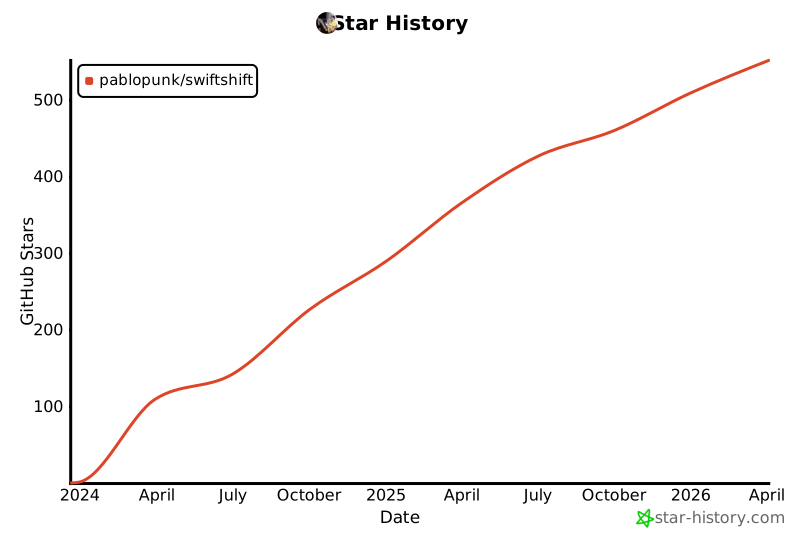
## Star History
[](https://www.star-history.com/#pablopunk/SwiftShift&type=date&legend=top-left)
## License
MIT License
* Launch at login
* Hide menubar icon
* Focus on window
* Smart resizing with quadrants
* Ignore custom apps
### Quadrants
https://github.com/pablopunk/SwiftShift/assets/4324982/5aac5bab-ad87-43c1-b2fe-fd55077f56f6
## Contributing
You can either use Xcode ([be careful with signing](https://github.com/pablopunk/SwiftShift/issues/52#issuecomment-2160423351)) or build it
directly from the command line:
### Build and run from the command line
```bash
make run
```
### Website
The marketing site lives in `www/` and is deployed by Vercel with Root Directory set to `www`.
```bash
cd www
bun install
bun run dev
```
### Accessibility permissions running locally
Local Debug builds use a separate app identity (`Swift Shift Dev` / `com.pablopunk.Swift-Shift.dev`), so they can coexist with the released app without reusing the same Accessibility permission entry.
I'm open to PRs and requests. If you are looking for something to do, take a look at the issues marked as [`help wanted`](https://github.com/pablopunk/SwiftShift/issues?q=is:issue+is:open+label:%22help+wanted%22).
### Release
One-time setup: store notarization credentials in your keychain:
1. Generate an app-specific password at [appleid.apple.com](https://appleid.apple.com) (Sign-In and Security → App-Specific Passwords)
2. Run:
```bash
xcrun notarytool store-credentials "SwiftShift" --apple-id YOUR_APPLE_ID --team-id YOUR_TEAM_ID
```
It will prompt you to paste the app-specific password.
Then release with a single command:
```bash
make release VERSION=0.28.0
```
This will: bump the version, archive, export, notarize, staple, generate the appcast, create a branch/commit/tag, open a PR with auto-merge, create a GitHub release with the zip attached, and update the Homebrew cask automatically.
If `GH_PAT` is available in the environment, the release script will use it to push the Homebrew tap update to `pablopunk/homebrew-brew`.
## Star History
[](https://www.star-history.com/#pablopunk/SwiftShift&type=date&legend=top-left)
## License
MIT License