# WeChat OpenCode
[中文](README.md) | [English](README.en.md)



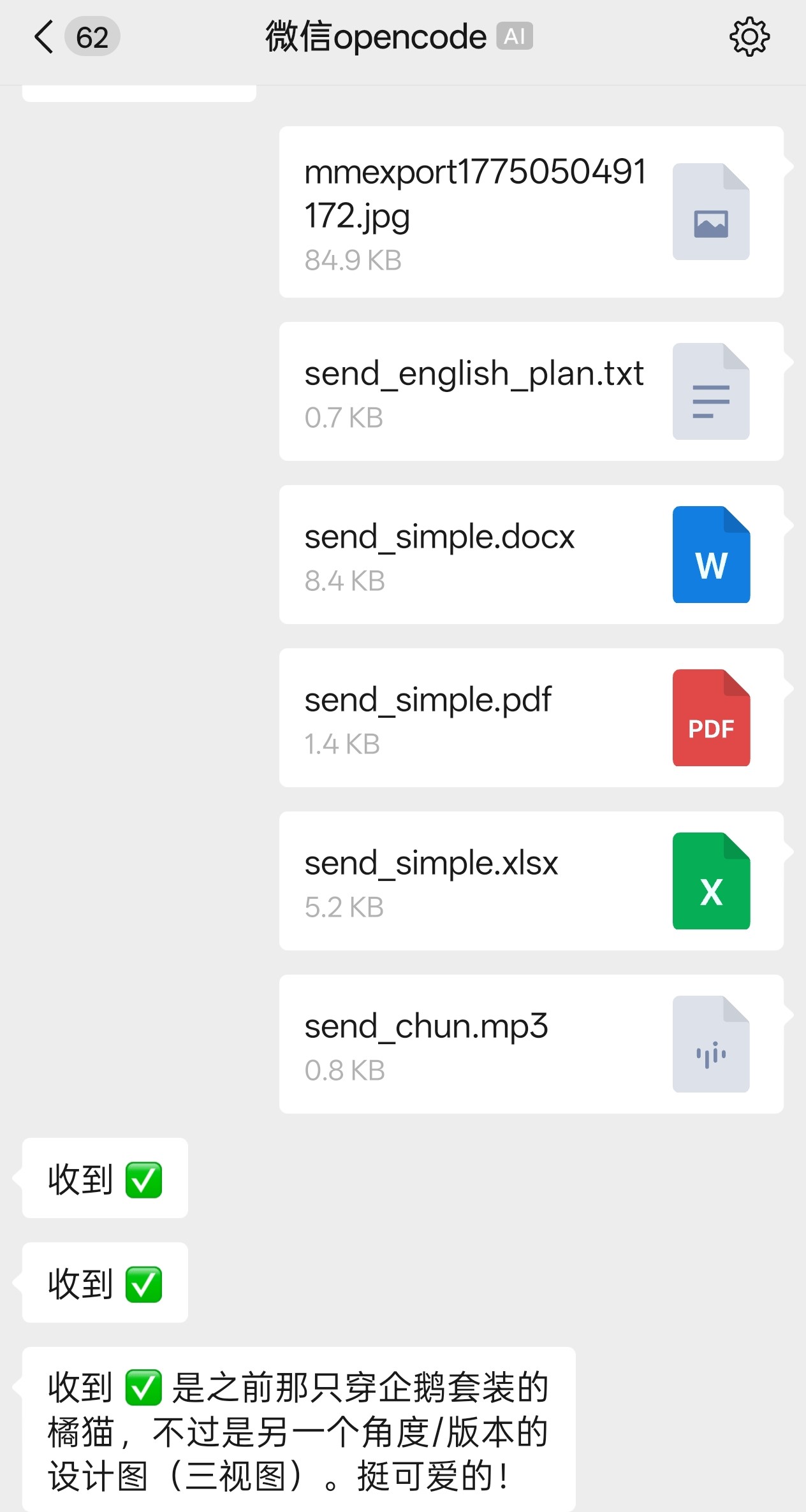
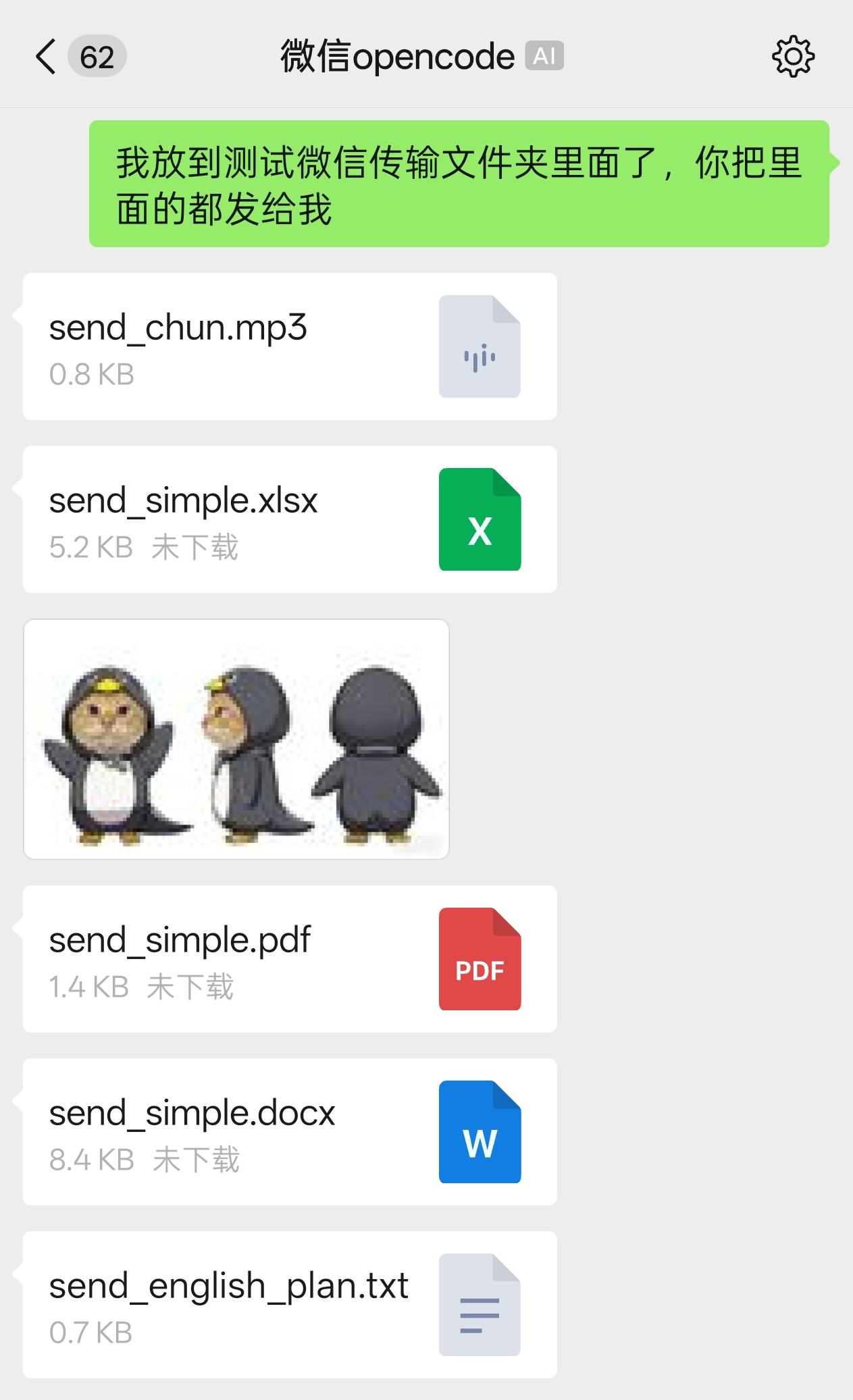
Bridge WeChat direct messages to OpenCode, with full bidirectional support for text, images, files, audio, and video. The goal is to recreate the OpenCode TUI and Desktop experience inside WeChat.
 ## Features
- **Send** — Text, images, files, audio/video sent from WeChat to the OpenCode agent; media is auto-downloaded to `~/.wechat-bridge-opencode/tempfile/` and forwarded as a file-path attachment
- **Receive** — Agent replies are forwarded to WeChat; the `send-wechat` tool lets the agent proactively push text, files, and images to WeChat
- **WeChat slash commands** — `/help`, `/workspace`, `/session`, `/agent`, `/model`, `/stop`, `/compact`, `/silent`, `/history` and 18+ more commands are consumed by the bridge, never forwarded to the agent
- **OpenCode slash commands** — Any `/xxx` the bridge doesn't recognize is forwarded to the agent as plain text, triggering OpenCode's built-in slash commands (e.g. `/init`, `/review`). Send `/help` to see all available commands
- **LLM Q&A** — Forward OpenCode `question` tool prompts to WeChat, supporting options / multi-select / custom answers; 30-min soft timeout auto-rejects unanswered questions
- **Permission cards** — Surface OpenCode's `permission.asked` events to WeChat as `once` / `always` / `reject` cards; `/auto-permission` toggles auto-accept mode; 30-min soft timeout
- **Silent mode** — When `/silent` (alias `/sl`) is on, the bridge suppresses reasoning, tool summaries, and incremental text during a turn; only the final text reply is delivered at turn completion. Questions and permission requests are unaffected. Settings persist across bridge restarts
- **Cross-session notifications** — Forward other sessions' question/permission/error/completion events to WeChat; auto-render cards when switching to a pending session
- **QR Login** — Terminal QR code rendering for WeChat login
- **OpenCode Server** — HTTP API based, no ACP subprocess required
## Installation & Usage
### Method 1: npx (no install, recommended)
Run directly in your project directory:
```bash
cd /path/to/your/project
npx wechat-bridge-opencode
```
### Method 2: Global install
```bash
npm install -g wechat-bridge-opencode
```
After installation, use the shorthand command from any project directory:
```bash
cd /path/to/your/project
wbo
```
First run will:
1. Auto-start `opencode serve` (HTTP Server)
2. Show QR code in terminal
3. Scan QR with WeChat
4. Save login token to `~/.wechat-bridge-opencode`
5. Start polling WeChat DMs
## Options
| Flag | Description |
|------|-------------|
| `--cwd ` | Working directory |
| `--server-url ` | Connect to external OpenCode Server; skip auto-start |
| `--server-username ` | HTTP Basic username for the external server (pair with `--server-password`) |
| `--server-password ` | HTTP Basic password for the external server |
| `--server-token ` | Bearer token for the external server (overrides Basic auth) |
| `--login` | Force re-login |
| `--daemon` | Run in background |
| `--config ` | JSON config file |
**External server authentication**
When `--server-url` points to an authenticated server, the bridge automatically injects an `Authorization` header. Two independent options are supported, with Bearer taking precedence:
- **Basic auth**: pass `--server-username` and `--server-password` together. Common with reverse proxies (nginx/caddy) using built-in auth.
- **Bearer token**: pass `--server-token `. Common with API keys or custom auth middleware.
To keep secrets out of shell history and on-disk config files, env vars are also supported (**precedence: CLI > env var > config file**):
```bash
export WECHAT_OPENCODE_SERVER_TOKEN=xxx
export WECHAT_OPENCODE_SERVER_USERNAME=admin
export WECHAT_OPENCODE_SERVER_PASSWORD=secret
```
> Basic auth requires BOTH `username` and `password` — supplying only one is a fatal startup error. When both Basic and Bearer are configured, the Bearer token wins. `password` and `token` are treated as secrets: never logged and never echoed back by `/status`.
**Startup timeout**
In sidecar mode the bridge waits for `opencode serve` to become ready before continuing (so subsequent session creation doesn't fail because the server isn't listening yet). Default is 180 seconds (3 minutes) — enough to cover first-time `npx opencode-ai` installs where npx has to download the package; warm restarts are typically <1s. To override:
```bash
export WECHAT_OPENCODE_STARTUP_TIMEOUT_MS=300000 # 5 minutes
export WECHAT_OPENCODE_STARTUP_TIMEOUT_MS=600000 # 10 minutes (very slow networks)
```
Valid values: non-negative integer in milliseconds. `0` means fail immediately (for tests); non-numeric or negative values log a warning and fall back to the default. While waiting past the first 20 seconds the daemon log fires a progress line every 20 seconds (with an npx-download hint) so admins watching the log can recognise a long first-install scenario.
## WeChat Commands
### Help (`/help`)
| Command | Description |
|---------|-------------|
| `/help` (`/h`, `/?`) | Show all available commands |
### Status (`/status`)
| Command | Description |
|---------|-------------|
| `/status` | Show current session (with title), workspace, agent, model, reasoning, context usage, and **MCP server status** (with failure reasons). Agent/Model/Reasoning/MCP are fetched from the OpenCode Server via HTTP API (scoped to the current workspace via `?directory=...`; auto-refreshed on workspace switch). For an empty session, Model falls back to the workspace's `model:` field from the server config |
### Workspace (`/workspace` or `/ws`)
| Command | Description |
|---------|-------------|
| `/workspace list` | List all workspaces sorted by recent activity, numbered |
| `/workspace status` | Show current workspace |
| `/workspace switch ` | Switch to directory by path (or by index from `/workspace list`); resumes the most recent session in that workspace (creates a new one if none exists) |
| `/workspace add ` | Add and switch to directory |
### Session (`/session` or `/s`)
| Command | Description |
|---------|-------------|
| `/session list` | List 20 most recent sessions with cwd |
| `/session list current` | List 20 most recent sessions in current workspace |
| `/session switch ` | Switch to session by index (auto-switches workspace) |
| `/session new` | New session (clear context) |
| `/session status` | Show current session info |
### Agent (`/agent` or `/a`)
| Command | Description |
|---------|-------------|
| `/agent list` | List available primary (non-built-in) agent modes with index |
| `/agent switch ` | Switch mode by name or index |
| `/agent status` | Show current agent mode |
### Model (`/model`)
| Command | Description |
|---------|-------------|
| `/model list` | List model providers with counts |
| `/model list ` | List all models under a specific provider |
| `/model switch ` | Switch model (e.g. anthropic/claude-sonnet-4-5) |
| `/model status` | Show current model |
### Reasoning (`/reasoning`)
| Command | Description |
|---------|-------------|
| `/reasoning list` | List actual reasoning levels for the current model (from model variants), with a synthetic `Default` entry at position 0 that mirrors the OpenCode TUI's variant dialog — selecting it (or `/reasoning switch default`) sets `currentReasoning` to `undefined` so the next prompt omits `variant` and the server applies its model default |
| `/reasoning switch ` | Switch reasoning level |
| `/reasoning status` | Show current reasoning level |
### Stop (`/stop`)
| Command | Description |
|---------|-------------|
| `/stop` | Stop the running agent |
| `/restart` | Restart OpenCode Server (external server mode: recover previous session only) |
### Context (`/compact`)
| Command | Description |
|---------|-------------|
| `/compact` (`/summarize`) | Force-trigger OpenCode Server's context compaction via `POST /session/:id/summarize`. Uses the session's current model for the summarization LLM call; the server replaces the active context with a rolling summary while keeping the full transcript durable. Rejected while the agent is mid-turn (`/stop` first); allowed while a question or permission is pending. See `.omo/plans/compact-command-design.md` for rationale |
### History (`/history`)
| Command | Description |
|---------|-------------|
| `/history` (`/hist`) | Show the most recent N text-bearing messages from the current session in chronological order (oldest at top, newest at bottom). Optional trailing positive integer N (default 5, range 1-20; 0/negative/>20 are rejected with no silent clamp). Read-only — works while the agent is busy. Display: text parts only — turns with zero text parts (pure tool-call / reasoning / file turns, common with the Sisyphus ultraworker style) are filtered out entirely so the chat log stays a chat log; user messages marked 👤 + timestamp, assistant messages marked 🤖 + timestamp + agent/model; each text body is forwarded in full (the bridge does NOT truncate to 500 chars — long messages are split into multiple WeChat sends by the outbound queue, which honours the 4000-char per-message cap). Header carries the session title (when available, fetched best-effort via `GET /session/:id`) and cwd; appends `(实际显示 X 条)` when the over-fetched window doesn't have N text turns. Over-fetches by 3× (capped at 60) and picks the LAST N text-bearing messages so the header count always matches the request. Fetches via `GET /session/:id/message?limit=N`; the server returns OLDEST-FIRST (its `MessageV2.page` does its own `items.reverse()`), so the bridge does NOT reverse again. |
### Thought Display (`/thought-display`)
| Command | Description |
|---------|-------------|
| `/thought-display on` (default) | Show model reasoning in WeChat as a single `🧠 Thought · {summary} · {duration}` line per reasoning block (no body — only the summary) |
| `/thought-display off` | Hide reasoning from WeChat (only logged to bridge log) |
| `/thought-display status` | Show current thought display state |
Settings persist independently across bridge restarts (~/.wechat-bridge-opencode/.wechat-bridge-state.json).
### Tool Display (`/tool-display`)
| Command | Description |
|---------|-------------|
| `/tool-display on` (default) | Show tool summary at end of turn (emoji + tool name + opencode-generated title, e.g. `✅ webfetch https://httpbin.org/get`, `✅ bash exit 0`) |
| `/tool-display off` | Hide tool summary |
| `/tool-display status` | Show current tool display state |
Settings persist independently across bridge restarts (~/.wechat-bridge-opencode/.wechat-bridge-state.json).
### Silent Mode (`/silent`)
| Command | Description |
|---------|-------------|
| `/silent on` (default off) | Enable silent mode (immersive mode) — hide reasoning, tool summaries, and incremental text parts during a turn; only send the final text reply at turn completion. Questions and permission requests are unaffected. |
| `/silent off` | Disable silent mode — resume real-time display of reasoning / tool / incremental text |
| `/silent status` | Show current silent mode state |
| `/sl` (alias) | Short alias for `/silent` |
Settings persist independently across bridge restarts (~/.wechat-bridge-opencode/.wechat-bridge-state.json).
### Cross-session Notifications (`/notify`)
| Command | Description |
|---------|-------------|
| `/notify` (`/n`) | Show notification status |
| `/notify on\|off` | Master switch |
| `/notify types on\|off` | Toggle one event type (question/permission/error/completion) |
| `/notify status` | Show current settings |
Forwards other sessions' question, permission, error, and completion events to WeChat. Auto-renders the card when switching to a session with a pending item.
### System (`/version`)
| Command | Description |
|---------|-------------|
| `/version` | Show Bridge, OpenCode Server, and the latest version published to npm; in sidecar mode hints `/restart` when a newer server version is available. External-server mode cannot update via the bridge |
### Message Limit (`/next`)
| Command | Description |
|---------|-------------|
| `/next` | WeChat limits bots to 10 consecutive messages; user reply required to continue. Send `/next` to reset the counter without forwarding to the agent |
### LLM Q&A (`/reject-question`)
| Command | Description |
|---------|-------------|
| `/reject-question` (`/rq`) | Dismiss a pending LLM `question` request. The agent receives `QuestionRejectedError` and proceeds without an answer. No-op if no question is pending. |
When the OpenCode agent calls the `question` tool, the bridge forwards the question verbatim to the WeChat DM; the user's reply is sent back to the server.
**WeChat input format**: `Q{n}={value}` to pick, `Q{n}-{text}` to force a custom answer, or positional `1 --- 2 --- 3` for single-question ordered answers. Multi-question, multi-select, and custom text via the dash marker are all supported; mobile whitespace around `=` is tolerated.
**Soft timeout**: 30 minutes of no reply auto-rejects and sends `⏱ Question timed out` to WeChat.
### Permission (`/reject-permission`, `/auto-permission`)
When the OpenCode agent calls a tool whose permission rule is `ask`, the bridge sends a permission card to WeChat. The user picks `once`, `always`, or `reject`.
**Reply grammar:** `1` (once) / `2` (always) / `3` (reject), or keywords `once` / `always` / `reject`; for 2+ pending permissions use `P1=once P2=reject` to control each.
**Explicit reject:** `/reject-permission` (alias `/rp`) dismisses all pending permission cards.
**Auto-accept toggle:** `/auto-permission` (alias `/ap`) sets `off` (default) / `once` / `always`. **Note:** `always` rules are stored in server memory and lost when `opencode serve` restarts.
**Soft timeout:** 30 minutes without reply → auto-reject + `⏱ Permission timed out` message.
## Requirements
- Node.js 20+
- WeChat iLink bot API access
- [OpenCode](https://github.com/anomalyco/opencode) (requires `opencode serve` support)
- Bridge auto-starts `opencode serve`; use `--server-url ` to connect to an external instance instead
## Storage
Runtime data stored in `~/.wechat-bridge-opencode`:
- Login token
- Auth tokens
- Temp files (downloaded media)
- Daemon PID / log
- Bridge state (`.wechat-bridge-state.json`)
## Notes
- Direct messages only (group chats ignored)
- `send-wechat` tool auto-installed to `~/.config/opencode/tools/send-wechat.ts`
## Acknowledgment
This project is based on [wechat-acp](https://github.com/formulahendry/wechat-acp) by [formulahendry](https://github.com/formulahendry). Thanks for the original work!
## Disclaimer
This project is **not** developed by the OpenCode team or the official WeChat team, and has **no affiliation** with either. It is purely a personal learning project.
## License
MIT
## Features
- **Send** — Text, images, files, audio/video sent from WeChat to the OpenCode agent; media is auto-downloaded to `~/.wechat-bridge-opencode/tempfile/` and forwarded as a file-path attachment
- **Receive** — Agent replies are forwarded to WeChat; the `send-wechat` tool lets the agent proactively push text, files, and images to WeChat
- **WeChat slash commands** — `/help`, `/workspace`, `/session`, `/agent`, `/model`, `/stop`, `/compact`, `/silent`, `/history` and 18+ more commands are consumed by the bridge, never forwarded to the agent
- **OpenCode slash commands** — Any `/xxx` the bridge doesn't recognize is forwarded to the agent as plain text, triggering OpenCode's built-in slash commands (e.g. `/init`, `/review`). Send `/help` to see all available commands
- **LLM Q&A** — Forward OpenCode `question` tool prompts to WeChat, supporting options / multi-select / custom answers; 30-min soft timeout auto-rejects unanswered questions
- **Permission cards** — Surface OpenCode's `permission.asked` events to WeChat as `once` / `always` / `reject` cards; `/auto-permission` toggles auto-accept mode; 30-min soft timeout
- **Silent mode** — When `/silent` (alias `/sl`) is on, the bridge suppresses reasoning, tool summaries, and incremental text during a turn; only the final text reply is delivered at turn completion. Questions and permission requests are unaffected. Settings persist across bridge restarts
- **Cross-session notifications** — Forward other sessions' question/permission/error/completion events to WeChat; auto-render cards when switching to a pending session
- **QR Login** — Terminal QR code rendering for WeChat login
- **OpenCode Server** — HTTP API based, no ACP subprocess required
## Installation & Usage
### Method 1: npx (no install, recommended)
Run directly in your project directory:
```bash
cd /path/to/your/project
npx wechat-bridge-opencode
```
### Method 2: Global install
```bash
npm install -g wechat-bridge-opencode
```
After installation, use the shorthand command from any project directory:
```bash
cd /path/to/your/project
wbo
```
First run will:
1. Auto-start `opencode serve` (HTTP Server)
2. Show QR code in terminal
3. Scan QR with WeChat
4. Save login token to `~/.wechat-bridge-opencode`
5. Start polling WeChat DMs
## Options
| Flag | Description |
|------|-------------|
| `--cwd ` | Working directory |
| `--server-url ` | Connect to external OpenCode Server; skip auto-start |
| `--server-username ` | HTTP Basic username for the external server (pair with `--server-password`) |
| `--server-password ` | HTTP Basic password for the external server |
| `--server-token ` | Bearer token for the external server (overrides Basic auth) |
| `--login` | Force re-login |
| `--daemon` | Run in background |
| `--config ` | JSON config file |
**External server authentication**
When `--server-url` points to an authenticated server, the bridge automatically injects an `Authorization` header. Two independent options are supported, with Bearer taking precedence:
- **Basic auth**: pass `--server-username` and `--server-password` together. Common with reverse proxies (nginx/caddy) using built-in auth.
- **Bearer token**: pass `--server-token `. Common with API keys or custom auth middleware.
To keep secrets out of shell history and on-disk config files, env vars are also supported (**precedence: CLI > env var > config file**):
```bash
export WECHAT_OPENCODE_SERVER_TOKEN=xxx
export WECHAT_OPENCODE_SERVER_USERNAME=admin
export WECHAT_OPENCODE_SERVER_PASSWORD=secret
```
> Basic auth requires BOTH `username` and `password` — supplying only one is a fatal startup error. When both Basic and Bearer are configured, the Bearer token wins. `password` and `token` are treated as secrets: never logged and never echoed back by `/status`.
**Startup timeout**
In sidecar mode the bridge waits for `opencode serve` to become ready before continuing (so subsequent session creation doesn't fail because the server isn't listening yet). Default is 180 seconds (3 minutes) — enough to cover first-time `npx opencode-ai` installs where npx has to download the package; warm restarts are typically <1s. To override:
```bash
export WECHAT_OPENCODE_STARTUP_TIMEOUT_MS=300000 # 5 minutes
export WECHAT_OPENCODE_STARTUP_TIMEOUT_MS=600000 # 10 minutes (very slow networks)
```
Valid values: non-negative integer in milliseconds. `0` means fail immediately (for tests); non-numeric or negative values log a warning and fall back to the default. While waiting past the first 20 seconds the daemon log fires a progress line every 20 seconds (with an npx-download hint) so admins watching the log can recognise a long first-install scenario.
## WeChat Commands
### Help (`/help`)
| Command | Description |
|---------|-------------|
| `/help` (`/h`, `/?`) | Show all available commands |
### Status (`/status`)
| Command | Description |
|---------|-------------|
| `/status` | Show current session (with title), workspace, agent, model, reasoning, context usage, and **MCP server status** (with failure reasons). Agent/Model/Reasoning/MCP are fetched from the OpenCode Server via HTTP API (scoped to the current workspace via `?directory=...`; auto-refreshed on workspace switch). For an empty session, Model falls back to the workspace's `model:` field from the server config |
### Workspace (`/workspace` or `/ws`)
| Command | Description |
|---------|-------------|
| `/workspace list` | List all workspaces sorted by recent activity, numbered |
| `/workspace status` | Show current workspace |
| `/workspace switch ` | Switch to directory by path (or by index from `/workspace list`); resumes the most recent session in that workspace (creates a new one if none exists) |
| `/workspace add ` | Add and switch to directory |
### Session (`/session` or `/s`)
| Command | Description |
|---------|-------------|
| `/session list` | List 20 most recent sessions with cwd |
| `/session list current` | List 20 most recent sessions in current workspace |
| `/session switch ` | Switch to session by index (auto-switches workspace) |
| `/session new` | New session (clear context) |
| `/session status` | Show current session info |
### Agent (`/agent` or `/a`)
| Command | Description |
|---------|-------------|
| `/agent list` | List available primary (non-built-in) agent modes with index |
| `/agent switch ` | Switch mode by name or index |
| `/agent status` | Show current agent mode |
### Model (`/model`)
| Command | Description |
|---------|-------------|
| `/model list` | List model providers with counts |
| `/model list ` | List all models under a specific provider |
| `/model switch ` | Switch model (e.g. anthropic/claude-sonnet-4-5) |
| `/model status` | Show current model |
### Reasoning (`/reasoning`)
| Command | Description |
|---------|-------------|
| `/reasoning list` | List actual reasoning levels for the current model (from model variants), with a synthetic `Default` entry at position 0 that mirrors the OpenCode TUI's variant dialog — selecting it (or `/reasoning switch default`) sets `currentReasoning` to `undefined` so the next prompt omits `variant` and the server applies its model default |
| `/reasoning switch ` | Switch reasoning level |
| `/reasoning status` | Show current reasoning level |
### Stop (`/stop`)
| Command | Description |
|---------|-------------|
| `/stop` | Stop the running agent |
| `/restart` | Restart OpenCode Server (external server mode: recover previous session only) |
### Context (`/compact`)
| Command | Description |
|---------|-------------|
| `/compact` (`/summarize`) | Force-trigger OpenCode Server's context compaction via `POST /session/:id/summarize`. Uses the session's current model for the summarization LLM call; the server replaces the active context with a rolling summary while keeping the full transcript durable. Rejected while the agent is mid-turn (`/stop` first); allowed while a question or permission is pending. See `.omo/plans/compact-command-design.md` for rationale |
### History (`/history`)
| Command | Description |
|---------|-------------|
| `/history` (`/hist`) | Show the most recent N text-bearing messages from the current session in chronological order (oldest at top, newest at bottom). Optional trailing positive integer N (default 5, range 1-20; 0/negative/>20 are rejected with no silent clamp). Read-only — works while the agent is busy. Display: text parts only — turns with zero text parts (pure tool-call / reasoning / file turns, common with the Sisyphus ultraworker style) are filtered out entirely so the chat log stays a chat log; user messages marked 👤 + timestamp, assistant messages marked 🤖 + timestamp + agent/model; each text body is forwarded in full (the bridge does NOT truncate to 500 chars — long messages are split into multiple WeChat sends by the outbound queue, which honours the 4000-char per-message cap). Header carries the session title (when available, fetched best-effort via `GET /session/:id`) and cwd; appends `(实际显示 X 条)` when the over-fetched window doesn't have N text turns. Over-fetches by 3× (capped at 60) and picks the LAST N text-bearing messages so the header count always matches the request. Fetches via `GET /session/:id/message?limit=N`; the server returns OLDEST-FIRST (its `MessageV2.page` does its own `items.reverse()`), so the bridge does NOT reverse again. |
### Thought Display (`/thought-display`)
| Command | Description |
|---------|-------------|
| `/thought-display on` (default) | Show model reasoning in WeChat as a single `🧠 Thought · {summary} · {duration}` line per reasoning block (no body — only the summary) |
| `/thought-display off` | Hide reasoning from WeChat (only logged to bridge log) |
| `/thought-display status` | Show current thought display state |
Settings persist independently across bridge restarts (~/.wechat-bridge-opencode/.wechat-bridge-state.json).
### Tool Display (`/tool-display`)
| Command | Description |
|---------|-------------|
| `/tool-display on` (default) | Show tool summary at end of turn (emoji + tool name + opencode-generated title, e.g. `✅ webfetch https://httpbin.org/get`, `✅ bash exit 0`) |
| `/tool-display off` | Hide tool summary |
| `/tool-display status` | Show current tool display state |
Settings persist independently across bridge restarts (~/.wechat-bridge-opencode/.wechat-bridge-state.json).
### Silent Mode (`/silent`)
| Command | Description |
|---------|-------------|
| `/silent on` (default off) | Enable silent mode (immersive mode) — hide reasoning, tool summaries, and incremental text parts during a turn; only send the final text reply at turn completion. Questions and permission requests are unaffected. |
| `/silent off` | Disable silent mode — resume real-time display of reasoning / tool / incremental text |
| `/silent status` | Show current silent mode state |
| `/sl` (alias) | Short alias for `/silent` |
Settings persist independently across bridge restarts (~/.wechat-bridge-opencode/.wechat-bridge-state.json).
### Cross-session Notifications (`/notify`)
| Command | Description |
|---------|-------------|
| `/notify` (`/n`) | Show notification status |
| `/notify on\|off` | Master switch |
| `/notify types on\|off` | Toggle one event type (question/permission/error/completion) |
| `/notify status` | Show current settings |
Forwards other sessions' question, permission, error, and completion events to WeChat. Auto-renders the card when switching to a session with a pending item.
### System (`/version`)
| Command | Description |
|---------|-------------|
| `/version` | Show Bridge, OpenCode Server, and the latest version published to npm; in sidecar mode hints `/restart` when a newer server version is available. External-server mode cannot update via the bridge |
### Message Limit (`/next`)
| Command | Description |
|---------|-------------|
| `/next` | WeChat limits bots to 10 consecutive messages; user reply required to continue. Send `/next` to reset the counter without forwarding to the agent |
### LLM Q&A (`/reject-question`)
| Command | Description |
|---------|-------------|
| `/reject-question` (`/rq`) | Dismiss a pending LLM `question` request. The agent receives `QuestionRejectedError` and proceeds without an answer. No-op if no question is pending. |
When the OpenCode agent calls the `question` tool, the bridge forwards the question verbatim to the WeChat DM; the user's reply is sent back to the server.
**WeChat input format**: `Q{n}={value}` to pick, `Q{n}-{text}` to force a custom answer, or positional `1 --- 2 --- 3` for single-question ordered answers. Multi-question, multi-select, and custom text via the dash marker are all supported; mobile whitespace around `=` is tolerated.
**Soft timeout**: 30 minutes of no reply auto-rejects and sends `⏱ Question timed out` to WeChat.
### Permission (`/reject-permission`, `/auto-permission`)
When the OpenCode agent calls a tool whose permission rule is `ask`, the bridge sends a permission card to WeChat. The user picks `once`, `always`, or `reject`.
**Reply grammar:** `1` (once) / `2` (always) / `3` (reject), or keywords `once` / `always` / `reject`; for 2+ pending permissions use `P1=once P2=reject` to control each.
**Explicit reject:** `/reject-permission` (alias `/rp`) dismisses all pending permission cards.
**Auto-accept toggle:** `/auto-permission` (alias `/ap`) sets `off` (default) / `once` / `always`. **Note:** `always` rules are stored in server memory and lost when `opencode serve` restarts.
**Soft timeout:** 30 minutes without reply → auto-reject + `⏱ Permission timed out` message.
## Requirements
- Node.js 20+
- WeChat iLink bot API access
- [OpenCode](https://github.com/anomalyco/opencode) (requires `opencode serve` support)
- Bridge auto-starts `opencode serve`; use `--server-url ` to connect to an external instance instead
## Storage
Runtime data stored in `~/.wechat-bridge-opencode`:
- Login token
- Auth tokens
- Temp files (downloaded media)
- Daemon PID / log
- Bridge state (`.wechat-bridge-state.json`)
## Notes
- Direct messages only (group chats ignored)
- `send-wechat` tool auto-installed to `~/.config/opencode/tools/send-wechat.ts`
## Acknowledgment
This project is based on [wechat-acp](https://github.com/formulahendry/wechat-acp) by [formulahendry](https://github.com/formulahendry). Thanks for the original work!
## Disclaimer
This project is **not** developed by the OpenCode team or the official WeChat team, and has **no affiliation** with either. It is purely a personal learning project.
## License
MIT