# dsh-balance-stats
**English** | [简体中文](README.zh-CN.md)
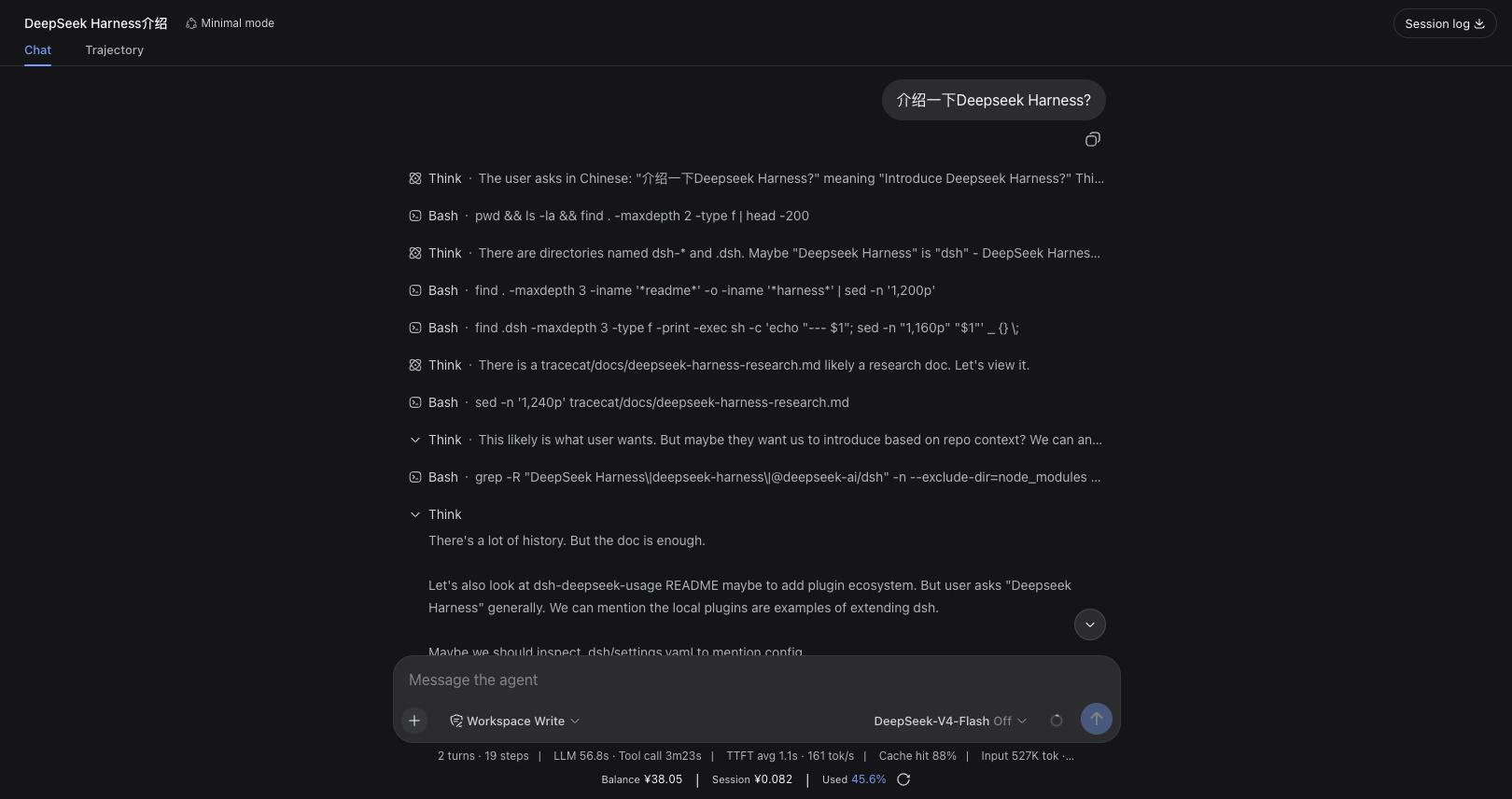
`dsh-balance-stats` is a balance and usage statistics plugin for DeepSeek Harness Web. It displays three key figures in a bar below the conversation composer:
```text
Balance ¥40.22 | This session ¥0.15 | Total spent 42.5%
```
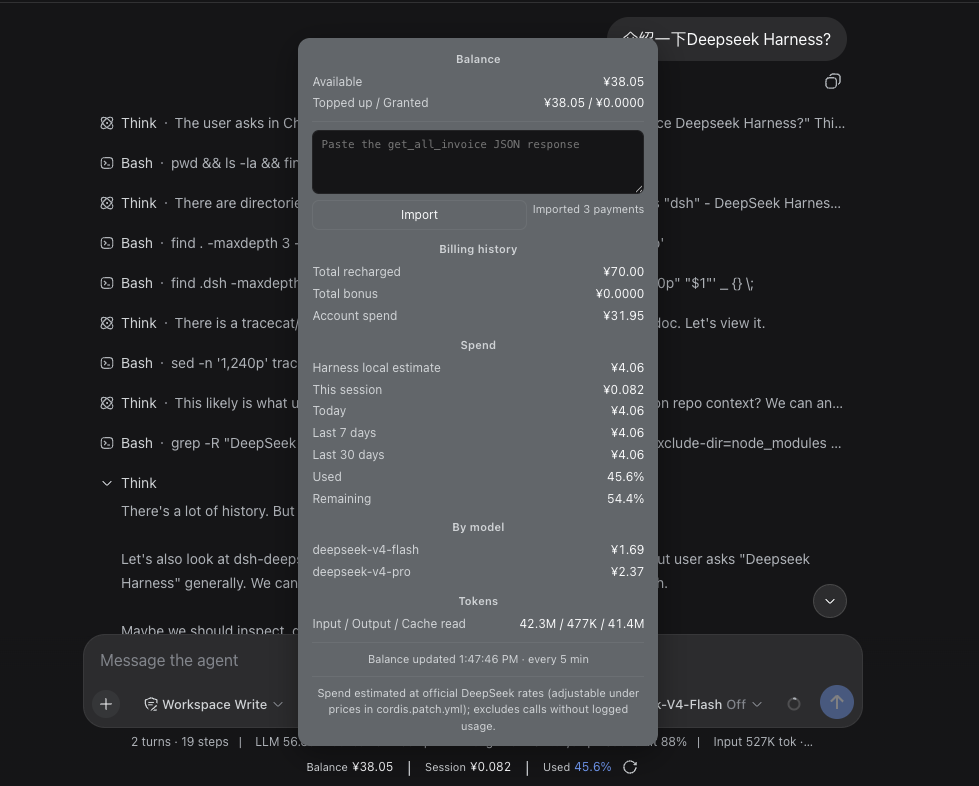
Click the bar to open an interactive, scrollable details card with balance composition, Harness local usage estimates, model-level spend, token usage, and historical billing summaries.
## Quick install
Make sure Node.js `>=22.19.0` is installed and `pnpm --version` works, then run:
```sh
npx @deepseek-ai/dsh plugin --profile web add https://github.com/pangzi499/dsh-balance-stats.git
```
Start or restart Harness Web, then hard-refresh the browser:
```sh
npx @deepseek-ai/dsh web
```
> **Update**: `npx @deepseek-ai/dsh plugin --profile web update dsh-balance-stats`
## Screenshots
**Stats bar** — balance, current session cost, and total spend below the composer:
**Details card** — click the bar to open it: balance composition, billing history, per-model spend, token usage, and the invoice import field:
## Features
- **Balance**: reads the official DeepSeek balance API and shows available, topped-up, and granted balances.
- **This session**: estimates the active conversation cost in real time through the composer-scoped `balanceStatsSessionCost` projection.
- **Total spent**: uses an accounting-based percentage after an invoice import; otherwise falls back to the Harness local estimate.
- **Details card**: shows spend today, over the last 7/30 days, per-model spend, token usage, and update time.
- **Auto invoice import (optional)**: paste your platform `userToken` once in the details card and the server re-fetches invoices on a schedule; the token persists to the local credentials file (mode 0600), survives restarts, and clears with one click.
- **JSON invoice import (fallback)**: without a token, paste a `get_all_invoice` JSON response for a one-shot import. Importing force-refreshes the balance, so every figure updates at once.
- **Caching and resilience**: retains the last successful balance/invoice when a request fails (stale-while-error) and refreshes server/client data on configurable intervals. The refresh button in the stats bar immediately re-fetches from DeepSeek.
How figures are calculated
### Balance
The server requests:
```text
GET https://api.deepseek.com/user/balance
```
By default, the API key is read from the Harness credential `DEEPSEEK_API_KEY`. It is never sent to the browser.
### Harness local estimate
The plugin scans usage events in Harness conversation logs and calculates spend from model prices using:
- Uncached input tokens
- Cache-hit/write tokens
- Output tokens
- Spend aggregated by date and model
This is a local estimate. It may exclude calls made outside Harness, deleted historical logs, or calls without standard usage events.
`prices` applies to ordinary models and v4 usage before `2026-08-17 00:00 +08:00`.
After that cutoff, v4 usage selects `v4PeakPrices` during `09:00–12:00` and
`14:00–18:00` Beijing time, and `v4OffPeakPrices` at other times. All three
price maps are configurable.
### Historical invoices
The public DeepSeek balance API does not return historical top-ups. To enable accounting-based figures, pick one of three ways:
**Option 1 — auto import (recommended)**
1. Click the stats bar to open the details card and expand "Auto invoice import".
2. Follow the 3-step guide: sign in to the platform → run `copy(localStorage.userToken)`
in the console → come back, paste it, and press Save.
3. Saving verifies the token with one live fetch, then persists it to the local
credentials file `~/.dsh/.credentials.yaml` (mode 0600). The plugin re-fetches
invoices every `invoiceRefreshIntervalMs` (default 6 hours) and restores the
token automatically after restarting dsh web.
4. An expired session turns the status dot amber ("Expired"); paste a fresh token
to resume. "Clear" removes everything again.
**Option 2 — manual JSON paste (no token)**
1. Sign in to `https://platform.deepseek.com/`.
2. Use browser developer tools to copy the JSON response from `https://platform.deepseek.com/auth-api/v0/users/get_all_invoice`.
3. Open the details card, expand "Advanced", paste the complete JSON, and click Import.
**Option 3 — environment / config**
Store the token under the Harness credential `DEEPSEEK_PLATFORM_TOKEN`
(or `platformToken` in `cordis.patch.yml`, or an env var of that name); auto
import starts on launch.
Only top-up orders where `payment_order_status === "SUCCESS"` are counted. Valid grant orders are accumulated separately.
```text
Accounting total = historical top-ups + historical grants
Accounting spend = max(0, accounting total - current total balance)
Total spent = accounting spend / accounting total × 100%
```
Without imported invoices:
```text
Total spent = Harness local estimated spend
/ (current total balance + Harness local estimated spend)
× 100%
```
Privacy and storage
- By default (no token provided), the plugin never requests `get_all_invoice` and stores no DeepSeek Platform credentials.
- Only when you explicitly paste a `userToken` and press Save does the plugin call the invoice endpoint with it and write the token to the local Harness credentials file `~/.dsh/.credentials.yaml` (mode 0600, managed by the Harness credentials provider). "Clear" in the card removes it again.
- No DeepSeek Platform cookies are accepted or stored; the token never leaves your machine except to `platform.deepseek.com`.
- Manually pasted JSON is parsed only in memory. The browser-side `localStorage` fallback summary keeps only aggregates: historical top-ups, grants, order count, currency, and import time. Order IDs, payment channels, and transaction details are not persisted.
- Signing out of the DeepSeek Platform immediately invalidates any saved token.
`get_all_invoice` is a private, authenticated DeepSeek Platform endpoint and its response format may change. Never share your userToken, cookies, authorization headers, or raw JSON containing order details.
## Requirements
- DeepSeek Harness: tested on `0.1.0-rc.6` through `0.1.1-rc.1`
- Node.js: `>=22.19.0`
- pnpm: must be available on `PATH` because Harness uses it to manage profile plugins (missing? see [Installation](#installation))
- Tested environment: OrbStack Ubuntu with Node.js `24.19.0`
> DeepSeek Harness is still in developer preview. The client APIs and mounting slot used by this plugin may change in upstream releases.
This is a community plugin for DeepSeek Harness. It is not an official `@deepseek-ai` plugin.
## Installation
### GitHub (recommended)
Install the latest version from the default branch:
```sh
npx @deepseek-ai/dsh plugin --profile web add https://github.com/pangzi499/dsh-balance-stats.git
npx @deepseek-ai/dsh web
```
Repository:
You can also download `dsh-balance-stats-0.2.1.tgz` from the GitHub Release and install it as a tarball.
pnpm prerequisite
Harness manages profile plugins with pnpm. Check it before installing:
```sh
pnpm --version
command -v pnpm
```
If pnpm is missing, install it with Corepack:
```sh
corepack enable
corepack prepare pnpm@10 --activate
pnpm --version
```
If Corepack is unavailable in your Node.js installation, use npm:
```sh
npm install --global pnpm@10
pnpm --version
```
Local directory / Tarball
### Local directory
```sh
npx @deepseek-ai/dsh plugin --profile web add /absolute/path/to/dsh-balance-stats
npx @deepseek-ai/dsh web
```
### Tarball
Build:
```sh
cd /path/to/dsh-balance-stats
npm pack
```
Install:
```sh
npx @deepseek-ai/dsh plugin --profile web add /absolute/path/to/dsh-balance-stats-0.2.1.tgz
npx @deepseek-ai/dsh web
```
Then hard-refresh the browser (macOS: `Command + Shift + R`; Windows/Linux: `Ctrl + Shift + R`).
## Updating
For GitHub one-line installs, the update command is in [Quick install](#quick-install) above.
For local-directory or tarball installations, run `add` again with the new path, then restart `dsh web`.
Configuration
Override plugin configuration in `$DSH_HOME/profiles/web/cordis.patch.yml`. Configuration is replaced as a whole, so repeat every key you want to retain:
```yaml
- id: dsh-balance-stats
config:
apiKey: ''
apiKeyRef: DEEPSEEK_API_KEY
baseUrl: https://api.deepseek.com
refreshIntervalMs: 300000
clientPollIntervalMs: 30000
timeoutMs: 8000
currency: CNY
platformToken: ''
platformTokenRef: DEEPSEEK_PLATFORM_TOKEN
invoiceRefreshIntervalMs: 21600000
platformBaseUrl: https://platform.deepseek.com
prices:
deepseek-chat: { cacheHit: 0.1, cacheMiss: 1, output: 2 }
deepseek-reasoner: { cacheHit: 1, cacheMiss: 4, output: 16 }
deepseek-v4-flash: { cacheHit: 0.02, cacheMiss: 0.1, output: 0.2 }
deepseek-v4-pro: { cacheHit: 0.025, cacheMiss: 3, output: 6 }
v4PeakPrices:
deepseek-v4-flash: { cacheHit: 0.10, cacheMiss: 3.0, output: 9.0 }
deepseek-v4-pro: { cacheHit: 0.30, cacheMiss: 9.0, output: 27.0 }
v4OffPeakPrices:
deepseek-v4-flash: { cacheHit: 0.05, cacheMiss: 1.5, output: 4.5 }
deepseek-v4-pro: { cacheHit: 0.15, cacheMiss: 4.5, output: 13.5 }
defaultPrices: { cacheHit: 0.1, cacheMiss: 1, output: 2 }
```
Prefer `apiKeyRef` / `platformTokenRef` so the plugin reuses Harness credentials. Never put a real API key or platform token in a `cordis.patch.yml` file that you plan to share.
Auto import keys:
- `platformToken`: literal platform token (plaintext; not recommended — prefer saving via the UI or credentials)
- `platformTokenRef`: credential reference name (default `DEEPSEEK_PLATFORM_TOKEN`; saving in the UI writes this credential entry)
- `invoiceRefreshIntervalMs`: invoice refresh interval, default 21600000 (6 h), minimum 600000
- `platformBaseUrl`: DeepSeek Platform base URL; normally leave as default
Verification
After starting the Web profile:
```sh
curl http://127.0.0.1:3080/balance-stats
curl http://127.0.0.1:3080/plugins/dsh-balance-stats/client.js
```
Example statistics response (amounts are illustrative):
```json
{
"ok": true,
"currency": "CNY",
"balances": [
{ "currency": "CNY", "total": 40.22, "granted": 0, "toppedUp": 40.22 }
],
"stats": {
"state": "ok",
"totalCost": 2.103612,
"percent": 5,
"today": 2.103612,
"day7": 2.103612,
"day30": 2.103612,
"sessions": 10
}
}
```
## Known limitations
- Harness local spend is an estimate, not an official DeepSeek invoice.
- Historical invoice summaries depend on the private `get_all_invoice` response format.
- The platform `userToken` expires when you sign out of the DeepSeek Platform; paste a fresh one to resume auto import.
- Manual JSON summaries are browser-local and do not sync across browsers or devices (auto-imported summaries live on the server side).
- Balance, invoice, and estimated-price currencies must match.
- Upstream changes to DSH client slots or projection APIs may require plugin updates.
## Uninstall
```sh
npx @deepseek-ai/dsh plugin --profile web remove dsh-balance-stats
```
## License
MIT