# 🐱 PrismCat
[English](./README.md) | [简体中文](./README_CN.md)
  
> **You never know how much junk your SDK silently injects into your prompts — until you use PrismCat.**
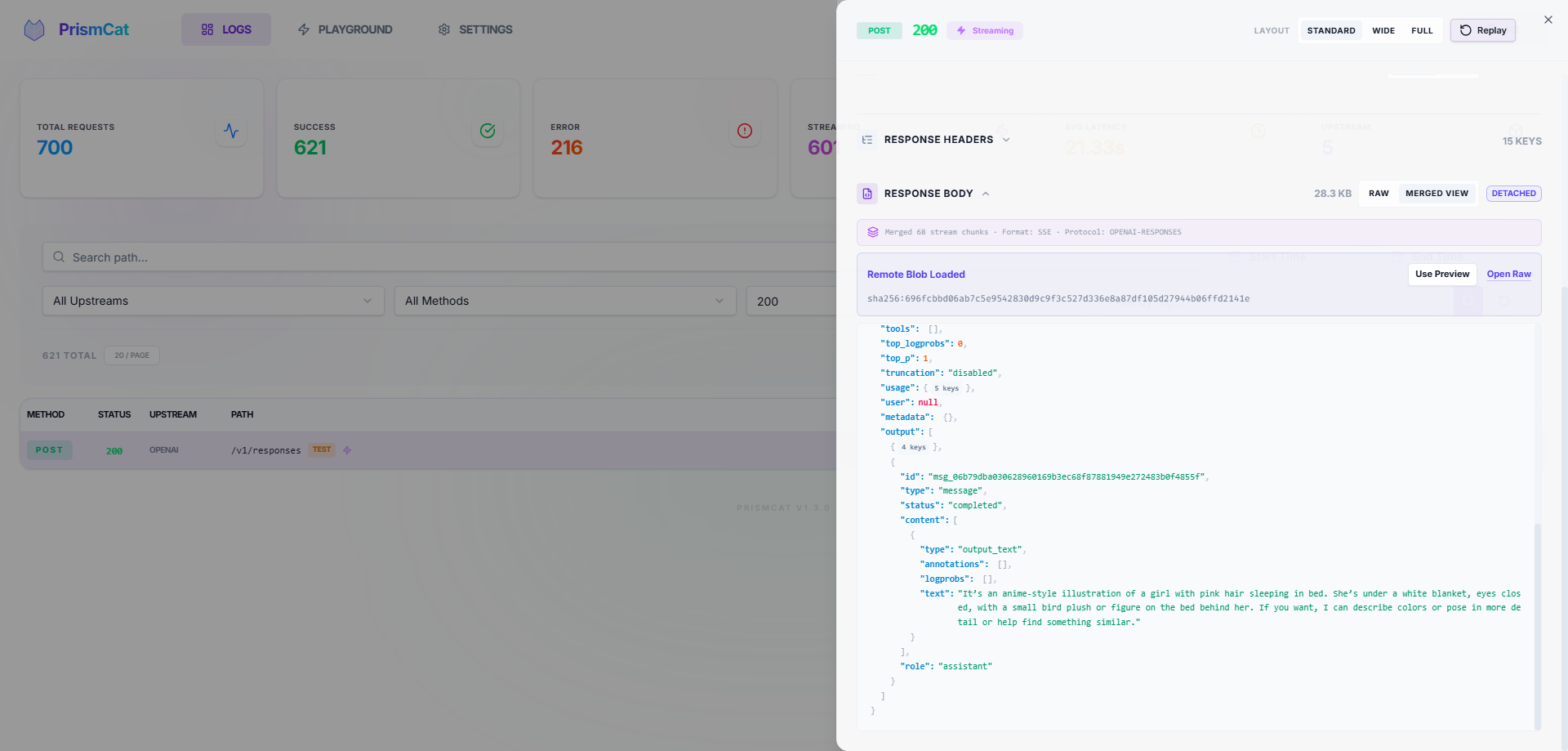
PrismCat is a **self-hosted, transparent proxy and debugging console for LLM APIs**.
Change one line — your `base_url` — and instantly see every request and response between your app and OpenAI / Claude / Gemini / Ollama / any LLM API, including streaming (SSE).
---
## ⚡ Get Started in 30 Seconds
### 1. Launch
Grab the binary for your system from [Releases](https://github.com/paopaoandlingyia/PrismCat/releases).
| Platform | How to Start |
|----------|-------------|
| **Windows** | Run `prismcat.exe` — it lives in your system tray |
| **Linux / macOS** | Run `./prismcat` |
| **Docker** | See [Docker Deployment](#-docker-deployment) |
Open **`http://localhost:8080`** in your browser.
### 2. Add an Upstream
In the Settings page, add an upstream. For example:
| Name | Target |
|------|--------|
| `openai` | `https://api.openai.com` |
PrismCat gives you a proxy address: **`http://openai.localhost:8080`**
### 3. Change One Line, Start Capturing
```python
from openai import OpenAI
client = OpenAI(
base_url="http://openai.localhost:8080/v1", # ← change only this
api_key="sk-..."
)
# everything else stays exactly the same
response = client.chat.completions.create(
model="gpt-4o",
messages=[{"role": "user", "content": "Hello!"}],
)
```
Go back to the dashboard. Your full request and response are already there. That's it.
---
## 🧩 How It Works
PrismCat uses **subdomain routing** for truly transparent proxying. When you add an upstream named `openai`:
```
Your App PrismCat OpenAI
│ │ │
│ openai.localhost:8080 │ api.openai.com │
│ ─────────────────────────>│ ────────────────────────────>│
│ │ logs request ✓ │
│<─────────────────────────│<────────────────────────────│
│ │ logs response ✓ │
```
**Why subdomains?** Because they make the proxy truly transparent — your request paths (like `/v1/chat/completions`) stay exactly the same. No path rewriting, no SDK quirks. Any language, any SDK, any LLM — as long as it lets you set a `base_url`, it just works. You can even chain proxies (App → PrismCat → relay → OpenAI) with zero friction.
> **💡 About `*.localhost`**: Modern browsers and most operating systems automatically resolve `*.localhost` to `127.0.0.1` — no hosts file editing required. If your environment doesn't support this, see [Path Routing Mode](#-fallback-path-routing-mode) or add a hosts entry manually.
---
## ✨ Key Features
### 📊 Full Traffic Observability
- Complete request/response headers and bodies
- **SSE streaming** captured in full — view raw chunks or the merged result
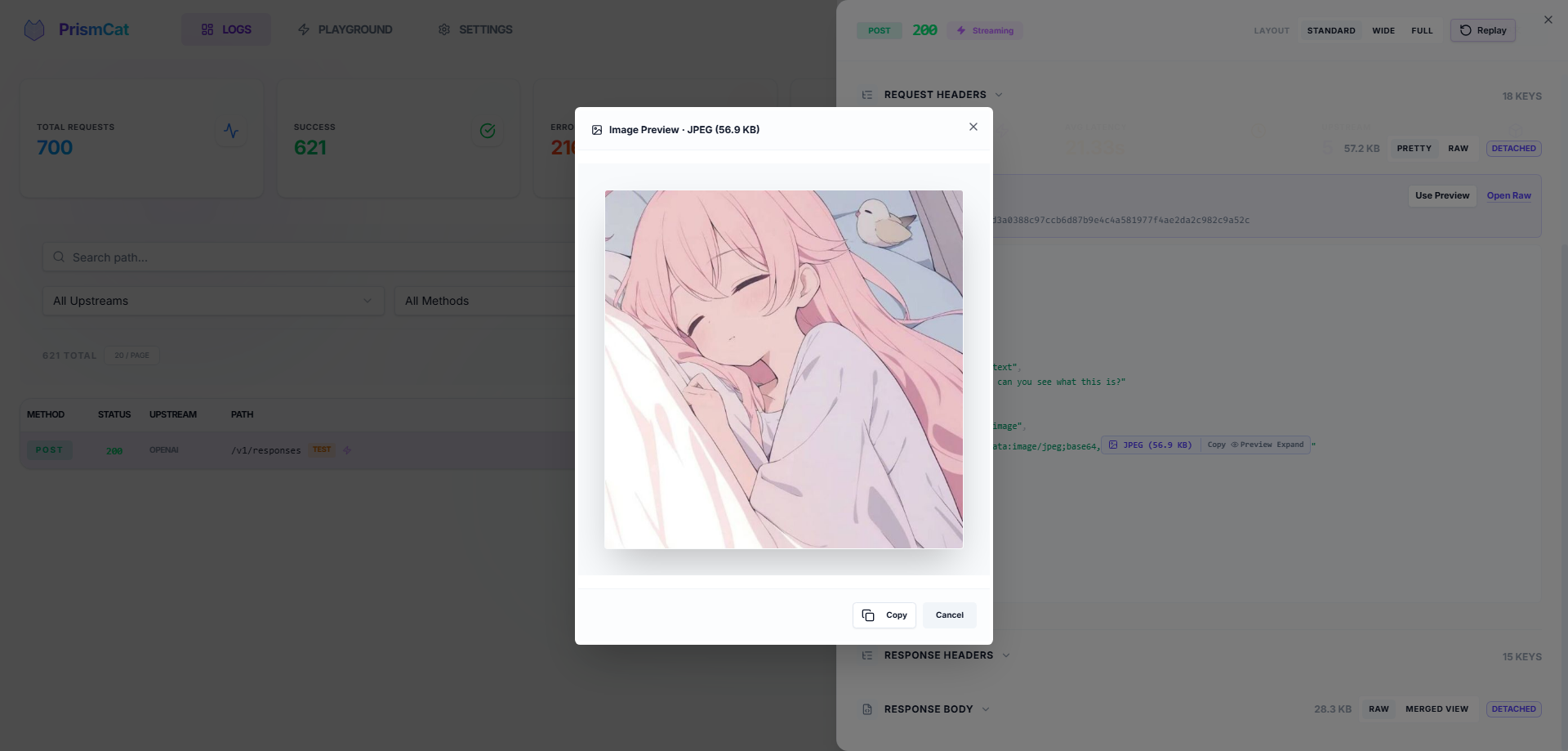
- Auto-formatted JSON, smart Base64 folding (no more drowning in image data) with one-click image preview
### 🎮 One-Click Replay (Playground)
See a failed request? Hit **Replay**, tweak the prompt or parameters right in your browser, and resend instantly. No need to re-run your Python/Node script.
### 🔐 Privacy & Security
- **Fully local** — data stays in local SQLite + filesystem, no third-party servers
- Automatic masking of sensitive headers (`Authorization`, `api-key`)
### 🏷️ Log Tagging
Add `X-PrismCat-Tag: my-tag` to any request header to categorize logs in the UI. Perfect for shared proxies with multiple users or projects.
### 📦 Dead-Simple Deployment
Single binary, zero dependencies. Windows system tray support. Native Docker image available.
### 🔄 Always-On, Always Reviewable
PrismCat is designed to run as a **silent, 24/7 LLM black box**. You don't need to "remember to start capturing" when a bug happens — it's already recording. Automatic log retention cleanup and large-body offloading keep storage healthy over months of continuous operation. Perfect for monitoring autonomous Agents that you can't fully predict — just go back and review what they actually sent and received, days after the fact.
---
## 🎯 Who Needs PrismCat?
| Your Problem | How PrismCat Helps |
|-------------|-------------------|
| "Why is my token usage so high? My prompt is short!" | See the hidden system prompts and few-shot examples your SDK/framework silently injects |
| "Function Calling keeps returning broken JSON" | Capture the raw model output, tweak your prompt in the Playground, and retry instantly |
| "Streaming output sometimes freezes or gets truncated" | Every SSE chunk is recorded — pinpoint whether the issue is the model, gateway, or client |
| "I run local models with Ollama, want to inspect the traffic" | Add an upstream pointing to `http://localhost:11434` — it's a universal HTTP proxy |
| "Multiple people share one API key — whose request failed?" | Use `X-PrismCat-Tag` to tag by user, find the culprit in seconds |
| "My Agent went rogue and I have no idea what it did" | PrismCat silently logs every API call — review the full behavior chain anytime |
---
## 🤔 PrismCat vs. Alternatives
| | PrismCat | mitmproxy | Langfuse / Helicone |
|---|---------|-----------|---------------------|
| Deployment | Single binary / Docker | Local install + certs | SaaS or complex self-host |
| LLM-Optimized | ✅ JSON formatting, Base64 folding, SSE merge | ❌ Generic HTTP inspector | ✅ But geared toward production monitoring |
| One-Click Replay | ✅ Built-in Playground | ❌ | Partial |
| Integration | Change `base_url` | System-wide proxy / certs | Instrument SDK code |
| Data Ownership | Fully local | Fully local | Third-party dependent |
| Stream Playback | ✅ Raw + merged view | Poor UX | Partial |
| Long-Term Running | ✅ Auto-cleanup, silent background | Ad-hoc debugging tool | ✅ But requires external infra |
---
## 🐳 Docker Deployment
```yaml
services:
prismcat:
image: ghcr.io/paopaoandlingyia/prismcat:latest
container_name: prismcat
ports:
- "8080:8080"
environment:
# Hosts allowed to access the dashboard
- PRISMCAT_UI_HOSTS=localhost,127.0.0.1
# Base domain for subdomain routing
- PRISMCAT_PROXY_DOMAINS=localhost
# Set a password for public-facing deployments
- PRISMCAT_UI_PASSWORD=your_strong_password
- PRISMCAT_RETENTION_DAYS=30
volumes:
- ./data:/app/data
restart: always
```
---
## 🔀 Fallback: Path Routing Mode
If your environment can't resolve `*.localhost` (some Windows network configurations, or inside certain containers), enable **path routing mode** in Settings to route by URL path instead of subdomain:
```python
# Path routing mode — no subdomain resolution needed
client = OpenAI(
base_url="http://localhost:8080/_proxy/openai/v1",
api_key="sk-..."
)
```
Enable via config or environment variable:
```yaml
# config.yaml
server:
enable_path_routing: true
path_routing_prefix: "/_proxy"
```
```bash
# or via environment variable
PRISMCAT_ENABLE_PATH_ROUTING=true
```
> **Note**: Path routing adds a prefix to your request URL (e.g., `/_proxy/openai/...`), which may require extra care with how some SDKs construct paths. Subdomain mode doesn't have this caveat.
---
## 🌐 Production Deployment (Nginx + Wildcard Domain)
For public-facing deployments, use a wildcard domain (e.g., `*.prismcat.example.com`) with Nginx:
```nginx
server {
listen 80;
server_name prismcat.example.com *.prismcat.example.com;
location / {
proxy_pass http://127.0.0.1:8080;
proxy_set_header Host $host; # Required: pass original Host for subdomain routing
# Required for SSE / streaming
proxy_http_version 1.1;
proxy_set_header Connection "";
proxy_buffering off;
client_max_body_size 50M;
}
}
```
Then add `prismcat.example.com` to PrismCat's `proxy_domains`. Your upstream `openai` will be accessible at `openai.prismcat.example.com`.
---
## ⚙️ Configuration Reference
The config file lives at `data/config.yaml` and is created on first launch. Most settings can also be changed from the Settings page in the UI.
Full config example
```yaml
server:
port: 8080
ui_password: "" # Dashboard password
proxy_domains: # Base domains for subdomain routing
- localhost
logging:
max_request_body: 1048576 # Max request body to log (1MB)
max_response_body: 10485760 # Max response body to log (10MB)
sensitive_headers: # Headers to auto-mask
- Authorization
- api-key
- x-api-key
detach_body_over_bytes: 262144 # Store bodies > 256KB as separate files
early_request_body_snapshot: true
storage:
retention_days: 30 # Log retention in days; 0 = keep forever
upstreams:
openai:
target: "https://api.openai.com"
timeout: 120
gemini:
target: "https://generativelanguage.googleapis.com"
timeout: 120
```
---
## 🧩 FAQ
Q: openai.localhost doesn't work?
Most modern systems resolve `*.localhost` to `127.0.0.1` automatically. If yours doesn't:
1. Add `127.0.0.1 openai.localhost` to your hosts file
2. Or enable [Path Routing Mode](#-fallback-path-routing-mode) as a workaround
3. Or use your own wildcard domain (see [Nginx Deployment](#-production-deployment-nginx--wildcard-domain))
Q: Streaming feels "stuck"?
If you're behind a reverse proxy (e.g., Nginx), make sure you have:
- `proxy_buffering off;`
- `proxy_http_version 1.1;`
Nginx buffers entire responses by default, making streaming look like it's hanging.
Q: Which LLM services are supported?
PrismCat is a generic HTTP proxy — it's not tied to any specific LLM provider. Any HTTP/HTTPS API works, including:
- OpenAI / Azure OpenAI
- Anthropic Claude
- Google Gemini
- Ollama / LM Studio (local models)
- API relay services / aggregators
Q: Does it add latency?
PrismCat uses asynchronous log writing. The proxy overhead is typically under 1ms. Logging never blocks request forwarding.
---
## 🛡️ License
[MIT License](LICENSE)