 # toast
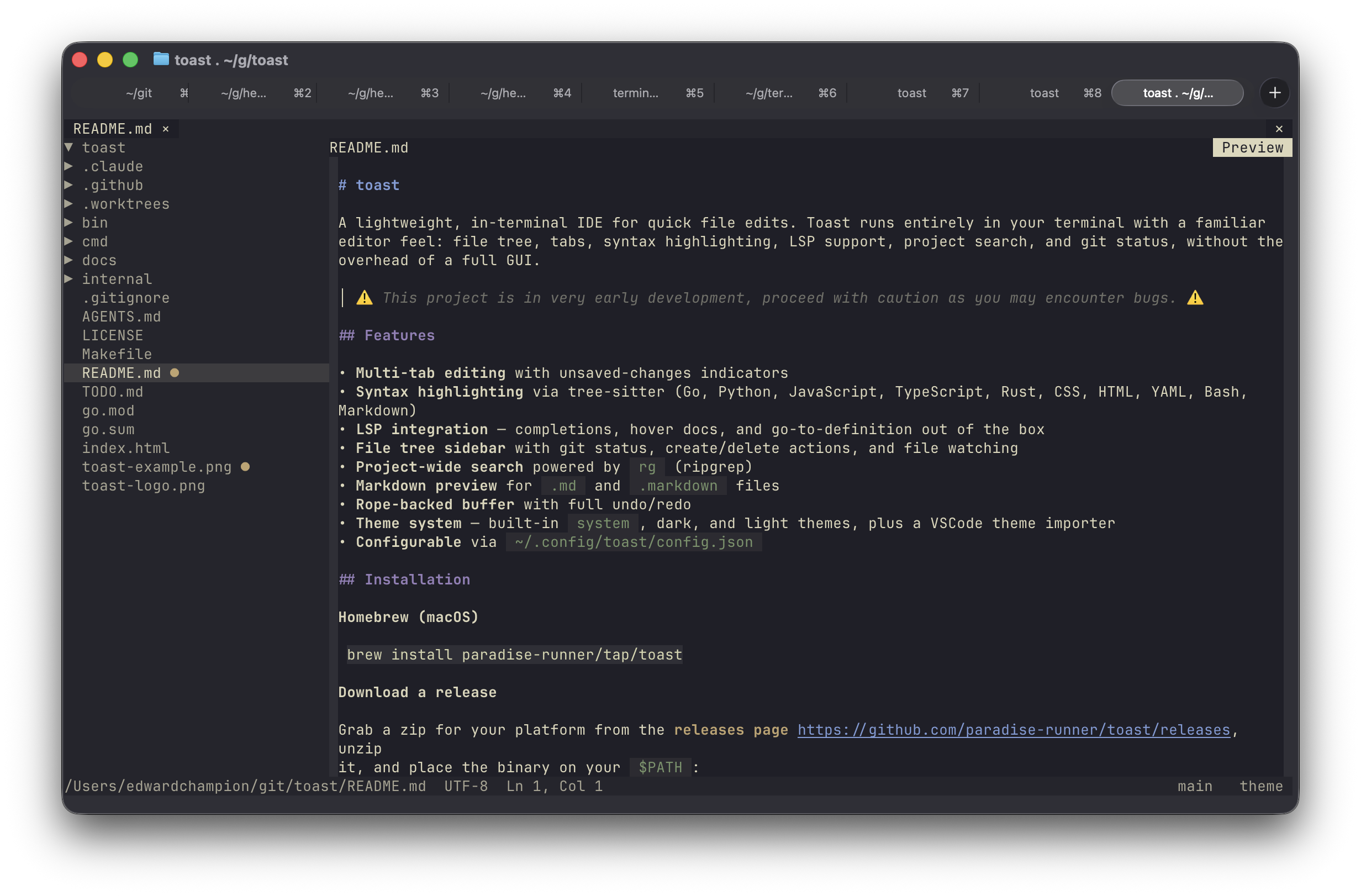
A lightweight, in-terminal IDE for quick file edits. Toast runs entirely in your terminal with a familiar editor feel: file tree, tabs, syntax highlighting, LSP support, project search, and git status, without the overhead of a full GUI.
> ⚠️ This project is in _very early development_, proceed with caution as you may encounter bugs. ⚠️
 ## Features
- **Multi-tab editing** with unsaved-changes indicators, mouse-close buttons, and quit confirmation
- **Syntax highlighting** via tree-sitter (Go, Python, JavaScript, TypeScript, Rust, CSS, HTML, YAML, Bash, Markdown)
- **LSP integration for configured languages** — completions, hover docs, diagnostics, and definition lookups
- **File tree sidebar** with git status, ignored-file dimming, create/delete actions, file watching, and draggable resizing
- **Project-wide search** powered by `rg` (ripgrep)
- **In-file find/replace** with next/previous navigation, match-case, and whole-word options
- **Go to line** overlay
- **Markdown preview** for `.md`, `.markdown`, and `.mdx` files
- **External file watching** that silently reloads clean buffers
- **Rope-backed buffer** with full undo/redo
- **Theme system** — built-in `system` (derived from terminal colors at runtime), `toast-dark`, and `toast-light`, plus a VSCode theme importer
- **Binary file guard** to avoid dumping binary content into the editor
- **Configurable** via `~/.config/toast/config.json`
## Installation
**Homebrew (macOS)**
```bash
brew install paradise-runner/tap/toast
```
**Download a release**
Grab a zip for your platform from the [releases page](https://github.com/paradise-runner/toast/releases), unzip it, and place the binary on your `$PATH`:
```bash
# example for Apple Silicon
curl -Lo toast.zip https://github.com/paradise-runner/toast/releases/latest/download/toast-darwin-arm64.zip
unzip toast.zip
install -m755 toast-darwin-arm64 /usr/local/bin/toast
```
**Build from source**
Requires Go 1.25.2+.
```bash
git clone https://github.com/paradise-runner/toast
cd toast
make build
# binary written to bin/toast
```
## Usage
```bash
toast # open current directory
toast path/to/dir # open a specific directory
toast path/to/file # open a file (auto-detects git root)
toast new/file.go # open a new file buffer if the parent directory exists
toast --help
toast --version
```
`rg` is required for project search. Language servers such as `gopls`, `pyright-langserver`, `typescript-language-server`, and `rust-analyzer` are optional and enable LSP features when installed.
## Keybindings
| Key | Action |
|-----|--------|
| `Ctrl+Q` | Quit |
| `Ctrl+S` / `Cmd+S` | Save |
| `Ctrl+W` / `Cmd+W` | Close tab |
| `Ctrl+Tab` | Next tab |
| `Ctrl+Shift+Tab` | Previous tab |
| `Ctrl+B` | Toggle sidebar |
| `Ctrl+Shift+E` | Toggle focus between editor and file tree |
| `Ctrl+Shift+F` | Search |
| `Ctrl+F` / `Cmd+F` | Find and replace in the current file |
| `Ctrl+G` / `Cmd+L` | Go to line |
| `Ctrl+Shift+M` | Toggle Markdown preview |
| `Ctrl+Z` / `Cmd+Z` | Undo |
| `Ctrl+Y` / `Ctrl+Shift+Z` / `Cmd+Y` / `Cmd+Shift+Z` | Redo |
| `Ctrl+Space` / `Cmd+Space` | Trigger completion |
| `Ctrl+Shift+K` | Show hover |
| `F12` | Ask the LSP for a definition |
File-tree create/delete actions are driven from the UI: right-click in the sidebar for file operations, drag the sidebar divider to resize it, use the `theme` button in the status bar to open the theme picker, and use the breadcrumb `Preview` button as a mouse shortcut for markdown preview.
## Configuration
Toast reads `~/.config/toast/config.json` on startup. Missing keys fall back to defaults.
```json
{
"theme": "toast-dark",
"editor": {
"tab_width": 4,
"auto_indent": true,
"trim_trailing_whitespace_on_save": true,
"insert_final_newline_on_save": true
},
"sidebar": {
"visible": true,
"width": 30,
"confirm_delete": true,
"file_icons": {
"enabled": true,
"color_mode": "accent"
}
},
"lsp": {
"go": { "command": "gopls", "args": ["serve"] },
"python": { "command": "pyright-langserver", "args": ["--stdio"] },
"typescript": { "command": "typescript-language-server", "args": ["--stdio"] },
"rust": { "command": "rust-analyzer", "args": [] }
},
"ignored_patterns": [".git", "node_modules", "__pycache__", ".DS_Store"]
}
```
The sidebar file tree uses homemade terminal-style file type markers by default, covering common IDE file types such as Go, JavaScript/TypeScript, HTML, CSS, Rust, Python, Ruby, PHP, JVM languages, Swift, C/C++, C#, shell scripts, JSON/YAML/TOML, SQL, Dockerfiles, images, archives, and build files. `sidebar.file_icons.color_mode` supports `accent` (one theme accent), `semantic` (type-specific colors derived from the active theme), and `none` (normal sidebar foreground).
The current UI honors the fields above. The config schema also contains `editor.word_wrap`, `editor.show_whitespace`, and `search.*`, but those are not wired into the current UI yet.
If you want LSP features for `.js` / `.mjs` files today, add a `javascript` entry to `lsp` that points at the same server you use for TypeScript.
### Themes
Built-in themes: `system`, `toast-dark`, `toast-light`. Custom themes live in `~/.config/toast/themes/`.
**Import a VSCode theme:**
```bash
toast migrate-theme vscode path/to/theme.json
# writes ~/.config/toast/themes/.json
```
Then set `"theme": ""` in your config.
## Current Limitations
- Project search opens the selected file, but it does not jump to the exact match line/column yet.
- `F12` opens the definition target file, but it does not jump to the exact location returned by the language server yet.
- Default LSP config covers Go, Python, TypeScript, and Rust. JavaScript files need an explicit `javascript` config entry if you want LSP features there.
## Feedback & Issues
Found a bug or have a feature request? We'd love to hear from you! Please open an [issue on GitHub](https://github.com/paradise-runner/toast/issues) with as much detail as possible. Your feedback helps make Toast better.
## Development
```bash
make build # compile
make run # go run ./cmd/toast .
make test # go test ./...
make test-integration # run opt-in Ghostty/tmux terminal integration tests
make test-integration-update # refresh golden screenshots
```
### Integration Tests
The integration test suite launches Toast inside a temporary Ghostty window
attached to an isolated tmux server, drives it with `tmux send-keys`, and writes
pane captures plus PNG screenshots to a temporary artifact directory. The
captured screenshots are compared against checked-in golden images in
`integration/testdata/ghostty` so the test can catch visual regressions over
time.
Requirements:
- macOS
- Ghostty installed at `/Applications/Ghostty.app` or set `TOAST_GHOSTTY_APP`
to the app path
- `tmux`
- `screencapture`
Before running the screenshot tests, enable Ghostty in:
```text
System Settings > Privacy & Security > Screen & System Audio Recording
```
Run the integration tests with:
```bash
make test-integration
```
Refresh the golden screenshots after an intentional visual change with:
```bash
make test-integration-update
```
By default, artifacts are written to a temporary directory and the path is
printed in the verbose test output. Set `TOAST_TERMINAL_ARTIFACT_DIR` to keep
artifacts in a specific directory.
## Features
- **Multi-tab editing** with unsaved-changes indicators, mouse-close buttons, and quit confirmation
- **Syntax highlighting** via tree-sitter (Go, Python, JavaScript, TypeScript, Rust, CSS, HTML, YAML, Bash, Markdown)
- **LSP integration for configured languages** — completions, hover docs, diagnostics, and definition lookups
- **File tree sidebar** with git status, ignored-file dimming, create/delete actions, file watching, and draggable resizing
- **Project-wide search** powered by `rg` (ripgrep)
- **In-file find/replace** with next/previous navigation, match-case, and whole-word options
- **Go to line** overlay
- **Markdown preview** for `.md`, `.markdown`, and `.mdx` files
- **External file watching** that silently reloads clean buffers
- **Rope-backed buffer** with full undo/redo
- **Theme system** — built-in `system` (derived from terminal colors at runtime), `toast-dark`, and `toast-light`, plus a VSCode theme importer
- **Binary file guard** to avoid dumping binary content into the editor
- **Configurable** via `~/.config/toast/config.json`
## Installation
**Homebrew (macOS)**
```bash
brew install paradise-runner/tap/toast
```
**Download a release**
Grab a zip for your platform from the [releases page](https://github.com/paradise-runner/toast/releases), unzip it, and place the binary on your `$PATH`:
```bash
# example for Apple Silicon
curl -Lo toast.zip https://github.com/paradise-runner/toast/releases/latest/download/toast-darwin-arm64.zip
unzip toast.zip
install -m755 toast-darwin-arm64 /usr/local/bin/toast
```
**Build from source**
Requires Go 1.25.2+.
```bash
git clone https://github.com/paradise-runner/toast
cd toast
make build
# binary written to bin/toast
```
## Usage
```bash
toast # open current directory
toast path/to/dir # open a specific directory
toast path/to/file # open a file (auto-detects git root)
toast new/file.go # open a new file buffer if the parent directory exists
toast --help
toast --version
```
`rg` is required for project search. Language servers such as `gopls`, `pyright-langserver`, `typescript-language-server`, and `rust-analyzer` are optional and enable LSP features when installed.
## Keybindings
| Key | Action |
|-----|--------|
| `Ctrl+Q` | Quit |
| `Ctrl+S` / `Cmd+S` | Save |
| `Ctrl+W` / `Cmd+W` | Close tab |
| `Ctrl+Tab` | Next tab |
| `Ctrl+Shift+Tab` | Previous tab |
| `Ctrl+B` | Toggle sidebar |
| `Ctrl+Shift+E` | Toggle focus between editor and file tree |
| `Ctrl+Shift+F` | Search |
| `Ctrl+F` / `Cmd+F` | Find and replace in the current file |
| `Ctrl+G` / `Cmd+L` | Go to line |
| `Ctrl+Shift+M` | Toggle Markdown preview |
| `Ctrl+Z` / `Cmd+Z` | Undo |
| `Ctrl+Y` / `Ctrl+Shift+Z` / `Cmd+Y` / `Cmd+Shift+Z` | Redo |
| `Ctrl+Space` / `Cmd+Space` | Trigger completion |
| `Ctrl+Shift+K` | Show hover |
| `F12` | Ask the LSP for a definition |
File-tree create/delete actions are driven from the UI: right-click in the sidebar for file operations, drag the sidebar divider to resize it, use the `theme` button in the status bar to open the theme picker, and use the breadcrumb `Preview` button as a mouse shortcut for markdown preview.
## Configuration
Toast reads `~/.config/toast/config.json` on startup. Missing keys fall back to defaults.
```json
{
"theme": "toast-dark",
"editor": {
"tab_width": 4,
"auto_indent": true,
"trim_trailing_whitespace_on_save": true,
"insert_final_newline_on_save": true
},
"sidebar": {
"visible": true,
"width": 30,
"confirm_delete": true,
"file_icons": {
"enabled": true,
"color_mode": "accent"
}
},
"lsp": {
"go": { "command": "gopls", "args": ["serve"] },
"python": { "command": "pyright-langserver", "args": ["--stdio"] },
"typescript": { "command": "typescript-language-server", "args": ["--stdio"] },
"rust": { "command": "rust-analyzer", "args": [] }
},
"ignored_patterns": [".git", "node_modules", "__pycache__", ".DS_Store"]
}
```
The sidebar file tree uses homemade terminal-style file type markers by default, covering common IDE file types such as Go, JavaScript/TypeScript, HTML, CSS, Rust, Python, Ruby, PHP, JVM languages, Swift, C/C++, C#, shell scripts, JSON/YAML/TOML, SQL, Dockerfiles, images, archives, and build files. `sidebar.file_icons.color_mode` supports `accent` (one theme accent), `semantic` (type-specific colors derived from the active theme), and `none` (normal sidebar foreground).
The current UI honors the fields above. The config schema also contains `editor.word_wrap`, `editor.show_whitespace`, and `search.*`, but those are not wired into the current UI yet.
If you want LSP features for `.js` / `.mjs` files today, add a `javascript` entry to `lsp` that points at the same server you use for TypeScript.
### Themes
Built-in themes: `system`, `toast-dark`, `toast-light`. Custom themes live in `~/.config/toast/themes/`.
**Import a VSCode theme:**
```bash
toast migrate-theme vscode path/to/theme.json
# writes ~/.config/toast/themes/.json
```
Then set `"theme": ""` in your config.
## Current Limitations
- Project search opens the selected file, but it does not jump to the exact match line/column yet.
- `F12` opens the definition target file, but it does not jump to the exact location returned by the language server yet.
- Default LSP config covers Go, Python, TypeScript, and Rust. JavaScript files need an explicit `javascript` config entry if you want LSP features there.
## Feedback & Issues
Found a bug or have a feature request? We'd love to hear from you! Please open an [issue on GitHub](https://github.com/paradise-runner/toast/issues) with as much detail as possible. Your feedback helps make Toast better.
## Development
```bash
make build # compile
make run # go run ./cmd/toast .
make test # go test ./...
make test-integration # run opt-in Ghostty/tmux terminal integration tests
make test-integration-update # refresh golden screenshots
```
### Integration Tests
The integration test suite launches Toast inside a temporary Ghostty window
attached to an isolated tmux server, drives it with `tmux send-keys`, and writes
pane captures plus PNG screenshots to a temporary artifact directory. The
captured screenshots are compared against checked-in golden images in
`integration/testdata/ghostty` so the test can catch visual regressions over
time.
Requirements:
- macOS
- Ghostty installed at `/Applications/Ghostty.app` or set `TOAST_GHOSTTY_APP`
to the app path
- `tmux`
- `screencapture`
Before running the screenshot tests, enable Ghostty in:
```text
System Settings > Privacy & Security > Screen & System Audio Recording
```
Run the integration tests with:
```bash
make test-integration
```
Refresh the golden screenshots after an intentional visual change with:
```bash
make test-integration-update
```
By default, artifacts are written to a temporary directory and the path is
printed in the verbose test output. Set `TOAST_TERMINAL_ARTIFACT_DIR` to keep
artifacts in a specific directory.