



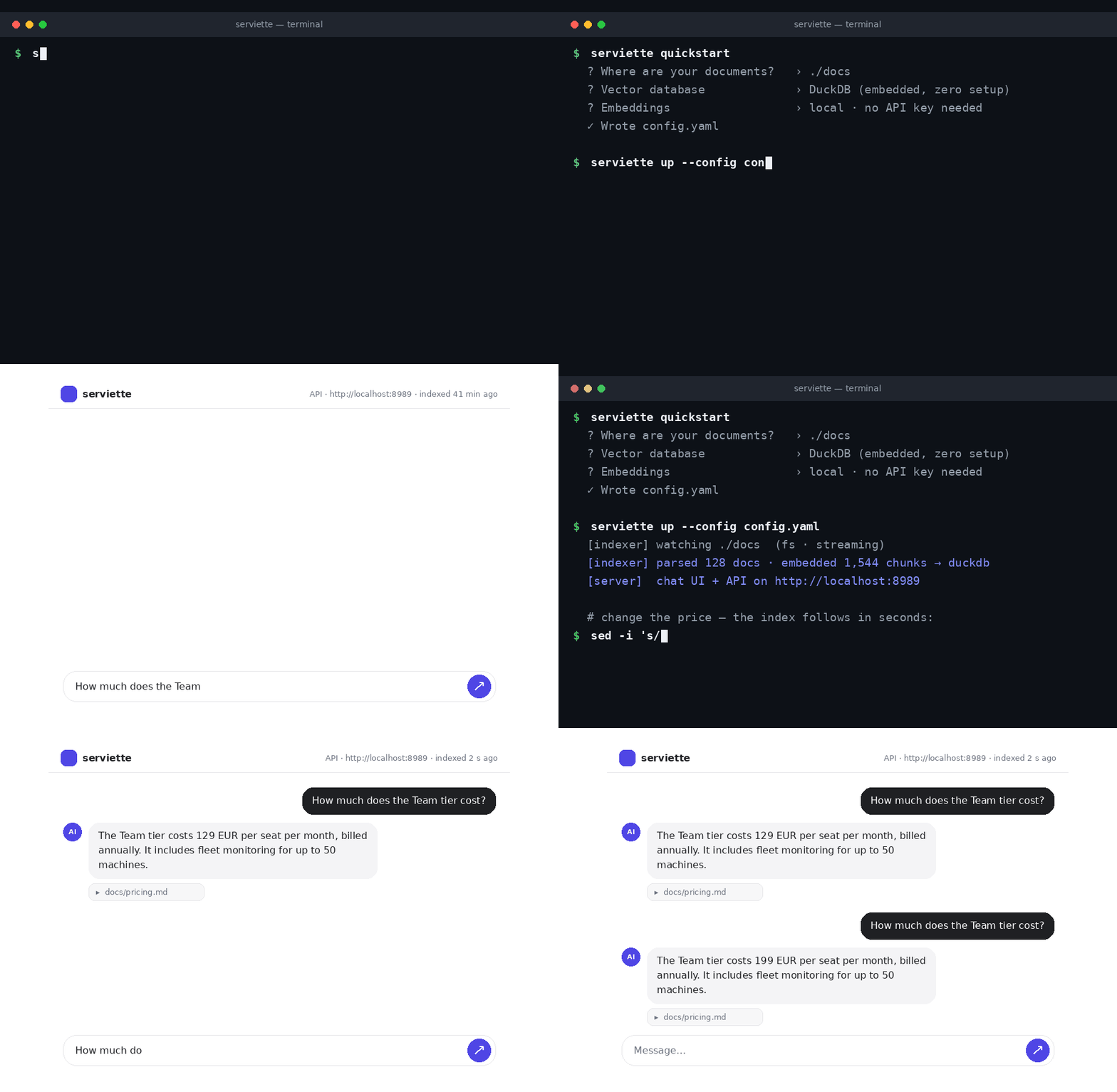
One command to a live RAG stack — then edit a document and watch the answer change.
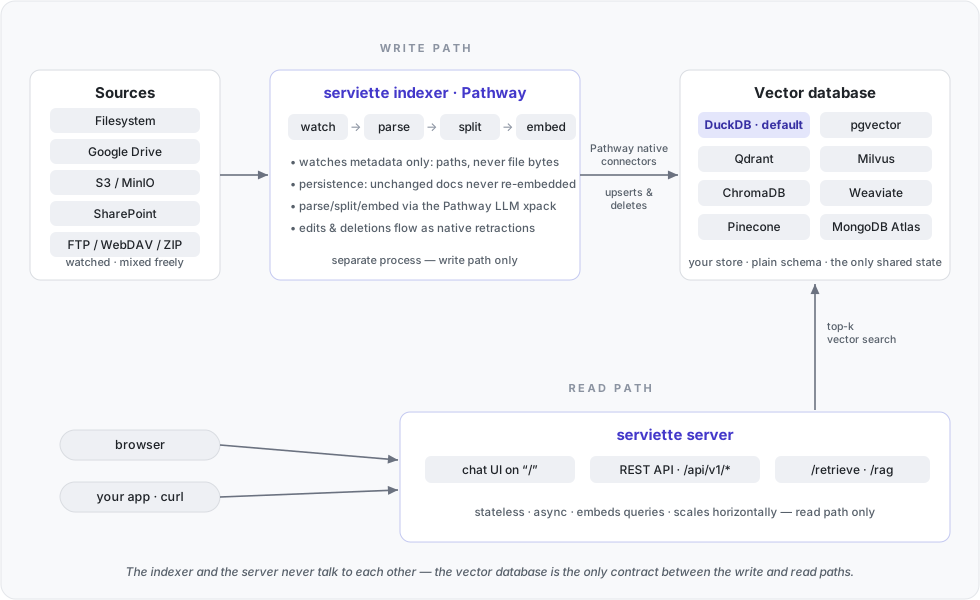
## Who is it for **What you get.** A question-answering assistant over your organisation's documents, with sources cited and answers that follow the documents: an edit, a new file or a deletion is reflected within seconds, with no re-upload or re-indexing step for anyone to run or forget. **What it costs to run.** Two processes (an indexer and a server) and one YAML file. Embeddings can be computed locally for free; the Pathway license is free; the only metered component is the optional model API that writes the answer text, billed per question rather than per document. **Where your data goes.** Nowhere by default. With the default local embedder, documents, their embeddings and the index stay on the machine or in the database you choose; the only thing that leaves is the handful of passages retrieved for a question, sent to the model API that writes the answer — and only if you configure one. (Choosing an API embedder instead sends the document text through that API as well.) **How mature it is.** serviette is a thin layer over the [Pathway Live Data Framework](https://github.com/pathwaycom/pathway) — the open-source engine that does the watching, parsing, embedding and writing: in development since 2022, 60 000+ GitHub stars, in production use at organisations such as [DB Schenker](https://pathway.com/success-stories/db-schenker), [Intel](https://pathway.com/framework/blog/intel-summit), [NATO](https://pathway.com/blog/jsec-pathway-ai-collaboration-steadfast-foxtrot-2024), [La Poste](https://pathway.com/success-stories/la-poste), [Transdev](https://pathway.com/success-stories/transdev) and [CMA CGM](https://pathway.com/success-stories/cma-cgm). serviette's own numbers are measured, not estimated: indexing up to 50 GB of text (26 million pages, 17 million files) in constant memory, retrieval accuracy on a public benchmark (FRAMES), eight vector databases under integration tests against real instances — all reproducible from this repository. **Where it stands today.** It answers one question at a time, from the current state of the documents. Conversation memory, user accounts and a hosted offering are not built in yet — and each is a short step from what is here. If your use case needs one of them, or something else, contact us for a tailor-made solution: [open an issue](https://github.com/pathwaycom/serviette/issues), write on [Discord](https://discord.gg/pathway), or email [contact@pathway.com](mailto:contact@pathway.com). The rest of this README is for the person setting it up. To run it over your own documents, generate a config and start the stack: ```bash pip install "serviette[local]" --extra-index-url https://download.pytorch.org/whl/cpu # [local] = free local embeddings, the wizard's default. It brings PyTorch; the # --extra-index-url picks its CPU build (~0.8 GB) instead of the default one # with CUDA libraries (~5 GB) — drop the flag only if you will embed on an # NVIDIA GPU. Plain `pip install serviette` if you will embed with OpenAI instead. export PATHWAY_LICENSE_KEY=... # the free Pathway license (see above); the wizard picks it up from here export OPENAI_API_KEY=sk-... # powers generated answers; omit to run keyless (answers quote the retrieved snippets) serviette wizard # interactive config wizard serviette up --config config.yaml # indexer + server together → http://localhost:8989 ``` (Production deployments run `serviette indexer` and `serviette server` separately — that is what `up` supervises.) The server hosts both the web chat UI (on `/`) and the versioned REST API (under `/api/v1`) on one port: ```bash curl -X POST http://localhost:8989/api/v1/retrieve \ -H 'Content-Type: application/json' \ -d '{"query": "how does persistence work?", "k": 5}' ``` ## Highlights - **No code.** Configure everything in one YAML file (or generate it with `serviette wizard`). - **Any vector DB — 8 backends.** DuckDB (embedded, zero setup — the default), pgvector, Qdrant, Milvus, ChromaDB, Weaviate, Pinecone and MongoDB Atlas Vector Search. Every backend is written through **Pathway's native connectors**, so file edits and deletions become real upserts/deletes in the store. - **Zero-setup default.** DuckDB is the default backend: an embedded database in a single local file, no external service to install or run, with built-in vector search. - **Live & incremental.** Built on Pathway: additions, edits and deletions are reflected in the vector DB in real time — whatever you change is answerable seconds later. Documents flow through the pipeline instead of accumulating in it, so a large corpus stays small in memory. - **Multiple sources.** Local filesystem, Google Drive, S3/MinIO, SharePoint — plus anything the PyFilesystem library opens: FTP, SFTP, WebDAV, even ZIP archives. All watched live, mixed freely in one config. - **Multimodal out of the box.** Text, Office documents, PDFs (with tables and layout), scanned images — and, with the corresponding API keys, audio recordings and even video. Every format is on by default and routed to the best parser that needs no API key; drop a file in the folder and it is answerable like any document. See [Multimodality](#multimodality). - **Reuses Pathway's LLM xpack.** Parsers, splitters and embedders are used as-is — serviette implements none of its own. Five embedder families (OpenAI, LiteLLM, SentenceTransformers, Gemini, Bedrock) work identically on the indexer and the server side — including a fully local, credential-free stack with local embeddings + DuckDB. - **Decoupled & scalable.** Indexer and API server are independent processes sharing only the vector DB. The server is stateless and scales horizontally; the indexer shards across worker processes with one config line. Every part scales on its own. - **Web chat UI, same port.** `serviette server` serves a clean ChatGPT/Claude-style chat page on `/` next to the versioned API (`/api/v1/...`) — same origin, no CORS, nothing extra to run. For split deployments (UI on a different host) there is a standalone `serviette frontend` proxy tier. - **Free Pathway license.** One click at
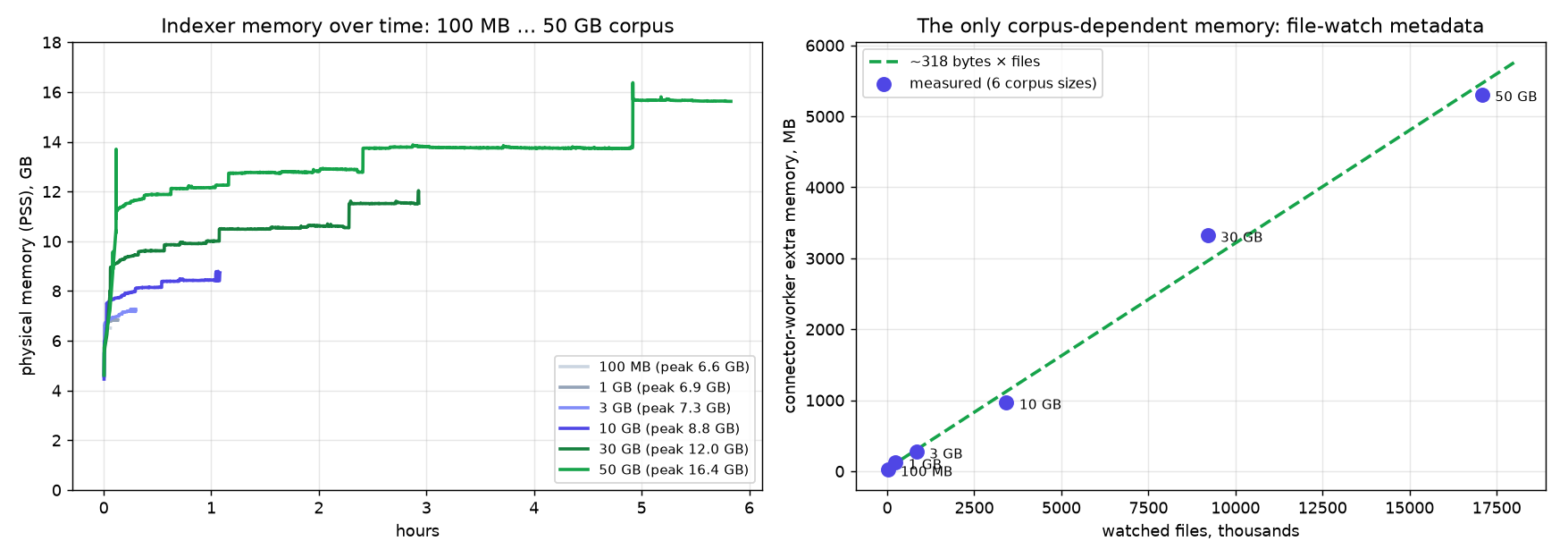
Curves from the run before the allocator tuning (peaks 6.6–16.4 GB); the table above has the final numbers from the tuned rerun (6.6–13.1 GB). The shape is the point: each curve reaches its plateau in the first minutes and holds it for the rest of the run — 5.5 hours for 50 GB.
The peak itself is dominated by the embedding stack, not the engine — a Pathway worker process is ~200 MB; the rest is the price of running embeddings locally (8 × PyTorch runtime + model), i.e. of paying no per-token API fees. Fewer workers or an API embedder shrink it accordingly.
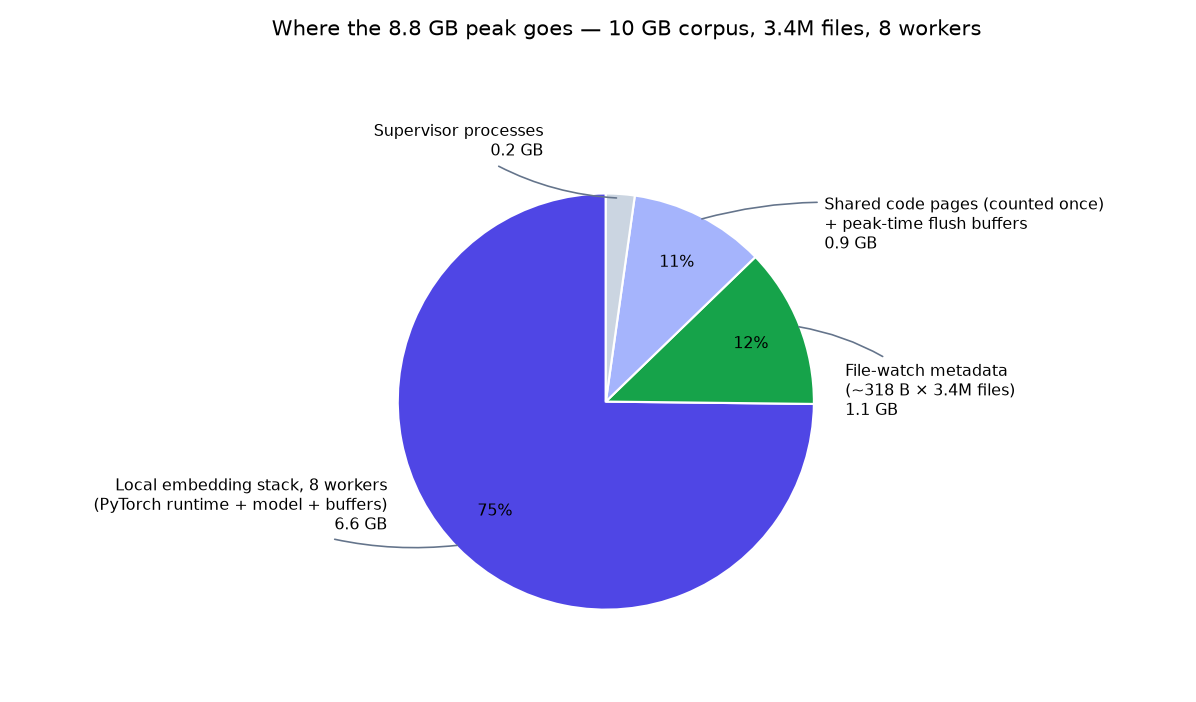
Same earlier run (8.8 GB peak on the 10 GB corpus; 7.7 GB after tuning). The proportions are what matters here: the embedding stack dominates, the engine and the file-watch index are small.
Memory is measured as PSS (proportional set size) summed over the container: shared pages — e.g. the PyTorch libraries mapped by every worker — are counted once, not once per process. Setup: 96-core CPU host, streaming mode, 8 worker processes, local `static-retrieval-mrl-en-v1` embeddings (no API calls; Matryoshka-truncated to 256 dims), 512-token chunks, Qdrant, and jemalloc's `background_thread` purging enabled in the indexer containers (measured free; it keeps idle workers from retaining freed pages). Numbers were measured on a nightly Pathway build whose engine matches the released wheel (pathway ≥ 0.32.1 — what the benchmark's docker image and the Development section install), so they are reproducible as-is. ### Retrieval accuracy (FRAMES) End-to-end evaluation on [FRAMES](https://arxiv.org/abs/2409.12941) (Google, 2024): 824 multi-hop questions whose answers must be assembled from 2–15 English Wikipedia articles — see [benchmarks/frames](https://github.com/pathwaycom/serviette/tree/main/benchmarks/frames), full technical report in [REPORT.md](https://github.com/pathwaycom/serviette/blob/main/benchmarks/frames/REPORT.md): | measurement | result | |---|---| | gold-article recall — the paper's metric, on the paper's corpus | **0.50** vs 0.15 published for the paper's BM25 baseline (0.21 for our reproduction of it) | | paired gain from adding serviette to gpt-5, paper's protocol | **+5.2 pp** over the same model without retrieval (McNemar z = 4.1, 824 questions) | | adaptive retrieval in the grounded (context-only) regime | **41.3% → 52.8%** (z = 7.5) — the largest single effect measured | | absolute accuracy (permissive, gpt-5) | **73.7%** — above every number in the paper, including its 5-step agent (66.0%) and oracle (72.9%) | The setup reproduces the paper wherever technically possible: the identical Wikipedia dump (TFDS `wikipedia/20230601.en`, 5.22M articles → 12.07M chunks) indexed in full by serviette with the free local `e5-small-v2` embedder — so the recall row costs nothing in API fees — plus the paper's own retrieval metric and its verbatim autorater prompt. Comparisons are paired and internal (identical corpus, generator, judge; only the retrieval layer varies — the opt-in strategies described under [Retrieval quality](#retrieval-quality) below), because the absolute score is dominated by the 2026 generator — its no-retrieval baseline alone reaches 68.5% — which is why the headline is the paired delta, not 73.7%. The grounded rows measure serviette as it ships for private corpora: answers strictly from retrieved documents, a deliberately stricter regime than the paper's. Methodology, statistics, limitations and raw per-question outputs: [REPORT.md](https://github.com/pathwaycom/serviette/blob/main/benchmarks/frames/REPORT.md). ## Multimodality Every file type is enabled by default. serviette routes each file to the best parser that works **without an API key**, and turns on key-requiring modalities automatically when their key is present: | format | parsed by default with | notes | |---|---|---| | text / Markdown | as-is | | | PDF | pypdf — **built in**; `serviette[docling]` upgrades to Docling (layout-aware, tables) | local, free | | Office (DOCX, PPTX, XLSX, HTML, EML…) | Unstructured — **built in**; `serviette[docling]` widens coverage (EPUB, legacy formats) | local, free | | scanned images (PNG, JPG, TIFF…) | PaddleOCR | local, free; install `serviette[ocr]` | | audio (MP3, WAV…) | Whisper | when `OPENAI_API_KEY` is set | | video (MP4, WebM, MOV…) | TwelveLabs Pegasus — a searchable text description of the video | when `TWELVELABS_API_KEY` is set | A modality whose only parser needs an absent key is skipped with a clear warning — never a crash. Everything stays live: drop a recording of yesterday's meeting into the watched folder and ask about it minutes later; expensive parses (video) are cached on disk, so restarts cost nothing. The routing is configurable per file pattern (`parser:` section — pick a vision model for images instead of OCR, set a custom video prompt); see [docs](https://github.com/pathwaycom/serviette/blob/main/docs/README.md). Embeddings work the same for every modality: parsed content is text, so any of the embedder families — including the local credential-free default — covers a multimodal corpus. ## Retrieval quality Retrieval and answering are pure-vector by default; five opt-in strategies improve accuracy, each a few lines of config. They compose freely — decompose widens *what* is retrieved, hybrid and reranking reorder *which* chunks win, MMR *diversifies* them, and adaptive RAG *retries* with more context when the answer is not found. - **Hybrid (BM25 + vector).** Fuses vector similarity with an in-process BM25 keyword index (reciprocal-rank fusion). The two signals fail differently — embeddings match paraphrases, BM25's IDF makes rare exact tokens (names, dates, IDs) dominate — so their fusion beats either alone on entity-heavy corpora. Enable with `hybrid: true` on the vector-db section. - **Reranker.** A second stage rescoring a shortlist of candidates: a local, keyless cross-encoder (`reranker: {type: cross_encoder}`) or pointwise LLM scoring (`type: llm`). Best for precise, single-hop questions. - **Adaptive RAG.** Answers from `k` chunks first, then grows the context and re-asks while the LLM reports the answer is not present (`rag.adaptive`). Your `llm.system_prompt` stays in force; the mode only appends the "reply with this marker when the context is insufficient" instruction it needs to decide when to fetch more. - **Query decomposition.** One LLM call splits a multi-hop question into sub-queries, retrieves for each, and fuses — so chunks of different hops stop competing for the same top-k slots (`rag.decompose`). - **MMR.** Diversifies the result set, trading relevance against redundancy (`rag.mmr`). - **Document questions.** "How many documents do you have?", "What does `journal.pdf` say?", "What changed between `law_2023.txt` and `law_2024.txt`?" are questions about documents, not about a passage, and chunk retrieval cannot answer them. `rag.documents` (on by default) answers them from the document catalog and from whole files: a question naming a file goes straight to that file; any other question is searched as usual, and only if that finds nothing does one short LLM call decide between a wider search and the catalog or the named documents. Two files that share most of their text are compared as a line-level diff computed by the server, so the model reads only what changed — however the files were chunked. Every step has a fixed context budget and the request as a whole a ceiling (`max_request_chars`); when a file cannot be identified the answer says which names were close. Not available on Pinecone, which cannot enumerate documents. The reranker and the multi-step strategies (adaptive, decompose) are backend-independent — they work on every vector DB. Hybrid and MMR read from the store, so support depends on the backend: | Backend | Vector | Reranker · Adaptive · Decompose | MMR | Hybrid (BM25) | |----------|:------:|:-------------------------------:|:---:|:-------------:| | DuckDB | ✅ | ✅ | ✅ | ✅ in-process | | Qdrant | ✅ | ✅ | ✅ | ✅ in-process | | pgvector | ✅ | ✅ | ✅ | ✅ in-process | | Milvus | ✅ | ✅ | ✅ | ✅ in-process | | Weaviate | ✅ | ✅ | ✅ | ✅ in-process | | ChromaDB | ✅ | ✅ | ✅ | ✅ in-process | | MongoDB | ✅ | ✅ | ✅ | ✅ in-process | | Pinecone | ✅ | ✅ | ✅ | ❌ — no scan-all API; native sparse-index hybrid is planned | The in-process index follows the store: it is rebuilt as soon as the backend reports a change (the row count; on DuckDB and pgvector also the newest `seen_at`, which catches in-place edits) and refreshed in the background every `hybrid_refresh_seconds` (default 30) as a bound on staleness for whatever that cheap signal misses. In-process BM25 targets corpora up to a few million chunks; above `hybrid_max_chunks` the keyword leg is skipped with a warning and retrieval stays pure-vector. **Pinecone** cannot enumerate its vectors, so it has no in-process hybrid — `hybrid: true` there fails fast at startup with that explanation; native hybrid (a second sparse index) is planned. Native server-side BM25 for the client-server backends (replacing the in-process leg at larger scale) is planned as well. ## Observability Three layers, all on by default or one config line away: **In the chat UI.** The header shows *"indexed N s ago"* — the age of the most recent write into the vector store. When you edit a source document, you can watch the counter reset as the change lands. **`GET /api/v1/stats`** on the API server: the backend in use, the number of indexed chunks, and index freshness — a JSON one-liner for dashboards and health checks, served without touching the indexer (it reads the vector store, like every other query). **Engine metrics (Prometheus).** The Pathway engine ships its own observability server; serviette exposes it with one config line: ```yaml indexer: monitoring_http_port: 20000 ``` Every worker process then serves `GET /metrics` on `127.0.0.1:(20000 + worker index)` — input/output latency gauges (i.e. the indexing lag behind the sources) and per-operator row counters, straight from the engine's dataflow. Point a Prometheus scrape at the worker ports and you get per-stage throughput and freshness graphs with no extra code. Logs from both processes go to stdout/stderr in plain text; `serviette up` interleaves them with per-process prefixes. ## Security The server listens on **localhost only** by default and ships no built-in authentication — exposing it is an explicit decision: set `server.host: 0.0.0.0` and put an authenticating reverse proxy in front (a five-line Caddy example lives in [docs](https://github.com/pathwaycom/serviette/blob/main/docs/README.md#security--exposing-the-server)). ## Requirements - Python ≥ 3.10 (the minimum supported by Pathway). - A free Pathway license key in `PATHWAY_LICENSE_KEY` —