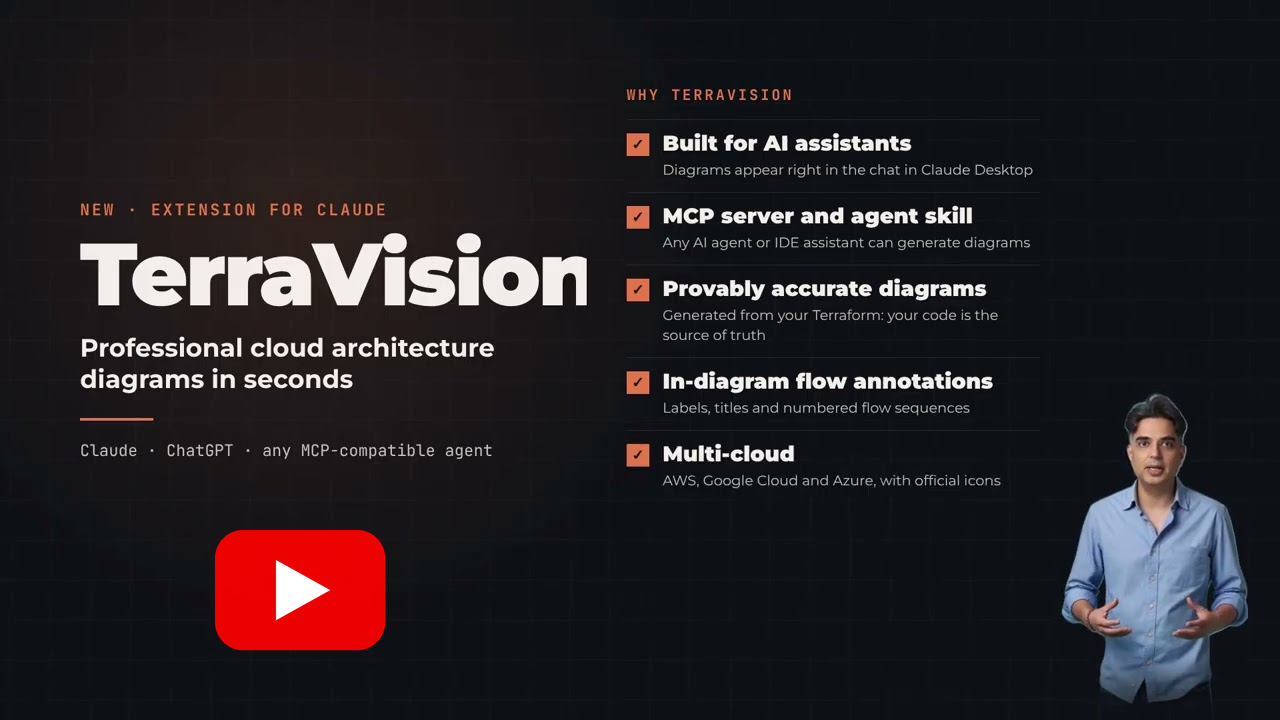
# TerraVision **Professional cloud architecture diagrams in official AWS, Azure and GCP style, from a description in Claude or ChatGPT or from your Terraform** [![pytest](https://img.shields.io/github/actions/workflow/status/patrickchugh/terravision/lint-and-test.yml?branch=main&label=pytest&logo=pytest&logoColor=white&style=flat-square)](https://github.com/patrickchugh/terravision/actions/workflows/lint-and-test.yml) [![CodeQL](https://img.shields.io/github/check-runs/patrickchugh/terravision/main?nameFilter=CodeQL%20%28python%29&label=CodeQL&logo=github&style=flat-square)](https://github.com/patrickchugh/terravision/actions/workflows/security.yml) [![Ruff security rules](https://img.shields.io/github/check-runs/patrickchugh/terravision/main?nameFilter=Python%20security%20rules%20%28ruff%29&label=Ruff%20security&logo=ruff&style=flat-square)](https://github.com/patrickchugh/terravision/actions/workflows/security.yml) [![pip-audit](https://img.shields.io/github/check-runs/patrickchugh/terravision/main?nameFilter=Dependency%20vulnerabilities%20%28pip-audit%29&label=pip-audit&logo=python&logoColor=white&style=flat-square)](https://github.com/patrickchugh/terravision/actions/workflows/security.yml) [![SonarQube quality gate](https://img.shields.io/sonar/quality_gate/patrickchugh_terravision?server=https%3A%2F%2Fsonarcloud.io&label=SonarQube%20quality%20gate&logo=sonarqubecloud&style=flat-square)](https://sonarcloud.io/summary/overall?id=patrickchugh_terravision) [![SonarQube vulnerabilities](https://img.shields.io/sonar/vulnerabilities/patrickchugh_terravision?server=https%3A%2F%2Fsonarcloud.io&label=SonarQube%20vulnerabilities&logo=sonarqubecloud&style=flat-square)](https://sonarcloud.io/project/issues?id=patrickchugh_terravision&types=VULNERABILITY) [![SonarQube coverage](https://img.shields.io/sonar/coverage/patrickchugh_terravision?server=https%3A%2F%2Fsonarcloud.io&label=SonarQube%20coverage&logo=sonarqubecloud&style=flat-square)](https://sonarcloud.io/component_measures?id=patrickchugh_terravision&metric=coverage) [![PyPI version](https://img.shields.io/pypi/v/terravision?style=flat-square)](https://pypi.org/project/terravision/) [![PyPI downloads](https://img.shields.io/pypi/dm/terravision?style=flat-square)](https://pypi.org/project/terravision/) [![GitHub stars](https://img.shields.io/github/stars/patrickchugh/terravision?style=flat-square)](https://github.com/patrickchugh/terravision/stargazers) [![License](https://img.shields.io/github/license/patrickchugh/terravision?style=flat-square)](https://github.com/patrickchugh/terravision/blob/main/LICENSE) **🌐 [terravision.online](https://terravision.online/) · 📖 [Full documentation →](https://patrickchugh.github.io/terravision/)** TerraVision is a free, open-source **cloud architecture diagram generator** for AWS, Azure and Google Cloud that works in both directions: **design to code** (describe it to your AI assistant, get the diagram, then the Terraform) and **code to diagram** (draw what your Terraform deploys). Ask your AI assistant for a cloud architecture diagram, in plain words, and get the diagram a cloud architect would draw: the official AWS, Azure and GCP icons, with every resource in its VPC, subnet, zone or resource group. From a description, from your Terraform code, or the other way round, with the Terraform written from the diagram. TerraVision runs on your own computer and needs no cloud access. > ### Draw prod without prod access. > TerraVision draws what your Terraform *will* deploy, from the code alone. The infrastructure doesn't have to exist yet, and you need no access to any account it deploys to. Live cloud scanners can't do that. **[See how →](https://patrickchugh.github.io/terravision/draw-any-environment/)** --- ## Watch the 90-Second Intro [![TerraVision extension for Claude and ChatGPT](./images/youtube-thumbnail.png)](https://youtu.be/BbXWR-v_Dl0) --- ## Gallery The same three-tier design on each cloud, then a flagship for each. Every example comes with the prompt and the source file: **[see the full gallery →](https://patrickchugh.github.io/terravision/gallery/)**
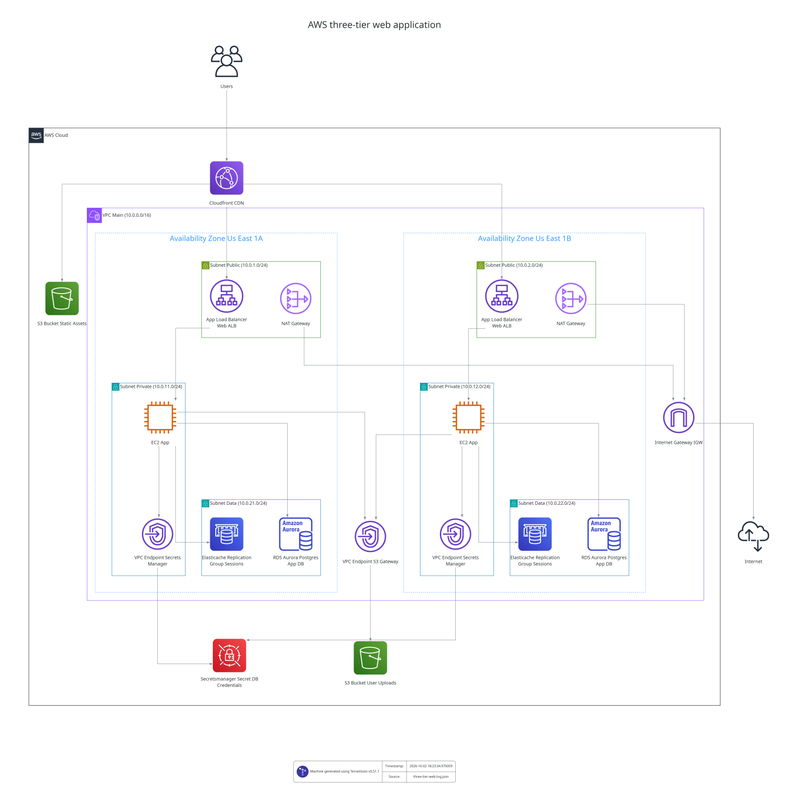
AWS three-tier web application architecture diagram
AWS three-tier web app
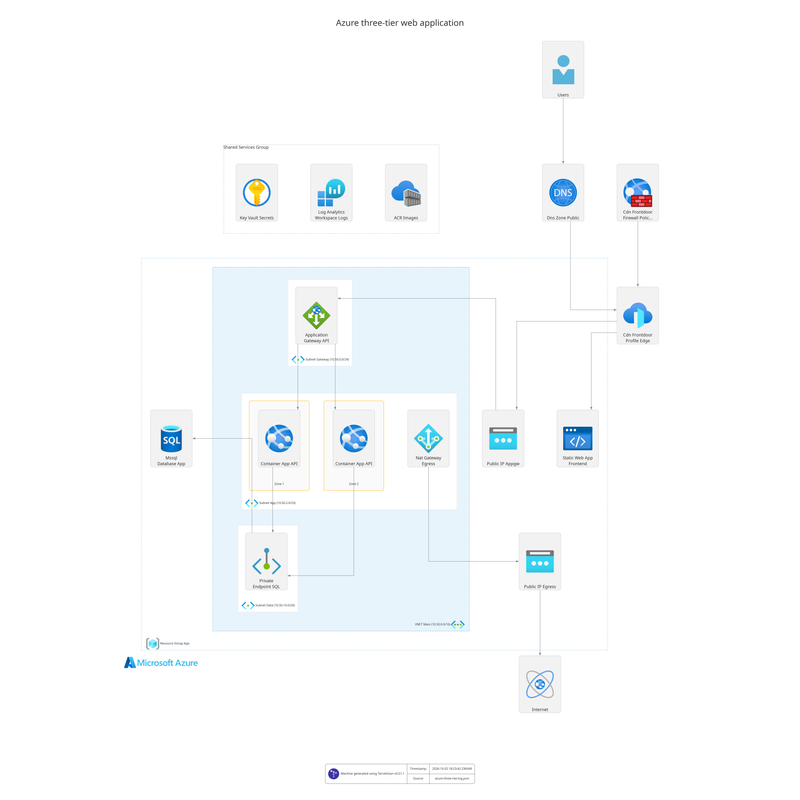
Azure three-tier web application architecture diagram
Azure three-tier web app
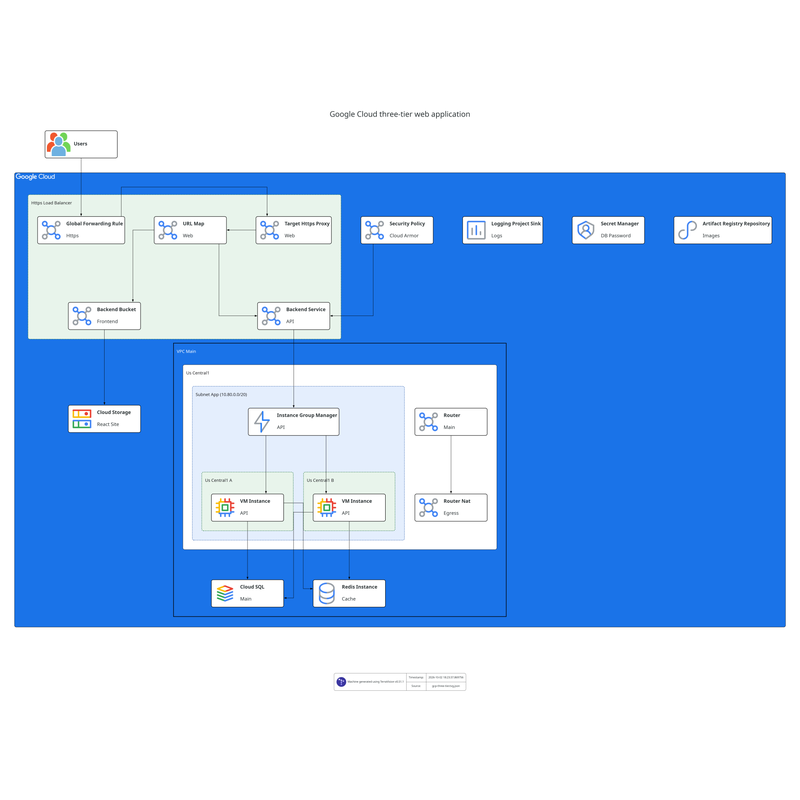
Google Cloud three-tier web application architecture diagram
Google Cloud three-tier web app
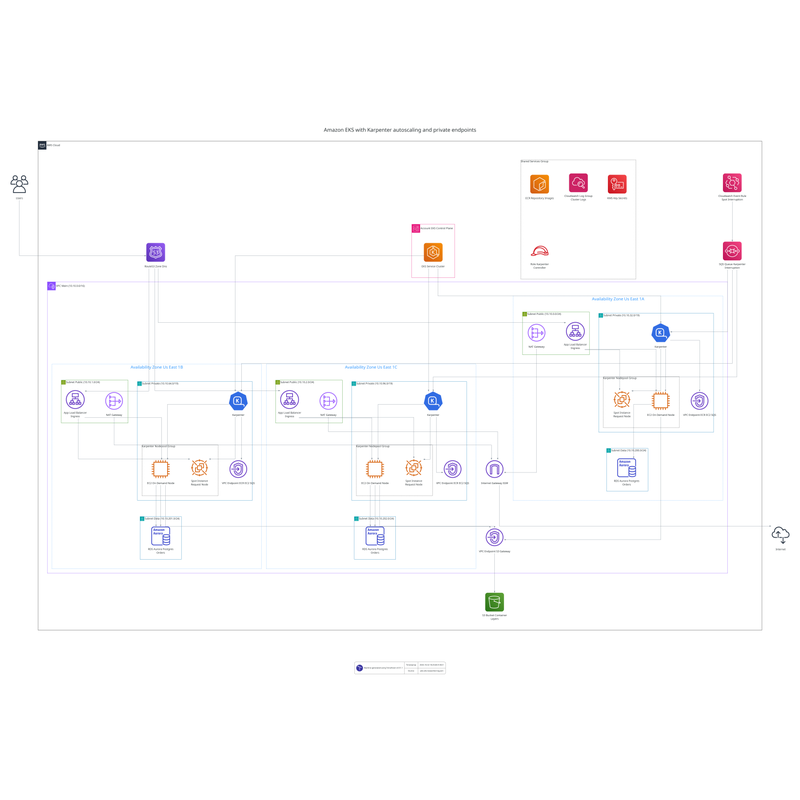
Amazon EKS with Karpenter architecture diagram
AWS EKS with Karpenter
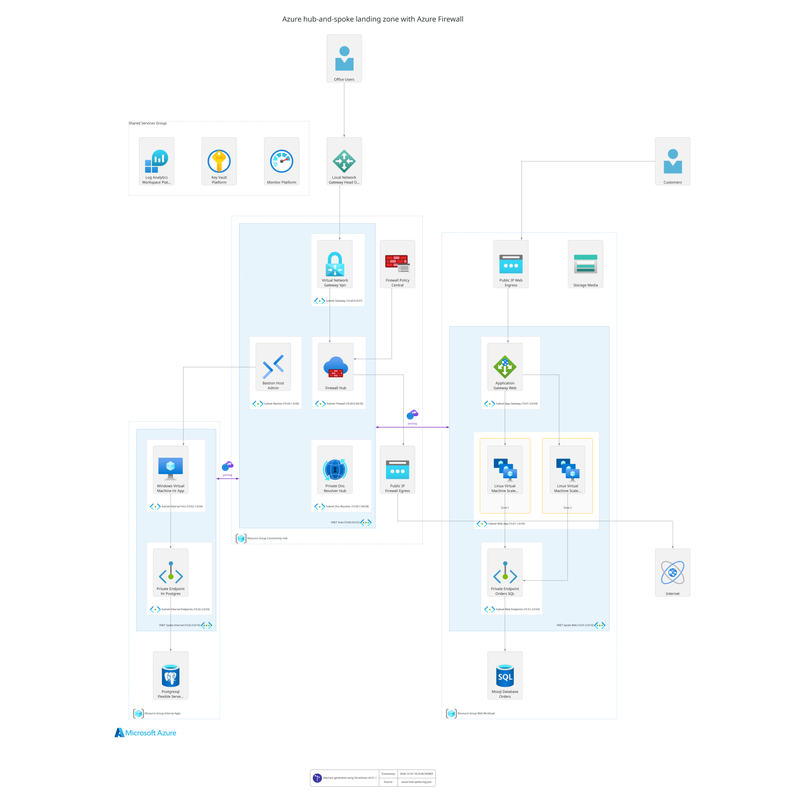
Azure hub-and-spoke network architecture diagram
Azure hub-and-spoke landing zone
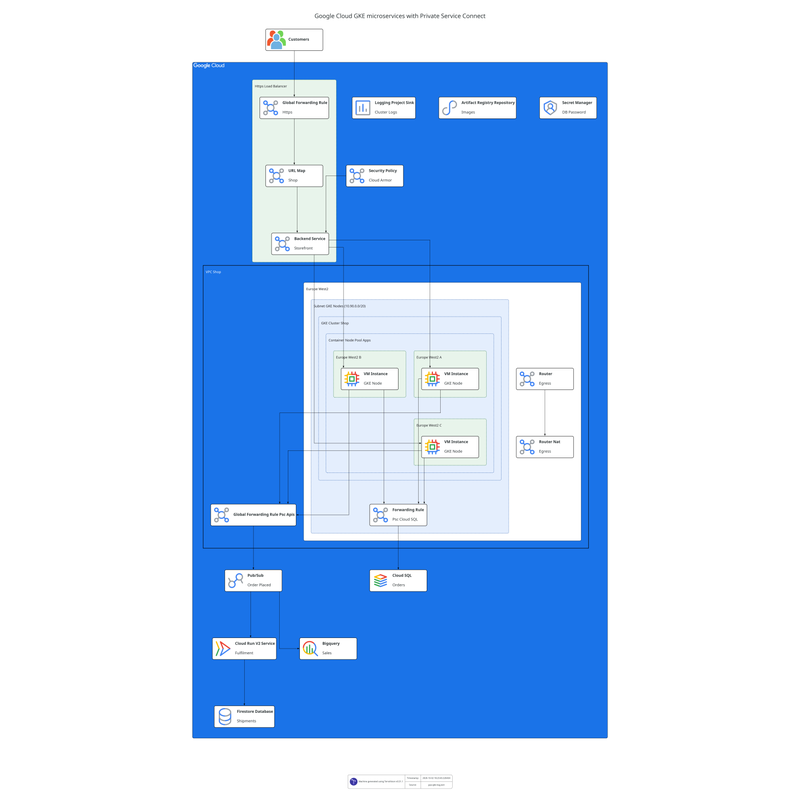
Google Cloud GKE microservices architecture diagram
Google Cloud GKE with Private Service Connect
More in the gallery: [AWS serverless event-driven](https://patrickchugh.github.io/terravision/gallery/#aws-serverless-event-driven-architecture-diagram) · [AWS data lake](https://patrickchugh.github.io/terravision/gallery/#aws-data-lake-architecture-diagram) · [AWS multi-region failover](https://patrickchugh.github.io/terravision/gallery/#aws-multi-region-failover-architecture-diagram) · [AWS multi-account network](https://patrickchugh.github.io/terravision/gallery/#aws-multi-account-network-architecture-diagram) · [Azure AKS](https://patrickchugh.github.io/terravision/gallery/#azure-aks-architecture-diagram) · [Google Cloud data pipeline](https://patrickchugh.github.io/terravision/gallery/#google-cloud-data-pipeline-architecture-diagram) --- ## Get started in Claude or ChatGPT TerraVision installs as an extension in **Claude Desktop** and a plugin in the **ChatGPT desktop app**, where the diagram appears right in the chat. It also works in Claude Code, Codex CLI, GitHub Copilot, Cursor and any other MCP client. ### 1. Install the prerequisites (once) TerraVision needs **Graphviz** (to draw) and **Git**. **uv** runs TerraVision for Claude Code, Codex, Antigravity CLI and other MCP clients; Claude Desktop brings its own on Windows and macOS, so skip it there. **Terraform** is only needed to draw from Terraform code.
macOS With [Homebrew](https://brew.sh): ```bash brew install graphviz git brew install uv # not needed for Claude Desktop brew install hashicorp/tap/terraform # optional: to draw from Terraform code ```
Windows In PowerShell: ```powershell winget install --id Graphviz.Graphviz -e winget install --id Git.Git -e winget install --id astral-sh.uv -e # not needed for Claude Desktop winget install --id Hashicorp.Terraform -e # optional: to draw from Terraform code ``` Then open a **new** terminal, and restart your AI app, so they see the new programs.
Linux (Debian, Ubuntu) ```bash sudo apt install graphviz git # Ubuntu 26.04 and later only (also Debian 14 "forky"/testing). # Skip on older releases such as Ubuntu 24.04: graphviz already includes it. sudo apt install libgvplugin-neato-layout8 curl -LsSf https://astral.sh/uv/install.sh | sh # Claude Desktop on Linux needs uv pre-installed # optionally install terraform, to draw from Terraform code: HashiCorp's apt repository wget -O- https://apt.releases.hashicorp.com/gpg | sudo gpg --dearmor -o /usr/share/keyrings/hashicorp-archive-keyring.gpg echo "deb [signed-by=/usr/share/keyrings/hashicorp-archive-keyring.gpg] https://apt.releases.hashicorp.com $(lsb_release -cs) main" | sudo tee /etc/apt/sources.list.d/hashicorp.list sudo apt update && sudo apt install terraform ``` Other distributions: [HashiCorp's install guide](https://developer.hashicorp.com/terraform/install).
No admin rights, or no package manager? Each tool can be unpacked into your home folder and added to your PATH: [installation guide](https://patrickchugh.github.io/terravision/installation/). ### 2. Connect your assistant **Claude Desktop:** download `terravision-.mcpb` from the [latest release](https://github.com/patrickchugh/terravision/releases/latest) and open it (or drag it into **Settings → Extensions**). Diagrams appear right in the chat, with buttons to open the image, edit it in draw.io, show it in its folder and see its source. **Claude Code** (terminal, VS Code or JetBrains): ```bash claude plugin marketplace add patrickchugh/terravision claude plugin install terravision-cloud-diagrams@terravision ``` Then start a new Claude Code session. Diagrams are saved in a `diagrams` folder in your project. If `/mcp` shows TerraVision failed to connect on first start (the install can take longer than Claude Code waits), choose **Reconnect**, or pre-install with `uvx --from "terravision[mcp]" terravision --version`. **ChatGPT desktop app and OpenAI Codex CLI:** in the desktop app, go to Settings, add the marketplace `https://github.com/patrickchugh/terravision`, then select `terravision-cloud-diagrams`. For the CLI: ```bash codex plugin marketplace add https://github.com/patrickchugh/terravision codex plugin add terravision-cloud-diagrams@terravision ``` **Google Antigravity CLI** (`agy`): ```bash agy mcp add terravision -- uvx --from "terravision[mcp]" terravision mcp --output-dir /path/for/diagrams ``` **VS Code with GitHub Copilot, Cursor and other MCP clients:** add an MCP server that runs `uvx --from "terravision[mcp]" terravision mcp --output-dir `. Configuration for each client, plus the `npx skills add patrickchugh/terravision` skill-only install, is in the [setup guide](https://patrickchugh.github.io/terravision/ai-assistants/). ### 3. Ask for a diagram (or code) | You have | Ask something like | You get | |---|---|---| | An idea | *"Draw an AWS three-tier app: React on CloudFront, ECS Fargate behind an ALB in two AZs, SQL Server on RDS Multi-AZ"* | The diagram (PNG, SVG, editable draw.io) and its graph. Refine it by asking: *"add ElastiCache"*, *"show how a request flows through it"* | | A diagram you like generated from TerraVision | *"Write the Terraform for this architecture"* | Terraform for the resources, zones and connections, with the diagram's flows and labels kept (quality depends on model used) | | Terraform code, local or on GitHub but no VERIFIED diagram | *"Draw the architecture of the Terraform in ./infra"* or *"Show me a cloud architecture diagram of https://github.com/patrickchugh/testcase-bastion//examples"* | A diagram of what `terraform plan` says the code deploys | | A TerraVision diagram of your Terraform that you want to publish in HTML documentation, or review resource by resource, for example in a security audit | *"Make this diagram interactive"* or *"Give me an interactive version I can click through"* | A single HTML page that works in any browser or docs site, no server needed: click any resource to see its settings (encryption, public access, ports, IAM), search and zoom. Built from `terraform plan`, so it needs the Terraform, not just a picture | | Terraform with an existing TerraVision diagram in a repository | *"Keep this diagram up to date in CI"* | A workflow that redraws the diagram whenever the Terraform changes | The first diagram takes a little longer while TerraVision installs itself. If anything is missing, the assistant says what to install. To check at any time, ask: *"Is TerraVision set up correctly?"* The full guide, with more example prompts: **[Use TerraVision with AI assistants](https://patrickchugh.github.io/terravision/ai-assistants/)**. --- ## Keep diagrams current in CI/CD Point the [TerraVision GitHub Action](https://github.com/patrickchugh/terravision-action) at your Terraform, and the diagram redraws itself on every change: ```yaml - uses: hashicorp/setup-terraform@v3 - uses: patrickchugh/terravision-action@v2 with: source: ./infrastructure outfile: docs/architecture format: both ``` A `terravision.yml` next to the Terraform adds the title, numbered flows and connection labels to every version. GitLab, Jenkins, Azure DevOps and others: [CI/CD Integration](https://patrickchugh.github.io/terravision/cicd-integration/). --- ## Why TerraVision? - ✅ **Built for AI assistants**: extensions and plugins for Claude, ChatGPT, Codex, Copilot and Cursor, with the diagram shown in the chat ([guide](https://patrickchugh.github.io/terravision/ai-assistants/)) - ✅ **Provably accurate**: drawn from `terraform plan`, so the code is the source of truth and what you see is what deploys - ✅ **Draw prod without prod access**: the infrastructure need not exist and you need no access to the account it deploys to; one codebase draws dev, staging and prod from their variables files ([how](https://patrickchugh.github.io/terravision/draw-any-environment/)) - ✅ **Official icons and conventions**: AWS, Azure and GCP icons, with every resource in its VPC, subnet, zone or resource group - ✅ **JSON graph input**: describe an architecture in a few lines of JSON, no custom DSL to learn ([Graph Format](docs/graph-format.md)) - ✅ **100% client-side**: runs locally, needs no cloud access, your code never leaves your machine - ✅ **Interactive HTML and editable draw.io output**, flow annotations (YAML or AI-generated via Ollama or Bedrock), Terragrunt support, free and open source --- ## How it compares | | TerraVision | Manual tools
(draw.io, Lucidchart, Visio) | AI workspaces
(Eraser) | Diagram as code
(Mermaid, D2, Python Diagrams) | Live cloud scanners
(e.g. Cloudcraft) | |---|---|---|---|---|---| | Draw from a plain-English description | ✅ inside the assistant you already use (Claude, ChatGPT, Copilot) | Partly only if your organisation approves third-party models | ✅ | No| No | | Draw from Terraform | ✅ built from `terraform plan`, client side | No | Partly AI interprets the files you paste (potentially exposes code & secrets) | No | No | | Draw an environment you have no access to, or one not built yet | ✅ from the code and a variables file alone: the infrastructure need not exist, and no access to any account it deploys to is needed. `--varfile prod.tfvars` draws prod, `--varfile dev.tfvars` draws dev | Partly drawn by hand from documents | Partly from code you paste | Partly written by hand | No draws only an account it can connect to | | Write the Terraform for a design | ✅ by your assistant, checked by redrawing the code AI writes | Partly Lucidchart beta, AWS only, paid add-on | No | No | No | | Official icons and VPC, subnet, zone grouping conventions | ✅ built in | Partly icon libraries; correct grouping is up to you | Partly icons, generic groups | No | No | | Stays current automatically | ✅ redrawn from the code in CI | No | Partly repository sync | No | ✅ follows the live account | |High Security - No access to your cloud account or upload of your code | ✅ | ✅ | No | ✅ | No | | Price | Free, open source | Free to paid | Free tier, paid plans | Free, open source | Paid | Already draw by hand? Generate the first version with TerraVision, then polish the exported file in draw.io or Lucidchart. Full comparison: [TerraVision vs draw.io, Lucidchart, Eraser, Mermaid and others](https://patrickchugh.github.io/terravision/alternatives/). --- ## Supported Cloud Providers | Provider | Status | Resource types | | ---------------- | --------------- | -------------- | | **AWS** | ✅ Full support | 427 types | | **Google Cloud** | ✅ Full support | 267 types | | **Azure** | ✅ Full support | 263 types | Full list: [Node types](docs/node-types.md). --- ## Use it from the command line TerraVision is also a command-line tool, for scripts and for people who prefer to write the graph themselves. ### Install ```bash pipx install terravision # or: uv tool install terravision # or: pip install terravision in a virtual env ``` You also need **Python 3.11+** (uv installs one for you), **Graphviz** and **Git**, plus **Terraform 1.x** (or OpenTofu) when drawing from Terraform code; JSON graphs don't need it. Platform-specific steps, Docker and Nix: [Installation Guide](https://patrickchugh.github.io/terravision/installation/). ### Diagram from JSON (no Terraform needed) Each key is `.`; each value is what it connects to or contains. That is the whole format. ```json { "tv_aws_users.users": ["aws_cloudfront_distribution.cdn"], "aws_cloudfront_distribution.cdn": ["aws_s3_bucket.static_site", "aws_alb.api"], "aws_vpc.main": ["aws_subnet.public~1", "aws_subnet.private~1"], "aws_subnet.public~1": ["aws_alb.api"], "aws_subnet.private~1": ["aws_lambda_function.orders"], "aws_alb.api": ["aws_lambda_function.orders"], "aws_lambda_function.orders": ["aws_dynamodb_table.orders", "aws_sqs_queue.events"] } ``` ```bash terravision draw --source architecture.tvg.json --format svg ``` Works for AWS (`aws_*`), Azure (`azurerm_*`) and GCP (`google_*`). Full spec, schema and Azure and GCP examples: [Graph Format](docs/graph-format.md). ### Diagram from Terraform ```bash terravision draw --source ./path-to-your-terraform --show # local directory terravision draw --source https://github.com/user/repo.git//subfolder --show # public Git repo terravision draw --source ./path-to-your-terraform --varfile prod.tfvars # draw prod without prod access terravision visualise --source ./path-to-your-terraform --show # interactive HTML ``` The diagram is derived from `terraform plan`, so it shows what the code actually deploys: conditionals, `count`, `for_each` and modules are resolved. Eraser and friends draw what the AI imagines; TerraVision proves what the code deploys. Output formats, pre-generated plans, AI annotations, the simplified view and every option (`terravision --help`): [Usage Guide](https://patrickchugh.github.io/terravision/usage-guide/). ### Try the interactive demos - 🟧 **[AWS demo](https://patrickchugh.github.io/terravision/demo-aws.html)**: Wordpress on ECS Fargate with CloudFront, RDS, EFS - 🟦 **[Azure demo](https://patrickchugh.github.io/terravision/demo-azure.html)**: VM scale set with load balancer and VNet - 🟩 **[GCP demo](https://patrickchugh.github.io/terravision/demo-gcp.html)**: Core GCP networking and compute --- ## Documentation Everything lives at **[patrickchugh.github.io/terravision](https://patrickchugh.github.io/terravision/)** ([llms.txt](https://patrickchugh.github.io/terravision/llms.txt) for AI agents). - **Using TerraVision:** [Installation](docs/installation.md) · [Usage Guide](docs/usage-guide.md) · [Draw prod without prod access](docs/draw-any-environment.md) · [Annotations](docs/annotations.md) · [CI/CD](docs/cicd-integration.md) · [MCP Server](docs/mcp-server.md) · [FAQ](docs/faq.md) · [Troubleshooting](docs/troubleshooting.md) - **Diagram generators:** [Cloud](https://patrickchugh.github.io/terravision/cloud-architecture-diagram-generator/) · [AI (description to diagram)](https://patrickchugh.github.io/terravision/ai-cloud-architecture-diagram-generator/) · [Diagram to Terraform](https://patrickchugh.github.io/terravision/diagram-to-terraform/) · [AWS](https://patrickchugh.github.io/terravision/aws-architecture-diagram-generator/) · [Azure](https://patrickchugh.github.io/terravision/azure-architecture-diagram-generator/) · [Google Cloud](https://patrickchugh.github.io/terravision/gcp-architecture-diagram-generator/) · [Terraform](https://patrickchugh.github.io/terravision/terraform-diagram-generator/) · [Alternatives compared](https://patrickchugh.github.io/terravision/alternatives/) - **For collaborators:** [Contributing](docs/CONTRIBUTING.md) · [Developer Guide](docs/developer-guide.md) · [Resource Handler Guide](docs/resource-handler-guide.md) · [Constitution](docs/constitution.md) --- ## Contributing and support TerraVision accepts pull requests only from invited collaborators. Bug reports, feature requests and questions are welcome in [Issues](https://github.com/patrickchugh/terravision/issues) and [Discussions](https://github.com/patrickchugh/terravision/discussions); [CONTRIBUTING.md](docs/CONTRIBUTING.md) says what to put in a bug report. Licensed under AGPL-3.0, see [LICENSE](LICENSE). Built on [Graphviz](https://graphviz.org/), [Terraform](https://www.terraform.io/) and [Terragrunt](https://terragrunt.gruntwork.io/), with the official AWS, Azure and GCP icon sets.