---
id: Jump links
section: components
---
import { Checkbox, List, ListItem } from '@patternfly/react-core';
## Accessibility
To implement accessible PatternFly **jump links**:
- Provide a unique and descriptive `aria-label` to the jump links component.
- Ensure a jump link item has the `aria-current="location"` attribute when it is selected.
- Ensure that the jump links toggle has an `aria-expanded` attribute that matches its expanded state. For example, a collapsed jump links toggle should have `aria-expanded="false"`.
- Provide a unique and descriptive `aria-label` to the jump links toggle if the jump links component is expandable.
- Ensure each jump link item has descriptive text content that conveys what the user will be jumping to upon selecting it, such as a section heading.
## Testing
At a minimum, jump links should meet the following criteria:
The jump links component has a unique and descriptive aria-label.} description="This helps users differentiate the jump links from other navigation elements on the page." />
Once a jump link item has been selected, it has the aria-current="location" attribute.} description="This will announce to users navigating via assistive technologies such as a screen reader that a jump link item has already been jumped to when navigating through the list of jump link items." />
If the jump links component is expandable, the jump links toggle can be collapsed or expanded via keyboard by pressing Space or Enter.} />
If the jump links component is expandable, it has an aria-expanded attribute that matches its current expanded state.} />
If the jump links component is expandable, the jump links toggle has a unique and descriptive aria-label.} />
Tab navigates to the next jump link item or focusable element, and Shift + Tab navigates to the previous jump link item or focusable element.} />
Only Enter should select a jump link item since it is an anchor element.} />
## React customization
The following React props have been provided for more fine-tuned control over accessibility.
| Prop | Applied to | Reason |
|---|---|---|
| `aria-label="[text that labels the jump links navigation]"` | `JumpLinks` | Adds an accessible name to the jump links' `nav` element for assistive technologies. This should generally be descriptive and unique, especially if there are multiple `nav` elements on the page. |
| `isExpanded` | `JumpLinks` | Sets the default `aria-expanded` attribute. **Required** if the jump links component should be expanded by default. |
| `toggleAriaLabel="[text that labels the expandable toggle]"` | `JumpLinks` | Adds an accessible name to the expandable toggle for assistive technologies. **Required** when the jump links component is expandable. |
| `children` | `JumpLinksItem` | The content of the jump links item. This content should be descriptive in order to convey what a user will be jumping to upon selecting it. |
| `isActive` | `JumpLinksItem` | Sets the `aria-current="location"` attribute on the jump links item. **Required** when the jump links item has been selected. |
## HTML/CSS customization
The following HTML attributes and PatternFly classes can be used for more fine-tuned control over accessibility.
| Attribute or class | Applied to | Reason |
|---|---|---|
| `aria-label="[text that labels the jump links navigation]"` | `.pf-v6-c-jump-links` | Adds an accessible name to the jump links' `nav` element for assistive technologies. This should generally be descriptive and unique, especially if there are multiple `nav` elements on the page. |
| `aria-expanded="[true or false]"` | `.pf-v6-c-jump-links__toggle > button` | Indicates whether the jump links toggle is expanded (true) or collapsed (false) to assistive technologies. **Required** when the jump links component is expandable. |
| `aria-label="[text that labels the expandable toggle]"` | `.pf-v6-c-jump-links__toggle > button` | Adds an accessible name to the expandable toggle for assistive technologies. **Required** when the jump links component is expandable. |
| `aria-hidden="true"` | `.pf-v6-c-jump-links__toggle-icon > i` | Removes the expandable toggle icon from the accessibility tree, preventing assistive technologies from potentially announcing duplicate or unnecessary information without visually hiding it. **Required**. |
| `role="list"` | `.pf-v6-c-jump-links__list` | Indicates that the jump links list is a list element. **Required**.
This role is redundant since `.pf-v6-c-jump-links__list` is a `` element, but it is required for assistive technologies to announce the list properly. |
| `aria-current="location"` | `.pf-v6-c-jump-links__item.pf-m-current` | Announces to users navigating via assistive technologies such as a screen reader that a jump link is selected. **Required** after a jump link item has been selected. |
## Additional considerations
Consumers must ensure they take any additional considerations when customizing jump links, using it in a way not described or recommended by PatternFly, or in various other specific use-cases not outlined elsewhere on this page.
### Unique nav labeling
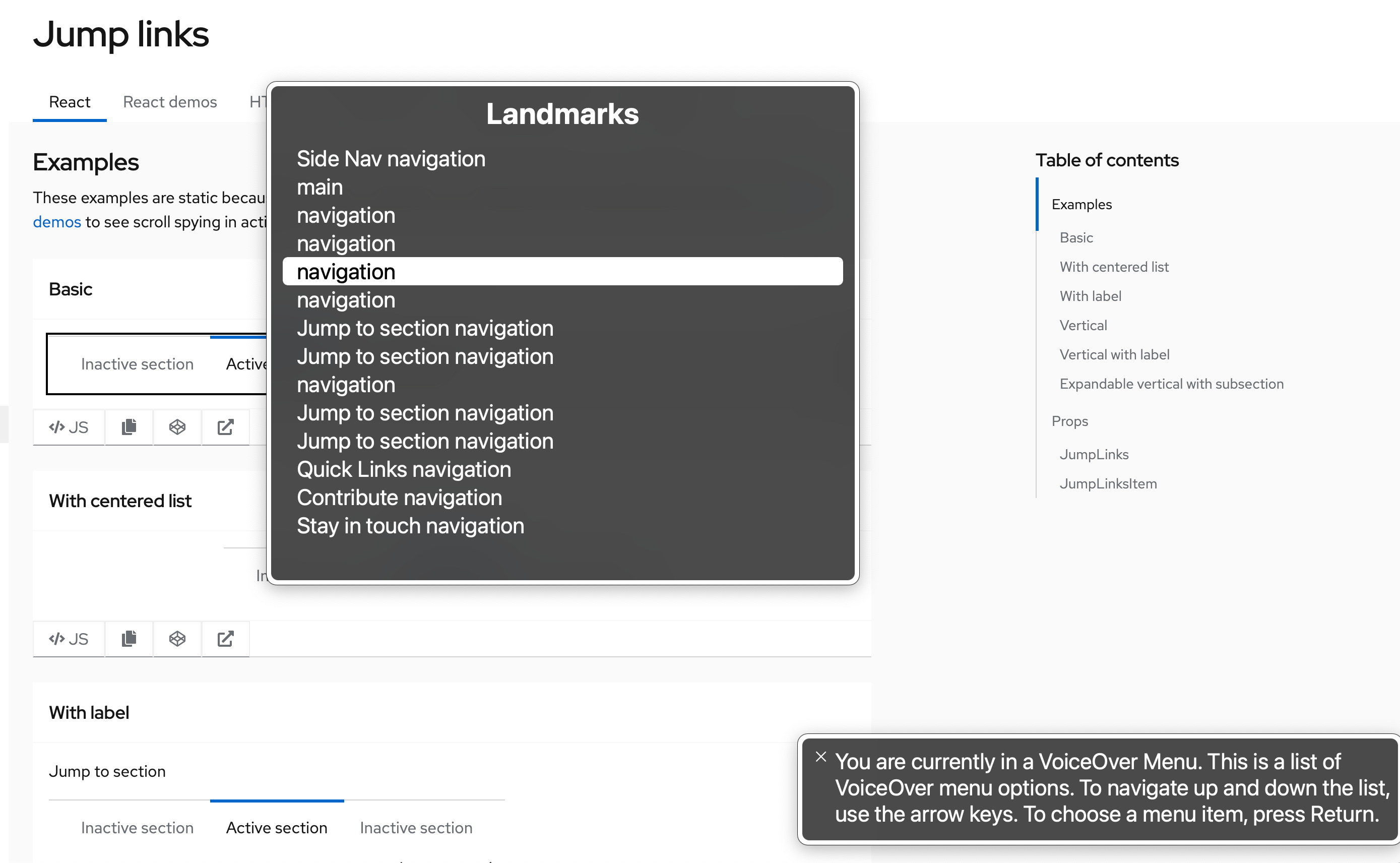
Whenever multiple navigation elements are present on a page, an `aria-label` is highly recommended. Users navigating via assistive technologies such as a screen reader may be using an elements list or rotor menu to navigate the page, and will be unable to distinguish between the various navigation elements without a unique accessible name.
The following image demonstrates the lack of information presented in VoiceOver's rotor menu when an `aria-label` is not present nor unique: