# Home Assistant App: Hikvision Doorbell


Connect your Hikvision IP door stations to Home Assistant to receive events (like motion detection or incoming calls) and send back commands (like opening a door connected to the door station relay or rejecting a call).
Make sure to read the full documentation here! [Readme](DOCS.md)
__NOTE__: This is the stable version of the app.
You feedback is very welcome! If you have any doubt, would like to report an issue or to simply chime in, please have a look at the [Github Issues page](https://github.com/pergolafabio/Hikvision-Addons/issues) and drop us a note!
## Features
- Capture doorbell **events**: _doorbell ringing_ /_motion detection_ /_door unlocked_ / _tamper alarm_
- **Open doors** connected to the doorbell (_useful for older devices where port 80 is blocked and `ISAPI` is not available_)
- Remote actions such as **answering**/**rejecting** the call, **hanging** up.
_This can be exploited in an HA automation. When for example a Zigbee door sensor signals a door opened, the ringing on the indoor stations and on the Hik-Connect devices is stopped. Se the documentation for more details._
- **Reboot** the door station
- Remote scenes / alarm / zone support such as **atHome**/**goOut**/**goToBed**/**custom** on indoor stations
- Take a snapshot on incoming call
- Control the backlight of your outdoor station
### Example
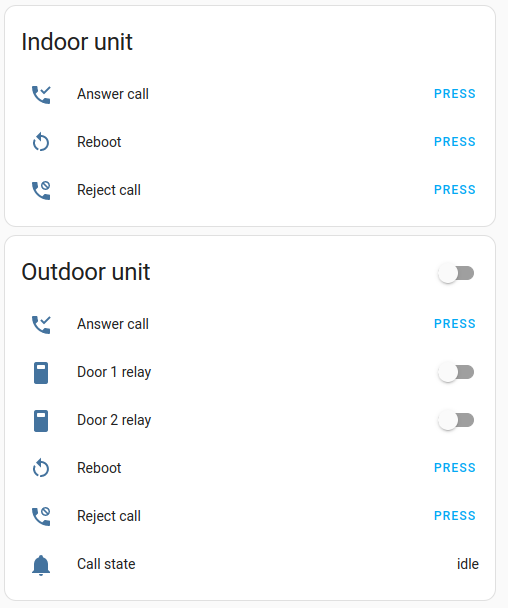
Here is an example setup showing two doorbells, an indoor and an outdoor unit:
Make sure to read the full documentation here! [Readme](DOCS.md)
## Getting started
**Note**: **Hikvision Doorbell** requires an MQTT broker to function correctly. Refer to the **Documentation** tab of the app to learn how to setup the official **Mosquitto app**.
__NOTE__: To use this _stable_ version, enable __Advanced mode__ in you Home Assistant profile:
- Click on you user name (in the lower-left corner of Home Assistant UI)
- Scroll down the profile page and toggle __Advanced Mode__

- Click the following button to automatically open the app in you Home Assistance UI:

If you are having problems, here are the manual steps:
- Open you Home Assistance interface, and navigate to `Settings` -> `Apps` -> `Apps store` -> `Repositories` (in the upper-right corner)
- Paste the following URL in the input field: `https://github.com/pergolafabio/Hikvision-Addons`
- Confirm the dialog by clicking **ADD**.
- **Hikvision Doorbell (Beta)** should be available in the _app store_ of your Home Assistant. (If it is not visible after some minutes, reload the store page by navigating to _Settings_ -> _appss_ -> _apps store_).
- Select the **Hikvision Doorbell ** app, then click **INSTALL**.
- Have a look at the **Documentation** tab of the app to setup the required configuration and to understand how this app can be integrated in Home Assistant
(The documentation can also be browsed online in the [Github repository](DOCS.md)).
## Supported devices
These devices have been reported to be working from other HA users.
If your device is not on the list, we are happy to include it. Just [open an issue here](https://github.com/pergolafabio/Hikvision-Addons/issues) on GitHub and let us know the kind of device you have.
- DS-KV8413
- DS-KD8003
- DS-KV8113
- DS-KV8213
- DS-KV6113
- DS-K1T34X
- DS-K1T67X
- DS-K1T670M
- DS-KB8113
- DS-KV9503 (no call event)
- Seems other rebranded devices confirmed working like: VDM10 made by Metzler
- ...
- This is just a confirmed list, probably other devices are working too...
- DS-KV8102-IM (First generation not supported, only open lock works)
- DS-K1T502DBFWX (Not supported at all)
- DS-HD1 and DS-HD2 not supported? They dont support ISAPI?
Make sure to read the full documentation here! [Readme](DOCS.md)
## Additional resources
- [Home Assistant community forum](https://community.home-assistant.io/t/hikvision-doorbell-videointercom-integration/532796)
## Contributing
This is an active open-source project. We are always open to people who want to
use the code or contribute to it. Thank you for being involved! :heart_eyes:
### Contributors
 Made with [contrib.rocks](https://contrib.rocks).
## Donations
Like my work? You can always [send me a donation](https://paypal.me/pergolafabio).
## Credits
This app was initially inspired by [this script](https://github.com/laszlojakab/hikvision-intercom-python-demo).
Made with [contrib.rocks](https://contrib.rocks).
## Donations
Like my work? You can always [send me a donation](https://paypal.me/pergolafabio).
## Credits
This app was initially inspired by [this script](https://github.com/laszlojakab/hikvision-intercom-python-demo).