# live-connector
An MCP server that lets AI agents read and write an Ableton Live Set as a graph. Ableton Live の Live Set を、AI エージェントがグラフとして読み書きできるようにする MCP サーバーです。
If live-connector helps you, a star keeps us going.
> [!IMPORTANT]
> live-connector is early-stage software built on Ableton Extensions SDK 1.0.0-beta.1, and it requires a Live Beta build with Extensions support. If you are upgrading from v2.x, note that v3.0.0 consolidated the MCP surface into four tools and removed every v2.x tool name.
### Quick start
1. Get the `.ablx`. Download `live-connector-3.2.2.ablx` from [Releases](https://github.com/philtzjp/live-connector/releases), or run `pnpm package` in the repository; it writes the file to `apps/extension/dist/`.
2. In Live, open Preferences → Extensions and choose the `.ablx`, or drop it onto the page.
3. Turn Developer Mode OFF and restart Live.
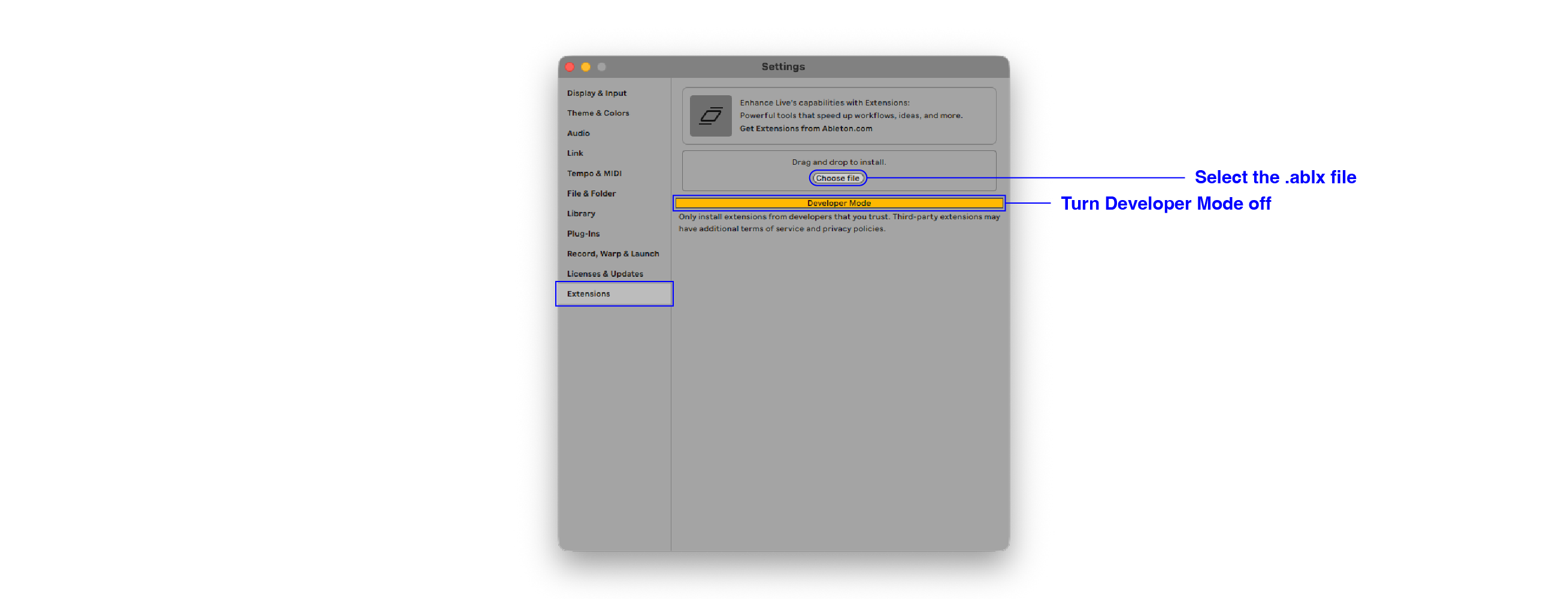
4. Check that it is running, and register it with Claude Code.
```sh
curl http://127.0.0.1:7799/health
claude mcp add --transport http live-connector http://127.0.0.1:7799/api/v1/mcp --scope project
```
> [!CAUTION]
> The MCP server has no authentication. Do not forward port 7799 to other hosts, and keep AbletonOSC off your LAN.
If `/health` returns `{"status":"pass","version":"3.2.2",...}`, the server is up.
> [!TIP]
> You only need to register the MCP server once. Reinstalling the `.ablx` keeps the same URL.
Restart Claude Code, open a Live Set, and try asking:
- "List the tracks and devices in this Live Set."
- "Create a MIDI track called Bass and add Wavetable to it."
- "Mute the Drums track. Actually, undo that."
- "What is the current value and range of Operator's Cutoff?"
### Technology
The Live Set is a graph
Tracks, devices, parameters and clips are exposed as nodes and relationships, and agents read and write them with the same Cypher.
```cypher
MATCH (:Track {name:"Drums"})-[:HAS_DEVICE]->(:Device {name:"Operator"})-[:HAS_PARAM]->(p:Parameter {name:"Cutoff"})
RETURN p.value, p.min, p.max
```
```cypher
MATCH (t:MidiTrack {name:"Bass"}) CREATE (t)-[:HAS_DEVICE]->(d:Device {name:"Wavetable"})
```
| Live | Graph |
| --- | --- |
| Track | `Track` node, with `MidiTrack` and `AudioTrack` as subtypes |
| Device on a track | `(:Track)-[:HAS_DEVICE]->(:Device)` |
| Device parameter | `(:Device)-[:HAS_PARAM]->(:Parameter)` |
| Mixer volume, pan and sends | `(:Track)-[:HAS_MIXER]->(:Mixer)-[:HAS_VOLUME\|HAS_PAN\|HAS_SEND]->(:Parameter)` |
| Rack chain | `(:Device)-[:HAS_CHAIN]->(:Chain)` |
| Playback state | virtual label `Transport` |
| Write history | virtual label `WriteEvent` |
| Capture job | virtual label `RenderJob` |
`meta` returns the complete list of labels and the grammar at runtime.
It runs inside Live
live-connector is a Live Extension, so there is no Remote Script or separate process to set up. The MCP server starts with Live and serves Streamable HTTP on a loopback address.
Every write can be undone
The SDK has no undo API, so live-connector records the operations that reverse each `do` write under a `writeId`. `undo` applies them newest first, or for a specific `writeId`. Each write is marked `full`, `partial` or `none` depending on how completely it can be restored; `partial` and `none` require confirmation. Query the history with `MATCH (e:WriteEvent) RETURN e`.
The log is kept as JSONL in the Extension's storage directory, up to 200 entries. When the SDK gains an undo API, this mechanism will be replaced.
SDK and OSC, each for what it does best
Set editing goes through the SDK. Transport control and Main output capture go through AbletonOSC, because the SDK has no API for them. OSC writes are read back to confirm they took effect, and a failed write is never retried automatically on the other backend.
Main output capture records the finished signal, including MIDI instruments and the devices on Main, by recording the Resampling input in real time. Pass `source:"main"` to `render` and go through two steps.
```json
{"source":"main","startTime":0,"endTime":64,"preview":true}
```
```json
{"source":"main","startTime":0,"endTime":64,"background":true,"confirm":true,"planId":"plan-...","requestId":"capture-001"}
```
`startTime` and `endTime` are zero-based quarter-note beats. During capture a temporary track is created and loop, punch and record mode are changed, then everything is restored. Other writes, `undo`, and another `render` are rejected until it finishes. Check progress with `MATCH (j:RenderJob {id:"..."}) RETURN j.phase, j.progressFraction`.
### Specification
MCP tools
| Tool | Purpose |
| --- | --- |
| `meta` | Service info, LOM schema, Cypher grammar, allowed `CALL` procedures, examples, and a Live Set overview |
| `do` | Cypher reads and writes, and `CALL` for transport |
| `render` | Pre-FX rendering of an AudioTrack, or real-time capture of the Main output |
| `undo` | Reverts `do` writes |
The recommended flow is `meta`, then `do` reads, `do` writes, `render`, and `undo` when needed.
Cypher
| Kind | Supported |
| --- | --- |
| Read | `MATCH … RETURN` with projection, aggregation, `ORDER BY`, `SKIP` and `LIMIT`. Results are truncated at 500 rows without `LIMIT` |
| Write | `SET`, `CREATE`, `DELETE`, `COPY` |
| Pattern | Directed relationships, variable-length hops, basic comparison operators |
| Procedure | `CALL transport.play()`, `transport.seek()`, `render.cancel()` and others listed by `meta` |
Endpoints and settings
| Item | Value |
| --- | --- |
| MCP endpoint | `http://127.0.0.1:7799/api/v1/mcp`, Streamable HTTP |
| Health check | `http://127.0.0.1:7799/health` |
| Enable AbletonOSC | `LIVE_CONNECTOR_OSC_ENABLED=true`. Off by default; everything else works without it |
## 日本語