# TTY::Spinner
[][gem]
[][gh_actions_ci]
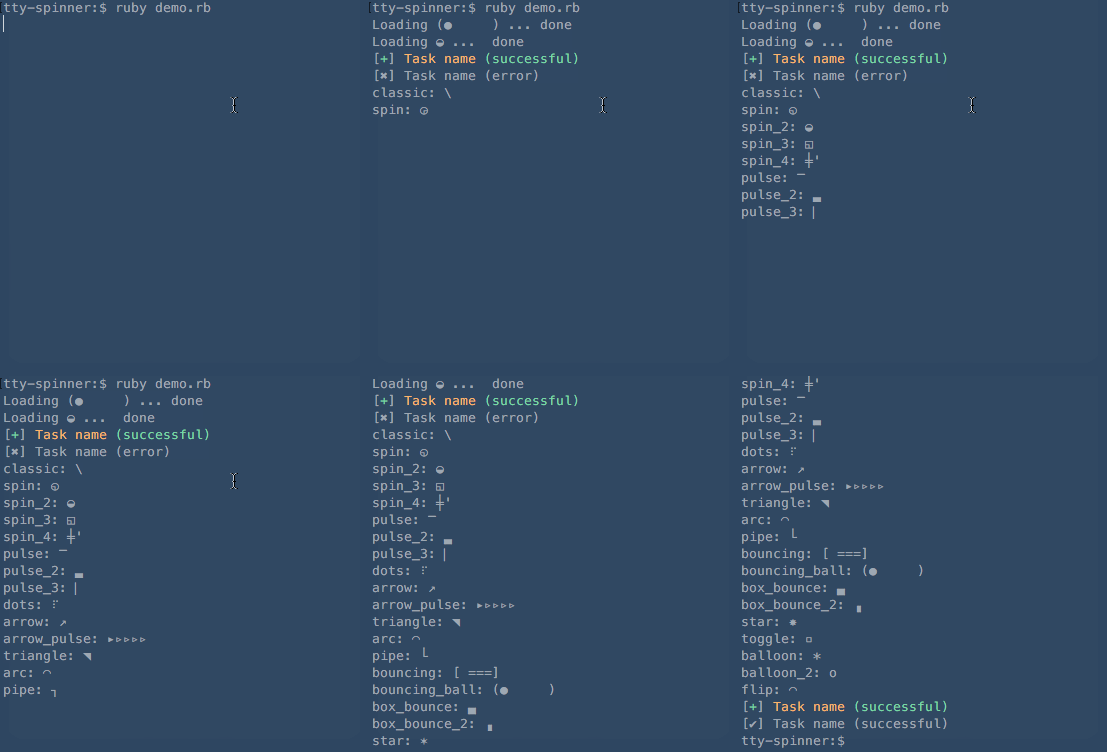
[][appveyor]
[][codeclimate]
[][coverage]
[gem]: https://badge.fury.io/rb/tty-spinner
[gh_actions_ci]: https://github.com/piotrmurach/tty-spinner/actions/workflows/ci.yml
[appveyor]: https://ci.appveyor.com/project/piotrmurach/tty-spinner
[codeclimate]: https://codeclimate.com/github/piotrmurach/tty-spinner/maintainability
[coverage]: https://coveralls.io/r/piotrmurach/tty-spinner
> A terminal spinner for tasks that have non-deterministic time frame.
**TTY::Spinner** provides independent spinner component for [TTY](https://github.com/piotrmurach/tty) toolkit.
## Installation
Add this line to your application's Gemfile:
```ruby
gem "tty-spinner"
```
And then execute:
$ bundle
Or install it yourself as:
$ gem install tty-spinner
## Contents
* [1. Usage](#1-usage)
* [2. TTY::Spinner API](#2-ttyspinner-api)
* [2.1 spin](#21-spin)
* [2.2 auto_spin](#22-auto_spin)
* [2.2.1 pause](#221-pause)
* [2.2.2 resume](#222-resume)
* [2.3 run](#23-run)
* [2.4 start](#24-start)
* [2.5 stop](#25-stop)
* [2.5.1 success](#251-success)
* [2.5.2 error](#252-error)
* [2.6 update](#26-update)
* [2.7 reset](#27-reset)
* [2.8 join](#28-join)
* [2.9 tty?](#29-tty)
* [2.10 log](#210-log)
* [3. Configuration](#3-configuration)
* [3.1 :format](#31-format)
* [3.2 :frames](#32-frames)
* [3.3 :interval](#33-interval)
* [3.4 :hide_cursor](#34-hide_cursor)
* [3.5 :clear](#35-clear)
* [3.6 :success_mark](#36-success_mark)
* [3.7 :error_mark](#37-error_mark)
* [3.8 :output](#38-output)
* [4. Events](#4-events)
* [4.1 done](#41-done)
* [4.2 success](#42-success)
* [4.3 error](#43-error)
* [5. TTY::Spinner::Multi API](#5-ttyspinnermulti-api)
* [5.1 register](#51-register)
* [5.2 auto_spin](#52-auto_spin)
* [5.2.1 manual async](#521-manual-async)
* [5.2.2 auto async tasks](#522-auto-async-tasks)
* [5.3 stop](#53-stop)
* [5.3.1 success](#531-success)
* [5.3.2 error](#532-error)
* [5.4 :style](#54-style)
## 1. Usage
**TTY::Spinner** by default uses `:classic` type of formatter and requires no parameters:
```ruby
spinner = TTY::Spinner.new
```
In addition you can provide a message with `:spinner` token and format type you would like for the spinning display:
```ruby
spinner = TTY::Spinner.new("[:spinner] Loading ...", format: :pulse_2)
spinner.auto_spin # Automatic animation with default interval
sleep(2) # Perform task
spinner.stop("Done!") # Stop animation
```
This would produce animation in your terminal:
```
⎺ Loading ...
```
And when finished output:
```
_ Loading ... Done!
```
Use **TTY::Spinner::Multi** to synchronize multiple spinners:
```ruby
spinners = TTY::Spinner::Multi.new("[:spinner] top")
sp1 = spinners.register "[:spinner] one"
# or sp1 = ::TTY::Spinner.new("[:spinner] one")
# spinners.register sp1
sp2 = spinners.register "[:spinner] two"
sp1.auto_spin
sp2.auto_spin
sleep(2) # Perform work
sp1.success
sp2.success
```
The spinners when done will display:
```
┌ [✔] top
├── [✔] one
└── [✔] two
```
For more usage examples please see [examples directory](https://github.com/piotrmurach/tty-spinner/tree/master/examples)
## 2. TTY::Spinner API
### 2.1 spin
The main workhorse of the spinner is the `spin` method.
Looping over `spin` method will animate a given spinner.
```ruby
loop do
spinner.spin
end
```
### 2.2 auto_spin
To perform automatic spinning animation use `auto_spin` method like so:
```ruby
spinner.auto_spin
```
The speed with which the spinning happens is determined by the `:interval` parameter. All the spinner formats have their default intervals specified ([see](https://github.com/piotrmurach/tty-spinner/blob/master/lib/tty/spinner/formats.rb)).
### 2.2.1 pause
After calling `auto_spin` you can pause spinner execution:
```ruby
spinner.pause
```
### 2.2.2 resume
You can continue any paused spinner:
```ruby
spinner.resume
```
### 2.3 run
Use `run` passing a block with a job that will automatically display spinning animation while the block executes and finish animation when the block terminates. The block yields a spinner instance.
```ruby
spinner.run do |spinner|
...
end
```
Optionally you can provide a stop message to display when animation is finished.
```ruby
spinner.run("Done!") do |spinner|
...
end
```
### 2.4 start
In order to set start time or reuse the same spinner after it has stopped, call `start` method:
```ruby
spinner.start
```
### 2.5 stop
In order to stop the spinner call `stop`. This will finish drawing the spinning animation and return to new line.
```ruby
spinner.stop
```
You can further pass a message to print when animation is finished.
```ruby
spinner.stop("Done!")
```
#### 2.5.1 success
Use `success` call to stop the spinning animation and replace the spinning symbol with check mark character to indicate successful completion.
```ruby
spinner = TTY::Spinner.new("[:spinner] Task name")
spinner.success("(successful)")
```
This will produce:
```
[✔] Task name (successful)
```
#### 2.5.2 error
Use `error` call to stop the spinning animation and replace the spinning symbol with cross character to indicate error completion.
```ruby
spinner = TTY::Spinner.new("[:spinner] Task name")
spinner.error("(error)")
```
This will produce:
```
[✖] Task name (error)
```
### 2.6 update
Use `update` call to dynamically change label name(s).
Provide an arbitrary token name(s) in the message string, such as `:title`
```ruby
spinner = TTY::Spinner.new("[:spinner] :title")
```
and then pass token name and value:
```ruby
spinner.update(title: "Downloading file1")
```
next start animation:
```ruby
spinner.run { ... }
# => | Downloading file1
```
Once animation finishes you can kick start another one with a different name:
```ruby
spinner.update(title: "Downloading file2")
spinner.run { ... }
```
### 2.7 reset
In order to reset the spinner to its initial frame do:
```ruby
spinner.reset
```
### 2.8 join
One way to wait while the spinning animates is to join the thread started with `start` method:
```ruby
spinner.join
```
Optionally you can provide timeout:
```ruby
spinner.join(0.5)
```
### 2.9 tty?
The spinner will not write any output if the output stream is not a TTY. You can check this with:
```ruby
spinner.tty?
```
### 2.10 log
To output log messages to the console above a spinner use the `log` method:
```ruby
spinner.log("Print this log message to the console")
```
## 3. Configuration
There are number of configuration options that can be provided to customise the behaviour of a spinner.
### 3.1 :format
Use one of the predefined spinner styles by passing the formatting token `:format`
```ruby
spinner = TTY::Spinner.new(format: :pulse_2)
```
All spinner formats that **TTY::Spinner** accepts are defined in [/lib/tty/spinner/formats.rb](https://github.com/piotrmurach/tty-spinner/blob/master/lib/tty/spinner/formats.rb)
If you wish to see all available formats in action run the `formats.rb` file in examples folder like so:
```ruby
bundle exec ruby examples/formats.rb
```
### 3.2 :frames
If you wish to use custom formatting use the `:frames` option with either `array` or `string` of characters.
```ruby
spinner = TTY::Spinner.new(frames: [".", "o", "0", "@", "*"])
```
### 3.3 :interval
The `:interval` option accepts `integer` representing number of `Hz` units, for instance, frequency of 10 will mean that the spinning animation will be displayed 10 times per second.
```ruby
spinner = TTY::Spinner.new(interval: 20) # 20 Hz (20 times per second)
```
### 3.4 :hide_cursor
Hides cursor when spinning animation performs. Defaults to `false`.
```ruby
spinner = TTY::Spinner.new(hide_cursor: true)
```
### 3.5 :clear
After spinner is finished clears its output. Defaults to `false`.
```ruby
spinner = TTY::Spinner.new(clear: true)
```
### 3.6 :success_mark
To change marker indicating successful completion use the `:success_mark` option:
```ruby
spinner = TTY::Spinner.new(success_mark: "+")
```
### 3.7 :error_mark
To change marker indicating error completion use the `:error_mark` option:
```ruby
spinner = TTY::Spinner.new(error_mark: "x")
```
### 3.8 :output
The spinner only outputs to a console and when output is redirected to a file or a pipe it does nothing. This is so, for example, your error logs do not overflow with spinner output.
You can change where console output is streamed with `:output` option:
```ruby
spinner = TTY::Spinner.new(output: $stdout)
```
The output stream defaults to `stderr`.
## 4. Events
**TTY::Spinner** emits `:done`, `:success` and `:error` event types when spinner is stopped.
### 4.1 done
This event is emitted irrespective of the completion method. In order to listen for this event you need to register callback:
```ruby
spinner.on(:done) { ... }
```
### 4.2 success
This event is fired when `success` call is made. In order to respond to the event, you need to register callback:
```ruby
spinner.on(:success) { ... }
```
### 4.3 error
This event is fired when `error` completion is called. In order to respond to the event, you need to register callback:
```ruby
spinner.on(:error) { ... }
```
## 5. TTY::Spinner::Multi API
### 5.1 register
Create and register a `TTY::Spinner` under the multispinner
```ruby
new_spinner = multi_spinner.register("[:spinner] Task 1 name", options)
# or
# spinner = ::TTY::Spinner.new("[:spinner] one")
# sp1 = multi_spinner.register(spinner)
```
If no options are given it will use the options given to the multi_spinner when it was initialized to create the new spinner.
If options are passed, they will override any options given to the multi spinner.
### 5.2 auto_spin
To create a top level spinner that tracks activity of all the registered spinners, the multispinner has to have been given a message on initialization:
```ruby
multi_spinner = TTY::Spinner::Multi.new("[:spinner] Top level spinner")
```
The top level multi spinner will perform spinning animation automatically when at least one of the registered spinners starts spinning.
If you register spinners without any tasks then you will have to manually control when the `multi_spinner` finishes by calling `stop`, `success` or `error` (see [manual](#521-manual-async)).
Alternatively, you can register spinners with tasks that will automatically animate and finish spinners when respective tasks are done (see [async tasks](#522-auto-async-tasks)).
The speed with which the spinning happens is determined by the `:interval` parameter. All the spinner formats have their default intervals specified ([see](https://github.com/piotrmurach/tty-spinner/blob/master/lib/tty/spinner/formats.rb)).
#### 5.2.1 manual async
In case when you wish to have full control over multiple spinners, you will need to perform all actions manually.
For example, create a multi spinner that will track status of all registered spinners:
```ruby
multi_spinner = TTY::Spinner::Multi.new("[:spinner] top")
```
and then register spinners with their formats:
```
spinner_1 = spinners.register "[:spinner] one"
spinner_2 = spinners.register "[:spinner] two"
```
Once registered, you can set spinners running in separate threads:
```ruby
spinner_1.auto_spin
spinner_2.auto_spin
```
Finally, you need to stop each spinner manually, in our case we mark the second spinner as failure which in turn will stop the top level multi spinner automatically and mark it as failure:
```ruby
spinner_1.success
spinner_2.error
```
The result may look like this:
```ruby
┌ [✖] top
├── [✔] one
└── [✖] two
```
#### 5.2.2 auto async tasks
In case when you wish to execute async tasks and update individual spinners automatically, in any order, about their task status use `#register` and pass additional block parameter with the job to be executed.
For example, create a multi spinner that will track status of all registered spinners:
```ruby
multi_spinner = TTY::Spinner::Multi.new("[:spinner] top")
```
and then register spinners with their respective tasks:
```ruby
multi_spinner.register("[:spinner] one") { |sp| sleep(2); sp.success("yes 2") }
multi_spinner.register("[:spinner] two") { |sp| sleep(3); sp.error("no 2") }
```
Finally, call `#auto_spin` to kick things off:
```ruby
multi_spinner.auto_spin
```
If any of the child spinner stops with error then the top level spinner will be marked as failure.
### 5.3 stop
In order to stop the multi spinner call `stop`. This will stop the top level spinner, if it exists, and any sub-spinners still spinning.
```ruby
multi_spinner.stop
```
#### 5.3.1 success
Use `success` call to stop the spinning animation and replace the spinning symbol with a check mark character to indicate successful completion.
This will also call `#success` on any sub-spinners that are still spinning.
```ruby
multi_spinner.success
```
#### 5.3.2 error
Use `error` call to stop the spinning animation and replace the spinning symbol with cross character to indicate error completion.
This will also call `#error` on any sub-spinners that are still spinning.
```ruby
multi_spinner.error
```
### 5.4 :style
In addition to all [configuration options](#3-configuration) you can style multi spinner like so:
```ruby
multi_spinner = TTY::Spinner::Multi.new("[:spinner] parent", style: {
top: ". "
middle: "|-> "
bottom: "|__ "
})
```
## Contributing
Bug reports and pull requests are welcome on GitHub at https://github.com/piotrmurach/tty-spinner. This project is intended to be a safe, welcoming space for collaboration, and contributors are expected to adhere to the [code of conduct](https://github.com/piotrmurach/tty-spinner/blob/master/CODE_OF_CONDUCT.md).
1. Fork it ( https://github.com/piotrmurach/tty-spinner/fork )
2. Create your feature branch (`git checkout -b my-new-feature`)
3. Commit your changes (`git commit -am 'Add some feature'`)
4. Push to the branch (`git push origin my-new-feature`)
5. Create a new Pull Request
## Code of Conduct
Everyone interacting in the TTY::Spinner project's codebases, issue trackers, chat rooms and mailing lists is expected to follow the [code of conduct](https://github.com/piotrmurach/tty-spinner/blob/master/CODE_OF_CONDUCT.md).
## Copyright
Copyright (c) 2014 Piotr Murach. See LICENSE for further details.