# PoshBuddy
   [](https://github.com/julesklord/poshbuddy/actions/workflows/rust.yml) [](https://github.com/julesklord/poshbuddy/actions/workflows/security.yml)
PoshBuddy manages Oh My Posh configurations. It provides a terminal user interface (TUI) and a command-line interface (CLI) to configure themes and install Nerd Fonts on Windows, Linux, and macOS. It supports PowerShell, Bash, Zsh, and Fish shells.
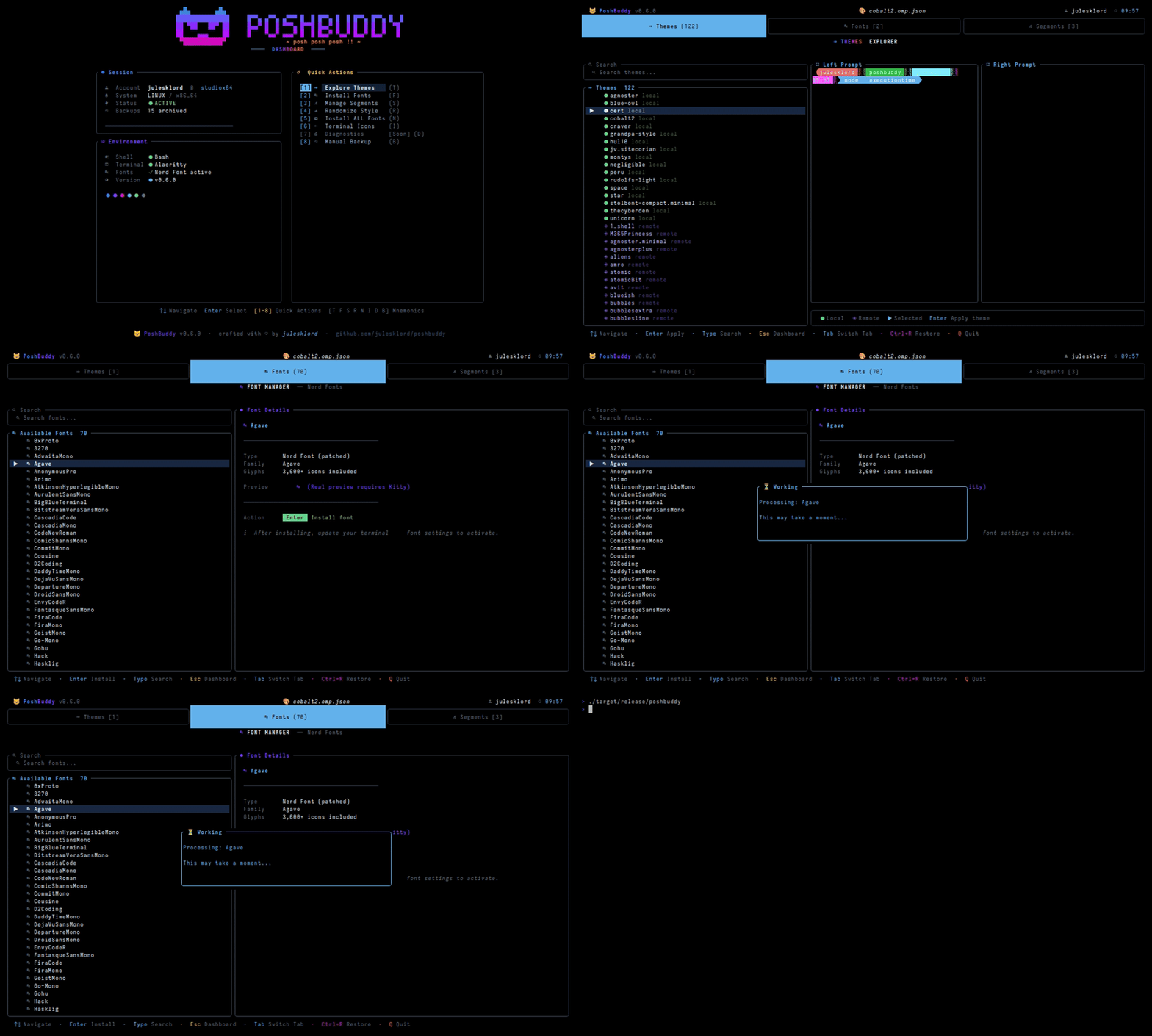
Developed in Rust, PoshBuddy handles shell environment stabilization and configuration file auditing.
## Features
### Theme Management
PoshBuddy manages local and remote Oh My Posh themes. The ThemeAsset engine interfaces with local files and GitHub repositories to discover and install themes.
### Segment Manipulation
The tool performs targeted edits on active themes. It toggles segments such as Git status, battery indicators, and execution time without modifying other theme components.
### Profile Injection
PoshBuddy configures shell profiles using a marker-based injection system. This keeps modifications reversible and isolated within the scripts.
## Capabilities
- **Stability**: Implements network timeouts and Oh My Posh binary checks to prevent interface freezes.
- **Multi-Shell Profile Sync**: Detects and updates PowerShell, Bash, Zsh, and Fish profiles.
- **Previews**: Generates isolated theme previews independent of active shell states.
- **Diagnostics**: Checks for Nerd Fonts, shell versions, and terminal compatibility.
## Technical Architecture
PoshBuddy uses modern systems programming patterns:
- **Rust**: Core logic and memory safety.
- **Tokio**: Asynchronous runtime for network operations and file I/O.
- **Ratatui**: TUI rendering loop.
- **Serde**: Serialization for JSON configuration processing.
## Installation
Install via [crates.io](https://crates.io/crates/poshbuddy):
```sh
cargo install poshbuddy
```
### Build from Source
Requires the [Rust toolchain](https://rustup.rs/).
```sh
git clone https://github.com/julesklord/poshbuddy.git
cd poshbuddy
cargo install --path .
```
*Note: Requires the Oh My Posh binary in the system PATH.*
## CLI Mode
PoshBuddy includes a command-line interface for headless operations.
### Theme Commands
- **Set Theme**: `poshbuddy set theme `
- Searches local and official remote catalogues.
- **List Themes**: `poshbuddy list themes [--local] [--remote]`
- Displays available themes in a table.
### Font Commands
- **Install Font**: `poshbuddy install font `
- Installs Nerd Fonts to the system.
- **List Fonts**: `poshbuddy list fonts`
- Lists official Nerd Fonts.
### Examples
```powershell
poshbuddy set theme bubbles
poshbuddy list themes --local
poshbuddy install font FiraCode
```
## Navigation
| Key | Action |
| :---------- | :------------------------------------------------------------- |
| **1** | **Themes Explorer** — Browse local and remote themes. |
| **2** | **Font Manager** — Manage Nerd Fonts. |
| **3** | **Segment Manager** — Toggle theme components. |
| **Esc / H** | **Dashboard** — Return to the main screen. |
| **Enter** | Apply theme, toggle segment, or start installation. |
| **Q** | Exit. |
### Dashboard Actions
| Key | Action |
| :---- | :------------------------------------ |
| **R** | Apply a **Random Theme**. |
| **N** | Install **All Nerd Fonts**. |
| **I** | Toggle **Terminal Icons**. |
| **D** | Run **Diagnostics**. |
| **V** | View and restore **Backups**. |
| **B** | Create **Manual Backup**. |
## Architecture Diagram
```mermaid
flowchart TD
subgraph group_runtime["Runtime"]
node_main(("Main
entrypoint
[main.rs]"))
node_cli["CLI
command surface
[cli.rs]"]
node_ui["TUI
terminal ui
[ui.rs]"]
node_appmod{{"App core
orchestration module
[mod.rs]"}}
node_handlers["Handlers
event bridge
[handlers.rs]"]
node_services["Services
business logic
[services.rs]"]
node_models["Models
state model
[models.rs]"]
node_api["Theme API
remote catalog
[api.rs]"]
node_assets["Assets
asset catalog
[assets.rs]"]
node_backup[("Backup
safe edit
[backup.rs]")]
node_installer["Installer
dependency install"]
node_diagnostic["Diagnostics
environment checks
[diagnostic.rs]"]
end
subgraph group_external["External"]
node_profilefs[("Profiles
filesystem")]
node_ompremote["OMP themes
remote source"]
node_fonts["Nerd Fonts
download source"]
node_powershell(("PowerShell
host environment"))
end
subgraph group_delivery["Delivery"]
node_githubci["GitHub CI
automation
[workflows]"]
node_tests["Tests
integration harness
[example.spec.ts]"]
end
node_main -->|"dispatches"| node_cli
node_main -->|"dispatches"| node_ui
node_main -->|"boots"| node_appmod
node_cli -->|"uses"| node_services
node_ui -->|"events"| node_handlers
node_handlers -->|"invokes"| node_services
node_appmod -->|"holds"| node_models
node_appmod -->|"wires"| node_handlers
node_appmod -->|"orchestrates"| node_services
node_services -->|"queries"| node_api
node_services -->|"manages"| node_assets
node_services -->|"protects"| node_backup
node_services -->|"installs"| node_installer
node_services -->|"checks"| node_diagnostic
node_services -->|"updates"| node_models
node_api -->|"fetches"| node_ompremote
node_assets -->|"syncs"| node_ompremote
node_backup -->|"writes"| node_profilefs
node_installer -->|"downloads"| node_fonts
node_diagnostic -->|"inspects"| node_powershell
node_services -->|"edits"| node_profilefs
node_services -->|"guards"| node_powershell
node_githubci -->|"runs"| node_tests
classDef toneNeutral fill:#f8fafc,stroke:#334155,stroke-width:1.5px,color:#0f172a
classDef toneBlue fill:#dbeafe,stroke:#2563eb,stroke-width:1.5px,color:#172554
classDef toneAmber fill:#fef3c7,stroke:#d97706,stroke-width:1.5px,color:#78350f
classDef toneMint fill:#dcfce7,stroke:#16a34a,stroke-width:1.5px,color:#14532d
classDef toneRose fill:#ffe4e6,stroke:#e11d48,stroke-width:1.5px,color:#881337
classDef toneIndigo fill:#e0e7ff,stroke:#4f46e5,stroke-width:1.5px,color:#312e81
classDef toneTeal fill:#ccfbf1,stroke:#0f766e,stroke-width:1.5px,color:#134e4a
class node_main,node_cli,node_ui,node_appmod,node_handlers,node_services,node_models,node_api,node_assets,node_backup,node_installer,node_diagnostic toneBlue
class node_profilefs,node_ompremote,node_fonts,node_powershell toneAmber
class node_githubci,node_tests toneMint
```
## Resources
- [Wiki](docs/wiki/index.md) - Architecture overview.
- [GitHub repository](https://github.com/julesklord/poshbuddy) - Source code.
- [Changelog](CHANGELOG.md) - Version history.