| Configuration | Card |
|---|
|
**Just the weather** - a larger header icon with `fill` icons and only the temperature in large letters.
```yaml
type: custom:clock-weather-card
entity: weather.home
weather_icon_type: fill
sections:
header:
weather_icon_size: 10rem
rows:
- font_size: 5rem
alignment: center
segments:
- type: weather
attribute: temperature
forecast_strip:
hide: true
forecast_list:
hide: true
```
|

*[Catppuccin Mocha](https://github.com/catppuccin/home-assistant/tree/v2.1.3)*
|
|
**Header and daily strip** - the strip shows the coming days instead of hours, with `flat` icons.
```yaml
type: custom:clock-weather-card
entity: weather.home
weather_icon_type: flat
sections:
forecast_strip:
forecast_type: daily
forecast_list:
hide: true
```
|
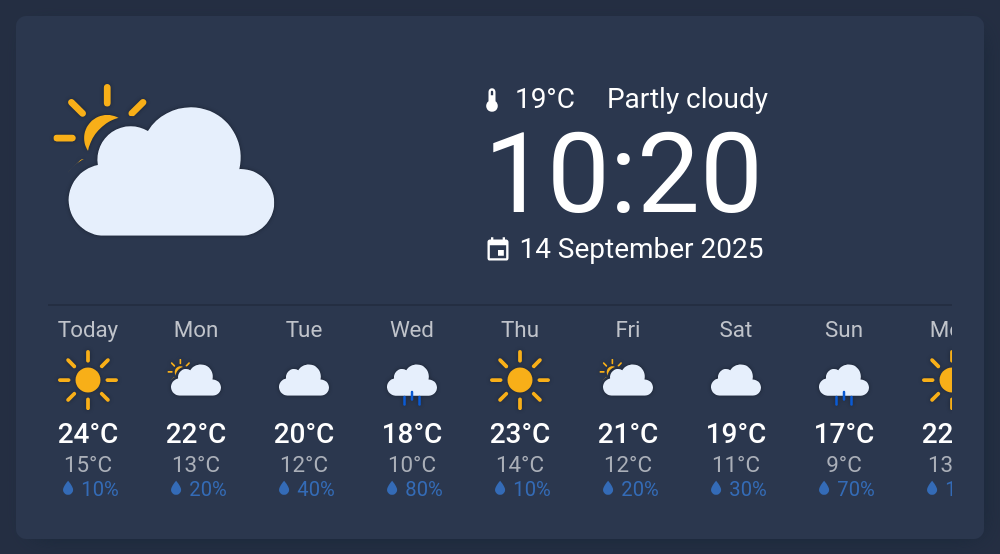
*[Noctis](https://github.com/aFFekopp/noctis/tree/3.3.5)*
|
|
**Custom header with daily list** - your own rows of segments above the coming days, without the strip.
```yaml
type: custom:clock-weather-card
entity: weather.home
sections:
header:
rows:
- font_size: 4.5rem
segments:
- type: time
time_pattern: HH:mm
- segments:
- type: date
date_pattern: EEE, d MMM
- type: spacer
- type: icon
icon: mdi:water-percent
- type: weather
attribute: humidity
- type: icon
icon: mdi:thermometer
- type: weather
attribute: temperature
forecast_strip:
hide: true
forecast_list:
count: 7
```
|

*[Metro Blue](https://github.com/Madelena/Metrology-for-Hass/tree/v.1.9.1)*
|
|
**Air quality at a glance** - a header with just the weather icon and the current AQI, above a list that charts the AQI forecast with your own `gradient`.
```yaml
type: custom:clock-weather-card
entity: weather.home
sections:
header:
rows:
- font_size: 3.5rem
alignment: center
segments:
- type: icon
icon: mdi:leaf
- type: weather
attribute: aqi
unit: " AQI"
forecast_strip:
hide: true
forecast_list:
attribute: aqi
gradient:
0: "#00F5D4"
20: "#00BBF9"
40: "#9B5DE5"
60: "#F15BB5"
```
|

*[Mushroom Shadow](https://github.com/piitaya/lovelace-mushroom-themes/tree/v0.0.11)*
|
|
**Wind forecast** - the strip shows any forecast attribute, here the wind speed with your own icon and color next to `monochrome` icons.
```yaml
type: custom:clock-weather-card
entity: weather.home
weather_icon_type: monochrome
sections:
header:
hide: true
forecast_strip:
forecast_type: daily
attribute: wind_speed
attribute_icon: mdi:weather-windy
attribute_color: "#0288D1"
forecast_list:
hide: true
```
|

*[Graphite Light](https://github.com/TilmanGriesel/graphite/tree/2.7.6)*
|
|
**Your own sensors** - `text` and `entity` segments show anything from Home Assistant, here a template sensor with the next event of a calendar.
```yaml
type: custom:clock-weather-card
entity: weather.home
sections:
header:
rows:
- font_size: 4rem
alignment: center
segments:
- type: time
- alignment: center
segments:
- type: icon
icon: mdi:calendar-clock
- type: text
text: "Next appointment:"
- type: entity
entity_id: sensor.next_appointment
forecast_strip:
hide: true
forecast_list:
hide: true
```
|

*[Catppuccin Latte](https://github.com/catppuccin/home-assistant/tree/v2.1.3)*
|
### Card Options
| Name | Type | Required | Default | Description |
|------|------|----------|---------|-------------|
| `entity` | string | **yes** | - | Entity ID of your weather provider |
| `title` | string | no | `null` | Title displayed at the top of the card |
| `sun_entity` | string | no | `sun.sun` | Entity ID of the sun entity, used to determine day/night icons |
| `weather_icon_type` | `fill` \| `flat` \| `line` \| `monochrome` | no | `line` | Visual style of the weather icons ([meteocons](https://github.com/basmilius/meteocons)). Applies to all sections; each section can override it with its own `weather_icon_type`. |
| `time_zone` | string | no | Home Assistant profile time zone | IANA time zone name (e.g. `Europe/Berlin`) used for all times and dates on the card (clock, date, forecast times, sunrise/sunset). When unset, follows the time zone setting in the user's Home Assistant profile: the browser's time zone if set to local, otherwise the time zone configured in Home Assistant. |
| `locale` | string | no | Home Assistant language | Language tag (e.g. `en-GB`, `de`, `pt-BR`) used for date/time formatting and translated text. When unset, falls back to the language configured in Home Assistant. Numbers follow the number format of your Home Assistant profile; its "Auto" setting uses this locale. |
| `temperature_unit` | `celsius` \| `fahrenheit` | no | Home Assistant unit system | Unit all temperatures are shown in (header, forecast strip, forecast list). Values from the weather entity and from `entity` segments with a `°C`/`°F` unit are converted. When unset, falls back to the temperature unit of the Home Assistant unit system. |
| `round_temperatures` | boolean | no | `true` | When `true`, temperatures are rounded to the nearest integer in every section. Set to `false` to show fractional values (if the weather provider has fractionals). Each section can override it with its own `round_temperatures`. |
| `tap_action` | object | no | `more-info` | [Action](https://www.home-assistant.io/dashboards/actions/) to run when the card is tapped, e.g. `navigate`, `url`, `more-info` (of `entity`) or `perform-action`. Set `action: none` to make the card not clickable. |
| `additional_sensors` | object | no | - | Sensors that replace values of the weather entity. See [Additional Sensors Options](#additional-sensors-options). |
| `sections` | object | no | - | Per-section configuration. See [Sections Options](#sections-options). |
### Additional Sensors Options
| Name | Type | Required | Default | Description |
|------|------|----------|---------|-------------|
| `temperature` | string | no | - | Entity ID of a temperature sensor (unit `°C` or `°F`) that replaces the weather entity's current temperature everywhere the card shows it: the `temperature` weather segment, the forecast list's current temperature dot and the "Now" entry of the hourly forecast strip. Values are converted to `temperature_unit`, shown in the header with the sensor's display precision when one is set in Home Assistant (regardless of `round_temperatures`), and otherwise rounded per section by `round_temperatures` (at most one decimal when not rounded). While the sensor is `unavailable` or `unknown`, the current temperature is hidden and the strip shows the forecast value. |
```yaml
additional_sensors:
temperature: sensor.outdoor_temperature
```
### Sections Options
Sections render top to bottom in the order `header`, `forecast_strip`, `forecast_list`.
#### `header`
Renders the current-weather icon next to the configurable rows of segments (clock, date, current weather, entities, icons) at the top of the card. By default the icon is as tall as the rows, but at least `9rem`; `weather_icon_size` overrides this. The icon never grows beyond half the card width.
| Option | Type | Required | Default | Description |
|--------|------|----------|---------|-------------|
| `hide` | boolean | no | `false` | Hide the header section. |
| `animated_icons` | boolean | no | `true` | Whether the large weather icon should be animated. |
| `weather_icon_type` | `fill` \| `flat` \| `line` \| `monochrome` | no | top-level `weather_icon_type` | Visual style for the large weather icon. Falls back to the card's main `weather_icon_type` when unset. |
| `weather_icon_size` | string | no | height of the rows, at least `9rem` | CSS length for the height of the large weather icon, capped at half the card width. Accepts `px`, `rem`, `em`, `vh`, `vw`, `%` (relative to half the card width). |
| `round_temperatures` | boolean | no | top-level `round_temperatures` | When `true`, the temperatures of `weather` segments (`temperature`, `apparent_temperature`, `dew_point` and values with a `°C`/`°F` `unit_attribute`) are rounded to the nearest integer. The display precision of `additional_sensors.temperature` takes precedence when set. |
| `rows` | list | no | See [Default Header Rows](#default-header-rows) | List of rows to display. See [Row Options](#row-options). |
#### `forecast_strip`
Renders a horizontally scrolling strip of upcoming hours (`forecast_type: hourly`, default) or days (`forecast_type: daily`) below the header. Each column shows a label, weather icon, temperature and one additional forecast attribute (precipitation probability by default, see `attribute`). Attribute columns without a value, or with a precipitation amount or probability of 0, stay blank; the row keeps its height even when every column is blank. Enabled by default. Requires a weather entity that advertises the `FORECAST_HOURLY` or `FORECAST_DAILY` supported feature, matching `forecast_type` - if the selected entity does not, the section renders an inline warning instead. Entities without `FORECAST_DAILY` but with `FORECAST_TWICE_DAILY` also work for `forecast_type: daily`: each day/night pair is merged into one day, with the high from the day and the low from the night.
In hourly mode, the first column is labeled "Now" and is sourced from the most recent forecast entry whose timestamp is at or before the current time. Subsequent columns are the upcoming forecast hours.
In daily mode, the first column is labeled "Today" (localized) and the others show the weekday. Each column shows the day's high temperature with the low below it.
In hourly mode, when the next sunrise or sunset (taken from `sun_entity`) falls within the visible hours, an extra column with its exact time and an up (sunrise) or down (sunset) arrow is inserted at the matching position. These columns count toward `count`.
When the configured columns do not fit the card width, the strip scrolls horizontally (swipe, trackpad, Shift + mouse wheel, or the thin scrollbar below the strip).
| Option | Type | Required | Default | Description |
|--------|------|----------|---------|-------------|
| `hide` | boolean | no | `false` | Hide the forecast strip section. |
| `weather_entity` | string | no | top-level `entity` | Weather entity whose forecast is displayed. Falls back to the card's main `entity` when not set. |
| `forecast_type` | `hourly` \| `daily` | no | `hourly` | Forecast data shown in the strip. |
| `count` | number | no | `24` | Maximum number of columns to render, including the leading "Now"/"Today" entry and any sunrise/sunset columns. Fewer are shown if the provider returns less. |
| `animated_icons` | boolean | no | `false` | Whether the strip's weather icons should be animated. Defaults to `false` to keep the strip lightweight. |
| `round_temperatures` | boolean | no | top-level `round_temperatures` | When `true`, temperatures in the strip are rounded to the nearest integer. |
| `weather_icon_type` | `fill` \| `flat` \| `line` \| `monochrome` | no | top-level `weather_icon_type` | Visual style for the icons in the forecast strip. Falls back to the card's main `weather_icon_type` when unset. |
| `hide_sunrise_sunset` | boolean | no | `false` | Hide the sunrise/sunset columns. Only supported with `forecast_type: hourly`. |
| `hide_attribute` | boolean | no | `false` | Hide the attribute row, including the space it reserves. `attribute`, `attribute_icon`, `attribute_unit` and `attribute_color` are ignored while it is `true`. |
| `time_pattern` | string | no | `t` | [Luxon](https://moment.github.io/luxon/#/formatting?id=table-of-tokens) format pattern for the hourly and sunrise/sunset column labels. The default `t` is the localized short time, e.g. `15:00` or `3:00 PM` depending on the locale and the time format in your Home Assistant profile; `H` shows only the hour. |
| `attribute` | string | no | `precipitation_probability` | Any numeric forecast attribute provided by the weather entity (e.g. `wind_speed`, `humidity`, `uv_index`), shown in the row below the temperature. See [Forecast attributes](#forecast-attributes). |
| `attribute_icon` | string | no | `mdi:water` if `attribute` is unset, otherwise none | Icon shown before each attribute value. |
| `attribute_unit` | string | no | resolved unit (see [Forecast attributes](#forecast-attributes)) | Unit shown after each attribute value, overriding the resolved one. Values are not converted. Set to `""` to show no unit. |
| `attribute_color` | string | no | `#3988EF` if `attribute` is unset, otherwise the theme's info color (text color with `weather_icon_type: monochrome`) | CSS color of the attribute row, e.g. `"#4a90d9"` or `var(--warning-color)`. Applies regardless of `weather_icon_type`. |
#### `forecast_list`
Renders a vertical list of upcoming days (`forecast_type: daily`, default) or hours (`forecast_type: hourly`) below the forecast strip. Each row shows a label, a weather icon, a low and high temperature, and a horizontal temperature bar. All bars share a single axis from the lowest low to the highest high across the visible rows, and each bar's gradient covers the configured color ramp clipped to that row's range.
In daily mode, each row spans the day's low and high. Today's row is labeled "Today" (localized) and shows a dot indicator at the current temperature on its bar.
In hourly mode, the first row is labeled "Now" and the others show the time (see `time_pattern`). Each row's bar spans from the previous hour's temperature to this hour's; the "Now" row starts from the current temperature and shows the current-temperature dot.
Requires a weather entity that advertises the `FORECAST_DAILY` or `FORECAST_HOURLY` supported feature, matching `forecast_type` - if the selected entity does not, the section renders an inline warning instead. Entities without `FORECAST_DAILY` but with `FORECAST_TWICE_DAILY` also work for `forecast_type: daily`: each day/night pair is merged into one day, with the high from the day and the low from the night.
| Option | Type | Required | Default | Description |
|--------|------|----------|---------|-------------|
| `hide` | boolean | no | `false` | Hide the forecast list section. |
| `weather_entity` | string | no | top-level `entity` | Weather entity whose forecast is displayed. Falls back to the card's main `entity` when not set. |
| `forecast_type` | `daily` \| `hourly` | no | `daily` | Forecast data shown in the list. |
| `count` | number | no | `5` | Maximum number of rows to render, starting from today (daily) or the current hour (hourly). Fewer are shown if the provider returns less. |
| `row_height` | string | no | `28px` | CSS length controlling the height of each day row. Drives both the icon size and the row's minimum height. Accepts `px`, `rem`, `em`, `vh`, `vw`, `%`. |
| `bar_thickness` | string | no | `60%` | CSS length controlling the thickness of the temperature bar. A percentage is relative to `row_height` (so the bar scales with the row); absolute units (`px`, `rem`, `em`, `vh`, `vw`) set a fixed thickness. The current-temperature dot scales with it. Thicker bars reduce the visible gap between adjacent rows. |
| `hide_current_temp_indicator` | boolean | no | `false` | When `true`, the dot showing the current temperature on today's row (daily) or the "Now" row (hourly) is not rendered. |
| `time_pattern` | string | no | `t` | [Luxon](https://moment.github.io/luxon/#/formatting?id=table-of-tokens) format pattern for the hourly row labels. The default `t` is the localized short time, e.g. `15:00` or `3:00 PM` depending on the locale and the time format in your Home Assistant profile; `H` shows only the hour. |
| `animated_icons` | boolean | no | `false` | Whether the list's weather icons should be animated. Defaults to `false` to keep the section lightweight. |
| `round_temperatures` | boolean | no | top-level `round_temperatures` | When `true`, the low and high temperatures are rounded to the nearest integer. |
| `weather_icon_type` | `fill` \| `flat` \| `line` \| `monochrome` | no | top-level `weather_icon_type` | Visual style for the icons in the forecast list. Falls back to the card's main `weather_icon_type` when unset. |
| `attribute` | string | no | `temperature` | Forecast attribute shown in the list: `temperature` or any numeric forecast attribute (see [Forecast attributes](#forecast-attributes)). For any attribute other than `temperature`, each row shows a single value right of its bar, which runs from `0` to the row's value; all bars share one axis spanning `0` and every visible value. The current-temperature dot is only shown for `temperature`. |
| `attribute_unit` | string | no | resolved unit (`temperature_unit` for `temperature`, see [Forecast attributes](#forecast-attributes)) | Unit shown after each value, overriding the resolved one. Values are not converted. Set to `""` to show no unit. |
| `gradient` | map | no | built-in ramp (see below) | Map of value → hex (`#rgb`, `#rrggbb`) or `rgb()` color used to colorize the bars. For `temperature`, keys are in °C regardless of the weather entity's unit; for other attributes, keys are in the attribute's own unit. Colors are linearly interpolated between adjacent stops. |
The built-in gradient is:
```yaml
gradient:
-10: "#78A2CC" # darker blue
0: "#A4C3D2" # light blue
10: "#79D2B3" # turquoise
20: "#FCF570" # yellow
30: "#FF964F" # orange
40: "#FFC09F" # red-ish
```
#### Forecast attributes
`forecast_strip.attribute` and `forecast_list.attribute` accept any numeric attribute of the weather entity's forecast entries, shown as provided (no rounding, except that the strip rounds `precipitation_probability` to the nearest 10 and leaves `precipitation` and `precipitation_probability` blank at 0); non-numeric values are treated as missing. If no forecast entry has the configured attribute, the section renders an inline warning instead (the strip's default `precipitation_probability` is exempt and simply leaves the row blank). The unit is resolved the same way as for the [`weather` segment](#weather) (e.g. `wind_speed_unit` for `wind_speed`, `%` for `humidity`, otherwise the entity's `