See, Hear, and Understand: Benchmarking Audiovisual Human Speech Understanding in Multimodal Large Language Models
[Le Thien Phuc Nguyen*](https://plnguyen2908.github.io/), [Zhuoran Yu*](https://www.zhuoranyu.com/), Samuel Low Yu Hang, Subin An, Jeongkik Lee, Yohan Ban, SeungEun Chung, [Thanh-Huy Nguyen](https://www.linkedin.com/in/antares0811/), Juwan Maeng, [Soochahn Lee](https://sites.google.com/view/soochahnlee/), [Yong Jae Lee](https://pages.cs.wisc.edu/~yongjaelee/) (* equal contribution)
🌐 Project Page |
📖 ArXiv |
🤗 Dataset |
🏆 Leaderboard
---
## Announcements
- 2026-03-15: AV-SpeakerBench has been integrated into [VLMEvalKit](https://github.com/open-compass/VLMEvalKit/pull/1393)! You can run both reasoning models and non-reasoning models on VLMEvalKit!
- 2026-01-26: For thinking models, please make sure that you do the parsing to output a single character while using [lmms-eval](https://github.com/EvolvingLMMs-Lab/lmms-eval/tree/main/lmms_eval/tasks/av_speakerbench). If you use our codebase, it is fine since we takes the last "A,B,C,D" character from your response.
- 2025-12-30: AV-SpeakerBench has been integrated into [lmms-eval](https://github.com/EvolvingLMMs-Lab/lmms-eval/tree/main/lmms_eval/tasks/av_speakerbench)
TL;DR: AV-SpeakerBench evaluates multimodal large langague models (MLLMs) on speakers conversation understanding audiovisually.
## Contents
- [Overview](#overview)
- [Environment Setup](#environment-setup)
- [Data](#data)
- [Quick Eval](#quick-eval)
- [Add Your Model](#add-your-model)
- [Add your model to the leaderboard](#add-your-model-to-the-leaderboard)
- [Outputs](#outputs)
- [Citation](#citation)
## Overview
AV-SpeakerBench is a curated benchmark of 3,212 multiple-choice questions that tests speaker-centric audiovisual reasoning in real-world videos. Unlike prior video datasets where many tasks are visually solvable or only loosely tied to speech, AV-SpeakerBench explicitly evaluates whether models can align who speaks, what is said, and when it happens. Questions are written with fusion-grounded semantics (audio–visual anchors) and expert-curated annotations to ensure temporal and cross-modal correctness. Initial results show that Gemini 2.5 Pro leads overall performance, while the gap between Gemini and strong open models such as Qwen3-Omni-30B highlights persistent weaknesses in audiovisual fusion.
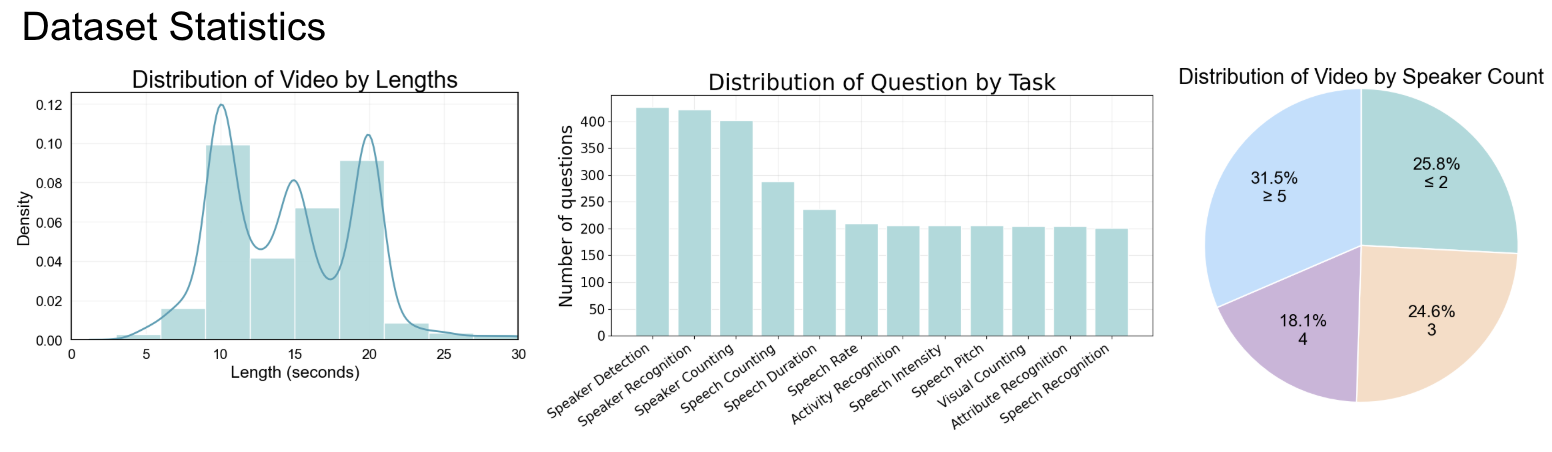
- **Clip length** – Videos are short, natural clips (mostly under ~25 seconds), since most of the open models only sample 8-10 frames.
- **Task coverage** – Each clip is annotated with questions spanning 11 audio-visual perception tasks (e.g., speaker detection/recognition/counting, speech duration/rate/intensity/pitch, activity, attribute recognition, visual counting, and speech recognition).
- **Speaker diversity** – Scenes cover a wide range of interaction settings: ~25.8% of videos have ≤2 speakers, 24.6% have 3, 18.1% have 4, and 31.5% contain ≥5 speakers, encouraging robust performance in crowded, multi-speaker scenarios.
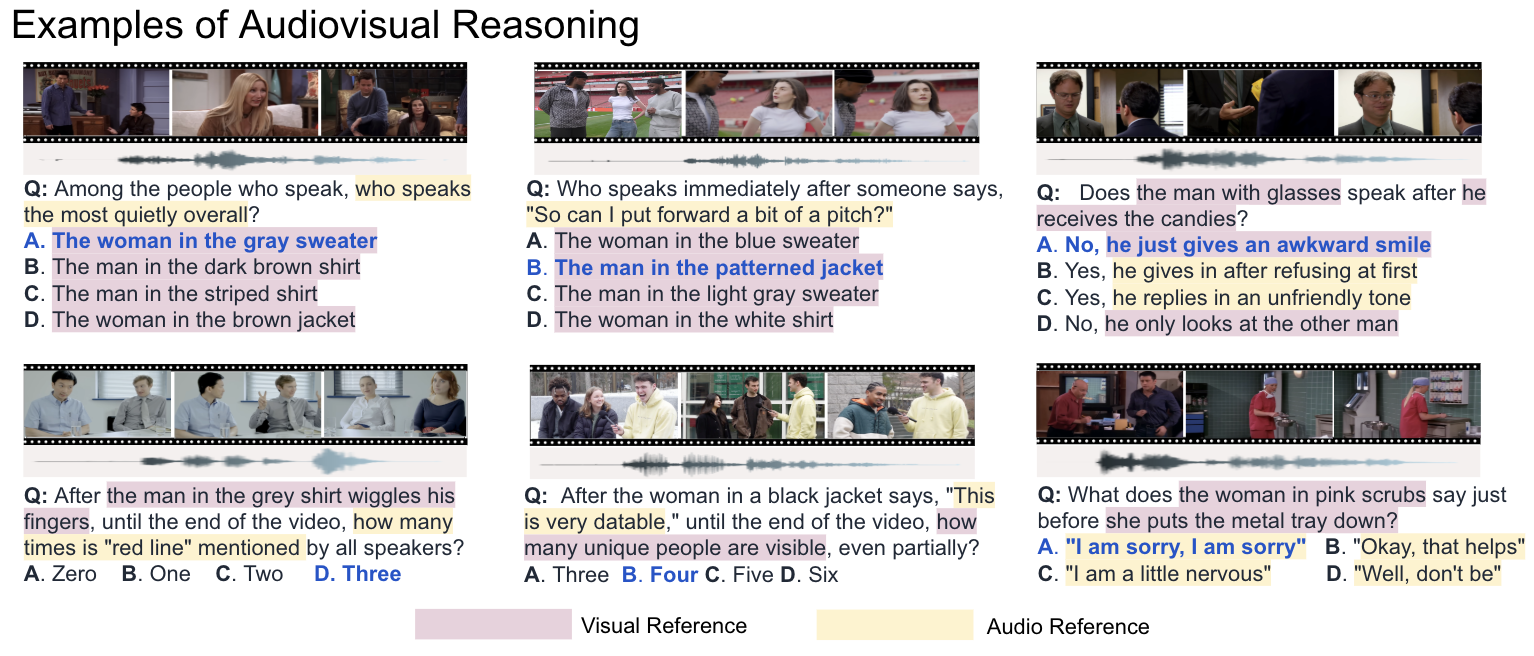
**Cross-modal question design (key novelty).**
We design each question so that solving it *requires* true audio–visual alignment via an explicit anchor–target structure.
- **Audio-centric tasks → visual anchor.**
Example: *“After the man in the grey shirt wiggles his fingers, until the end of the video, how many times is `red line` mentioned by all speakers?”*
Here, the model must first **use the visual anchor** (“the man in the grey shirt wiggles his fingers”) to find the correct time span, and then **listen** within that window to count how many times the phrase “red line” is spoken.
- **Visual-centric tasks → audio anchor.**
Example: *“After the woman in a black jacket says, `This is very datable,` until the end of the video, how many unique people are visible, even partially?”*
In this case, the model must first **use the audio anchor** (the quoted utterance) to locate the right moment in the audio stream, and then **inspect the video** to count distinct visible people.
- **Speaker-centric tasks → mixed anchors and answer cues.**
For speaker reasoning (e.g., “Among the people who speak, who speaks the most quietly overall?”), questions may use either **visual or audio anchors**, while answer choices differ in the **opposite modality** (e.g., visually distinct people who share the scene or people who say different lines). This mixed design forces the model to jointly track *who*, *when*, and *where* across modalities, making unimodal shortcuts much harder.
## Environment Setup
- Core deps: `pip install huggingface-hub datasets "moviepy>=2.0"`.
- Install your model’s extras (e.g., `transformers`, `peft`, etc.).
- Optional: set `HF_HOME` to control Hugging Face cache (see footer of `main.py`).
## Data
- Update `local_dir` in `download_data.py` if needed.
- Download: `python download_data.py`.
- Use the downloaded root as `--data_path` for evaluation.
## Dataset reading
```
from datasets import load_dataset
from pathlib import Path
import tqdm
root = Path("/path/to/dataset")
ds = load_dataset("plnguyen2908/AV-SpeakerBench", split="test")
for idx, row in tqdm.tqdm(enumerate(ds), total=len(ds)):
audio = root / row["audio_path"]
visual = root / row["visual_path"]
av = root / row["audio_visual_path"]
# feed clips to your AVQA pipeline
choices = ast.literal_eval(row["choices"])
choices_str = "\n".join(choices)
prompt = f"Select the best answer to the following multiple-choice question based on the video. Respond with only the letter (A, B C, or D) of the correct option.\n{row['question']}\n{choices_str}\nThe best answer is:"
```
## Quick Eval
```bash
python main.py \
--data_path /path/to/Holistic_AVQA_bench \
--model_name Qwen3-Omni-3B \
--task_id dev \ # optional: filter by task id
--category \ # optional: filter category
--sub_category \ # optional: filter subcategory
--audio # optional: audio-only; use --visual for video-only
```
## Add Your Model
### For open models
1) Place code under `model/open_model/` (see `model/open_model/Qwen3Omni` as a template).
2) Export your init/process functions into `model/open_model/__init__.py`.
3) In `model/__init__.py`, add a new `model_init` branch (lines ~82–111) returning `(model, tokenizer, ...)`.
4) Extend `model/__init__.py` processing (lines ~228–277) to call your `model_process(model, tokenizer, video, audio, ...)` and return a text answer. Here we have three paths for you to choose: `new_video_path` (video with no audio), `new_audio_path` (audio only), and `new_combined_path` (video with audio).
5) Register the save logic in `main.py`:
```python
elif args.model_name == "your_model":
print("=" * 5 + "your model" + "=" * 5)
with open("result/your_model.json", "w") as f:
json.dump(result, f, indent=2)
with open(f"record/your_model_record_{args.task_id}.json", "w") as f:
json.dump(records, f, indent=2)
```
### For closed models that can be accessed through API
1) Place code under `model/closed/` (see `model/closed/gemini/` as a template).
2) Export your init/process functions from `model/open_model/__init__.py`.
3) In `model/__init__.py`, add a new `model_init` branch (lines ~82–111) returning `client, ...`.
4) Extend `model/__init__.py` processing (lines ~228–277) to call your `model_process(client, video, audio, ...)` and return a text answer. Here we have three paths for you to choose: `new_video_path` (video with no audio), `new_audio_path` (audio only), and `new_combined_path` (video with audio).
5) Register the save logic in `main.py`:
```python
elif args.model_name == "your_model":
print("=" * 5 + "your model" + "=" * 5)
with open("result/your_model.json", "w") as f:
json.dump(result, f, indent=2)
with open(f"record/your_model_record_{args.task_id}.json", "w") as f:
json.dump(records, f, indent=2)
```
## Add your model to the leaderboard
Please send us your inference code with the weight so that we can verify your result!
## Outputs
- Accuracy: `result/.json`
- Per-question responses: `record/_record_*.json`
- Temporary clips: `args.temp_dir` (default `./temp`, cleaned per question)
We have put the code for Gemini and Qwen 3-Omni 30B for you to replicate. For Gemini, please create an .env file and put the API key there. For Qwen 3-Omni 30B, please download the weight into the corresponding folder.
## Citation
If you use this benchmark or code, please cite:
```
@misc{nguyen2025seehearunderstandbenchmarking,
title={See, Hear, and Understand: Benchmarking Audiovisual Human Speech Understanding in Multimodal Large Language Models},
author={Le Thien Phuc Nguyen and Zhuoran Yu and Samuel Low Yu Hang and Subin An and Jeongik Lee and Yohan Ban and SeungEun Chung and Thanh-Huy Nguyen and JuWan Maeng and Soochahn Lee and Yong Jae Lee},
year={2025},
eprint={2512.02231},
archivePrefix={arXiv},
primaryClass={cs.CV},
url={https://arxiv.org/abs/2512.02231},
}
```
## License
This dataset is released under the **Creative Commons Attribution–NonCommercial 4.0 International (CC BY-NC 4.0)** license. Usage of this dataset requires proper attribution and is restricted to non-commercial purposes.