{
"cells": [
{
"cell_type": "markdown",
"metadata": {},
"source": [
"#### New to Plotly?\n",
"Plotly's Python library is free and open source! [Get started](https://plotly.com/python/getting-started/) by downloading the client and [reading the primer](https://plotly.com/python/getting-started/).\n",
"\n",
"\n",
"
\n",
" \n",
" \n",
" sepal_length \n",
" sepal_width \n",
" petal_length \n",
" petal_width \n",
" \n",
" \n",
" \n",
" \n",
" count \n",
" 1.050000e+06 \n",
" 1.050000e+06 \n",
" 1.050000e+06 \n",
" 1.050000e+06 \n",
" \n",
" \n",
" mean \n",
" 5.843322e+00 \n",
" 3.053826e+00 \n",
" 3.758637e+00 \n",
" 1.198662e+00 \n",
" \n",
" \n",
" std \n",
" 8.488862e-01 \n",
" 4.761369e-01 \n",
" 1.769910e+00 \n",
" 7.865315e-01 \n",
" \n",
" \n",
" min \n",
" 3.513149e+00 \n",
" 1.299055e+00 \n",
" 3.115114e-01 \n",
" -6.631019e-01 \n",
" \n",
" \n",
" 25% \n",
" 5.156767e+00 \n",
" 2.740113e+00 \n",
" 1.636770e+00 \n",
" 3.929785e-01 \n",
" \n",
" \n",
" 50% \n",
" 5.801633e+00 \n",
" 3.033015e+00 \n",
" 4.306745e+00 \n",
" 1.316042e+00 \n",
" \n",
" \n",
" 75% \n",
" 6.443514e+00 \n",
" 3.345643e+00 \n",
" 5.143670e+00 \n",
" 1.827473e+00 \n",
" \n",
" \n",
" max \n",
" 8.598814e+00 \n",
" 5.109186e+00 \n",
" 7.763358e+00 \n",
" 3.267767e+00 \n",
" \n",
" \n",
"
\n",
"
"
]
},
"execution_count": 7,
"metadata": {},
"output_type": "execute_result"
}
],
"source": [
"initial_img"
]
},
{
"cell_type": "markdown",
"metadata": {},
"source": [
"#### Create FigureWidget with background image"
]
},
{
"cell_type": "code",
"execution_count": 8,
"metadata": {},
"outputs": [],
"source": [
"import plotly.graph_objs as go"
]
},
{
"cell_type": "code",
"execution_count": null,
"metadata": {
"scrolled": false
},
"outputs": [],
"source": [
"f = go.FigureWidget(data=[{'x': x_range, \n",
" 'y': y_range, \n",
" 'mode': 'markers',\n",
" 'marker': {'opacity': 0}}], # invisible trace to init axes and to support autoresize\n",
" layout={'width': plot_width, 'height': plot_height})\n",
"f"
]
},
{
"cell_type": "code",
"execution_count": 10,
"metadata": {},
"outputs": [],
"source": [
"# Set background image\n",
"f.layout.images = [go.layout.Image(\n",
" source = initial_img, # plotly now performs auto conversion of PIL image to png data URI\n",
" xref = \"x\",\n",
" yref = \"y\",\n",
" x = x_range[0],\n",
" y = y_range[1],\n",
" sizex = x_range[1] - x_range[0],\n",
" sizey = y_range[1] - y_range[0],\n",
" sizing = \"stretch\",\n",
" layer = \"below\")]"
]
},
{
"cell_type": "markdown",
"metadata": {},
"source": [
"#### Install change callback to update image on zoom/resize"
]
},
{
"cell_type": "code",
"execution_count": 11,
"metadata": {},
"outputs": [],
"source": [
"def update_ds_image(layout, x_range, y_range, plot_width, plot_height):\n",
" img = f.layout.images[0]\n",
" \n",
" # Update with batch_update so all updates happen simultaneously\n",
" with f.batch_update():\n",
" img.x = x_range[0]\n",
" img.y = y_range[1]\n",
" img.sizex = x_range[1] - x_range[0]\n",
" img.sizey = y_range[1] - y_range[0]\n",
" img.source = gen_ds_image(x_range, y_range, plot_width, plot_height)\n",
"\n",
"# Install callback to run exactly once if one or more of the following properties changes\n",
"# - xaxis range\n",
"# - yaxis range\n",
"# - figure width\n",
"# - figure height\n",
"f.layout.on_change(update_ds_image, 'xaxis.range', 'yaxis.range', 'width', 'height')"
]
},
{
"cell_type": "markdown",
"metadata": {},
"source": [
"#### Image updates on drag zoom"
]
},
{
"cell_type": "code",
"execution_count": null,
"metadata": {
"scrolled": false
},
"outputs": [],
"source": [
"f.layout.dragmode = 'zoom'\n",
"f"
]
},
{
"cell_type": "markdown",
"metadata": {},
"source": [
""
]
},
"metadata": {},
"output_type": "display_data"
},
{
"data": {
"text/html": [
""
]
},
"metadata": {},
"output_type": "display_data"
},
{
"name": "stdout",
"output_type": "stream",
"text": [
"Collecting git+https://github.com/plotly/publisher.git\n",
" Cloning https://github.com/plotly/publisher.git to /tmp/pip-req-build-MGM4eC\n",
"Building wheels for collected packages: publisher\n",
" Running setup.py bdist_wheel for publisher ... \u001b[?25ldone\n",
"\u001b[?25h Stored in directory: /tmp/pip-ephem-wheel-cache-yx3xDQ/wheels/99/3e/a0/fbd22ba24cca72bdbaba53dbc23c1768755fb17b3af0f33966\n",
"Successfully built publisher\n",
"Installing collected packages: publisher\n",
" Found existing installation: publisher 0.11\n",
" Uninstalling publisher-0.11:\n",
" Successfully uninstalled publisher-0.11\n",
"Successfully installed publisher-0.11\n",
"\u001b[33mYou are using pip version 10.0.1, however version 18.0 is available.\n",
"You should consider upgrading via the 'pip install --upgrade pip' command.\u001b[0m\n"
]
}
],
"source": [
"from IPython.display import display, HTML\n",
"\n",
"display(HTML(' 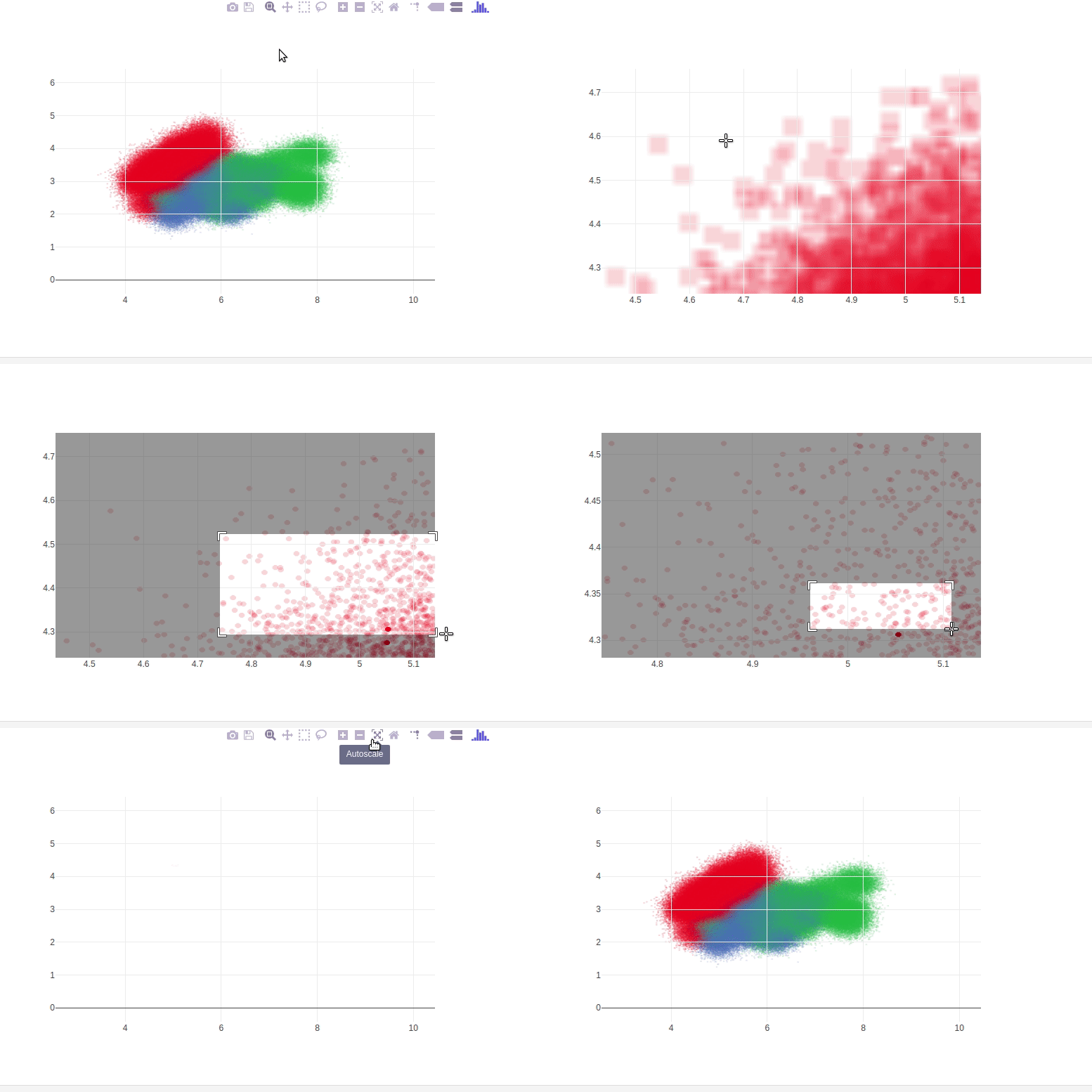 "
]
},
{
"cell_type": "markdown",
"metadata": {},
"source": [
"#### Reference"
]
},
{
"cell_type": "markdown",
"metadata": {},
"source": [
"See [these Jupyter notebooks](https://github.com/jonmmease/plotly_ipywidget_notebooks) for even more FigureWidget examples."
]
},
{
"cell_type": "code",
"execution_count": 2,
"metadata": {},
"outputs": [
{
"data": {
"text/html": [
""
],
"text/plain": [
"
"
]
},
{
"cell_type": "markdown",
"metadata": {},
"source": [
"#### Reference"
]
},
{
"cell_type": "markdown",
"metadata": {},
"source": [
"See [these Jupyter notebooks](https://github.com/jonmmease/plotly_ipywidget_notebooks) for even more FigureWidget examples."
]
},
{
"cell_type": "code",
"execution_count": 2,
"metadata": {},
"outputs": [
{
"data": {
"text/html": [
""
],
"text/plain": [
"