{
"cells": [
{
"cell_type": "markdown",
"metadata": {},
"source": [
"#### New to Plotly?\n",
"Plotly's Python library is free and open source! [Get started](https://plotly.com/python/getting-started/) by downloading the client and [reading the primer](https://plotly.com/python/getting-started/).\n",
"
You can set up Plotly to work in [online](https://plotly.com/python/getting-started/#initialization-for-online-plotting) or [offline](https://plotly.com/python/getting-started/#initialization-for-offline-plotting) mode, or in [jupyter notebooks](https://plotly.com/python/getting-started/#start-plotting-online).\n",
"
We also have a quick-reference [cheatsheet](https://images.plot.ly/plotly-documentation/images/python_cheat_sheet.pdf) (new!) to help you get started!"
]
},
{
"cell_type": "markdown",
"metadata": {},
"source": [
"#### Update Points Using a Click Callback"
]
},
{
"cell_type": "code",
"execution_count": null,
"metadata": {},
"outputs": [],
"source": [
"import plotly.graph_objs as go\n",
"\n",
"import numpy as np\n",
"\n",
"x = np.random.rand(100)\n",
"y = np.random.rand(100)\n",
"\n",
"f = go.FigureWidget([go.Scatter(x=x, y=y, mode='markers')])\n",
"\n",
"scatter = f.data[0]\n",
"colors = ['#a3a7e4'] * 100\n",
"scatter.marker.color = colors\n",
"scatter.marker.size = [10] * 100\n",
"f.layout.hovermode = 'closest'\n",
"\n",
"\n",
"# create our callback function\n",
"def update_point(trace, points, selector):\n",
" c = list(scatter.marker.color)\n",
" s = list(scatter.marker.size)\n",
" for i in points.point_inds:\n",
" c[i] = '#bae2be'\n",
" s[i] = 20\n",
" scatter.marker.color = c\n",
" scatter.marker.size = s\n",
"\n",
"\n",
"scatter.on_click(update_point)\n",
"\n",
"f"
]
},
{
"cell_type": "markdown",
"metadata": {},
"source": [
"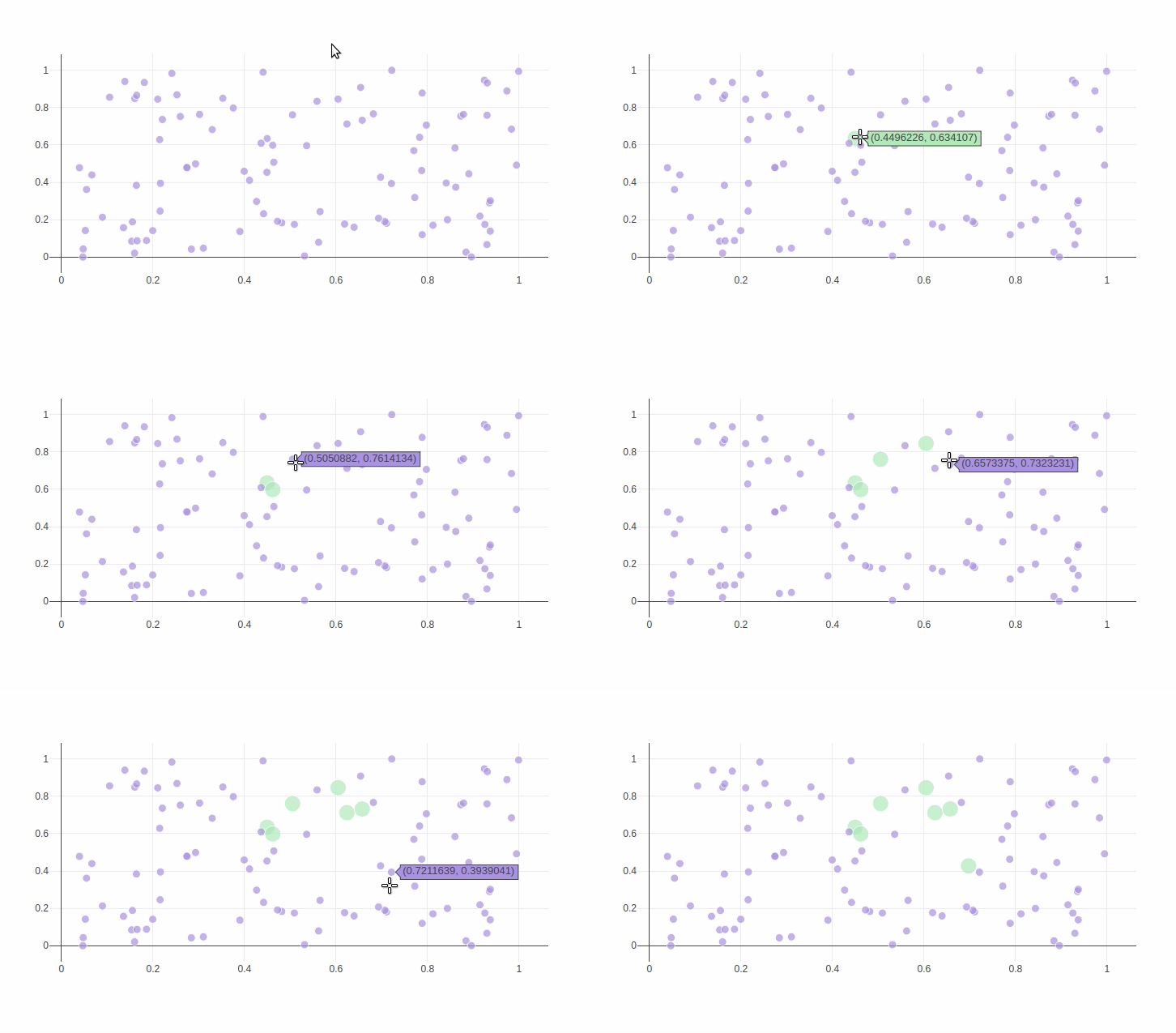 "
]
},
{
"cell_type": "markdown",
"metadata": {},
"source": [
"#### Reference"
]
},
{
"cell_type": "markdown",
"metadata": {},
"source": [
"See [these Jupyter notebooks](https://github.com/jonmmease/plotly_ipywidget_notebooks) for even more FigureWidget examples."
]
},
{
"cell_type": "code",
"execution_count": 3,
"metadata": {},
"outputs": [
{
"name": "stdout",
"output_type": "stream",
"text": [
"Help on method on_click in module plotly.basedatatypes:\n",
"\n",
"on_click(self, callback, append=False) method of plotly.graph_objs._scatter.Scatter instance\n",
" Register function to be called when the user clicks on one or more\n",
" points in this trace.\n",
" \n",
" Note: Callbacks will only be triggered when the trace belongs to a\n",
" instance of plotly.graph_objs.FigureWidget and it is displayed in an\n",
" ipywidget context. Callbacks will not be triggered on figures\n",
" that are displayed using plot/iplot.\n",
" \n",
" Parameters\n",
" ----------\n",
" callback\n",
" Callable function that accepts 3 arguments\n",
" \n",
" - this trace\n",
" - plotly.callbacks.Points object\n",
" - plotly.callbacks.InputDeviceState object\n",
" \n",
" append : bool\n",
" If False (the default), this callback replaces any previously\n",
" defined on_click callbacks for this trace. If True,\n",
" this callback is appended to the list of any previously defined\n",
" callbacks.\n",
" \n",
" Returns\n",
" -------\n",
" None\n",
" \n",
" Examples\n",
" --------\n",
" >>> from plotly.callbacks import Points, InputDeviceState\n",
" >>> points, state = Points(), InputDeviceState()\n",
" \n",
" >>> def click_fn(trace, points, state):\n",
" ... inds = points.point_inds\n",
" ... # Do something\n",
" \n",
" >>> trace.on_click(click_fn)\n",
" \n",
" Note: The creation of the `points` and `state` objects is optional,\n",
" it's simply a convenience to help the text editor perform completion\n",
" on the arguments inside `click_fn`\n",
"\n"
]
}
],
"source": [
"help(scatter.on_click)"
]
},
{
"cell_type": "code",
"execution_count": 1,
"metadata": {},
"outputs": [
{
"data": {
"text/html": [
""
],
"text/plain": [
""
]
},
"metadata": {},
"output_type": "display_data"
},
{
"data": {
"text/html": [
""
],
"text/plain": [
""
]
},
"metadata": {},
"output_type": "display_data"
},
{
"name": "stdout",
"output_type": "stream",
"text": [
"Collecting git+https://github.com/plotly/publisher.git\n",
" Cloning https://github.com/plotly/publisher.git to /tmp/pip-req-build-fyqWMB\n",
"Building wheels for collected packages: publisher\n",
" Running setup.py bdist_wheel for publisher ... \u001b[?25ldone\n",
"\u001b[?25h Stored in directory: /tmp/pip-ephem-wheel-cache-HH5VVg/wheels/99/3e/a0/fbd22ba24cca72bdbaba53dbc23c1768755fb17b3af0f33966\n",
"Successfully built publisher\n",
"Installing collected packages: publisher\n",
" Found existing installation: publisher 0.11\n",
" Uninstalling publisher-0.11:\n",
" Successfully uninstalled publisher-0.11\n",
"Successfully installed publisher-0.11\n",
"\u001b[33mYou are using pip version 10.0.1, however version 18.0 is available.\n",
"You should consider upgrading via the 'pip install --upgrade pip' command.\u001b[0m\n"
]
}
],
"source": [
"from IPython.display import display, HTML\n",
"\n",
"display(HTML(''))\n",
"display(HTML(''))\n",
"\n",
"! pip install git+https://github.com/plotly/publisher.git --upgrade\n",
" \n",
"import publisher\n",
"publisher.publish(\n",
" 'figurewidget-click-event.ipynb', 'python/click-events/', 'Click Events with go.FigureWidget',\n",
" 'Click Events With FigureWidget',\n",
" title = 'Click Events',\n",
" name = 'Click Events',\n",
" has_thumbnail='true', thumbnail='thumbnail/figurewidget-click-events.gif', \n",
" language='python', page_type='example_index', \n",
" display_as='chart_events', order=24,\n",
" ipynb= '~notebook_demo/240')"
]
},
{
"cell_type": "code",
"execution_count": null,
"metadata": {},
"outputs": [],
"source": []
}
],
"metadata": {
"kernelspec": {
"display_name": "Python 3",
"language": "python",
"name": "python3"
},
"language_info": {
"codemirror_mode": {
"name": "ipython",
"version": 3
},
"file_extension": ".py",
"mimetype": "text/x-python",
"name": "python",
"nbconvert_exporter": "python",
"pygments_lexer": "ipython3",
"version": "3.6.5"
}
},
"nbformat": 4,
"nbformat_minor": 2
}
"
]
},
{
"cell_type": "markdown",
"metadata": {},
"source": [
"#### Reference"
]
},
{
"cell_type": "markdown",
"metadata": {},
"source": [
"See [these Jupyter notebooks](https://github.com/jonmmease/plotly_ipywidget_notebooks) for even more FigureWidget examples."
]
},
{
"cell_type": "code",
"execution_count": 3,
"metadata": {},
"outputs": [
{
"name": "stdout",
"output_type": "stream",
"text": [
"Help on method on_click in module plotly.basedatatypes:\n",
"\n",
"on_click(self, callback, append=False) method of plotly.graph_objs._scatter.Scatter instance\n",
" Register function to be called when the user clicks on one or more\n",
" points in this trace.\n",
" \n",
" Note: Callbacks will only be triggered when the trace belongs to a\n",
" instance of plotly.graph_objs.FigureWidget and it is displayed in an\n",
" ipywidget context. Callbacks will not be triggered on figures\n",
" that are displayed using plot/iplot.\n",
" \n",
" Parameters\n",
" ----------\n",
" callback\n",
" Callable function that accepts 3 arguments\n",
" \n",
" - this trace\n",
" - plotly.callbacks.Points object\n",
" - plotly.callbacks.InputDeviceState object\n",
" \n",
" append : bool\n",
" If False (the default), this callback replaces any previously\n",
" defined on_click callbacks for this trace. If True,\n",
" this callback is appended to the list of any previously defined\n",
" callbacks.\n",
" \n",
" Returns\n",
" -------\n",
" None\n",
" \n",
" Examples\n",
" --------\n",
" >>> from plotly.callbacks import Points, InputDeviceState\n",
" >>> points, state = Points(), InputDeviceState()\n",
" \n",
" >>> def click_fn(trace, points, state):\n",
" ... inds = points.point_inds\n",
" ... # Do something\n",
" \n",
" >>> trace.on_click(click_fn)\n",
" \n",
" Note: The creation of the `points` and `state` objects is optional,\n",
" it's simply a convenience to help the text editor perform completion\n",
" on the arguments inside `click_fn`\n",
"\n"
]
}
],
"source": [
"help(scatter.on_click)"
]
},
{
"cell_type": "code",
"execution_count": 1,
"metadata": {},
"outputs": [
{
"data": {
"text/html": [
""
],
"text/plain": [
""
]
},
"metadata": {},
"output_type": "display_data"
},
{
"data": {
"text/html": [
""
],
"text/plain": [
""
]
},
"metadata": {},
"output_type": "display_data"
},
{
"name": "stdout",
"output_type": "stream",
"text": [
"Collecting git+https://github.com/plotly/publisher.git\n",
" Cloning https://github.com/plotly/publisher.git to /tmp/pip-req-build-fyqWMB\n",
"Building wheels for collected packages: publisher\n",
" Running setup.py bdist_wheel for publisher ... \u001b[?25ldone\n",
"\u001b[?25h Stored in directory: /tmp/pip-ephem-wheel-cache-HH5VVg/wheels/99/3e/a0/fbd22ba24cca72bdbaba53dbc23c1768755fb17b3af0f33966\n",
"Successfully built publisher\n",
"Installing collected packages: publisher\n",
" Found existing installation: publisher 0.11\n",
" Uninstalling publisher-0.11:\n",
" Successfully uninstalled publisher-0.11\n",
"Successfully installed publisher-0.11\n",
"\u001b[33mYou are using pip version 10.0.1, however version 18.0 is available.\n",
"You should consider upgrading via the 'pip install --upgrade pip' command.\u001b[0m\n"
]
}
],
"source": [
"from IPython.display import display, HTML\n",
"\n",
"display(HTML(''))\n",
"display(HTML(''))\n",
"\n",
"! pip install git+https://github.com/plotly/publisher.git --upgrade\n",
" \n",
"import publisher\n",
"publisher.publish(\n",
" 'figurewidget-click-event.ipynb', 'python/click-events/', 'Click Events with go.FigureWidget',\n",
" 'Click Events With FigureWidget',\n",
" title = 'Click Events',\n",
" name = 'Click Events',\n",
" has_thumbnail='true', thumbnail='thumbnail/figurewidget-click-events.gif', \n",
" language='python', page_type='example_index', \n",
" display_as='chart_events', order=24,\n",
" ipynb= '~notebook_demo/240')"
]
},
{
"cell_type": "code",
"execution_count": null,
"metadata": {},
"outputs": [],
"source": []
}
],
"metadata": {
"kernelspec": {
"display_name": "Python 3",
"language": "python",
"name": "python3"
},
"language_info": {
"codemirror_mode": {
"name": "ipython",
"version": 3
},
"file_extension": ".py",
"mimetype": "text/x-python",
"name": "python",
"nbconvert_exporter": "python",
"pygments_lexer": "ipython3",
"version": "3.6.5"
}
},
"nbformat": 4,
"nbformat_minor": 2
}