[**Russian**](README.md)
## FlClashX
[](https://github.com/pluralplay/FlClashX/releases/)
[](https://github.com/pluralplay/FlClashX/releases/)
[](LICENSE)
[](https://t.me/FlClashX)
A fork of the multi-platform proxy client FlClash based on ClashMeta, simple and easy to use, open source and ad-free.
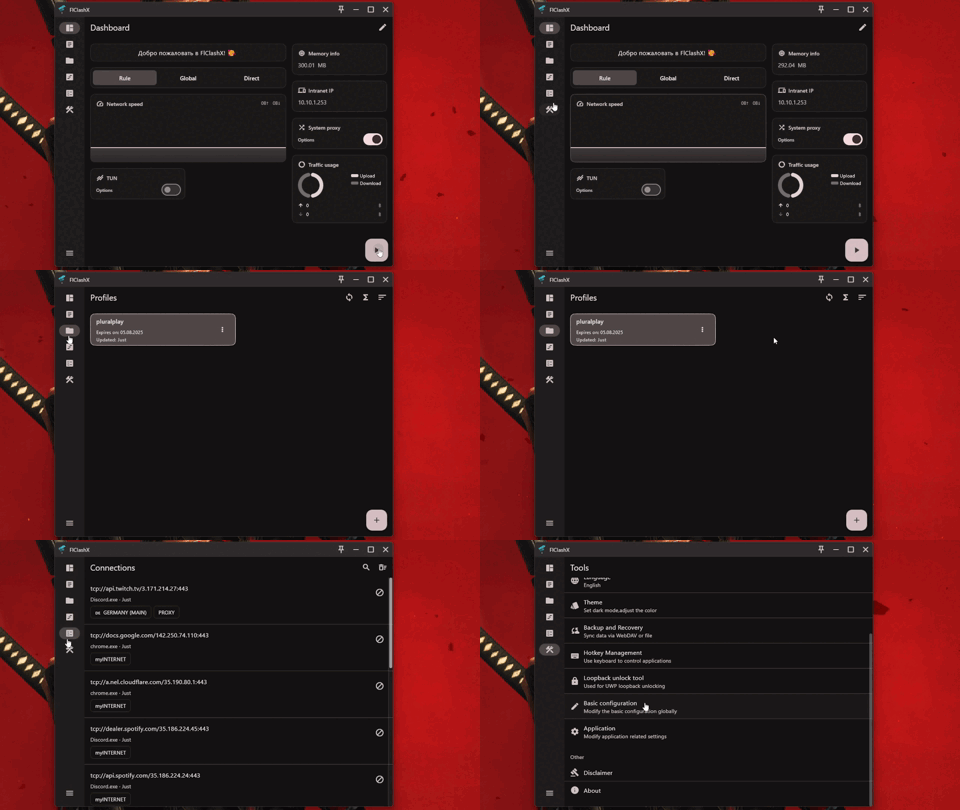
on Desktop:
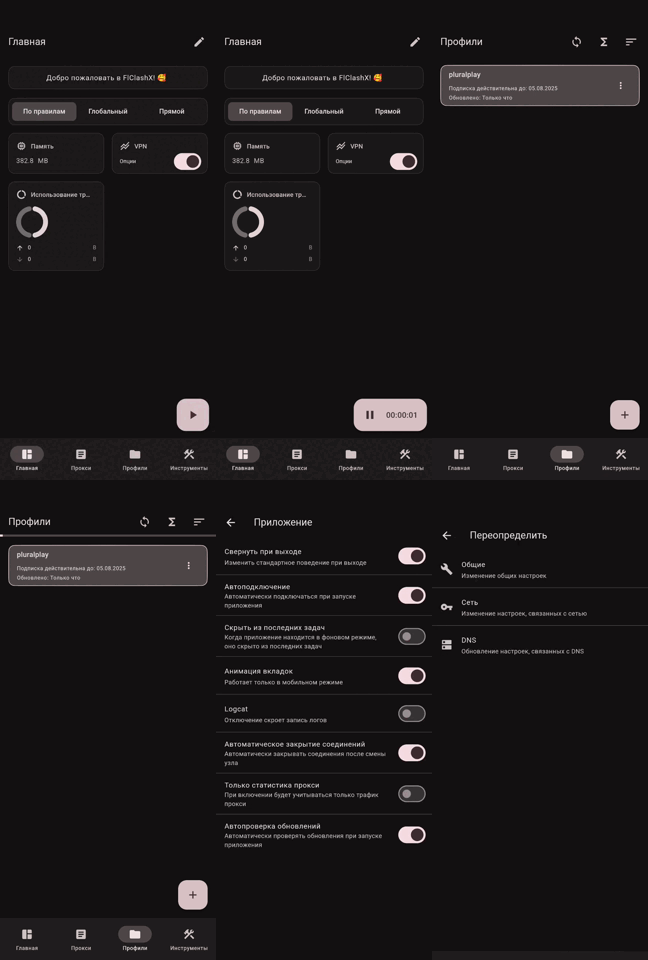
on Mobile:
## Added Functionality
🛠️ Fixed default settings: process search mode on, TUN mode on, system proxy mode off, proxy list display mode set to 'list', changed camera behavior when adding a subscription via QR.
📱 **Android 120Hz Display Support:** Added support for high refresh rate displays (120Hz) on Android devices for smoother animations and scrolling.
🗑️ **Clear Application Data:** Added "Clear Data" button in Application Settings that removes all profiles from the profiles folder. Useful for troubleshooting or resetting the application.
🇷🇺 Added Russian language to the installer and redesigned the localization in the application.
✈️ Transmit HWID to the panel (Works only with Remnawave).
💻 Added a new "Announcements" widget. It transmits announcements from the panel to the widget. (Works only with Remnawave).
📺 Optimized controls for Android TV:
- Added a "Paste" button to the menu for adding a subscription via a link.
- Added a profile selection button.
- Added the ability to transfer a profile from the mobile app via a QR code.
🪪 Redesigned the profile card:
- Uses a traffic volume indicator with color change (not displayed if traffic is unlimited).
- Displays subscription expiration date (if the year is 2099, it displays "Your subscription is permanent").
- Added a new "Support" button in the profile, which pulls the supportUrl from the panel.
- The autoupdateinterval parameter for the profile is now correctly transmitted from the panel.
🪪
- Added "Meta-Info" widget. Transmits subscription parameters to the widget: remaining traffic, subscription expiration date, profile name, and prominently displays days remaining until subscription expires (3 days before expiration).
- Added "serviceInfo" widget. Displays your service name. You can additionally pass the `flclashx-servicelogo` header for a custom logo (supports svg/png links), and clicking opens the support link (supportURL).
- Added "changeServerButton" widget. Clicking redirects to the proxy page.
🌐 Added parsing of custom headers from the subscription page:
- flclashx-widgets: arranges widgets in the order received from the subscription.
| Value | Name widget |
| :------------------: | ----------------------------------------------------------- |
| `announce` | Announce Badge |
| `networkSpeed` | Network speed |
| `outboundModeV2` | Proxy mode (new type) |
| `outboundMode` | Proxy mode (old type) |
| `trafficUsage` | Traffic usage |
| `networkDetection` | Determining location and IP |
| `tunButton` | TUN button (Desktop only) |
| `vpnButton` | VPN button (Android only) |
| `systemProxyButton` | System Proxy Button (Desktop only) |
| `intranetIp` | Local IP-Address |
| `memoryInfo` | Memory usage |
| `metainfo` | Profile information |
| `changeServerButton` | Change server button |
| `serviceInfo` | Service information (only with header flclashx-servicename) |
Usage:
```bash
flclashx-widgets: announce,metainfo,outboundModeV2,networkDetection
```
- flclashx-view: Configures the appearance of the proxy page obtained from the subscription.
| Value | Description | Possible values |
| :------: | ----------------------------- | --------------------------------- |
| `type` | Display mode | `list`,`tab` |
| `sort` | Sorting type | `none`,`delay`,`name` |
| `layout` | Layout | `loose`,`standard`,`tight` |
| `icon` | Icon style (for list display) | `none`,`icon` |
| `card` | Card size | `expand`,`shrink`,`min`,`oneline` |
Usage:
```bash
flclashx-view: type:list; sort:delay; layout:tight; icon:icon; card:shrink
```
- flclashx-custom: Controls the application of styles for Dashboard and ProxyView.
| Value | Description |
| :------: | ------------------------------------------------------------ |
| `add` | Styles are applied only when the subscription is first added |
| `update` | Styles are applied every time the subscription is updated |
Usage:
```bash
flclashx-custom: update
```
- flclashx-denywidgets: When set to true, editing the Dashboard page is disabled. Accepts true/false.
Usage:
```bash
flclashx-denywidgets: true
```
- flclashx-servicename: Your service name displayed in the ServiceInfo widget.
Usage:
```bash
flclashx-servicename: FlClashX
```
- flclashx-servicelogo: Your logo used in the ServiceInfo widget (works only with active flclashx-servicename header). Supports png/svg.
Usage:
```bash
flclashx-servicelogo: https://cdn.jsdelivr.net/gh/homarr-labs/dashboard-icons/svg/remnawave.svg
```
- flclashx-serverinfo: Proxy group name to display in the ChangeServerButton widget. The widget shows the active server from the specified group with country flag, ping, and a quick switch button.
**Displayed elements:**
- Country flag (automatically extracted from serverDescription or proxy name)
- Active server name
- Current ping with color indication (green < 600ms, orange >= 600ms, red - timeout)
- Quick navigation button to proxy page
Usage:
```bash
flclashx-serverinfo: Proxy
```
- flclashx-background: Sets a custom background image for the application. Provide a direct link to an image. Optionally append a comma and a transparency (visibility) value from 1 to 100 (higher = more visible image; omit it for the default dimmed look).
**Image Recommendations:**
- Format: PNG, JPG, or WebP
- Resolution: 1920x1080 or higher for desktop, 1080x1920 for mobile
- File size: Keep under 2MB for better performance
- Content: Use images with subtle patterns or gradients; avoid too bright or busy images
- Contrast: Ensure good readability of text over the background
Usage:
```bash
flclashx-background: https://example.com/background.jpg
# with transparency (1-100, higher = more visible background):
flclashx-background: https://example.com/background.jpg,30
```
- flclashx-settings: Manage application settings via header (with client-side override option). By default, all parameters are **disabled**. If you pass a parameter, it will be **enabled**. If you don't pass it - it stays **disabled**.
| Parameter | Description | Default |
| :-----------: | ------------------------------------------------ | :----------: |
| `minimize` | Minimize application on exit instead of closing | ❌ Disabled |
| `autorun` | Launch application on system startup | ❌ Disabled |
| `shadowstart` | Launch application minimized to tray | ❌ Disabled |
| `autostart` | Automatically start proxy on application launch | ❌ Disabled |
| `autoupdate` | Automatically check for application updates | ❌ Disabled |
| `openlogs` | Enable logging (the "Logs" tab and core log stream) | ❌ Disabled |
|`closeconnections`| Drop active connections when switching proxy/mode | ❌ Disabled |
> Note: `closeconnections` is enabled by default in the app itself, but when `flclashx-settings` is used the state is set explicitly — if you don't pass the token, the option will be disabled.
**Client-side override:** Users can enable "Override provider settings" in Application Settings to apply their local configuration instead of subscription settings. The matching toggles in settings (including "Logs" and "Close connections") are editable only when "Override provider settings" is enabled.
Usage:
```bash
flclashx-settings: minimize, autorun, shadowstart, autostart, autoupdate, openlogs, closeconnections
```
- flclashx-globalmode: When set to `false`, hides all proxy-mode controls from the client (tray, proxies page, mode-switch widgets).
Usage:
```bash
flclashx-globalmode: false
```
- flclashx-hex: Configures the app theme — primary color, scheme variant, and an optional "pure black" mode via `pureblack`. Variants: `tonalSpot`, `fidelity`, `monochrome`, `neutral`, `vibrant`, `expressive`, `content`, `rainbow`, `fruitSalad`.
Usage:
```bash
flclashx-hex: FF5733
flclashx-hex: FF5733:vibrant
flclashx-hex: FF5733:vibrant:pureblack
```
Parameters can also be used separately:
```bash
flclashx-hex: FF5733
flclashx-hex: vibrant
flclashx-hex: pureblack
```
- flclashx-androidsecure: Forces `mixed-port: 0` on Android devices only, even when a port (e.g. 7890) is active in the config.
Usage:
```bash
flclashx-androidsecure: true
```
- flclashx-newboard: When `true`, enables the new home screen instead of the widget grid: a large logo and service name, a traffic/expiry card, an active-server panel (flag, IP, ping) with a fan of available locations, a connect button, and the bottom navigation. Widget editing is hidden in this mode. Users can enable the same look locally via the "New look" setting.
Usage:
```bash
flclashx-newboard: true
```
- flclashx-newdomain: Subscription domain migration. If the value differs from the current host of the profile link, on the next update the client automatically replaces the host in the subscription URL with the given one (path and query are preserved). Useful for moving the subscription page to a new domain without users reinstalling the profile.
Usage:
```bash
flclashx-newdomain: new.example.com
```
- flclashx-buyplan: Direct subscription purchase/renewal link. The "Renew subscription" button appears under the traffic card on the new dashboard (`flclashx-newboard`) only when less than 3 days remain until expiry (including already-expired subscriptions). Tapping it opens the given link.
Usage:
```bash
flclashx-buyplan: https://example.com/pay
```
- flclashx-buytraffic: Direct extra-traffic purchase link. The "Buy traffic" button appears under the traffic card on the new dashboard (`flclashx-newboard`) only when less than 10% of the traffic limit remains. When both triggers fire (`flclashx-buyplan` and `flclashx-buytraffic`), the buttons are shown in one row.
Usage:
```bash
flclashx-buytraffic: https://example.com/buy-traffic
```
### YAML keys in the config
These keys are set directly in the subscription's YAML config (in the `proxy-groups` section), not in HTTP response headers.
- flclashx-override (inside the GLOBAL group): Set inside the `GLOBAL` proxy-group. With `flclashx-override: true` the client uses this group's proxy list and order as a "curated GLOBAL": in Global mode the Proxies screen shows only the `GLOBAL` group with exactly these entries in this order, and the service groups (used by rule mode) are hidden. Without the flag the behavior is unchanged — `GLOBAL` is auto-built by the core from all groups.
Usage:
```yaml
proxy-groups:
- name: GLOBAL
flclashx-override: true
type: select
proxies:
- 🎲 Any available
- 🔓 No VPN
- 🌍 Main VPN
- 🇩🇪 Germany
- 🇫🇮 Finland
```
- description (on any proxy-group): A custom subtitle for the group on the Proxies screen. By default the group's type (Selector/URLTest/Fallback…) or the currently selected node is shown under its name; setting `description` displays the given text instead. Handy for clearer labels on nested groups.
Usage:
```yaml
proxy-groups:
- name: 🌍 Main VPN
type: select
description: Auto-pick the best location
proxies:
- 🇩🇪 Germany
- 🇫🇮 Finland
```
### Configuration Settings Override
By default, the following configuration parameters received from the subscription are **not overridden** by the client:
- `allow-lan` - Allow LAN connections
- `ipv6` - Enable IPv6 support
- `find-process-mode` - Process search mode
- `tun-stack` - TUN mode network stack
- `mixed-port` - Mixed port for HTTP/SOCKS proxy
**Client-side override:** Users can enable "Override provider settings" or "Override network settings" in Application Settings to apply their local configuration instead of subscription settings. This is useful when you need custom network settings.
## Application Usage
### Linux
⚠️ Before use, ensure the following dependencies are installed:
```bash
sudo apt-get install libayatana-appindicator3-dev
sudo apt-get install libkeybinder-3.0-dev
```
### Android
The following actions are supported:
```bash
com.follow.clashx.action.START
com.follow.clashx.action.STOP
com.follow.clashx.action.CHANGE
```
## Download

 ## Star
The easiest way to support the developers is to click the star (⭐) at the top of the page.
If you want to support with a small donation, you can do so here.
**TON USDT:** `UQDSfrJ_k1BdsknhdR_zj4T3Is3OdMylD8PnDJ9mxO35i-TE`