---
title: Controlled Inputs
description:
nav: 1
---
# Controlled Inputs
## set
To change values in Leva store from the outside, use the function API by passing `() => schema` to `useControls`.
```jsx
const [{ text }, set] = useControls(() => ({ text: 'my string' }))
return set({ text: e.target.value })} />
```
Use `set` to update values from outside of Leva GUI.
See an [example in Storybook](https://leva.pmnd.rs/?path=/story/misc-controlled-inputs--external-updates-with-set).
## onChange
`onChange` callback in the schema is called for all changes to the value. Values with `onChange` will no longer cause React to rerender (unless passing an additional `transient` flag set to `false`, see below), so you can use it to efficiently update frequently changing values.
```jsx
const divRef = React.useRef(null)
const data = useControls({
color: {
value: '#f00',
onChange: (v) => {
// imperatively update the world after Leva input changes
divRef.current.style.color = v
},
},
})
// `data.color` is undefined
```
See an [example in Storybook](https://leva.pmnd.rs/?path=/story/misc-input-options--on-change).
### Transient
If you need the `onChange` callback while still wanting to retrieve the input value, you can set `transient: false`.
```jsx
const divRef = React.useRef(null)
const data = useControls({
color: { value: '#f00', onChange: (v) => {}, transient: false },
})
// `data.color` will be defined
```
## set and onChange
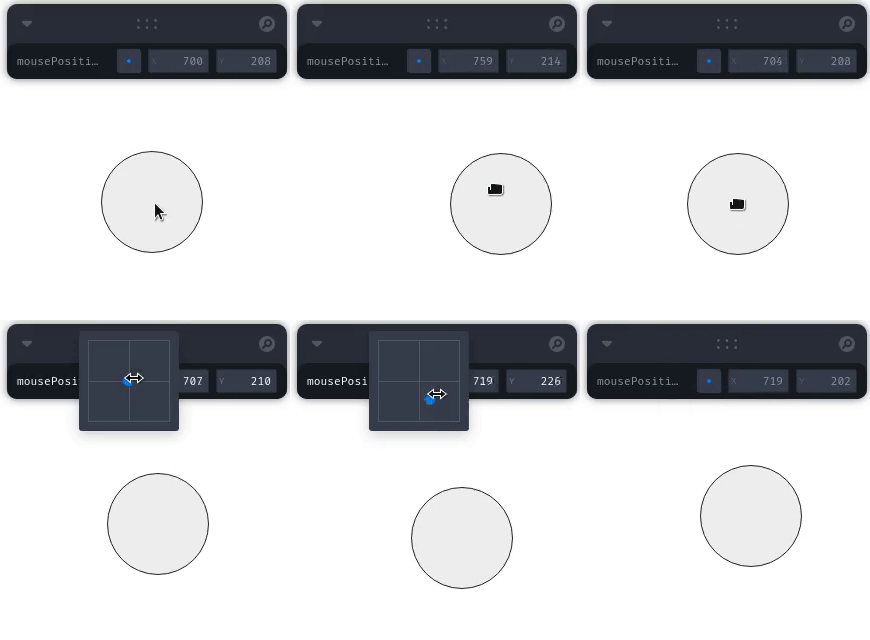
With `set` and `onChange` we can bind to any imperative API. Whenever external changes occur, both the GUI and your application state stay in sync:
```jsx
import { useDrag } from '@use-gesture/react'
const [, set] = useControls(() => ({
position: {
value: { x: 0, y: 0 },
onChange: (value) => {
// imperatively update the world after Leva input changes
elementRef.current.style.transform = `translate(${value.x}px, ${value.y}px)`
},
},
}))
const targetRef = useRef()
useDrag(({ offset: [x, y] }) => set({ position: { x, y } }), { target: targetRef })
```
See [this CodeSandbox](https://codesandbox.io/s/leva-controlled-input-71dkb?file=/src/App.tsx) for an example.
[](https://codesandbox.io/s/leva-controlled-input-71dkb?file=/src/App.tsx)
## Using get with set
The `get` function allows you to read current values when updating:
```jsx
const [{ counter }, set, get] = useControls(() => ({ counter: 0 }))
const increment = () => {
set({ counter: get('counter') + 1 })
}
```
This is especially useful when working with folders:
```jsx
const [{ counter, counterB }, set, get] = useControls('folder', () => ({
counter: 0,
folder2: folder({
counterB: 0,
}),
}))
const incrementCounter = () => {
set({ counter: get('counter') + 1 })
}
const incrementCounterB = () => {
set({ counterB: get('counterB') + 1 })
}
```
## onChange Context
The `onChange` callback receives additional context:
```jsx
const [, set] = useControls(() => ({
value: {
value: 0.1,
onChange: (value, path, context) => {
console.log('Value:', value)
console.log('Path:', path) // e.g., "value"
console.log('Initial:', context.initial) // true on first call
console.log('Get function:', context.get) // Access other values
console.log('Input settings:', context) // All input settings
},
},
}))
```
## onEditStart and onEditEnd
These callbacks fire when editing begins and ends, useful for performance optimization:
```jsx
const values = useControls({
position: {
value: { x: 0, y: 0 },
onEditStart: (value, path) => {
console.log('Started editing', path, 'with value', value)
// Pause expensive updates
},
onEditEnd: (value, path) => {
console.log('Finished editing', path, 'final value', value)
// Resume expensive updates
},
},
})
```
## Multiple Panels
You can use multiple panels with separate stores for different parts of your application:
```jsx
import { useCreateStore, useControls, LevaPanel } from 'leva'
function MyApp() {
const uiStore = useCreateStore()
const sceneStore = useCreateStore()
const uiValues = useControls(
{
showUI: true,
theme: 'dark',
},
{ store: uiStore }
)
const sceneValues = useControls(
{
cameraPosition: [0, 0, 5],
lightIntensity: 1,
},
{ store: sceneStore }
)
return (
<>
)
}
```
## External State Synchronization
Bind Leva controls to external state management systems:
```jsx
import { useState, useEffect } from 'react'
function SyncedControls() {
const [externalState, setExternalState] = useState({ count: 0 })
const [{ count }, set] = useControls(() => ({
count: {
value: externalState.count,
onChange: (value) => {
setExternalState({ count: value })
},
},
}))
// Sync external changes back to Leva
useEffect(() => {
if (externalState.count !== count) {
set({ count: externalState.count })
}
}, [externalState.count])
return null
}
```
## Imperative API Integration
Integrate with libraries that use imperative APIs:
```jsx
const threeObjectRef = useRef()
const [, set] = useControls(() => ({
rotation: {
value: { x: 0, y: 0, z: 0 },
onChange: ({ x, y, z }) => {
if (threeObjectRef.current) {
threeObjectRef.current.rotation.set(x, y, z)
}
},
},
}))
// External rotation update
const rotate = (axis, angle) => {
const current = threeObjectRef.current.rotation
set({
rotation: {
x: axis === 'x' ? angle : current.x,
y: axis === 'y' ? angle : current.y,
z: axis === 'z' ? angle : current.z,
},
})
}
```