
[]()
[](https://github.com/pmusolino/PMSuperButton/blob/master/LICENSE)
[](https://cocoapods.org/pods/PMSuperButton)
[](https://github.com/Carthage/Carthage)
PMSuperButton is a powerful UIButton coming from the countryside, but with super powers! 😎

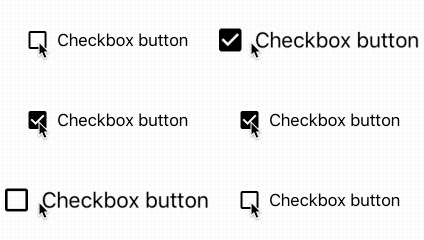

##### An easy way to create custom and complex buttons with custom attributes, directly added to the iOS Interface Builder, very easy to integrate into every project!
## Top 100 Coolest Super Powers:
- [x] Edit everything directly from storyboard or code 😏
- [x] Change border color, width
- [x] Customize the corner radius
- [x] Set a gradient background
- [x] Edit everything about the shadows: color, opacity, offset
- [x] Animations when the button is highlighted 🤗
- [x] Animations when the button is selected
- [x] Ripple tap effect, where you can edit ripple color and ripple speed (like a Google Material button) 😮
- [x] Toggle functionality
- [x] Image View content mode and alpha
- [x] Touch up inside closure 🤠
- [x] Loader 🤜🤛
- [x] Swift 3, 4 and Swift 5 support
- [x] **and much more**
## How it works
The library allows you to use all the features of standard UIButton with a lot of new cool features, customizable from Storyboard or from code.
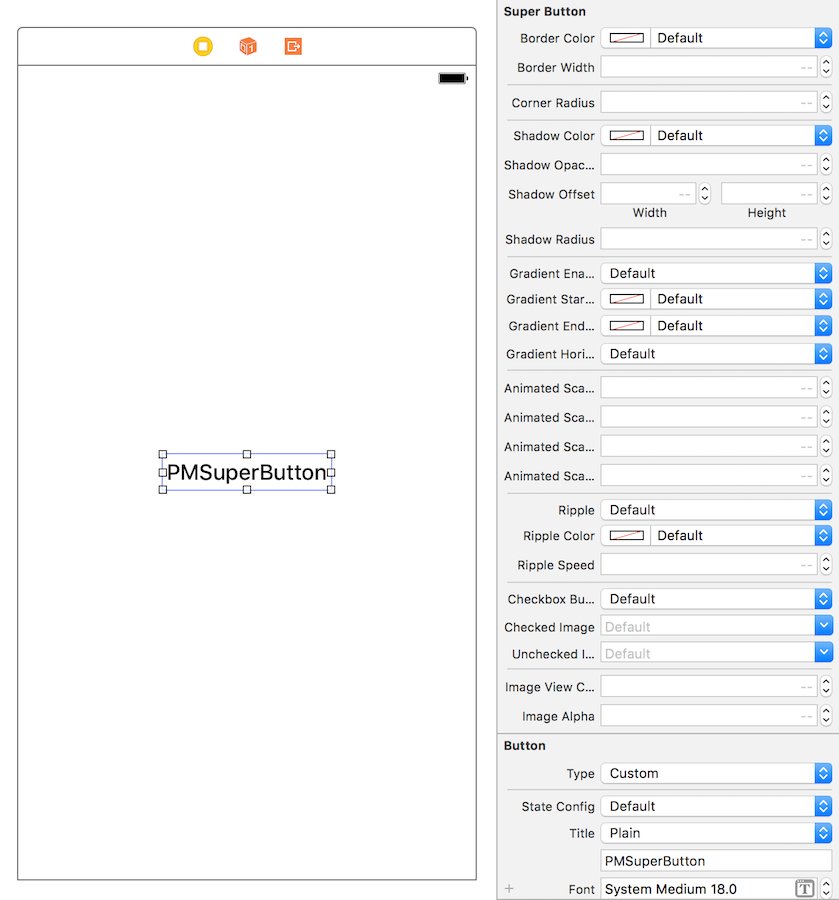
First of all, drag & drop a new UIButton inside your view controller in storyboard, then set the UIButton class to PMSuperButton:
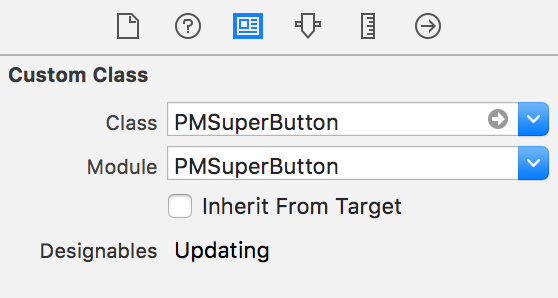
That's it! Now you are ready to customize your PMSuperButton from the `Attributes Inspector` of Interface Builder.
##### How to use Touch Up Inside closure
IBAction or addTarget() with #selector? No thanks, we have a closure for this:
```
myButton.touchUpInside {
print("This button was pressed!")
}
```
##### How to show the loader indicator
```
//Pass `false` to disable user interaction while loading is showed
myButton.showLoader(userInteraction: true)
//Hide loader
myButton.hideLoader()
```
## Requirements
- iOS 8.0+
- Xcode 10+
## CocoaPods
[CocoaPods](http://cocoapods.org) is a dependency manager for Cocoa projects. You can install it with the following command:
```bash
$ gem install cocoapods
```
To integrate PMSuperButton into your Xcode project using CocoaPods, specify it in your `Podfile`:
```ruby
source 'https://github.com/CocoaPods/Specs.git'
platform :ios, '8.0'
use_frameworks!
pod 'PMSuperButton'
```
Then, run the following command:
```bash
$ pod install
```
## Carthage
----------------
[Carthage](https://github.com/Carthage/Carthage) is a decentralized dependency manager that builds your dependencies and provides you with binary frameworks.
You can install Carthage with [Homebrew](http://brew.sh/) using the following command:
```bash
$ brew update
$ brew install carthage
```
To integrate PMSuperButton into your Xcode project using Carthage, specify it in your `Cartfile`:
```ogdl
github "pmusolino/PMSuperButton"
```
Run `carthage update` to build the framework and drag the built `PMSuperButton.framework` into your Xcode project.
## Manually
1. Download and drop ```/Sources``` folder in your project.
2. Congratulations!
## Swift compatibility
- If you use Swift 5 or higher, you can use the [latest release](https://github.com/pmusolino/PMSuperButton/releases).
- If you use Swift 4, you can use the [release 2.2.0](https://github.com/pmusolino/PMSuperButton/releases/tag/2.2.0).
- If you use Swift 3, you can use the [release 1.0.0](https://github.com/pmusolino/PMSuperButton/releases/tag/1.0.0).
## Contributing
- If you **need help** or you'd like to **ask a general question**, open an issue.
- If you **found a bug**, open an issue.
- If you **have a feature request**, open an issue.
- If you **want to contribute**, submit a pull request.
## Acknowledgements
**Made with ❤️ by [Paolo Musolino](https://github.com/pmusolino).**
***Follow me on:***
#### 💼 [Linkedin](https://www.linkedin.com/in/paolomusolino/)
#### 🤖 [Twitter](https://twitter.com/pmusolino)
#### 🌇 [Instagram](https://www.instagram.com/pmusolino/)
#### 👨🏼🎤 [Facebook](https://www.facebook.com/paolomusolino)
## MIT License
PMSuperButton is available under the MIT license. See the LICENSE file for more info.
Made with ❤️ by [Paolo Musolino](https://github.com/pmusolino).